Ensembl Variant View: How to Find
By Dr. Zubair Khalid, DVM, MS, PhD ·

Ensembl Variant View is the dedicated report page that the Ensembl genome browser builds for one genetic variant, showing its exact genomic position, allele frequencies, predicted functional consequences, and links to clinical and population resources. You reach it by running an Ensembl variant search with an identifier, coordinate, gene name, or phenotype, and then opening the matching entry in the variant table.
This page matters because variants are the raw material of almost every downstream question in genetics. A published study may report that a single DNA change in the MSH2 gene causes loss of protein expression in Lynch syndrome tumors, and the analyst then needs allele frequencies, transcript consequences, and clinical annotations for that exact change before drawing any conclusion [1]. The Ensembl project maintains detailed annotation of gene structures, regulatory elements, and variants for vertebrate species, and delivers all of it through genome browsers, search interfaces, and tools such as the Ensembl Variant Effect Predictor, with data freely available without restriction [2]. A variant search is the fastest way into that annotation, and the protocols published for the browser explicitly treat variant and phenotype exploration as one of the core tasks a new user should learn [3].
What Does Ensembl Variant Search Mean?
An Ensembl variant search is the act of querying the Ensembl database for a known DNA or RNA sequence difference and retrieving its curated record. The query can take several forms. You can supply an rsID (the accession number that dbSNP assigns to a variant, written like rs12345), a human genome variation society (HGVS) name (a standardized notation such as c.1894_1898del for a five-base deletion in a coding sequence), a genomic coordinate (chromosome plus position, such as 7:140453136), a gene symbol, or a disease or phenotype term.
The result of the search is the Variant View page. This page is not a raw database dump. It is a synthesized report that combines Ensembl's own annotation with imported data from sources such as dbSNP, ClinVar, the 1000 Genomes Project, and gnomAD, and it links each claim back to the underlying evidence. A useful way to think about it is as an intersection point. Published clinical workflows show exactly this pattern in action. Researchers screening 70 patients with macular and cone dystrophy identified a VAX2 variant and then searched for it across 1000 Genomes, Ensembl, UCSC, ExAC, and dbSNP to establish whether it had been seen before [4]. Ensembl Variant View consolidates much of that cross-database checking into a single page, which is why it is a standard stop in variant triage.
The phrase "Ensembl variant search interpretation" refers to the second half of the workflow: once you find the variant record, you must read it correctly. The page reports facts, such as the consequence predicted for each transcript and the allele frequency in each population. Interpreting those facts into a judgment about pathogenicity or biological relevance is a separate step, and later sections of this guide show how published studies perform it.
Quick Reference: Ensembl Variant View and Related Resources
| Resource | What it gives you | When you use it |
|---|---|---|
| Ensembl Variant View | Curated variant record with consequence, frequency, regulation, and links, inside the genome browser context | First lookup for a known variant, or browsing variants near a gene or phenotype |
| Ensembl Variant Effect Predictor (VEP) | Batch annotation of your own variant lists, including consequences on all transcripts | You have hundreds or millions of variants from sequencing and need them annotated in bulk [2][5] |
| dbSNP | The original rsID registry, with submitter-reported frequencies | Verifying an identifier or finding the canonical name of a variant |
| ClinVar | Curated clinical assertions about pathogenicity submitted by laboratories | Clinical interpretation under ACMG-style frameworks [1] |
| DECIPHER | Patient-level copy number variant data with its own visualization plus Ensembl browser integration | Clinical interpretation of deletions and duplications rather than single nucleotide changes [6] |
| UCSC Genome Browser | Alternative visualization of the same reference genome | Cross-checking a variant found through Ensembl, as done in published variant-screening workflows [4] |
The most common point of confusion is the difference between Variant View and VEP. Variant View answers "what is known about this one variant I am looking at." VEP answers "what is the predicted effect of every variant in this file I just produced." They share the same consequence-prediction logic, but one is a browser page and the other is a batch tool that also runs from the command line [2].
How to Use Ensembl to Find a Variant: Step by Step
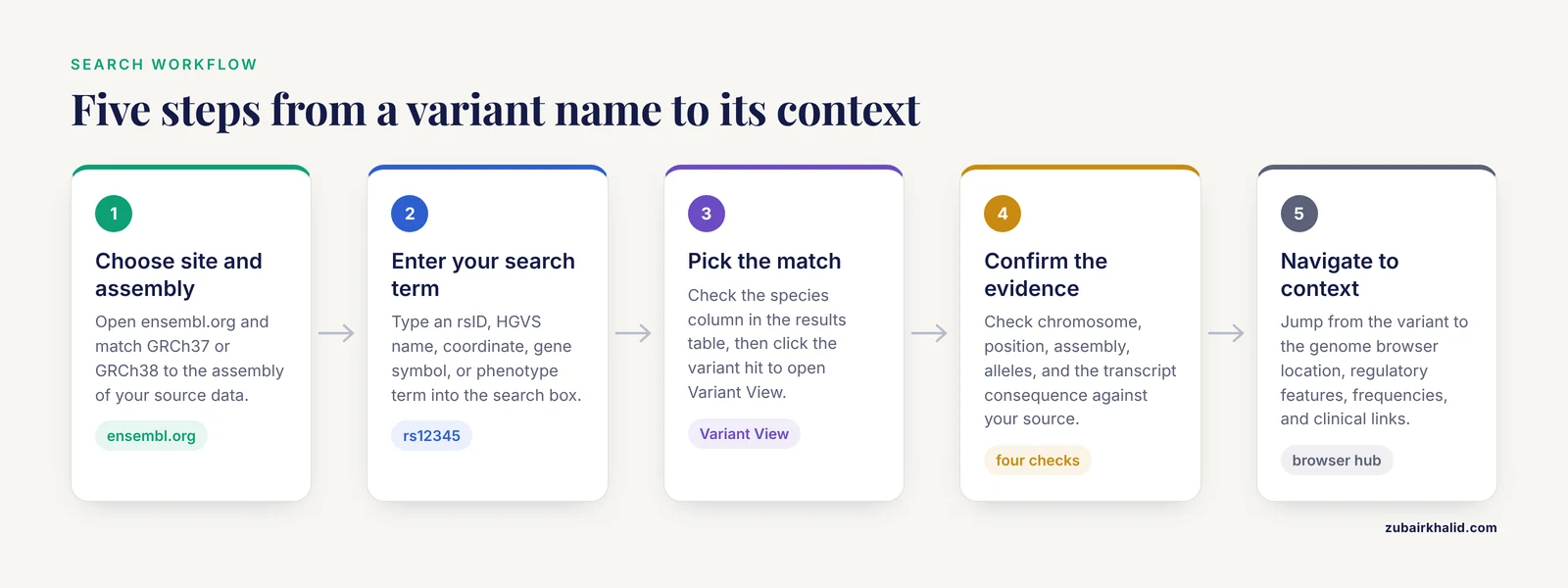
This section is a practical Ensembl genome browser tutorial for the variant workflow. Follow it in order the first time, and later use only the step that matches what you have in hand.
Step 1. Choose the Correct Site and Assembly
Open the main site at ensembl.org. Ensembl also maintains two specialist portals. Ensembl Rapid Release provides core tools and services for newly assembled genomes as quickly as possible and supports large biodiversity sequencing projects [2]. The SARS-CoV-2 browser integrates Ensembl annotation with public genomic data for the pandemic response [2]. For routine human variant work, the main site is the right choice.
The second decision is genome assembly. Human variant positions differ between GRCh37 and GRCh38, the two reference coordinate systems in widespread use. A coordinate from an older paper may be GRCh37, and pasting it into a GRCh38 search will land you in the wrong place or return nothing. Ensembl lets you pick the assembly, and tools built on top of it accept both builds. PhyreRisk, for example, accepts Ensembl, VCF, reference SNP ID, and HGVS input formats for both GRCh37 and GRCh38 [7]. Match the assembly of your input to the assembly of your query every time.
Step 2. Enter Your Search Term
Type your identifier into the search box at the top of the Ensembl home page. Each input type behaves differently.
- rsID. The most reliable input when you have one. Typing rs12345 resolves directly to the variant record.
- HGVS notation. A name such as NM_000251.3(MSH2):c.1894_1898del specifies the reference transcript and the coding change [1]. Ensembl accepts HGVS strings and maps them to the genome.
- Coordinate. Format as chromosome:position, for example 7:140453136. This is the least ambiguous input but only if you know the assembly.
- Gene symbol. Searching a gene name such as VAX2 takes you to the gene page, from which the variants tab lists all known variation in that gene [4].
- Phenotype or disease term. Searching a disease name returns genes and variants associated with it, which is one of the two browser exploration protocols published for Ensembl [3].
Step 3. Pick the Match from the Results Table
The search returns a table of hits that can include genes, transcripts, variants, and phenotypes. Variant hits are labeled as such. When a search term is ambiguous, for example a gene symbol that matches entries in several species, check the species column before clicking. Clicking a variant hit opens Variant View.
Step 4. Confirm the Variant Matches Your Evidence
Before you interpret anything, verify four things on the page: the chromosome and position match your source, the assembly matches your source, the reference and alternate alleles match your source, and the transcript-level consequence matches what the original report claims. Published variant characterizations model this habit. The VAX2 study confirmed its variant was heterozygous, non-synonymous, and defined by the exact change c.416T>G producing p.Leu139Arg, before any functional interpretation [4]. The MSH2 study pinned its variant to transcript NM_000251.3 at c.1894_1898del, which introduces a stop codon in exon 12 of 16 [1]. If the Variant View page does not reproduce those details, you are looking at the wrong entry or the wrong transcript.
Step 5. Navigate from the Variant to Its Context
Variant View is a hub. From it you can jump to the location view in the genome browser, to overlapping genes and transcripts, to regulatory features, to population frequency data, and to clinical records. Later sections explain what each of these panels contains.
Ensembl Variant Search Explained: Reading the Variant Page
This is the part of the workflow where most new users hesitate, because the page is dense. The following breakdown covers the standard panels in the order they matter for interpretation.
Consequence Per Transcript
The single most important panel lists, for every transcript overlapping the variant, the predicted consequence. A variant can be a missense change in one transcript and a synonymous change in another, because transcripts have different exon boundaries. The consequences are computed by the same prediction engine that powers VEP, which Ensembl provides as a specialist tool alongside the browser [2]. Read the row for the transcript that matters biologically, not the first row on the page. Clinical reports name their transcript precisely for this reason, as in the MSH2 notation above [1].
The standard consequence vocabulary includes synonymous (no amino acid change), missense (one amino acid replaced), nonsense or stop gained (a premature stop codon), frameshift (the reading frame shifts, as with the MSH2 five-base deletion [1]), splice region (near an exon boundary), and regulatory variants. Frameshift and stop-gained changes usually abolish the protein product, and downstream steps such as nonsense-mediated decay prediction quantify that effect, as the MSH2 analysis did with MutationTaster2021 [1].
Allele Frequencies
The frequency panel reports how often the alternate allele appears in population sequencing projects. Allele frequency is the proportion of chromosomes in the sample carrying the alternate allele, not the proportion of individuals. A variant absent from gnomAD, 1000 Genomes, and ExAC is rarer, and rarity is one input to pathogenicity scoring under American College of Medical Genetics and Genomics criteria, which is why the MSH2 workflow screened ClinVar, VarSome, Ensembl, PubMed, EVA, and ABraOM for frequency and prior reports in one pass [1]. When you read the frequency panel, note the population stratum. A variant common in one ancestry and absent in another changes the interpretation of a case.
Clinical Links
Variant View links out to ClinVar and similar resources. These links take you to submitted clinical assertions, which the MSH2 study treated as one component of an ACMG-style evidence search rather than a verdict in itself [1]. The direction of interpretation flows from the variant page outward. Variant View tells you a ClinVar record exists. The ClinVar record tells you what submitters asserted and with what review status.
Regulatory and Epigenomic Context
For variants outside coding sequence, the regulatory panels show overlapping regulatory features and epigenetic marks. The published browser protocols treat promoter exploration, including epigenetic marks and protein-binding activity, as a companion workflow to variant exploration [3]. If your variant sits in a promoter, enhancer, or splice region, these panels are where the mechanistic hypothesis begins.
Population Genetics and Conservation
Beyond raw frequency, the page connects to comparative data. Cross-species conservation is a standard argument in variant interpretation. In the KIF4A study of X-linked intellectual disability type 100, the authors retrieved amino acid sequences across species from the Ensembl Genome Browser database and aligned them with Clustal Omega to judge whether a mutated residue was conserved [8]. You can reach the same material from a Variant View page or its parent gene page. Evolutionary conservation is a qualitative signal that supports, but never replaces, clinical classification.
Variant Search Interpretation in Practice: Three Published Workflows
Abstract instructions become clear when you see how working scientists use the page. Three case studies cover the main patterns.
Pattern One: Triage a Novel Missense Variant
The VAX2 study identified a heterozygous non-synonymous variant, c.416T>G producing p.Leu139Arg, in one cone dystrophy proband out of a 70-patient cohort [4]. The workflow after identification was database triage: search the variant across 1000 Genomes, Ensembl, UCSC, ExAC, and dbSNP to learn whether it was known and how rare it was [4]. Ensembl Variant View serves exactly this role, consolidating frequency and prior annotation so the analyst does not have to visit each database separately. In this study, the interpretation continued past the browser into the laboratory. The mutant protein mislocalized to the cytoplasm and nucleus and formed aggregates undergoing degradation, a cellular phenotype consistent with loss of function. Notably, a different change at the same position present in the normal population, p.Leu139Met, behaved like wild type in the same assay, which strengthened the case that arginine 139 specifically is intolerant [4]. The lesson for browser users is that Variant View frames the question. It does not close the case.
Pattern Two: Support ACMG Classification for a Familial Variant
The MSH2 Lynch syndrome study is the clearest published template for variant search interpretation [1]. The team faced NM_000251.3(MSH2):c.1894_1898del, a five-base deletion causing a frameshift and a premature stop, p.Ile633Lysfs*9, in exon 12 of 16. Their bioinformatics assessment ran in layers: database screening for frequency and prior reports across ClinVar, VarSome, Ensembl, PubMed, EVA, and ABraOM, impact prediction with ExPASy Translate, Pfam, and Modeller, and evaluation of mechanisms that could soften the effect, including alternative splicing and nonsense-mediated decay [1]. In that layered scheme, the Ensembl search anchors the first layer. It confirms the coordinate, the transcript, the consequence, and the absence of prior frequency data, all of which feed the pathogenicity criteria applied afterward. The clinical anchor was loss of MSH2 expression on immunohistochemistry in one tumor and loss of both MSH2 and MSH6 in another, a pattern explained by the known dependence of MSH6 stability on MSH2 [1]. Ensembl contributed the variant facts. The phenotype and family history supplied the clinical weight.
Pattern Three: Annotate Thousands of Variants at Scale
When the variant list numbers in the millions, browsing one variant at a time is impossible. A whole-genome sequencing study of mouse lines selected for fatness and leanness identified 6.3 million SNPs, of which 1.3 million were new, and annotated the full set with Ensembl VEP before prioritizing variants by predicted impact, gene function, and conservation [5]. The output of that annotation step is the same consequence vocabulary you see in Variant View, applied to every variant at once. One concrete finding from the study illustrates how the pieces combine: the lean line carried SNP rs248726381 in the seed region of the microRNA mmu-miR-3086-3p, a position that could affect fatty acid metabolism targets [5]. Whether you inspect one such variant interactively in Variant View or process millions through VEP, the underlying Ensembl annotation is the same [2].
A fourth, lighter pattern comes from basic research. When investigating regulation of the Keap1-Nrf2 antioxidant pathway, researchers used Ensembl database searches to establish that mouse p62/Sqstm1 produces a splicing variant whose protein lacks the Keap1-interacting region, then confirmed the transcript biochemically [9]. There the search answered a transcript-discovery question rather than a clinical one, which shows the same infrastructure supporting very different goals.
Finding Variants in the Genome Browser View
Variant View sits inside the larger Ensembl genome browser, and the browser's location view is where genomic context becomes visible. When you open the region around your variant, you see the reference sequence tracks, gene models, and variant tracks layered by coordinate. published clinical infrastructure relies on exactly this view. DECIPHER, the online repository of genotype and phenotype data for copy number variants, instructs users to navigate regions of interest using its in-house visualization tools together with the Ensembl genome browser, then to analyze affected genes and prioritize them by likelihood of haploinsufficiency, the state in which one working copy of a gene is insufficient for normal function [6]. The two published Ensembl browser protocols frame phenotype-to-variant browsing and promoter-to-epigenetic-mark browsing as the two entry points, and describe both as springboards for further exploration [3].
Practical navigation tips follow from this structure. Zoom from the variant out to the gene to see all transcripts, then out to the region to see neighboring genes and regulatory features. Configure tracks to show variation density so that a variant sitting in a hot spot of common variation is visibly different from one in a quiet interval. These habits translate directly from the single-variant workflow to the region-level workflow used in copy number analysis [6].
From the Variant to the Protein Structure
Some variant questions cannot be answered at the DNA level, and the ecosystem around Ensembl handles that handoff. PhyreRisk is an open-access web application that maps human variants onto protein structures. It covers 70 percent of the 20,214 canonical human proteins with partial or complete structural coverage, storing 18,874 experimental structures and 84,818 pre-built models, and it accepts genomic coordinates in Ensembl, VCF, reference SNP ID, and HGVS formats on GRCh37 and GRCh38 [7]. The practical workflow is to run your Ensembl variant search, confirm the consequence and transcript, and then paste the same identifiers into a structure-mapping tool to see where the altered residue sits in the folded protein. This extends the missense triage pattern from the VAX2 study one step further, from conserved residue to structural position.
Programmatic Access: When You Outgrow the Search Box
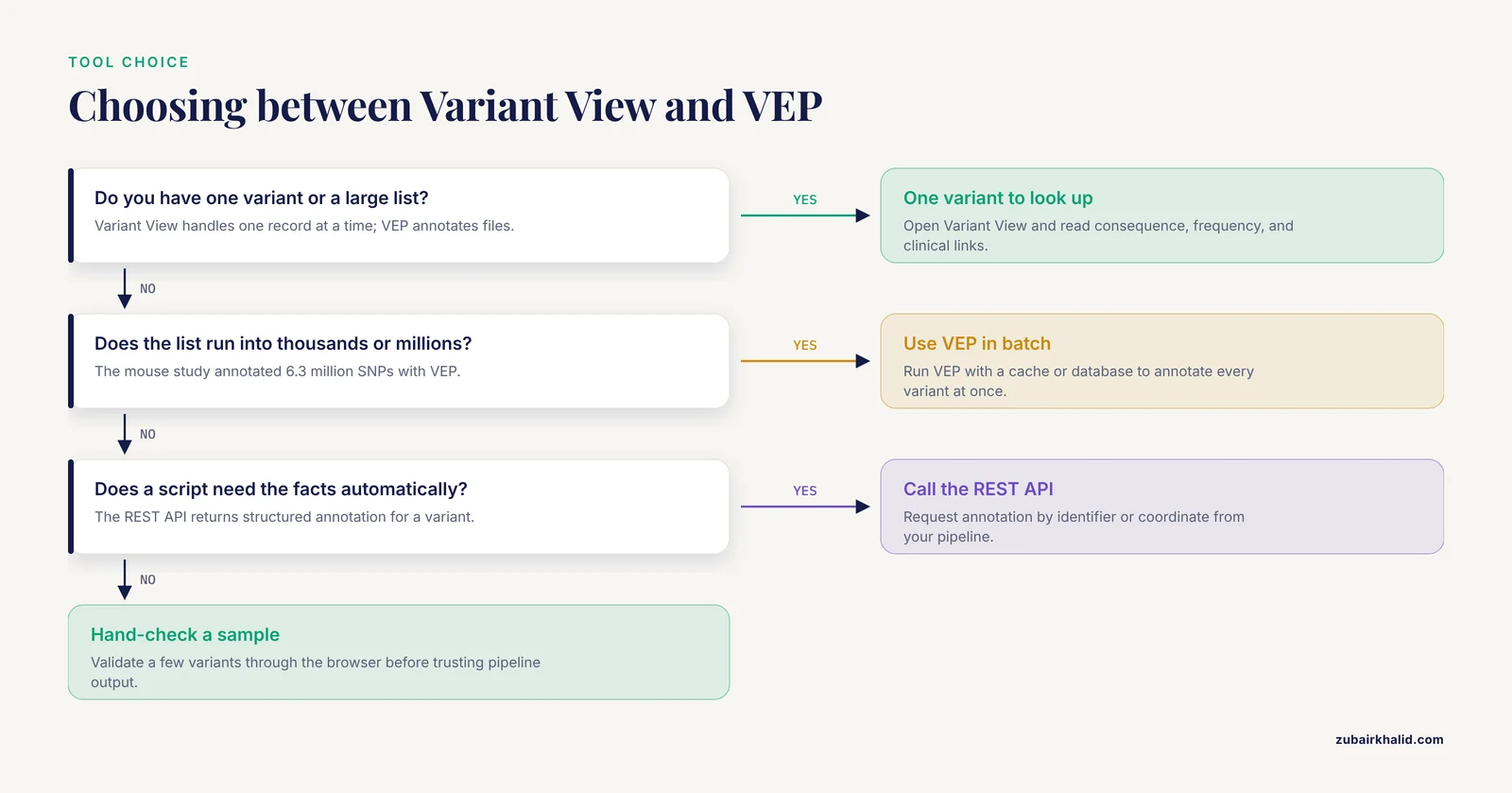
The Ensembl search box and Variant View are interactive. Three programmatic routes extend the same data.
The Variant Effect Predictor from the command line. VEP annotates a file of variants with consequences on all transcripts, using either an offline cache or database access. A typical invocation against the GRCh38 cache looks like this:
vep -i input.vcf -o output.txt --cache --assembly GRCh38 --everythingThe input is a VCF, the standard file format for genetic variants, which stores one variant per line with its chromosome, position, reference allele, and alternate allele. The mouse obesity study used VEP for annotation after calling variants with GATK, processing the full 6.3 million SNP set this way [5]. Ensembl documents VEP as one of its specialist tools alongside the browser and download files [2].
The REST API. Ensembl exposes its annotation programmatically through a Representational State Transfer interface, so scripts can request the annotation for a variant by identifier or coordinate and receive structured output. Use this when your pipeline needs to pull variant facts automatically rather than reading a web page.
BioMart and bulk downloads. For whole-table questions, such as exporting every missense variant in a gene family with its frequencies, BioMart and the download files provide structured exports [2].
A caution applies to all three routes. Programmatic output gives you the same facts as Variant View but strips away the navigational context that helps you notice a mismatch. Any production pipeline should include a validation step in which a sample of variants is checked by hand through the browser interface.
Common Mistakes and Limitations
Assembly mismatch. The most frequent error in the entire workflow. GRCh37 and GRCh38 coordinates differ for the same variant, and a pasted coordinate against the wrong assembly either fails or silently resolves to a different locus. Always record the assembly alongside every coordinate, as structure-aware tools explicitly require when accepting input on either build [7].
Reading the wrong transcript row. Variant View lists one consequence per transcript. Readers who stop at the first row can mislabel a variant. Clinical-grade interpretation names the transcript, and published ACMG-style work does so in the variant nomenclature itself [1]. Match the transcript in your source document to the transcript row on the page.
Treating a VEP consequence as a clinical verdict. A missense prediction is a computational annotation, not a diagnosis. The MSH2 study combined database screening, protein-level prediction, splicing analysis, and clinical findings before classification [1], and the VAX2 study backed a missense call with cellular phenotype data [4]. The browser page is one input among several.
Assuming absence from Ensembl means the variant is fake or the gene is boring. Ensembl Rapid Release exists precisely because newly sequenced genomes need fast but incomplete annotation [2]. A variant missing from the main human browser may still be present in dbSNP or in a cohort-specific call set, as cross-database checking in published workflows demonstrates [4][1].
Forgetting that frequencies are population-specific. An overall frequency can hide an ancestry-specific signal. Read the stratified panels rather than the single headline number.
Confusing variant search with gene search. Searching a gene symbol takes you to the gene, not to a variant. If you know the gene but not the variant, use the gene page's variants tab or search the phenotype directly, which is a documented Ensembl exploration route [3].
A general limitation. Ensembl reports prediction and curation, not certainty, and no browser page substitutes for clinical judgment in an individual case. Human medical questions need a qualified clinician or genetic counselor involved.
Quick Review
- An Ensembl variant search retrieves a curated variant record, and the resulting Variant View page consolidates position, consequence, frequency, and external links in one place.
- Five query types work: rsID, HGVS notation, genomic coordinate, gene symbol, and phenotype or disease term, with phenotype-based browsing documented as a core browser workflow [3].
- Always match genome assembly, GRCh37 or GRCh38, between your input and your query [7].
- Consequences are listed per transcript, so identify the transcript your source document uses before reading the table.
- Variant View supports interpretation but does not perform it. Published workflows add frequency screening, prediction tools, conservation analysis, and clinical evidence [4][1][8].
- VEP is the batch equivalent of the consequence panel, used to annotate millions of variants at once [2][5].
- Ensembl data are freely available without restriction, and specialist portals cover rapid-release genomes and SARS-CoV-2 [2].
Frequently Asked Questions
What does Ensembl variant search mean?
It means querying the Ensembl genome browser for a specific genetic variant using an identifier, coordinate, gene, or phenotype, and retrieving its Variant View page. That page reports the variant's position, predicted consequence on each transcript, population allele frequencies, and links to clinical databases [2].
How do I find a variant if I only know the gene name?
Search the gene symbol, open the gene page, and use its variants tab to list known variation in that gene. If you also know a disease, search the phenotype instead, since phenotype-to-variant browsing is one of the documented exploration routes for the Ensembl browser [3]. Published studies follow exactly this path when screening all variants in a candidate gene [4].
What is the difference between Ensembl Variant View and the Variant Effect Predictor?
Variant View is an interactive browser page for one variant you are looking up. VEP is a batch tool, available through the website and command line, that annotates large variant files with the same consequence predictions [2]. Genome-scale studies use VEP on millions of variants at once [5].
Which genome assembly should I use, GRCh37 or GRCh38?
Use the assembly that matches your source data, and record it with every coordinate. The same variant has different coordinates in each build. Tools that consume Ensembl identifiers, such as PhyreRisk, explicitly support both GRCh37 and GRCh38 to accommodate this [7].
Can I search Ensembl variants by phenotype or disease?
Yes. Searching a phenotype term returns associated genes and variants, and the published Ensembl protocols describe exploring a phenotype and its associated variants and genes as one of two standard browser workflows [3]. Clinical context can also be added afterward from linked resources such as ClinVar [1].
Does Ensembl variant search work for non-human species?
Yes. Ensembl annotates genomes and variants for vertebrate species, and comparative work depends on it. One study retrieved KIF4A protein sequences across multiple species from the Ensembl Genome Browser for conservation analysis [8], and mouse genome studies annotated their full variant sets with Ensembl VEP [2][5].
Sources
- Characterization of a novel MSH2 variant in Lynch syndrome: clinical data and complementary bioinformatics assessment.
- Ensembl 2021.
- The Ensembl Genome Browser: Strategies for Accessing Eukaryotic Genome Data.
- Identification and characterization of the VAX2 p.Leu139Arg variant: possible involvement of VAX2 in cone dystrophy.
- Whole genome sequencing of mouse lines divergently selected for fatness (FLI) and leanness (FHI) revealed several genetic variants as candidates for novel obesity genes.
- Interpretation of genomic copy number variants using DECIPHER.
- PhyreRisk: A Dynamic Web Application to Bridge Genomics, Proteomics and 3D Structural Data to Guide Interpretation of Human Genetic Variants.
- [[Analysis of a child with X-linked intellectual disability type 100 due to variant of KIF4A gene and a literature review].](https://pubmed.ncbi.nlm.nih.gov/40372222/)
- Negative Regulation of the Keap1-Nrf2 Pathway by a p62/Sqstm1 Splicing Variant.