Common Bioinformatics Data Management Plan Mistakes and Fixes
By Dr. Zubair Khalid, DVM, MS, PhD ·

The most common bioinformatics data management plan mistake is writing the plan before anyone has estimated the data. A plan that never states how many samples will be sequenced, how much raw output each sample produces, which file formats the pipeline generates, and who pays for ten years of storage will fail the first time a run comes off the instrument. The first thing to check is arithmetic, not policy. Open your project directory, run a disk usage command, and compare the number you get against the number written in the plan. In most failing projects those two numbers differ by a wide margin, and every other problem in this article flows from that gap.
This guide walks through the causes of bioinformatics data management plan mistakes in order from most common to rarest, explains the mechanism behind each failure, gives a diagnostic sequence you can follow in about half an hour, and ends with prevention practices you can put into a revision of the plan this week.
Why Bioinformatics Data Management Plans Fail
Data management plans fail in bioinformatics for a structural reason. Sequencing platforms produce data volumes that grow in discrete jumps, while storage and staffing budgets grow in slow linear increments. A single high-output sequencing run can add hundreds of gigabytes to a project directory overnight. The pipeline then multiplies that volume through intermediate formats. A compressed FASTQ file holds raw reads. A BAM file holds aligned reads. A CRAM file is a more compact alignment format. A VCF file stores variant calls. Each transformation roughly doubles the footprint of a single sample across the working directory until someone prunes intermediates, and most plans never say who prunes what or when.
The second structural cause is that plans are often written by a principal investigator and a grants administrator, then handed to the informatics staff who inherit the consequences. The people who know that the sequencer produces run folders with per-cycle error profiles, that basecalling software changes output format between versions, and that the institutional cluster deletes scratch files every two weeks are rarely in the room when the plan is drafted. A multi-country survey of sequencing and bioinformatics capacity, which analyzed 120 usable responses from 52 countries, captured data management as a distinct questionnaire domain alongside instrumentation, throughput, and analytical tools, precisely because data handling decisions drive cost and sustainability in ways that laboratory managers routinely underestimate [1]. The same survey informed an expanded genomics costing tool designed to budget sequencing and bioinformatics activities together rather than treating data management as an afterthought [1].
The third cause is human. Plans fail when one person holds all the working knowledge. That person leaves, gets sick, or simply forgets a decision made three years ago, and the project stalls because nobody else knows where the checksum file lives or why the pipeline points at a moved directory.
The First 30 Minutes: A Diagnostic Sequence
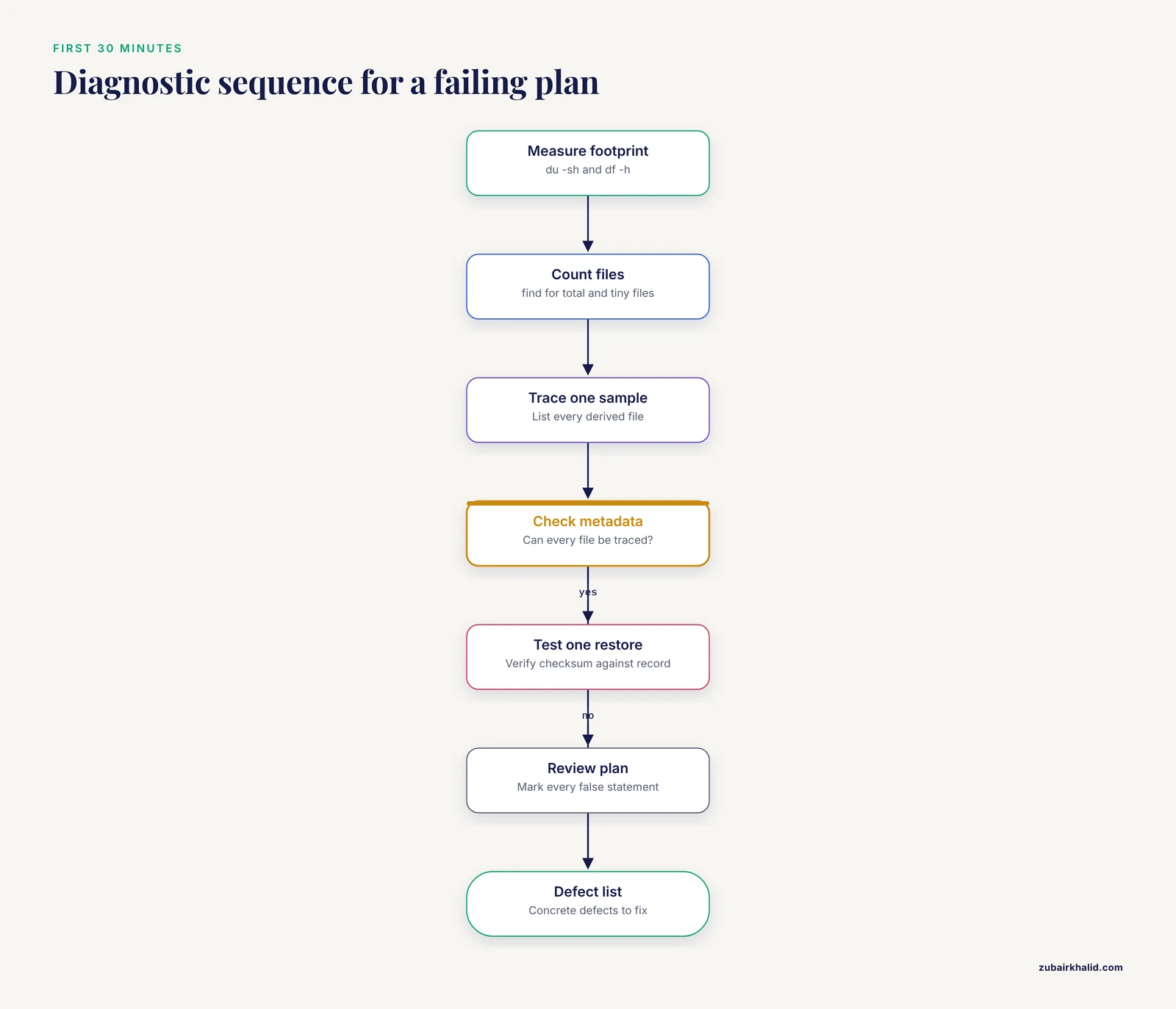
Run this sequence before you rewrite anything. It converts a vague sense that data management is broken into a list of concrete defects.
- Measure the current footprint. From the project root, run
du -sh * | sort -hto list directory sizes anddf -hto see free space on each mounted volume. Write both outputs down. - Count the files. Small files stress file systems far more than the same bytes in a few large files. Run
find . -type f | wc -landfind . -type f -size -1M | wc -lto see what fraction of your file count is tiny files such as per-sample QC reports and logs. - Trace one sample end to end. Pick a single sample and list every file derived from it, from raw BCL or FASTQ through alignment, duplicate marking, variant calling, and QC. Note which intermediates you actually need and which you could regenerate from upstream files.
- Check the metadata. Open the sample sheet and ask whether every file on disk can be traced to a row with a unique identifier, a collection date, a tissue or specimen type, and a batch. If any file fails this test, you have a provenance gap.
- Test one restore. Pick a file that supposedly exists in a backup, restore it to a scratch location, and verify its checksum with
md5sumorsha256sumagainst the record taken at backup time. Untested backups fail at a rate that surprises most teams. - Review the written plan against reality. Mark every statement in the plan that is now false. Typical candidates are the storage estimate, the named repository for deposition, the retention period, and the named data steward.
The output of this sequence is a defect list. The rest of this article explains each common defect, its mechanism, and its fix.
Troubleshooting Table: Symptoms, Causes, and Fixes
This table is the core of the article. Each row pairs a symptom you can observe with the underlying cause, a way to confirm the diagnosis, and the fix.
| Symptom | Likely cause | How to confirm | Fix |
|---|---|---|---|
| Storage fills mid-project and analyses crash | Per-sample data volume was never estimated, or intermediate files were never scheduled for deletion | Compare du -sh on raw, aligned, and analysis subdirectories against the plan estimate | Recompute the estimate from one real sample, add a tiered storage policy, and set explicit deletion rules for intermediates |
| Re-running the pipeline gives different results | Tool versions drifted between environments, or container images were rebuilt | Compare recorded tool versions against the current environment, run conda env export or pip freeze | Pin exact versions, use container images with fixed tags, and record software versions in every output report |
| Samples cannot be matched to phenotypes or source records | No metadata standard, free-text identifiers, or duplicate sample names | Attempt to join the file list to the sample sheet by identifier and count failures | Adopt a sample sheet with one canonical identifier, a data dictionary, and controlled vocabulary terms |
| A backup exists but the restored file is corrupt or missing | Backups are written but never restored and verified | Restore one file per class (FASTQ, BAM, VCF, metadata) and compare checksums | Follow the 3-2-1 rule and schedule automated restore tests with recorded results |
| A collaborator cannot reproduce the published analysis | Workflow steps live in ad hoc scripts on one person's account | Give the collaborator the code and count how many undocumented steps they hit | Move the analysis into a workflow engine with a single entry point, containers, and a recorded seed for randomized steps |
| Data cannot be deposited at project end | Repository, format, and consent restrictions were never mapped in the plan | Check the funder's repository requirements against the consent language and file formats held | Map each dataset class to a named archive in the plan, and export in the archive's accepted formats from the start |
| An audit or report request cannot locate the primary data | Retention schedule never documented, or data moved without a record | Trace the documented path from the plan to the actual storage location | Write a retention and location register, and update it whenever data moves |
| Analysis server slows for everyone | Scratch and long-term storage are mixed, and millions of small files strain the file system | Count inodes or file counts in the shared directory, check whether QC outputs sit beside raw reads | Separate scratch from project storage, move small outputs into packaged archives, and set quotas |
| A human genomics file is readable by the whole lab group | No tiered access model, no audit logging | Review group permissions on directories holding human read data | Apply least-privilege access, log access, and store human data only in controlled locations with de-identified link keys |
| The one person who understands the system leaves | Knowledge concentrated in a single individual, credentials in personal accounts | Ask a second person to perform the restore test unaided | Name co-stewards, move credentials into an institutional password manager, and require written runbooks |
Mistake 1: Storage Math Nobody Did
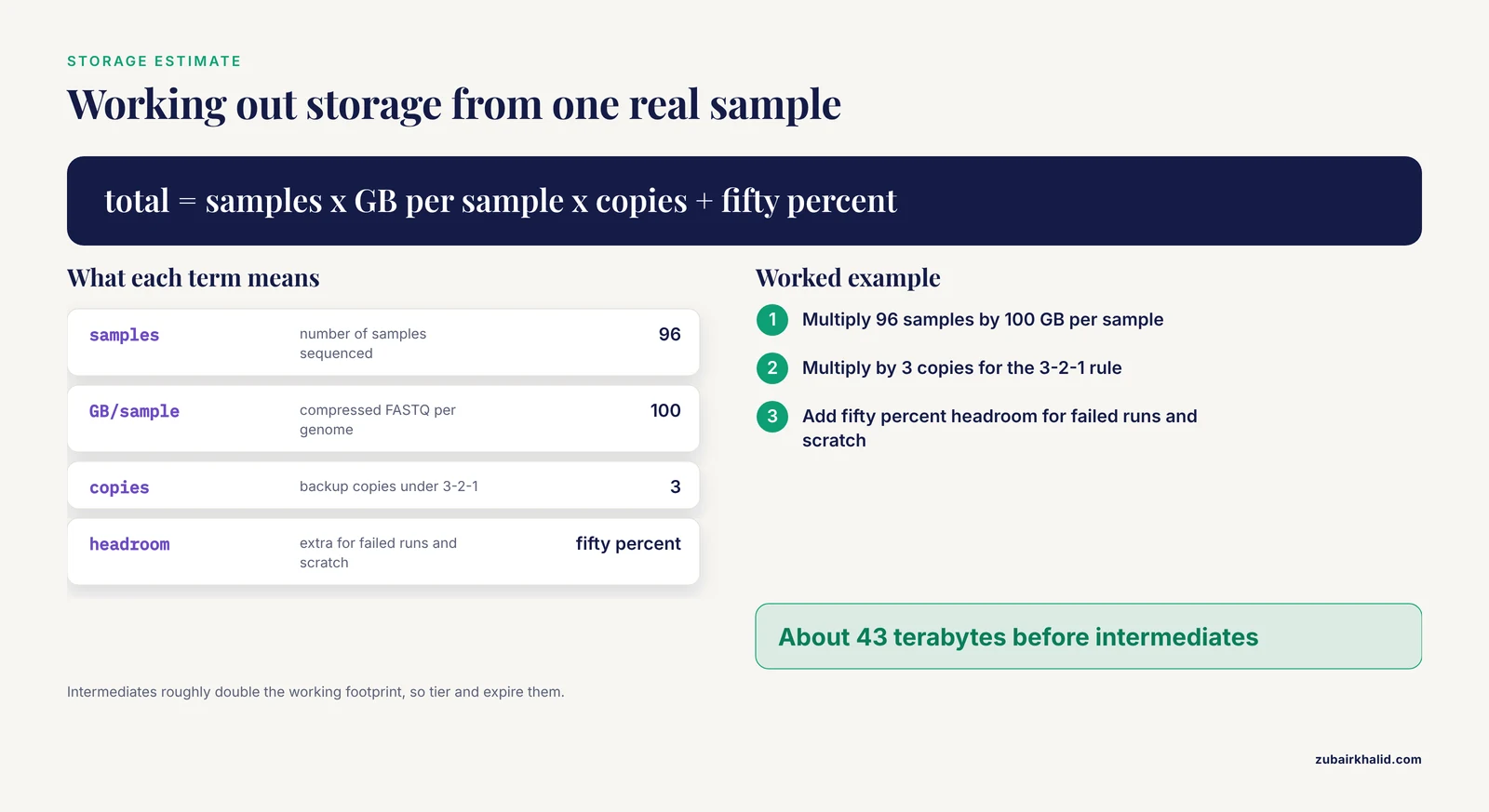
This is the mistake behind roughly half of the emergencies. The mechanism is simple. Raw sequence output scales with the number of samples and the depth of sequencing, and many teams plan for the raw file alone. A 30x whole human genome, meaning the genome was read about thirty times over, produces compressed FASTQ files on the order of 50 to 100 gigabytes. Alignment to a BAM file produces a file of similar magnitude, variant calls add more, and QC artifacts add clutter. A 96-sample project therefore generates tens of terabytes before anyone considers duplicate copies for backup, which the 3-2-1 rule requires.
The compounding error is that plans often budget storage for the raw data but not for the pipeline's working footprint. Alignment algorithms need scratch space several times the size of a single input file, temporary files pile up when jobs fail mid-run, and failed runs are rarely cleaned. The fix is to build a storage budget with three explicit numbers: bytes per sample at each stage, total samples, and the multiplier for backup copies. Then apply tiering. Raw data lives on inexpensive, high-capacity storage that is rarely rewritten. Active analysis data lives on fast storage near the compute. Intermediate files live on scratch storage with automatic expiry, typically one to two weeks. None of this needs exotic hardware. It needs the numbers written down and a deletion policy someone actually enforces.
A survey that fed into the expanded genomics costing tool found wide variation in sequencing throughput and instrumentation across respondent laboratories, which reinforces a key planning point. Your neighbor's storage number is meaningless. You must derive your own from your instrument, your depth, and your sample count [1].
Mistake 2: Metadata That Cannot Answer Questions Later
The second most common mistake is treating metadata as a formality. The mechanism of failure is this: six months after collection, the only person who remembers that sample_042 means a field isolate collected on the same day as sample_043 under a specific protocol is that person. When the identifier scheme has no enforced structure, joins between the sequencing files and the clinical or experimental records fail silently, and analyses quietly drop samples or mislabel them.
Fixes that work in practice:
- Assign one canonical identifier per specimen at accessioning and use it in every filename and every row of every table. Do not reuse identifiers between projects.
- Maintain a sample sheet, usually a CSV or TSV file, with one row per sample and fixed columns for identifier, source, collection date, extraction method, library prep, sequencing run, and batch.
- Write a data dictionary that defines every column and lists the allowed values. Controlled vocabularies beat free text because free text produces the same concept spelled five ways.
- Version the sample sheet. When a row changes, record who changed it and why. A flat file under version control is adequate for most laboratories.
- Store the metadata alongside the data with the same backup and access protections. Metadata lost alongside data means the data are unrecoverable in any meaningful sense.
Mistake 3: Confusing Backup With Archive
A backup answers the question, can we recover from a failure today. An archive answers the question, will this data exist in readable form in ten years. Plans that list a single nightly copy to an attached drive have addressed neither question well.
The 3-2-1 rule is the standard fix: keep at least three copies of the data, on at least two different types of storage media, with at least one copy off-site. In modern practice the off-site copy is usually an object storage service or a second institution's system. The rule fails most often at the verification step. Backups rot silently through media degradation, software changes, and simple configuration errors, so an untested backup is a hope rather than a control. Schedule restore tests on a calendar, document them, and verify checksums every time. A checksum is a fixed-length value computed from a file's contents, and any change to the file changes the value, which makes it a reliable integrity check.
For archival integrity, store raw data in an immutable or write-once configuration where policy allows. This prevents accidental overwrites and satisfies auditors. Raw sequencing data should be treated as the irreplaceable asset. Almost every derived file, including alignments and variant calls, can be regenerated from raw data given the pipeline, so the archival priority order is raw data first, metadata second, derived results third.
Safety note. Human genomic sequence data is inherently identifying information, because it cannot be de-identified as completely as most clinical variables and it persists for the lifetime of the individual. Any backup or archive that includes human reads must carry the same access controls and encryption as the primary storage, and copying data to a laptop or external drive for convenience defeats every control in the plan.
Mistake 4: Budgeting Sequencing But Not Bioinformatics
Plans frequently budget for reagents and instrument time and then hand-wave the computational costs. A cross-country capacity survey found that laboratories operate a median of three sequencing instruments each, with short-read and long-read platforms both in common use, and that sustainable genomic surveillance depends on costed national strategies that integrate financial planning across sequencing and bioinformatics activities [1]. The survey work fed directly into the expanded genomics costing tool, which exists because institutions repeatedly discovered that data handling, compute, and bioinformatics staff time were unbudgeted line items [1].
The fix is to budget four cost streams explicitly in the plan:
- Storage, including growth over the funded period and the post-project retention period.
- Compute, including the reality that a pipeline rerun after a software update can cost as much as the original run.
- Personnel, including the informatician's time for data transfers, QC, troubleshooting, and deposition. This line is consistently the largest and the most often omitted.
- Egress and transfer costs, where cloud services charge for moving data out, which surprises teams that budget only for moving data in.
If your institution must justify genomics spending to a funder or ministry, the costing tool approach of treating bioinformatics as a first-class budget domain rather than an accessory to the sequencer is the model to follow [1].
Mistake 5: No Repository Map and No Sharing Pathway
Plans fail at project closeout because they never named where the data would go. The mechanism is that deposit requirements differ by data type and by access model. Sequence reads, alignments, and variant calls each have their own accepted formats and conventions at public archives. Consent forms may restrict redistribution. Human data generally requires controlled access with a data access committee, while non-human reference data may be fully open. When these decisions are deferred to the last month of the grant, the team discovers that the consent language forbids the planned deposit, or that the files must be reformatted, or that the metadata required by the archive was never collected.
The fix is a repository map written at the planning stage. For each dataset class, record the archive, the required format, the metadata standard, the access model, and the timeline. Deposit-ready data is data that was structured for deposit from day one, not retrofitted at the end. This connects directly to open science practice. A teaching program in biomedical data science centered its curriculum on open datasets, open source languages such as R and Python, and correct data cleaning before analysis, on the reasoning that reproducible work depends on data being findable and usable by people who did not collect it [2].
Mistake 6: Format and Version Churn
Bioinformatics file formats evolve. Alignment formats gain compressed variants, basecallers change output structure between releases, and reference genomes are revised. Each change is individually reasonable and collectively corrosive, because a pipeline that ran cleanly last year can fail this year with no code change at all. The failure mechanism is environment drift: the analysis depends not only on scripts but on specific versions of dozens of libraries, reference files, and parameters, and nothing records them.
The fix has three layers.
- Pin the environment. Export the exact software environment with
conda env exportor an equivalent lock file, and commit it to the repository alongside the code. - Containerize. Package the pipeline and its dependencies into a container image with a fixed tag. Record the image identifier in every result summary so any result can be tied to the exact software that produced it.
- Freeze the references. Store the exact reference genome and annotation files used, with checksums, in a read-only location. Reference drift silently changes coordinates and variant representations.
A practical diagnostic: if you cannot state, for any result file, the software versions and reference build that produced it, your plan has a reproducibility defect regardless of how well the storage is organized.
Mistake 7: Access Control Treated as a Network Problem
Human genomics data requires an access model, not just a password. The mechanism of failure is that laboratories default to shared group directories because they are convenient, and convenience is exactly the property that makes sensitive data overexposed. A single misconfigured permission on a group-writable directory can expose hundreds of whole genomes.
The fix is a tiered model:
- Public tier. Published, non-sensitive data and documentation. Anyone in the group can read, only stewards can write.
- Project tier. Working data for a specific study. Access by named membership, reviewed when staff join or leave.
- Controlled tier. Human genomic reads and linked clinical identifiers. Access by named individual, with a documented justification, an audit log, and encryption at rest. Link keys connecting de-identified data to identities live here, and nowhere else.
Review access lists on a schedule, at least quarterly. Add a written incident response step to the plan, so that a suspected exposure triggers a defined sequence rather than a discussion.
Mistake 8: Reproducibility Left Out of the Plan
A data management plan that says nothing about computational reproducibility will produce results nobody can rebuild, including the original authors. The failure mechanism is that interactive, exploratory analysis accumulates in notebooks, shell histories, and desktop files that never enter version control. Then a reviewer asks for the exact filtering thresholds, or a collaborator wants to apply the method to their cohort, and the reconstruction takes weeks.
The fix is to make the workflow a managed artifact. Express the analysis in a workflow engine so that the entire analysis has a single entry point, put the workflow under version control with the container definitions and the reference checksums, and record the random seed for any step with stochastic behavior. Teaching practice reflects this standard. A published biomedical data science course plan emphasizes that students learn data cleaning, exploratory analysis, modeling, and validation as a disciplined sequence using open source tools, precisely because ad hoc analysis habits are the source of most irreproducible results [2].
Retrospective studies illustrate the stakes. An ovarian cancer study that built an ensemble machine learning model from seventy baseline clinical features collected over multiple years, combining feature selection methods and classifiers into a weighted fusion model, could only succeed because the features, the cohort window, and the modeling choices were defined and documented across the whole period [3]. A plan that does not guarantee consistent feature definitions across years cannot support that design.
Mistake 9: Retention and Destruction Timelines That Match Nothing
Plans often state a retention period that conflicts with the funder's requirement, the institutional policy, or both. The failure mechanism is mundane: nobody reconciles the three clocks. The funder may require data availability for a stated number of years after the award ends, the institution may require destruction of identifiable data on a different schedule, and the laboratory may want to keep everything forever for future analyses. When the clocks conflict, the plan is either ignored or followed into a violation.
The fix is a written retention schedule with one row per dataset class: what the data is, where it lives, how long it is retained, what triggers destruction, and who authorizes it. Distinguish data that must be destroyed on schedule, such as identifiable link keys, from data that may be retained, such as de-identified aggregate results. Reconcile the schedule against the funder agreement and institutional policy at plan-writing time, not at audit time.
Mistake 10: The Single Point of Failure Person
The rarest but most damaging mistake is structural dependence on one individual. The mechanism is that bioinformatics environments accrete undocumented decisions, and the person who made them becomes the only person who can perform routine operations. When that person departs, restores fail, pipelines stall, and nobody can even enumerate what the project holds.
The fix is organizational, not technical.
- Name at least two data stewards per project, with equal ability to perform restores, transfers, and access changes.
- Keep institutional credentials for all shared accounts, never personal ones, in an institutional password manager.
- Write runbooks for the five operations that matter most: a restore test, a data deposit, a new sample accession, an access grant, and a storage expansion.
- Require that any documented procedure be executed successfully by a second person before it counts as documented.
Training helps close this gap. The biomedical data science teaching proposal argues for structured instruction in finding open datasets, cleaning them, and avoiding common mistakes before analysis, which is the same knowledge base a data steward needs, and it recommends open source languages such as R and Python as the working environment [2]. Investing in a second trained person is cheaper than losing the first one.
When Study Design Stresses the Plan
Certain study designs put unusual loads on a data management plan, and recognizing them early prevents the failures described above.
Linked retrospective datasets. Studies that join large administrative datasets to program-specific records, such as an analysis that linked a national five percent sampling of Medicare fee-for-service claims to medication therapy management program data across multiple years and evaluated tens of thousands of enrollees, depend on documented linkage keys, consistent variable definitions across sources, and a defensible record of which version of each source file was used [4]. A plan that cannot answer which claims file version fed the analysis is not ready for this design.
Prospective AI evaluation studies. Studies that feed structured patient data into an artificial intelligence system, such as an evaluation in which clinical data for each of fifty patients with infective endocarditis was supplied to a chatbot to generate a management plan that three independent specialists then scored, require the data capture form, the knowledge base provided to the model, and the scoring rubric all fixed before enrollment [5]. Any of those elements drifting mid-study invalidates the comparison.
Integrated device and record streams. Pragmatic trials that merge external device data with the record system, such as a dual-site randomized trial integrating a home spirometry device and mobile application into an EHR-based clinical decision support system for pediatric asthma across twenty-two clinician-patient dyads, need the plan to specify data flow direction, latency expectations, and what happens when a device stream goes offline [6].
Multi-year model building. Retrospective modeling over a window of several years, as in the ovarian cancer platinum resistance study that collected seventy baseline features from 2019 through 2023 and validated the model across treatment subgroups, requires feature definitions and laboratory assay stability to be documented across the entire window [3].
If your plan includes any of these designs, add a section addressing the specific data flow, and test it with a small pilot before the full cohort arrives.
Common Mistakes and Limitations
This section consolidates the practical points that recur across real plans, with honest boundaries about what a plan can and cannot do.
- Plans written to satisfy a template rather than to operate a project. Funder templates ask the right questions but answering them minimally produces a document nobody consults. The fix is to keep the operational version of the plan, with commands, paths, and names, separate from the grant-facing version.
- Estimates copied from another project. Throughput, depth, and file sizes vary enormously across instruments and designs, as the multi-country capacity survey demonstrated through its wide variation in laboratory throughput and instrumentation [1]. Derive your own numbers.
- No data dictionary. Column names are not documentation. Write the dictionary while writing the sample sheet, not after.
- Checksums computed but not stored. A checksum proves integrity only if the expected value is recorded somewhere independent of the file.
- Test data treated as disposable. Fixtures used to validate the pipeline deserve version control and documentation, because they are how you detect breakage after an environment change.
- Cloud egress ignored. Transferring large cohorts out of a cloud provider costs real money, and plans that budget ingress only will be surprised.
- Compliance treated as an IT task. Human data governance involves the principal investigator, the IRB or ethics body, and the informatics staff together. Assign the responsibility in the plan by name.
- A limitation to accept. A data management plan cannot predict every failure. Disks fail, grants end early, software projects are abandoned, and institutions change storage providers. The goal of the plan is not the absence of failure but the ability to detect failure quickly and recover without losing the irreplaceable asset, which is the raw data and the metadata that gives it meaning.
Prevention Practices
Prevention is a short list of habits that cost little and eliminate most of the mistakes above.
- Estimate before you commit. Compute bytes per sample at every pipeline stage from one real sample, multiply by your sample count, add a backup multiplier, and add fifty percent headroom.
- Adopt the 3-2-1 rule and test restores quarterly. Record every test with date, operator, and checksum verification result.
- One identifier, one sample sheet, one data dictionary. Enforce controlled vocabulary, version the sheet, and back it up with the data.
- Pin versions and containerize. Commit environment exports and container tags to version control, and print them into every result summary.
- Tier your storage. Fast storage for active analysis, high-capacity storage for raw data, scratch with automatic expiry for intermediates.
- Apply least-privilege access to human data. Named access, audit logs, encryption at rest, quarterly reviews, and a written incident response step.
- Map repositories at planning time. Name the archive, format, metadata standard, and access model for every dataset class before the first sample is sequenced.
- Budget four streams. Storage, compute, personnel, and transfer or egress, treating bioinformatics as a first-class cost domain the way the genomics costing tool framework does [1].
- Write runbooks and name co-stewards. Every critical operation documented, tested by a second person, and free of personal credentials.
- Reconcile retention clocks once. Funder, institution, and laboratory requirements aligned in a single written schedule.
Safety note on hardware. On-premises storage and compute carry physical hazards that software plans ignore. Server rooms require adequate cooling and fire suppression rated for electrical equipment, uninterruptible power for controlled shutdowns, and clear procedures for lifting and racking heavy storage chassis. Anyone maintaining the hardware should know where the electrical disconnects are and never work alone on powered equipment.
Frequently Asked Questions
What is a bioinformatics data management plan?
It is a written document that states what data a sequencing or analysis project will produce, where each class of data will be stored, how it will be protected and backed up, how it will be described with metadata, when it will be shared or deposited, and when it will be destroyed. A useful plan also names the responsible people and the operational procedures, not just the intentions.
How much storage do I need for a sequencing project?
Estimate from one real sample rather than from a rule of thumb. As a ballpark, a 30x whole human genome produces compressed FASTQ files on the order of 50 to 100 gigabytes, and alignments and intermediates roughly double the working footprint. Multiply by your sample count, add your backup copies, and add at least fifty percent headroom for failed runs and scratch space.
What is the difference between backup and archive?
A backup is a copy made for recovery from recent failure, and it rotates. An archive is a long-lived, verified copy intended to remain readable for years, often in immutable storage. A project needs both, and an untested backup provides no guarantee of either.
Which file formats should I keep long term?
Keep raw data first, metadata second, and derived results third. Raw reads in FASTQ and the accompanying metadata allow almost every derived file, including alignments and variant calls, to be regenerated. Keep final results and the exact software environment for reproducibility, but intermediates can usually be deleted on a schedule.
How do I share human genomic data safely?
Use controlled access rather than open deposit, store human reads only in locations with named-individual access and audit logs, keep the link keys between de-identified data and identities in a separate controlled tier, and confirm that the consent language permits the sharing model you intend before the first sample is collected.
How often should I test my backups?
Test restores at least quarterly, and always after any change to the backup system, its credentials, or the storage platform. Each test should restore one file of each major class, such as FASTQ, BAM, and metadata, and verify checksums against recorded values.
What metadata do I need to record?
At minimum, a unique identifier per specimen, source or tissue, collection date, extraction and library preparation method, sequencing run, and batch. Write a data dictionary defining every field and its allowed values, and version the sample sheet so changes are traceable.
How do I budget for data management in a grant?
Budget four streams separately: storage over the funded and retention periods, compute including pipeline reruns, bioinformatics personnel time for transfers, QC, and deposition, and data transfer or egress costs. Treat bioinformatics as a core budget domain alongside sequencing rather than an accessory to the instrument.
Sources
- Next-generation sequencing and bioinformatics capacity: findings from a multi-country survey to guide the genomics costing tool 2.0.
- A teaching proposal for a short course on biomedical data science.
- Ensemble Machine Learning Predicts Platinum Resistance in Ovarian Cancer Using Laboratory Data.
- Characterizing Medicare Medication Therapy Management program enrollees with central nervous system-active polypharmacy.
- A prospective cohort study on the performance of chat-bot artificial intelligence in infective endocarditis management compared to infectious diseases consultation.
- Pediatric asthma management via integration of a remote spirometry device into an EHR-based artificial intelligence-powered clinical decision support system: A feasibility pragmatic clinical trial.