What Is a Database System? Definition, Components and Examples
By Dr. Zubair Khalid, DVM, MS, PhD ·
The definition of a database system is the combination of an organized collection of data, the software that manages it, the structure that describes it, and the people and applications that use it. A plain file stores bytes. A database system stores data plus the rules, relationships and controls that make those bytes reliable and queryable. The sections below break down each component and show a working example.
Quick Answer
- A database system is the database, the database management system (DBMS), the schema, the applications and the users, taken together [1].
- The DBMS is the software layer that lets users and apps create, query, update and delete data, and it also handles security, logging and performance tracking [2].
- The schema defines the structure: tables, columns, data types, keys and constraints. Relational database systems always have one, and some nonrelational databases do not require one [2].
- A plain file has no enforced structure, no relationships between records, no concurrent access control and no query language. A database system has all four.
- The practical payoff is that you can ask questions across related tables with SQL and get consistent answers, instead of manually reconciling separate spreadsheets.
What a Database System Means
In everyday speech, people say "database" for almost anything that stores records. The precise definition of database system is narrower. It refers collectively to the database model, the database management system, and the database itself [1]. Add the applications that talk to the DBMS and the users who operate them, and you have the full working system.
The plain definition: a database system is data plus the machinery that keeps that data organized, safe and available.
The precise definition: a database system is a set of components in which a database (an organized collection of data) is created, structured and accessed through a DBMS, with the DBMS enforcing the rules of a particular database model such as the relational model [1]. The database model determines what structures are legal, the DBMS enforces them, and the schema records them.
That distinction matters because the word "database" gets used loosely for the DBMS, the system, or a single application [1]. When someone asks about the definition of database system, they usually want the whole stack, not one file.
How It Works
A database system works through four cooperating layers. The mechanism is easiest to see in the relational model, where data lives in tables and relationships are expressed as keys.
The core idea is that each table is a relation, and a relation is a set of rows sharing the same columns. A query selects, filters and combines relations. The join operation matches rows across tables using a shared key:
$$ R \bowtie_{R.k = S.k} S $$
Here $R$ and $S$ are two tables, $k$ is the key column they share, and $\bowtie$ is the join operator. The result contains every pair of rows where the key values match.
The components map onto that mechanism:
- Data. The rows themselves, stored in tables, documents or key-value pairs.
- DBMS. The software that parses queries, executes them, and manages storage, concurrency and recovery [2].
- Schema. The declared structure: column names, data types, primary keys and foreign keys [2].
- Users and applications. The people and programs issuing queries and updates through the DBMS [2].
The DBMS is what turns a request into a result. It formats databases, manages metadata, runs queries, and applies inserts, updates and deletes [2]. Many DBMSs also enforce access controls, log user activity and track performance [2]. The schema is the contract that keeps the data consistent across all of that activity.
Worked Example
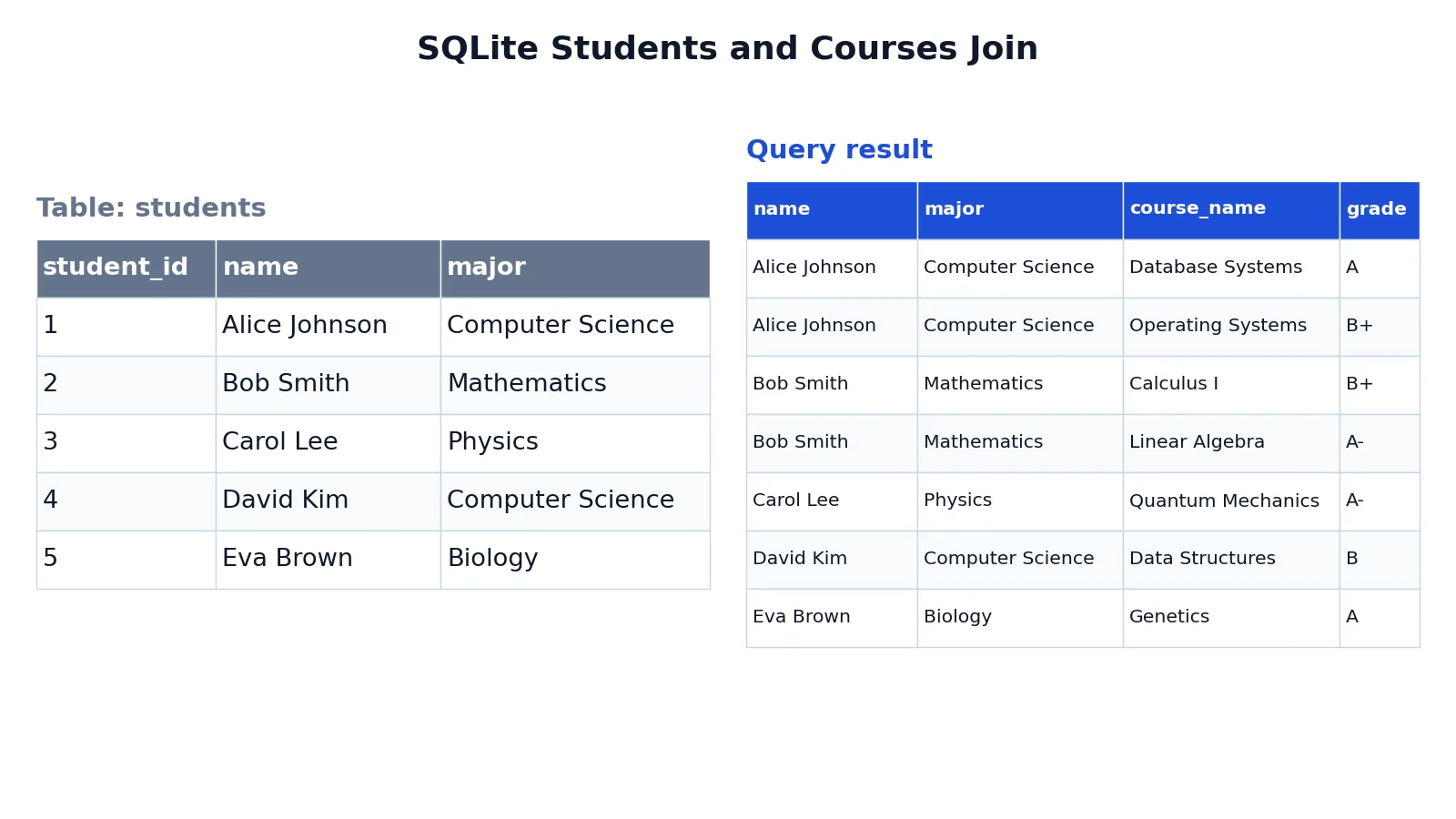
Consider a small university records system. Two tables hold students and the courses they take, and the DBMS joins them on a shared student ID.
The students table:
| student_id | name | major |
|---|---|---|
| 1 | Alice Johnson | Computer Science |
| 2 | Bob Smith | Mathematics |
| 3 | Carol Lee | Physics |
| 4 | David Kim | Computer Science |
| 5 | Eva Brown | Biology |
The schema declares student_id as the primary key, so each student is uniquely identified. The courses table declares a foreign key back to students, which enforces referential integrity: a course row cannot point at a student who does not exist.
The query asks for each student alongside their courses and grades:
SELECT s.name, s.major, c.course_name, c.grade
FROM students AS s
JOIN courses AS c ON s.student_id = c.student_id
ORDER BY s.name, c.course_name;
The result:
| name | major | course_name | grade |
|---|---|---|---|
| Alice Johnson | Computer Science | Database Systems | A |
| Alice Johnson | Computer Science | Operating Systems | B+ |
| Bob Smith | Mathematics | Calculus I | B+ |
| Bob Smith | Mathematics | Linear Algebra | A- |
| Carol Lee | Physics | Quantum Mechanics | A- |
| David Kim | Computer Science | Data Structures | B |
| Eva Brown | Biology | Genetics | A |
The result was checked with an equivalent SQLite query. Seven rows come back from five students because Alice and Bob each take two courses. The join produced that shape automatically from the key relationship, with no manual matching.
This is the practical difference between a database system and a file. In a spreadsheet, you would keep students in one sheet and courses in another and reconcile them by hand or with lookup formulas. Here the DBMS enforces the link, and the query language expresses the combination in one statement. If you want to see how the structure is declared before any data goes in, the explanation of what a database schema is walks through the same idea.
How to Interpret It
Read the output as a set of facts that satisfy a stated condition. Each row is one student-course pairing, and the columns tell you who, what major, which course and which grade. The join did not invent anything. It matched existing rows on student_id.
Three things to check when you read results like this:
- Row count. Five students and seven enrollments produce seven rows. If you expected five, you asked the wrong question.
- Key integrity. Every
student_idincoursesexists instudents, so no rows were dropped by the join. - Sort order.
ORDER BYcontrols presentation only. It does not change which rows qualify.
The same logic scales. Once the schema declares keys and constraints, the DBMS keeps the data consistent as rows are added, changed or removed, and queries return answers that respect those rules.
When to Use It (and when not to)
Use a database system when your data has structure, relationships and multiple users. That covers most analytical and operational work: transactions, reporting, dashboards, and any dataset where records relate to other records.
Use one when:
- Several people or programs read and write the same data.
- Records relate to each other through keys, such as customers and orders.
- You need constraints that reject invalid data at the point of entry.
- You need to query the data repeatedly with different filters.
Skip it when:
- You have a single small file that one person edits occasionally.
- The data is unstructured text or media with no relationships to enforce.
- You need a one-off calculation and nothing will be reused.
A flat file is not wrong for a one-off. It becomes wrong when two people edit it at once, when a value must match a value in another file, or when you need the same answer tomorrow. If you are still deciding whether your data is regular enough for tables, the guide to structured data covers the boundary.
Database System vs Plain File
The closest related idea is a plain file, such as a CSV or spreadsheet. Both store data. They differ in what enforces the rules.
| Aspect | Plain file | Database system |
|---|---|---|
| Structure | Implicit in the columns you type | Declared in a schema with types and keys |
| Relationships | Manual matching or lookup formulas | Enforced by keys and joins |
| Concurrent access | Risk of conflicting edits | DBMS manages concurrent access |
| Query language | None, or limited formulas | SQL or another query language [1] |
| Validation | Whatever the editor allows | Constraints reject invalid rows |
| Security | File permissions only | Access controls and activity logging [2] |
| Recovery | Manual backups | DBMS recovery facilities |
The DBMS is the component that closes most of these gaps. It sits between the data and everyone who touches it, and it applies the same rules to every request [2].
Common Mistakes
- Calling the DBMS the database. The DBMS is software, the database is the data. The system includes both plus the schema and users [1]. Fix: name the component you actually mean.
- Treating a spreadsheet as a database system. A spreadsheet has no enforced schema, no keys and no query language. Fix: move to a DBMS when relationships or multiple users appear.
- Skipping the schema. Without declared types and keys, nothing stops duplicate or orphaned rows. Fix: define primary and foreign keys before loading data [2].
- Assuming every database has a schema. Relational systems always do, but some nonrelational databases have none or make them optional [2]. Fix: check the specific system before you rely on schema enforcement.
- Forgetting that joins multiply rows. Two courses for one student produce two rows, not one. Fix: check the row count against the grain of the question you asked.
- Confusing sort order with filtering.
ORDER BYrearranges output and removes nothing. Fix: useWHEREto filter andORDER BYonly to present.
Limitations
A database system does not clean your data for you. It enforces the rules you declare, so a schema that permits a free-text grade column will happily store "A", "A+" and "a" as three different values. Constraints catch structural problems, not judgment problems.
It also adds operational weight. A DBMS needs configuration, backups, access management and monitoring, and those are ongoing tasks. For a single small file with one editor, that overhead buys you little. The system pays off when data is shared, related and queried repeatedly, and it costs you when none of those are true.
Frequently Asked Questions
What is the definition of database system in simple terms?
A database system is an organized collection of data plus the software that manages it, the structure that describes it, and the people and applications that use it [1]. The software component is the DBMS, and it handles storage, queries, security and recovery [2]. Think of the database as the contents and the DBMS as the machinery around them.
What are the main components of a database system?
The main components are the data, the DBMS, the schema, and the users and applications [1][2]. The data is the stored records. The DBMS is the software layer. The schema declares tables, columns, types and keys. Users and applications issue the queries and updates that the DBMS executes.
Is a database the same as a database system?
No. A database is the organized collection of data, while a database system includes that data plus the DBMS, the database model and the associated applications [1]. People often use "database" loosely for any of these parts [1]. In precise writing, keep the terms separate.
Does every database system need a schema?
Relational database systems always have schemas [2]. Some nonrelational databases have schemas, some do not, and some allow them without requiring them [2]. If your work depends on enforced types and keys, confirm the behavior of the specific system you are using.
Can I use SQL without a database system?
SQL is a query language, and it needs something to execute it against. The DBMS is what parses and runs your SQL and returns results [1]. You can practice on a single-file database engine, but the engine is still a DBMS, even when it is small.
References
Further Reading
- Codd EF (1970). A relational model of data for large shared data banks. Communications of the ACM
- PostgreSQL Documentation: SELECT
- SQLite: SQL As Understood By SQLite
- Wilson G, Bryan J, Cranston K et al. (2017). Good enough practices in scientific computing. PLOS Computational Biology