WDL for Bioinformatics: A Practical Overview
By Dr. Zubair Khalid, DVM, MS, PhD ·

By the end of this guide you will be able to write a WDL workflow from scratch, validate it with two independent tools, run it locally with two different engines, parallelize it across samples with scatter, and diagnose the small set of failures that cause most lost hours. You will also know where WDL fits against Nextflow and Snakemake, so you can pick the right bioinformatics workflow manager for your team instead of inheriting one by accident.
Have on hand: a terminal, Java 11 or newer, Python 3 with pip, and Docker running locally. Every command below uses standard, freely available tools, and the full walkthrough takes about 20 minutes on a laptop.
What WDL Is (and What It Is Not)
WDL, short for Workflow Description Language and expanded in some papers as Workflow Definition Language, is an open, declarative language for describing computational pipelines. You write two kinds of building blocks. Tasks wrap a single command with typed inputs and declared outputs. A workflow wires tasks together, scatters work across samples, and promotes final outputs. The file describes what to run, never how to schedule it, and a separate engine handles execution, file transfer, retries, and caching.
The language was created at the Broad Institute to drive large genomics pipelines, including the GATK best-practice workflows, and is now maintained by the OpenWDL community as a versioned specification. The versions you will encounter are draft-2 (legacy), 1.0 (the first stable standard), 1.1 (the current stable standard, which adds structs and the after keyword for expressing dependencies), and a 2.0 specification in development.
Because WDL is declarative, there are no variables you mutate as the run proceeds, no while loops, and no channels. Data flows from task inputs to task outputs, and the engine decides execution order within the constraints you declare.
Three engines matter in practice:
- Cromwell. The Broad Institute's production runner. It is written in Scala, runs on the JVM, and submits work to a backend, meaning the execution environment you configure, such as your laptop, an HPC scheduler, or a cloud service.
- miniwdl. A Python runner and static checker, ideal for local development thanks to fast startup and readable errors.
- sprocket. A newer runner written in Rust, useful when you want a single static binary.
WOMtool ships alongside Cromwell and validates WDL files and generates input templates.
One disambiguation saves confusion later. In some cheminformatics literature, WDL stands for weighted deep learning, as in WDL-RF, a method combining weighted deep learning with random forest to predict the bioactivity of GPCR-associated ligands [1]. That WDL has no connection to the workflow language. If a search lands you on a machine learning paper, check which WDL the authors mean before reading further.
Why WDL Bioinformatics Is Used in Production
WDL for bioinformatics earned its production record in three settings that punish fragile pipelines: large reference genomics, public health laboratories, and clinical research.
Terra, the cloud analysis platform widely used by the Broad Institute community, executes WDL through Cromwell and gives laboratory scientists a point-and-click interface. That combination is why public health laboratories adopted it. The Theiagen workflow collection performs genome assembly, quality control, characterization, and phylogeny building, and uses WDL together with open-source containerized software for standardization and interoperability, with version-controlled code in public GitHub repositories and workflows published on Dockstore [2].
TheiaEuk shows the pattern applied to a hard problem. It is a species-agnostic WDL workflow for fungal genomic characterization, built from containerized components and deployed on Terra so laboratory scientists can analyze fungal isolates without writing code. During an outbreak of Candida auris in southern Nevada, the workflow processed 752 new isolates and tracked FKS1 mutations accumulating over the course of the outbreak [3].
ImmunoNX shows the same pattern in clinical research. It is an end-to-end protocol for neoantigen prediction and personalized vaccine design, built with WDL and executed via Cromwell on Google Cloud Platform. The workflow has supported over 185 patients across 11 clinical trials and enables vaccine design in under three months [4].
The common thread: WDL plus containers plus a managed runner turns pipelines into something a scientist can run without opening a terminal, while every result stays traceable to a specific workflow version, container tag, and inputs file.
Choosing a Bioinformatics Workflow Manager: WDL, Nextflow vs Snakemake
A bioinformatics workflow manager turns loose scripts into pipelines you can rerun, scale, and audit. The four systems you will encounter most are WDL, Nextflow, Snakemake, and CWL. A systematic evaluation in Scientific Reports compared Nextflow, CWL, and WDL together with several of their executors, plus Swift/T from high-scale physics, using two use cases, a variant-calling pipeline and a scalability-testing framework, each run locally, on an HPC cluster, and in the cloud. The evaluation scored language expressiveness, modularity, scalability, robustness, reproducibility, interoperability, ease of development, and adoption [5]. Its conclusion is practical: the right choice is a function of the language and engine features, and of adoption and collaboration patterns within the communities you actually work with.
In the perennial nextflow vs snakemake debate, both tools are excellent, and the deciding factors are usually organizational. The same is true for WDL. Use this comparison to frame the decision:
| Dimension | WDL | Nextflow | Snakemake |
|---|---|---|---|
| Language basis | Declarative DSL with typed task and workflow blocks | Groovy-based DSL on the JVM | Python-based DSL with rules |
| Mental model | Describe tasks and wiring, the engine schedules | Channels stream data between processes | Rules resolve files backward from targets |
| Typical home ground | Terra, GATK pipelines, clinical and public health settings | HPC clusters, nf-core community pipelines | Academic research computing, conda-based environments |
| Usability for non-coders | High on platforms like Terra | Moderate | Moderate |
| Sharing venues | Dockstore, Terra, GATK scripts | nf-core, Dockstore | Workflow catalogs, Dockstore |
Practical guidance:
- Choose WDL if you run in Terra, depend on GATK, or serve users who should never need a terminal.
- Choose Nextflow if your team lives on an HPC cluster or adopts nf-core pipelines.
- Choose Snakemake if your work is Python-centric research computing with conda-managed tools.
- Whatever you choose, containerize your tools and publish workflows to a registry, which keeps the choice reversible.
WDL Bioinformatics Step by Step: Your First Workflow
Step 1: Install a runner and a validator
Download Cromwell and WOMtool from the project's GitHub releases page (check the page for the current release number, 86 is used in the examples here), and install miniwdl with pip:
wget https://github.com/broadinstitute/cromwell/releases/download/86/cromwell-86.jar
wget https://github.com/broadinstitute/cromwell/releases/download/86/womtool-86.jar
pip install miniwdl
java -version
miniwdl --version
Expected output (versions will differ on your machine):
openjdk version "17.0.10" 2024-01-16
OpenJDK Runtime Environment (build 17.0.10+11)
miniwdl 1.11.1
Cromwell executes workflows. WOMtool validates them and writes input templates. miniwdl does both jobs locally with faster feedback.
Step 2: Write hello.wdl
Create a file named hello.wdl:
version 1.1

task hello {
  input {
    String name
  }

  command <<<
    set -euo pipefail
    echo "Hello, ~{name}!" > greeting.txt
    cat greeting.txt
  >>>

  output {
    File greeting = "greeting.txt"
  }

  runtime {
    docker: "ubuntu:24.04"
    cpu: 1
    memory: "1 GiB"
  }
}

workflow hello_wf {
  input {
    String name
  }

  call hello {
    input: name = name
  }

  output {
    File greeting = hello.greeting
  }
}
What each block does:
version 1.1declares the language version. Without it, runners assume legacy draft-2 behavior, which is the most common source of confusing placeholder errors.task hellois a unit of work. The engine runs it in its own sandbox and container.input { String name }declares a typed input. Core types areString,Int,Float,Boolean,File, andArray[T].command <<< ... >>>is the shell script the task runs.~{name}is a placeholder the engine substitutes before the command executes.output { File greeting = "greeting.txt" }declares what the task produces. The file must exist in the task working directory when the command finishes.runtimerequests resources.dockerpins the container image, andcpuandmemoryare passed to the backend. These are requests, and cloud backends enforce them.workflow hello_wforchestrates.callruns the task once,input: name = namemaps the workflow variable to the task input, and the workflow output promotes the task output so callers and platforms can find it.
Step 3: Validate before you run
java -jar womtool-86.jar validate hello.wdl
miniwdl check hello.wdl
Expected output:
Success! No errorsminiwdl check prints nothing on a clean file and exits with status 0. If you mistype a placeholder, for example ~{nmae} in the command while the input is called name, miniwdl prints the file, line, and column with a message such as Identifier 'nmae' is not defined. Fix the name and rerun. Running two independent validators catches different classes of problems, and both take seconds.
Step 4: Generate and fill in the inputs file
java -jar womtool-86.jar inputs hello.wdl > hello.inputs.json
cat hello.inputs.json
Expected output:
{
  "hello_wf.name": null
}
Edit the file:
{
  "hello_wf.name": "Ada"
}
Keys use dotted names in the form workflow.variable. Inputs to a call inside the workflow appear as workflow.call_name.variable. File inputs accept local paths and, when the backend supports them, URIs such as gs://, s3://, and https:// addresses. The engine localizes them, meaning it copies or downloads each file into the task's working directory before the command runs.
Step 5: Run with Cromwell
java -jar cromwell-86.jar run hello.wdl -i hello.inputs.jsonAbbreviated expected output:
[info] Workflow starting (id: 3f2c8a1e-...)
[info] Workflow hello_wf completed successfully
Exact log wording varies between Cromwell versions. The signals to look for are your workflow's id and a final succeeded status. Cromwell also writes files into a hello_wf/ folder in your working directory:
outputs.json, the workflow outputs with absolute pathsmetadata.json, the full execution record, including per-call statusworkflow.log, the run log
outputs.json looks like this:
{
  "hello_wf.greeting": "/home/you/cromwell-executions/hello_wf/3f2c8a1e-.../call-hello/attempt-1/execution/greeting.txt"
}
The execution directory cromwell-executions/hello_wf/<workflow id>/call-hello/attempt-1/execution/ contains everything the task produced, including greeting.txt, plus stdout, stderr, script, and rc. The rc file holds the exit code, and it is the first place to look when something fails.
Step 6: Run with miniwdl for faster iteration
miniwdl run hello.wdl -i hello.inputs.jsonYou can also pass inputs inline:
miniwdl run hello.wdl name=Adaminiwdl pulls the pinned image, runs the task, and writes a timestamped folder named after the workflow. Its outputs.json maps the same dotted keys to local paths:
{
  "hello_wf.greeting": "/home/you/hello_wf/20250101_120000_hello_wf/work/hello_wf/hello/greeting.txt"
}
The folder name includes a timestamp and will differ on your machine. For day-to-day development, miniwdl's fast startup and readable error output make it the better loop, with Cromwell as the reference engine for final runs.
Step 7: Scale out with scatter
Create batch.wdl:
version 1.1

task hello {
  input {
    String name
  }
  command <<<
    set -euo pipefail
    echo "Hello, ~{name}!" > greeting.txt
  >>>
  output {
    File greeting = "greeting.txt"
  }
  runtime {
    docker: "ubuntu:24.04"
    cpu: 1
    memory: "1 GiB"
  }
}

workflow batch_wf {
  input {
    Array[String] names
  }

  scatter (name in names) {
    call hello {
      input: name = name
    }
  }

  output {
    Array[File] greetings = hello.greeting
  }
}
Inputs:
{
  "batch_wf.names": ["Ada", "Grace", "Linus"]
}
Run it:
java -jar cromwell-86.jar run batch.wdl -i batch.inputs.jsonExpected outputs.json:
{
  "batch_wf.greetings": [
    ".../call-hello/shard-0/attempt-1/execution/greeting.txt",
    ".../call-hello/shard-1/attempt-1/execution/greeting.txt",
    ".../call-hello/shard-2/attempt-1/execution/greeting.txt"
  ]
}
The engine runs one shard per element, where a shard is one parallel instance of the call. Shards execute in parallel up to the backend's concurrency limit, and scattered outputs are gathered automatically into Array[File] in input order. You wrote no gather logic, because gathering is built into the language. Nest scatters for cross products, and use conditionals such as if (defined(x)) { ... } for optional branches.
Step 8: Write a realistic task
version 1.1

task haplotype_caller {
  input {
    File reference_fasta
    File reference_fai
    File reference_dict
    File input_bam
    String sample_id
    Int cpus = 2
  }

  command <<<
    set -euo pipefail
    gatk HaplotypeCaller \
      -R ~{reference_fasta} \
      -I ~{input_bam} \
      -O ~{sample_id}.vcf.gz
  >>>

  output {
    File output_vcf = "~{sample_id}.vcf.gz"
    File output_vcf_index = "~{sample_id}.vcf.gz.tbi"
  }

  runtime {
    docker: "broadinstitute/gatk:4.6.0.0"
    cpu: cpus
    memory: "8 GiB"
    disk: "20 GiB"
    maxRetries: 1
  }
}
Parameter notes:
- The reference index files (
reference_fai,reference_dict) are declared as inputs so the engine localizes them. Generate indexes once upstream and version the results, never inside the task. Int cpus = 2shows a default value, which makes the input optional in the inputs JSON.- Outputs are named from
sample_idwith placeholders, so outputs stay deterministic and downstream tasks can reference them safely. maxRetries: 1asks the engine to retry once on failure, which absorbs transient cloud and storage errors.disk: "20 GiB"sizes the scratch disk on cloud backends. The Local backend ignores it.
Step 9: Check that the result is right
Work through four checks:
- Read the
rcfile in the call's execution directory. It must contain0. - Open
outputs.jsonand confirm every declared output exists and is non-empty, for example withls -lh. - Inspect the content. For the variant caller above,
zcat sample_id.vcf.gz | head -n 30should show##fileformat=VCFv...header lines and a#CHROMline listing the columns. - Open
metadata.jsonand confirm every call reportsSucceeded, then rerun the same workflow with the same inputs. If call caching is enabled, meaning the engine reuses results from previous identical calls, the rerun completes without recomputing.
Step 10: Where to go next
- Move outputs to durable storage with a Cromwell options file, passed with
-o options.json. Cromwell then delocalizes outputs, meaning it uploads them from the execution sandbox to the bucket:
{
  "final_workflow_outputs_dir": "gs://my-bucket/outputs",
  "use_relative_output_paths": true
}- For HPC, write a Cromwell config that defines your scheduler backend and start Cromwell with
java -Dconfig.file=cromwell.conf -jar cromwell-86.jar server. - Put
womtool validateandminiwdl checkinto continuous integration so broken WDL never merges. - Publish finished workflows on Dockstore with version-controlled code in a public repository, the model the Theiagen public health collection uses [2].
Runtime Attributes That Control Execution
Runtime attributes are the knobs a task exposes to the backend. Support varies, the Local backend ignores disk, while cloud backends require docker. The attributes you will use constantly:
| Attribute | Example | What it does | Where it matters |
|---|---|---|---|
docker | docker: "broadinstitute/gatk:4.6.0.0" | Runs the command inside this container image | Required on cloud backends, best practice everywhere |
cpu | cpu: 2 | Requests CPU cores from the scheduler or virtual machine | All backends |
memory | memory: "8 GiB" | Requests RAM, undershoot causes killed containers | All backends |
disk | disk: "20 GiB" | Sizes the scratch disk for the task | Cloud backends, ignored locally |
maxRetries | maxRetries: 1 | Retries the task automatically after a failure | Transient cloud and storage errors |
continueOnReturnCode | continueOnReturnCode: [1] | Treats the listed exit codes as success | Tools that exit nonzero on purpose, such as grep with no matches |
failOnStderr | failOnStderr: true | Fails the task if anything lands on stderr | Tools that report real problems on stderr |
Two behaviors deserve emphasis. First, memory is enforced on cloud backends, and a task that exceeds it is killed, which surfaces as exit code 137. Second, failOnStderr and continueOnReturnCode change what failure means. Many bioinformatics tools write progress noise to stderr, so decide per task whether stderr should be treated as a failure signal.
WDL Bioinformatics Tips That Save Debugging Time
- Validate in continuous integration.
miniwdl checkruns in seconds, so wire it andwomtool validateinto pull-request checks. Broken WDL should never merge. - Pin container tags.
ubuntu:24.04andbroadinstitute/gatk:4.6.0.0are reproducible,:latestis not. Two runs months apart must execute the same binaries. - Keep tasks hermetic. Read only declared inputs, write only to the working directory, and avoid network calls inside tasks. Hermetic tasks are what make call caching safe.
- Document inputs with
parameter_meta. Platforms render these descriptions to users who never open the WDL file. - Model sample sheets with structs or
read_tsv. One structured input beats thirty scalars, and structs in WDL 1.1 give you typed records end to end. - Test in layers. Run each task in isolation with
miniwdl run, then the whole workflow on one sample, then scatter over a small batch before the full cohort. - Use retries deliberately.
maxRetriesabsorbs transient cloud and storage failures.continueOnReturnCodeis for tools whose nonzero exits are meaningful, not a general ignore-errors switch. - Enable call caching in production. In the Cromwell config:
call-caching {
  enabled = true
}
Reruns, backfills, and samples shared across projects then reuse prior results instead of paying for them twice.
- Derive output names from inputs.
~{sample_id}.vcf.gzkeeps outputs deterministic, which simplifies downstream code and improves cache behavior. - Publish when stable. Version-controlled code in a public repository plus a Dockstore entry makes your workflow citable and installable by others [2].
Common Mistakes and Limitations
These are the mistakes that fill troubleshooting channels, each with its fix:
- Omitting the
versionline. Runners then treat the file as draft-2, where${}placeholders behave differently and modern features do not exist. Always start withversion 1.1. - Mixing
${}and~{}placeholders. Pick~{}everywhere in modern WDL and convert old files once. - Floating container tags.
:latesttoday is a different image next quarter. Pin exact tags. - Writing outputs outside the working directory. The engine only captures files inside the task sandbox. Write to the current directory and declare outputs there.
- Over-broad globs.
glob("")sweeps up logs and intermediates. Glob the exact suffix you expect, for exampleglob(".vcf.gz"). - Under-provisioned memory or disk. Exit code 137 means the container was killed for exceeding memory. Raise
memory, and setdiskexplicitly on cloud backends. - Assuming scatter order. Gathered arrays preserve input order, but shard execution order and timing are not guaranteed. Never coordinate shards through shared files.
- Editing code and expecting old cache hits. Cache keys include the task definition and inputs, so any edit invalidates reuse. That behavior protects correctness.
- Hardcoding sample names, paths, or sequences in command blocks. Move them into typed inputs so one WDL serves every sample.
- Skipping validation. Two seconds of
miniwdl checkprevents an hour of a failed cloud run.
The failures you will actually see, and what to do:
| Message or signal | Meaning | Fix |
|---|---|---|
Required workflow input 'wf.sample_id' not specified | A required input is missing from the inputs JSON | Add the dotted key, or give the input a default in WDL |
Identifier 'nmae' is not defined | A placeholder references an unknown name | Correct the spelling or declare the input |
Unsupported WDL version draft-2 | The file uses legacy syntax | Add version 1.1 and convert ${} placeholders to ~{} |
| The job fails before launch and the log mentions a missing docker runtime attribute | Cloud tasks must run in a container | Add a pinned docker attribute |
| Exit code 137 | The container was killed for exceeding memory | Raise memory and check memory-hungry tool flags |
| Task marked Failed, log says the output file does not exist or a glob matched nothing | The command did not produce the declared outputs | Rerun the command by hand in the execution directory and fix paths and globs |
| Localization failure in the log | The engine could not fetch an input file | Check the path or URI, permissions, and backend credentials |
| Task fails with exit code 0 and non-empty stderr | failOnStderr was triggered | Silence the stderr noise or remove the attribute |
Limitations, stated once: WDL 2.0 is still in development, so advanced features vary between runners and versions. Runtime attribute support differs by backend, which is why the same workflow can behave differently locally and on a cloud platform. Porting between WDL, Nextflow, and CWL is manual, because no converter handles every construct. And WDL describes computation, not data management, so you still need a plan for storage, credentials, and provenance.
Frequently Asked Questions
What does WDL stand for in bioinformatics?
WDL stands for Workflow Description Language, and some papers expand it as Workflow Definition Language. It was created at the Broad Institute and is now maintained as an open standard by the OpenWDL community.
Do I need cloud computing to run WDL workflows?
No. WDL runs on a laptop with miniwdl or Cromwell's Local backend, on HPC clusters through scheduler backends, and in the cloud through platforms such as Terra. The same file moves between all three.
How is WDL different from Nextflow and Snakemake?
WDL is a declarative language executed by a separate engine, Nextflow is a Groovy-based dataflow DSL, and Snakemake is a Python-based rule system. Pick based on your team's skills, target environment, and the pipelines your collaborators already share.
Should I use Cromwell or miniwdl?
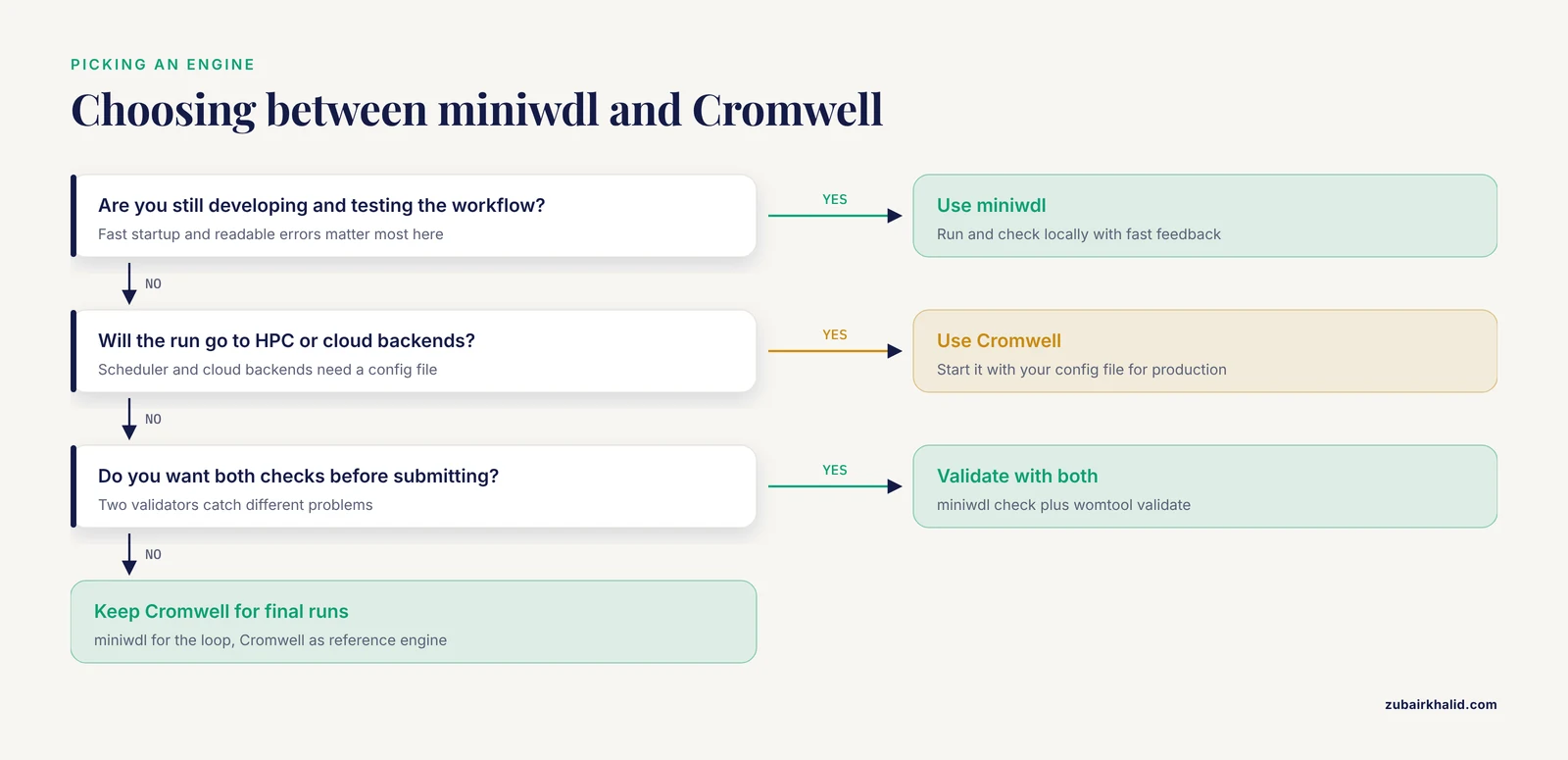
Use miniwdl for fast local testing and static checks, and Cromwell for production runs on HPC or cloud backends. Many teams validate with both before submitting a job.
How do I run a WDL workflow on an HPC cluster?
Configure a Cromwell backend for your scheduler, such as SLURM, SGE, LSF, or PBS, then start Cromwell with that config file. Cromwell submits one scheduler job per task call and honors the cpu and memory runtime attributes.
Where can I find ready-made WDL workflows?
Dockstore hosts versioned WDL workflows, including the open-source Theiagen public health collection, and the GATK documentation links to the WDL scripts behind its best-practice pipelines.
What is the difference between WDL draft-2, 1.0, and 1.1?
Draft-2 is the legacy syntax with ${} placeholders, 1.0 is the first stable standard with ~{} placeholders, and 1.1 adds structs and the after keyword for dependencies. Start new work in 1.1.
Can I convert a WDL workflow to Nextflow or CWL?
There is no fully reliable automated converter, so plan to port tasks by hand. Small tasks with typed inputs and pinned containers port with the least pain.
Sources
- WDL-RF: predicting bioactivities of ligand molecules acting with G protein-coupled receptors by combining weighted deep learning and random forest.
- Accelerating bioinformatics implementation in public health.
- TheiaEuk: a species-agnostic bioinformatics workflow for fungal genomic characterization.
- ImmunoNX: a robust bioinformatics workflow to support personalized neoantigen vaccine trials.
- Design considerations for workflow management systems use in production genomics research and the clinic.