How to Use UniProt's ID Mapping Tool
By Dr. Zubair Khalid, DVM, MS, PhD ·

By the end of this UniProt ID mapping tool tutorial you will be able to take a raw list of protein identifiers, such as gene symbols, Entrez Gene IDs, or RefSeq accessions, and convert them into stable UniProtKB accessions. You will also be able to go in the opposite direction, from UniProt accessions to cross-references in RefSeq, Ensembl, or the PDB, both through the web interface and through a small Python script you can drop into a pipeline.
You need three things on hand before you start. First, a plain-text list of identifiers, one per line, cleaned of spreadsheet artifacts. Second, a modern web browser for the interactive workflow. Third, if you want automation, either Python 3 with the requests library installed (pip install requests) or the curl command-line client, which ships with macOS and most Linux distributions.
What the ID Mapping Tool Does and Why It Exists
Every major protein database assigns identifiers with its own conventions, and those identifiers change, get retired, or collide across databases. Reconciling the various, potentially unstable identifiers that refer to the same protein is one of the oldest practical problems in bioinformatics, and it shows up every time you try to unify datasets annotated by different sources [1]. Your RNA-seq table says TP53. Your mass spectrometry report says P04637. Your structural model says ENSP00000269305. All three point at the same protein, but no downstream analysis works until you prove it and unify them.
UniProt, the Universal Protein Resource, is a comprehensive resource for protein sequence and annotation data, and its website is the primary way most scientists interact with it [2]. Alongside searchable datasets, UniProt provides four main tools. BLAST does sequence similarity searching, Align does multiple sequence alignment, Peptide Search retrieves proteins containing a short peptide sequence, and Retrieve/ID Mapping uses a list of identifiers to retrieve UniProtKB proteins and to convert database identifiers between UniProt and external databases in either direction [2]. The tool was already one of the three core UniProt tools back when the site drew about 400,000 unique visitors per month [3], and it remains the batch conversion workhorse now that the site draws roughly 800,000 unique visitors per month [2]. If you are new to UniProt and working through a general UniProt database tutorial, the ID mapping piece is usually the one you hit first in real analysis work.
The mapping is anchored in UniParc, the UniProt Archive. UniParc stores every distinct protein sequence ever loaded into UniProt and records cross-references to all source databases, so two records that share a sequence can be tied together reliably. This design was pioneered by the Protein Identifier Cross-Reference (PICR) service, which used UniParc as a data warehouse to offer cross-references based on 100 percent sequence identity to proteins from more than 70 distinct source databases, with results filterable by source database, taxonomic identifier, and activity status [1]. The modern ID mapping tool carries the same idea forward: it resolves identifiers through recorded cross-references rather than by guessing from text or sequence similarity.
One distinction to fix in your head before you touch the tool. Identifier mapping is not sequence searching. The tool looks up recorded cross-references. If you have an amino acid sequence and no identifier, use BLAST or Peptide Search instead, both documented in the same UniProt tools protocol as the ID mapping workflow [2].
Identifiers You Can Feed In
The single biggest determinant of success is choosing the correct "From database" value for your input. The tool is strict about input type. Here are the identifier flavors you will meet most often.
UniProtKB accession. A stable, six-character (or eight-character) identifier such as P04637 for human p53. Accessions are permanent. UniProtKB is the UniProt Knowledgebase, the curated database of protein sequences and annotation. Within UniProtKB, entries are either reviewed (Swiss-Prot, manually curated by UniProt biocurators) or unreviewed (TrEMBL, computationally annotated).
UniProtKB entry name. A mnemonic such as TP53_HUMAN or EGFR_HUMAN. Entry names can change when annotation changes, so accessions are the identifier you want to keep long term.
Gene name. A gene symbol such as TP53 or EGFR. These are strings, they are not unique across species, and they change over time. The tool treats them as name lookups, not as biological inferences.
Entrez Gene ID. A numeric NCBI Gene identifier such as 7157 for human TP53.
RefSeq protein accession. An NCBI Reference Sequence protein identifier such as NP_000537 for human p53.
Ensembl protein identifier. An identifier such as ENSP00000269305 for the human p53 protein.
PDB identifier. A four-character structural database code such as 1TUP, used for a p53-DNA complex structure.
Also note the isoform format. UniProtKB isoform identifiers append a flag to the accession, for example P04637-2 for the second annotated isoform of human p53. If your data comes from a proteomics search engine with isoform-level output, that suffix matters.
A quick warning about spreadsheets. Microsoft Excel converts gene symbols like SEPT1, MARCH1, and DEC1 into dates or floating-point numbers, silently corrupting identifiers in ways you will not notice until mapping fails. Keep identifier lists in plain text or CSV opened as text, and verify a few values visually before submitting.
Step-by-Step: Using the Web Interface
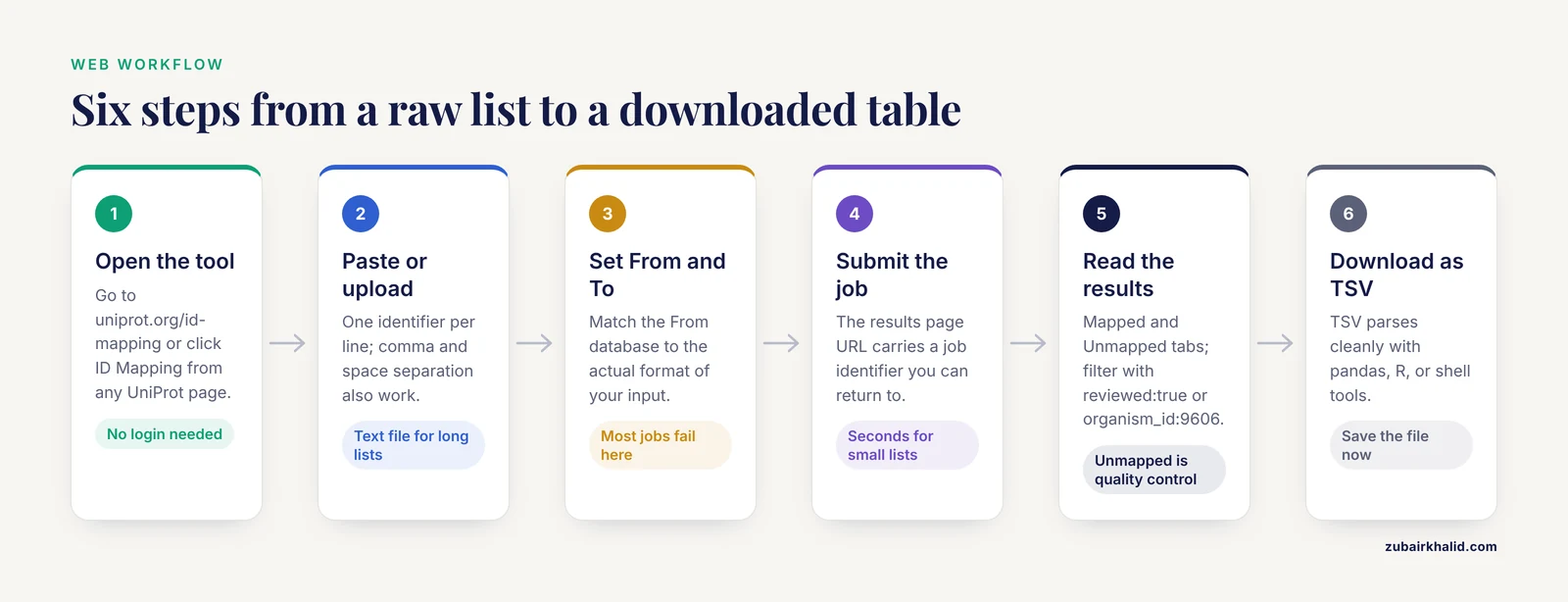
This walkthrough maps human gene symbols to reviewed UniProtKB accessions. The same five steps apply to any identifier pair.
Step 1. Open the tool
Go to https://www.uniprot.org/id-mapping or click ID Mapping from the Tools area of any UniProt page. The tool is free, requires no login to run a job, and keeps a history of your recent jobs on the same page while your browser session retains them.
Step 2. Paste or upload your identifiers
Type or paste identifiers into the input box, one per line. Comma and space separation also work. A clean input list looks like this:
TP53
EGFR
BRCA1
AKT1
INS
You can instead upload a text file with one identifier per line, which is the better option for anything over a few dozen entries because it avoids clipboard line-ending surprises.
Step 3. Choose the From and To databases
Two dropdowns control the conversion. Set From database to match your input exactly. For this example choose Gene Name. Set To database to your target, here UniProtKB.
This is the step where most jobs go wrong, so slow down. If your list is actually Entrez Gene IDs (7157, 1956, 672, 207, 3630 for the same five genes), choosing Gene Name will produce garbage or unmapped entries. Match the identifier type, not the organism or the memory of what you exported.
Step 4. Submit and wait for the job
Click Submit. The page transfers to a results page whose URL contains a job identifier. Jobs for lists of this size typically finish in seconds. A large file can take longer, and you can leave the page and return through the job history.
Step 5. Read the results
The results page presents two tabs.
The Mapped tab shows a table with a From column (your input identifier) and a To column (the mapped identifier), plus whichever UniProt columns you have enabled. For our five gene symbols, the mapping to UniProtKB yields:
From    To
TP53    P04637
EGFR    P00533
BRCA1   P38398
AKT1    P31749
INS     P01308
These five accessions are the canonical reviewed human entries for each gene, and you should see exactly this kind of one-to-one result for well-annotated human genes mapped to reviewed UniProtKB entries.
The Unmapped tab lists identifiers the tool could not convert, grouped by reason. Typical reasons are that the identifier was not found, the target entry has been deleted, or the identifier is obsolete. Treat this tab as quality control, not as noise. Every identifier sitting there is a question about your input file.
Use the query box above the results to filter before downloading. Entering reviewed:true restricts the results to manually curated Swiss-Prot entries, which is what most analyses want. You can also restrict to an organism with a query such as organism_id:9606 for human, which is how you prune cross-species name collisions when mapping from gene names.
Step 6. Download the results
Use the Download button and choose TSV (tab-separated values), Excel, or another format. For pipeline use, TSV is the right choice because it parses cleanly with pandas, R, or plain shell tools. Copy the results page URL if you want to share the exact job with a colleague, and download the file now anyway, since long-retained job links are not a substitute for a file in your project directory.
How to Read and Verify the Results
A mapping job returns pairs, and pairs can be one-to-many. Mapping a gene name to UniProtKB frequently returns several accessions because a symbol like a paralog family member, a deprecated symbol, or the same symbol in another species can all match. Three checks keep you honest.
First, check the organism column. When mapping from gene names, filter or sort by organism before you take anything downstream. Symbol collisions across species are real, and a name-based mapping knows nothing about orthology.
Second, check the reviewed status. If your downstream method assumes high-quality annotation, restrict to reviewed entries with reviewed:true and accept that some inputs will then be unmapped rather than mapped to an unreviewed guess.
Third, spot-check at least a handful of accessions by opening the UniProtKB entry pages. Confirm the protein name, the organism, and the sequence length match what your experiment implies. A thirty-second check of five entries catches most upstream file mistakes.
A final verification habit: keep a count summary. For a 5,000-identifier list, record how many mapped, how many mapped one-to-many, and how many landed in the Unmapped tab. If the unmapped fraction changes between two runs of the same pipeline on the same input, that is a signal your input formatting, not the database, moved.
Automating with the REST API
For recurring work, the same tool runs over an HTTP API at https://rest.uniprot.org/idmapping. The pattern is always submit, poll, then fetch results. The web interface uses the identical machinery, so API jobs behave like web jobs.
Submit the job
curl -X POST -H "Accept: application/json" \
  -F ids="TP53,EGFR,BRCA1,AKT1,INS" \
  -F from="Gene_Name" \
  -F to="UniProtKB" \
  https://rest.uniprot.org/idmapping/run
The three form fields are ids (your comma-separated identifier list), from (the source database identifier), and to (the target database identifier). A successful submission returns a small JSON object:
{"jobId": "6b8c4f2e8814f458a3c1e5d1a2b6f9a1c3d2b8e7"}Save that jobId. It is your handle on everything that follows.
Poll the status
curl https://rest.uniprot.org/idmapping/status/6b8c4f2e8814f458a3c1e5d1a2b6f9a1c3d2b8e7The response is JSON with a jobStatus field. While the job works you will see a value such as RUNNING or PROCESSING. When it completes you will see:
{"jobStatus": "FINISHED"}If the job fails, jobStatus becomes ERROR and the response carries an errorMessage field you can log directly. Common failure causes are an unrecognized from or to value and a malformed identifier list, and both return HTTP status 400 on submission.
Fetch the results
When the target is UniProtKB, stream the results from the uniprotkb results endpoint, choosing your output columns with the fields parameter:
curl "https://rest.uniprot.org/idmapping/uniprotkb/results/stream/6b8c4f2e8814f458a3c1e5d1a2b6f9a1c3d2b8e7?format=tsv&fields=accession,id,protein_name,gene_names,organism_name"Expected output for our example:
accession  id          protein_name               gene_names  organism_name
P04637     TP53        Cellular tumor antigen p53 TP53        Homo sapiens
P00533     EGFR        Epidermal growth factor... EGFR        Homo sapiens
P38398     BRCA1       Breast cancer type 1 su... BRCA1       Homo sapiens
P31749     AKT1        RAC-alpha serine/threo...  AKT1        Homo sapiens
P01308     INS         Insulin                    INS         Homo sapiens
The fields parameter uses UniProt's standard field names, so you can request anything the website's column selector offers, including xref_refseq and xref_geneid when you want cross-references in the same table as your accessions.
When the target is not UniProtKB, for example a job from UniProtKB to RefSeq, the results stream lives at https://rest.uniprot.org/idmapping/results/stream/{jobId} and returns simple From and To columns:
From     To
P04637   NP_000537
P00533   NP_005219
P38398   NP_009225
P31749   NP_005154
P01308   NP_000198
A complete Python script
This script wraps all three steps and is small enough to keep in a project's bin directory:
import time
import requests

API = "https://rest.uniprot.org/idmapping"

def submit(ids, source, target):
    response = requests.post(
        f"{API}/run",
        data={"ids": ",".join(ids), "from": source, "to": target},
    )
    response.raise_for_status()
    return response.json()["jobId"]

def wait_for(job_id):
    while True:
        status = requests.get(f"{API}/status/{job_id}").json()
        if status["jobStatus"] == "FINISHED":
            return
        if status["jobStatus"] in ("ERROR", "ABORTED"):
            raise RuntimeError(status)
        time.sleep(3)

def fetch(job_id):
    url = f"{API}/uniprotkb/results/stream/{job_id}"
    params = {
        "format": "tsv",
        "fields": "accession,id,protein_name,gene_names,organism_name",
    }
    return requests.get(url, params=params).text

if __name__ == "__main__":
    genes = ["TP53", "EGFR", "BRCA1", "AKT1", "INS"]
    job_id = submit(genes, "Gene_Name", "UniProtKB")
    wait_for(job_id)
    print(fetch(job_id))
Running this prints the same TSV table shown above. For production pipelines, add a retry around each request, log the job identifier alongside your data, and write the TSV to disk instead of standard output.
Choosing Source and Target Databases
The from and to values you pass to the API match the names in the web dropdown, with a few legacy API names worth knowing. The table below covers the pairs that handle most real-world requests.
| Task | From value | To value | Notes |
|---|---|---|---|
| Gene symbols to UniProt accessions | Gene_Name | UniProtKB | Filter by organism afterward, symbols collide across species |
| Entrez Gene IDs to UniProt accessions | GeneID | UniProtKB | Also seen as P_ENTREZ_GENEID in older tooling |
| RefSeq proteins to UniProt accessions | RefSeq_Protein | UniProtKB | P_REFSEQ_AC is the legacy name |
| Ensembl proteins to UniProt accessions | P_ENSG | UniProtKB | Verify organism in results |
| UniProt accessions to RefSeq | UniProtKB_AC-ID | RefSeq_Protein | Output is a From/To pair table |
| UniProt accessions to PDB structures | UniProtKB_AC-ID | P_PDB | Useful before homology modeling or structure retrieval |
| UniProt accessions to UniRef clusters | UniProtKB_AC-ID | UniRef100 | UniRef50 and UniRef90 also available for clustering workflows |
| Recover deleted or obsolete entries | UniProtKB_AC-ID | UniParc | UniParc archives every sequence ever loaded [1] |
When you paste identifiers into the web form, the site lists database names in readable form. When you script against the API, use the short values in this table, and confirm an unfamiliar name against the database list linked from the tool's own interface rather than guessing.
Practical Tips
Prefer accessions over names whenever the option exists. A UniProtKB accession is permanent. A gene symbol is a string that committees have renamed repeatedly. Every step you can move from names to accessions early in a workflow buys you stability downstream.
Map through UniProtKB, then enrich. UniProtKB entries carry cross-references to dozens of external databases, so a robust strategy is a two-hop job. First map your input to UniProtKB. Then use the retrieve step of the Retrieve/ID Mapping workflow, which the UniProt tools protocol covers as batch retrieval together with ID mapping [2], to pull xref_refseq, xref_geneid, or xref_pdb columns in one TSV. This gives you one auditable table instead of several fragile pairwise maps.
Run small test jobs first. Before submitting 50,000 identifiers, submit the first twenty, eyeball the results, and confirm the From database choice was right. A wrong source database wastes one small job instead of a large one.
Keep the job identifier in your logs. Results page URLs embed the job ID, which makes a mapping run reproducible and shareable. Write it into your workflow log next to the output filename.
Remember what the mapping is anchored in. The design traces to PICR, whose mappings relied on 100 percent sequence identity and cross-references recorded across the UniParc warehouse [1]. That means the tool resolves exact, recorded equivalences. It will not propose probable orthologs, fuzzy name matches, or sequence-similar candidates. When you need those, the correct UniProt tools are BLAST and Peptide Search [2].
Plan for isoforms. If your upstream tool emits isoform identifiers such as P04637-2, decide before mapping whether you want isoform-level resolution or canonical entries. Mapping then filtering in the results page handles either choice.
Common Mistakes and Limitations
These are the failures that show up repeatedly in real project work, with fixes.
Mismatched From database. The most common mistake by far. Feeding Entrez Gene IDs while selecting Gene Name, or RefSeq accessions while selecting Ensembl, produces either unmapped entries or plausible-looking nonsense. The fix is to inspect three or four raw input values and match their format to the dropdown before submitting.
Treating name mapping as orthology. Gene Name mapping is a string lookup. The symbol ABC1 in human and ABC1 in yeast have no guaranteed relationship. Always filter results to your organism, and get orthology from dedicated orthology resources rather than from name coincidence.
Ignoring the Unmapped tab. Unmapped identifiers are diagnostic. A cluster of unmapped inputs usually means one of three things: the identifiers are obsolete, the identifiers are from a database the tool does not source from, or your file is corrupted by spreadsheet mangling or stray headers. Fix the cause instead of deleting the rows.
Confusing entry names with accessions. Entry names like TP53_HUMAN are memorable but mutable. UniProt entry names change when nomenclature or annotation changes, while accessions such as P04637 do not. Store accessions in your results files, and treat entry names as display convenience.
Expecting sequence-based matching. The tool does not search by sequence. A sequence with no identifier and no recorded cross-reference maps nowhere. For sequence inputs, use BLAST or Peptide Search [2], then map the resulting accessions.
One-to-many confusion. A single gene name can map to multiple UniProtKB accessions, and a single accession can map to multiple RefSeq entries for different isoforms. Collapsing one-to-many mappings silently is a data-integrity hazard. Decide on a collapse rule, for example keep only reviewed entries or keep only the canonical form, apply it once, and record it in your methods.
Assuming the map is a stable lookup table. Mappings reflect the current state of UniProt and of the source databases. Entries get merged, deleted, or renamed between releases, so a mapping table built last year is not a permanent asset. Re-run mappings when you refresh other data, and date-stamp the output.
Oversized ad hoc web submissions. The web form is excellent up to lists of thousands, but very large files belong in the API workflow, where submission, polling, and downloading can be scripted and retried. If a web job stalls or the browser tab is lost, the API path is the recovery route.
The honest limitation to carry with you: the tool tells you what cross-references UniProt has recorded, with nothing more and nothing less. It does not assign confidence scores to individual mappings, it cannot recover identifiers that never had a cross-reference, and it reflects one snapshot in time. For biological interpretation of individual proteins, including questions about function or clinical significance, consult the corresponding curated evidence rather than the identifier mapping alone, and route individual research questions to the appropriate domain experts.
A Diagnostic Field Guide to Identifier Formats
The step-by-step walkthrough in the main article tells you to match the From database to your input. That advice is only useful if you can actually tell which format you are holding. In practice, the most common failure is not carelessness but genuine ambiguity: a collaborator sends a column labeled "ID" and you have no way to know what it contains. Learning to identify formats on sight, before you touch the tool, saves hours of trial and error.
Numeric identifiers are almost always Entrez Gene IDs. A column of integers such as 7157, 1956, 672 is nearly always NCBI Gene identifiers. The trap here is that some exported tables also carry a column of row numbers that looks identical, so check whether the first value is a small integer starting near 1 with no gaps, which suggests a row index rather than a biological identifier.
The NP_, XP_, and AP_ prefixes indicate RefSeq protein accessions. The two-letter prefix followed by an underscore and six digits is the RefSeq protein convention. The prefix carries meaning: NP_ entries are curated reference proteins, XP_ entries are predicted proteins from genome annotation, and the distinction matters because predicted entries map less reliably to reviewed UniProtKB records. If your list is heavy on XP_ accessions, expect a larger unmapped fraction and plan to justify your collapse rules carefully.
ENSP, ENSG, and ENST prefixes indicate Ensembl. ENSP marks proteins, ENSG marks genes, and ENST marks transcripts. The single most expensive mistake in this family is submitting a list of ENSG gene identifiers while selecting an Ensembl protein source in the From dropdown. The identifiers parse as plausible strings, the job runs, and the results are quietly wrong. Check the third and fourth characters, not just the ENS prefix.
A dash followed by a digit means an isoform. Identifiers such as P04637-2 or NP_000537.1 deserve a second look. The dash form is a UniProt isoform designation; the dot form is a version number on a RefSeq or similar accession. Both suffixes carry information that a naive mapper will either use or discard depending on your target choice, so decide before submission whether you want that level of resolution.
Four characters of letters and digits, sometimes starting with a digit, indicate PDB. Structural codes are short enough to be mistaken for nothing at all in a mixed column. If your list came from a structural biology collaborator and some values are four characters, that is your answer.
Mnemonic names with an underscore and an organism suffix are UniProtKB entry names. The pattern of four or five letters, an underscore, and a species tag such as HUMAN or YEAST is the entry name convention. These are convenient for reading and unreliable for storage, which the main article covers; here the practical point is that entry names can be submitted to the tool as a distinct identifier type, and mixing them with accessions in the same submission is a common silent failure.
Bare gene symbols are the hardest case. A short alphabetic string such as TP53 could be a gene symbol, part of an entry name, or a protein domain abbreviation. There is no pattern to confirm. This is why the field guide rule is: when you cannot tell what an identifier is, ask the person who generated the file rather than guessing at the dropdown. One clarifying email is cheaper than a week of analyses built on a misidentified source database.
Preprocessing an Identifier List Before You Submit
Most failed mapping jobs fail at the input stage, not the database stage. UniProt's ID mapping resolves identifiers through recorded cross-references anchored in the UniParc archive, which pioneered this approach by tying together records from more than seventy source databases through shared sequences [1]. Recorded cross-references are exact: they contain the identifier exactly as recorded, with no tolerance for stray whitespace, smart quotes, or a pasted spreadsheet header. A short preprocessing routine catches nearly all of these problems.
Start by getting the list into a plain-text file, one identifier per line. Then run through these checks with shell tools, which are universal on macOS and Linux:
Strip surrounding whitespace and carriage returns, which appear when files move between Windows and Unix systems:
sed 's/\r$//' ids_raw.txt | awk '{$1=$1};1' > ids_clean.txtRemove an accidental header row. If the first line is not an identifier, drop it:
tail -n +2 ids_clean.txt > ids_body.txtDeduplicate while preserving order, because duplicate identifiers produce duplicate result rows that inflate your counts:
awk '!seen[$0]++' ids_body.txt > ids_unique.txtCount what you have before mapping, so you can reconcile input counts against mapped counts afterward:
wc -l ids_unique.txtScan for characters that should never appear in an identifier list. Smart quotes, tab characters inside lines, and semicolons that indicate multiple identifiers crammed into one row are the usual culprits:
grep -n '[";]"' ids_unique.txtOne preprocessing step deserves its own paragraph: exploding multi-identifier fields. Proteomics search engines frequently emit cells containing several accessions separated by semicolons, representing protein groups that share peptides. A mapping tool receives that entire string as one identifier and fails. Split those cells before submission, and track which original row each exploded identifier came from so you can rebuild the grouping later. This is a structural decision about your data, not a formatting detail, and it should be made deliberately rather than discovered in the Unmapped tab.
Finally, sanity-check a random sample. Open the cleaned file, pick three identifiers from the middle, and confirm each one against its original source. Thirty seconds here routinely catches problems that would otherwise surface as mysterious unmapped clusters.
Worked Example: Cleaning Up a Proteomics Results Table
Consider a realistic scenario. You have a quantitative proteomics table with roughly four thousand rows. One column holds protein identifiers produced by the search engine, another holds gene names, and the values are a mix of UniProt accessions, isoform suffixed accessions, and occasionally entry names. Your collaborator wants the table annotated with stable UniProtKB accessions, reviewed entries only, restricted to human.
Here is the sequence that works.
First, decide your resolution level. If the experiment needs isoform-level resolution, keep the dash suffixes and map them as submitted. If the experiment operates at protein-group level, strip the suffixes first, because mapping isoform identifiers when you plan to collapse to canonical entries anyway creates a one-to-many mess you will have to undo. Most discovery proteomics analyses can state their collapse rule at the canonical level, so strip, but record the decision.
Second, explode and clean. Split the semicolon-delimited identifier cells, deduplicate, and keep a mapping file linking each exploded identifier back to its original row. This back-link file is what lets you annotate the original table after mapping without losing protein-group structure.
Third, run a small pilot. Take the first twenty identifiers and submit them through the web interface with From set to the format you diagnosed in the field guide above. If the pilot maps cleanly to reviewed human entries, proceed. If the pilot returns a scattered mess across organisms, stop and re-diagnose the input format. A twenty-identifier pilot costs seconds and protects the full run.
Fourth, run the full job and apply the reviewed filter. Submit the full list, then use the results query box with reviewed:true and the organism restriction before downloading, exactly as described in the main walkthrough. The download now contains only the rows your analysis should consume.
Fifth, reconcile counts and document. You should be able to state, in one sentence each: how many unique identifiers were submitted, how many mapped to at least one reviewed human entry, how many mapped to multiple reviewed entries, and how many were unmapped with what reasons. Every number should be derivable from files in your project directory, not from memory of what the results page looked like.
The characteristic failure in proteomics work is the protein group. When one row's identifiers split into three accessions that map to three distinct reviewed entries, you cannot simply paste accessions back into the row without deciding whether the row represents one protein or three. That decision belongs to your quantification method, not to the mapper. The mapper gives you the identity relationships; the biology of how those relationships affect quantification is yours to reason through and document.
Worked Example: From an RNA-seq Gene List to Protein Accessions
A frequent request in translational projects is the bridge from transcriptomics to proteomics: here are the significant genes from a differential expression analysis, now tell us which proteins to look for in a targeted mass spectrometry assay. The mapping itself is straightforward; the subtlety is that the gene-to-protein relationship is one-to-many more often than people expect.
Run the job with From set to GeneID (Entrez Gene identifiers are the safest gene-level input, because numeric identifiers avoid the symbol collision problem entirely) and To set to UniProtKB. Apply the organism filter and the reviewed filter in the results query. For a well-annotated human gene list, most entries will map to exactly one reviewed accession.
Then interrogate the exceptions, because they carry the biological content:
Genes that map to multiple reviewed accessions. Some genes encode several annotated proteins, and at the reviewed level these are distinct UniProtKB entries with distinct accessions. If your assay design needs one target per gene, you need a selection rule, and the defensible ones are: choose the canonical form, choose the longest sequence, or choose the entry with the most documented evidence. Pick one rule, apply it uniformly, and state it in your methods.
Genes that map to nothing. A significant gene with no reviewed protein entry usually means the protein has not been manually curated, or the gene's product is not a protein at all, which happens with noncoding RNA hits in differential expression output. Check what the unmapped identifiers actually are before assuming a database failure. Finding out that ten percent of your "protein targets" are long noncoding RNAs at the assay design stage is a cheap discovery; finding out after ordering reagents is not.
Genes that map across species. If you forgot the organism filter, symbol collisions will inject entries from model organisms into your table. This is why the verification habit from the main article, sorting by organism before downloading, is not optional.
The output of this workflow, a table of Entrez Gene IDs with their reviewed human protein accessions, is exactly the artifact you want to hand to an assay design team, because every identifier in it is traceable and every collapse decision is written down.
Worked Example: UniProt Accessions to PDB Structures
Structural work inverts the usual direction of mapping. You have a list of reviewed UniProt accessions, perhaps from the proteomics or transcriptomics workflows above, and you want to know which proteins have experimentally determined structures available.
Run the job with From set to UniProtKB_AC-ID and To set to P_PDB. The results stream returns From and To pairs, and here the one-to-many behavior is not a nuisance but the entire point: a well-studied protein will map to dozens of structures covering different states, complexes, ligands, and mutants.
Interpreting the output requires one habit the other workflows do not: reading the structures, not just counting them. A protein mapping to thirty PDB entries is not thirty times better covered than a protein mapping to one. What matters is whether a structure covers your region of interest, at what resolution, in what state. The mapping tool tells you which structure identifiers exist; evaluating them means opening the entries and checking coverage against your sequence of interest.
For a homology modeling project, the practical pipeline is: map your accessions to PDB, download the pair table as TSV, join it against your protein list, and then triage the structural hits by coverage and relevance manually. For a protein with no PDB cross-reference at all, the mapping result is itself informative: it tells you, definitively as of that date, that UniProt records no experimentally determined structure cross-reference for that entry, which is a legitimate negative finding to report rather than a failure of the tool.
A Decision Tree for Mapping Failures
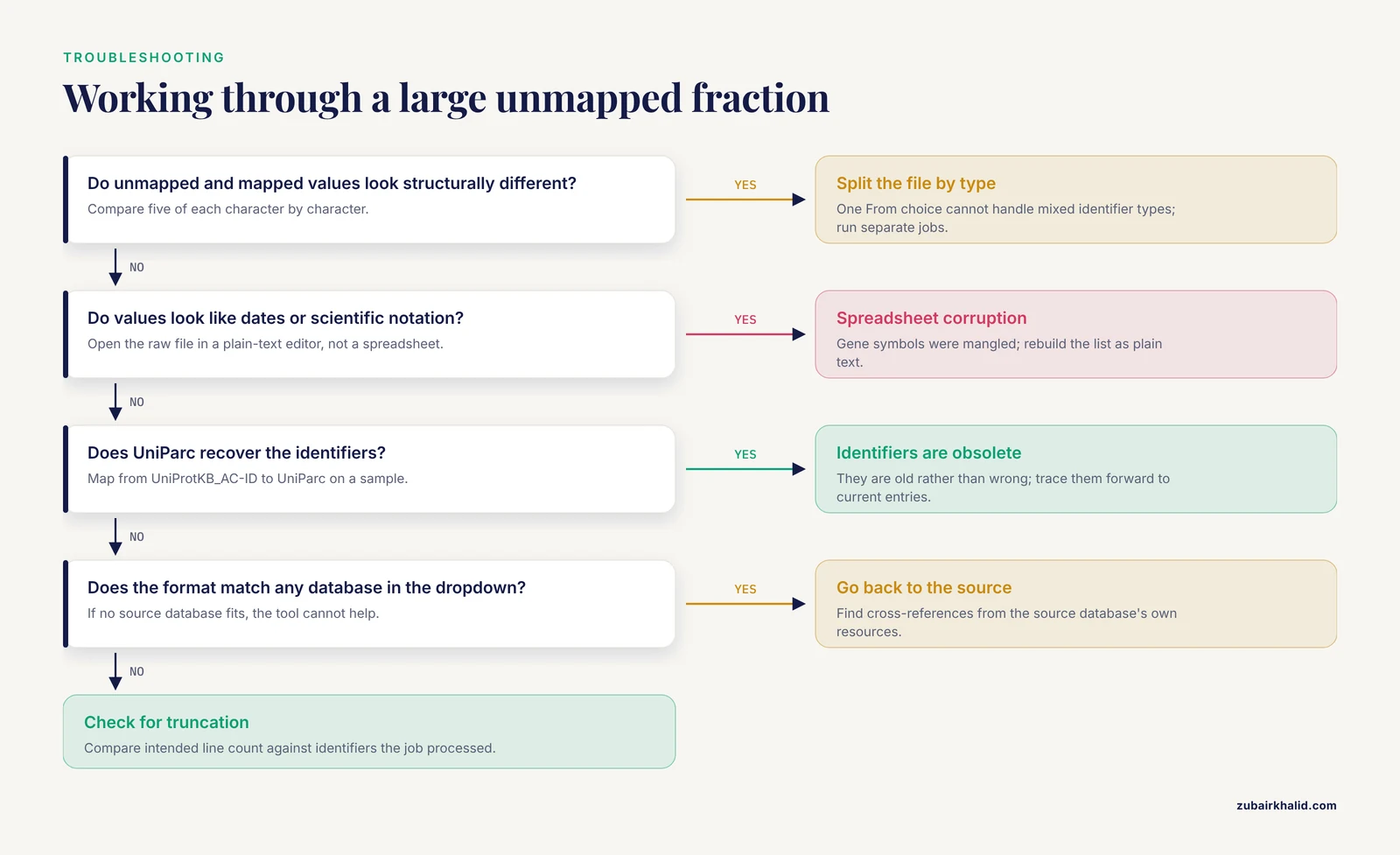
When a job returns a large unmapped fraction, work through this sequence rather than trying fixes at random.
Step one: re-diagnose the input format. Take five unmapped identifiers and five mapped identifiers and compare their formats character by character. If the unmapped ones look structurally different from the mapped ones, for example a mix of numeric and alphanumeric values in one column, your input file contains multiple identifier types, which no single From database choice can handle. Split the file by type and run separate jobs.
Step two: check for spreadsheet corruption. Open the raw file in a plain-text editor, not a spreadsheet application. Look for values that became dates, values that lost leading zeros, and scientific notation where there should be an accession. The gene symbol mangling problem affects a specific and predictable set of symbols, and once you have seen a converted symbol you will recognize the pattern immediately.
Step three: check whether the identifiers are obsolete. Feed a sample of the unmapped identifiers into a mapping job with From set to UniProtKB_AC-ID and To set to UniParc. UniParc archives every distinct sequence ever loaded into UniProt [1], so an identifier that existed and was cross-referenced can often be recovered here even after the UniProtKB entry was deleted or merged. If UniParc finds them, your identifiers are old rather than wrong, and you can trace them forward to current entries.
Step four: check whether the identifiers belong to a source UniProt does not cross-reference. Some specialized databases simply are not among the sources the tool draws from, and no amount of retrying will map them. If the identifier format matches no database in the tool's dropdown list, that is your answer, and the honest path is to find the cross-references from the source database's own resources.
Step five: check for truncation. Files exported with line-length limits, or pasted through a form with a character cap, silently lose the tail of the list. Compare the line count of the file you intended to submit against the number of identifiers the job actually processed. This is a fifteen-second check that catches a surprisingly persistent failure mode.
If all five steps come back clean, you are looking at genuinely unknown identifiers, and the right move is to go back to the data's origin rather than to keep trying mapper configurations.
Choosing Collapse Rules for One-to-Many Mappings, with pandas
The main article advises deciding on a collapse rule and recording it. This section makes that concrete, because the collapse step is where silently corrupted datasets are born. Suppose you have downloaded a TSV of a Gene Name to UniProtKB job, and the input contained three hundred symbols but the output contains four hundred rows, because some symbols matched multiple entries.
Load the results and quantify the problem first:
import pandas as pd

results = pd.read_csv("mapping_results.tsv", sep="\t")
counts = results.groupby("From")["To"].nunique()
print(counts.value_counts().sort_index())
This tells you immediately how many inputs mapped one-to-one and how many are contested. For the contested ones, three collapse rules cover most legitimate needs.
Rule one: reviewed entries only. If you did not apply reviewed:true in the results query, you can apply it after download by filtering on the review status column. Reviewing after download rather than in the query has one advantage: you keep the full mapping table on disk, so a reviewer can later ask how the results would look without the filter.
Rule two: canonical form only. Some inputs map to both canonical entries and isoform-specific entries. If your analysis operates at canonical level, drop rows whose target is an isoform record. The danger of this rule is that for some proteins the isoform is the biologically dominant form, so apply it only when your analysis genuinely cannot use isoform resolution.
Rule three: one row per input, with provenance. When you must produce exactly one output per input, prefer keeping all mapped targets in a single delimited cell rather than deleting rows:
collapsed = (
    results
    .groupby("From")["To"]
    .apply(lambda s: ";".join(sorted(s.unique())))
    .reset_index()
)
This preserves the full mapping while enforcing the one-row-per-input shape your downstream tool needs, and it leaves an audit trail. The data-integrity hazard the main article warns about, collapsing one-to-many mappings silently, is almost always a delete operation performed without a log. Every collapse should be an operation someone can reverse or at least re-examine.
Whichever rule you choose, add a line to your run log stating the rule, the input count, the pre-collapse output count, and the post-collapse count. Those four numbers are the complete provenance of the collapse, and they take thirty seconds to record.
Comparing ID Mapping Strategies
The UniProt tool is not the only way to reconcile identifiers, and knowing when it is the wrong choice is part of using it well. Three broad strategies exist, and they answer different questions.
Recorded cross-reference lookup, which is what this tool does. The mapping resolves exact equivalences that source databases have recorded, anchored in the UniParc warehouse [1]. The strengths are precision and auditability: every mapping is a documented relationship, not an inference. The limitations follow from the same design: no fuzzy matching, no orthology, no confidence scoring, and no recovery of identifiers that never had a recorded cross-reference. Choose this strategy when your identifiers are well-formed and you need defensible, reproducible equivalences, which describes nearly all production pipeline work.
Sequence similarity search. When you hold an amino acid sequence and no identifier, or when an identifier exists but has no recorded cross-reference, the correct UniProt tools are BLAST and Peptide Search, which the same UniProt tools protocol documents alongside the mapping workflow [2]. Similarity search can identify a protein that mapping cannot, but it produces candidates with similarity scores rather than recorded equivalences, and its output requires interpretation that mapping output does not. The two strategies are complements, not competitors: a common pattern is to identify unknown proteins by similarity search first, then map the resulting accessions to every other database you need.
Interactive single-entry lookup. For one or two identifiers, opening the UniProtKB entry page directly and reading its cross-references section is faster and more informative than running a mapping job, because the entry page presents the cross-references with their context and annotations attached [2]. The batch tool earns its keep when the list grows past what you can read, which is the same threshold that justifies scripting over clicking.
A practical hybrid worth knowing: map through UniProtKB first, then use the retrieval step to pull cross-reference columns such as xref_refseq, xref_geneid, and xref_pdb in a single table, as the main article's tips section describes. This turns a multi-database reconciliation problem, which would otherwise be several fragile pairwise maps, into one UniProt-anchored table with one timestamp and one job identifier [2]. When a collaborator later asks how a RefSeq identifier in your supplementary table was derived, the answer is a single job ID rather than a chain of remembered lookups.
What the comparison should teach is that the question determines the tool. Equivalences that databases have recorded: mapping tool. Identity of an unknown sequence: similarity search. Meaning of a single protein: the entry page. Reaching for the mapping tool to answer a similarity question, or for BLAST to answer an equivalence question, produces work that looks plausible and does not hold up.
A Production-Ready Script: Chunking, Retries, and Checkpoints
The complete Python script in the main article is a working template for small jobs. Production use adds three requirements: resilience to transient network failures, the ability to resume after interruption, and behavior that degrades gracefully on large inputs. The script below extends the same submit, poll, and fetch pattern with those requirements.
import time
import sys
import requests

API = "https://rest.uniprot.org/idmapping"

def post_with_retry(url, attempts=5, **kwargs):
    for attempt in range(attempts):
        try:
            response = requests.post(url, timeout=60, **kwargs)
            if response.status_code < 500:
                response.raise_for_status()
                return response
        except requests.RequestException as exc:
            print(f"attempt {attempt + 1} failed: {exc}", file=sys.stderr)
        time.sleep(2 ** attempt)
    raise RuntimeError(f"giving up on {url}")

def get_with_retry(url, attempts=5, **kwargs):
    for attempt in range(attempts):
        try:
            response = requests.get(url, timeout=120, **kwargs)
            if response.status_code < 500:
                response.raise_for_status()
                return response
        except requests.RequestException as exc:
            print(f"attempt {attempt + 1} failed: {exc}", file=sys.stderr)
        time.sleep(2 ** attempt)
    raise RuntimeError(f"giving up on {url}")

def submit(ids, source, target):
    response = post_with_retry(
        f"{API}/run",
        data={"ids": ",".join(ids), "from": source, "to": target},
    )
    return response.json()["jobId"]

def wait_for(job_id):
    while True:
        status = get_with_retry(f"{API}/status/{job_id}").json()
        state = status.get("jobStatus")
        if state == "FINISHED":
            return
        if state in ("ERROR", "ABORTED"):
            raise RuntimeError(status)
        time.sleep(3)

def fetch(job_id, fields):
    url = f"{API}/uniprotkb/results/stream/{job_id}"
    params = {"format": "tsv", "fields": fields}
    return get_with_retry(url, params=params).text

def chunked(seq, size):
    for i in range(0, len(seq), size):
        yield seq[i:i + size]

if __name__ == "__main__":
    ids = [line.strip() for line in open(sys.argv[1]) if line.strip()]
    fields = "accession,id,protein_name,gene_names,organism_name"
    with open("mapping_output.tsv", "w") as out, open("job_ids.log", "w") as log:
        for n, chunk in enumerate(chunked(ids, 500), start=1):
            job_id = submit(chunk, sys.argv[2], sys.argv[3])
            log.write(f"chunk {n} job {job_id} inputs {len(chunk)}\n")
            log.flush()
            wait_for(job_id)
            out.write(fetch(job_id, fields))
            out.flush()
    print("done; see mapping_output.tsv and job_ids.log")
Run it as python map_ids.py ids_unique.txt Gene_Name UniProtKB. Several design choices deserve explanation.
Exponential backoff on retries. The 2 ** attempt sleep doubles the wait after each failure, which is the standard polite behavior against a service experiencing load. It protects you from hammering an endpoint that is already struggling.
The job log file. Writing each chunk's job identifier to disk as it is obtained, with the stream flushed, means an interrupted run leaves behind the handles to every completed chunk. Because job pages remain accessible by their identifiers, you can recover results from an interrupted run without resubmitting the data, which matters when the input took hours to assemble.
Flushing output per chunk. If the process dies at chunk forty of sixty, you have thirty-nine chunks of results on disk. Combined with the job log, resuming means re-running only the remaining chunks.
Chunk size as a deliberate parameter. The chunk size of five hundred here is a choice, not a limit, and you should tune it to your workflow: smaller chunks give finer-grained resume points and easier manual inspection of any single result; larger chunks reduce total request count. What should not be tuned down to zero is the practice of keeping chunks small enough that a single failure does not discard the whole run.
One honesty note for anyone adapting this script: it does not include rate limiting, authentication, or parallel submission, and it deliberately does not, because those features depend on your execution environment and the service's current usage guidance. Read the service's own documentation before scaling a script beyond what you would run by hand, and keep any scheduled, unattended mapping jobs modest enough that a mistake cannot cause harm.
Reading a UniProt Entry Page to Verify a Mapping
Spot-checking mapped accessions is a habit the main article recommends; this section explains what to actually look at once the entry page is open, because a page full of annotation is only useful verification if you know which parts speak to identity and which speak to function.
The header block confirms identity. The accession, entry name, protein name, gene name, and organism at the top of the page should match what your experiment implies. This is the thirty-second check: does P38398 say BRCA1, Homo sapiens, and a plausible protein name, or does it say something from another kingdom of life?
The sequence length catches the wrong-isoform problem. If your mass spectrometry data implies a protein of around a thousand residues and the entry page reports a canonical sequence half that length, you are either looking at a different isoform than your data describes or the mapping went sideways. Sequence length is a cheap, hard-to-argue-with identity check because it comes straight from the sequence itself.
The cross-references section connects the map to its sources. The entry page lists cross-references to external databases grouped by type, and these are the same recorded relationships the mapping tool resolves [2]. Verifying that a mapped RefSeq accession actually appears on the entry page closes the loop between the bulk tool and the curated record underneath it.
The review status line tells you how much to trust the annotation. Reviewed Swiss-Prot entries carry manual curation with evidence, while unreviewed TrEMBL entries carry computational annotation. Within UniProtKB, that reviewed versus unreviewed split is the primary quality signal, and it is why the reviewed:true filter appears throughout this article's workflows [2].
The literature and comment sections contextualize function. These are not identity checks, and they are not what the mapping tool provides. But if your downstream work involves interpreting a protein's role, the curated comments and their evidence citations are the appropriate resource, which is exactly the point the main article's limitations section makes: mapping establishes identity, and interpretation requires the curated evidence itself.
Documenting ID Mapping in Your Methods Section
A mapping step that cannot be described precisely cannot be reproduced, and reviewers increasingly notice. A complete methods description for an ID mapping step fits in four sentences if you record the right things at run time.
Record the following, ideally into the same log file as your job identifiers:
- The input description: source of the identifier list, identifier type, organism, and count of unique identifiers after cleaning.
- The job parameters: From database, To database, any filters applied in the results query such as review status and organism restriction, and the date of the run.
- The outcome counts: mapped inputs, inputs mapping to multiple targets, and unmapped inputs with the stated reasons.
- The collapse rule, if any, applied to one-to-many mappings, stated as an unambiguous sentence.
For the collapse rule, a sentence such as "where a gene symbol mapped to multiple reviewed human UniProtKB entries, all mapped accessions were retained in a semicolon-delimited field, and analyses at gene level were performed on the union" is reproducible. A sentence such as "duplicates were removed" is not, because it does not say which duplicate was removed or on what basis.
The job identifiers earn their place here. Because results page URLs embed the job ID, citing the job ID in a methods or supplementary note gives any reader a pointer to the exact conversion your analysis used, within the limits of link retention. This is why the main article's tips section recommends logging the identifier, and it is the single cheapest reproducibility improvement available in this workflow: it costs one line in a log file.
The date stamp matters more than people expect. Because mappings reflect the current state of UniProt and of the source databases, with entries merged, deleted, and renamed between releases, two identical jobs run a year apart can differ legitimately [2]. A methods section that states the mapping date converts that drift from a hidden inconsistency into a disclosed property of the analysis.
Common Misconceptions About ID Mapping
Beyond the operational mistakes cataloged in the main article, several conceptual misconceptions about what the tool does produce subtler errors. Each is worth correcting explicitly.
Misconception: a mapped accession confirms functional equivalence. Mapping establishes that two identifiers refer to records describing the same sequence. It says nothing about whether two experiments measured the same thing. Two isoforms of one gene share an accession's parent sequence but can differ in function, localization, and interaction partners, and a name-based mapping that ignored isoform structure has already discarded that distinction. The mapping tool resolves identity; equivalence of biological meaning is always yours to establish.
Misconception: one accession equals one gene. The relationship runs in both directions with exceptions. A single gene can produce multiple annotated proteins, and the reviewed knowledgebase represents that with separate entries. Conversely, some entries cover proteins that gene-level resources treat differently. Any workflow that assumes a clean one-to-one gene-protein correspondence will inherit errors exactly where biology is most interesting, at alternatively spliced and multi-product loci.
Misconception: mapping results are symmetric and lossless. Mapping from database A to B and then back from B to A does not reliably return your original list. Different databases cover different subsets of proteins, and cross-references are recorded where they exist. Round-tripping through a mapping is a useful diagnostic: if your identifiers do not come back, that quantifies the coverage gap between the databases, which is information rather than failure, but it must be planned for rather than discovered mid-analysis.
Misconception: everything is equally well annotated. Reviewed Swiss-Prot coverage is deep for model organisms and comparatively shallow elsewhere, which is a structural property of manual curation at scale, not a defect. If your organism sits outside the well-covered clades, expect a larger fraction of your work to involve unreviewed entries, and adjust your confidence statements accordingly rather than pretending a reviewed:true filter will not cost you most of your list.
Misconception: the unmapped list will be empty if I do everything right. Some identifiers will be unmapped for reasons that no correct workflow eliminates: entries deleted by source databases, identifiers from sources with no recorded cross-references, sequences retired as artifacts. A nonempty unmapped list is the normal state of a real dataset. The goal is a small, explained, documented unmapped list, not a zero.
Misconception: the tool is a database of protein facts. The tool is a converter. It sits between your data and the knowledgebase, and its entire value is that the conversion it performs is anchored in exact recorded relationships rather than guesses. Everything you want to know about the proteins themselves lives one hop away, on the entry pages and in the curated annotations [2].
When to Stop Using the Mapping Tool
The final skill this tutorial can teach is recognizing the boundary of the tool's competence, because the most damaging misuse is not a botched job but a well-executed job applied to a question it cannot answer.
Stop at the mapping tool and use something else when the question is orthology. Name coincidence across species is not relatedness, and the article has said so in several places because the error is that persistent. Dedicated orthology resources exist precisely for this question.
Stop when the question is identification of an unknown sequence. A peptide mass list, a de novo sequence, or a contig from an assembly has no identifier to map, and the entry point is sequence similarity search through BLAST or Peptide Search [2], after which the resulting accessions can be mapped everywhere else.
Stop when the question is individual protein interpretation. Function, clinical significance, disease association, and site-level evidence live in the curated annotations of the entry pages and in the primary literature they cite [2]. A mapping table can tell you which entry to read; it cannot do the reading for you, and it carries no confidence score that would let you skip it.
Stop when the question is historical reconstruction. If you need to know what a dataset contained as of a past date, a fresh mapping run answers a different question: what the relationships are now. The honest treatment is to re-map as of the current date, date-stamp the result, and state that the analysis reflects that snapshot, exactly as the main article's limitations section advises.
What remains true everywhere else, across every workflow in this article from a five-symbol web job to a chunked production run, is the underlying design: the tool converts identifiers by resolving recorded cross-references through the UniParc archive, with precision as its defining virtue and no inference beyond what the sources recorded [1]. Used within that contract, with clean inputs, verified outputs, logged job identifiers, and documented collapse rules, it converts one of bioinformatics' oldest practical problems into a solved, scriptable, and auditable step at the front of your pipeline.
Frequently Asked Questions
Is UniProt's ID mapping tool free to use?
Yes. The tool is free on the UniProt website and through the REST API, and it requires no account to run jobs.
Can I map gene names from one species to another?
No. Name mapping is a string lookup, not an orthology prediction. Map within one organism, then find orthologs with dedicated orthology resources.
How many identifiers can I submit at once?
The tool handles large batches, and lists in the tens of thousands are routine through the API. For very large files, script the submit, poll, and fetch steps rather than pasting into the browser.
Why did some of my identifiers fail to map?
Failures usually mean the identifier is obsolete or deleted, the identifier belongs to a database type you did not select as the From database, or the input was corrupted. Check the Unmapped tab for the stated reasons.
What is the difference between mapping to UniProtKB and to UniParc?
UniProtKB is the curated knowledgebase of living entries. UniParc is the archive of every distinct sequence ever loaded, so mapping to UniParc can recover deleted and obsolete entries that no longer exist in UniProtKB.
Does the ID mapping tool compare sequences?
No. It resolves identifiers through recorded cross-references anchored in the UniParc archive. For sequence-based identification, use UniProt's BLAST or Peptide Search tools.
Can I automate ID mapping for a recurring pipeline?
Yes. The REST API at rest.uniprot.org/idmapping supports submit, status, and results-stream endpoints, and the Python script in this article is a complete working template.
How do I convert UniProt accessions to RefSeq or Ensembl IDs?
Run a job with From set to UniProtKB_AC-ID and To set to RefSeq_Protein or the Ensembl target. The results stream returns a From/To table you can download as TSV.