UniProt Homepage Walkthrough: Where to Start Your Protein Search
By Dr. Zubair Khalid, DVM, MS, PhD ·

The UniProt homepage is the front door to the UniProt Knowledgebase (UniProtKB), a curated public database of protein sequences and functional annotations maintained by the UniProt Consortium. A UniProt homepage tutorial teaches you to use that front page to find a protein, filter the results, read the entry, and export the data you need. This article is a full UniProt homepage walkthrough, written for students and researchers who want to go from a protein name in a paper to a usable sequence and annotation record in under ten minutes.
UniProt matters because it has become the de facto reference for protein sequence and function in molecular biology. When you read a paper that mentions "human TP53, UniProt P04637," that accession points to a single, versioned, curated record that consolidates sequence data, functional descriptions, domains, post-translational modifications, variants, cross-references to dozens of other databases, and the literature that supports each claim. Knowing how to use UniProt well saves you from working with stale sequences from old PDFs, mislabeled FASTA files, or annotation that looks authoritative but came from an unreviewed automated prediction.
What Is UniProt and What Does It Actually Contain?
UniProt is built and maintained by the UniProt Consortium, a collaboration between the European Bioinformatics Institute (EMBL-EBI), the SIB Swiss Institute of Bioinformatics, and the Protein Information Resource ( Georgetown University in the United States). Its core product, UniProtKB, is split into two sections that every user must understand before running a single search.
Swiss-Prot is the manually reviewed and curated section. Trained biologists inspect each entry, verify the sequence, correct errors, attach experimentally supported function, and write the annotation with evidence tags that say how each claim is backed. Swiss-Prot is small relative to the total, precise, and the section most researchers should default to.
TrEMBL is the unreviewed, computationally annotated section. Entries here are generated and enriched by automated systems without full manual curation. TrEMBL is enormous, which is its value, but its annotation is prediction-based and must be treated with more caution.
Around UniProtKB sit three companion databases that the homepage also gives you access to:
- UniParc, a nonredundant archive of every protein sequence the consortium has ever processed. UniParc stores sequences, not annotation.
- UniRef, clustered sets of related sequences (UniRef100, UniRef90, and UniRef50) built to speed up similarity searches and reduce redundancy.
- Proteomes, the set of proteins expressed by an organism whose genome has been sequenced, organized by reference proteome.
The homepage exposes all of these. A good UniProt database tutorial starts by making that hierarchy explicit, because most beginner errors come from confusing the reviewed knowledgebase with the raw archive.
The UniProt Homepage at a Glance
The layout at uniprot.org changes cosmetically over time, but its functional anatomy has been stable for years. When the page loads you will find four things worth orienting on.
The main search bar. This sits near the center of the page and searches UniProtKB by default. You can type a protein name (P53), a gene name (TP53), an accession (P04637), an organism (human), or any combination. A short example query is usually displayed inside or beside the box.
The top navigation bar. Links across the top take you directly to the standalone tools: BLAST for sequence similarity search, Align for pairwise alignment, Peptide Search for finding exact peptide matches, ID Mapping for converting identifiers between databases, Upload for private datasets, Statistics for release counts, Downloads for bulk files, and Help for documentation.
Release and statistics panels. The homepage displays the current release number and the approximate number of entries in Swiss-Prot and TrEMBL. These counts grow with every release, and UniProt updates on a regular release cycle, roughly every two months, so treat any exact figure you see on a given day as a snapshot.
News and training panels. Recent release notes, webinars, and documentation links appear here. If a search feature has changed recently, this is where the announcement will be.
One habit worth building from day one: bookmark the homepage, not a search results page. Results pages change with every query, and the homepage is the only stable entry point that always reflects the current release.
Step-by-Step Walkthrough: Your First UniProt Search
This UniProt homepage walkthrough uses a real, concrete example. Suppose you read a paper about the human tumor suppressor p53 and you need its canonical sequence and domain annotation.
- Go to uniprot.org. The main search bar accepts free text. Type
TP53 humanand press Enter. - Read the results header. UniProt reports how many matches it found and, crucially, splits them. You will see a count for reviewed entries (Swiss-Prot) and a much larger count for unreviewed entries (TrEMBL). For a famous gene like TP53 the reviewed result set is small, often a single canonical human entry plus orthologs from other species.
- Filter or restrict before you search. Instead of sifting through hundreds of hits, refine with the syntax described in the next section. A query like
gene:TP53 AND organism_id:9606 AND reviewed:truereturns the manually reviewed human TP53 entry, which is P04637. - Open the entry. Click the accession. You land on the entry view, covered in the section below.
- Verify you have the right protein. Check the protein name (Cellular tumor antigen p53), the organism (Homo sapiens), the length (the human protein is 393 amino acids), and the gene (TP53). Thirty seconds of checking prevents the classic mistake of grabbing an ortholog or an isoform you did not intend.
- Export what you need. The Download button on the results page or the entry page offers formats including FASTA, flat file text (TXT), Excel, XML, and GFF. FASTA is what you want for BLAST, alignment, or cloning design.
That five-step loop, search, restrict, verify, open, export, is the core skill. Everything else in this article builds on it.
Search Syntax: Filters That Save Hours
The UniProt search box understands structured field queries. Learning six operators turns the search from a guessing game into a precision tool. These follow standard conventions and are documented in the UniProt help pages.
| Query component | What it does | Example |
|---|---|---|
reviewed:true | Restricts to manually curated Swiss-Prot entries | kinase AND reviewed:true |
organism_id:9606 | Restricts by NCBI taxonomy ID, 9606 for human | organism_id:9606 AND gene:BRCA1 |
gene: | Searches the gene name field | gene:TP53 |
protein_name: | Searches the recommended protein name | protein_name:"tumor protein" |
accession: | Searches a specific UniProt accession | accession:P04637 |
length:[100 TO 200] | Restricts by sequence length in amino acids | human AND length:[350 TO 450] |
Combine terms with AND, OR, and NOT, and put multiword phrases in quotes. A practical query for a lab meeting might be:
gene:BRCA1 AND organism_id:9606 AND reviewed:true
That returns the single reviewed human BRCA1 entry, Q13673 variant products aside, rather than thousands of predicted orthologs across species. If you prefer point-and-click, the results page also has a filter sidebar where you can tick Reviewed, add an organism, and set sequence length ranges, and the sidebar generates the same query syntax for you.
Reading a UniProtKB Entry: What Each Section Means
Opening P04637 gives you a long, dense page. It is organized into collapsible sections, and knowing the order makes it navigable.
Names and taxonomy. The recommended protein name, gene names, organism, and taxonomy lineage. Check this block first, every time, to confirm identity.
Function. A plain-language summary of what the protein does, written by curators. For p53 this describes its role as a transcriptional regulator in the cellular response to DNA damage. Each statement carries evidence tags, and hovering over a tag shows whether the claim rests on direct experimental evidence, phylogenetic inference, or prediction.
Subcellular location and topology. Where the protein localizes and, for membrane proteins, which segments cross the membrane.
Domain and sequence features. Graphical viewers show regions such as the p53 DNA-binding domain, compositional biases, motifs, and sites of post-translational modification. Clicking a feature zooms to the exact residues and shows the annotation source, often PROSITE, Pfam, or experimental literature.
Sequence. The amino acid sequence with isoform information. Alternative isoforms arising from alternative splicing are listed here with their own identifiers and sequences.
Structure. Cross-references to the Protein Data Bank (PDB) for experimentally determined structures, plus predictions where available. For p53, numerous PDB entries cover the DNA-binding core domain.
Interactions. Protein-protein interaction data pulled in from partner resources, displayed in a network viewer.
Variants and pathology. For well-studied human proteins this section lists naturally occurring variants, disease-associated mutations, and links to resources such as OMIM. The p53 entry catalogs hundreds of missense variants found in tumors, each with literature backing.
Publications. The curated literature list, the source of most of the experimental annotation above.
Two habits make entries readable. First, collapse sections you do not need so the page is not a wall of text. Second, treat the evidence tags as part of the annotation. An entry statement backed by a specific paper is a different kind of fact from one tagged as predicted by similarity.
Swiss-Prot Versus TrEMBL and the Terms It Gets Confused With
Beginners routinely mix up UniProt's products with each other and with neighboring databases. This table draws the boundaries.
| Term | What it is | Key property |
|---|---|---|
| UniProtKB | The combined knowledgebase of protein entries with annotation | The thing you search from the homepage |
| Swiss-Prot | The reviewed section of UniProtKB | Manual curation, evidence-tagged |
| TrEMBL | The unreviewed section of UniProtKB | Automated annotation, huge coverage |
| UniParc | Sequence archive, no annotation | Nonredundant, version-tracked sequences |
| UniRef | Clustered sequence sets | Built for fast, redundancy-reduced searching |
| NCBI RefSeq | A separate NCBI database of reference sequences | Curated separately, different accessions |
| PDB | Experimentally determined 3D structures | Structures, not a general protein annotation record |
The distinction that matters most in daily work is reviewed versus unreviewed. For a pathway figure, a primer design, or a BLAST reference sequence, use a reviewed Swiss-Prot entry unless you have a specific reason not to. TrEMBL is the right place to look when your protein comes from a newly sequenced organism and no curated entry exists yet, or when you need exhaustive coverage of a protein family across many genomes.
Built-In Tools: BLAST, Peptide Search, Align, and ID Mapping
The homepage navigation gives one-click access to four tools that cover most routine needs.
BLAST. The UniProt BLAST service searches your query sequence against UniProtKB, or against a subset such as reviewed entries only. Paste a FASTA sequence or raw sequence text, choose the target database and the BLAST program (blastp for protein against protein is the default use case), and run. Results show hits sorted by score, aligned regions, and links to the full UniProt entries. A common high-value setting is restricting the search to reviewed Swiss-Prot sequences, which keeps the hit list interpretable when your query matches thousands of unreviewed predictions.
Peptide Search. Enter an exact peptide sequence, for example from a mass spectrometry observation, and Peptide Search reports every UniProtKB protein containing that exact string, mapped to species and entries. It is a small tool with a sharp purpose, and it is the fastest route from a peptide to a parent protein.
Align. A pairwise sequence alignment tool for two sequences. It is not a multiple-sequence aligner, but for checking whether two accessions differ by a substitution or a truncation it is quick and adequate.
ID Mapping. Research data arrives with identifiers from many namespaces, RefSeq, Ensembl, GeneID, PDB, gene symbols. The ID Mapping tool takes a list of identifiers in one database and converts them to their counterparts in another. Paste your list, choose the source and target database from the menus, and submit. Results come back as a table you can download. When someone hands you an RNA-seq gene list and asks for UniProt accessions, this is the tool, and it avoids the error-prone alternative of matching on gene symbols alone, which collides across species and across genes with shared symbols.
Downloading Data: Web Interface, REST API, and Bulk Files
UniProt supports three download routes, scaled to different needs.
From the web interface. On any results page, the Download button exports your current filtered result set. You choose the format (FASTA, TSV, Excel, TXT, XML, GFF) and which columns to include. For a set of a few hundred entries this is the simplest path.
Through the REST API. Every UniProtKB entry has a stable REST address, and the command line works well for scripted pipelines. Two real examples:
curl "https://rest.uniprot.org/uniprotkb/P04637.fasta"returns the p53 sequence in FASTA, while
curl "https://rest.uniprot.org/uniprotkb/search?query=gene:TP53+AND+organism_id:9606+AND+reviewed:true&format=tsv&fields=accession,id,protein_name,length"runs the structured search from earlier and returns a tab-separated table with accession, entry name, protein name, and length. The fields parameter accepts the same field names shown on the customizable results table in the web interface, so you can design a table visually and then reproduce it in a script.
Bulk downloads. The Downloads page links to complete release files over FTP, including the full Swiss-Prot and TrEMBL flat files in compressed FASTA and text formats. Local mirrors of these files are the standard substrate for building an in-house BLAST database or running local annotation pipelines. For anything beyond a few thousand sequences, download once and work locally.
UniProt also exposes a SPARQL endpoint at sparql.uniprot.org for users who want to query the data as linked RDF triples. That route is powerful but has a learning curve, and it is unnecessary for the workflows in this article.
A Worked Example: From Gene Name to Ready-to-Use FASTA
Here is a complete UniProt homepage tutorial example end to end, using human insulin receptor (INSR) as the target.
- On the homepage, type
INSR humanin the search bar. - The results page shows both reviewed and unreviewed matches. Click the Reviewed filter, or refine the query to
gene:INSR AND organism_id:9606 AND reviewed:true. - Confirm the top hit, P06213, Insulin receptor, Homo sapiens. Note the length and the presence of isoform descriptions in the Sequence section.
- On the entry page, open the Function section and skim the curator summary. Open the Domain section and locate the transmembrane region and the tyrosine kinase domain, each drawn against the sequence ruler.
- Click Download, choose FASTA, and select the canonical sequence. Save the file, for example as
INSR_human_P06213.fasta. - Verify the file with a text editor or
head INSR_human_P06213.fastain a terminal. The header line begins with>sp|P06213|INSR_HUMAN, wherespmarks a Swiss-Prot entry. That single character in the header is a reliable audit trail showing the sequence came from the reviewed database.
That last detail, the sp versus tr prefix in FASTA headers, is one of the most practical pieces of trivia in any UniProt homepage tutorial. Files built from unreviewed entries carry tr headers, and noticing the prefix catches mixing errors before they propagate into an analysis.
How UniProt Compares to Other Databases You Might Use
A researcher choosing where to start a protein search has several options, and the right answer depends on the question.
Use UniProt when the question involves protein function, domains, sequence annotation, variant biology, or when you need a curated FASTA reference. The annotation layer is what distinguishes UniProtKB from raw sequence repositories.
Use NCBI resources when you are anchored in GenBank nucleotide records, gene-level queries, or PubMed literature mining, and note that RefSeq accessions and UniProt accessions are different namespaces that the ID Mapping tool can reconcile.
Use the PDB when you need atomic-resolution structures, and reach it through the Structure section of a UniProt entry to keep the sequence context attached.
Use Ensembl when the question is genome-centric, such as exon coordinates or gene models, and map to UniProt when you need protein-level annotation.
These databases cross-reference each other constantly, and UniProt entries are rich with outbound links. In practice the efficient pattern is to start at UniProt for any protein question, then follow cross-references outward to whichever specialized resource the subquestion demands.
Common Mistakes and Limitations
Every experienced bioinformatician has made at least three of these.
Grabbing the first hit without checking the organism. Searching a gene symbol alone often returns orthologs from many species, and the top hit is not always human even when you are working with human samples. Always restrict by organism or verify the taxonomy line in the entry.
Using unreviewed entries as ground truth. TrEMBL annotation is automated. If an unreviewed entry claims a function that contradicts the reviewed literature, the reviewed record and the underlying papers win. Treat unreviewed functional statements as hypotheses.
Confusing isoforms with the canonical sequence. Many proteins have multiple isoforms, and the canonical sequence shown first is a curation choice, usually the longest or best-supported form. If your experiment targets a specific isoform, select it explicitly in the Sequence section before downloading.
Matching on gene symbols across species. A gene symbol like MSTRG or a short symbol can collide across species and loci. Identifier-based mapping through the ID Mapping tool, using stable accessions as the input, avoids silent mismatches.
Trusting a cached or copied FASTA file. Sequences occasionally get revised, and accessions gain version histories. Re-download from UniProt rather than passing around a lab copy of unknown age, and record the accession and retrieval date in your methods.
Overlooking evidence tags. Two entries can both say a protein is involved in DNA repair while one claim rests on knockout experiments and the other on computational inference. Reading the evidence changes how you phrase the claim in your own work.
Expecting the homepage to answer quantitative questions it does not hold. UniProt aggregates and curates, it does not replace the primary literature for contested or quantitative biological questions. Follow the publications section to the source when precision matters.
A final limitation applies to any database walkthrough: database interfaces change. The functional logic described here, search, restrict, verify, export, survives interface redesigns, but the exact placement of buttons on the homepage should be re-checked against the live site and the official UniProt help documentation when you teach this to someone new.
Quick Review
- UniProtKB has two sections, manually reviewed Swiss-Prot and computationally annotated TrEMBL, and the distinction should drive which entries you trust for which task.
- The homepage search bar accepts structured field queries such as
gene:TP53 AND organism_id:9606 AND reviewed:true. - Always verify protein name, organism, gene, and length on the entry page before using a sequence.
- UniParc is a sequence archive without annotation, and UniRef is a set of clustered sequence databases. Neither substitutes for UniProtKB.
- The Download menu exports FASTA, TSV, Excel, and other formats, and the
sportrprefix in a FASTA header records whether the source was reviewed or unreviewed. - The ID Mapping tool converts accessions between databases and is safer than matching on gene symbols.
- Bulk release files are available for local BLAST databases and pipelines, and the REST API reproduces web-interface queries in scripts.
A UniProt homepage tutorial can only take you so far before questions start arriving that the basics do not answer. Why does one search return twelve hits and another return forty thousand? What exactly does an evidence tag certify, and what does it not? When a BLAST hit looks perfect, can you safely copy its function onto your protein? This expansion picks up where the core walkthrough stops, adding deeper worked examples, full tool walkthroughs, troubleshooting for the failures people actually hit, and the misconceptions that even experienced lab members carry. Everything here assumes you have already read the basic search loop and can find your way around a UniProtKB entry.
A Mental Model: How Data Flows Into UniProt Before It Reaches You
Understanding where entries come from changes how much you trust each field you read. UniProtKB does not invent its sequences. Sequences arrive from upstream source databases, most prominently the nucleotide sequence repositories where genome submissions are deposited, from which protein-coding regions are translated, along with direct protein submissions from other resources. Those incoming sequences land in TrEMBL as unreviewed entries. From there, two parallel processes act on them.
The first is automatic annotation. The Consortium runs rule-based and machine-assisted annotation systems that scan each incoming sequence for signature matches, such as known protein family domains and active-site patterns, and transfer functional statements when the evidence rules allow it. This is why a TrEMBL entry can already carry a plausible name, predicted domains, and cross-references the moment it appears. It is also why those statements carry no human review: the systems are generally reliable at scale, but they are predictions, and the entry pages say so through their evidence tags.
The second process is manual curation, which moves entries from TrEMBL into Swiss-Prot. Curators read the literature, verify the sequence against the experimental record, resolve conflicts between sources, write the function summaries, and attach the evidence tags that document which claims rest on experiments and which rest on inference. Curation is slow and deliberate, which is precisely why Swiss-Prot is small relative to TrEMBL and why its annotation is the reference standard in the field.
Three consequences of this pipeline matter for everyday work:
- Every TrEMBL entry is a candidate for future review. When you find your protein of interest only in TrEMBL today, check again months later, because the reviewed entry may have appeared after a release.
- Reviewed status applies to the entry as a whole, but individual annotation items within it can still carry different evidence strengths. A Swiss-Prot entry can contain curator-written experimental claims and predicted claims side by side, each tagged separately.
- The homepage statistics panel, which shows the growing Swiss-Prot and TrEMBL counts each release, is a direct window into this pipeline: Swiss-Prot grows by curation, TrEMBL grows largely by the pace of new genome submissions worldwide.
When you explain UniProt to a colleague, this two-track picture is the single most useful thing to convey. It dissolves most of the confusion between "the database" as a monolith and the very different trust levels of its two sections.
Reading Evidence Tags and Protein Existence Levels Like a Curator
The existing walkthrough introduced evidence tags as labels to hover over. They deserve a more systematic treatment, because they are the difference between reading UniProt annotation and merely skimming it.
Each annotation item in an entry carries an evidence classification that answers one question: how do we know this? The broad categories you will encounter are direct experimental evidence, such as a published assay; evidence inferred by similarity from a characterized homolog; evidence inferred from a pattern or signature match; and purely predictive annotation derived from sequence analysis alone. Hovering over a tag in the web interface reveals which category applies and, where relevant, points to the specific source.
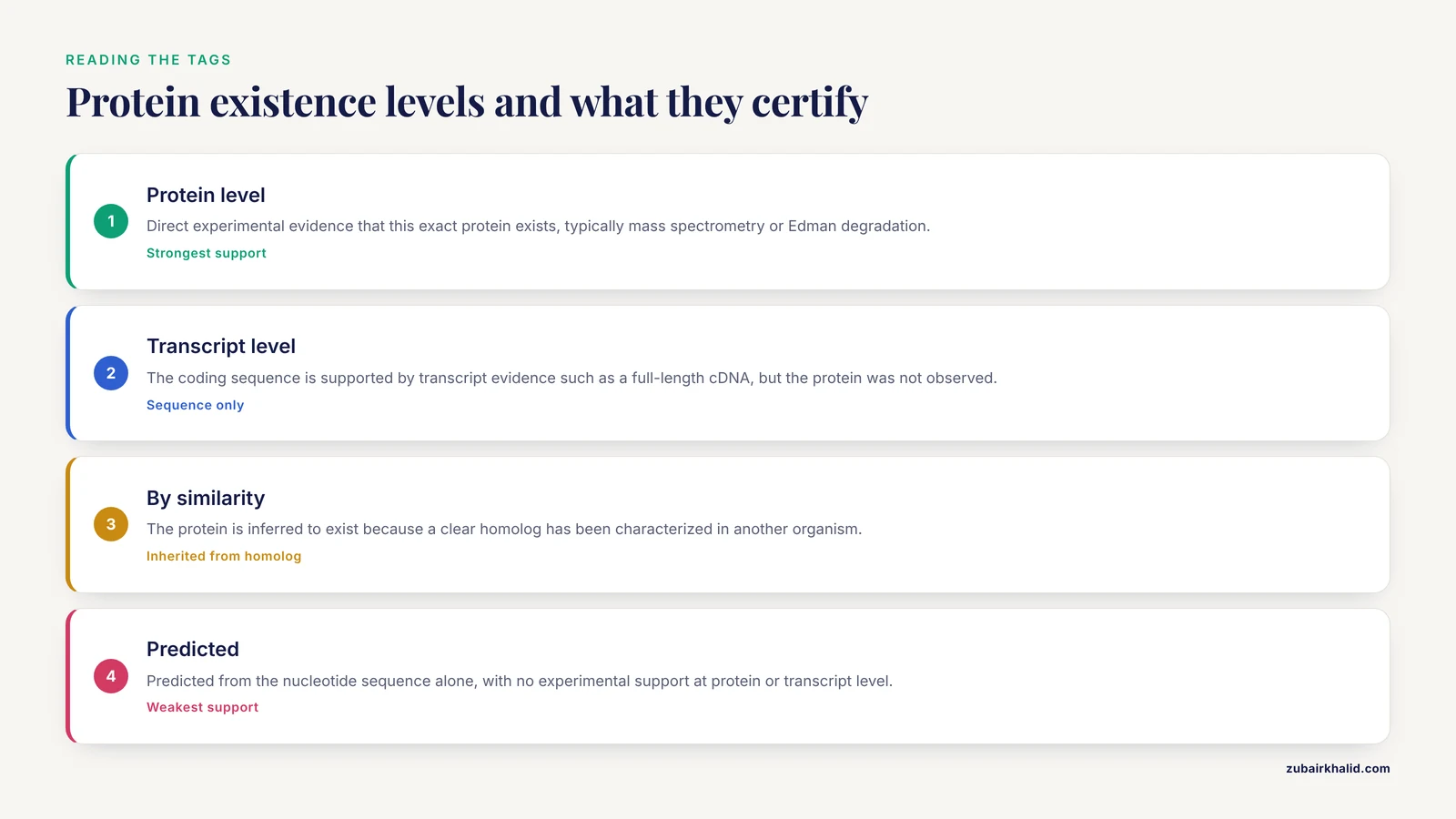
Alongside annotation evidence, UniProtKB entries carry a protein existence level, a separate and extremely useful field that answers a different question: how well established is this exact protein product? The levels form a scale, and learning to read them takes seconds:
- Protein level. There is direct experimental evidence that this exact protein exists, typically mass spectrometry or Edman degradation data confirming the translated product.
- Transcript level. The coding sequence is supported by transcript evidence, such as a full-length cDNA, but the protein itself has not been directly observed.
- By similarity. The protein is inferred to exist because a clear homolog has been characterized in another organism.
- Predicted. The protein is predicted from the nucleotide sequence alone, with no experimental support at either the protein or transcript level.
- Uncertain. The existence of the protein is in doubt, often because the coding sequence assignment itself is questionable.
For a proteomics collaborator asking "has anyone seen this protein by mass spec," the existence level answers the question instantly, before you open a single paper. For a candidate protein whose existence rests only on prediction, every downstream claim inherits that uncertainty.
A second-layer skill is reading the qualifier language in function lines. Curated entries use calibrated wording, and the differences are meaningful. A statement that a protein "catalyzes" a reaction rests on demonstrated activity. A statement that it is "probably" or "predicted to be" involved in a process signals inference. When you lift a sentence from the Function section into your own manuscript or figure legend, carry that qualifier with it. Stripping "predicted" from a sentence during rewriting is one of the quiet ways unverified claims enter the literature.
Finally, notice what evidence tags do for you when entries disagree. Two entries, one reviewed and one not, may both assign the same molecular function, but the reviewed entry's tag may tie the claim to a specific paper describing a purified enzyme assay, while the unreviewed entry's tag ties it to a signature match against a domain model. Same sentence, very different epistemic weight. The tags are the mechanism the Consortium built precisely so that you can make that distinction in seconds rather than digging through citations.
Three More Worked Examples for Different Real-World Scenarios
The core article demonstrated the canonical path with human TP53 and INSR. Real work arrives in messier shapes. Here are three scenarios that exercise different parts of the homepage.
Scenario 1: An Enzyme You Need to Mutate, Starting from a Paper Citation
Suppose a paper reports that human glucokinase, gene symbol GCK, is allosterically regulated, and you need the catalytic residues and domain boundaries to plan mutagenesis.
- Search
gene:GCK AND organism_id:9606 AND reviewed:truefrom the homepage bar. - Confirm the top reviewed human entry by checking the protein name, the organism line, and the gene field. Record the accession in your notebook along with the date.
- In the entry, open the Function section. Curated enzyme entries typically list catalytic activity in precise Enzyme Commission-oriented language, including cofactor requirements and the reaction direction. Read this before you touch the sequence.
- Open the Sequence features viewer and locate the annotated active-site residues and any binding-site features. Each feature flags the exact residue positions and cites the source of the annotation, whether experimental literature or a signature database match.
- Note the distinction that matters for your design: features backed by experimental evidence are safe anchors for a mutagenesis plan, while predicted site annotations should be cross-checked against the primary literature cited in the Publications section before you commit oligo orders.
The general lesson is that the entry page, read carefully, often replaces an hour of literature triangulation for the specific narrow question of where functionally important residues sit.
Scenario 2: An Uncharacterized Protein Known Only from a Proteomics Run
A mass spectrometry facility sends back a peptide sequence with no gene name attached, only an amino acid string from a fragmentation spectrum.
- Open Peptide Search from the top navigation bar.
- Paste the peptide sequence, using the standard one-letter amino acid code, and submit.
- The results map your exact peptide onto every UniProtKB protein that contains it. If the peptide is long enough and specific enough, you will typically see a short list, often a single protein per organism.
- Restrict attention to the organism your sample came from, then open the corresponding entry. If the parent protein is reviewed, you now have curated function, domains, and cross-references attached to what was previously a bare peptide string.
- If the parent protein is unreviewed, treat the automated annotation as a lead rather than an answer, and consider running the full protein sequence through BLAST against reviewed Swiss-Prot entries to find the closest characterized relative.
This workflow demonstrates why Peptide Search exists as a separate tool: it answers an exact-string question that full-text search is structurally unable to answer, because search terms tokenize on words, not on arbitrary amino acid substrings.
Scenario 3: A Protein from a Non-Model Organism
Your organism of interest, a soil bacterium or an under-studied plant, has a genome but little curated protein annotation. You have a gene model from an annotation pipeline and want to know what the protein probably does.
- Retrieve the predicted protein sequence from your genome annotation and format it as FASTA.
- Open BLAST from the top navigation bar and run blastp against the reviewed Swiss-Prot subset. Restricting to reviewed entries is the point of this exercise: you want your query compared against proteins that humans have characterized, not against thousands of other unreviewed predictions, which would return a hall of mirrors where predictions match predictions.
- Examine the top hits for reciprocal coherence: the best hits should cluster around one protein family, their described functions should agree, and the aligned region should cover the bulk of your query rather than a fragment.
- Open the top reviewed hits and read their evidence tags. If a hit's function rests on direct experimental evidence in a well-studied organism, and your query aligns across the full length including the catalytic residues, you have a defensible basis for a "putative" functional assignment.
- Record in your notes both the hit accession and the nature of its evidence, because a methods section that says "function assigned by similarity to a reviewed entry characterized by direct assay" is far stronger than one that says "BLAST said so."
This is the standard route by which genome-scale annotation for non-model organisms gets a foothold in the literature, and the homepage tools carry the entire workflow without leaving the site.
A Detailed BLAST Walkthrough: Running the Search and Reading the Output
The BLAST tool deserves its own step-by-step treatment because the interpretation layer is where beginners lose their way.
Step 1: Prepare your query. Copy your sequence in FASTA format, with a header line beginning with the greater-than character, or as bare sequence text. Confirm there are no characters outside the standard amino acid alphabet, since stray characters from a PDF copy, such as digits or formatting artifacts, cause input validation errors.
Step 2: Choose the target database. This is the most consequential setting on the form. Searching against full UniProtKB maximizes sensitivity and coverage, which is appropriate when you want to find everything related to your query. Searching against reviewed Swiss-Prot only trades coverage for interpretability, and it is the right default when your goal is functional inference, because every hit carries curator-written, evidence-tagged annotation.
Step 3: Choose the program. For a protein query against a protein database, blastp is the program. The form handles this context sensibly, but confirm it if you arrived at the form with a nucleotide sequence by mistake, which is the most common input error and produces either an error or a meaningless result.
Step 4: Submit and wait. Jobs run on the service's queue. Long-running jobs continue server-side, and you can leave the page and return using the job identifier the service provides. Keep that identifier if the job is important, because it is your way back to the results.
Step 5: Interpret the hit list with three questions, in order. First, how much of my query does the alignment cover? A hit with a spectacular score over 40 residues out of a 600-residue protein is reporting a shared domain, not a full-length relationship. Second, where does the alignment begin and end relative to the hit, and does the hit carry annotation for that region specifically? Third, what is the nature of the best hit, reviewed or unreviewed, and how strong is its functional annotation evidence?
The classic interpretive trap is the single-domain hit. Many multi-domain proteins share one module with unrelated partners. A hit that covers only one domain tells you about that domain, and extrapolating whole-protein function from it is a genuine error that has propagated into published annotations repeatedly. Pair the BLAST result with the domain viewer on the resulting entry pages so you can see which regions aligned and which did not.
A second trap is circular inference: using an unreviewed entry as a hit, then citing that hit's predicted function as support for your own claim. The unreviewed entry's prediction may itself have come from a chain of similarity transfers. Anchoring on reviewed hits, or tracing a hit back to the primary experimental literature in its Publications section, breaks the circle.
A Detailed ID Mapping Walkthrough: From a Gene List to UniProt Accessions
The core article introduced ID Mapping briefly. Here is the full procedure, because a large share of real-world UniProt questions arrive in this form: someone hands you a list of identifiers and wants protein-level data.
Step 1: Prepare the input. One identifier per line, plain text. Clean the list of duplicates and of quotation marks or commas left over from a spreadsheet export, since format noise is the most common cause of failed mappings.
Step 2: Select the source namespace. The tool requires you to declare what kind of identifier your list contains, because the same string can be valid in multiple namespaces. If your list came from an RNA-seq differential expression table, the identifiers are usually gene-level identifiers from an annotation source, and you must pick the matching option from the source menu rather than guessing.
Step 3: Select the target. Choose the UniProtKB target for standard cases. If you need cross-references to a specific other database instead, the target menu covers those as well.
Step 4: Submit and review. The job returns a mapping table. Before you download anything, audit it, because the audit is where the real value lies:
- One-to-many mappings. A single input identifier may map to multiple UniProt entries, often because the gene has several protein products or because orthologs are present. Decide deliberately which entries you want rather than keeping all rows.
- Unmapped identifiers. Some inputs return nothing. Common causes include identifiers that are gene symbols rather than database accessions, symbols from a different species than you assumed, and identifiers from an assembly version that has since been superseded. Unmapped rows deserve inspection, not silent deletion.
- Organism mixing. If your input was not organism-restricted, the output can contain entries from several species. Filter by organism before the output feeds any analysis.
Step 5: Export and record. Download the mapping table and archive it with your analysis. Six months from now, the mapping you actually used is part of the methods, and reproducing it from memory is impossible.
The deeper principle, worth restating, is that identifier mapping through a maintained service beats string matching on gene symbols for one structural reason: the service tracks the relationship between the source database's identifiers and UniProt's accessions as both sides evolve, while a symbol string has no such contract. Symbols are labels for human convenience; accessions are keys for machines. Pipelines built on the former break silently, and silent breakage is the most expensive kind.
Troubleshooting: When the Search Does Not Behave as Expected
Every category below corresponds to a real failure mode that newcomers hit, usually within their first hour.
The search returns thousands of hits. You probably searched a bare protein name or gene symbol with no restriction. Add reviewed:true, add an organism_id: term, or use the filter sidebar on the results page. Remember that the sidebar and the query syntax generate the same underlying query, so you can refine interactively and then read off the syntax the interface assembled.
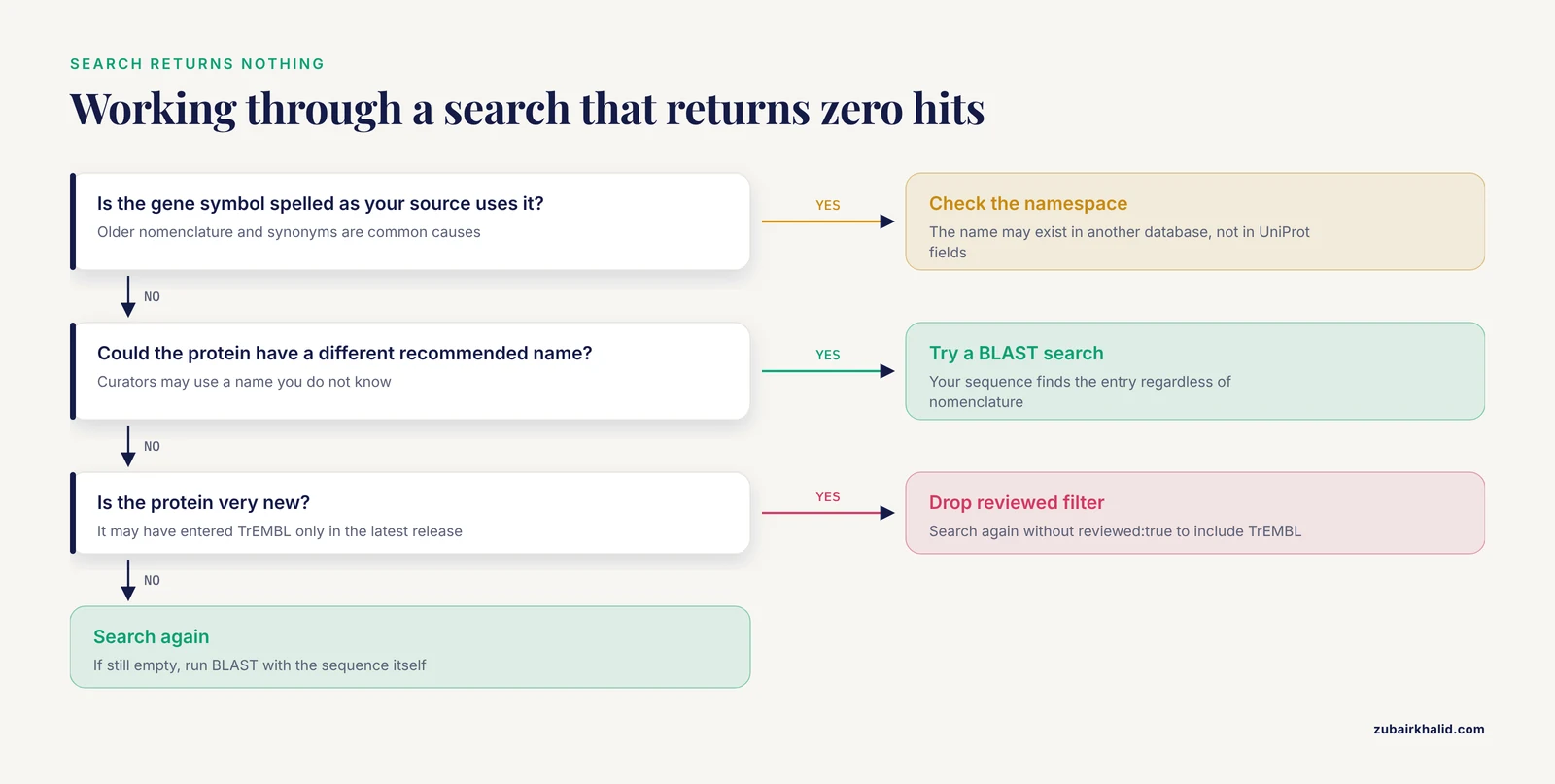
The search returns zero hits for a protein you know exists. Work through these causes in order. First, spelling: the gene symbol may have a synonym, and the name used in your source paper may be an older nomenclature. Second, namespace: you may be searching a name that exists in another database but not in UniProt's fields. Third, the protein may be annotated under a different recommended name than the one you know, in which case a BLAST search with your sequence will find it regardless of nomenclature. Fourth, the protein may be very new, having entered TrEMBL only in the latest release, so drop the reviewed:true restriction and search again.
The accession you typed is not found. The most common cause is a transcription error, since accessions are unforgiving strings. A second cause is that the entry was deleted or merged, in which case UniProt's policy routes users to replacement entries where they exist; the search infrastructure generally surfaces the successor. If you need to know merely whether a sequence string ever existed in UniProt's holdings, UniParc is the archive of record, because it retains sequences even when the knowledgebase entries that carried them are gone.
The downloaded sequence looks truncated or too short. Check whether you grabbed a fragment entry. Sequence records in the underlying databases are sometimes fragmentary, and UniProt preserves that fact rather than padding. Fragment status is visible on the entry page, and it is one more reason to verify length and completeness before an export enters your pipeline.
The REST request fails or returns an error page. Check that the query string is properly encoded, that spaces between query terms are encoded rather than left raw, and that field names match the documented vocabulary exactly. A request that works in the web interface but fails at the command line is almost always an encoding or field-name problem, not a permissions problem, since standard access requires no login.
The results look different from a tutorial screenshot. Interfaces evolve on their own schedule. Before concluding that a feature is gone, check the news and help panels on the homepage, which is exactly where interface changes are announced. This is the reason the core article recommends bookmarking the homepage rather than a results page: the homepage is also the site's notice board.
Two sources give slightly different sequences for the same protein. Sequence revisions happen, and different databases propagate them on different schedules. When this occurs, prefer the current UniProt reviewed entry, note the discrepancy, and if the difference is biologically meaningful for your work, trace it through the entry's version and literature history to see what changed and why. Recording the accession and retrieval date in your methods is what makes the discrepancy diagnosable later.
Common Misconceptions, Corrected
The core article catalogued practical mistakes. These are the deeper misconceptions, the ones that survive into group meetings unchallenged.
"UniProt and NCBI's protein resources are the same thing with different logos." They are independent efforts with separate curation processes, separate accession namespaces, and complementary strengths. The same physical protein has a UniProt accession and, usually, a different NCBI accession, related through cross-references and reconcilable through ID Mapping. Confusing the namespaces produces reference lists that mix identifiers from two systems, which then fails downstream tools unpredictably.
"The canonical sequence is the most abundant isoform in the cell." Canonical status is a curation decision reflecting the best-supported representative sequence, typically the longest or most fully documented form. Abundance in a given tissue or condition is a separate biological question that UniProt does not answer. If your experiment targets a specific splice product, the isoform list in the Sequence section is where you go, and the canonical label is not evidence about expression.
"Reviewed means every statement in the entry is experimentally proven." Reviewed means the entry passed through human curation, with each annotation item evidence-tagged. Within a reviewed entry you can still find predicted items, and the tags mark them. The correct reading of reviewed status is that a professional has assessed the whole record and labeled the evidence, not that everything has been demonstrated at the bench.
"The accession changes when the sequence is corrected." UniProt accessions are designed to be stable across revisions, so that a citation to an accession remains resolvable even as the entry's content is improved. What changes over an entry's lifetime is its content and its version. This design is why citing the accession, rather than a sequence file, is the durable citation practice, and why re-downloading rather than reusing an old local copy is the safe workflow.
"A very strong BLAST hit proves the function." Similarity is evidence for inference, and inference has limits. Near-identity across full length with conserved catalytic residues supports a strong functional assignment. A strong hit confined to one domain supports only a claim about that domain. And any similarity-based assignment inherits the quality of the source annotation, which loops back to the reviewed-versus-unreviewed distinction. The disciplined phrasing for a similarity-based claim is "putative" or "by homology," and reviewers increasingly expect it.
"A UniParc identifier is just another kind of UniProt accession." UniParc tracks sequences, not annotated proteins, and its identifiers live in their own namespace. The same sequence can be associated with knowledgebase entries in multiple organisms, and the archive entry aggregates the history of that exact string across all of them. If you find yourself holding a UniParc-style identifier expecting functional annotation, you are holding an archive key; take the sequence back to UniProtKB search or BLAST to find the annotated entries.
"If it is on the internet it must be current." The homepage shows the current release, but the protein sequence in your lab's shared folder may be years old. Data currency is a property of where and when you retrieved, not of the database's existence. This is why the retrieval-date habit appears repeatedly in this guide: it is the only cheap insurance against stale-sequence errors.
Practical Applications: What People Actually Do at the Homepage
Abstract database skills become concrete when tied to the tasks different researchers bring to the site. Here is how the homepage workflow maps onto the most common use cases.
Cloning and construct design. The sequence you clone must match the isoform you intend. The walkthrough loop, search, restrict, verify, export, applies directly, with one addition: before ordering primers, open the Sequence section and confirm that the isoform you downloaded is the isoform your experimental system expresses, since the canonical form and the expressed form are not always the same. The sp header prefix and the accession recorded in your file name give you the audit trail.
Antibody and peptide reagent design. Choosing an immunogenic peptide means finding a region of the protein that is accessible, specific, and conserved where it should be. The domain and feature viewers let you avoid transmembrane segments and highly conserved catalytic motifs, and Peptide Search lets you confirm that your chosen peptide string is unique to the target and does not appear in unrelated proteins that would become off-target binding partners.
Proteomics pipeline construction. Building a search database for mass spectrometry means exporting a defined, reproducible protein set, typically a reference proteome for your organism, and recording exactly which release it came from. The Proteomes section and the bulk download route serve this, and the release number belongs in your methods section because spectral identifications are only as reproducible as the database version they were searched against.
Phylogenetics and comparative genomics. Fetching orthologs across species is a BLAST-plus-filter workflow: run the query sequence against reviewed entries, gather the orthologous accessions, and export their sequences together. The reviewed restriction matters doubly here, because phylogenetic analysis built on prediction-derived sequences inherits their errors, including fragments and mispredicted start positions.
Variant interpretation. For human genetics work, the Variants section of a reviewed entry aggregates naturally occurring variants with literature backing and links out to disease resources. The homepage workflow to reach it is the same as any other, and the payoff is a versioned, citation-backed variant list rather than a table copied from a review article of unknown vintage.
Pathway figures and grant writing. When a figure needs an accurate molecular function statement with a citation behind it, the Function section's curator-written summary plus its evidence-tagged source citations provide both the sentence and the reference. This is one of the highest-frequency, lowest-effort uses of the site in everyday scientific writing.
Quality control on a sequence someone sent you. A collaborator emails a FASTA file of unknown provenance. Paste it into BLAST against reviewed entries. If it comes back as a near-perfect match to a reviewed entry, you have identified it and can replace the anonymous file with a properly accessioned record. If it matches partially, you have learned something about its actual content. This five-minute QC step has caught more mislabeled sequences in real labs than any other single habit.
Working with Proteomes for Organism-Scale Questions
When the unit of work shifts from one protein to a whole organism's protein complement, the Proteomes section of the site becomes the relevant entry point, and it connects back to the homepage search in specific ways.
A proteome is the set of proteins attributed to an organism with a sequenced genome. For each organism with genome-level coverage, UniProt designates a reference proteome, a curated representative set chosen to serve as the standard for that organism. Reference proteomes are what you want for most analyses: they are complete, they are the versions other resources align to, and they avoid the complications of redundant or fragmented assemblies.
The practical workflows are three. You can browse a proteome from its organism page and inspect its entries individually, which suits small-scale exploration. You can restrict a homepage search to a specific proteome or organism and export the result set in any of the standard formats, which suits building a custom analysis subset. And you can download the complete proteome FASTA for an organism, which suits the proteomics database construction described above and any pipeline that needs a stable, complete input file.
Two cautions apply. First, proteome contents change across releases as genome annotations improve, so the file you downloaded last year is not guaranteed to equal the file available today, which reinforces the record-the-release habit. Second, proteome-level exports include unreviewed entries by construction, since most organisms have no reviewed coverage beyond a fraction of their proteins. Everything said earlier about treating automated annotation as hypothesis applies across the entire file, not just to individual entries.
Citing and Recording UniProt Data in Your Methods
The reproducibility layer of this tutorial deserves explicit treatment, because "I got it from UniProt" is not a methods statement a reviewer can act on.
A complete record of a UniProt retrieval includes four items: the accession, the organism, the specific sequence form, meaning canonical or a named isoform, and the retrieval date. Adding the release number visible on the homepage at the time of retrieval strengthens the record further. Together these five items let any reader regenerate your exact input, which is the definition of a reproducible bioinformatics method.
For citing the resource itself, the Consortium publishes updated database description papers on a regular cycle in the annual database issue of Nucleic Acids Research, and those papers are the standard citation for the resource as a whole. For entry-specific claims, cite the underlying primary literature listed in the Publications section of the entry rather than the database alone, because the database aggregates and the papers demonstrate.
A note on versioned data in figures: if your figure annotates domains or sites on a sequence ruler, the positions are only valid for the specific sequence version you used. If a later revision changes the sequence, the residue numbering shifts. Pinning the accession, sequence form, and retrieval date to the figure legend prevents the slow-motion confusion of two papers showing the "same" figure with different numbering.
A Second-Pass Skills List: Efficiency Features Worth Learning in Week Two
Once the core loop is automatic, three interface features compound into real time savings.
Custom result table columns. The results page table is configurable: you can add and remove columns such as protein name, length, organism, annotation status, and cross-reference counts, then download exactly the table you designed. The column names map directly onto the fields parameter of the REST search shown earlier, so time spent designing a table in the browser converts directly into a scripted query.
Combining filters interactively. The filter sidebar applies filters cumulatively, and each click rewrites the query. Watch the query as you filter, and within a few sessions you will find yourself writing the structured queries directly, skipping the sidebar. Reading the assembled query is also how you learn which fields exist and how they combine.
The entry page as a hub. The cross-references panel of an entry links outward to dozens of resources, from structure and interaction databases to family and motif resources to organism-specific collections. Building the reflex of treating every entry as a hub, rather than a terminal page, converts UniProt from a sequence lookup service into the routing layer for your entire protein-information workflow. The homepage gets you to the entry; the entry gets you everywhere else.
A Lab Onboarding Checklist for Teaching UniProt
If you are the person who teaches this to new students, the following sequence covers the essentials in a single sitting, using only the tools covered in this guide.
- Have the student open the homepage and identify the search bar, the top navigation tools, and the release statistics panel, explaining that the counts reflect the current release.
- Run the TP53 example from the core walkthrough end to end: search, restrict with the structured query, open the reviewed human entry, and locate the Function, Sequence, and Variants sections.
- Have the student hover over three evidence tags of different kinds and articulate, out loud, what each certifies. This exercise teaches the epistemology faster than any explanation.
- Export the canonical sequence as FASTA and inspect the header, confirming the
spprefix and the accession. - Run one BLAST against reviewed entries with a sequence the student actually cares about from their own project, and interpret coverage together.
- Map a five-identifier list through ID Mapping, including at least one identifier that will not map, and discuss why.
- Close by having the student write a two-line methods statement, with accession, organism, sequence form, and retrieval date, for the data they just retrieved.
Students who complete this sequence rarely make the classic errors, and the sequence takes well under an hour. The investment compounds, because every subsequent protein question in the student's project begins, correctly, at the homepage.
Frequently Asked Questions
What is UniProt and what is it used for?
UniProt is a public, collaboratively maintained database of protein sequences and functional annotation. Researchers use it to look up curated protein information, find sequences for cloning or analysis, run similarity searches, and map identifiers between databases.
How do I search UniProt for a specific protein?
Type the protein name, gene name, or accession into the homepage search bar, then narrow the results with filters or field queries such as gene:TP53 AND organism_id:9606 AND reviewed:true to isolate the reviewed entry for your organism.
What is the difference between reviewed and unreviewed UniProt entries?
Reviewed entries belong to Swiss-Prot and were checked by human curators with evidence-tagged annotation. Unreviewed entries belong to TrEMBL and carry automated, prediction-based annotation, so their functional claims need extra caution.
How do I download a protein sequence in FASTA format?
Open the entry or a filtered results page, click Download, choose FASTA, and save the file. For scripts, a curl command against rest.uniprot.org retrieves the same FASTA record directly.
Is UniProt free to use?
Yes. UniProt is publicly and freely accessible over the web, through its API, and as bulk downloads, with no login required for standard use.
How current is the data on the UniProt homepage?
UniProt releases updates on a regular cycle, roughly every two months, and the homepage displays the current release number and entry counts, so anything you see reflects the most recent release at that moment.