How to Use Boolean Operators in UniProt Search
By Dr. Zubair Khalid, DVM, MS, PhD ·

By the end of this guide you will be able to build precise Boolean queries in UniProt, combine them with field-specific filters such as gene: and organism_id:, run the exact same query through the UniProt REST API from the command line or a script, and diagnose the mistakes that make a query return the wrong number of results.
You need a web browser for the interactive part. For the API section you need curl (version 7.x or later, installed by default on macOS and most Linux distributions) or Python 3.8 or later. Nothing else needs to be installed. A UniProt account is optional and only useful for saving favorite entries.
What Boolean operators do in UniProt
Boolean operators are the words AND, OR, and NOT, which tell a search engine how to combine conditions. AND keeps only records that match every condition. OR keeps records that match at least one condition. NOT removes records that match a condition. UniProt supports all three, along with quoted phrases, parentheses for grouping, and wildcard characters.
UniProt is the protein knowledgebase maintained by the UniProt Consortium, whose members include the European Bioinformatics Institute (EMBL-EBI) in the United Kingdom, the Swiss Institute of Bioinformatics (SIB), and the Protein Information Resource (PIR). The main database, UniProtKB, has two sections. Swiss-Prot contains reviewed entries that human curators have checked and annotated by hand. TrEMBL contains unreviewed entries annotated computationally. When you learn how to use UniProt for real projects, controlling the reviewed status of your results is one of the most valuable things Boolean logic lets you do.
The UniProt documentation describes a query syntax in the Lucene style, meaning queries are built from field-value pairs such as gene:BRCA1, joined by Boolean operators. A field query restricts the search to one indexed attribute of an entry instead of searching full text everywhere. Once you understand the pattern field:value combined with OPERATOR, you can express almost any biological question the database can answer.
How UniProt parses a query
Three rules explain nearly everything that goes wrong with UniProt Boolean operators.
First, operators are conventionally written in uppercase. When you write kinase and human, the lowercase word and is treated as a search term in its own right, so the engine looks for entries containing the literal word "and" alongside your other words. The result count balloons or shifts for no biological reason. Write kinase AND human.
Second, multiword values need double quotes. The query protein_name:tumor protein p53 does not search for the phrase "tumor protein p53". The words are split into separate tokens, and each token is evaluated on its own. Quoted, protein_name:"tumor protein p53" matches the phrase as a unit.
Third, field values are generally forgiving about case, but operators are not. gene:brca1 and gene:BRCA1 find the same entries, yet and and AND behave differently. This asymmetry catches many people on their first day with UniProt.
When several terms appear with no operator between them, they are treated as independent terms rather than one phrase. The result set then drifts away from what you intended. The habit that fixes this: every term gets an explicit operator or quotes.
Getting oriented in the UniProt interface
If you are new to how to use UniProt, spend five minutes on the layout before touching Boolean logic.
- Go to
https://www.uniprot.org. The search box sits at the top of every page. The database selector next to it (UniProtKB, UniRef, Proteomes, Taxonomy, and others) decides which index your query runs against. UniProt Boolean operators work in UniProtKB and the other indexes, but this guide focuses on UniProtKB, where protein entries live.
- Type a plain keyword such as
kinaseand press Enter. The results page shows the total count at the top, a table of entries with columns such as Entry, Entry Name, Protein Names, Gene Names, Organism, and Length, and a Download button that exports the current result set in formats including TSV, FASTA, and JSON.
- Look at your browser address bar. After the search, the URL contains
?query=kinase. UniProt echoes your full query in the URL. This is the single most useful feature for learning the syntax, because every advanced query you build through the interface ends up as plain text you can copy, edit, and reuse.
- Click the Advanced option under the search box. UniProt offers a query builder where you pick fields, operators, and values from menus. It writes the query string for you and shows it in the search box. If you are unsure how to express something, build it once in the builder, then read the generated string. After a few rounds you will write these queries directly.
- Every result row links to a full entry page with the sequence, annotations, cross-references, and evidence tags. Checking one entry against your query is a standard verification step, described later in this guide.
Using UniProt Boolean operators step by step
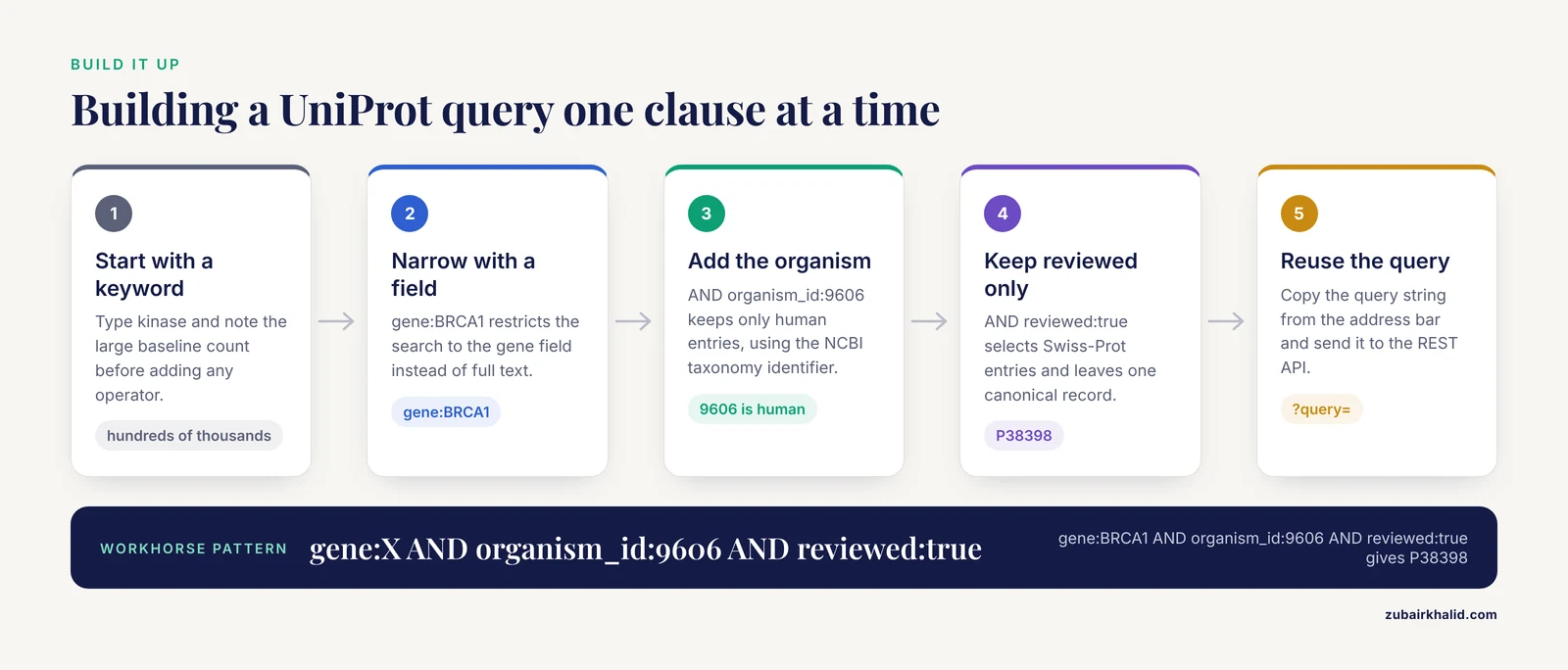
This walkthrough builds one query at a time on the live site, checking the result count after each change. Work through it in order. Each step shows the query to type into the search box and the kind of output to expect.
Step 1: Start with a single keyword
kinaseExpect a result count in the hundreds of thousands, dominated by unreviewed TrEMBL entries from thousands of organisms. This baseline matters, because every Boolean operator you add should visibly move that number in a predictable direction. If a change does not move the count the way you expect, the query is not doing what you think.
Step 2: Narrow with a field query
gene:BRCA1The count drops to entries whose gene field contains BRCA1. You will still see many entries, because genes named BRCA1 exist in numerous species and the TrEMBL section holds unreviewed copies. The gene field holds gene symbols, so this query matches symbols, not free text anywhere in the entry.
Step 3: Add an organism with AND
gene:BRCA1 AND organism_id:9606organism_id: takes an NCBI taxonomy identifier. 9606 is human. Now the count falls to a handful: the reviewed human entry plus unreviewed human sequence variants. The AND requires both conditions to hold in the same entry.
Step 4: Restrict to reviewed entries
gene:BRCA1 AND organism_id:9606 AND reviewed:truereviewed:true selects Swiss-Prot entries and reviewed:false selects TrEMBL entries. With all three clauses, the count collapses to one canonical entry: P38398, BRCA1_HUMAN, the manually curated human BRCA1 protein, roughly 1,863 amino acids long for the canonical isoform. This three-clause pattern, gene plus organism plus reviewed status, is the workhorse of day-to-day UniProt searching.
Step 5: Quote a multiword protein name
protein_name:"tumor protein p53" AND organism_id:9606 AND reviewed:trueThe quotes force phrase matching, and the query resolves to the single reviewed human p53 entry, P04637. Without the quotes the three words would be evaluated separately and the count would jump to entries containing any of the words anywhere.
Step 6: Expand with OR and parentheses
(gene:BRCA1 OR gene:BRCA2) AND organism_id:9606 AND reviewed:trueOR broadens the search, and the parentheses control which clauses the OR binds together. Expect exactly two entries: P38398 (BRCA1_HUMAN) and P51587 (BRCA2_HUMAN). Try removing the parentheses and watch the count change. Parentheses are cheap insurance against surprise results.
Step 7: Exclude with NOT
protein_name:kinase AND organism_id:9606 NOT reviewed:falseNOT reviewed:false removes unreviewed entries, leaving several hundred reviewed human kinase entries. The same set would be expressed positively as reviewed:true, and in production work you should usually write it that way. The NOT form is shown here so you can see its effect on the count. Note that NOT sits between clauses. A query that begins with NOT and has no positive clause is not a sensible search in Lucene-style systems.
Step 8: Filter by sequence length with a range
organism_id:9606 AND gene:BRCA1 AND length:[1800 TO 1900] AND reviewed:trueSquare brackets define an inclusive range. The canonical human BRCA1 protein is about 1,863 amino acids, so the entry appears, while shorter isoform records and fragments are excluded. Ranges combine freely with Boolean operators. A star serves as an open end, so length:[1000 TO *] means one thousand amino acids or more.
Step 9: Try a trailing wildcard
gene:PDE* AND organism_id:9606 AND reviewed:trueThe asterisk matches any trailing characters, so this returns the reviewed human phosphodiesterase family entries (PDE1 through PDE11 variants present in Swiss-Prot). Wildcards work at the end of a term. A leading wildcard, such as *kinase, is not something to rely on in UniProt queries.
Step 10: Reuse the query
At this point your address bar contains the full query string. Two ways to reuse it:
- Copy the whole URL and share it. Anyone who opens it sees the same search.
- Lift the query string out of the URL and use it in the REST API, covered in the next section.
Operator and field reference
The table below summarizes the operators available in UniProt search.
| Operator or syntax | Meaning | Example | Effect on results |
|---|---|---|---|
| , - | , - | , - | , - |
AND | All conditions must match | gene:BRCA1 AND organism_id:9606 | Narrows |
OR | At least one condition must match | gene:BRCA1 OR gene:BRCA2 | Broadens |
NOT | Excludes matching entries | organism_id:9606 NOT reviewed:false | Narrows |
"..." | Exact phrase match | protein_name:"insulin receptor" | Prevents token splitting |
( ) | Groups clauses | (gene:A OR gene:B) AND reviewed:true | Controls logic |
* | Trailing wildcard | gene:MAPK* | Broadens within the field |
[x TO y] | Inclusive range | length:[500 TO 1000] | Filters numeric ranges |
The table below lists the field queries you will use most often in UniProtKB.
| Field | Example | What it matches |
|---|---|---|
| , - | , - | , - |
accession: | accession:P38398 | The stable UniProt accession |
id: | id:BRCA1_HUMAN | The entry name |
gene: | gene:BRCA1 | Gene symbols listed in the entry |
protein_name: | protein_name:"tumor protein p53" | Recommended protein names |
organism_id: | organism_id:9606 | NCBI taxonomy identifier |
reviewed: | reviewed:true | Swiss-Prot (true) or TrEMBL (false) |
length: | length:[1800 TO 1900] | Sequence length in amino acids |
go: | go:0005634 | Gene Ontology term by ID |
proteome: | proteome:UP000005640 | Entries belonging to a proteome |
annotation_score: | annotation_score:[100 TO 500] | UniProt annotation quality score |
Additional fields exist for keywords, cross-references, sequence variants, and annotated features. The UniProt help pages under the search box list the complete field vocabulary, and the advanced query builder generates examples for any field you select.
Combining operators with correct precedence
When you mix operators in one query, precedence decides how the clauses group. In the Lucene convention that UniProt follows, NOT binds most tightly, then AND, then OR. A query written without parentheses can therefore mean something different from what a reader assumes.
Take this example:
gene:BRCA1 OR gene:BRCA2 AND organism_id:9606Because AND binds tighter than OR, the engine reads this as "BRCA1 from anywhere, or BRCA2 from human". BRCA1 entries from every organism flood in. The query you probably wanted is:
(gene:BRCA1 OR gene:BRCA2) AND organism_id:9606The practical rule is simple. Whenever a query mixes AND with OR, parenthesize the OR group explicitly, every time, even when you believe the precedence would give the same reading. Parentheses cost nothing, and they make the query self-documenting for the colleague who inherits your pipeline.
The same rule applies to NOT. Write the positive conditions first, joined by AND or OR, then append exclusions:
(protein_name:kinase OR gene:MAPK*) AND organism_id:9606 AND reviewed:true NOT fragment:trueWait, the last clause deserves a caution rather than an example. Fields such as fragment flags exist in the schema, but before adding any field you have not used before, run it alone in the search box and confirm the result count moves in the expected direction. Build queries incrementally, one clause at a time, and the logic errors reveal themselves immediately.
Running the same query through the REST API
The UniProt REST API accepts the identical query syntax, which makes it the right tool when you need results inside a script or pipeline rather than on a web page.
A basic curl request
curl --get "https://rest.uniprot.org/uniprotkb/search" \
  --data-urlencode "query=(gene:BRCA1 OR gene:BRCA2) AND organism_id:9606 AND reviewed:true" \
  --data-urlencode "format=tsv" \
  --data-urlencode "fields=accession,id,protein_name,gene_names,organism_name,length" \
  --data-urlencode "size=500"
The -get and -data-urlencode combination handles URL encoding for you, including the spaces and parentheses inside the query. If you build the URL by hand instead, spaces must be encoded as %20 or +, and unencoded parentheses or quotes are a common source of errors.
Expected output, representative rows:
Entry	Entry Name	Protein Names	Gene Names	Organism	Length
P38398	BRCA1_HUMAN	Breast cancer type 1 susceptibility protein (BRCA1)	BRCA1	Rattus? no. Homo sapiens (Human)	1863
P51587	BRCA2_HUMAN	Breast cancer type 2 susceptibility protein (BRCA2)	BRCA2	Homo sapiens (Human)	3418
(Column widths and exact phrasing of protein names vary with releases. The header row, the two accessions, and the two entry names are the parts to check.)
Parameters that matter:
query: the same Boolean string you tested on the website.format: one oftsv,fasta,json,xml, and related formats. Usetsvfor spreadsheets and quick parsing,fastafor sequences,jsonfor programmatic work.fields: a comma-separated list controlling TSV columns. Field names mirror the searchable fields, for exampleaccession,id,protein_name,organism_name,length,gene_names.size: results per page, with a maximum of 500.
Pagination with the cursor
Any query returning more than 500 entries needs pagination. Request the first page with curl -i to include response headers:
curl -i --get "https://rest.uniprot.org/uniprotkb/search" \
  --data-urlencode "query=reviewed:true AND organism_id:83333" \
  --data-urlencode "format=tsv" \
  --data-urlencode "fields=accession,id,length" \
  --data-urlencode "size=500"
organism_id:83333 is Escherichia coli strain K-12, and its reviewed entry set exceeds one page. In the response headers you will find a Link header containing a URL with rel="next". Fetch that URL to get the next page, then follow its Link header in turn, until no next link appears. This cursor-style pagination guarantees complete, non-overlapping coverage. Write your loop so it follows rel="next" rather than guessing page numbers.
A minimal Python example
import urllib.parse
import urllib.request

base = "https://rest.uniprot.org/uniprotkb/search"
params = {
    "query": '(gene:BRCA1 OR gene:BRCA2) AND organism_id:9606 AND reviewed:true',
    "format": "tsv",
    "fields": "accession,id,protein_name,organism_name,length",
    "size": "500",
}
url = base + "?" + urllib.parse.urlencode(params)
with urllib.request.urlopen(url) as response:
    print(response.read().decode())
For queries you expect to exceed one page, add the cursor-following loop described above. The REST API returns errors as an HTTP status code together with a message body, so check the status before parsing results.
Tips for reliable UniProt Boolean searches
These tips come from the way the search engine actually behaves, not from habit.
- Put
reviewed:truein the query early. A search that returns half a million TrEMBL entries buries the curated record you usually want. Start reviewed, and only drop that filter when the question genuinely needs unreviewed data.
- Use
organism_id:instead of typing an organism name. Taxonomy identifiers are unambiguous. Strain-level work in bacteria especially benefits, because a name like "Escherichia coli" spans many strains with different proteomes, while 83333 points at one strain.
- Build one clause at a time and read the count after each addition. A count that fails to change when you add a clause means the clause matched nothing, which usually signals a misspelled field name or a value in the wrong field.
- Learn syntax from the advanced query builder, then graduate to typing. The builder writes valid queries and shows them in the search box. Copy those strings into a notes file with a comment explaining what each one is for. Six months later, that file is your personal documentation.
- Test every query on the website before it enters a script. The interactive result count gives you an immediate sanity check, and a query that misbehaves on the website will misbehave in code.
- Quote anything containing a space, hyphen, or punctuation. Hyphenated names and names with apostrophes get tokenized, and quotes are the only reliable way to hold them together.
- Version your queries like code. Record the query string, the date, and the result count for each dataset you download. UniProt updates on a regular release schedule, so counts for the same query change over time. A recorded count tells you whether a later rerun hit the same slice of the database or something moved underneath you.
- Prefer positive phrasing. A query built from what you want (
reviewed:true,organism_id:9606) is easier to verify than one built from what you do not want, and it avoids the edge cases around leadingNOTclauses.
Common Mistakes and Limitations
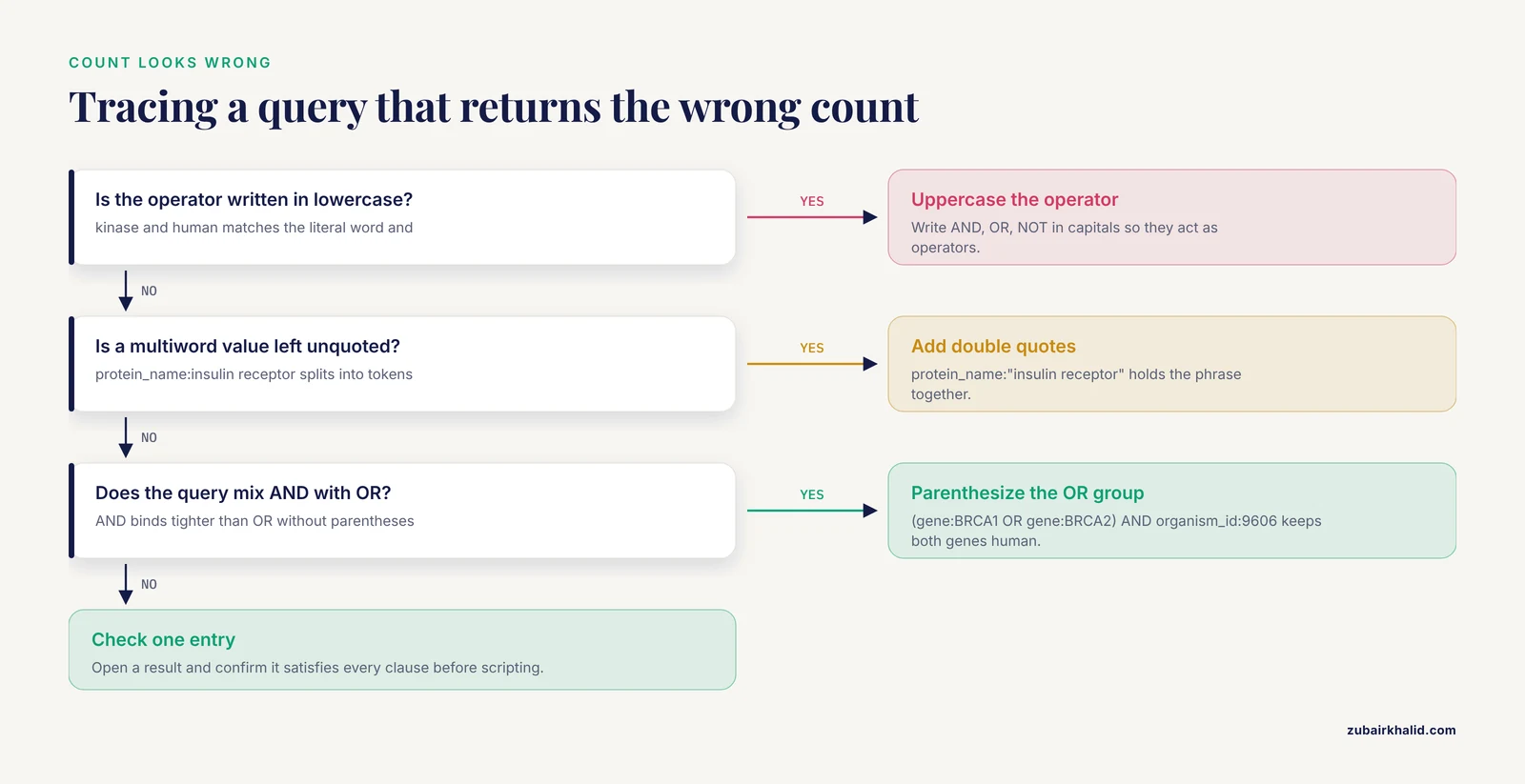
Lowercase operators treated as search terms. Writing brca1 and human makes the engine match the literal word "and". Symptom: the result count is far larger than the gene-specific query should allow, and results contain unrelated entries. Fix: write operators in uppercase, AND, OR, NOT.
Unquoted multiword values. protein_name:insulin receptor splits into separate terms. Symptom: the count jumps and results include proteins that merely mention "receptor" or "insulin". Fix: protein_name:"insulin receptor".
Mixing AND and OR without parentheses. As shown above, precedence groups AND clauses first. Symptom: results include a broad slice you meant to exclude, often an entire organism or the full set of entries for one gene across all species. Fix: parenthesize every OR group.
A query that starts with NOT. A purely negative query has nothing positive to match against and does not behave as people expect. Symptom: zero results or a confusing count. Fix: state at least one positive condition and append NOT clauses afterward.
Leading wildcards. kinase is not a reliable construct in this search engine. Symptom: an error or zero results. Fix: use a trailing wildcard (kinase) or a more specific term.
Wrong field for the question. gene: searches gene symbols, protein_name: searches protein names, and full-text keyword search touches everything. Searching gene:insulin will not behave like protein_name:insulin. Symptom: plausible-looking but incomplete results. Fix: match the field to the attribute you care about and verify one result entry by opening it.
Assuming counts are frozen. UniProt entries are added, merged, and revised on a regular release schedule. A count recorded last quarter may differ today for sound reasons. Fix: date-stamp every saved query and rerun a small verification query when reproducing old results.
Unencoded URLs in scripts. Hand-built URLs with raw spaces, quotes, or parentheses often fail with an HTTP 400 status and an error message in the response body. Fix: use -data-urlencode in curl or urllib.parse.urlencode in Python.
Expecting keyword search to replace sequence search. Boolean queries filter entries by attributes. They will not find proteins with a similar sequence or a specific motif. For similarity questions, use the BLAST service linked from the UniProt site, then use Boolean queries to filter and organize what BLAST returns.
One final limitation applies to any database query. UniProt reflects the state of curation at the moment of your search, and automated annotations in TrEMBL carry prediction uncertainty. Confirm that results match your biological intent before feeding them into downstream analysis, and consult the primary literature for entries where annotation details drive a decision.
Verifying your results
A query that runs is not a query that is right. Three checks catch most errors.
First, open one result entry and confirm it actually satisfies every clause. If you queried gene:BRCA1 AND organism_id:9606 AND reviewed:true, the entry page should show BRCA1 among the gene names, Homo sapiens as the organism, and the reviewed (Swiss-Prot) label near the top of the entry.
Second, test the boundaries. Run the query with one clause removed and confirm the count moves in the expected direction. Run a deliberately over-narrow variant, for example adding a length range around a known protein, and confirm the target entry survives. A query that returns a plausible-looking count for the wrong reason passes every casual glance, which is exactly why boundary checks matter.
Third, for scripted work, count what you actually received. In a shell:
curl -s --get "https://rest.uniprot.org/uniprotkb/search" \
  --data-urlencode "query=(gene:BRCA1 OR gene:BRCA2) AND organism_id:9606 AND reviewed:true" \
  --data-urlencode "format=tsv" \
  --data-urlencode "fields=accession" \
  --data-urlencode "size=500" | wc -l
One header line plus two data lines gives 3. If wc -l reports 501 for a query you believed returned forty entries, pagination silently delivered more than you expected, and your downstream code is processing a different dataset than you designed it for.
Where to go next
Once Boolean queries feel routine, three directions extend the skill. Learn the deeper annotation fields in the UniProt help documentation so you can filter on features such as domains, variants, and subcellular location directly in the query. Combine search with the ID mapping service in the REST API to translate a list of gene names from another resource into UniProt accessions, then query those accessions. And for large recurring exports, move from per-request downloads to the asynchronous job endpoints in the UniProt REST API, which handle bulk retrieval without pagination loops in your own code.
Frequently Asked Questions
Do Boolean operators have to be uppercase in UniProt?
Write them uppercase (AND, OR, NOT) because that is the documented, reliable form. Lowercase operator words risk being interpreted as ordinary search terms, which silently changes your result set.
What is the difference between reviewed:true and reviewed:false?
reviewed:true selects Swiss-Prot entries, which are manually curated. reviewed:false selects TrEMBL entries, which are annotated computationally. Most day-to-day queries should start with reviewed:true.
Can I combine Boolean operators with field queries like gene: and organism_id:?
Yes, and that combination is the core of UniProt search. A query such as gene:BRCA1 AND organism_id:9606 AND reviewed:true joins a gene filter, a taxonomy filter, and a curation filter in one string.
How do I run a UniProt Boolean query from the command line?
Send the same query string to the REST endpoint https://rest.uniprot.org/uniprotkb/search with curl, using -data-urlencode for the query, format, fields, and size parameters. Use the Link response header with rel="next" to page through large result sets.
Why does my UniProt query return more results than I expected?
The usual causes are a lowercase operator being read as a search term, an unquoted multiword value being split into tokens, or OR clauses binding differently than you assumed because of precedence. Add quotes and parentheses, then recheck the count.
Does UniProt support wildcard searches with Boolean operators?
Yes. A trailing asterisk such as gene:PDE* matches any ending within that field and combines normally with AND, OR, and NOT. Leading wildcards are not something to rely on.
How many results can I download from UniProt at once?
A single search request returns at most 500 entries per page. For larger result sets, follow the cursor-style pagination in the Link response header until no next page remains, or use the API's export options for bulk downloads.
How do I save and reuse a UniProt search query?
Copy the query string from the website URL, where UniProt echoes the full query, or record the curl command that produced your download. Store it with the date and the result count so you can reproduce the dataset later.