How to Run a BLAST Search Against UniProt
By Dr. Zubair Khalid, DVM, MS, PhD ·

By the end of this guide you will be able to run a BLAST search against UniProt three different ways: through the UniProt web interface, against a local copy of the database with the NCBI BLAST+ command-line tools, and iteratively with PSI-BLAST when a plain search fails to find distant homologs. You will also be able to read an alignment intelligently, pick an E-value cutoff with a defensible rationale, and avoid the mistakes that quietly turn a good search into a misleading one.
Here is what you need on hand before starting:
- A protein query sequence in FASTA format (a single sequence works for your first search).
- A modern web browser for the web workflow.
- For the command-line workflow, the NCBI BLAST+ toolkit installed locally. With conda this is one command:
conda install -c bioconda blast. - Disk space. A compressed copy of UniProtKB/Swiss-Prot is a few hundred megabytes. The complete UniProtKB, including TrEMBL, is many gigabytes compressed and considerably larger once formatted for BLAST.
- Roughly 30 to 60 minutes for a first careful pass through both workflows.
This single UniProt database tutorial covers the two mainstream routes in depth, then goes into iterative and pattern-seeded searching, verification, and the specific pitfalls that trip up both newcomers and experienced users.
What BLAST Does and Why UniProt Is the Right Target
BLAST, the Basic Local Alignment Search Tool, finds local regions of similarity between a query sequence and every entry in a database. It is a heuristic method. Instead of computing the full optimal alignment of your query against every database sequence, which is what the Smith-Waterman dynamic programming algorithm does, BLAST uses short seed matches to decide which sequences deserve expensive alignment work. Rapid heuristic similarity searching goes back to the Wilbur and Lipman algorithm published in 1983, and BLAST descended from that line of thinking [1].
The heuristic has a cost and a benefit. Comparison studies have measured BLAST and FASTA against hardware-accelerated Smith-Waterman and found that BLAST trades a small amount of sensitivity for large gains in speed, a trade most working biologists accept every day [2]. What matters for you is knowing that a BLAST search is not guaranteed to find every homolog in the database. When a search comes back empty, that is evidence of absence only in a weak sense.
The seeds themselves are a tunable part of this trade-off. The classic protein BLAST heuristic considered short seed words, and later work showed that using longer seed words of length 6 or 7 for protein searches reduces running time by 20 to 30 percent while preserving retrieval accuracy, provided the score threshold for the seed matches is adjusted appropriately [3]. That insight is baked into modern BLAST+ defaults, but it explains why the word size parameter exists and why changing it changes both speed and sensitivity.
UniProt is the right target for a protein search for a practical reason: annotation. UniProtKB, the UniProt Knowledgebase, consists of two sections. Swiss-Prot contains reviewed, manually annotated entries with evidence-tracked function claims. TrEMBL contains unreviewed entries annotated largely by automated rules. Both are searchable, and choosing between them is the first decision of any UniProt BLAST tutorial worth reading. When you find a match in Swiss-Prot, the gene name, function, domains, and cross-references attached to it have been curated by humans, which makes annotation transfer far more defensible than transferring annotation from an unreviewed TrEMBL entry that was itself annotated by an automated pipeline.
Choosing the Right UniProt Database Before You Search
UniProt exposes several related databases, and the choice changes your results in important ways.
| Database | Contents | Best used for |
|---|---|---|
| UniProtKB/Swiss-Prot | Reviewed, manually annotated entries | Function inference, naming, citing accessions |
| UniProtKB (Swiss-Prot plus TrEMBL) | Everything, including unreviewed entries | Maximum recall, identifying obscure proteins |
| UniRef100 | Clustered sequences with a 100 percent identity and 11 region-overlap rule | Fast searches with near-complete coverage |
| UniRef90 | Clusters merged at 90 percent identity | Removing redundancy while keeping distant relatives |
| UniRef50 | Clusters merged at 50 percent identity | Fast family-level scans |
The trade is completeness against redundancy and annotation quality. If your goal is to name an unknown protein, a Swiss-Prot search often answers the question with a handful of curated hits. If your goal is to find every relative, the full UniProtKB gives you the most raw material, but the hit list becomes dominated by near-identical entries from closely related strains and redundant isoforms. UniRef databases collapse that redundancy so the alignment statistics are computed against a smaller, less redundant target set.
A second decision is scope. A search against all of UniProtKB mixes sequences from every branch of life. Restricting by taxonomy, which both the web interface and local workflows support, is one of the most useful tips in any UniProt BLAST tutorial because it converts a sea of hits into a focused comparison, for example against all mammalian sequences or all bacterial proteomes.
UniProt BLAST Tutorial Step by Step on the Web
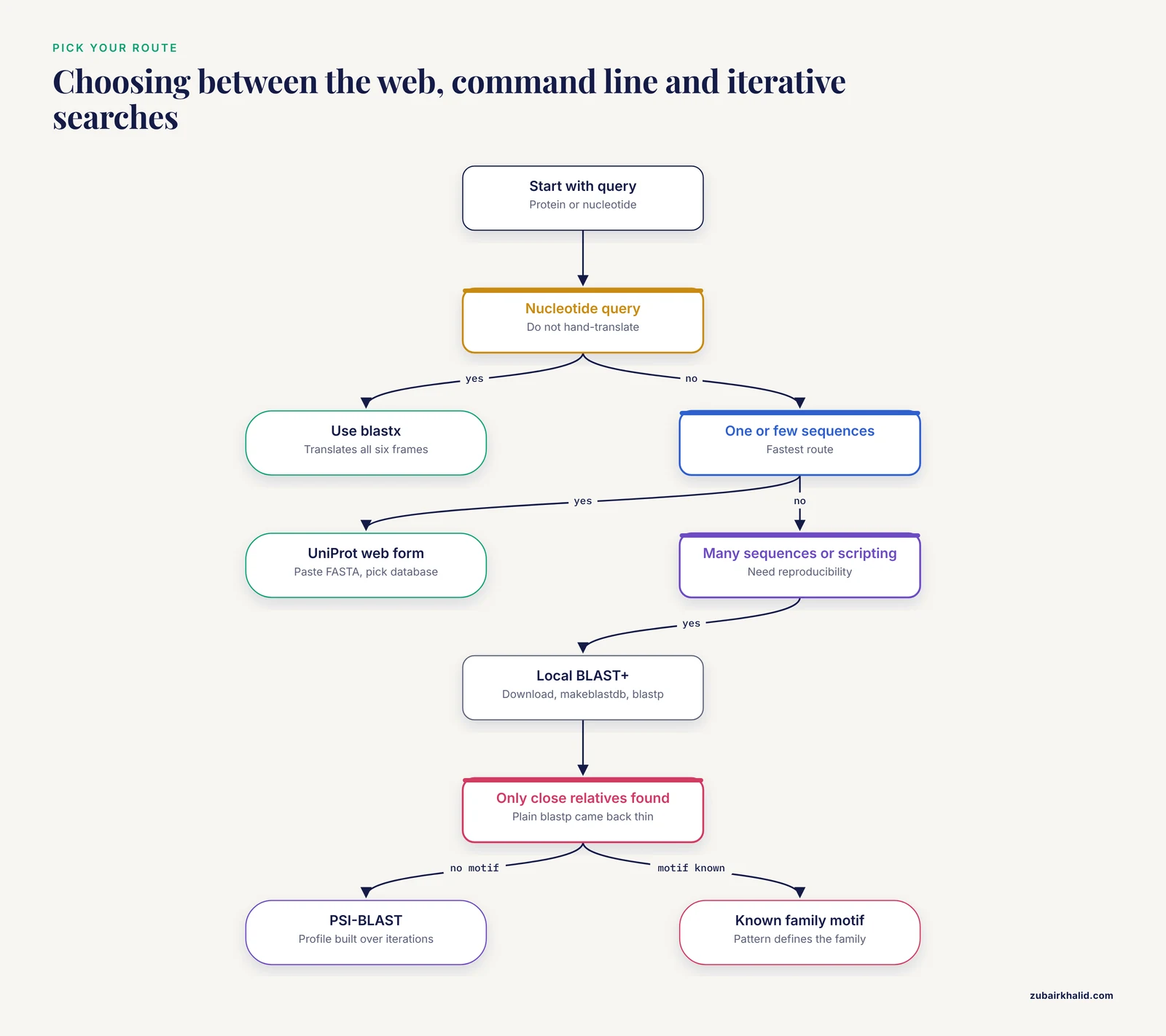
This walkthrough is the fastest route if you have one or a few sequences.
- Prepare your query in FASTA format. A FASTA record begins with a
>line containing an identifier and optional description, followed by the sequence in single-letter amino acid code.
>my_query_human_HBA
MVLSPADKTNVKAAWGKVGAHAGEYGAEALERMFLSFPTTKTYFPHFDLSHGSAQVKGHG
KKVADALTNAVAHVDDMPNALSALSDLHAHKLRVDPVNFKLLSHCLLVTLAAHLPAEFTP
AVHASLDKFLASVSTVLTSKYR- Open the UniProt BLAST page at
https://www.uniprot.org/blastin your browser. UniProt is maintained jointly by the European Bioinformatics Institute, the Swiss Institute of Bioinformatics, and the Protein Information Resource, and the BLAST service runs on their servers.
- Paste the sequence into the query box, including the FASTA header. Give the job a short title so you can identify it later in your saved job history.
- Select the database. The dropdown offers UniProtKB, UniProtKB/Swiss-Prot, UniRef100, UniRef90, and UniRef50. For a first identification search, choose UniProtKB/Swiss-Prot. For maximum recall, choose the full UniProtKB.
- Confirm the program. UniProt detects whether your query is protein or nucleotide and sets the program accordingly. For a protein query against a protein database this is blastp. If you paste a nucleotide query, the server switches to a translated search, which the site documents in its help text.
- Set parameters. The form exposes the E-value cutoff, the substitution matrix (BLOSUM62 is the standard default), low-complexity filtering, the option to run gapped alignment, and the number of alignments to display. Defaults are sensible for most first searches. Leave them alone until you understand what each one does, which the parameter table later in this article explains.
- Optionally restrict by taxonomy. In the taxonomy restriction box you can enter a NCBI taxonomy identifier, for example
9606for human or83333for Escherichia coli K-12, to limit hits to a branch of the tree of life. You can also exclude models of uncertain provenance if that option is offered for the selected database.
- Run the job and wait. Large database searches queue briefly. The results page lists hits ranked by score with columns for the match, alignment length, percent identity, similarity, and E-value, plus an E-value histogram and an overview graphic showing where each hit aligns on the query.
- Read the top hits, then the alignment of the best hit. Each row expands into the pairwise alignment with identical residues, conservative substitutions, and gaps marked. Click through the matched accession to reach the full UniProt entry.
- Download what you need. The results page offers the hit table and alignments in downloadable formats, which you should save immediately because UniProt, like all BLAST servers, purges old jobs.
A quick sanity check on expected output: if you search human hemoglobin subunit alpha against Swiss-Prot, the top hit is the query itself or its exact duplicates, with 100 percent identity and an E-value reported at or near 0.0. Anything less means something is wrong with the query, such as stray characters, a truncated sequence, or the wrong alphabet.
Running BLAST Against UniProt From the Command Line
The command-line route is the one to learn if you will search many sequences, want reproducibility, or need to script the step inside a larger pipeline. A step-by-step UniProt BLAST tutorial for the terminal needs four stages: download, format, search, parse.
Step 1. Download the database
wget https://ftp.uniprot.org/pub/databases/uniprot/current_release/knowledgebase/complete/uniprot_sprot.fasta.gz
gunzip uniprot_sprot.fasta.gz
For the complete knowledgebase, download uniprotkb.fasta.gz from the same directory instead. The FASTA identifiers in these files follow UniProt conventions. A Swiss-Prot entry looks like sp|P69905|HBA_HUMAN and a TrEMBL entry looks like tr|A0A023ABC1|A0A023ABC1_9ECOLI, with the accession between the first and second pipe characters.
Step 2. Format the database with makeblastdb
makeblastdb -in uniprot_sprot.fasta -dbtype prot -parse_seqids -out swissThree things happen here. -dbtype prot declares a protein database. -parse_seqids makes BLAST keep the full pipe-delimited identifiers so downstream tools can extract them. -out swiss names the database, and that name is what you will pass to every search command. If you have a taxonomy identifier mapping file, -taxid_map attaches taxonomy to each entry so you can later filter results locally. Consult the makeblastdb -help output for the exact file format.
Step 3. Run the search
blastp -query my_query.fasta -db swiss \
  -outfmt "6 qseqid sseqid pident length mismatch gapopen qstart qend sstart send evalue bitscore stitle" \
  -evalue 1e-3 -max_target_seqs 50 -num_threads 8 -out hits.tsv
Command breakdown:
-querytakes the FASTA file with your protein.-db swisspoints at the database you built in step 2.-outfmt 6requests tabular output. The quoted list of field codes customizes the columns.-evalue 1e-3discards hits with expectation values above 0.001.-max_target_seqs 50caps how many hits are reported.-num_threads 8parallelizes the search across eight cores.-outwrites results to a file instead of standard output.
Step 4. Read the results
head -n 5 hits.tsvTabular output is one hit per line with columns in the order you requested. An illustrative first line for a human hemoglobin alpha query looks like this:
sp|P69905|HBA_HUMAN sp|P69905|HBA_HUMAN 100.000 142 0 0 1 142 1 142 0.0 300+ Hemoglobin subunit alphaThe column meanings, in the order used above: query identifier, subject identifier, percent identity over the alignment, alignment length, mismatched positions, gap openings, query start and end, subject start and end, E-value, bit score, and the subject title. The exact bit score value depends on your scoring parameters, so treat the number shown here as a placeholder for format purposes rather than a value to reproduce.
Tabular output is compact but hides the alignments. When you need to inspect where the alignment starts and ends, which residues match, and where the gaps are, rerun without -outfmt to get the full default report with aligned sequences and per-alignment statistics:
blastp -query my_query.fasta -db swiss -evalue 1e-3 -out report.txtVariant: searching a single proteome
Frequently you want hits from one organism only. Rather than filtering afterward, build a tiny database from a targeted download using the UniProt REST API:
curl -o ecoli_k12.fasta "https://rest.uniprot.org/uniprotkb/stream?query=%28organism_id%3A83333%29&format=fasta&compressed=false"
makeblastdb -in ecoli_k12.fasta -dbtype prot -out ecoli_k12
blastp -query my_query.fasta -db ecoli_k12 -outfmt 6 -evalue 1e-3 -out ecoli_hits.tsv
The URL-encoded query (organism_id:83333) downloads the E. coli K-12 proteome in FASTA format. This pattern scales to any taxonomy identifier or UniProt search query, which makes it the cleanest way to run focused comparisons locally.
Variant: nucleotide queries
If your starting material is DNA or RNA, do not hand-translate. Use blastx, which translates the nucleotide query in all six reading frames and compares each against the protein database. This matters because real coding sequences contain frameshifts, start codons are ambiguous in raw genomic DNA, and the correct reading frame may not be the one you assume. General nucleotide-versus-nucleotide searching is a related but distinct problem covered in dedicated protocol literature [4].
Parameters That Matter
Most BLAST failures trace back to a handful of parameters. The table below summarizes the ones worth knowing for a protein search against UniProt, with BLAST+ defaults. You can always print current defaults with blastp -help.
| Parameter | Typical default | What it does | When to change it |
|---|---|---|---|
-word_size | 6 for blastp | Length of seed words that trigger extension | Lower for very short queries or weak similarity, higher to speed up large searches |
-evalue | 10 in BLAST+ | Hits with E above this threshold are discarded | Tighten to 1e-3 or 1e-5 for high-throughput pipelines, loosen when hunting remote homologs |
-matrix | BLOSUM62 | Amino acid substitution scoring matrix | BLOSUM45 for more distant relationships, PAM30 or BLOSUM80 for short or close queries |
-gapopen / -gapextend | 11 / 1 | Costs for opening and extending a gap | Change rarely, and only when the default produces obviously over-gapped alignments |
-comp_based_stats | 2 for blastp | Composition-based score adjustment | Keep the default for proteins with biased composition, set 0 only for legacy comparability |
-max_target_seqs | 500 | Maximum number of hits reported | Lower for tidy tabular output, and remember it caps reporting, not the underlying search |
-seg | on with default thresholds | Masks low-complexity regions in the query | Leave on for most searches, turn off if real low-complexity homology is the signal you want |
-num_threads | 1 | CPU cores used | Raise to the number of available cores for local searches |
-outfmt | pairwise text | Output format and columns | Tabular (6 ...) for parsing, default for reading alignments |
Two of these deserve deeper explanation.
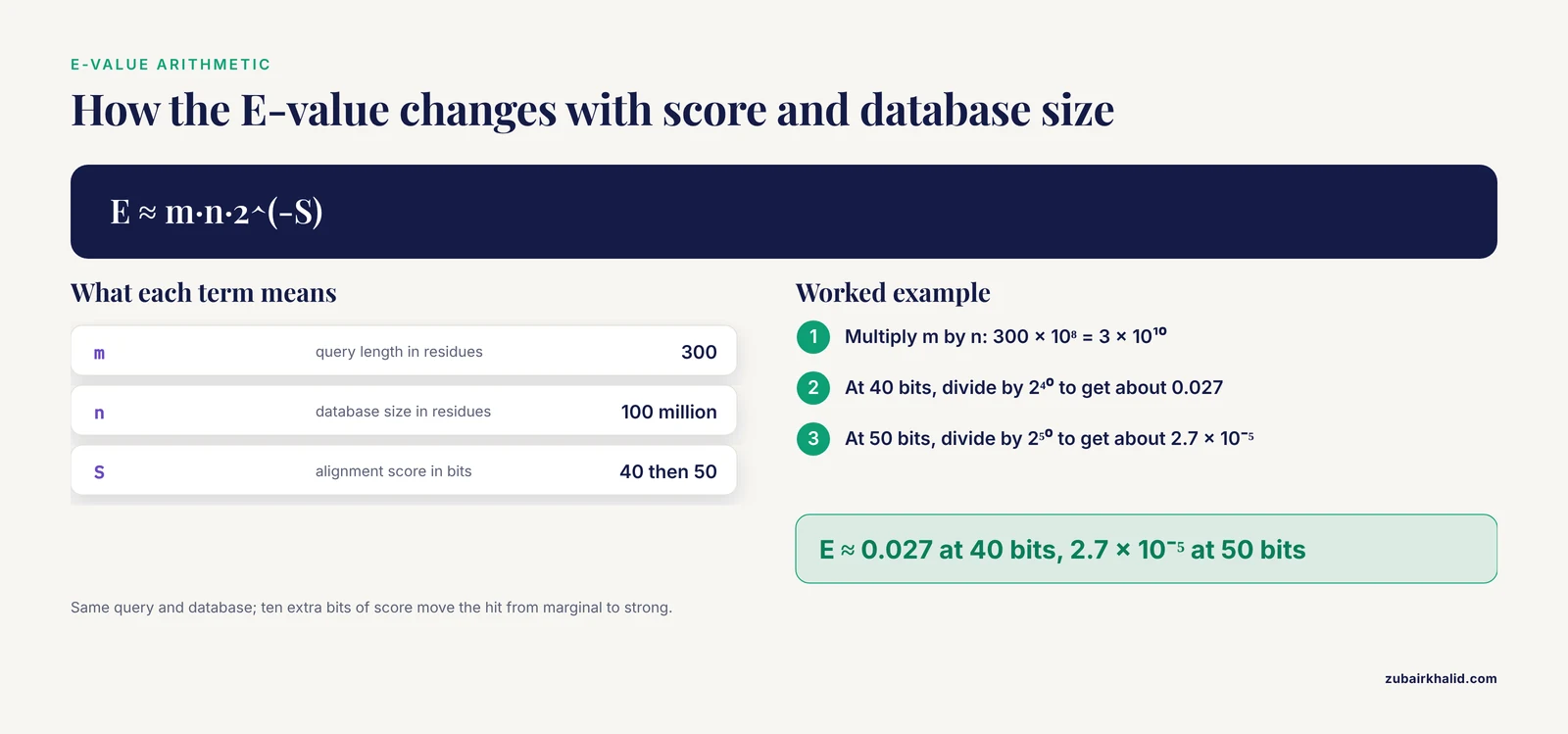
E-value. The expectation value estimates how many alignments with a score at least this good you would expect to find by chance in a database of the size searched. It depends on the alignment score and on the combined length of query and database. In the standard formulation, E = K·m·n·e^(-λS), where m is the query length, n is the database size, S is the raw score, and K and λ are scale parameters of the scoring system. In bit scores the relationship simplifies to E ≈ m·n·2^(-S). A worked example makes the numbers concrete. For a 300-residue query against a database of 100 million residues, an alignment scoring 40 bits gives E ≈ 300 × 10⁸ × 2⁻⁴⁰ ≈ 0.027, meaning roughly one hit that good per 37 searches by chance alone. At 50 bits, the same query and database give E ≈ 2.7 × 10⁻⁵. The same alignment score means less in a bigger database, which is why an E-value that was significant against Swiss-Prot can become marginal against the full UniProtKB.
Composition-based statistics. Proteins with skewed amino acid composition, such as coiled-coils and low-complexity regions, produce spuriously high raw scores against other compositionally biased sequences. Composition-based statistics adjust the scores to account for this. The refinement was a major accuracy improvement for iterative searching, and it is on by default in current tools [5]. Separately, statistical accuracy and retrieval accuracy are distinct properties, and the best-performing modern protein search programs combine evidence about both the alignment and the overall compositional similarity of the two sequences [6]. Practically, leave the default adjustment on unless you have a specific reason not to.
Iterative Searches: PSI-BLAST and PHI-BLAST Against UniProt
When a single blastp pass finds only close relatives, two BLAST variants extend your reach.
PSI-BLAST
PSI-BLAST (Position-Specific Iterated BLAST) takes the significant hits from a first search, builds a position-specific score matrix, a profile recording which amino acids are tolerated at each position of the aligned family, and then re-searches the database with that profile. Iterative profile searching substantially improves detection of distant homologs and is a standard step in domain identification workflows [7]. Profile-based searching is now a whole subfield, with faster and leaner profile-comparison algorithms developed specifically to make family-level searching cheaper than classic PSI-BLAST [8].
A three-iteration search against your local Swiss-Prot database:
psiblast -query my_query.fasta -db swiss -num_iterations 3 -evalue 1e-3 -out psi_report.txtSave the position-specific score matrix so you can reuse it and reproduce the exact final search:
psiblast -query my_query.fasta -db swiss -num_iterations 3 -out_ascii_pssm my_profile.pssm
psiblast -query my_query.fasta -db swiss -in_pssm my_profile.pssm -outfmt 6 -out profile_hits.tsv
Two cautions govern every PSI-BLAST run. First, composition-based statistics are central to its accuracy, and the refinements that introduced them dramatically reduced false positives in iterative searches [5]. Keep them enabled. Second, PSI-BLAST makes a characteristic error called homologous over-extension, in which an alignment that starts in a genuinely homologous region extends past the boundary into a neighboring, unrelated domain. The unrelated neighbor then gets absorbed into the profile and contaminates subsequent iterations. In controlled tests against complete protein sequences, 5 to 9 percent of alignments at iteration 5 were non-homologous, and over-extension accounted for the largest share of those errors [9]. The practical defenses are to inspect alignments visually at every iteration, to remove suspicious sequences from the alignment before the next iteration (the -in_msa and -save_align options support a manual workflow), and to be more skeptical of hits that appear only in later iterations.
PHI-BLAST
PHI-BLAST (Pattern-Hit Initiated BLAST) restricts search seeds to database sequences containing a user-specified pattern, which concentrates the search on proteins that share both the pattern and sequence similarity. Pattern-seeded searching was designed exactly for this purpose, improving specificity where a short recurring motif defines a protein family [10]. Patterns use a PROSITE-like syntax stored in a text file:
[AG]x(4)GK[ST]This example matches a lysine preceded by a small residue, four arbitrary positions, and glycine-lysine followed by serine or threonine, a motif characteristic of phosphate-binding loops. Run it against UniProt with:
psiblast -query my_query.fasta -db swiss -phi_pattern pattern.txt -outfmt 6 -out phi_hits.tsvPHI-BLAST answers a different question than PSI-BLAST. Use it when you already know a conserved motif that defines the family of interest, and use PSI-BLAST when you know nothing except your query sequence.
Reading and Verifying Your Results
A hit list is not an answer. Verification is where careful analysts separate themselves from casual users.
Check coverage, not just identity. A hit with 90 percent identity over 40 residues of a 400-residue query is a weak match to one short conserved patch. Percent identity means nothing without the alignment length and the fraction of the query covered. Read both from the tabular columns or the graphical overview.
Read the alignment for artifacts. Alignments that begin and end inside low-complexity tracts, consist mostly of glycine-serine runs, or align a polymeric tail to another polymeric tail are composition artifacts, not homology. The statistical machinery that accounts for compositional similarity exists precisely because naive scores mislead here [6].
Distrust remote matches for functional annotation. Cross-species protein identification by sequence similarity has a measurable dependence on the sequence identity between the query and the closest homolog in the database, as demonstrated in proteome-wide modeling of MS BLAST-style searches [11]. Below roughly 25 to 30 percent identity, which is the classical twilight zone, you are in territory where a single BLAST alignment cannot establish that two proteins share a function. Profile methods raise sensitivity, and profile-based representations of protein families are used in applications from remote homology detection to structural class prediction [12], but the transfer of specific functional claims still requires domain-level evidence.
Run a reciprocal check. Take your best hit, extract its sequence, and search it back against a database containing your original query. If the best hit of the reverse search is your original sequence, you have a reciprocal best hit, the simplest defensible criterion for calling an orthologous relationship.
Confirm annotation provenance. A Swiss-Prot entry states whether each function claim has experimental evidence or is inferred electronically. A TrEMBL entry's annotation is largely rule-based and inherits uncertainty from whatever curated entry seeded the rule. When you transfer a function claim into your own work, transfer it from the reviewed entry with experimental evidence, not from the first unreviewed hit with a plausible-looking name.
Look beyond sequence when the question is structural. BLAST against UniProt addresses sequence similarity. When the question is structural annotation of individual residues, dedicated BLAST-based pipelines against the Protein Data Bank with residue-level annotation modules exist for that purpose [13]. When the question is fold similarity between distant proteins, structural comparison methods outperform sequence comparison by design [14].
Repeat the search later. Databases grow continuously, and a new relative may be deposited next month. The ReHAB tool was built specifically to diff the results of the same PSI-BLAST query run against two versions of a database and surface the new hits, motivated by the observation that significant new matches get buried in long result lists from repeated searches [15]. At minimum, record the UniProt release version and date with your results so a future rerun is interpretable.
Common Mistakes and Limitations
These are the failures seen most often, with fixes.
Confusing the E-value with a probability. An E-value of 0.01 does not mean there is a 1 percent chance the hit is spurious. It means you would expect 0.01 hits with scores this good by chance in a database of this size. The distinction matters most in very large databases, where multiple near-threshold hits are expected and each individually looks marginal.
Ignoring database scope when quoting E-values. The same alignment scores differently against Swiss-Prot and the full UniProtKB because E scales with database size. If you quote an E-value, name the database version you searched.
Reporting percent identity without length or coverage. "95 percent identical" over 20 aligned residues is a motif match, not evidence of homology. Always report alignment length and coverage alongside identity, or better, report the bit score and E-value with them.
Letting PSI-BLAST drift. Iterative searches converge on whatever the profile contains, including contaminants absorbed through homologous over-extension [9]. Curate the included sequences at every iteration rather than accepting the automatic set, and stop iterating once new hits stop looking defensible.
Transferring names from unreviewed entries. TrEMBL entries can carry gene names propagated by annotation rules, and a chain of such transfers can amplify an error across dozens of entries. Trace any function claim back to a reviewed Swiss-Prot entry or primary literature.
Searching a nucleotide sequence with blastp. blastp expects protein input. A nucleotide query produces nonsense or errors. Use blastx for nucleotide queries against UniProt.
Over-reporting with -max_target_seqs. This option caps reported hits and interacts with the heuristic search order, so a low value can hide hits that would have been reported had the option been absent. If a reviewer or a colleague asks why a known homolog is missing from your table, this option is a common culprit. Raise it or rerun with the default when in doubt.
Treating BLAST scores as a universal measure of functional similarity. Sequence similarity networks built from BLAST bit scores cluster proteins one way, structure-based networks cluster them another way, and active-site similarity clusters them differently again. The clustering you get depends on the edge metric you chose, and functional hierarchies are best reflected by metrics matched to the question being asked [16]. BLAST bit scores are one input, not a complete functional distance.
Forgetting that BLAST is a heuristic. A failed search is not proof of absence. Hardware-accelerated full-sensitivity searches find similarities that heuristics miss [2]. If the biological question genuinely demands exhaustive sensitivity, follow BLAST with a slower, complete method on the candidate set.
Not recording versions. UniProt releases updated databases regularly, and BLAST parameters influence scores. Any result you intend to publish or reuse needs the database release, the tool version, and the full parameter list, all of which are captured by rerunning with -version and saving the command line alongside the output.
Frequently Asked Questions
Should I search Swiss-Prot or the full UniProtKB?
Search Swiss-Prot first when your goal is identification or functional annotation, because its reviewed entries give the most trustworthy names and function claims. Search the full UniProtKB when your goal is maximum recall, such as finding every known relative or identifying a protein from an poorly sampled lineage, and expect a hit list dominated by unreviewed near-duplicates.
What E-value cutoff should I use?
A cutoff of 1e-3 is a reasonable default for exploratory searches and 1e-5 is common for high-throughput pipelines, but the right value depends on database size and what you will do with borderline hits. Inspect anything near the cutoff manually rather than trusting the threshold to make the decision for you.
Can I BLAST a nucleotide sequence against UniProt?
Yes, with blastx, which translates your nucleotide query in all six frames before comparing it to the protein database. Do not paste a hand-translated sequence, because the correct frame is not always the obvious one.
Why do my results differ from a search I ran last year?
UniProt is updated on a rolling release schedule, so both the database contents and the hit statistics change over time. Record the release version with every search, and if you need to find new hits since a previous run, compare results across database versions the way the ReHAB tool does rather than eyeballing two long lists.
How do I speed up a command-line search against the full UniProtKB?
Increase -num_threads to the number of available cores, search a less redundant database such as UniRef90 when full redundancy is unnecessary, and consider raising the word size, since longer seed words for protein searches cut runtime by 20 to 30 percent at comparable retrieval accuracy. For many queries, batch them into one multi-FASTA file so the database is scanned once.
How do I restrict my search to one organism or a group of organisms?
On the UniProt web form, enter a taxonomy identifier in the restriction box, for example 9606 for human. On the command line, download just the proteomes you need with the UniProt REST API and build a small local database with makeblastdb, which is faster and gives cleaner results than filtering a whole-database output afterward.
Is a hit with only 30 percent identity meaningful?
It can be, but treat it as a hypothesis. Around 30 percent identity over a full-length alignment is the classic twilight zone where homology is plausible yet function transfer becomes unreliable, and profile methods such as PSI-BLAST exist precisely to add evidence in this range. Check that conserved catalytic or structural residues align and that the match spans the relevant domains.
What information should I record when reporting a UniProt BLAST result in a paper?
Report the query identifier, the UniProt accession and entry name of each hit, the percent identity, alignment length, bit score, and E-value, plus the UniProt release version, the BLAST program and version, and the full parameter settings. Without the database release and parameters, another scientist cannot reproduce your numbers.
Sources
- Rapid similarity searches of nucleic acid and protein data banks.
- Sensitivity and selectivity in protein similarity searches: a comparison of Smith-Waterman in hardware to BLAST and FASTA.
- Improved BLAST searches using longer words for protein seeding
- Finding Similar Nucleotide Sequences Using Network BLAST Searches
- Improving the accuracy of PSI-BLAST protein database searches with composition-based statistics and other refinements.
- Retrieval accuracy, statistical significance and compositional similarity in protein sequence database searches
- Protein domain identification and improved sequence similarity searching using PSI-BLAST
- PHOG-BLAST - a new generation tool for fast similarity search of protein families
- Homologous over-extension: a challenge for iterative similarity searches
- Protein sequence similarity searches using patterns as seeds.
- The Power and the Limitations of Cross-Species Protein Identification by Mass Spectrometry-driven Sequence Similarity Searches*S
- Prediction of protein structural class for low-similarity sequences using support vector machine and PSI-BLAST profile.
- BLAST-based structural annotation of protein residues using Protein Data Bank
- iSARST: an integrated SARST web server for rapid protein structural similarity searches
- Recent Hits Acquired by BLAST (ReHAB): A tool to identify new hits in sequence similarity searches
- Comparison of topological clustering within protein networks using edge metrics that evaluate full sequence, full structure, and active site microenvironment similarity