Structuring a Research Repository: Best Practices
By Dr. Zubair Khalid, DVM, MS, PhD ·

A folder of analysis files and a research repository differ in one key way: the repository pairs a deliberate directory structure with a version history that lets a reviewer, a collaborator, or you in two years rerun the work, while the folder only stores it. The rule of thumb for structuring a research repository is to keep everything needed to rerun the analysis in one Git repository, keep data that is too large or too sensitive for Git in an external store referenced by checksums, and name directories after the stages of the pipeline rather than after the day you created them.
A few definitions before the options. Git is a distributed version control system, a program that records snapshots of a project folder and keeps the full history on every copy. A repository is a project folder that Git tracks. A commit is one recorded snapshot, labeled with a message that says what changed and why. GitHub is the hosting service most researchers use to store Git repositories online, adding collaboration features such as pull requests, issue tracking, and automation. A review of version control in science laid out the case that still anchors this practice: Git provides a lightweight yet robust framework for managing the full suite of research outputs, including datasets, statistical code, figures, lab notes, and manuscripts, while giving individual researchers a way to retrace errors and giving collaborative teams a complete authorship trail [1].
Why Git Belongs at the Center of a Research Repository
Git for scientists runs on the same mechanics as Git for software teams, with one difference in emphasis. Software projects mostly version text. Research projects version text (code, manuscripts, metadata, configuration files) alongside binary files (sequencing output, imaging volumes, model weights), and that difference drives nearly every structural decision below.
Three properties make Git the right backbone:
- History you can interrogate. Every commit records who changed what, when, and why. The payoff described in the version control literature is concrete: researchers can track and compare versions, retrace errors to their origin, and explore new approaches in a structured manner while keeping a full audit trail [1].
- Distribution by default. Every clone of a repository contains the complete history. A laptop, an institutional server, and a hosting service can each hold a full copy, so no single disk failure destroys the project.
- A merge model built for collaboration. Contributors work asynchronously and merge their contributions at any time, all while a complete authorship trail accumulates [1]. For a lab spread across sites, that replaces emailing spreadsheets back and forth.
Git is also worth defining by what it is not. It is not a backup service or a file server. It is a history of deliberate snapshots. That distinction shapes everything that follows. Files that churn automatically, such as logs and caches, belong in .gitignore and out of history. Files that change rarely and matter deeply, such as code and metadata, belong in commits. Files too large to snapshot repeatedly belong behind a manifest in an external store.
Structure is what converts these properties into reproducibility. Git tracks changes line by line in text files, so the layout decides what a commit means. When code and generated results share a repository, a commit that touches one script and one results table reads as cause and effect. When forty files change at once across an unorganized folder, history becomes noise that no one can audit.
Research Repository Structure in Git: The Main Options
Four layouts cover nearly every research project, and most labs eventually run some combination of them. The table compares them side by side on the criteria that come up in real decisions.
| Structure | What lives in Git | Pros | Cons | Best for |
|---|---|---|---|---|
| Single project repository | Code, small data, results, manuscript | One history, one clone reruns everything, simplest audit trail | Binary data bloats history, access control is all or nothing | Single-study papers with modest data |
| Code repository plus external data store | Code, checksum manifests, metadata, manuscript | Git stays fast, sensitive data stays out, data can sit on compliant storage | Two systems to keep in sync, reruns need both pieces | Large, protected, or clinical data |
| Split repositories | Separate repos for tools, analyses, and papers | Independent versioning, clean tagged releases, reusable pipelines get their own history | Cross-repo version pinning, coordination overhead, drift risk | Pipelines and tools reused across projects |
| Standardized data repository | Data arranged in a community-standard layout | Predictable to tools and outsiders, enables shared pipelines and quality control | Standard may not fit your data type, less flexible | Consortia and shared processing platforms |
| Platform-managed repository | Models, data, and workflows inside an integrated platform | Enforced consistency, built-in validation and viewers | Lock-in, dependence on the platform's roadmap | Labs that want structure without maintaining it |
No layout wins on every criterion, which is why the pros and cons columns matter more than any universal ranking. The options also build on each other. The external data store exists because the single repository breaks on large data. Split repositories exist because a pipeline can outgrow a single project. Platforms exist because structure by policy fails when the team is large. The sections below take each option on its own terms.
Option 1: The Single Project Repository
The single project repository holds code, small data, results, and the manuscript in one Git history. It is the default for a single-study paper, and it is the structure most journal data-availability policies implicitly expect, because one link hands a reviewer everything.
A layout that works across languages and domains looks like this:
| Path | Contents | Purpose |
|---|---|---|
| README.md | Project overview, install steps, rerun command | The entry point for reviewers and future you |
| code/ | One script or module per pipeline stage | Keeps all logic in one place |
| data/raw/ | Immutable input files | Never edited by hand, never overwritten |
| data/metadata/ | Sample sheets and a data dictionary | Documents what each input means |
| results/ | Tables and figures written by code | Nothing here is typed by a human |
| doc/ | Protocols, decision notes, meeting summaries | Captures the context code cannot |
| environment.yml, requirements.txt, or renv.lock | Pinned software versions | Makes the software stack reinstallable |
| Snakefile or Makefile | Pipeline entry point | One command reruns everything |
| LICENSE | Reuse terms | Tells others what they may do |
| .gitignore | Patterns Git should skip | Keeps caches, secrets, and scratch files out of history |
Create it with standard commands:
mkdir myproject && cd myproject
git init
mkdir code data results doc
echo "# MyProject: differential expression analysis" > README.md
git add README.md
git commit -m "Start project: add README and directory plan"
Commit cadence matters as much as layout. Commit when a stage completes, with a message that records the decision:
git add code/02_filter_samples.py
git commit -m "Filtering: drop two outlier samples flagged by quality control"
The payoff of one shared history shows up the first time something breaks. Because a commit can pair a change in code with the change it produced in results, you can walk back through history to the exact commit that introduced a wrong figure. That is the audit trail property of version control in research, and it only works when the layout keeps code and outputs in the same repository and in predictable places [1].
Published methods show the pattern at its best. Pafnucy, a deep neural network that predicts protein-ligand binding affinity from a 3D grid representation of the complex, was released as a Git repository containing the model together with usage instructions and worked examples [2]. A reader could go from the paper to a running model without guessing where any file lived. That is the single-repository contract: one clone, everything present.
The limit is size. Git stores every version of every file forever, so a repository that absorbs large binaries grows heavy with every commit, and every clone downloads all of it. Once raw data stops fitting comfortably in the repository, move to the next option.
Option 2: Code Repository With an External Data Store
When data is too large, too sensitive, or both, the repository documents the data instead of containing it. Four mechanisms make the split trustworthy.
Checksum manifests. A checksum is a short fingerprint computed from a file's bytes, so any change to the file changes the fingerprint. A manifest is a plain-text inventory listing each file and its checksum. Generate one over the raw data and commit it:
sha256sum data/raw/* > data/checksums.txt
git add data/checksums.txt
git commit -m "Record input checksums for raw data"
Anyone rerunning the analysis verifies their copy of the data against the manifest before trusting any result. The manifest also documents, inside Git, exactly which inputs the results depend on.
Pointer-based large file support. Git Large File Storage (LFS) replaces large binary files with small pointer files inside the repository and stores the binaries on a separate server. Clones stay fast, and the large files still ride along under version control. It suits moderately sized binaries, not archive-scale collections.
A data dictionary. Commit a plain-text dictionary in data/metadata/ that defines every column, every code, and every unit in the external store. The repository then carries the meaning of the data even where it cannot carry the bytes.
Standardized layouts. When a field agrees on a structure, adopt it rather than inventing one. Brain Imaging Data Structure (BIDS) is a community standard that arranges neuroimaging datasets in predictable folders with descriptive filenames, so any person or tool can locate a subject, a session, and a file type without a codebook. NeuroStage, a web platform for routine MRI research, builds its workflow on this idea, supporting automatic upload, anonymization, organization into BIDS, and standard preprocessing, with interactive viewers that let researchers check BIDS classification results and quality control reports before preprocessing begins, preventing wasted computation on low-quality data [3]. A standard layout is what makes that kind of automation possible across many labs.
The split also solves an access problem. A repository can be private during the project, moved to institutional hosting when policy requires code to stay on premises, and made public at publication, while the data never leaves the storage system that holds it. The cost worth naming is sync: reruns now need both pieces, and the two can drift if the manifest is not updated when inputs change. Treat manifest updates as commits in their own right, with messages that say which inputs changed and why.
Option 3: Split Repositories
When a pipeline outlives the project that produced it, give it its own repository. The split usually looks like this: a tool or pipeline repository that is versioned and released independently, one or more analysis repositories that pin a specific pipeline version, and a manuscript repository, or the manuscript folded into the analysis repository.
The Genome Evaluation Pipeline (GEP) shows why the split earns its keep. GEP is a Snakemake-based command-line tool for genome assembly quality control, designed around the recommendations of international projects to standardize genome evaluation across the Tree of Life. Its Build Mode generates k-mer databases (a k-mer is a sequence of k consecutive letters) from high-accuracy sequencing reads with optional quality control and preprocessing, and its Evaluate Mode assesses assemblies using standard, gene content, and k-mer based metrics, producing reports that summarize contiguity, completeness, and correctness. The developers published it as a Git repository so other teams can adopt it directly [4]. A tool with that many potential users needs its own issues, its own releases, and its own history. Burying it inside one paper's analysis folder would hide it from everyone else.
The pros of splitting: the pipeline gets clean tagged releases, other groups can adopt it without your project's data and baggage, and each paper can record exactly which release it used. The cons: two or more histories to keep consistent, and a real risk of drift between the pipeline version a paper describes and the version its repository now contains. The fix for drift is mechanical. Record the pipeline's commit hash or release tag in the analysis README and in the header of every results file, and bump it deliberately when you upgrade.
Option 4: Standardized and Platform-Managed Repositories
Standards and platforms both impose structure from outside your own discipline, and they solve the same problem from two directions: what happens when you cannot rely on every contributor's good habits.
A standardized repository adopts a community layout such as BIDS, described above. The structure is decided once, by the field, and every tool that speaks the standard works on your data without configuration.
A platform-managed repository embeds Git inside software that enforces the structure. BioUML, a web-based integrated platform for systems biology, integrates Git repositories where users store their models and data, plugs in external programs and Jupyter kernels through Docker (a container technology that packages software with its dependencies), connects with Galaxy and its tool repository, runs workflows in several formats including CWL and nextflow, and provides two-way integration with R and Python so scripts can call platform functions and the other way around [5]. For a lab that wants the structure without maintaining it, the platform carries the burden.
NeuroStage applies the same idea to clinical imaging and shows the platform argument at its sharpest. It is a unified web platform that handles the workflow from scanner to processed, validated data, requires no programming skills, and can be deployed in the cloud or locally, which allows processing of protected health information with the same user experience as any other deployment [3].
The pros: consistency is enforced rather than requested, validation and viewers come built in, and new lab members inherit the structure on day one. The cons: you depend on the platform's continued existence and roadmap, you give up control over layout, and leaving means migrating. Choose this option when uniformity across many contributors matters more than flexibility for one.
Choosing a Structure: The Criteria That Decide Real Projects
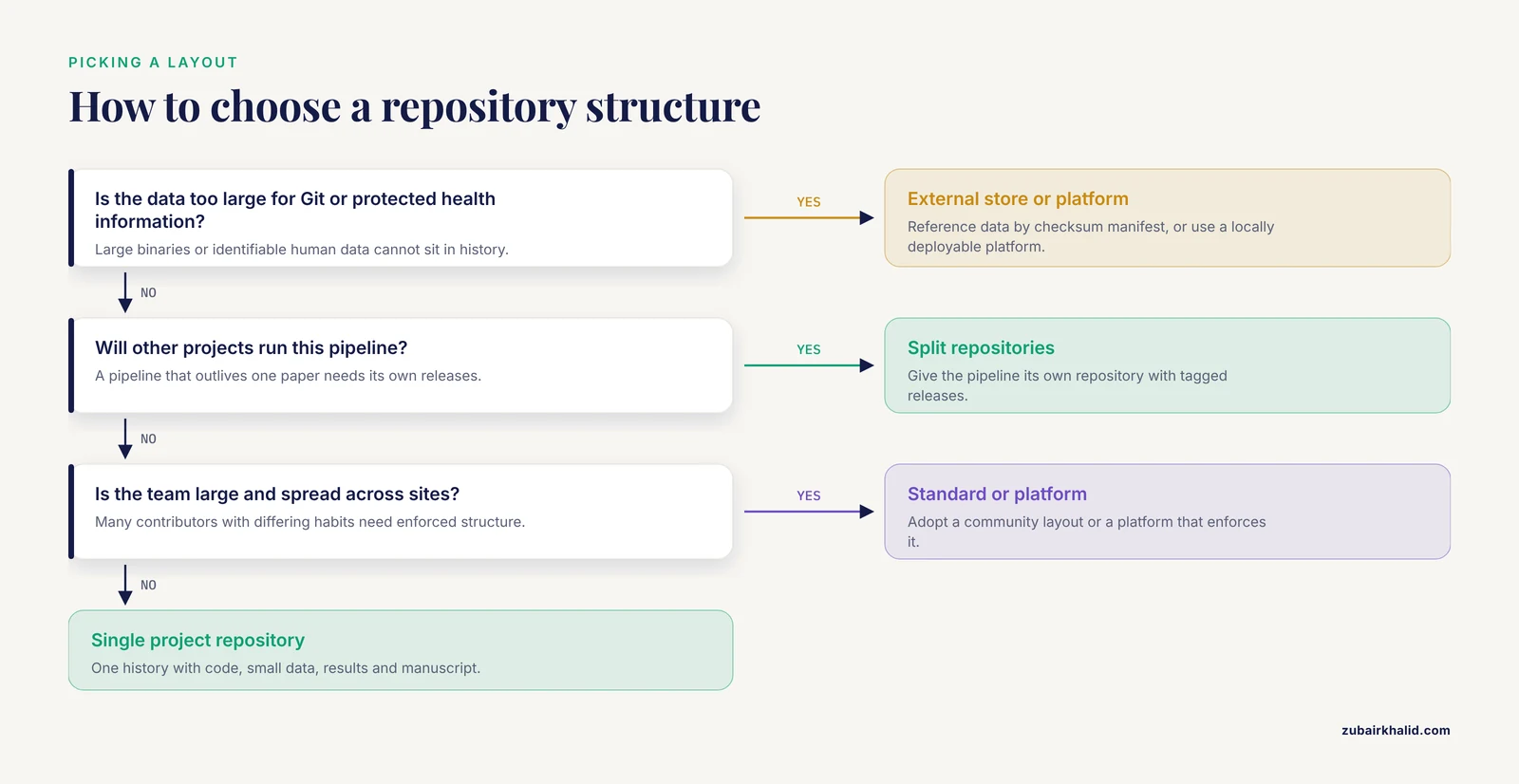
Five criteria decide the choice, roughly in the order they arise:
- Reproducibility requirements. Journals and funders increasingly expect code and data availability statements that actually resolve. A single repository with a one-command rerun satisfies those checks with the least effort, which is why it is the default.
- Data volume and sensitivity. Identifiable human data changes the answer. NeuroStage's local deployment option exists precisely so protected health information can be processed without leaving institutional infrastructure [3]. If data cannot move, the repository must reference it, not contain it.
- Reuse horizon. A pipeline run once belongs inside the analysis repository. A pipeline other projects will run deserves its own repository with tagged releases, the pattern GEP established [4].
- Team size and distribution. Git's collaboration model, where contributors work asynchronously and merge while the authorship trail stays intact, was built for distributed teams. The larger and more heterogeneous the team, the more structure should be enforced by standard or platform rather than requested by policy.
- Maintenance budget. A single repository is cheapest to maintain. Splits cost coordination. Platforms shift maintenance to someone else at the price of lock-in.
Mapping situations to choices:
| If your project looks like this | Choose |
|---|---|
| One analyst, one paper, data that fits on a laptop | Single project repository |
| Data too large for Git, or protected health information | Code repository plus external data store |
| A pipeline other projects will run | Split repositories with tagged releases |
| A consortium harmonizing metadata across sites | Metadata in Git with validation-gated publishing [6] |
| Clinical imaging with identifiable data | Platform-managed, deployable locally [3] |
Worked Scenarios
Scenario 1: A single-analyst genomics paper
You have a count matrix, a dozen figures, and a manuscript draft. Build the single project repository. Put one script per stage in code/ (quality control, normalization, differential expression, plotting), the count matrix in data/raw/, the sample sheet and a column dictionary in data/metadata/, generated tables and figures in results/, and pinned package versions in environment.yml. Add a Snakefile that reruns the whole analysis from one command. Commit after each stage completes, with messages that say why, and tag the repository v1.0.0 on the day the manuscript is submitted. A reviewer who asks for code gets one clone and one command.
Scenario 2: A machine learning method release
You developed a model and want other groups to adopt and verify it. Follow the Pafnucy pattern: the repository carries the model code together with usage instructions and worked examples, so the path from paper to running model is explicit [2]. The ZING method for protein-protein complex structure prediction shows why that openness matters with numbers attached. ZING combines predictions from a template-based method (SPRING) with a template-free method (ZDOCK) and reached a 68.2 percent success rate in the top 10 predictions on the protein-protein docking benchmark version 5.0, against 52.1 percent for SPRING and 35.9 percent for ZDOCK alone, and the method is available for download as a GitHub repository [7]. Those comparisons are only checkable because the repository exists. Structure yours so a newcomer can run your benchmark in one command.
Scenario 3: A consortium harmonizing metadata
The German Center for Lung Research needed consortium-wide queries through one interface, but the participating study sites' register data differed in software, coding systems, and data field coverage, and no single existing terminology, including LOINC and SNOMED, covered all their concepts with the needed granularity. The answer was a collaborative metadata management platform whose key parts are RDF (Resource Description Framework, a graph data model for representing metadata) and Git [6]. Structurally this is the external-data-store pattern inverted: the metadata is small enough to live in Git, the bulk register data stays at the sites, and the shared conceptual layer lives in the repository where every site can propose changes.
Scenario 4: Clinical MRI with protected health information
Identifiable images cannot be pushed to a public host, and the analysis still needs standard structure and preprocessing. This is the case where the platform-managed option earns its keep, because local deployment keeps identifiable data inside institutional walls while the standardized layout keeps processing predictable and quality control visible before compute is spent [3].
Scenario 5: A reusable evaluation pipeline
Your assembly quality control workflow has outgrown your own projects. Split it out. Give it its own repository with a Snakemake entry point, documented modes, small test data for a smoke test, and a tagged release for every version others might cite. Publish it as a standalone Git repository, the same pattern the GEP developers used [4], and record the release tag in every analysis repository that runs it.
Automation: Continuous Integration and Validation
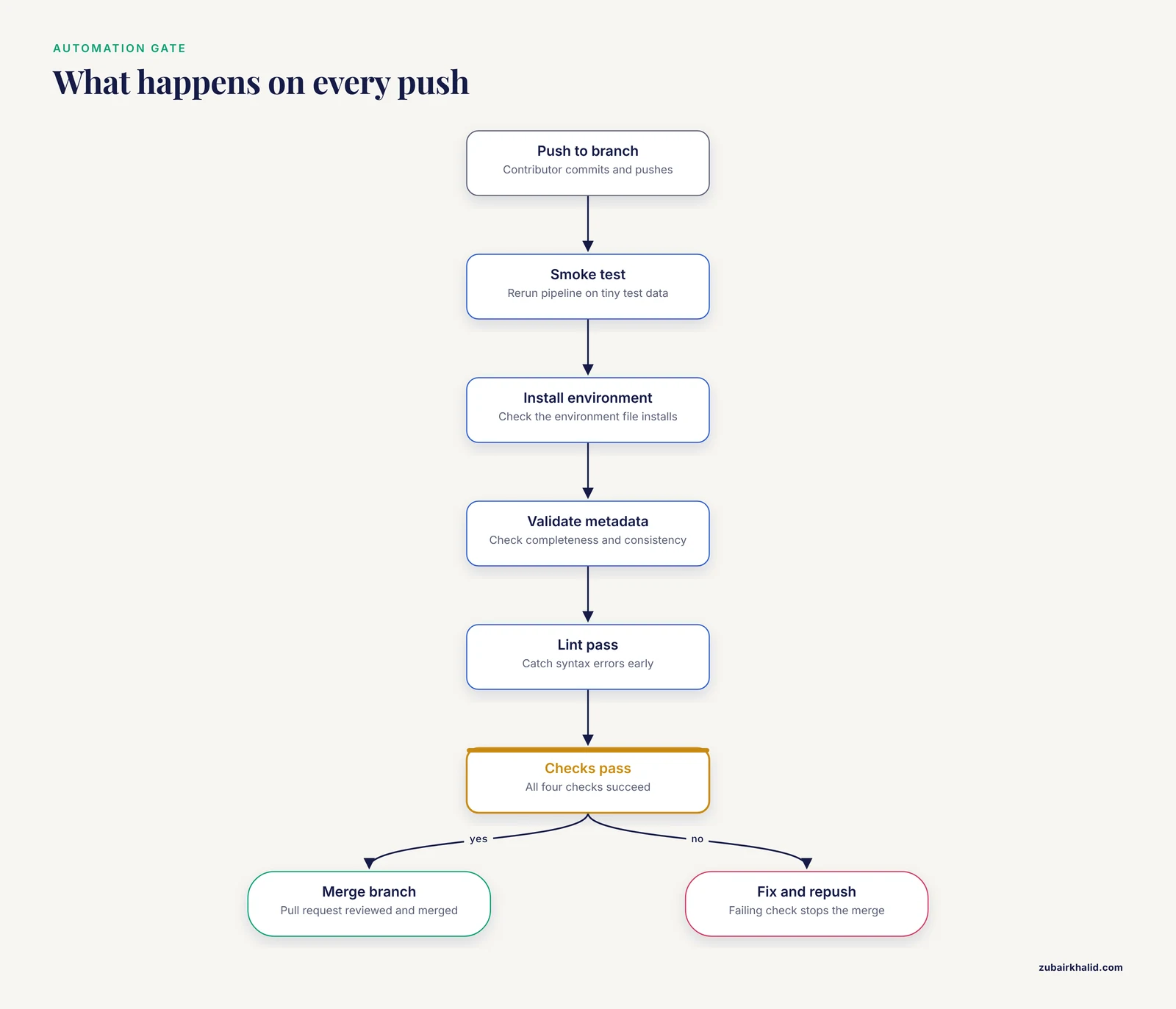
Continuous integration (CI) is the practice of running automated checks on every push to a repository. GitHub Actions provides it on GitHub, and institutional GitLab servers provide the equivalent. In a research repository, four checks earn their keep quickly:
- A smoke test that reruns the pipeline on a tiny test dataset and fails loudly if any stage breaks.
- A check that the environment file actually installs.
- Validation of metadata for completeness and consistency.
- A lint pass that catches syntax errors before reviewers do.
Structure is what makes automation possible. Checks only work when the pipeline entry point sits in a known location, test data sits in a known folder, and the environment file has a standard name. A predictable layout is not cosmetic, it is the interface your automation calls.
CI also leaves a record that is itself research-grade. One recent dataset paired CI/CD pipeline workflow history with code-level repository metrics across 34 highly active open-source projects, capturing 303,079 execution records that combine archived Travis CI data with live GitHub Actions metadata and deep Git commit history, including pipeline durations, final status, triggering events, code churn (lines added and deleted), and the number of changed files [8]. Repositories that run CI from day one accumulate that operational record automatically, and the record is only interpretable because workflow files live in predictable places.
The validation-gated publishing pattern closes the loop. The German Center for Lung Research's metadata platform publishes updated metadata automatically and immediately after validation tests for completeness and consistency pass [6]. Wire the same gate into any repository that feeds a public resource: nothing moves to the published branch or the archived snapshot unless the checks pass.
Everyday Habits That Keep the Structure Honest
Structure decays without habits. Five keep a repository honest:
- Write commit messages for the reader six months out. State the why, not just the what. "Fix bug" says nothing. "Fix sample swap in merging step, two samples had reversed identifiers" pays for itself the first time you retrace an error.
- Branch per question. Start a branch for each analysis question or figure revision, merge it when it answers the question, and delete it. History then reads as a list of answered questions rather than a stream of edits.
- Tag releases. A tag is a named marker on a commit. Run
git tag v1.0.0at submission and at each revision, then push the tag. Papers should cite tags, not moving branches. - Decide about big files before the first commit. Removing a large file later does not shrink history, because every past version remains. The cheapest time to route big data to an external store is day one.
- Test the clone, not the original. Periodically clone the repository fresh on another machine and rerun the pipeline. The fresh clone is the honest test of whether a stranger could reproduce the work.
For researchers using GitHub, the pull request doubles as the review unit: a colleague comments on the branch before it merges, which turns structure into a shared habit rather than a personal one.
Common Mistakes and Limitations
These are the mix-ups that cost the most rework:
- Committing large raw data to Git. Every version of every file stays in history forever, so binaries make every clone slow and every push heavy. Keep raw data external and commit a checksum manifest instead.
- A README that never says how to run anything. A repository without run instructions is a backup, not a research repository. Put install steps and the rerun command at the top.
- Unpinned software. Results that depend on whatever package versions were current last Tuesday cannot be guaranteed to reproduce. Commit an environment file, and use a container for anything fragile.
- Hand-edited results. The moment someone edits a figure or table by hand, the audit trail breaks and no commit history can explain the file. Results directories should contain only files written by code.
- Vague, giant commits. A commit labeled "update" that touches forty files destroys the value of history. The audit trail argument for Git depends on commits that record what changed and why [1]. Commit when a unit of work completes.
- Mutable raw data. If data/raw/ can change silently, every downstream result is suspect. Make raw inputs immutable and regenerate everything downstream from them.
- Secrets in history. Credentials committed once remain in history even after later removal. Keep secrets out of the repository entirely and list their file patterns in .gitignore.
- Treating a public repository as an archive. Hosts change, links rot. Tag a release, deposit a snapshot with an archival service that issues a Digital Object Identifier (DOI), and cite the DOI in the paper.
Two limitations sit beyond any layout. Structure is necessary but not sufficient: a well-organized repository running incorrect code reproduces the wrong result efficiently, and no directory scheme substitutes for domain expertise when interpreting the outputs. Git's strengths are also text-shaped, so binary-heavy projects will always need the external-store pattern and the discipline that comes with it. For human-subject data, repository decisions interact with institutional security review, which no directory layout replaces.
Frequently Asked Questions
What is the best research repository structure for Git?
For most single-study projects, one repository with code/, data/, results/, and doc/ directories, a pinned environment file, and a single pipeline entry point is the best structure. Move to a split or platform-managed layout only when data size, sensitivity, or reuse across projects demands it.
Can I commit raw data files to Git?
Commit small, text-like inputs such as count matrices and sample sheets, and keep large binaries in external storage referenced by a checksum manifest. Git keeps every version of every file in its history, so large binaries slow every clone permanently.
How do I structure a Git repository for a scientific paper?
Mirror the pipeline stages: one script per stage in code/, immutable inputs in data/raw/, generated outputs in results/, protocols in doc/, plus an environment file and a README whose first instructions are the install and rerun commands. Tag the repository when the manuscript is submitted.
Do researchers need GitHub, or is Git enough on its own?
Git alone already provides history, branching, and offline version control. Hosting adds backup, collaboration, issue tracking, and continuous integration, and any host works, including institutional servers running the same Git software.
How often should I commit, and how large should commits be?
Commit each time a unit of work completes, such as one pipeline stage or one figure revision. Small, frequent commits with messages that explain the why make the history usable as an audit trail.
How do I make my repository citable in a publication?
Tag a release, deposit that snapshot with an archival service that issues a DOI, and cite the DOI in the paper while keeping the live repository linked in the README. The archive preserves the exact state used for the paper, and the repository carries future development.
Sources
- Git can facilitate greater reproducibility and increased transparency in science.
- Development and evaluation of a deep learning model for protein-ligand binding affinity prediction.
- Democratizing data sharing and processing of routine MRI data acquired for neuroimaging research.
- Genome Evaluation Pipeline (GEP): a fully automated quality control tool for parallel evaluation of genome assemblies.
- BioUML-towards a universal research platform.
- Using RDF and Git to Realize a Collaborative Metadata Repository.
- Integrating ab initio and template-based algorithms for protein-protein complex structure prediction.
- An empirical dataset combining repository metrics and pipeline workflows for predictive software analytics.