How to Build a Reproducible Bioinformatics Pipeline in Python
By Dr. Zubair Khalid, DVM, MS, PhD ·

By the end of this guide you will have built, run, and tested a small but complete reproducible bioinformatics pipeline in Python. The template reads FASTA files, computes GC content and sequence lengths, writes a summary table, records its own configuration and package versions, downloads data from NCBI with automatic retries, and passes an automated test suite. You will also lock the environment so a collaborator on another computer gets the same numbers you did, and package the whole thing so it runs from a single command.
If you are new to python for bioinformatics, the walkthrough doubles as a short Biopython tutorial covering sequence parsing and NCBI queries. The same skeleton scales up to RNA-seq, phylogenetics, or image analysis. Step-by-step Python pipeline guides with reproducible environments are now standard practice across fields, from neuroradiomics [1] to chloroplast genomics, where a 14-module suite carries raw reads through to publication-ready outputs [2].
Here is what you need on hand before starting:
- A computer with at least 4 GB of free RAM and roughly 500 MB of free disk space.
- Miniconda or Miniforge installed (any recent release).
- A terminal (Terminal on macOS, PowerShell or WSL on Windows, any shell on Linux).
- Git, for versioning the code and config. Optional but strongly recommended.
- Docker, only for the optional container step near the end.
What Reproducibility Requires
Reproducibility means that the same inputs, the same code, and the same software environment produce the same outputs, down to the numbers in your tables. In bioinformatics this is harder than it sounds because of dependencies. A dependency is any external software your code relies on, and each dependency has its own release cycle. Identical code can produce different results depending on which versions are installed, and incomplete documentation of versions undermines the analysis [3]. Version pinning, which means fixing exact version numbers in a file rather than installing "whatever is current", is the first line of defense.
An environment is the specific set of installed interpreters and package versions your code runs against. Reproducible pipelines treat the environment as part of the analysis, not as a given.
There is also an honest scope question. Scripting languages, particularly Python, R, and notebooks, are popular and sufficient for small-scale pipelines intended for a single user, but they are not enough on their own to support large-scale, shareable, maintainable, and reusable pipelines that handle large volumes of data on high-performance computing clusters [4]. The template in this guide makes the small-to-medium case reproducible by default, and its structure keeps the door open for workflow managers when you outgrow it.
Python for bioinformatics earned its central position through libraries such as Biopython for sequence work, pandas for tables, NumPy for arrays, and scikit-learn for modeling. Published pipelines routinely build on exactly this stack, including a public-health pipeline that combines Pandas, scikit-learn, statsmodels, and python-docx in a single Python-only workflow [5].
The Template at a Glance
The template follows six design rules drawn from how working pipelines are actually built:
- One declarative config file drives every run. The TRaP toolkit encodes complete processing pipelines into a single configuration file so the same workflow behaves consistently across heterogeneous systems [6], and EEG-Pype saves and loads configurations so users can rerun analyses in batch [7].
- Core logic lives in small modules that expose both a Python API and a command-line interface. PyPeakRankR provides exactly this pairing, with a CLI and a matching Python API, and separates deterministic feature extraction from downstream ranking so strategies can be benchmarked transparently [8].
- Data moves between stages as pandas DataFrames. BioImageIT adopts pandas DataFrames as the universal data structure for inter-node communication and automatically captures metadata for every processing step [9].
- Every run writes to its own output folder containing results, logs, and a manifest.
- Tests guard each module against silent breakage.
- The environment lock travels with the code, so the dependency set is documented, not remembered [3].
The project layout looks like this:
gcprofiler/(project root)gcprofiler/environment.yml(pinned dependency list)gcprofiler/config.yaml(all run settings)gcprofiler/data/fasta/(input files, never edited by the pipeline)gcprofiler/src/gcprofiler/sequence_stats.py(core computation)gcprofiler/src/gcprofiler/ingest.py(remote downloads with retries)gcprofiler/src/gcprofiler/cli.py(command-line entry point)gcprofiler/tests/test_sequence_stats.py(pytest tests)gcprofiler/results/(created at runtime, one folder per run)gcprofiler/README.md(install and run instructions)
This template format follows the common src layout, where importable code lives under src/ and never depends on your current working directory. Inputs stay read-only under data/, and nothing the pipeline writes ever lands next to the code.
A Reproducible Bioinformatics Pipeline Python Template, Step by Step
Everything from here on is one worked example. Type the commands in order from the project root and you will finish with a runnable, tested, shareable pipeline.
Step 1. Create a Pinned Environment
Create the project folder, then an environment file that fixes exact versions:
# environment.yml
name: biopipeline
channels:
  - conda-forge
  - bioconda
  - nodefaults
dependencies:
  - python=3.12
  - biopython=1.84
  - pandas=2.2
  - numpy=1.26
  - pyyaml=6.0
  - pytest=8.2
Each line pins a package. biopython is the standard library for reading biological sequence formats and querying NCBI. pandas handles tables. pyyaml reads the config file. pytest runs the tests. Build and activate it:
conda env create -f environment.yml
conda activate biopipeline
Expected output from the create step ends like this:
Preparing transaction: done
Verifying transaction: done
Executing transaction: done
#
# To activate this environment, use
#     $ conda activate biopipeline
#
Verify the imports before writing any code:
python <<'EOF'
import sys
import Bio
import pandas
import yaml
print(sys.version.split(), Bio.__version__, pandas.__version__, yaml.__version__)
EOF
Expected output (your patch versions may differ slightly):
3.12.4 1.84 2.2.3 6.0.2If the conda solver stalls for minutes on this file, install mamba and run mamba env create -f environment.yml instead. It resolves the same specification with a faster solver.
Step 2. Write the Config File
The config file is the single place a run's settings live. YAML is a human-readable configuration format that parses directly into Python dictionaries. Create config.yaml at the project root:
run_name: demo_run
input_dir: data/fasta
output_dir: results
min_length: 5
summary_format: tsv
entrez_email: [email protected]
retries: 3
The parameters that matter:
| Parameter | Purpose | Example value | Notes |
|---|---|---|---|
run_name | Names the output folder for this run | demo_run | Change per run so results never overwrite each other |
input_dir | Folder of input FASTA files | data/fasta | Relative to the project root |
output_dir | Parent folder for results | results | One subfolder per run_name |
min_length | Minimum sequence length in bases to pass QC | 5 | Set to 5 for the toy data, raise it for real reads |
summary_format | Output table format | tsv | tsv or csv |
entrez_email | Contact email sent with NCBI API requests | [email protected] | NCBI asks that automated scripts identify themselves |
retries | Retry attempts for downloads | 3 | Delay grows with each attempt |
Two habits make the config earn its keep. First, never hardcode any of these values in the code. Second, copy the config into the run's output folder at runtime, which Step 4 does, so every result folder carries a record of exactly what settings produced it. That single habit eliminates the most common reproducibility failure in practice, which is results that no longer match any known settings.
Step 3. Build Small Modules with a Matching API
Create the package skeleton:
mkdir -p src/gcprofiler tests data/fasta
touch src/gcprofiler/__init__.py
FASTA is the plain-text sequence format in which each record starts with a header line beginning with >, followed by the sequence itself. GC content is the percentage of bases in a sequence that are guanine or cytosine. Put the core computation in src/gcprofiler/sequence_stats.py:
from pathlib import Path

import pandas as pd
from Bio import SeqIO

def summarize_fasta(path, min_length=50):
    """Return a DataFrame with one row per FASTA record."""
    rows = []
    for record in SeqIO.parse(path, "fasta"):
        seq = str(record.seq).upper()
        length = len(seq)
        gc_count = seq.count("G") + seq.count("C")
        gc_percent = round(100 * gc_count / length, 2) if length else None
        rows.append(
            {
                "file": path.name,
                "id": record.id,
                "length_bp": length,
                "gc_percent": gc_percent,
                "passed_min_length": length >= min_length,
            }
        )
    return pd.DataFrame(rows)

def summarize_dir(input_dir, min_length=50):
    """Summarize every FASTA file in a folder."""
    frames = []
    for path in sorted(Path(input_dir).glob("*.fasta")):
        frames.append(summarize_fasta(path, min_length))
    if not frames:
        raise FileNotFoundError(f"No .fasta files found in {input_dir}")
    return pd.concat(frames, ignore_index=True)
A pandas DataFrame is a labeled in-memory table, and it is the right currency between stages because every downstream tool in the scientific Python stack accepts one [9]. The function contract is deliberately narrow, DataFrame in, DataFrame out, which mirrors how production packages structure extraction steps [8].
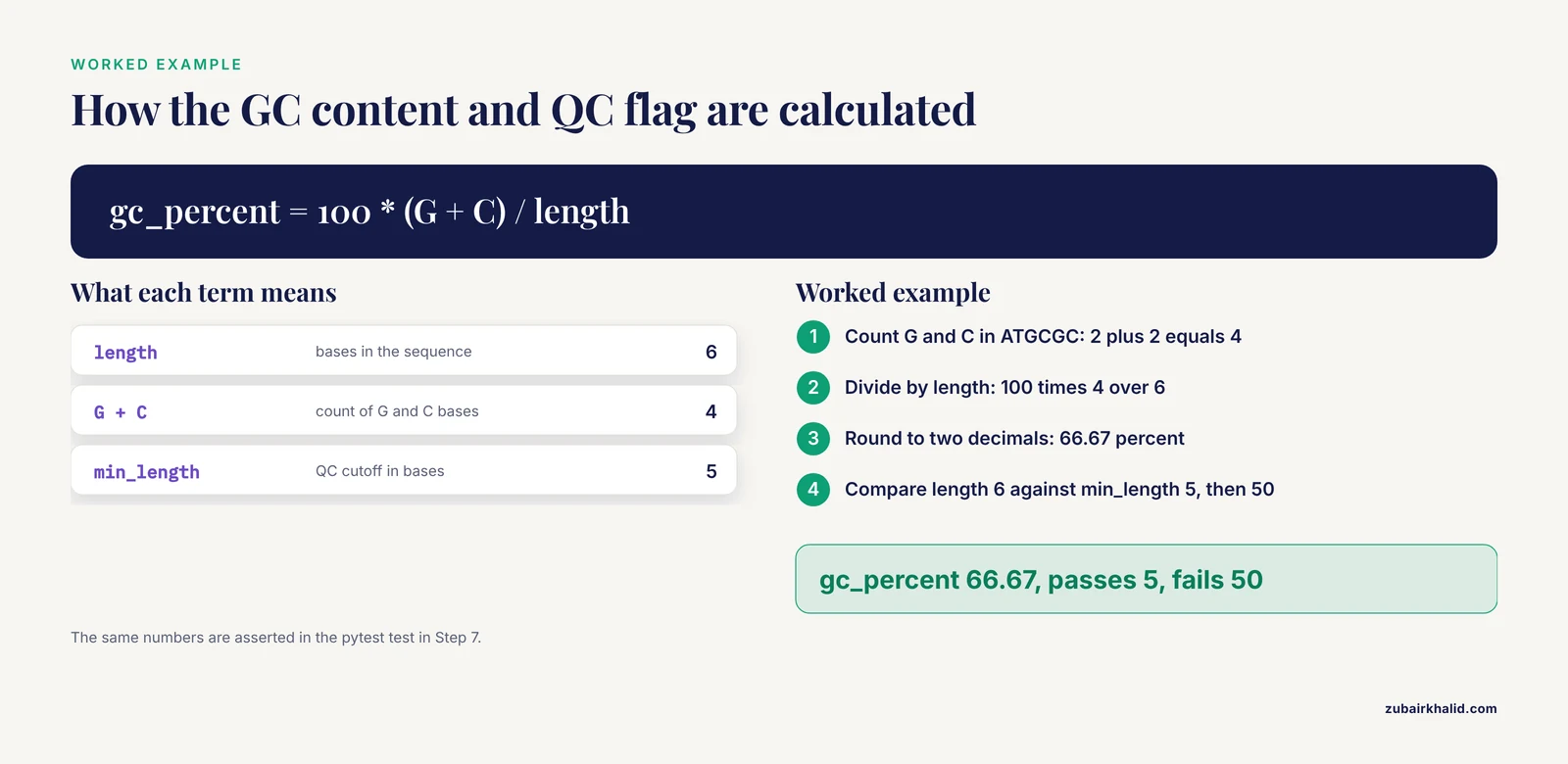
Worked calculation for the QC flag. For the six-base sequence ATGCGC, G appears twice and C appears twice, so GC content is 100 × 4 ÷ 6 = 66.67 percent, and the record passes a min_length of 5 but fails a min_length of 50. Every number the pipeline later writes traces back to arithmetic this simple, which is what makes the tests in Step 7 meaningful.
Step 4. Add a Command-Line Entry Point with Logging
A command-line interface (CLI) is the set of commands you type in a terminal to run a program. Create pyproject.toml at the project root so the package installs properly:
[build-system]
requires = ["setuptools>=68"]
build-backend = "setuptools.build_meta"

[project]
name = "gcprofiler"
version = "0.1.0"
requires-python = ">=3.11"
dependencies = ["biopython", "pandas", "pyyaml"]

[project.scripts]
gcprofiler = "gcprofiler.cli:main"

[tool.setuptools.packages.find]
where = ["src"]
Then create src/gcprofiler/cli.py:
import argparse
import json
import logging
import platform
import sys
from pathlib import Path

import Bio
import pandas as pd
import yaml

from gcprofiler.sequence_stats import summarize_dir

LOG_FORMAT = "%(asctime)s %(levelname)s %(name)s %(message)s"

def parse_args(argv=None):
    parser = argparse.ArgumentParser(description="GC-content profiling pipeline")
    parser.add_argument("-c", dest="config", required=True, help="path to config.yaml")
    parser.add_argument("-f", dest="force", action="store_true", help="rerun even if outputs exist")
    return parser.parse_args(argv)

def main(argv=None):
    args = parse_args(argv)
    with open(args.config) as handle:
        config = yaml.safe_load(handle)

    run_dir = Path(config["output_dir"]) / config["run_name"]
    log_dir = run_dir / "logs"
    log_dir.mkdir(parents=True, exist_ok=True)

    logging.basicConfig(
        level=logging.INFO,
        format=LOG_FORMAT,
        handlers=[
            logging.StreamHandler(sys.stdout),
            logging.FileHandler(log_dir / "run.log", mode="w"),
        ],
    )
    log = logging.getLogger("gcprofiler")

    summary_path = run_dir / "summary.tsv"
    if summary_path.exists() and not args.force:
        log.info("Outputs for %s already exist. Use -f to rerun.", config["run_name"])
        return 0

    log.info("Python %s on %s", platform.python_version(), platform.system())
    log.info("Biopython %s, pandas %s", Bio.__version__, pd.__version__)

    table = summarize_dir(config["input_dir"], min_length=config["min_length"])
    table.to_csv(summary_path, sep="\t", index=False)
    log.info("Wrote %s with %d rows", summary_path, len(table))

    manifest = {
        "run_name": config["run_name"],
        "python_version": platform.python_version(),
        "biopython_version": Bio.__version__,
        "pandas_version": pd.__version__,
        "platform": platform.system(),
        "config": config,
    }
    with open(run_dir / "manifest.json", "w") as handle:
        json.dump(manifest, handle, indent=2)
    log.info("Wrote manifest.json")
    return 0

if __name__ == "__main__":
    raise SystemExit(main())
Install the package in editable mode and you get the gcprofiler command:
pip install -e .Three details in this file carry most of the reproducibility weight. The log goes both to the terminal and to a file, because a saved log alongside results improves documentation and makes reruns auditable, which is the same design choice EEG-Pype makes [7]. The log records Python, Biopython, and pandas versions on every run, so a mysterious number in a six-month-old result can always be traced to a specific environment. The manifest is a small JSON file that records what produced this output, including a verbatim copy of the config.
Step 5. Ingest Remote Data with Retries
Real pipelines rarely start from files that are already on disk. The public-health pipeline cited earlier ingests data from public APIs with automated retries before analysis and reporting [5]. Add src/gcprofiler/ingest.py:
import time

from Bio import Entrez

def fetch_with_retries(fetch_fn, attempts=3, delay_s=5):
    """Call fetch_fn with growing delays between attempts."""
    for attempt in range(1, attempts + 1):
        try:
            return fetch_fn()
        except Exception:
            if attempt == attempts:
                raise
            time.sleep(delay_s * attempt)

def fetch_fasta(accession, email):
    """Download one FASTA record from NCBI by accession number."""
    Entrez.email = email

    def run():
        with Entrez.efetch(
            db="nucleotide", id=accession, rettype="fasta", retmode="text"
        ) as handle:
            return handle.read()

    return fetch_with_retries(run)
Entrez.efetch queries NCBI's Entrez system, and the function returns the FASTA text, a header line beginning with > followed by the sequence in fixed-width lines. Use it interactively or from a script:
from gcprofiler.ingest import fetch_fasta

text = fetch_fasta("NC_001416", "[email protected]")
Path("data/fasta/lambda.fasta").write_text(text)
The retry wrapper matters more than it looks. Transient network failures and rate limits are normal during bulk downloads, and a pipeline that dies on the first timeout forces manual babysitting, which is where undocumented manual fixes creep in. The delay grows with each attempt (5, then 10, then 15 seconds), and after the final attempt the exception propagates so the failure is loud rather than silent. NCBI also asks that automated scripts identify themselves with a contactable email and keep request rates modest, which the entrez_email config parameter handles.
Step 6. Keep Stages Resumable with Structured Outputs
The skip logic in cli.py (return early when summary.tsv exists unless -f is passed) is the simplest form of resumability. It costs three lines and saves hours on long runs. Two structural habits extend it:
- Classify outputs into structured folders by stage, so intermediate files remain usable as inputs for further or parallel analyses. PePApipe does exactly this, classifying generated files into structured folders for its thirteen integrated tools [10].
- Organize the pipeline into numbered phases with clear boundaries, the way CGAS separates genome assembly and annotation, comparative genomics, and phylogenetic inference into three sequential phases [2].
For this template the convention is one folder per run under results/, with logs/ inside it. When you add a second stage later, write its outputs into the same run folder with a stage prefix (01_summary.tsv, 02_filtered.tsv) and apply the same exists-check before each stage. A stage that finds its outputs present does nothing, so reruns resume where they stopped instead of repeating completed work.
Step 7. Test with pytest
Create tests/test_sequence_stats.py:
from gcprofiler.sequence_stats import summarize_fasta

FASTA_TEXT = ">contig_1 demo\nATGCGC\n"

def test_gc_and_length(tmp_path):
    fasta = tmp_path / "demo.fasta"
    fasta.write_text(FASTA_TEXT)
    table = summarize_fasta(fasta, min_length=5)
    row = table.iloc
    assert row["length_bp"] == 6
    assert row["gc_percent"] == 66.67
    assert bool(row["passed_min_length"]) is True
Run it:
pytestExpected output:
============================= test session starts =============================
collected 1 item

tests/test_sequence_stats.py .                                                 [100%]

============================== 1 passed in 0.03s ==============================
The test encodes the hand calculation from Step 3, so a parser change or a pandas upgrade that silently alters the arithmetic fails loudly here instead of quietly in a paper. tmp_path is a pytest fixture that provides a fresh temporary directory per test, which keeps tests independent of your real data. As the pipeline grows, add one test per module with tiny fixture inputs and known expected outputs. Quality control deserves this same explicit treatment at the data level. The TidyMS project built a model-driven curation pipeline with dedicated quality assessment tools for LC-MS data precisely because data quality review lacked consensus practices [11].
Step 8. Lock and Share the Environment
The environment.yml you wrote in Step 1 pins the packages you named. A lock file goes further and pins the complete resolved set, including every transitive dependency:
conda env export > environment.lock.ymlCollaborators recreate the exact environment with:
conda env create -f environment.lock.yml
conda activate biopipeline
If you maintain a pure pip variant, pip freeze > requirements.lock.txt serves the same role. Version control the code and both files with Git:
git init
git add environment.yml environment.lock.yml config.yaml pyproject.toml src tests
git commit -m "Initial reproducible pipeline template"
Add input integrity with checksums, fixed-length fingerprints computed from a file's bytes:
sha256sum data/fasta/*.fasta > data/checksums.txtFor the strongest guarantee, wrap everything in a container, a portable package that holds an application together with its entire runtime environment. Create a file named Dockerfile:
FROM python:3.12-slim
WORKDIR /app
COPY requirements.lock.txt .
RUN pip install -r requirements.lock.txt
COPY pyproject.toml .
COPY src/ src/
RUN pip install -e .
ENTRYPOINT ["gcprofiler"]
Build and run it:
docker build -t gcprofiler:0.1 .
docker run -v "$PWD/data:/app/data" -v "$PWD/results:/app/results" -v "$PWD/config.yaml:/app/config.yaml" gcprofiler:0.1 -c config.yaml
Containerization is the direction the field is moving. FairFlow generates ready-to-run interfaces for R, Python, Bash, Galaxy, Nextflow, and StreamFlow from a single declarative specification, each executing inside a version-locked container, so end users need only Docker and their preferred language [3]. Distributing your own work through PyPI is a lighter-weight option that still travels well. aPhyloGeo ships as both a PyPI package and plain scripts for Linux, macOS, and Windows [12], and the pyproject.toml in this template puts you on the same path.
Step 9. Run It End to End
Add a demo input file at data/fasta/demo.fasta:
>contig_1 demo fragment
ATGCGC
>contig_2 demo fragment
AATTAATGGA
Run the pipeline:
gcprofiler -c config.yamlExpected terminal output:
2026-11-11 09:14:02,101 INFO gcprofiler Python 3.12.4 on Linux
2026-11-11 09:14:02,102 INFO gcprofiler Biopython 1.84, pandas 2.2.3
2026-11-11 09:14:02,388 INFO gcprofiler Wrote results/demo_run/summary.tsv with 2 rows
2026-11-11 09:14:02,390 INFO gcprofiler Wrote manifest.json
Run it a second time without -f and you get one line instead, confirming the skip logic:
2026-11-11 09:14:10,551 INFO gcprofiler Outputs for demo_run already exist. Use -f to rerun.The run folder now contains three things:
results/demo_run/summary.tsv, the per-record tableresults/demo_run/manifest.json, the config plus package versionsresults/demo_run/logs/run.log, the timestamped log
The summary table, in TSV (tab-separated values) format, one record per line:
file	id	length_bp	gc_percent	passed_min_length
demo.fasta	contig_1	6	66.67	True
demo.fasta	contig_2	10	20.0	True
Check the result is right in three ways. The row count matches the number of FASTA records in the input. The GC values match hand calculation (4 of 6 bases, and 2 of 10 bases). The manifest's config block matches config.yaml exactly. When all three hold, the run is internally consistent and externally documented.
Adapting the Template to Your Own Analysis
The skeleton stays the same. Only the core module changes. Map your analysis onto five stage types:
- Ingestion. Replace or extend
ingest.py. Keep the retry wrapper. - Quality control. Add a module that computes per-record QC flags and writes a QC table before anything else runs.
- Core computation. Replace
summarize_fastawith your own function, keeping the DataFrame-in, DataFrame-out contract. - Statistics and modeling. A separate module that consumes the core output. The public-health pipeline cited above runs K-means clustering and correlation analysis on its ingested and preprocessed data [5].
- Reporting. Write final tables and figures into the run folder. For narrative reports, python-docx can construct Word documents programmatically with tables and embedded figures, which is how the same pipeline produces its dynamic reports [5].
For domain examples, the phylogenetics space shows how to unify heterogeneous external tools behind one interface. A published Python pipeline integrates MAFFT, MUSCLE, and ClustalW for alignment, Neighbor-Joining, UPGMA, maximum likelihood, and maximum parsimony for tree building, plus Robinson-Foulds and AU, KH, and SH statistical tests, all inside a single framework [13]. Your wrapper module can do the same for whatever command-line tools your science needs, with each tool's invocation logged verbatim.
Troubleshooting Common Errors
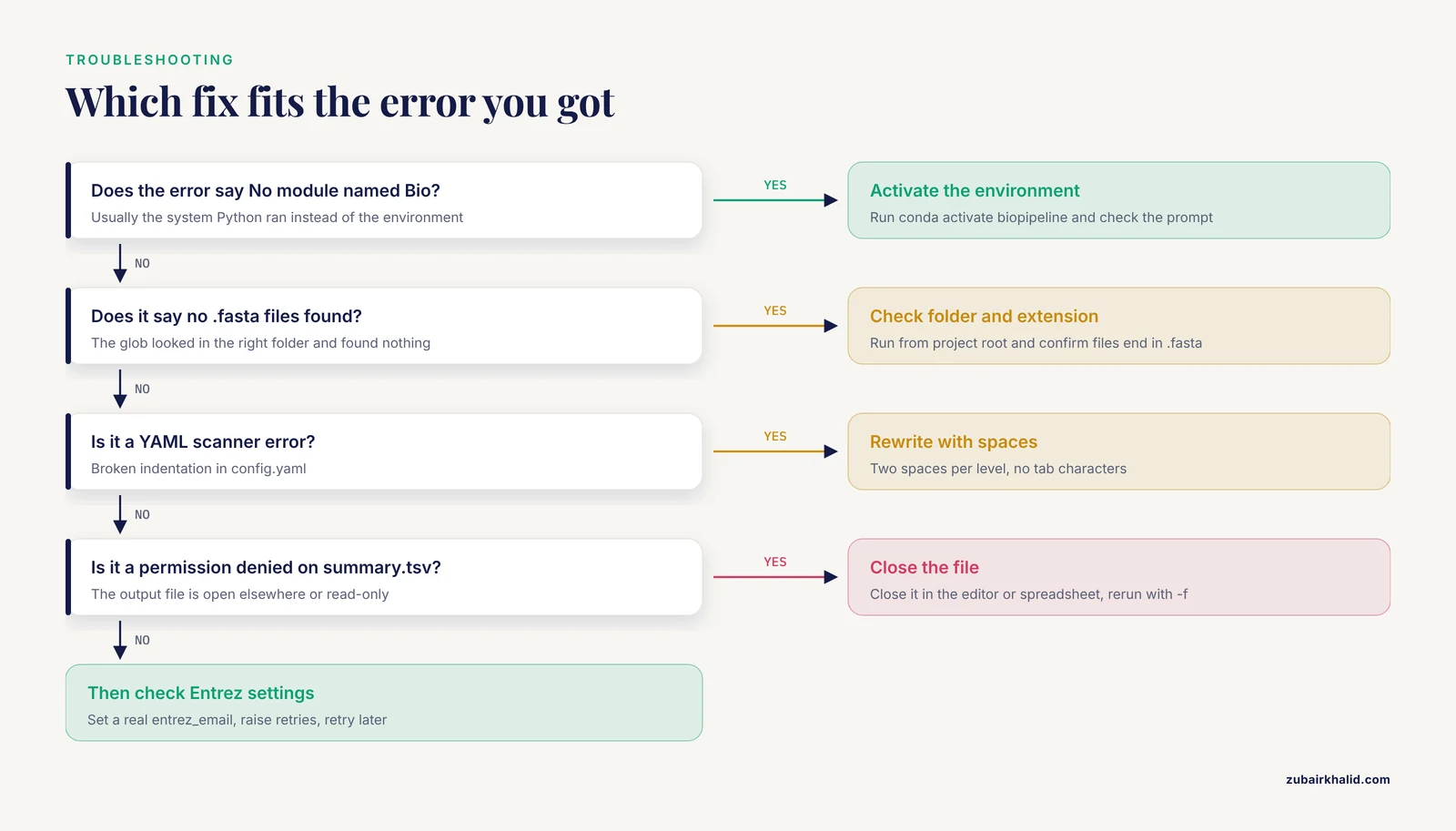
ModuleNotFoundError: No module named 'Bio' The command ran with a Python that lacks Biopython, almost always the system Python. Fix: run conda activate biopipeline and confirm the prompt shows (biopipeline) before retrying.
FileNotFoundError: No .fasta files found in data/fasta The pipeline looked in the right relative folder and found nothing. Fix: run from the project root (ls data/fasta should list your files) and confirm the extension is .fasta, matching the glob in summarize_dir.
yaml.scanner.ScannerError: mapping values are not allowed here The config file has broken indentation, usually a tab character where YAML requires spaces. Fix: rewrite the file using two spaces per indent level and no tab characters.
ResolvePackageNotFound during conda env create Two pins conflict or a version string does not exist for your platform. Fix: relax the patch digit (for example pandas=2.2 instead of a full three-part pin), or install the conflicting packages in a second command.
PermissionError: [Errno 13] Permission denied: 'results/demo_run/summary.tsv' The output file is open in another program, or the folder is read-only. Fix: close the file in your editor or spreadsheet application, then rerun with -f.
HTTPError or repeated timeouts during an Entrez fetch The request reached NCBI and was refused, or the network dropped. Fix: confirm entrez_email is set to a real address, raise retries in the config, and retry later if NCBI is rate-limiting.
Scaling Up to Workflow Managers and Clusters
Plain Python scripts hit three walls as analysis grows: many samples, long-running tasks, and shared computing hardware. The signs that you need a workflow manager are concrete. You need automatic reruns of only the stages affected by a changed file. You need jobs distributed across a cluster scheduler such as Slurm. You need restart behavior more sophisticated than the single-stage skip logic in this template.
The ecosystem has settled options. Sunbeam, a metagenomics pipeline, is written in Python using the Snakemake workflow manager, installs in a single step without administrative access, works with most cluster frameworks, and offers an extension framework for adding custom steps [14]. TEffectBayes demonstrates the Nextflow pattern for a multi-omic Bayesian pipeline [15]. On the cluster side, PePApipe ships both a local bash execution mode and a Slurm protocol for batch processing of multiple samples [10], a dual delivery that fits most institutional HPC setups. The review literature is unambiguous that workflow systems are the route to modular, reproducible, and reusable pipelines at scale [4].
Migration is painless if you preserve the contracts this template establishes. A workflow manager needs three things from each stage: a declarative input, a command, and a declared output. Your config file, CLI, and per-stage output files already provide all three, so each stage becomes one rule in a Snakemake or Nextflow file without rewriting the Python underneath. FairFlow takes the idea further, generating runnable interfaces for several workflow systems from one declarative specification executed in a version-locked container [3].
Common Mistakes and Limitations
- Treating
pip installas a finished environment. Unpinned dependencies are the leading cause of irreproducible results, because the same code can produce different numbers under different installed versions [3]. Pin inenvironment.yml, lock withconda env export, and record versions in every run log. - Using a notebook as the pipeline of record. Notebooks are fine for exploration and figures. They are a poor system of record for scheduled or shared runs, and the workflow literature classifies them with small-scale single-user scripting rather than shareable pipeline infrastructure [4]. Keep notebooks downstream of tested modules.
- Manual parameter tuning and fragmented scripts. Inconsistent preprocessing and scattered manual choices limit cross-dataset comparability, which is why standardized frameworks such as disint exist and why it validates its integration across 28 transcriptomic datasets [16]. If a parameter matters, it belongs in the config file.
- Hardcoded absolute paths. A pipeline that only runs on your laptop is not a pipeline. Every path in this template comes from the config and resolves relative to the project root.
- Mixing deterministic extraction with downstream judgment calls. When feature extraction and ranking decisions share code, neither can be benchmarked cleanly. PyPeakRankR's separation of deterministic extraction from downstream ranking exists precisely to keep that boundary visible [8].
- Skipping tests because the dataset is "small". Silent breakage does not care about dataset size. One hand-checked assertion per module, as in Step 7, catches most parser and arithmetic regressions.
- Limitation, scope. This template covers single-machine analyses from a handful of samples up to moderate scale. Large-volume, multi-user, cluster-based work needs a scientific workflow system rather than a longer script [4].
- Limitation, validity. Reproducibility means you get the same answer again. It does not mean the answer is biologically correct. Validate against inputs with known expected results before trusting new outputs, the same way the public-health pipeline was tested against a real national dataset before deployment [5].
Frequently Asked Questions
What is a reproducible bioinformatics pipeline Python template?
It is a preorganized project skeleton with pinned dependencies, a single config file, modular code, per-run outputs, logs, and tests, which you copy and adapt for each new analysis. This article builds one complete template across nine steps, ending with a runnable, tested, containerizable project.
Is Conda required, or can I use pip alone?
Conda is not required. If every dependency ships on PyPI, a virtual environment plus a lock file works: python -m venv .venv, source .venv/bin/activate, then pip install -r requirements.lock.txt. Conda with the bioconda channel is the safer choice when you also need external command-line tools that are not pure Python.
How do I run the pipeline on a high-performance computing cluster?
Wrap each stage as a scheduler job or use a workflow manager that submits jobs for you. PePApipe provides both a local bash mode and a Slurm protocol for batch processing [10], and Sunbeam is designed to work with most cluster computing frameworks [14]. Keep this template's per-stage command and output structure and the translation is straightforward.
When should I move from plain scripts to a workflow manager like Snakemake or Nextflow?
Move when the pipeline must handle many samples, incremental reruns, cluster scheduling, or multiple users. Scripting is sufficient for small single-user work, while large-scale, shareable, maintainable, and reusable pipelines call for scientific workflow systems [4]. Sunbeam's use of Snakemake from Python is a common on-ramp [14].
How do I give a collaborator exactly the same results I got?
Share the code, the locked environment file, the config, input checksums, and the run manifest. For the strongest guarantee, execute inside a version-locked container, the approach FairFlow automates from a single declarative specification [3]. The manifest in this template records the package versions and settings behind every run.
Can Jupyter notebooks be part of a reproducible pipeline?
Yes, for exploration, visualization, and communicating results. No, as the system of record for scheduled or shared runs, because notebooks fall in the small-scale single-user category that does not scale to shareable pipeline infrastructure [4]. The pattern that works is tested modules first, notebook last.
How does the template handle flaky downloads from NCBI or other APIs?
With a retry wrapper that backs off between attempts and raises after the final failure, plus full logging of each run. Automated retries for API-based ingestion are a documented feature of production pipelines [5]. Set the attempt count with the retries config parameter and your contact address with entrez_email.
Where can I find a free, open-source pipeline template to adapt?
On GitHub, several published pipelines double as free templates. CGAS organizes chloroplast genome analysis into 14 modules across three phases [2], aPhyloGeo ships as a PyPI package and scripts for Linux, macOS, and Windows [12], Sunbeam offers an extensible Snakemake-based metagenomics pipeline [14], and PyPeakRankR provides a compact CLI-plus-API design [8]. Read their layouts and borrow the conventions that fit your project.
Sources
- Computational Pipeline in Neuroradiomics.
- CGAS (Chloroplast Genome Analysis Suite): An automated python pipeline for comprehensive comparative chloroplast genomics.
- FairFlow: A transparency-first framework for verifiable and reproducible bioinformatics.
- Developing and reusing bioinformatics data analysis pipelines using scientific workflow systems.
- A Reproducible Python-Based Computational Pipeline for Real-Time Ingestion, Advanced Analysis, and Dynamic Reporting of Public Health Data: A Systems Validation Study.
- TRaP: An Open-source, Reproducible Framework for Raman Spectral Preprocessing across Heterogeneous Systems.
- EEG-Pype: An accessible MNE-Python pipeline with graphical user interface for preprocessing and analysis of resting-state electroencephalography data.
- PyPeakRankR: Reproducible Peak-Level Feature Extraction for Regulatory Element Ranking.
- BioImageIT: A novel python-based architecture for reproducible bio-image workflows.
- 'PePApipe': A complete bioinformatics analysis pipeline for African Swine Fever Virus genome.
- Model-driven data curation pipeline for LC-MS-based untargeted metabolomics.
- aPhyloGeo: a Python application for correlating genetic and climatic conditions.
- A python-based automated pipeline for phylogenetic tree construction, visualization, and comparative statistical evaluation.
- Sunbeam: an extensible pipeline for analyzing metagenomic sequencing experiments.
- TEffectBayes: a nextflow pipeline for exploring the potential effect of transposable elements in gene regulatory network with multi-omic Bayesian network model.
- Reproducible and Multi-Study Transcriptomic Integration with disint, Disease Integration and Clustering Toolkit, and Application to Drug Repositioning.