How to Reproduce Bioinformatics Analyses with Data Versioning
By Dr. Zubair Khalid, DVM, MS, PhD ·
By the end of this guide you will be able to take a bioinformatics analysis, freeze its code, data, parameters, and software environment into a single versioned state, and rerun that state on a different machine or a year later to produce the same numerical results. You will also know how to pull versioned public datasets instead of re-downloading them by hand, how to verify a rerun with checksums, and how to diagnose the errors that almost always appear on the first reproduction attempt.
Here is what you need on hand before you start:
- A Unix-like shell (Linux, macOS, or Windows Subsystem for Linux). All commands below assume bash.
- Git (version 2.30 or newer) installed and configured with your name and email.
- Python 3.9 or newer, or Miniconda for environment management.
- DVC, the open source data version control tool, installed with
pip install dvcorconda install -c conda-forge dvc. - A workflow engine. Snakemake or Nextflow both work. The examples use Snakemake because it installs with pip.
- Roughly 10 GB of free disk space for the worked example, and access to object storage (an S3 bucket, Google Cloud Storage, or an institutional server) if you want a remote data backup.
- Optional but strongly recommended: Docker or Apptainer (formerly Singularity) for containerized software environments.
If you manage large-scale genomics data storage for a group rather than a single project, the same tools apply, and this guide explains where the strategy changes at terabyte and petabyte scale.
Why Data Versioning Decides Whether an Analysis Can Be Reproduced
Most failed reproductions in computational biology do not fail because of the code. They fail because the inputs changed. A reference genome gets updated, a database release moves from version 22 to version 23, a collaborator sends a corrected metadata table, or a raw FASTQ file is silently re-exported from the sequencer with a new bcl conversion. The pipeline runs without complaint and produces different numbers.
Code versioning with Git solves half of the problem. It records your scripts, parameters, and pipeline definitions. It does nothing for a 40 GB FASTQ file, a multi-gigabyte reference index, or a database dump, because Git is designed for small text files and becomes unusable when asked to track large binary data.
Data versioning closes that gap. The pattern that has become standard in bioinformatics data management is to keep small text files in Git and to track large data files with a tool that stores a content hash, or checksum, of each file in Git while the file itself lives in cheap object storage or on a file server. DVC is the most widely used tool for this pattern, and the BioBricks.ai project shows how far it scales: each dataset there is packaged as a DVC Git repository with an extract, transform, load pipeline attached, and a package-manager-style interface handles installation and dependency resolution across more than 90 curated datasets spanning genomics, proteomics, cheminformatics, and epidemiology [1].
The second half of the problem is the software environment. Published work in immune repertoire sequencing found that analysis pipelines are highly sensitive to varying parameters and setups, and addressed it by shipping ready-to-use pipelines with versioned containers, comprehensive documentation, and archiving capabilities so that previously published results could be reproduced [2]. The lesson generalizes: a reproducible analysis pins four things at once, which are the data, the code, the parameters, and the software.
Core Concepts: Code Versions, Data Versions, and Provenance
Three terms appear throughout this guide, so here are working definitions.
Version means an immutable, addressable snapshot. For code, that snapshot is a Git commit identified by a 40-character hash such as a1b2c3d.... For data under DVC, the snapshot is a set of .dvc metafiles in Git plus content-addressed copies of the files in a cache. If two files have the same checksum, they are byte-for-byte identical, which is what makes "same version" verifiable rather than a matter of trust.
Provenance means the complete record of where a result came from. It includes the input data version, the code version, the container or environment version, the parameters, the execution host, and the timestamps. A reproducible analysis is one where every one of these can be stated as a concrete identifier.
Checksum means the output of a hash function such as MD5 or SHA-256 run over a file. Two identical files produce identical checksums. A single changed byte produces a completely different checksum. You will use MD5 checksums at the end of the walkthrough to verify reproduction numerically.
Tools You Need and What Each One Does
| Tool | Role | What it versions | Typical command |
|---|---|---|---|
| Git | Code and metadata versioning | Scripts, configs, small tables, .dvc pointers | git commit -m "message" |
| DVC | Data versioning | Large files and directories via checksums | dvc add data/raw |
| Conda | Environment pinning | Package names and versions | conda env export > environment.yml |
| Docker or Apptainer | Full software environment | OS, libraries, toolchain | docker build -t myanalysis . |
| Snakemake or Nextflow | Workflow execution order | Steps, dependencies, parameter wiring | snakemake -c 8 |
| S3, GCS, or an institutional file server | Remote data storage | The actual bytes behind DVC pointers | dvc push |
None of these tools is required in its specific brand. The pattern is what matters. If your institution runs Apptainer instead of Docker, or uses Nextflow instead of Snakemake, substitute accordingly. What you cannot substitute away is the pairing of a code history with a data history that reference each other.
Step-by-Step: Reproduce a Bioinformatics Analysis with Data Versioning
This walkthrough builds a small but complete reproducible project. The analysis itself is deliberately simple, a quality-control pass over sequencing reads with FastQC plus checksum bookkeeping, because the goal is the versioning infrastructure, not the biology. Every command shown is real and every output shown is what you should expect to see.
Step 1. Create the project and its directory layout
mkdir -p ~/projects/rnaseq-demo
cd ~/projects/rnaseq-demo
mkdir -p data/raw data/reference results/qc results/counts scripts config
git init
Expected output:
Initialized empty Git repository in /home/you/projects/rnaseq-demo/.git/The layout follows a convention you can reuse in any project. Raw data never gets modified in place. Results are disposable, which means everything under results/ must be regenerable from data/ plus scripts/ plus config/. If you cannot delete a results directory and regenerate it, the analysis is not yet reproducible.
Step 2. Pin the software environment before writing any code
Create a file named environment.yml:
name: rnaseq-demo
channels:
  - conda-forge
  - bioconda
dependencies:
  - python=3.11
  - fastqc=0.12.1
  - snakemake=8.14.0
Build and activate it:
conda env create -f environment.yml
conda activate rnaseq-demo
Then export the exact solved environment so the full dependency tree, not just your top-level requests, is recorded:
conda env export > environment.lock.yml
git add environment.yml environment.lock.yml
git commit -m "Pin analysis environment"
The two files serve different purposes. environment.yml is human-readable intent. environment.lock.yml is the machine-readable full solution and is what a reproducer should install from. If a reproducer gets different package versions from your top-level spec alone, small numerical differences can appear, which is exactly the parameter sensitivity documented in published pipeline guidelines [2].
Step 3. Add the raw data and hand it to DVC
Copy or download your raw reads into data/raw. For the demo, suppose you have two FASTQ files. Now initialize DVC and track them:
dvc init
dvc add data/raw
Expected output:
100% Add|████████████████████████████████████████|2/2 [00:03<00:00, 1.55s/file]Inspect what changed:
git status --shortExpected output:
 M .gitignore
?? data/raw.dvc
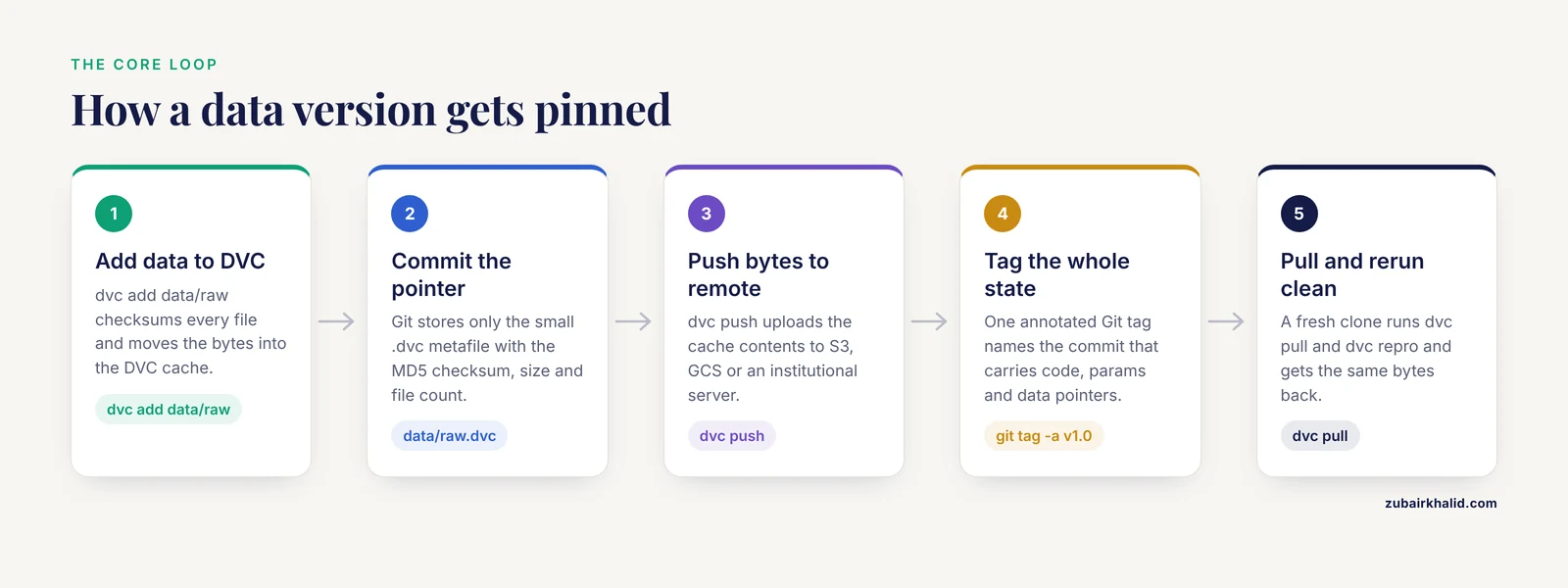
This is the moment the whole pattern becomes visible. DVC did three things. It computed an MD5 checksum tree for everything in data/raw, moved the actual files into .dvc/cache/, wrote a tiny pointer file data/raw.dvc that records those checksums, and added data/raw to .gitignore so Git never touches the large files. Commit the pointer:
git add data/raw.dvc .gitignore
git commit -m "Track raw FASTQ data with DVC"
The pointer file looks like this:
outs:
  - md5: 9c4f1a2b7e8d3f5a6c0b1e2d4f6a8c0b.dir
    size: 4823910441
    nfiles: 2
    path: data/raw
That md5 value is the data version. Any collaborator who has your Git repository can ask DVC to fetch the exact bytes that match that checksum from a shared remote.
Step 4. Configure a remote data store
Point DVC at somewhere durable. On an S3-compatible bucket:
dvc remote add -d storage s3://my-lab-bucket/rnaseq-demo
dvc push
Expected output:
1 file pushedFor institutional storage that is not S3-compatible, the ssh:// remote type works against any server you can reach with your normal credentials. The -d flag sets this as the default remote so plain dvc push and dvc pull work without naming it. Genomics data storage at this layer is a capacity and cost question, and the choice of backend matters less than the rule that raw data exists in exactly two places, the working copy and the remote, with checksums binding them.
Step 5. Write the pipeline as code, not as a shell history
Create Snakefile:
configfile: "config/params.yaml"

rule all:
    input:
        expand("results/qc/{sample}_fastqc.html", sample=config["samples"])

rule fastqc:
    input:
        "data/raw/{sample}_R1.fastq.gz"
    output:
        html="results/qc/{sample}_fastqc.html",
        zip="results/qc/{sample}_fastqc.zip"
    threads: config["threads"]
    shell:
        "fastqc {input} -o results/qc -t {threads}"
Create config/params.yaml:
samples:
  - sampleA
  - sampleB
threads: 4
The parameters live in a versioned file, not in the commands you type. When a reviewer asks what thread count produced a figure, the answer is a Git blame command, not memory. Commit both files:
git add Snakefile config/params.yaml
git commit -m "Add QC pipeline with externalized parameters"
Step 6. Run the pipeline and record the data flow
snakemake -c 4Expected output (abbreviated):
Building DAG of jobs...
Using shell: /usr/bin/bash
1 jobs of 2 steps in total.
[Mon Jan  1 10:00:00 2026]
rule fastqc:
    input: data/raw/sampleA_R1.fastq.gz
    output: results/qc/sampleA_fastqc.html, results/qc/sampleA_fastqc.zip
    jobid: 1
    reason: Missing output files: results/qc/sampleA_fastqc.html
Finished job 0.
2 of 2 steps (100%) done
Now connect the pipeline outputs to the data history so DVC tracks them too. Add a stage to dvc.yaml:
stages:
  qc:
    cmd: snakemake -c 4
    deps:
      - Snakefile
      - config/params.yaml
      - data/raw
    outs:
      - results/qc
From this point on you never run Snakemake directly. You run:
dvc reproExpected output:
Data and pipelines are up to date.That single line is the core of day-to-day reproducibility. DVC compared the checksums of every dependency against the last run and found nothing changed, so it skipped everything. When a parameter or an input changes, the same command re-executes only the affected stages. dvc dag prints the dependency graph so you can see what will rerun before you commit to it.
Step 7. Tag the versioned state as a unit
A reproduced analysis needs one identifier that pins code and data together. Git tags on the commit that also carries the .dvc pointers do exactly that:
git add dvc.yaml dvc.lock results/qc.dvc
git commit -m "Record first full run"
git tag -a v1.0 -m "QC run on raw data as of 2026-01-01, params in config/params.yaml"
git push origin v1.0
dvc push
dvc.lock is the run manifest. It records the MD5 of every input, output, and the command string for each stage. A reproducer who checks out tag v1.0 and runs dvc pull followed by dvc repro holds the same bytes you held.
Step 8. Test the reproduction from scratch, on a clean machine
This step is where most so-called reproducible projects fail, so do it deliberately. On a fresh machine or container:
git clone [email protected]:yourlab/rnaseq-demo.git
cd rnaseq-demo
git checkout v1.0
conda env create -f environment.lock.yml
conda activate rnaseq-demo
dvc pull
dvc repro
dvc pull fetches every tracked data file from the remote by checksum. dvc repro then reports Data and pipelines are up to date, which means the downloaded data matched the locked checksums exactly and the pipeline needed no re-execution. If any file had changed in transit, DVC would report the mismatch by name.
Step 9. Verify the result numerically, not by eye
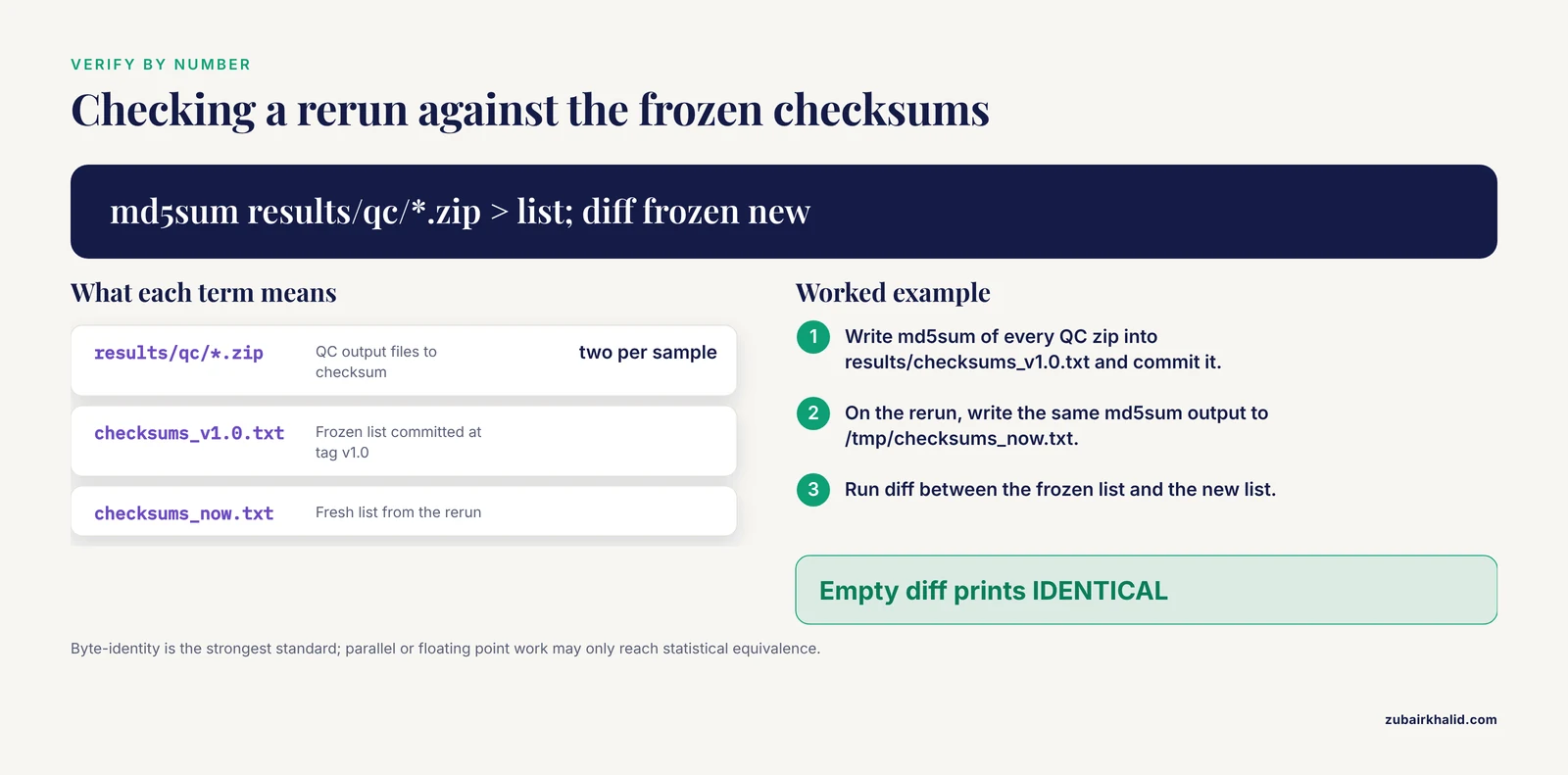
Generate checksums for your outputs and compare them to a frozen list:
md5sum results/qc/*.zip > results/checksums_v1.0.txt
git add results/checksums_v1.0.txt
git commit -m "Freeze output checksums for v1.0"
To verify a later rerun:
md5sum results/qc/*.zip > /tmp/checksums_now.txt
diff results/checksums_v1.0.txt /tmp/checksums_now.txt && echo "IDENTICAL"
Expected output on a successful reproduction:
IDENTICALIf the diff is empty, the outputs are byte-identical. If the diff shows differences, you have a lead, and the usual suspects are listed in the troubleshooting section below. Note that byte-identity is the strongest standard. Analyses with parallel scheduling or floating point reductions can be reproducible in the weaker sense of producing statistically equivalent results, and you should decide in advance which standard a given result must meet.
Step 10. Record the execution context
Two commands belong in every analysis log:
conda list --explicit > results/conda_list.txt
uname -a > results/host.txt
For R work, capture sessionInfo() output into a text file at the end of every script. This is provenance, it costs one line, and it answers the question "which machine and which libraries" that checksums cannot answer.
A Table of the Commands That Matter
| Goal | Command | What it does |
|---|---|---|
| Track a data directory | dvc add data/raw | Checksums files, moves them to cache, writes a .dvc pointer |
| Commit a data version | git add data/raw.dvc && git commit | Binds the data checksum into code history |
| Back up data | dvc push | Uploads cache contents to the configured remote |
| Fetch data on a new machine | dvc pull | Downloads files matching the locked checksums |
| Rerun affected stages only | dvc repro | Executes stages whose dependencies changed |
| Show the dependency graph | dvc dag | Prints the pipeline as stage nodes |
| Try a parameter change | dvc exp run -S threads=8 | Runs a tracked experiment without touching the main history |
| List experiments | dvc exp show | Table of parameters and metrics across runs |
| Pin a full state | git tag -a v1.0 | Names one commit containing code, params, and data pointers |
| Verify outputs | md5sum results/* | Produces checksums to diff against a frozen list |
Sourcing and Storing Versioned Public Data
You do not always need to version raw data yourself. When an analysis depends on public datasets, prefer sources that already version their releases, because that removes an entire class of drift from your provenance chain.
BioBricks.ai treats public biological and chemical datasets as versioned packages. Each dataset, called a brick, is a DVC Git repository containing the extract, transform, load pipeline that produced it, and a package-manager-style interface handles installation, dependency resolution, and updates. Assembling multi-dataset analytic cohorts that once took days of bespoke scripting is reduced to minutes, and the design goal is FAIR data access with provenance tracking [1]. In practice this means your analysis can declare a dependency on a specific brick version the same way it declares a dependency on a package version.
For cancer genomics, the scale problem is different in kind. The Cancer Genome Atlas holds more than 1.2 petabytes across whole genome sequence, whole exome sequence, methylation, RNA expression, proteomic, and clinical data for at least 500 cases of 20 tumor types [3]. Portals expose these data to browsing, but navigating and downloading them piecemeal is slow and inconsistent. TCGA Expedition addresses this with a set of Bash, Python, and Java scripts that download, extract, harmonize, version, and archive all TCGA data and metadata, supporting command-line access at high-performance computing facilities with security and regulatory controls conforming to federal best practices [3]. The transferable lesson is not the specific software but the architecture: acquisition, harmonization, versioning, and archiving are separate, scripted steps, and the versioned archive is what analyses point at.
For your own laboratory, the practical rules of genomics data storage that follow from these systems are:
- Raw data is immutable. Once checksummed and pushed, nothing overwrites it. Corrections happen as new versions, not as edits.
- Keep at least one remote copy on storage that is not the analysis workstation. Object storage with checksum verification is the default choice because DVC verifies content hashes on transfer.
- Separate hot storage for the active project from cold archival storage for completed ones. A finished project needs its
dvc.lock, tags, and remote intact, not its full working directory online. - Version metadata with the same discipline as reads. Sample sheets, phenotypes, and clinical annotations change more often than the sequencing data and cause more silent errors.
Worked Domain Example: Immune Repertoire Sequencing
The principles above are not generic advice. Published guidelines for adaptive immune receptor repertoire sequencing (AIRR-seq) data analysis implemented ten common pipelines behind a user-friendly interface for pipeline management and automation, accompanied by versioned containers, documentation, and archiving capabilities, and demonstrated the ability to reproduce previously published results by following them [2]. Two specifics from that work are worth adopting in any domain.
First, automation of pre-processing steps with the ability to modify pipeline parameters for specific research needs. A pipeline should expose its knobs in a config file, as Step 5 did, rather than burying them in scripts. Second, explicit acknowledgment that results are highly sensitive to parameters and setups, which is why the guidelines pair every pipeline with versioned containers and archiving [2]. When a reviewer asks how a clonality figure was produced, the answer should be a tag, a container digest, and a params file, all resolvable today.
Reproducibility Tips
These are the habits that separate projects that reproduce from projects that almost reproduce.
Tip 1. Version the reference data, not just your files. If your pipeline aligns to a genome, record the exact reference build, its checksum, and the exact version and parameters of the index builder. A regenerated index with different software parameters is a different input even if the genome sequence is identical.
Tip 2. Freeze database releases by date and version. Write the release identifier into your config file and checksum the downloaded database files with DVC the same as any other data.
Tip 3. Never hand-edit files in data/raw. If a sample needs renaming or reformatting, write a scripted transformation stage that reads raw and writes derived data. The raw directory stays pristine and the transformation is versioned.
Tip 4. Use experiment tracking for parameter sweeps. dvc exp run -S threads=8 creates a versioned, comparable experiment without polluting your main history, and dvc exp show tabulates parameters against metrics.
Tip 5. Make the empty-directory test a habit. Once per milestone, clone into a scratch directory, run dvc pull and dvc repro, and diff the outputs. Ten minutes of this catches broken remotes, undeclared dependencies, and hidden manual steps while they are still cheap to fix.
Tip 6. Write the README as a reproduction recipe. Assume the reader is you in eighteen months with no memory. List the exact commands in order, starting from git clone.
Tip 7. Version the container with a digest, not a tag. myimage:latest changes underneath you. Record the image digest so the software environment is as frozen as the data.
Tip 8. Check in small derived data selectively. A 2 KB summary table that a figure depends on can live in Git directly. Multi-gigabyte files belong in DVC. The boundary is roughly whether a text diff is meaningful.
Troubleshooting: Exact Errors and Fixes
Error 1. fatal: not a git repository (or any of the parent directories): .git
You ran a Git command outside the project directory or before git init. Run pwd to confirm where you are, cd into the project root, and if the repository truly does not exist yet, run git init first.
Error 2. ERROR: 'dvc.yaml' does not exist when running dvc repro
You are in a subdirectory of the project. DVC looks for dvc.yaml in the current directory. cd to the repository root, or run dvc repro with the path to the stage file.
Error 3. DVC reports that no remote is configured when you run dvc push
This happens on a fresh clone because remotes are configured in .dvc/config, which some teams gitignore. Either commit .dvc/config (without credentials) or run dvc remote add -d storage s3://your-bucket/path locally. Put credentials in environment variables or a credential file, never in the committed config.
Error 4. ResolvePackageNotFound: fastqc=0.12.1 during conda env create
The package name or version string is wrong for the channels in your environment.yml. Check the spelling, confirm the bioconda channel is listed, and verify the version exists with conda search -c bioconda fastqc.
Error 5. permission denied while trying to connect to the Docker daemon socket
Your user is not in the docker group on Linux. Either add your user to the group and log out and back in, or use Apptainer, which runs without a daemon and is common on shared high-performance computing clusters.
Error 6. MissingInputException in rule fastqc from Snakemake
A file the pipeline expects does not exist at the path given in the rule. Nine times out of ten the filename pattern in the Snakefile does not match the actual files, for example a sample name mismatch. Run ls data/raw/ and reconcile the pattern.
Error 7. A checksum mismatch on dvc pull or md5sum
The file changed between versions, or the transfer corrupted it. Do not guess. Re-run dvc pull to force a fresh fetch, and if the mismatch persists, compare the checksum in the .dvc pointer file against the remote copy to determine which side changed. If the remote copy itself differs from a historical lock file, someone overwrote the archive, which is the failure mode that immutability policies exist to prevent.
Error 8. Reruns produce different numbers with identical inputs
Check, in order: the container or environment actually used on each run, thread counts and any nondeterministic settings in the tools, iteration order in any script that iterates over an unordered structure, and floating point accumulation order in parallel code. Recording conda list or container digests per run, as in Step 10, makes this diagnosable instead of mysterious.
Common Mistakes and Limitations
Mistake 1. Committing data to Git because DVC feels like extra setup. A repository with multi-gigabyte files in Git history becomes effectively unclonable, pushes take hours, and every collaborator pays the cost forever. The .dvc pointer plus remote pattern exists precisely to avoid this.
Mistake 2. Versioning data but not parameters. Threads, cutoffs, adapter strings, and reference versions hidden inside scripts are the most common cause of "the same code gives different answers". Parameters belong in versioned config files.
Mistake 3. Treating the remote as optional. A DVC cache on the same disk as the working copy protects against nothing. If the disk dies, the data version is a pointer to lost bytes. Push to genuinely separate storage.
Mistake 4. Reproducing only on your own machine. A rerun on the same host with a warm cache proves almost nothing. The clean-machine test in Step 8 is the real test.
Mistake 5. Confusing regeneration with reproduction. Re-executing a pipeline today can produce today's correct results while the historical run's exact environment no longer exists. Archiving, the practice of preserving the executed environment itself, is what published pipeline guidelines pair with versioning for this reason [2].
Mistake 6. Overwriting raw public data with your own preprocessing. If you download a public dataset and modify files in place, your version chain no longer matches the upstream release and no one, including you, can tell which release you analyzed. Keep public downloads immutable and transform into derived directories.
Mistake 7. Trusting filenames as identity. sampleA_R1.fastq.gz on two machines is not proof of the same file. Only checksums prove identity, which is the entire basis of the DVC design.
Limitation. Data versioning infrastructure does not by itself make an analysis correct, biologically sound, or free of batch effects. It makes whatever the pipeline does deterministic and auditable. Methodological validity is a separate question that version control cannot answer. Also, byte-identical reproduction can be unattainable for some parallel or stochastic workloads, in which case define an equivalence criterion in advance and document it. Finally, individual research projects with human subjects data carry regulatory constraints on where data may be stored, and those constraints govern your choice of remote storage before any technical preference does.
Next Steps
Once the single-project workflow above is routine, the natural progressions are continuous integration that runs dvc repro on a small test dataset for every pull request, shared laboratory remotes with per-project prefixes for access control, adoption of a workflow platform with built-in versioned containers and archiving for teams that need turnkey pipelines as demonstrated in the AIRR-seq guidelines [2], and contribution of your curated datasets back into shared versioned registries so other groups start from your version instead of re-sourcing the raw data [1].
Frequently Asked Questions
What does data versioning actually mean in bioinformatics?
It means recording an immutable, checksum-verified snapshot of every data file an analysis used, alongside the code version, so that both can be restored exactly. In practice this usually means Git for code and a tool like DVC for large files, with the two histories referencing each other.
Do I need DVC if I already use Git?
Yes, if any of your data exceeds what Git handles comfortably, which is typically files of tens of megabytes or larger. Git stores full content histories, which makes large files unusable, while DVC stores the files in a separate cache and remote and keeps only checksum pointers in Git.
How do I version very large files like FASTQ or BAM files?
Track the directory containing them with dvc add, commit the resulting pointer file to Git, and push the actual bytes to a remote with dvc push. The pointer records MD5 checksums, total size, and file count, which is enough for any collaborator to fetch and verify the exact bytes.
How much storage do I need for a genomics project?
It depends entirely on the data types and scale, from megabytes for a small targeted panel to petabytes for whole-genome cohorts, so plan from your own file counts rather than a rule of thumb. For scale context, the Cancer Genome Atlas alone exceeds 1.2 petabytes across its sequencing, methylation, expression, proteomic, and clinical data types [3].
Can I reproduce an analysis from a paper if the authors only published code?
Sometimes, but incompletely. With code but no data versions, you can rerun the pipeline on whatever inputs you can find, yet you cannot confirm those inputs match the originals without checksums or frozen data releases. Prefer sources that ship data with versioning, and in your own papers, publish both.
How do I verify that my rerun matches the original result?
Checksum the outputs and diff against a frozen checksum list, as in Step 9. An empty diff means byte-identical outputs. If you only need statistical equivalence, define and document a numerical tolerance before comparing.
What is the difference between a container and an environment file?
An environment file, like environment.lock.yml, pins the package versions a package manager should install, while a container image pins the operating system, system libraries, and everything else in one artifact. Containers are the stronger guarantee and are what published reproducible pipelines ship as versioned containers [2].
How often should I re-run a pipeline to check reproducibility?
Run the clean-machine test at every milestone and before every release or submission, not on a calendar. Each tag you intend to cite or share should have been reproduced at least once from a fresh clone.