How to Fix Common renv Errors in Bioinformatics Projects
By Dr. Zubair Khalid, DVM, MS, PhD ·

The most common renv error in an R project is deceptively simple: you open the project, run library(), and R cannot find a package that used to be there. In nearly all cases the cause is that R is not using the project library, either because renv never activated, because you switched R versions, or because the lockfile and the library drifted out of sync. The first thing to check in every case is the same. Run these two commands and read the output before changing anything.
renv::status()
.libPaths()
renv::status() compares three things: the packages your code actually loads, the packages recorded in renv.lock, and the packages present in the project library. If all three agree, renv prints that the project is synchronized. If any of them disagree, renv tells you exactly which packages are missing, extra, or at different versions, and that message tells you which section of this article applies to you.
This guide walks through renv errors in order from most common to rarest, explains the mechanism behind each failure, and gives concrete fixes you can run. It closes with prevention practices suited to genomics, transcriptomics, and metabolomics projects where an analysis script, a Bioconductor release, and a cluster environment all have to agree with each other.
Why renv matters in bioinformatics
Reproducibility is not optional in computational biology. The H3ABioNet consortium, which spans 27 research institutions in 17 African countries, built variant calling, 16S rDNA, GWAS, and imputation workflows specifically to run portably across heterogeneous computing environments, and found that scalable, reproducible, portable workflows are a genuine engineering challenge rather than an afterthought [1]. The same lesson appears across the literature. A review of bioinformatics pipelines notes that R scripts and notebooks are fine for small, single-user analyses, but larger, shareable pipelines require deliberate infrastructure for reproducibility and reuse [2]. Reviews of mass spectrometry platforms describe "workflow decay," the process by which analyses become unreproducible because they depend on a specific, unmanaged computing platform, and argue that standardized infrastructure is the remedy [3].
renv is that infrastructure at the R level. It records every package your project uses, including the version and source, in a JSON file called renv.lock. It gives each project its own private package library so that upgrading a package for one project cannot break another. When a collaborator or a cluster node runs renv::restore(), renv reads the lockfile and reinstalls the exact recorded versions. Modern bioinformatics papers build directly on this pattern. A targeted methylation sequencing protocol places its differential methylation analysis with methylKit inside a unified, reproducible framework with explicit reporting of intermediate outputs [4]. The MeTime package for longitudinal metabolomics is installed from GitHub and keeps all intermediate results and provenance inside a single container so workflows stay transparent [5]. The tcga-data-nf workflow wraps an R package, NetworkDataCompanion, inside a Nextflow pipeline so thousands of TCGA samples can be processed with a single command [6]. The GCAC pipeline ensures the reproducibility of R-based virtual screening models by embedding R inside the Galaxy workflow system [7]. renv plays the same role for a single R project that these systems play at the pipeline level. When it fails, everything downstream inherits the failure, so fixing renv errors quickly is a core skill in R for bioinformatics.
How renv actually works, in three sentences
renv maintains three artifacts. First, a project library, a folder of packages that lives inside your project directory and is activated through an entry in the project's .Rprofile. Second, the lockfile, renv.lock, a JSON record of every package, its version, its source (CRAN, Bioconductor, GitHub, or a local path), and the R version. Third, a global cache, a shared store of package installations that individual project libraries link into rather than copy, which is why installing one package in one project does not consume disk space in every other project. Almost every renv error is one of these three artifacts disagreeing with the others, or the cache and library paths pointing somewhere unexpected.
A five-minute diagnostic sequence
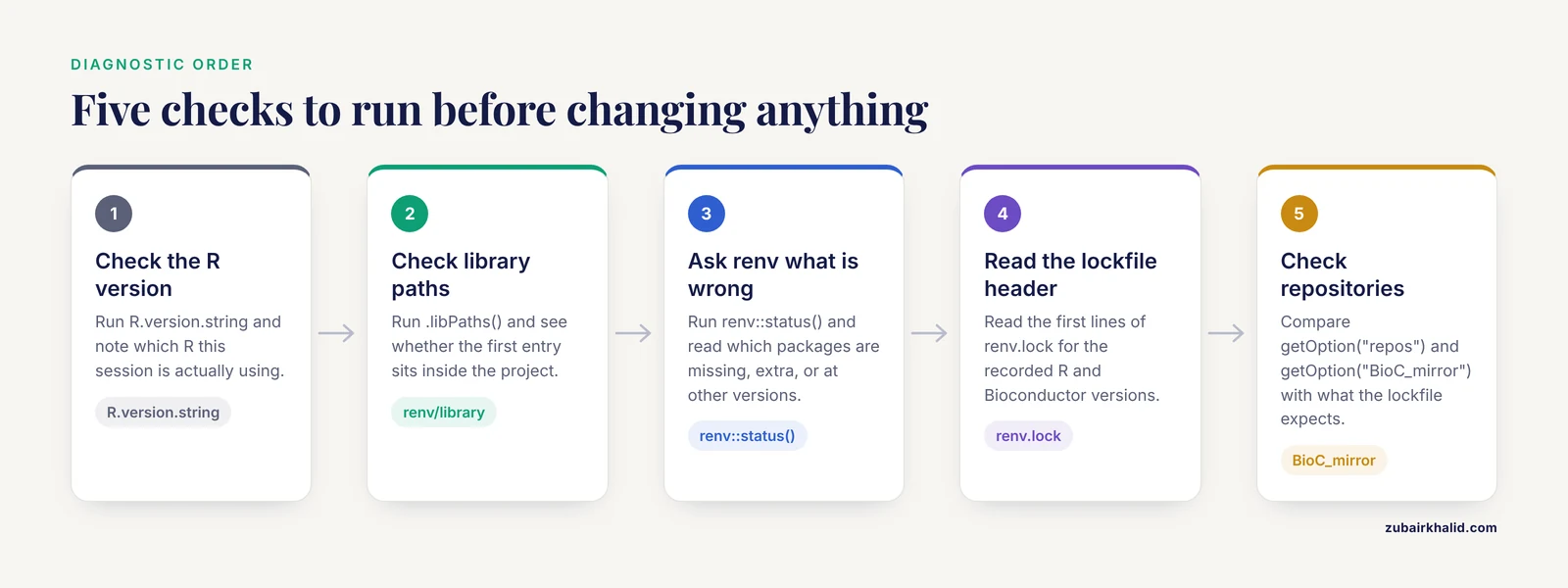
Run these checks in order and note where the answers stop matching expectations.
- Confirm which R you are running.
R.version.string- Confirm which library paths R is using and whether the first entry points inside your project.
.libPaths()- Confirm renv is active and ask it what is wrong.
renv::status()- Read the lockfile header for the recorded R version and Bioconductor version.
readLines("renv.lock", n = 15)- Check the repository configuration, because a wrong CRAN or Bioconductor mirror breaks restores silently.
getOption("repos")
getOption("BioC_mirror")
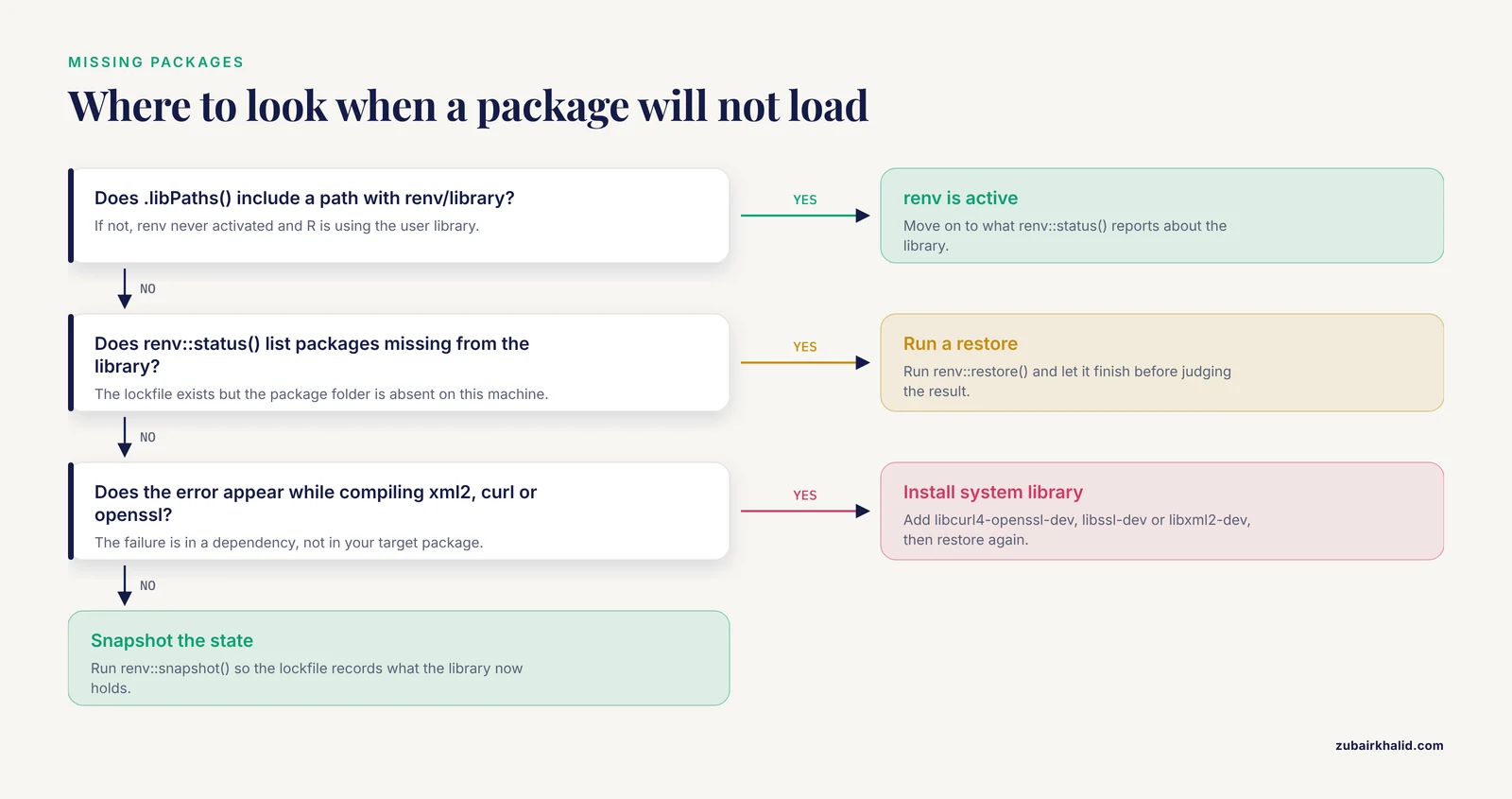
If .libPaths() does not show a path containing renv/library, renv is not active, which is the number one cause of missing packages. If it does show the project library but renv::status() reports missing packages, the problem is a restore that never completed or a package installed outside renv. Those two families of failure cover the majority of real cases.
Troubleshooting table
| Symptom | Likely cause | How to confirm | Fix |
|---|---|---|---|
library(pkg) says there is no package called "pkg" | renv did not activate, so R is using the user library instead of the project library | .libPaths() does not include a path with renv/library | Restart R in the project root, or run renv::activate() |
renv::status() lists packages used in the project but missing from the library | A renv::restore() never ran or was interrupted on this machine | Lockfile exists but the package folder is absent from the project library | Run renv::restore() |
renv::status() says the library is out of sync with the lockfile | Packages were installed or updated outside renv, or a snapshot was never taken after adding packages | Compare renv::status() output with recent install.packages() or remotes::install_github() calls | Run renv::snapshot() to record, or renv::restore() to roll back |
| Restore installs different package versions than expected | The R version or Bioconductor version differs from the one recorded in the lockfile | Compare R.version.string with the R field in renv.lock, and BiocManager::version() with the lockfile repositories | Switch to the recorded R version, or update the lockfile deliberately |
| Restore fails with "dependency not available" for xml2, curl, openssl, or similar | System libraries required for compilation are missing | The error appears during compilation of a dependency, not your target package | Install the system library (for example libcurl4-openssl-dev on Debian or Ubuntu) and rerun renv::restore() |
| GitHub package fails to install during restore | GitHub rate limits, a missing personal access token, or a moved repository | The error mentions GitHub or downloads, and renv.lock lists a Github remote | Set a GitHub token with usethis::git_sitrep() guidance, then rerun restore |
| Everything worked yesterday, nothing works today after a cluster update | The cluster module system loaded a different R version | R.version.string changed without your action | Reload the previous R module or update the lockfile and restore |
| Restore hangs or fails partway with hash or checksum errors | Corrupted or partially downloaded entries in the global cache | The same package fails repeatedly even after manual install.packages() | Remove the affected cache entry, then rerun restore |
| "Permission denied" during install or restore on a shared filesystem | Another user owns the cache or library directories, or a stale lock file exists | Check ownership with ls -la on the cache and project library paths | Fix ownership or point the cache at a directory you own with RENV_PATHS_CACHE |
| renv messages appear but packages still resolve to the wrong versions | A second .Rprofile or startup script overrides .libPaths() after renv activates | Search startup files with usethis::edit_r_environ() and check the project .Rprofile | Remove conflicting library path assignments so renv controls the library |
| Bioconductor packages fail or resolve to the wrong release | The Bioconductor version recorded in the lockfile does not match what BiocManager would use | BiocManager::version() differs from the lockfile | Align BiocManager and the lockfile, then restore |
The most common renv errors, from most to least frequent
1. Packages are missing because renv never activated
This is the single most common situation in renv errors troubleshooting r discussions, and the fix is usually one restart. renv activates a project by sourcing renv/activate.R from the project's .Rprofile. If you open the project by launching R from a different directory, or if your R session was started before the project was initialized, R uses your default user library, where the package may genuinely not exist at the recorded version.
Confirm the problem by checking whether the first entry of .libPaths() points inside the project. If it does not, renv is not controlling your session. Fix it by restarting R with the project directory as the working directory. In RStudio this means opening the .Rproj file rather than a script file. On the command line it means launching R from the project root, because renv's autoload relies on the working directory at startup. If activation still fails, inspect the project .Rprofile for a line that sources renv/activate.R. If that line is missing, renv::activate() regenerates it.
A related variant happens on clusters: you load an R module, launch R, and the project library never appears. Some cluster setups set R_PROFILE_USER or ship a site-wide .Rprofile that interferes with renv's startup file. Check with Sys.getenv("R_PROFILE_USER") and, if it points somewhere unexpected, unset it for your sessions.
2. A fresh clone restores nothing, or restores incompletely
You pull a project from Git, open it, and packages are missing. The cause is mechanical: the lockfile travels with the repository, but the project library and the cache do not. renv expects you to run a restore on each new machine.
renv::restore()This reads renv.lock and installs every recorded package at the recorded version. When the restore is interrupted, for example by a network timeout, a killed session, or a disk quota, it fails partway and leaves the library incomplete. Running renv::restore() again resumes where it left off, because renv skips packages it has already installed into the cache. If a package repeatedly fails at the same point, the problem is usually a missing system dependency or a broken cache entry rather than the restore itself.
One subtlety trips people up: renv::restore() only installs what is in the lockfile. If a collaborator installed a package with install.packages() and never ran renv::snapshot(), that package is not in the lockfile and restore will not bring it. Have the collaborator run renv::snapshot(), commit the updated lockfile, and pull again.
3. R version mismatch between machines
The lockfile records the R version used when the project was snapshotted. renv uses that version to decide where the project library lives, because R package libraries are version-specific. If your collaborator runs R 4.3 and you run R 4.4, renv builds a library under a different path and cannot reuse the cached installations recorded under the old version.
Diagnose this by comparing R.version.string with the R field at the top of renv.lock. You have two honest options. Either install the recorded R version, which is the choice that maximizes reproducibility, or accept the version change, run renv::snapshot() after updating packages, and commit the new lockfile so the team converges on the new baseline. Silently drifting between versions, where each lab member has slightly different package versions and nobody knows it, is the state renv exists to prevent.
On clusters this error often arrives wearing a different costume. Your jobs ran fine for months, then a scheduled maintenance updated the R module, and suddenly renv reports a different R version than the lockfile. The cluster module and the lockfile are now two sources of truth in conflict. The practical fix is to pin the module version in your job submission scripts, for example loading R/4.3.2 rather than a floating default, so the module system stops changing under you.
4. Bioconductor version mismatch
Bioconductor deserves its own treatment because it releases twice a year and pins packages to a specific release. A lockfile that recorded Bioconductor 3.18 packages will not restore correctly into a session that BiocManager resolves to 3.19, and the failure mode is confusing: restore either cannot find the recorded versions or installs newer versions than you asked for.
Confirm the state with BiocManager::version() and compare it with the repositories recorded in renv.lock. renv stores the Bioconductor repository URLs in the lockfile, so restoring from the lockfile should pull packages from the recorded release. The most reliable pattern is to make sure BiocManager itself is installed at a version compatible with your R version before restoring, because BiocManager is what tells renv which Bioconductor repository URLs to use. If BiocManager is missing, install it into the project first:
renv::install("BiocManager")Then rerun renv::restore(). If you intend to move the project to a newer Bioconductor release, do it deliberately: update BiocManager, run renv::snapshot(), and accept that some package versions will change.
A short Bioconductor checklist for renv projects, the part most bioconductor tutorial material skips:
- Install BiocManager inside the project library before the first restore, so it is recorded in the lockfile.
- Record the Bioconductor release you depend on in your README, because the lockfile records repository URLs but a human-readable statement of the release makes intent explicit.
- Expect longer restore times than a CRAN-only project, since many Bioconductor packages compile C or C++ code and some, in the omics space, depend on external libraries such as those required for image and XML handling.
- If a Bioconductor package fails to compile, check for its system library prerequisites before blaming renv.
5. The lockfile and library drift out of sync
renv tracks a state it calls synchronization. Your session can drift in either direction. If you install packages with install.packages() without renv noticing, the lockfile lags reality and a collaborator restoring the project will not get what you actually ran. If you update the lockfile without installing, the library lags the lockfile.
renv::status() distinguishes these states explicitly. When the library is out of sync with the lockfile, renv::restore() brings the library back to what the lockfile says. When the lockfile lags the library, renv::snapshot() writes the current state into the lockfile. A disciplined habit removes most of this error class entirely: after every session in which you installed or removed a package, run renv::status(), and if it reports differences, decide which direction to reconcile.
Two settings reduce the friction. If your project loads packages that you use but never attach with library(), for example packages used only through namespace syntax like SummarizedExperiment::assay(), the default implicit snapshot may miss them unless renv's dependency scanner sees the call. Setting the snapshot type to all records every installed library package:
renv::settings$snapshot.type("all")The tradeoff is a larger lockfile that includes packages you do not use. For small scripts the default is fine. For long, multi-package analysis projects with deep dependency trees, being explicit avoids both bloat and accidental omissions.
6. GitHub and remotes packages fail during restore
Bioinformatics R code leans heavily on GitHub packages, because method authors often release tools there before or instead of CRAN. MeTime, for example, is distributed through GitHub [5]. These packages carry extra failure modes during restore.
The lockfile records the GitHub user, repository, commit reference, and sometimes a pull request reference. During restore, renv downloads the repository at that commit. The common failures are rate limiting on unauthenticated GitHub API access, which you fix by configuring a personal access token, and renamed or archived repositories, which you fix by updating the recorded reference. If a package must be installed from a private repository, every machine that restores the project needs credentials, which is worth deciding before you put a private dependency into a shared project.
After successfully installing a GitHub package by any means, including remotes::install_github(), remember that the installation lives outside the renv bookkeeping until you snapshot. Run renv::snapshot() and confirm the package appears in the lockfile with its commit reference. A package installed from GitHub but recorded only by version number is a reproducibility hole, because the version string does not identify the exact code.
7. System dependencies: the error that looks like a renv error
A large share of what people report as renv failures is actually a missing operating system library. The classic signature is a restore that fails while compiling a dependency such as xml2, curl, openssl, or a imaging library, with an error about headers not being found. renv is doing its job correctly. The operating system lacks the development files the package needs to compile.
The fix lives at the operating system level, not in renv. On Debian and Ubuntu systems you install the development packages, for example libcurl4-openssl-dev, libssl-dev, and libxml2-dev, using the system package manager. On macOS, the Xcode command line tools plus Homebrew equivalents cover most cases. On clusters you may need to request the library module or build the dependency into a conda environment. This is the same class of problem that forces large-scale bioinformatics pipelines to manage their system environment deliberately, and it is a major reason reviews of pipeline practice recommend workflow systems that can capture the full environment rather than only the R layer [2].
If you lack administrator rights on a cluster, conda is the pragmatic route. Installing R itself through conda and then using renv inside that environment gives you a completely self-contained R plus system libraries stack, which you can recreate on any machine. Note that conda-installed R changes the library compilation toolchain, so lockfiles are portable across conda environments of the same R version, but mixing a lockfile built under one operating system into a different one can require recompilation from source.
8. Cache corruption and partial installations
The global cache is renv's biggest efficiency win and an occasional source of trouble. If a process is killed mid-install, if a filesystem fills up, or if two sessions write to the same cache entry concurrently on a shared filesystem, an entry can become corrupt. The symptom is a package that fails to load or reinstall even though renv believes it is present.
The diagnostic is to install the same package manually with install.packages() into a temporary library. If it succeeds there, the cache entry is the problem. Remove that specific package from the cache and rerun renv::restore(), which rebuilds the entry cleanly. renv also provides renv::clean() to remove stale cache entries that no project references.
Safety note: cache directories can be large, and a careless recursive delete aimed at a cache can destroy package installations shared by every project on the machine. Before deleting anything under a renv cache path, print the path with renv::paths$cache() and confirm you are deleting only the specific package directory you diagnosed, not the cache root, unless you intend to force a full reinstallation of every project that shares it.
9. Permission problems on shared and network filesystems
Clusters and shared servers produce a distinctive renv failure family. The cache typically lives in your home directory. If the home directory has a small quota, restores fail with disk errors partway through. If the filesystem is shared across nodes, concurrent jobs can race on the same cache entry. If a collaborator created directories you inherit, ownership mismatches produce permission denied errors.
The main lever is relocating the cache. The RENV_PATHS_CACHE environment variable controls where renv places its cache, and setting it in your .Renviron to a directory on scratch space with adequate quota solves both quota and, in many cases, concurrency problems. After moving the cache, existing projects will not find their previously cached packages and the next restore will rebuild them, which is a one-time cost. Check ownership with ls -la before attributing a permission error to renv itself, because most of these are filesystem issues wearing renv's name.
10. Startup file conflicts
.Rprofile files are a known source of confusing behavior in R, and renv adds its own entry to that file. If you maintain a user-level .Rprofile that sets .libPaths() or .lib.loc, it can fight with renv's activation. The symptom is that renv reports itself active but library() still resolves packages from the wrong place, or package versions differ from what the lockfile records.
Diagnose by inspecting every startup file in play: the site-wide profile, your user profile, and the project profile. Any line that assigns .libPaths() after renv activates will override it. The fix is to remove competing library path assignments and let renv own the library. If you rely on options set in a user profile, such as repository mirrors, keep them, since renv layers its activation on top and those options remain useful.
Another startup-related quirk: in non-interactive sessions, such as Rscript-based jobs on a cluster, renv's autoload behaves differently than in RStudio. If a scheduled job cannot find project packages, explicitly activate at the top of the script:
source("renv/activate.R")placed as the first line, before any library() calls.
11. Cross-platform restore, binary versus source packages
When a project moves between operating systems, say from a macOS laptop to a Linux cluster, cached binary packages from the first platform cannot be reused, so restore compiles everything from source. This is expected behavior, not an error, but it looks like one because restore that took minutes on the laptop takes an hour on the cluster. The lockfile is platform independent by design. What changes is where the compiled artifacts live.
Plan for this by warming the cache on each platform you use regularly. Run a restore on the cluster once, interactively, before submitting long jobs, so the cache is populated and subsequent jobs start instantly. For heavyweight Bioconductor packages this single hour of interactive setup prevents repeated hour-long failures inside batch jobs.
Working with Bioconductor and large dependency trees
Bioconductor projects stress renv harder than typical R projects for three reasons. First, the release cycle means that an out-of-date lockfile can reference packages whose recorded versions exist only in archived repositories, which restore handles by fetching the archive but which can slow restores or fail if the archive location changes. Second, dependency trees are deep. A single differential expression workflow can pull in dozens of infrastructure packages, so a missing system library blocks a large fraction of the restore. Third, many packages need compilation, which makes them sensitive to the compiler toolchain and to the R version they are built against.
The practical rhythm that avoids most Bioconductor-related renv pain is straightforward. Start a new project with renv::init() before installing any packages. Install BiocManager first. Install your analysis packages next, snapshot, and commit the lockfile immediately, before writing analysis code. When you upgrade the Bioconductor release, do it as a discrete, committed event: restore, update, snapshot, test, commit. Treat the lockfile as the record of a working state, not a wish list.
This rhythm mirrors what the methodological literature recommends more broadly. Best-practice protocol papers in genomics now build multi-stage reproducible frameworks with explicit reporting of intermediate outputs, precisely so that each analysis stage can be audited and rerun [4]. renv's lockfile is the R-level equivalent of that reporting discipline for your software environment.
renv on clusters and inside workflow systems
Many renv questions in bioinformatics are really questions about how renv coexists with other reproducibility layers. The layering that works in practice is this: the workflow system or scheduler owns the R version and system libraries, and renv owns the R packages inside that R.
Concretely, on a cluster you pin the R module in your job scripts, let that R find renv through the project's activation, and let renv manage everything below the R version. When the cluster updates its modules, your scripts keep requesting the pinned version, and renv's lockfile stays valid. When you do upgrade R intentionally, you update the module reference and the lockfile in the same commit.
For projects that graduate from single-user scripts to shared pipelines, the literature is clear about the transition point. Scripting languages including R are popular and sufficient for small, single-user pipelines, but large-scale, shareable, maintainable, and reusable pipelines require scientific workflow systems [2]. The tcga-data-nf project illustrates the target state: a Nextflow workflow calling an R package to infer regulatory networks from TCGA data reproducibly with a single command [6]. In that architecture, renv inside the R container or environment pins package versions while Nextflow pins the workflow logic, data, and execution environment. Similarly, GCAC wraps R-based model building inside Galaxy to guarantee reproducibility for virtual screening [7], and standardized platforms for mass spectrometry exist precisely to counter workflow decay on too-specific computing setups [3]. The consistent lesson across these systems is that the environment must be a declared artifact, not an accident of whichever machine happened to run the analysis. renv errors are most often the symptom of that declaration being incomplete or inconsistent.
Common Mistakes and Limitations
Several mistakes cause most of the avoidable pain with renv in bioinformatics projects.
Committing the project library or the cache to Git. The lockfile belongs in version control. The renv/ library folder does not, with the exception of renv/activate.R and the lockfile itself. Configure your .gitignore so the library stays local and the lockfile travels. A repository containing thousands of installed package files is slow to clone and merges badly.
Never snapshotting until the end of the project. Teams that defer snapshotting to submission time discover that some packages cannot be pinned retroactively because the commit they actually used is gone or the CRAN archive lookup is ambiguous. Snapshot after every package change. The lockfile costs a few kilobytes, and committing it frequently gives you a versioned history of your environment that pairs with your commit history of your code.
Ignoring renv's prompts and clicking through them. When renv asks for consent to use the project library during initialization, or warns that packages are missing, those messages are the troubleshooting data. Dismissing them and reinstalling packages ad hoc creates exactly the drift that generates the next error.
Assuming the lockfile pins everything. renv records R packages, their versions, and their sources, and it records the R version in the lockfile, but it does not install R for you, and it does not manage operating system libraries, Python modules, or command-line tools called with system() or system2(). A lockfile plus a Bioconductor release note is not a substitute for documenting system dependencies. This is why teams that outgrow single-machine work pair renv with containers or workflow engines rather than replacing them [2][6].
Mixing package installation methods without snapshotting. Installing a package with conda into the R environment while renv also manages it produces two sources of truth for one package. Pick one layer per package. If a package must come from conda because of a system library, keep it out of the renv lockfile and document it in the environment definition instead.
Treating renv status as a one-time setup task. The synchronized state is something you maintain, like a version-controlled manuscript. Ten seconds of renv::status() at the end of a session prevents hours of archaeology later.
A final limitation worth stating plainly: a reproducible environment does not make an analysis correct, and renv cannot capture everything that influences results, including seed handling in code that does not set one, data preprocessing that happened outside the project, and hardware-specific numerical behavior. Reproducibility of the environment is necessary but not sufficient for reproducibility of scientific conclusions.
Prevention practices that keep renv quiet
Initialize before you install. Start every project with renv::init() in an empty or nearly empty directory. Retrofitting renv onto a project with a crowded user library is possible with renv::hydrate(), but starting clean avoids mixing project and user packages from day one.
Pin the R version in writing. Record the R version in your README next to the Bioconductor release. The lockfile records both, but a human-readable statement prevents a collaborator from discovering a version requirement only after a failed restore.
Commit the lockfile after every package change. Small, frequent commits of renv.lock give you a diffable history of your environment and make bisecting a version-related analysis problem possible.
Run renv::status() as a habit. Attach it to the end of your analysis sessions the way you attach a session information dump to a report. Some teams add it to the final chunk of their R Markdown or Quarto documents so every rendered report records its environment state.
Warm caches on each platform you use. Run one interactive restore per platform per project before batch work. Restore times drop from tens of minutes to seconds once the cache holds the needed builds.
Set the cache location deliberately on shared machines. Use RENV_PATHS_CACHE in your .Renviron to place the cache on storage with adequate quota, and check ownership when a project moves between users.
Test the restore path, not just the working path. Once before each major milestone, clone your own repository into a fresh directory and run renv::restore() followed by your analysis on a small test input. This is the same philosophy that drives reproducibility hackathons across distributed research networks: the environment is verified by rebuilding it, not by assuming it [1].
Document the layers. A short project README listing the R version, Bioconductor release, system libraries, and any conda environment turns every future renv error from a mystery into a one-line fix. This documentation habit scales naturally upward, since it is the same information a containerfile or workflow specification needs when the project graduates to shared infrastructure [2].
Frequently Asked Questions
Should I commit renv.lock to Git?
Yes. The lockfile is small, human-readable JSON that records exactly which package versions your analysis used, and committing it with every package change gives you a versioned history of your environment. Commit renv.lock and renv/activate.R, and ignore the rest of the renv/ library directory.
Why do my packages disappear after I switch R versions?
renv stores project libraries under a path that includes the R version, so a different R version means a different library directory that has not been populated yet. Either use the R version recorded in the lockfile, or accept the upgrade and run renv::snapshot() to re-record the environment after restoring under the new version.
How do I add a package installed from GitHub to the lockfile?
After the GitHub package is installed, run renv::snapshot() and check that the package appears in renv.lock with its repository and commit reference. If the lockfile records only a version number without a commit, the reference is not reproducible and should be updated with renv::record().
Can I use renv with conda or a cluster module system?
Yes, and the clean division of labor is that conda or the module system owns R itself and the system libraries, while renv owns the R packages inside that R installation. Avoid letting both layers manage the same package, and pin your R module versions in job scripts so they cannot change without your knowledge.
Why does renv not record a package I only use with double-colon syntax?
The default implicit snapshot scans your code for library() and require() calls and for namespace-qualified calls, but scanners can miss dynamic or unusual usage. Either use explicit syntax that the scanner recognizes, or set the snapshot type to all with renv::settings$snapshot.type("all") so every installed package is recorded.
How do I move a project to a collaborator or a new machine?
Push the repository with the lockfile, then on the new machine clone the project, open it with the R version recorded in the lockfile, and run renv::restore(). The lockfile travels with Git, the library and cache do not, and the restore rebuilds them from the recorded versions.
Does renv capture the R version itself?
The lockfile records the R version that was active when the snapshot was taken, so the requirement is documented, but renv does not install R for you. You or your environment manager must provide the matching R version, which is why pinning the R version in your cluster modules or container is part of every complete renv setup.
How large is the renv cache and can I share it across projects?
The cache is shared by design, and identical package installations are stored once and linked into every project that needs them, which keeps per-project disk usage modest. Total cache size grows with the number of distinct package versions across your projects, and on machines with small home directory quotas you can relocate it with the RENV_PATHS_CACHE environment variable.
Sources
- Developing reproducible bioinformatics analysis workflows for heterogeneous computing environments to support African genomics.
- Developing and reusing bioinformatics data analysis pipelines using scientific workflow systems.
- An evolving computational platform for biological mass spectrometry: workflows, statistics and data mining with MASSyPup64.
- A Guide to Enzymatic Targeted Methylation Sequencing Bioinformatics Workflow: Best Practices.
- MeTime: an R package for reproducible longitudinal metabolomics data analysis.
- Reproducible processing of TCGA regulatory networks.
- GCAC: galaxy workflow system for predictive model building for virtual screening.