Calling External Bioinformatics Tools from Python
By Dr. Zubair Khalid, DVM, MS, PhD ·
Most bioinformatics work happens at the command line. BLAST aligns sequences, BWA maps reads, samtools sorts alignment files, and FastQC summarizes read quality. Each of these tools is excellent at one job, but real analyses chain dozens of them together with specific parameters, file names, and decision points. Writing that logic by hand in bash gets painful fast. Python fixes the problem because it can prepare inputs, run external programs, inspect their outputs, and decide what happens next, all in one script.
By the end of this article you will be able to run any command-line bioinformatics tool from a Python script, capture its output, handle its errors, feed one tool's results into the next, and do all of it safely and reproducibly. The walkthrough uses BLAST+ and samtools as concrete examples because they are free, standard, and available on every major platform.
To follow along you need Python 3.8 or newer, a terminal, and at least one command-line tool installed. If you do not have BLAST+ yet, install it with conda, which pulls prebuilt binaries from the Bioconda channel:
conda install -c conda-forge -c bioconda blast samtoolsVerify the installs before you write any code, because a script that cannot find its tools is the most common first failure:
blastn -version
samtools --version
Expected output looks like this:
blastn: 2.15.0+
   Package: blast 2.15.0, build Jul 17 2023 10:38:28

samtools 1.19.2
Using htslib 1.19.1
If your numbers differ, that is fine. What matters is that the commands print anything at all, which proves the tools are on your PATH (the list of directories your shell searches for executables).
Why Python Is the Right Glue for Bioinformatics Tools
Command-line tools stay command-line tools for good reasons. They are fast, they are tested by thousands of users, and rewriting BLAST in pure Python would be a waste of everyone's time. The practical pattern in modern python for bioinformatics is therefore orchestration: Python handles data flow, parameter logic, and quality decisions while the established binaries do the heavy computation.
This pattern shows up across the published literature. PePApipe, a pipeline for African Swine Fever Virus genome analysis, integrates thirteen separate software tools covering quality control, de novo assembly, and variant calling into one automated workflow driven by Python scripts, and it was designed so laboratory staff with basic command-line knowledge can run it [1]. A separate study on chili leaf curl virus built automated Python scripts that download, curate, and process hundreds of complete genomes from public databases before running phylogenetic and recombination analyses [2]. In structural biology, pyKVFinder detects and characterizes biomolecular cavities and was explicitly built to integrate with NumPy, SciPy, matplotlib, and Jupyter in automated workflows [3]. Even a tool as specialized as GOLD docking got a Python wrapper, PyGOLD, whose entire purpose is to parse, edit, and write GOLD configuration files so docking can run inside an automated virtual screening workflow instead of requiring a GUI session between every step [4].
The lesson from all of them is the same. The value is not in replacing the tool. The value is in the Python layer that connects tools into a repeatable workflow.
The Tool You Need: subprocess
Python's built-in subprocess module is the standard way to spawn a new process, run a program in it, and connect to its input and output streams. You do not need to install anything. It replaces the older os.system and the deprecated commands module, both of which appear in old scripts you may inherit.
The module has one function you will use almost every time and a few others for special cases:
| Function or parameter | What it does | When to use it |
|---|---|---|
subprocess.run(args) | Runs a command and waits for it to finish | Default choice for almost everything |
capture_output=True | Captures stdout and stderr into the result object | When you need the tool's text output in Python |
text=True | Returns output as str instead of bytes | Always, unless you handle binary streams |
check=True | Raises CalledProcessError on a nonzero exit code | Always, unless a failure is expected and handled |
subprocess.check_output(args) | Runs a command and returns its stdout as a string | Short convenience for grabbing output |
subprocess.Popen(...) | Starts a process without waiting, giving you streams | Streaming long output line by line |
timeout=N | Kills the process after N seconds | Guarding against tools that hang |
shell=False (the default) | Treats the command as a list of arguments | Always. Avoid shell=True with user data |
cwd="path" | Sets the working directory for the command | Tools that write files relative to where they run |
env={...} | Sets environment variables for the command | Controlling thread counts or cache directories |
Keep this table open as you work through the walkthrough. Every parameter in it comes up in real scripts.
Step-by-Step: Running BLAST from Python
Step 1. Run a command and confirm it worked
Start with the simplest possible case. Make a small query file and a small reference database, then run blastn from Python.
# In your terminal, create test data
printf ">query1\nATGAAACGCATTAGCACCACCATTACCACCACCATCACCATTACCA\n" > query.fasta
printf ">ref1\nATGAAACGCATTAGCACCACCATTACCACCACCATCACCATTACCACCGGTAA\n>ref2\nTTGCTTTCGCGTAACGGTGGTGTAAGGTGGTGGTAGTGGTAAGGG\n" > refs.fasta
makeblastdb -in refs.fasta -dbtype nucl -out mydb
Expected output:
Building a new DB, current time: 11/11/2026 10:15:00
New DB name:   /home/you/mydb
New DB title:  refs.fasta
Sequence type: Nucleotide
...
Now the Python side. The single most important habit in python subprocess bioinformatics is passing the command as a list of strings, one argument per list item, and using check=True:
import subprocess

result = subprocess.run(
    ["blastn", "-query", "query.fasta", "-db", "mydb", "-outfmt", "6"],
    capture_output=True,
    text=True,
    check=True,
)
print(result.stdout)
Expected output:
query1    ref1    100.000    48    0    0    1    48    1    48    2.2e-15    86.0
query1    ref2    84.783    46    7    0    1    46    6    51    1.4e-06    40.1
Your exact bit scores and e-values depend on your BLAST+ version. The structure is what matters: one tab-separated line per alignment because -outfmt 6 requests tabular output.
Walk through what each argument did. The list form of the command tells subprocess to run blastn directly, with -query, query.fasta, and the rest passed as separate arguments, no shell involved. capture_output=True collects whatever the tool prints on standard output and standard error instead of letting it scroll past. text=True decodes those byte streams into Python strings. check=True makes Python raise an exception if BLAST exits with a failure code, which stops your pipeline on a bad run instead of silently continuing with missing data.
Step 2. Parse the output you captured
Tabular BLAST output is just text, so Python string operations finish the job. The tabular columns for -outfmt 6 are, in order, query id, subject id, percent identity, alignment length, mismatches, gap opens, query start, query end, subject start, subject end, e-value, and bit score. Splitting on tabs gives you structured data immediately:
rows = []
for line in result.stdout.strip().splitlines():
    fields = line.split("\t")
    rows.append({
        "qseqid": fields,
        "sseqid": fields[4],
        "pident": float(fields[1]),
        "length": int(fields[5]),
        "evalue": float(fields),
    })

hits_95 = [r for r in rows if r["pident"] >= 95.0]
print(f"{len(rows)} total hits, {len(hits_95)} at 95 percent identity or better")
Expected output:
2 total hits, 1 at 95 percent identity or betterThis is the core loop of calling external bioinformatics tools from Python. Run the tool, parse its standard output or its output file, make a decision in Python, then feed the decision forward.
Step 3. Handle the failure modes on purpose
A command that fails should fail loudly. Remove check=True for a moment and see what a silent failure looks like:
result = subprocess.run(
    ["blastn", "-query", "query.fasta", "-db", "database_that_does_not_exist"],
    capture_output=True, text=True,
)
print("return code:", result.returncode)
print("stderr:", result.stderr)
Expected output:
return code: 2
stderr: blastn: error: Database database_that_does_not_exist not found
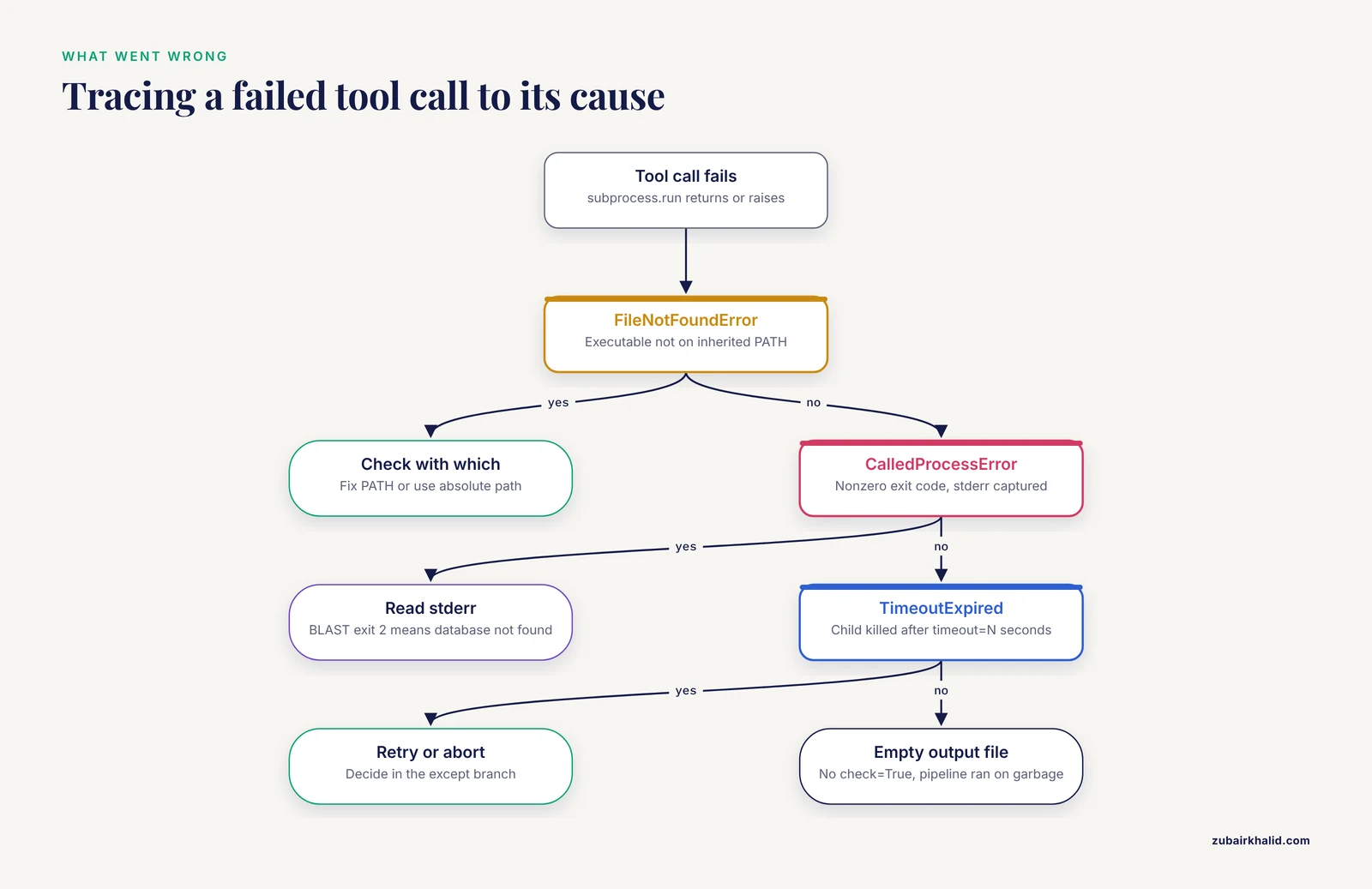
BLAST returns exit status 2 for errors and 1 for a query with no hits. With check=True, Python raises CalledProcessError and the exact command is included in the traceback, which makes debugging much easier:
subprocess.CalledProcessError: Command '['blastn', '-query', 'query.fasta',
'-db', 'database_that_does_not_exist']' returned non-zero exit status 2.
Catch the exception when a failure is expected or when you want to log it and keep going:
import subprocess

def run_blast(query, db):
    cmd = ["blastn", "-query", query, "-db", db, "-outfmt", "6"]
    try:
        result = subprocess.run(cmd, capture_output=True, text=True, check=True, timeout=600)
    except subprocess.CalledProcessError as e:
        raise RuntimeError(f"BLAST failed (exit {e.returncode}): {e.stderr}") from e
    except subprocess.TimeoutExpired:
        raise RuntimeError("BLAST timed out after 600 seconds")
    return result.stdout
Two things in that function are habits worth copying. First, the stderr content travels with the exception, so the actual error message reaches whoever reads the log. Second, timeout=600 guarantees the script cannot hang forever on a stuck process. When the limit is hit, subprocess kills the child and raises subprocess.TimeoutExpired.
Step 4. Deal with tools that want files, not pipes
Many bioinformatics tools were designed decades ago around files, and some still behave best when reading and writing them. BLAST accepts queries on stdin, but samtools and many assemblers work most predictably with real files. The pragmatic approach is to write a temporary file, run the tool, read the result, and clean up:
import subprocess
import tempfile
from pathlib import Path

def run_blast_to_file(query_path, db, out_dir):
    out_tsv = Path(out_dir) / f"{Path(query_path).stem}_hits.tsv"
    cmd = [
        "blastn",
        "-query", str(query_path),
        "-db", db,
        "-out", str(out_tsv),
        "-outfmt", "6 qseqid sseqid pident length evalue",
        "-num_threads", "4",
        "-evalue", "1e-5",
    ]
    subprocess.run(cmd, check=True, capture_output=True, text=True)
    return out_tsv
Note two more things this example introduces. -num_threads 4 tells BLAST to use four CPU cores, and -evalue 1e-5 is the conventional default significance threshold for BLAST searches in published workflows. Both are standard parameters you would otherwise type at the shell, and wrapping them in the function means they are now consistent across every run of your pipeline.
When you do want streams instead of files, pipe them carefully. Feeding data to a tool's stdin works like this:
sequence = "ATGAAACGCATTAGCACCACCATTACCACCACCATCACCATTACCA"
fasta_text = f">query1\n{sequence}\n"

result = subprocess.run(
    ["blastn", "-db", "mydb", "-outfmt", "6"],
    input=fasta_text,
    capture_output=True, text=True, check=True,
)
print(result.stdout)
The input parameter sends the string to the process's standard input. Do not combine input= with stdout=subprocess.PIPE in ways that require you to write and read simultaneously, because that is where deadlocks come from. More on that in the mistakes section.
Step 5. Stream long output with Popen
Some tools produce output continuously for minutes or hours. Reading it line by line lets you log progress, update a monitor, or start processing before the tool finishes. That is the job of subprocess.Popen:
import subprocess

proc = subprocess.Popen(
    ["blastn", "-query", "big_query.fasta", "-db", "mydb", "-outfmt", "6"],
    stdout=subprocess.PIPE,
    stderr=subprocess.PIPE,
    text=True,
)

n_hits = 0
for line in proc.stdout:
    n_hits += 1
    if n_hits % 10000 == 0:
        print(f"{n_hits} hits so far")

proc.stdout.close()
return_code = proc.wait()
if return_code != 0:
    print(proc.stderr.read())
    raise RuntimeError(f"blastn exited with status {return_code}")
print(f"Done. {n_hits} hits total.")
Popen returns immediately, and the for line in proc.stdout loop reads each result line as it arrives. After the loop you must call proc.wait() to collect the exit code. Never decide a run succeeded just because the loop finished. Tools that crash mid-stream also end their output early, and only the return code tells you whether what you read was complete.
Step 6. Run many samples in parallel
When you have 96 samples and each takes five minutes, running them one at a time wastes most of your machine. concurrent.futures.ThreadPoolExecutor is the simplest safe way to run subprocesses in parallel, because each subprocess is a separate OS process anyway and the Python threads merely wait for them:
import subprocess
from concurrent.futures import ThreadPoolExecutor, as_completed
from pathlib import Path

samples = sorted(Path("raw").glob("*.fasta"))

def blast_one(sample):
    out = Path("results") / f"{sample.stem}.tsv"
    subprocess.run(
        ["blastn", "-query", str(sample), "-db", "mydb",
         "-outfmt", "6", "-out", str(out)],
        check=True, capture_output=True, text=True,
    )
    return sample.stem, out

with ThreadPoolExecutor(max_workers=8) as pool:
    futures = [pool.submit(blast_one, s) for s in samples]
    for fut in as_completed(futures):
        name, path = fut.result()
        print(f"{name} finished, output at {path}")
Set max_workers to roughly the number of jobs that fit your cores and memory. Each BLAST process itself uses -num_threads cores if you set it, so the total demand is workers times threads per job. Oversubscribing slows everything down.
Step 7. Chain tools into a pipeline
Real workflows pass output to input. The classic read-processing chain is quality trimming with fastp, alignment with bwa mem, sorting with samtools sort, and indexing with samtools index. In Python each stage is a function that receives paths and returns the next stage's paths, with checks between stages:
import subprocess
from pathlib import Path

def run(cmd):
    result = subprocess.run(cmd, capture_output=True, text=True, check=True)
    return result

def process_sample(sample_id, fastq, ref_index, workdir):
    wd = Path(workdir) / sample_id
    wd.mkdir(parents=True, exist_ok=True)
    trimmed = wd / "trimmed.fastq"
    bam = wd / "aligned.bam"
    sorted_bam = wd / "aligned.sorted.bam"

    run(["fastp", "-i", str(fastq), "-o", str(trimmed),
         "--thread", "4"])
    run(["bwa", "mem", "-t", "4", ref_index, str(trimmed)]) \
        # bwa writes SAM to stdout, so capture and pipe it through samtools:
    with open(bam, "wb") as bam_out:
        sam_proc = subprocess.Popen(
            ["bwa", "mem", "-t", "4", ref_index, str(trimmed)],
            stdout=subprocess.PIPE)
        subprocess.run(
            ["samtools", "view", "-b", "-"],
            stdin=sam_proc.stdout, stdout=bam_out, check=True)
        sam_proc.stdout.close()
        sam_proc.wait()
        if sam_proc.returncode != 0:
            raise RuntimeError(f"bwa mem failed for {sample_id}")

    run(["samtools", "sort", "-@", "4", "-o", str(sorted_bam), str(bam)])
    run(["samtools", "index", str(sorted_bam)])
    return sorted_bam
This chaining pattern, where one tool's output becomes the next tool's input under Python's control, is exactly what published pipelines formalize. PePApipe chains thirteen tools from raw reads through quality control, assembly, and variant calling, classifies the generated files into structured folders, and keeps intermediate files available for further or parallel analyses [1]. The ChiLCV genomics study used the same philosophy, with Python scripts automating genome download, curation, and processing before downstream phylogenetics [2].
The direct pipe between bwa mem and samtools view in that function uses one process's stdout as the other's stdin, which avoids writing a large intermediate SAM file to disk. This is the one pattern where you genuinely need Popen for the upstream process.
Step 8. Package it, then decide whether you need a workflow manager
Once each stage is a tested function, wrap them in a module with a command-line entry point:
if __name__ == "__main__":
    import argparse
    parser = argparse.ArgumentParser(description="Trim, align, sort, index")
    parser.add_argument("sample_id")
    parser.add_argument("fastq")
    parser.add_argument("ref_index")
    parser.add_argument("--workdir", default="work")
    args = parser.parse_args()
    bam = process_sample(args.sample_id, args.fastq, args.ref_index, args.workdir)
    print(f"Wrote {bam}")
Run it like any other tool:
python align_pipeline.py sample42 raw/sample42.fastq refs/index --workdir workAt some point, a hand-rolled script stops being enough. If you need to rerun only the steps whose inputs changed, resume a crashed run from where it stopped, submit jobs to a cluster, or run each tool in a container, a workflow management system is the right tool. Jackson and colleagues, who reimplemented the RiboViz ribosome profiling workflow from a Python script into a workflow management system, describe exactly this trade. Workflow managers provide a common language for describing analyses, support incremental builds and re-entrancy so only changed steps re-execute, and handle containers, high-performance computing systems, and clouds, which frees the bioinformatician to focus on what the workflow should do rather than how it is run [6]. A good rule of thumb is that subprocess scripts serve one analysis or one lab group, while workflow systems serve shared, long-lived, multi-sample production pipelines. Your subprocess functions do not go to waste when you graduate, because most workflow systems call out to the same command-line tools your functions already wrap.
Common Mistakes and Limitations
These are the failures that show up again and again in real python subprocess bioinformatics work. Each one has a specific fix.
Using shell=True with interpolated strings. Writing subprocess.run(f"blastn -query {sample}", shell=True) works until a file name contains a space, a quote, or a semicolon, and it opens a command injection risk if sample names come from user input or a spreadsheet. Always pass a list of arguments and leave shell at its default of False. If a tool truly needs shell syntax such as wildcards or pipes, run that one small piece through ["bash", "-c", script_string] with data passed as arguments, never interpolated into the string.
Not checking the exit code. Without check=True, a failed tool call produces an empty output file and your pipeline keeps running on garbage. Every subprocess.run call in a pipeline should carry check=True or an explicit if result.returncode != 0 branch that raises with the captured stderr.
Reading a large output while also writing to the process. If you set stdout=subprocess.PIPE and then try to proc.communicate() with a huge input string while the child is blocked writing output, both processes can block each other and deadlock. For any command with substantial input and output, write to a file or use proc.communicate(input=...), which handles both streams concurrently, or pipe through a second process as shown in the chaining example.
Assuming the tool is installed and on the PATH. The first error in any new environment is almost always FileNotFoundError: [Errno 2] No such file or directory: 'blastn'. That message means the executable was not found, not that your Python is broken. Check with which blastn (Linux, macOS) or where blastn (Windows), and consider recording explicit absolute paths or a conda environment specification in your repository so collaborators get the same tools.
Ignoring version drift. A flag that worked in samtools 1.9 can be renamed or removed by 1.19, and BLAST changes its default behavior between releases. Print tool versions at the start of every run, for example samtools, version, and write them into your log. A one-line helper that runs each tool with -version and records the output makes results reproducible months later.
Parsing human-readable output formats. Default BLAST and samtools output is formatted for people, with column widths and headers that shift. Parse only fixed machine formats such as -outfmt 6 tabular output, VCF, BAM, or JSON, and parse them with a real parser rather than position counting. The SNPio project was motivated by exactly this fragmentation problem, where scattered command-line utilities and ad hoc conversion scripts complicate reproducibility and obscure data provenance, and it consolidated VCF parsing, filtering, and summary statistics into one Python-native framework [5].
Hardcoding absolute paths. /home/alice/projects/refs/nt means nothing on the lab server or a collaborator's laptop. Derive paths from the script location or a configuration file, and use pathlib.Path rather than string concatenation so the code works on Windows and Unix.
Not cleaning up temporary files. Long pipelines fill disks with intermediates. Use tempfile.TemporaryDirectory() as a context manager for scratch space, and keep only the outputs you actually need.
Forgetting that subprocess inherits your environment. Environment variables such as OMP_NUM_THREADS, NCBLASTS, or tool-specific cache directories silently change behavior between your laptop and the cluster. Pass an explicit env= dictionary for the runs where behavior matters.
Assuming a Python wrapper means a tool is safe to parallelize blindly. Tools that write to fixed temporary file names or lock a shared database will corrupt each other's outputs when run concurrently. Give each parallel job its own working directory, as the process_sample example does with wd.mkdir(parents=True, exist_ok=True).
One deeper limitation deserves an honest statement. Subprocess orchestration scales beautifully until it does not. If your pipeline spans multiple samples, clusters, containers, and months of reuse, the hand-rolled approach accumulates hidden fragility around reruns and failure recovery. That is the point at which the workflow manager literature is unambiguous: delegating execution mechanics to a maintained system is more robust than reimplementing them yourself [6].
Working with Biopython and Existing Wrappers
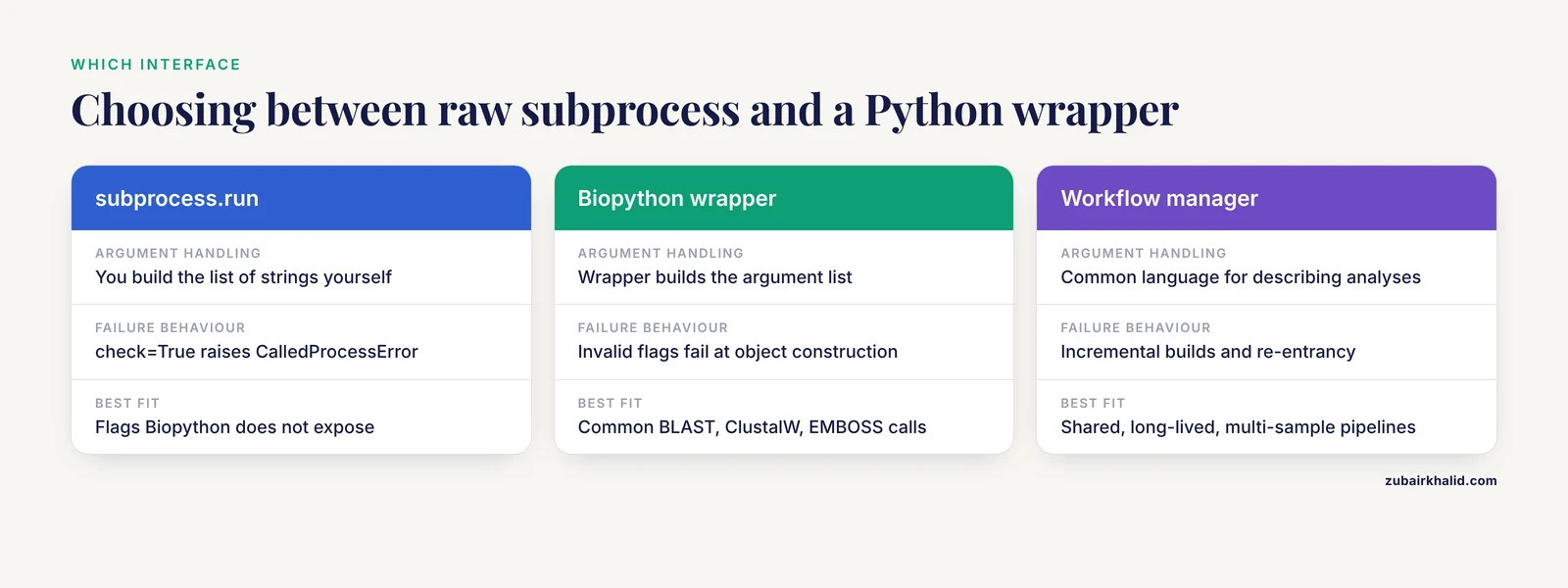
Before you write a subprocess call, check whether a maintained Python interface already exists, because a wrapper handles argument validation, version differences, and output parsing for you. Biopython, the foundational library for python for bioinformatics, ships wrappers for common tools including BLAST, ClustalW, and EMBOSS programs in its Bio.Align.Applications and related modules. A minimal biopython tutorial example of its command-line wrapper style:
from Bio.Blast.Applications import NcbiblastnCommandline

blastn = NcbiblastnCommandline(query="query.fasta", db="mydb", outfmt=6)
stdout, stderr = blastn()
print(stdout)
The wrapper builds the argument list, runs the command, and raises an error on failure. Its main advantage is that invalid flags fail at object construction with a clear message rather than at runtime.
Beyond Biopython, domain-specific Python packages increasingly absorb the subprocess layer entirely. pyKVFinder performs cavity detection natively in Python and returns results as NumPy arrays so they plug directly into machine learning and visualization libraries [3]. SNPio replaces fragmented VCF preprocessing utilities with Python-native parsing and filtering [5]. PaDuA builds (phospho)proteomics workflows inside Jupyter Notebooks for both end users and developers [7]. SerialFIB exposes a scripting module compatible with available Python packages for automated cryo-FIB protocols [8]. PyGOLD removes the GUI from GOLD docking by programmatically parsing and writing its configuration file [4]. The pattern across all of these is that the ecosystem prefers Python-native interfaces when they are feasible and subprocess when the tool must stay a binary. Both belong in your toolkit, and choosing between them is a design decision, not an afterthought.
How to Verify Your Pipeline Actually Worked
Trust nothing until you have checked it. A practical verification checklist for any subprocess-driven workflow:
- Check exit codes. Every tool call should have succeeded, which
check=Trueguarantees or a log confirms. - Check output existence and size. A zero-byte BAM or an empty TSV is usually a silent failure.
Path(out).stat().st_size > 0catches the obvious case. - Validate formats. Run
samtools quickcheck aligned.sorted.bamfor alignment files, or count records and confirm expected columns for tabular text. - Spot-check content. Open the first few lines. A BLAST TSV should have twelve tab-separated fields on every line.
awk -F '\t' 'NF != 12 {print NR}' hits.tsvprints any malformed line numbers. - Record versions and commands. Log the exact command lines and tool versions with each run. When a colleague gets a different answer, this log is the difference between a five-minute diagnosis and a week of guessing.
- Run the negative control. Point the pipeline at an empty or unrelated input and confirm it fails cleanly rather than producing plausible-looking output.
Frequently Asked Questions
How do I call an external command-line tool from a Python script?
Import subprocess and call subprocess.run(["tool", "arg1", "arg2"], capture_output=True, text=True, check=True). Pass the command as a list of strings, one list item per argument, and read results from result.stdout and result.stderr.
Why does subprocess raise FileNotFoundError when my tool is clearly installed?
The message FileNotFoundError: [Errno 2] No such file or directory: 'tool' means the executable is not on the PATH that your Python process inherited. Confirm with which tool in the same shell environment, then either fix the PATH, use the absolute path to the binary, or activate the correct conda environment before launching Python.
Should I use shell=True in my subprocess calls?
Almost never. shell=True exposes you to command injection when any argument comes from data, and it breaks on file names containing spaces or special characters. Use a list of arguments with the default shell=False, and reserve ["bash", "-c", ...] for the rare command that genuinely needs shell syntax.
How do I pass one tool's output directly to another tool in Python?
Use subprocess.Popen for the upstream process with stdout=subprocess.PIPE, then call subprocess.run on the downstream tool with stdin=upstream_proc.stdout. Close the upstream pipe and call upstream_proc.wait() afterward so you can check its exit code. Writing intermediate files to disk is slower but easier to debug, so use pipes only for large intermediates such as SAM files.
How do I stop a hung tool from freezing my pipeline forever?
Pass timeout=N to subprocess.run, which kills the child and raises subprocess.TimeoutExpired after N seconds. Wrap the call in a try block and decide in the except branch whether to retry, skip, or abort the run.
Is Biopython better than subprocess for running BLAST?
Biopython's NcbiblastnCommandline is a convenience layer over subprocess that validates arguments and parses results for you, so it is a good default when your use case fits its wrappers. Raw subprocess.run is better when you need flags Biopython does not expose, custom streaming, or fine control over files and environment. Both run the same underlying BLAST binary.
How many subprocesses can I run in parallel from Python?
The limit is your CPU cores and memory, not Python. A practical start is one worker per two cores if each job itself uses multiple threads, or one worker per core for single-threaded tools. Monitor memory first, because genomics tools such as assemblers are frequently memory bound before they are CPU bound.
When should I switch from subprocess scripts to a workflow manager like Snakemake?
Switch when your analysis needs selective re-execution of changed steps, resumption after crashes, cluster or cloud submission, or containerization, or when multiple people need to rerun it reliably. Published comparisons describe workflow management systems as providing a common language for reproducible multistep analyses and freeing scientists from execution mechanics, which hand-written scripts struggle to match at scale.
Sources
- 'PePApipe': A complete bioinformatics analysis pipeline for African Swine Fever Virus genome.
- A python based automated computational framework to classify and comparative genomics analysis of the global diversity of chili leaf curl virus (ChiLCV) strains to understand virus host interactions.
- pyKVFinder: an efficient and integrable Python package for biomolecular cavity detection and characterization in data science.
- PyGOLD: a python based API for docking based virtual screening workflow generation.
- SNPio: a Python interface for population genomic data processing.
- Using prototyping to choose a bioinformatics workflow management system.
- PaDuA: A Python Library for High-Throughput (Phospho)proteomics Data Analysis.
- A modular platform for automated cryo-FIB workflows.