Common Pitfalls When Migrating Bioinformatics to the Cloud
By Dr. Zubair Khalid, DVM, MS, PhD ·

The single most common failure in a cloud bioinformatics migration is not a broken pipeline. It is a cost and data-transfer surprise that appears weeks after the first successful run, when storage has quietly accumulated, egress charges have stacked up, and nobody documented which bucket, region, or instance family the work depends on. The first thing to check is always the same: open the cloud provider's cost and usage report, group it by service and by tag, and look at the two lines that almost always explain the problem, storage and data transfer. If either line grew faster than compute, you have found the mechanism behind most migration pain.
This article walks through the pitfalls of migrating bioinformatics workloads to the cloud in order of how often they cause trouble, from budget surprises and slow uploads down to rare failure modes such as service quota exhaustion and archival retrieval delays. Each section explains the mechanism behind the failure, gives a short diagnostic sequence, and describes a concrete fix. The goal is a practical playbook for anyone moving sequencing, alignment, variant calling, or analysis workloads into cloud bioinformatics infrastructure, including teams working with AWS genomics services such as S3, EC2, Batch, and Athena.
Why Cloud Bioinformatics Migrations Fail
On a local server or an institutional cluster, the costs of inefficiency are invisible. A job that leaves 200 GB of intermediate files behind, a container that quietly pulls the latest tag of a tool every run, or a dataset duplicated across three directories all feel free. In the cloud, every one of those behaviors maps to a line item on a bill, and every unplanned data movement maps to a transfer charge. Most pitfalls migrating bioinformatics to the cloud come from carrying local-server assumptions into an environment where storage, bandwidth, and compute are separately metered.
A second structural cause is that cloud genomics workloads are bursty. A sequencing core may run nothing for a week and then submit 40 whole-genome alignment jobs in one afternoon. Local infrastructure is sized for the average, cloud infrastructure is sized per-job, and teams that do not update their operational habits after migration end up paying for capacity they no longer need or failing to provision capacity they suddenly do.
A third cause is organizational rather than technical. The person who understands the pipeline and the person who understands the cloud account are often different people, and the migration happens in the gap between them. The fixes in this article therefore cover three layers, the technical layer (buckets, instances, containers), the workflow layer (engines, retries, caching), and the governance layer (tags, budgets, access policy).
Troubleshooting Table: Symptom, Cause, Confirmation, Fix
The table below is the core of this guide. It lists the failure symptoms in rough order of frequency, the mechanism behind each, how to confirm the diagnosis, and how to fix it. The sections after the table expand on each row in detail.
| Symptom | Likely cause | How to confirm | Fix |
|---|---|---|---|
| Monthly bill far exceeds the pilot estimate | Idle compute left running, unmanaged storage growth, cross-region or internet egress charges | Cost and usage report grouped by service, region, and tag. Compare storage and data-transfer lines to compute | Tag all resources, enable budgets and alerts, shut down idle clusters, move intermediates to lifecycle-managed buckets |
| Uploading sequencing data takes days or stalls | Single-threaded transfers over a high-latency link, TLS overhead, small-object churn | Measure throughput on a single large file versus parallel transfers of many files | Use a multipart parallel upload tool, transfer from a network close to the provider, batch small files first |
| Jobs crash with out-of-memory or disk-full errors | Instance sizing copied from local server habits, dense EBS root volumes | Review the engine's exit codes and the instance metrics for memory and disk | Right-size per workflow stage, attach larger scratch volumes, use memory- or compute-optimized families where the stage needs them |
| The same tool gives different results in the cloud and locally | Unpinned container tags, missing reference checksums, locale or threading differences | Diff the tool version logs between environments, check container image digests | Pin images by digest, ship reference files with checksums, record software versions in the workflow |
| Spot jobs die partway through a long run | Spot capacity reclamation, no checkpoint or retry logic | Look for an interruption notice in the instance or batch logs | Use spot only for restartable work, add retries and checkpoints, reserve on-demand capacity for critical long stages |
| Permissions errors on every other job | Hand-crafted IAM policies copied between projects | Run the failing job with verbose logging and read the exact denied action | Grant least-privilege roles per workflow, test with the same role the job runs under |
| Pipeline restarts recompute finished steps | Workflow call caching or resume disabled or invalidated | Compare the cache keys and task hashes across runs | Enable caching in the engine, keep inputs and containers byte-identical between runs, mount reference data read-only |
| Retrieving old data takes hours or days | Objects moved to an archival storage class | Check the storage class on the objects in question | Keep an accessible copy of active data, plan retrieval into the analysis schedule, restore before you need the file |
| Everything worked yesterday and nothing works today | Service quota hit, region capacity shortage, expired credentials | Read the error message, check service quotas and credential expiry | Request quota increases ahead of large runs, spread across regions or accounts, automate credential rotation |
| Auditors or security review flag the account | Unencrypted buckets, public access, no BAA or access logging for human genomic data | Run the provider's account security audit tools | Block public access at the account level, enforce encryption, enable access logs, sign the applicable healthcare agreement before loading protected data |
Pitfall 1: Cost Surprises After the Pilot Looks Cheap
The most frequent of all pitfalls migrating bioinformatics to the cloud is a bill that looks nothing like the pilot. The mechanism is simple. Pilots run on a small dataset for a short time, and they hide three cost drivers that only appear at production scale.
The first driver is storage accumulation. A whole-genome analysis pipeline routinely writes more intermediate data than it reads as input, and BAM or CRAM files, index files, and per-sample temporary outputs accumulate in buckets that nobody revisits. On a local server this fills a disk and someone notices. In the cloud it becomes a recurring monthly charge that grows with every batch.
The second driver is idle compute. Teams accustomed to a shared cluster leave interactive nodes, notebook servers, and half-forgotten EC2 instances running around the clock. A 24/7 interactive instance costs many times what the same hours would cost as spot capacity or as a stopped instance with storage retained.
The third driver is data movement. Moving data between regions, out to the public internet, or through network address translation gateways is metered, and a poorly placed pipeline can generate more transfer charges than compute charges. This is a well-documented pattern in cloud bioinformatics and it is the reason providers publish detailed guidance on keeping data transfer within a single region (AWS Well-Architected Framework, Cost Optimization pillar).
Diagnostic sequence. Open the cost and usage report, group by service and by linked account or tag, and look at a 90-day trend. Identify the top three line items. For each, ask whether it maps to storage, transfer, or compute. Then walk through these checks:
- List storage buckets with their sizes and storage classes. Look for buckets holding intermediates or raw instrument output that no workflow reads.
- List running compute resources and their launch dates. Anything running for more than a few days without a reason is a candidate for shutdown scheduling.
- Check transfer charges by region. Cross-region movement inside the same provider and internet egress are the usual culprits in AWS genomics accounts.
Fixes. Tag every resource at creation with project, owner, and environment, and enforce the tagging policy with the provider's tooling. Set a budget with alerts at the point where spending would surprise you, not after it has. Apply lifecycle rules that transition intermediates to cheaper storage classes or expire them after a defined number of days. Schedule interactive compute to stop outside working hours. Keep heavy data paths inside one region so that pipeline inputs, outputs, and the compute reading them sit together.
A useful habit is a monthly cost review that takes fifteen minutes, looks at the top five cost lines, and assigns each to a named person. Cost surprises in cloud genomics are rarely caused by one large mistake. They are caused by ten small unmetered habits.
Pitfall 2: Slow or Failed Data Uploads
Moving a sequencing core's worth of data over the internet is often the longest phase of a migration, and it is the phase most often underestimated. The mechanism of the failure is usually not bandwidth. It is the interaction between latency, transfer protocol, and file count.
A single-threaded transfer over a long-distance link spends most of its time waiting for round trips rather than moving bytes, so the observed throughput lands far below the link's rated speed. Sequencing data makes this worse because it arrives as a mix of very large files and enormous numbers of small files such as index fragments, reports, and per-lane metadata. Many small objects transfer slowly because each one pays the connection and request overhead.
Diagnostic sequence.
- Time a single large file transfer and compute the effective throughput. Compare it against the link capacity you expect from your internet service provider or institutional network.
- Time a directory of many small files. If the small-file case is dramatically slower per byte, request overhead is your bottleneck.
- Check where the transfer starts. A laptop on office Wi-Fi will never saturate a link that a rack server in the same building could.
Fixes. Use a transfer tool that supports multipart, parallel, and resumable uploads rather than a single-stream copy. For AWS genomics workloads, the AWS CLI's high-performance configuration, the S3 Transfer Manager family of tools, or dedicated transfer appliances and physical shipping options for very large archives all exist precisely for this problem. Stage data close to the provider, for example from a network with direct connectivity or from a colocation point, when the dataset is large. Compress or batch small files before upload where the downstream workflow tolerates it. Finally, validate after transfer with checksums, because a failed upload discovered after the instrument drive has been wiped is a far more expensive problem than a slow upload.
A data-integrity note that belongs here. Genomic and clinical data are irreplaceable at the sample level. Always verify checksums on both sides of a transfer before deleting the local copy, and keep the source copy until the cloud copy has been used successfully by at least one real workflow run.
Pitfall 3: Compute Sizing and the Bursty Workload Problem
The third pitfall is compute sizing, and its mechanism is a mismatch between job shape and instance shape. A local server usually runs one job at a time on hardware chosen years ago. Cloud genomics lets every stage of a workflow run on hardware chosen for that stage, but teams that migrate without re-profiling their workflows either pay for memory they never use or crash on stages that need more than they provisioned.
Typical failure patterns look like this. Alignment stages that are memory-hungry crash on general-purpose instances chosen for cost. Variant caller joint genotyping on large cohorts needs far more memory than single-sample calling, and a fixed instance type across the whole workflow either wastes money on most stages or fails on one. Fastq compression and decompression stages are CPU-bound and gain little from oversized memory. Interactive data analysis in notebooks quietly runs for days on the same machine type as production jobs.
Diagnostic sequence.
- For each workflow stage, record the peak memory, CPU utilization, disk I/O, and runtime from a representative run. Workflow engines and the provider's monitoring tools both expose these metrics.
- Group stages by resource profile. You will typically find three or four distinct profiles, not one.
- Compare the instance types currently configured against those profiles.
Fixes. Configure per-task instance selection in the workflow engine rather than one global setting. Use scratch volumes sized for the largest intermediate the stage writes, and clean scratch storage on task completion so that disk does not accumulate across retries. Match CPU-optimized families to CPU-bound stages and memory-optimized families to memory-bound stages. For AWS Batch users, define separate job queues and compute environments for high-priority work and for opportunistic work so that a spot reclamation of one queue does not starve the other.
Interactive work deserves its own rule. Give analysts a small, schedulable, auto-stopping environment, and keep production workflow compute entirely separate. Every serious cloud genomics cost audit finds abandoned notebooks, and the fix is architectural rather than personal discipline.
Pitfall 4: Spot Interruptions and Unrestartable Workflows
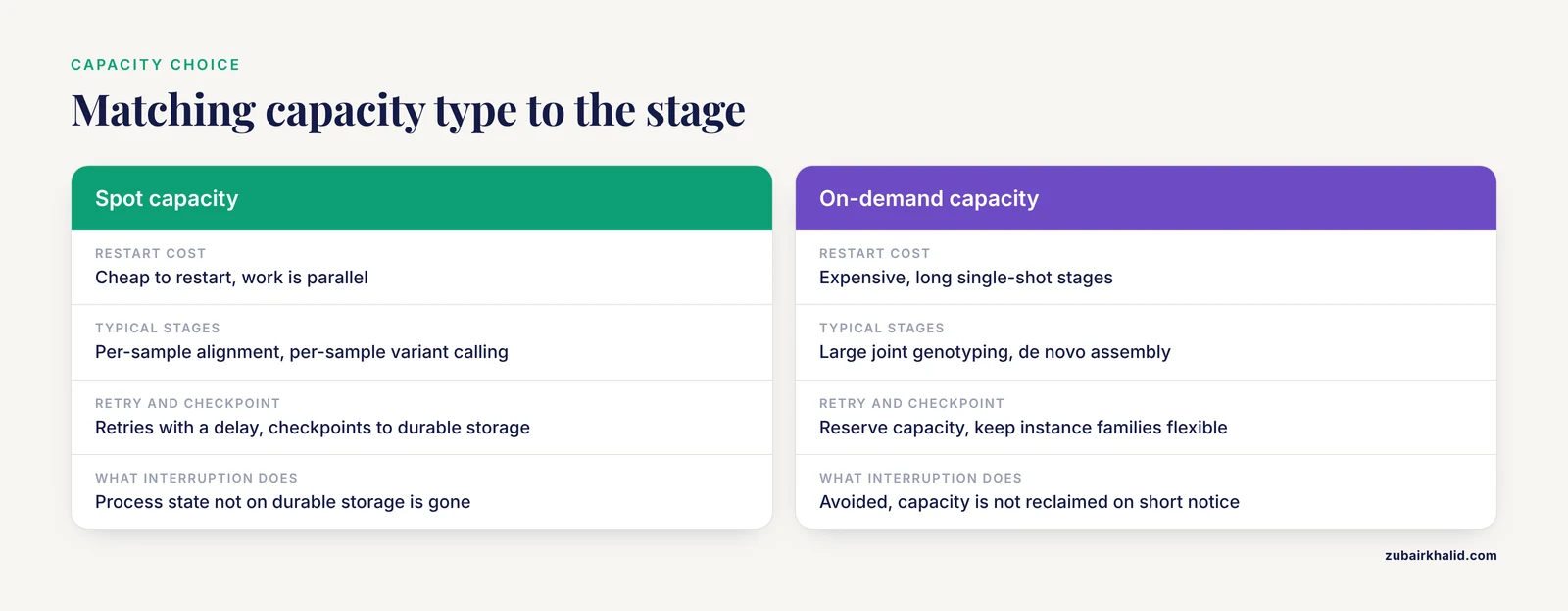
Spot capacity offers large discounts in exchange for the possibility that the provider reclaims the instance on short notice. The pitfall is not using spot. The pitfall is using spot for work that cannot survive interruption, and running long, irreproducible stages without retry logic.
The mechanism is worth understanding because it shapes the fix. When a spot instance is reclaimed, the operating system gets a brief warning and then the machine stops. Any process state not written to durable storage is gone. A workflow engine that treats the task as failed and restarts it from scratch will still finish the workflow if each task is idempotent, but a task that runs for many hours on a single large input will burn its compute budget repeatedly if interruptions recur.
Diagnostic sequence.
- Look for interruption or termination notices in the logs of failed tasks. If the task failed without an application error, capacity reclamation is the likely cause.
- Check whether the workflow engine is configured with retries, and whether a retry re-reads inputs from durable storage rather than from the dead instance's local disk.
- Check whether long stages write intermediate state that a resumed task can reuse.
Fixes. Use spot for restartable, embarrassingly parallel work such as per-sample alignment or per-sample variant calling. Use on-demand or reserved capacity for long, single-shot, checkpoint-poor stages such as large joint genotyping or de novo assembly. Configure retries with a delay, since spot capacity often returns within minutes. Where a tool supports checkpointing, direct its checkpoint output to durable storage so a resumed task starts from the checkpoint. Keep instance families flexible in the job specification so the scheduler can place the work on whatever capacity is available rather than waiting for one exact instance type.
A subtle companion mistake is running spot work on instance types with a poor interruption history for your region and time of day. If a specific stage keeps getting reclaimed, move that stage to on-demand and stop troubleshooting. The engineering time costs more than the discount.
Pitfall 5: Permissions, Identity, and Account Sprawl
Access control failures are the pitfall that generates the most support tickets per byte of data. The mechanism is that cloud permissions are evaluated per action, per resource, and per role, and a pipeline that works interactively often runs under a different identity in production. A job launched by the workflow engine may assume a service role that lacks permission to read one bucket or write to one prefix, while the engineer who tested it interactively had broad personal credentials and saw no problem.
Diagnostic sequence.
- Capture the exact identity the failing job runs under. For AWS Batch and similar services, that is the job's role, not the submitter's user.
- Read the denied action in the error message. The message names the action, the resource, and sometimes the missing condition.
- Test the fix by running the job with the same role it will use in production, not with your own credentials.
Fixes. Give each workflow or project its own role with least-privilege access to exactly the buckets and prefixes it needs. Prefer bucket policies and role policies that name prefixes over wildcard grants. Keep separate accounts or separate environments for development and production so that an experiment with broad permissions cannot touch clinical data. Automate credential hygiene, short-lived roles over long-lived keys, and rotate anything long-lived that must exist.
A hazard note fits here. Permission cleanups and storage cleanups are the two most common moments when genomic data gets destroyed by accident. Before any policy change or lifecycle rule takes effect, verify that every production workflow can still read its inputs and write its outputs, and keep versioning enabled on buckets that hold irreplaceable data so that a bad deletion is recoverable rather than permanent.
Pitfall 6: Workflow Engine Misconfiguration and Lost Caching
Workflow engines such as Nextflow, Cromwell, and Snakemake translate a local pipeline into cloud tasks, and most migration failures at this layer come from three settings, caching, retries, and scratch handling.
Call caching or resume lets the engine skip tasks whose inputs, command, container, and parameters are identical to a previous successful run. The mechanism of failure is that the cache key is sensitive. If the engine records file paths that changed, container tags that were rebuilt, or parameters that drifted between runs, every task recomputes and the restart costs as much as the original run. Teams often conclude the cache is broken when the real problem is that the inputs are not byte-identical between runs.
Diagnostic sequence.
- Compare the engine's cache keys or task hashes for a recomputed task against the previous run. Identify which component changed.
- Check the container tags in the workflow. A floating tag such as a latest tag changes under you when the image is rebuilt.
- Check whether reference files are mounted read-only and whether any preprocessing step rewrites them in place.
Fixes. Pin containers by immutable digest, not by tag. Keep reference data in a dedicated read-only location and reference it by a stable path that includes a version. Enable the engine's resume or caching feature and configure its cache directory or database on durable storage. Configure retry counts and per-retry resource scaling so that a task that failed on memory can succeed on a retry with a larger instance. Route all scratch output to storage that the engine cleans up, so failed runs do not leave gigabytes of partial intermediates in buckets.
Pitfall 7: Container and Environment Drift
The pitfall of environment drift has a quiet mechanism. Locally, a tool installed once in 2021 keeps working. In the cloud, every task pulls a container image, and if that image is tagged rather than pinned, or if the tag is rebuilt, the pipeline's behavior changes without any code change on your side. The classic presentation is the reviewer's question about why a variant set differs from a previous run, with no code diff to explain it.
Diagnostic sequence.
- Print the tool version inside each task's logs. If the version differs between runs, you have drift.
- Compare image digests between the run that worked and the run that did not.
- Check whether any build process on your side pushes to the same tag the workflow uses.
Fixes. Pin images by digest, which is an immutable content address, and update digests through a deliberate code review rather than by accident. Build images from a versioned definition file rather than by hand so the environment is reproducible. Record the image digest and the tool versions in the workflow's outputs so that every result carries its own software provenance. This practice also satisfies the reproducibility expectations that journals and clinical laboratories increasingly apply to computational analyses.
Pitfall 8: Reference Data, Genome Builds, and Silent Mismatches
Few errors in cloud bioinformatics are as expensive as a genome build mismatch, because it produces plausible-looking wrong answers rather than crashes. The mechanism is that reference resources on the cloud are easy to copy, and a pipeline can end up reading an index built against a different reference preparation than the FASTA it is paired with, or a transcript annotation from a different release than the one used in the earlier analysis being compared against.
Diagnostic sequence.
- Record the exact reference identifiers, including build, source, and preparation, in every run's metadata.
- When results differ unexpectedly between the cloud and a previous local run, compare reference identifiers before debugging the tools.
- Verify that index files were generated against the same FASTA, and regenerate them from the bundled reference if provenance is uncertain.
Fixes. Maintain one canonical, versioned reference bundle per genome build per project, stored once and mounted read-only by every workflow. Name the bucket or path with the build and release so a mismatch is visible in the command line. Never copy a reference into a project bucket per analysis, because copies diverge. Public reference resources are maintained by organizations such as NCBI and EMBL-EBI, and citing the exact release you used belongs in the run metadata, not in a readme nobody reads after the fact.
Pitfall 9: Networking, Placement, and the Hidden Transfer Bill
The networking pitfall is the mechanical twin of the cost pitfall, but it deserves its own section because the fix is architectural. The mechanism is metered data movement. Within a single cloud region, transfers between storage and compute in the same availability zone are the cheapest path. Transfers across availability zones inside a region, transfers across regions, and transfers out to the internet are each progressively more expensive, and a pipeline can generate large volumes across any of these boundaries without any single step looking wrong.
The most common concrete pattern in AWS genomics accounts is a pipeline whose storage sits in one region while the compute or the analysts sit elsewhere, or a transfer path that routes through a network translation gateway when a same-network endpoint exists. Both patterns are invisible in the workflow code and obvious in the bill.
Diagnostic sequence.
- Map your data flow. For each workflow, write down where inputs live, where compute runs, and where outputs are written, including region and network path.
- Compare that map against the transfer line items in the cost report.
- Look for repeated large transfers of the same object, which indicates that a shared resource such as a reference bundle is being fetched per task instead of being placed near the compute.
Fixes. Co-locate compute and primary storage in a single region. Use private endpoints for storage access where the provider offers them, so that storage traffic does not route through paths that add both latency and charge. For shared resources, place one copy near the compute and grant read access, rather than having every task fetch across the network. For analyst access, serve summaries and subsets rather than pulling whole BAM files to laptops. When collaboration spans continents, plan deliberate replication between regions rather than letting individual jobs cross regions by accident.
Pitfall 10: Storage Classes, Lifecycle Rules, and the Archive Trap
Cloud object storage comes in classes, from frequently accessed standard storage through infrequent-access tiers down to archival classes where retrieval takes minutes to hours and carries a retrieval charge. The pitfall has two faces. The expensive face is keeping everything in the most expensive class because nobody wrote a lifecycle rule. The disruptive face is archiving data that a workflow still needs, then discovering during an analysis that retrieval takes longer than the project deadline.
The mechanism of the archive trap is that lifecycle transitions are easy to configure and hard to notice. A rule written for one project's intermediates can sweep up another project's active inputs if the bucket layout is shared. Retrieval from archival classes is asynchronous by design, and an analysis job that starts before its archived input is restored will fail or stall.
Diagnostic sequence.
- List buckets and objects with their storage classes and last-access or last-modified dates.
- Identify objects in archival classes that any active workflow reads.
- Review every lifecycle rule for bucket scope and confirm the rule's prefix matches its intended project.
Fixes. Separate buckets by data temperature, an active bucket for inputs and outputs, an intermediate bucket with short expiration, and an archive bucket for long-term retention. Scope lifecycle rules narrowly by prefix so one project's rules cannot touch another's data. For anything archival that might be needed on short notice, restore objects before scheduling the analysis rather than assuming retrieval is instant. Keep at least the metadata, indexes, and checksums in an immediately accessible class even when the bulk data is archived, because those small files unlock verification and planning.
Pitfall 11: Governance, Protected Data, and Audit Readiness
Genomic data is often identifiable human data, and governance failures are the pitfall with the highest stakes even though they are among the least frequent. The mechanism is that cloud accounts make sharing easy. A bucket set to public during a debug session, an export to a collaborator's personal storage, or a dataset loaded before a healthcare business associate agreement is in place each create exposure that no amount of pipeline correctness repairs.
Diagnostic sequence.
- Run the provider's account-level security audit tooling to enumerate public access, encryption status, and logging.
- Confirm that public access is blocked at the account level, not merely per bucket, so a future bucket cannot silently reopen.
- Confirm the legal prerequisites for protected data, including the applicable agreement with the provider, are in place before data arrives, not after.
Fixes. Enforce encryption at rest and in transit as account defaults rather than per-bucket choices. Enable access logging and object versioning on buckets holding protected or irreplaceable data. Use fine-grained access grants for collaborators with expiry dates, and review them on a schedule. Keep protected data in dedicated accounts or environments so that experimental projects physically cannot reach it. Treat the security review as a migration milestone equal in rank to the first successful pipeline run, because in regulated settings the run without the review is not a deliverable.
Pitfall 12: Quotas, Regions, and Rare Operational Failures
The rarest pitfalls deserve brief coverage because they appear exactly when deadlines are tightest.
Service quotas limit how many of a resource type you can run concurrently, such as instances in a compute environment or requests per second against a storage service. The mechanism of failure is that quotas are calibrated to your historical usage, and a migration creates a sudden step change. The diagnostic is to read the error message, which almost always names the specific quota, then request an increase well before the next large run. The fix is procedural, request quota increases as part of planning every scale-up rather than as an emergency response.
Regional capacity shortages mean that a specific instance family may be temporarily unavailable or interrupted more often in a specific zone. The diagnostic is the provider's capacity and recommendation tooling. The fix is flexibility, allow multiple instance families and multiple zones in your job specifications so the scheduler can route around a shortage.
Credential and key expiry produces the confusing symptom that everything worked yesterday and fails today, identically, across jobs. The diagnostic is simple, check the expiry. The fix is automation, use short-lived roles issued by the provider's identity service rather than long-lived keys embedded in configurations.
Finally, provider-side changes such as deprecations of older instance generations or service features occasionally break workflows that nobody has touched in a year. This is the argument for running your pipeline regularly on a small test dataset even when no new data has arrived. A pipeline exercised monthly breaks loudly and early. A pipeline exercised yearly breaks during a submission.
A Practical Diagnostic Sequence for Any Migration Failure
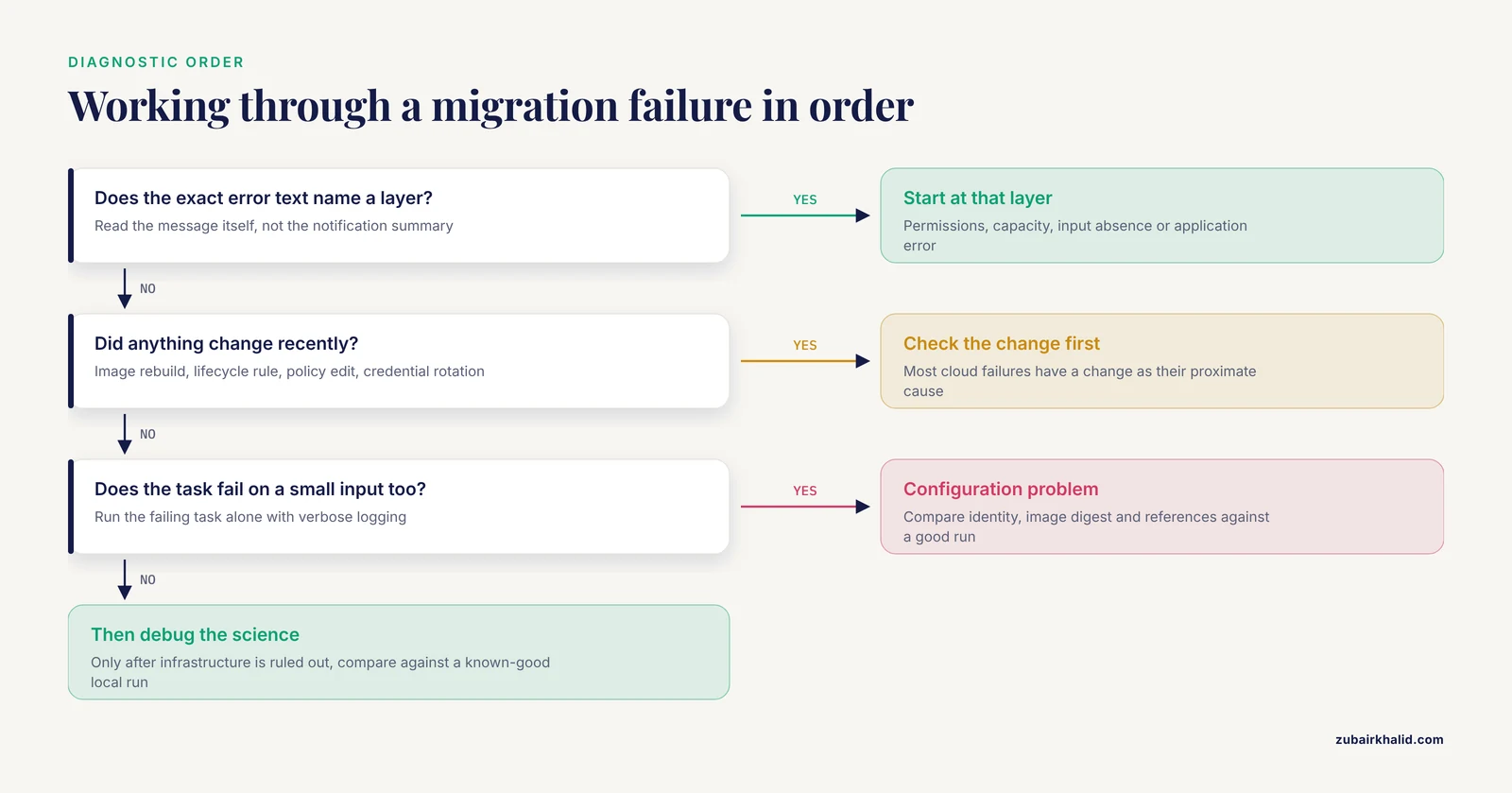
When something fails and the cause is not obvious, work through this sequence in order. It is ordered from cheapest test to most expensive and from most common cause to rarest.
- Read the actual error message, not the summary in the notification. The exact text usually names the layer that failed, permissions, capacity, input absence, or application error.
- Check whether anything changed, an image rebuild, a lifecycle rule, a policy edit, a credential rotation. Most cloud failures have a change as their proximate cause.
- Check identity. Confirm the role the job ran under, not the identity you tested with.
- Check resources. Confirm every input exists at the path the workflow expects, in the storage class you expect, and that outputs had somewhere writable to go.
- Check scale. Compare the resource profile of the failed task against the instance it ran on, memory, disk, and CPU.
- Check placement. Confirm the compute and the storage it reads are in the same region and, where possible, the same network path.
- Reproduce minimally. Run the failing task alone, on a small slice of input, with verbose logging. A failure that disappears on a small input is a resource or scale problem. A failure that persists is a configuration or environment problem.
- Only then debug the science. Once infrastructure is ruled out, compare results against a known-good local run with identical inputs, containers, and references.
This sequence resolves the majority of post-migration failures without touching the pipeline's scientific logic, which is the correct order of operations because infrastructure causes are more common than analytical ones.
Prevention Practices for Cloud Bioinformatics
Prevention in cloud genomics is mostly a set of small, repeatable habits rather than large architectural bets.
Reproducibility by construction. Pin containers by digest, version reference bundles, and record software versions, image digests, reference identifiers, and parameters in every run's output metadata. A run that cannot describe itself cannot be debugged, audited, or repeated.
One canonical copy of shared data. References, known variant resources, and shared databases live once, read-only, near the compute. Every per-project copy is a future mismatch waiting to happen.
Tagging and budgets from day one. Require project, owner, and environment tags on creation, enforce them with policy, and set budget alerts at the level where a surprise would be actionable. Cost control after the fact is archaeology. Cost control at creation is hygiene.
Lifecycle rules with narrow scope. Separate active, intermediate, and archive buckets, and scope rules by prefix. Review rules whenever a new project joins a shared account.
Spot for restartable work, durable capacity for critical stages. Configure retries everywhere, checkpoints where tools support them, and reserve on-demand capacity for the stages whose restart cost exceeds their discount.
Least privilege per workflow. One role per pipeline or project, granting exactly the reads and writes the workflow needs. Test with the production role, not your own credentials.
Regular small-scale drills. Run the full pipeline monthly on a test sample in the same configuration as production. This exercise surfaces quota changes, image drift, credential expiry, and provider deprecations while they are cheap to fix.
Documented data flow. Keep a one-page map of where each dataset class lives, which region, which accounts can read it, and which workflows touch it. Almost every networking and governance pitfall in this article becomes obvious on a single page of diagram, and invisible without one.
Common Mistakes and Limitations
Several mistakes recur even among experienced teams, and a few honest limitations belong alongside them.
Treating the cloud as a rented server is the deepest mistake. The cloud's value in bioinformatics comes from elasticity, per-stage resource selection, and metered storage, and all three require changing habits, not just changing hardware. Teams that lift and shift a single oversized server configuration lose most of the benefit and keep all of the bill.
Underestimating the data movement phase is the most common planning mistake. Upload time is measurable before migration, and it should be measured. A migration plan that does not include a checksummed, validated transfer schedule is not a plan.
Skipping the security review for protected data is the highest-consequence mistake. Human genomic data usually qualifies as protected health information, and the legal prerequisites, encryption defaults, access controls, and audit logging must exist before the first file loads.
Over-automating early is a subtler error. Teams sometimes build elaborate infrastructure as code before their workflows have stabilized, then spend more time maintaining the automation than running analyses. The better sequence is to stabilize the pipeline manually, capture what actually works, and automate the stable configuration.
On limitations. This article addresses infrastructure and process, not the scientific validity of any particular pipeline, and cloud migration does not repair an incorrect workflow, it only runs the same workflow with different failure modes. Individual clinical or research decisions about data governance, patient consent, and institutional policy require review by the responsible compliance and security officers, and the specifics vary by institution and data type. Cost figures vary continuously by provider, region, and negotiated terms, so this article deliberately describes cost mechanisms rather than quoting prices, and every real estimate should be regenerated from the provider's current pricing tools at planning time.
Frequently Asked Questions
What are the most common pitfalls when migrating bioinformatics to the cloud?
The most common pitfalls are cost surprises from unmanaged storage and idle compute, slow or stalled data uploads, compute sizing mismatches, spot interruptions on unrestartable jobs, permission errors, lost workflow caching, container drift, and governance gaps around protected data. Nearly all of them stem from carrying local-server habits into a metered, elastic environment.
Why did my cloud bioinformatics bill spike after migration?
Bill spikes almost always come from three drivers, accumulating intermediate files in buckets, compute left running around the clock, and data transfer between regions or out to the internet. Group your cost report by service and tag, compare the storage and transfer lines against compute, and the top three lines will usually name the culprit.
How do I fix slow S3 uploads for large sequencing files?
Use a transfer tool that supports multipart, parallel, resumable uploads, start the transfer from a network close to the provider, and batch small files before upload. Single-stream transfers over long-distance links spend most of their time waiting on round trips, which is why parallel transfer typically delivers a large improvement immediately.
Should I use spot instances for genomics workloads?
Yes, for restartable, parallelizable work such as per-sample alignment, with retries and durable inputs. No, for long single-shot stages with no checkpointing, such as large joint genotyping, where a reclamation costs more in recomputation than the discount saves. Match the capacity type to the stage's restart cost.
How do I keep genomic data secure and compliant in the cloud?
Block public access at the account level, enforce encryption at rest and in transit, enable access logging and versioning, grant least-privilege roles per workflow, keep protected data in a dedicated environment, and complete the required agreements with the provider before any data is loaded. Treat the security review as a migration milestone, not an afterthought.
Why does my pipeline work locally but fail in the cloud?
The usual causes are a different execution identity with narrower permissions, instance sizing that does not match the stage's resource profile, unpinned container images that changed between environments, or reference data that was not copied with its indexes and checksums. Run the failing task alone with verbose logging and compare its identity, resources, and image digest against the working local run.
Do I need to move all of our data to the cloud at once?
No. A staged migration works better, move the active working set first, keep the archive local or in a low-cost tier until a workflow actually needs it, and validate each stage with checksums before deleting the source copy. Bulk-moving everything up front maximizes transfer cost and risk while answering a question the pipeline itself can answer more cheaply.
How should we estimate cloud costs before migrating bioinformatics?
Profile each workflow stage for memory, CPU, disk, and runtime on a representative sample, estimate the storage retained after each run including intermediates, and use the provider's pricing and cost calculator tools with those measured profiles. Then set a budget with alerts and review actual spending against the estimate after the first production batch, because the first real month is the only estimate that matters.