Comparing Open-Source vs. Commercial Bioinformatics Tools
By Dr. Zubair Khalid, DVM, MS, PhD ·

Open-source bioinformatics software gives you readable, modifiable code and a free license, while commercial bioinformatics software gives you a paid product with vendor support, validated workflows, and a polished interface. The rule of thumb for choosing between them is straightforward: use open source when your team can write and maintain pipelines, needs full methodological transparency, or must reproduce results in a publication, and use commercial software when you need vendor-supported validation, regulatory documentation, or a graphical interface for analysts who do not code. Most working laboratories use both, and the interesting question is not which category wins but which tool fits a specific project, budget, and compliance requirement.
This guide compares the two categories across the criteria that actually decide purchases and project designs: cost structure, transparency, reproducibility, validation, support, integration, performance, and licensing risk. It grounds those comparisons in peer-reviewed head-to-head evaluations where they exist, including direct benchmarks of open-source and commercial tools on the same datasets.
The Core Comparison at a Glance
| Criterion | Open-source bioinformatics tools | Commercial bioinformatics tools |
|---|---|---|
| License cost | Free to acquire and run | Upfront license plus annual maintenance, or per-sample/cloud pricing |
| Source code | Public, inspectable, modifiable | Proprietary, closed, vendor-controlled |
| Reproducibility | High when pipelines are versioned and scripted | Depends on vendor version pinning and export formats |
| Support | Community forums, mailing lists, your own staff time | Vendor help desk, contracts, service-level agreements |
| Validation | You validate against your own data and gold standards | Vendor documents performance, you still verify on your data |
| Learning curve | Steep, command-line and scripting skills required | Gentle, graphical workflows with drag-and-drop logic |
| Updates | Continuous, community-driven, sometimes breaking | Scheduled releases, tested, backward compatible by design |
| Integration | Excellent with workflow managers, containers, clusters | Good within the vendor ecosystem, variable outside it |
| Failure mode | Silent algorithmic edge cases you must catch yourself | Opaque algorithms you cannot inspect, vendor lock-in |
| Typical fit | Research, method development, large-scale pipelines | Core facilities, regulated settings, service labs, teaching |
No row in that table is a guaranteed advantage for either side. Each criterion translates into a different trade-off depending on who is running the analysis and what happens if a number is wrong.
What Open-Source Bioinformatics Software Actually Is
Open-source software is distributed under a license that grants the right to run, study, modify, and redistribute the code. In bioinformatics, the category covers nearly the entire analytical stack that modern genomics is built on.
Sequence processing and alignment. Tools such as BWA, Bowtie, SAMtools, and the GATK toolchain read sequencing data, align reads to a reference genome, and produce variant calls. These tools are free, scriptable, and documented in methods sections of tens of thousands of papers.
Statistics and visualization. R with Bioconductor packages and Python with libraries such as pandas, Biopython, and scikit-learn handle differential expression, clustering, machine learning, and plotting. The R environment is the default for many genomics statistics courses in graduate programs.
Workflow management. Snakemake and Nextflow let you chain individual tools into pipelines, run them on a laptop or a cluster, and reproduce the exact same result later by fixing software versions in containers. This reproducibility layer is largely a strength of the open-source ecosystem because commercial software rarely exposes itself to containerization in the same way.
Interactive platforms. Galaxy provides a web interface that wraps hundreds of open-source tools, which allows bench scientists without command-line experience to run substantial analyses while still recording every parameter for reproducibility.
Domain-specific open tools. In metabolomics, MS-DIAL is a widely used open-source package for untargeted feature detection and annotation of mass spectrometry data [1]. In environmental forensics chemistry, Guineu is an open-source package for peak alignment in two-dimensional gas chromatography data, and the newer jAligner4GCxGC is an open-access Julia package for the same task [2].
The defining property across all of these is inspectability. You can read the code, identify exactly which parameters and statistical tests were applied, patch a bug, or adapt an algorithm to your organism or instrument. The price is that you, not a vendor, carry the burden of installation, version management, validation, and troubleshooting.
What Commercial Bioinformatics Software Actually Is
Commercial bioinformatics software is a product sold under a license, typically with a graphical interface, curated workflows, technical support, and documentation written by a paid staff. Well-known examples in genomics include QIAGEN CLC Genomics Workbench, Partek Flow, and Geneious Prime. In analytical chemistry, Thermo Fisher's Compound Discoverer is a commercial platform designed specifically for processing Orbitrap mass spectrometry data [1], and LECO's ChromaTOF Sync 2D is the commercial alignment module for its GC×GC-MS instruments [2].
Commercial products earn their price in a few specific ways:
- Turnkey validated workflows. The vendor has tested the pipeline across instrument types and sample types, documented expected outputs, and handles version regression testing so an update does not silently change your results.
- Support accountability. When a job fails at 2 a.m. before a grant deadline, you can open a ticket and someone whose job depends on it will respond. Open-source support, even when excellent, is volunteer goodwill.
- Audit and compliance documentation. In clinical and regulated environments, laboratories need documented software validation, change control, and vendor qualification. A commercial vendor supplies much of this package as part of the product.
- Accessible interfaces. A well-designed graphical interface shortens onboarding for analysts, clinicians, and students who will never write a shell script, which changes who on a team can perform an analysis.
The corresponding weaknesses are cost, opacity, and lock-in. Proprietary algorithms cannot be independently audited, export formats may not preserve everything you need, and a license lapse can halt production work mid-project. In adjacent fields, the same pattern is documented. In chemical process simulation, a comparison of the commercial Aspen Plus against the open-source DWSIM noted that the commercial tool was often considered too costly to purchase and maintain, while the open-source alternative allowed models to be studied and modified by any interested party, which promoted technology transfer between academia and industry [3]. Reviews of open-source versus commercial data management solutions in bioinformatics reach a similar structural conclusion: both categories exist and both must be assessed case by case against the needs of heterogeneous research data [4].
The Empirical Evidence: What Head-to-Head Studies Actually Show
The strongest arguments in the open-source versus commercial debate come from studies where both tool classes were run on the same data by the same evaluators. Bioinformatics has its own head-to-head evidence, and adjacent computational fields provide useful confirming patterns.
Metabolomics: open-source MS-DIAL versus commercial Compound Discoverer
The most directly relevant bioinformatics-adjacent benchmark comes from untargeted metabolomics. A 2024 study in Analytical and Bioanalytical Chemistry evaluated two data processing tools on the same gas chromatography-Orbitrap high-resolution mass spectrometry dataset, using the geographical differentiation of thyme (Spanish versus Polish samples) as the case study [1]. One tool was the open-source MS-DIAL. The other was the commercial Compound Discoverer, built by the instrument manufacturer for Orbitrap data.
Both tools succeeded at the overall scientific task. Both also showed the same structural problem: feature detection was heavily affected by unknown metabolites at the lowest identification confidence levels, by background signals, and by duplicate features, all of which had to be assessed carefully before any multivariate statistical analysis [1]. On annotation depth, the open-source tool annotated more compounds at the stricter level of confidence, puttingatively annotating 115 compounds at Level 2 compared with 52 for the commercial platform [1]. A Level 2 annotation in the metabolomics reporting scheme means a putatively assigned compound class supported by diagnostic evidence, one step below fully confirmed standards.
Three lessons generalize from this study to the broader bioinformatics tools comparison. First, open source can outperform commercial software on raw analytical output, so a paid license is not a proxy for better science. Second, the dominant error mode (low-confidence identifications and artifacts) was shared by both platforms, which means tool choice does not substitute for expert curation. Third, the comparison was meaningful because both tools were applied to identical data with the same biological question, which is exactly how your own lab should benchmark candidates before committing.
Peak alignment: workflow-level comparisons and their limits
A study published in Briefings in Bioinformatics benchmarked a new open-access Julia package, jAligner4GCxGC, against the open-source Guineu and the commercial ChromaTOF Sync 2D for inter-sample peak alignment in GC×GC-MS non-targeted screening [2]. The benchmark used three indoor dust samples, including certified reference material, spiked with more than 150 reference compounds at concentrations of 0.5, 5.0, and 50 pg/µL. At the highest spike level, the open-source tools detected and aligned the large majority of the spiked compounds correctly [2].
The methodological caution in this study matters more than the winner. Because the three packages also differed in peak detection and preprocessing, comparisons involving the commercial tool had to be interpreted at the whole-workflow level rather than as a pure test of alignment algorithms [2]. This is a persistent trap in comparing open-source vs. commercial bioinformatics tools. Commercial suites usually bundle detection, processing, and statistics into one pipeline, so any difference you measure reflects the entire bundle, not a single algorithm. When you benchmark tools yourself, isolate one step at a time or explicitly accept that you are comparing workflows.
Medical imaging: near-equivalence measured directly
Outside omics but inside computational methods, segmentation studies provide clean quantitative equivalence data. A comparison of automatic segmentation producing three-dimensional skull models from medical imaging found that the open-source tool InVesalius and the commercial tool MIMICS produced nearly identical outputs, with an average Dice similarity coefficient of 97.6 percent and a Hausdorff distance of 0.01 mm [5]. The Dice similarity coefficient measures overlap between two segmentations on a scale from 0 to 100 percent, and the Hausdorff distance measures the greatest surface separation between them. Values of 97.6 percent overlap and one-hundredth of a millimeter separation are, for practical purposes, indistinguishable models.
The same research group later evaluated a semi-automatic open-source segmentation algorithm, GrowCut, on clinical jaw CT datasets against a manually generated ground truth. Segmentation took about one minute, achieved mean Dice scores above 85 percent, and the differences in assessment parameters were not statistically significant [6]. The authors framed the practical payoff explicitly, noting that license-free tools benefit small research institutions and hospitals that need clinical-quality three-dimensional models without purchasing expensive commercial software [6]. That framing applies equally to a small genomics core or a university veterinary diagnostic laboratory deciding between a free pipeline and a licensed suite.
Engineering simulations: open source reaching industrial scale
Computational field simulations were once assumed to be commercially dominated, and the evidence has shifted. A 5-kW high-efficiency induction motor was analyzed with a two-dimensional open-source finite-element platform and compared against commercial software and physical measurements. The results were close across torque, current, and losses, and the open-source route required less computational time [7]. The follow-up journal study concluded that open-source software could be used on industrial-scale problems with acceptable accuracy for losses and noted additional benefits of transparency of all software features and license-free usage [8]. For bioinformaticians, the transferable insight is that transparency and parallel-computing flexibility are not academic luxuries. They are measurable performance advantages once your problem is large enough that proprietary black boxes limit how you parallelize.
The wider literature points the same direction
Similar head-to-head results appear across computational disciplines, and the pattern is consistent enough to treat as a finding. In web security testing, an empirical study of eight vulnerability scanners, both commercial and open-source, found that commercial scanners detected vulnerabilities effectively but that some open-source scanners, such as ZAP and Skipfish, were also effective, with the authors recommending that both categories improve coverage and reduce false positives [9]. In satellite positioning, ten open-source software packages and five online services all reached millimeter-level precision across 45 global reference stations, and the online services outperformed some specialized standalone software [10]. In data mining, dedicated evaluations have compared open-source suites on equal footing, treating them as serious contenders rather than budget alternatives [11]. Even the Open Software Evaluation literature has matured, with formal comparison frameworks proposed for evaluating open-source software methods systematically rather than by anecdote [12].
The honest summary of this evidence base is that license type predicts almost nothing about analytical quality. Design, data handling, and validation effort predict quality. License type predicts cost structure, transparency, support model, and legal obligations, and those four factors drive most real decisions.
Decision Criteria That Actually Matter
When comparing open-source vs. commercial bioinformatics tools for a specific project, score candidates on the following criteria. These are the questions that separate a good choice from an expensive or fragile one.
1. Total cost of ownership, not license price
The license price of commercial software is the visible cost. The hidden cost of open source is staff time: installation, environment management, troubleshooting version conflicts, and writing glue code. Conversely, the hidden cost of commercial software is often per-seat licensing, instrument-tied subscriptions, per-sample cloud charges, and the risk that a budget cut interrupts access. A small laboratory with strong computational staff may find open source genuinely cheaper. A service laboratory billing by the sample may find that the vendor contract, with guaranteed turnaround on support tickets, is worth more than the savings from free software.
2. Transparency and auditability
Open source lets you read exactly what the algorithm did. This matters in three situations. When a reviewer asks how a p-value or an annotation was produced, you can answer at the code level. When a result looks wrong, you can trace it. When your field's reporting standards require methodological detail, scripted open-source pipelines satisfy them naturally. In the metabolomics benchmark, both tools produced large numbers of low-confidence annotations and duplicate features that needed manual review before downstream statistics [1], and only a transparent tool lets you build that review into the pipeline itself.
3. Reproducibility
Reproducibility has become a publication requirement, not an aspiration. Open-source pipelines combined with workflow managers (Nextflow, Snakemake) and containers (Docker, Apptainer) freeze every tool version and parameter, so a collaborator can rerun your analysis years later and get the same numbers. Commercial software can be reproducible when the vendor supports version pinning and exports complete parameter logs, but you depend on the vendor's design choices. If your output is a manuscript or a regulatory submission, reproducibility should weigh heavily toward scripted open-source tooling or toward commercial platforms that explicitly support it.
4. Validation and regulatory fitness
For research, a tool is validated when it reproduces known results on your data and agrees with orthogonal evidence. For clinical, diagnostic, or regulated production use, validation is a formal process with documented requirements, test cases, and change control. Commercial vendors typically supply validation documentation that accelerates this process, and they carry responsibility for defects. Using open-source software in a regulated workflow is entirely possible, but your laboratory owns the entire validation burden. A useful parallel comes from clinical imaging research, where an open-source algorithm reached statistically equivalent segmentation accuracy to manual ground truth on clinical CT data, yet the study itself was structured as a formal feasibility assessment with defined metrics and a controlled design [6]. That is what validation looks like when nobody hands you a certificate.
5. Support model
Ask the question before the crisis, not during it. Open-source support lives in forums, issue trackers, community Slack or Discord groups, and occasionally in paid consulting. Response quality varies from outstanding to silent. Commercial support is contractual. A useful middle position, noted in industry research on open-source governance, is that companies managing open-source well define processes and use tooling to track components, licenses, and updates rather than relying on ad hoc adoption [13].
6. Integration with your existing stack
Open-source tools integrate with clusters, containers, CI/CD systems, and each other with very little friction because they share text-based formats (FASTQ, FASTA, VCF, mzML) and Unix conventions. Commercial suites integrate beautifully within their own ecosystem and variably outside it. Recent bioinformatics work on data infrastructure reviews both open-source and commercial solutions for managing heterogeneous research data and finds that the choice must be driven by the flexibility and governance needs of the specific project rather than by category loyalty [4].
7. Performance and scalability
Contrary to intuition, open source frequently wins on raw performance because it is built to run in parallel on the hardware you already own. The induction motor studies found the open-source platform not only matched commercial accuracy but reduced computational time, partly through effective use of parallel computing [8], [7]. In bioinformatics, the same dynamic appears when a cluster of commodity machines runs an open-source aligner across thousands of samples at no marginal license cost. Commercial software tied to specific workstations or cloud instances can be slower or costlier at scale, though vendors increasingly offer HPC and cloud editions precisely to close this gap.
8. Licensing risk and compliance
Open source is free, not unrestricted. Licenses differ in what they allow, particularly for commercial redistribution, and ungoverned use of open-source components creates legal and financial risks to a firm and its intellectual property. Companies with mature open-source practices rely on governance processes, license scanning, and bills of materials tracking exactly which components ship in a product [13]. A bioinformatics service company embedding open-source code into a deliverable should run the same discipline. Commercial software carries a different risk: vendor lock-in, where data, workflows, and staff skills become bound to one product and one vendor's pricing decisions.
When to Use Open Source
Choose open-source bioinformatics software when most of the following are true.
- Your output is research. Publication-facing analysis benefits from methodological transparency and scripted, versioned pipelines. Journals increasingly expect reproducible code, which favors open tooling.
- You need methodological freedom. Novel algorithms, custom statistics, non-standard organisms, or unusual data types require code you can edit. No commercial GUI anticipates your edge case.
- You have or can hire the skills. At least one team member comfortable on the command line and in R or Python changes the entire calculus. Graduate students and postdocs, who often do the analyses, tend to prefer scriptable tools.
- Scale matters. Thousands of samples on rented or owned compute with zero marginal license cost is an open-source strength, reinforced by the parallel-computing advantages documented for open-source platforms in other computational fields.
- You must inspect or extend the algorithm. Auditing, teaching, and method development all require readable source.
Concrete scenarios:
- A genomics core processes 5,000 RNA-seq samples per year. A Nextflow pipeline running STAR, featureCounts, and DESeq2 in containers on a university cluster costs no license fees, scales with hardware, and produces a versioned, publishable workflow. Commercial per-seat licenses at that sample volume would dominate the budget.
- A doctoral student is developing a new variant-calling filter for an underrepresented livestock genome. The filter does not exist in any commercial product, so the project requires open-source code by definition.
- A teaching laboratory wants students to see every parameter. Galaxy wraps open tools in a friendly interface while logging each step, giving pedagogical transparency that a closed GUI cannot match.
When to Use Commercial Software
Choose commercial bioinformatics software when most of the following are true.
- The analysis must be defensible to auditors, regulators, or clients. Vendor documentation, formal validation packages, and a liable support desk shorten the path to a defensible result. Diagnostic service laboratories and GLP-adjacent environments fall here.
- Your analysts do not code. A graphical interface turns a two-week scripting project into a two-hour drag-and-drop session, and it keeps analyses in the hands of domain scientists rather than a scarce bioinformatician.
- Turnaround time matters more than flexibility. For a routine, well-defined assay repeated weekly, a locked, tested commercial workflow is faster and less error-prone than a hand-built pipeline.
- You need vendor accountability. When a defect appears, a contract defines who fixes it and when. Volunteer communities help generously, but nobody is contractually obligated to debug your production run.
- Your instrument vendor bundles the analysis. The metabolomics study compared Compound Discoverer, designed by the instrument manufacturer for Orbitrap data, against the open-source MS-DIAL, and both completed the task with different annotation counts [1]. If your instrument's ecosystem is built around a commercial platform, using it for the first-pass processing and exporting to open-source statistics is a defensible hybrid.
Concrete scenarios:
- A veterinary diagnostic laboratory reports clinical results to submitting veterinarians. Reports need standardized formatting, traceability, and documented software performance. A supported commercial LIMS-integrated platform fits better than a DIY pipeline that one departing technician maintains.
- A contract research organization runs the same 30-sample expression assay for many sponsors. Sponsors want a validated, consistent, auditable process. Locking the workflow in a commercial product with vendor validation documentation is a feature, not a limitation.
- A hospital research group needs three-dimensional surgical planning models. Even here the evidence is nuanced. Open-source segmentation reached near-identical geometric agreement with a commercial package (Dice 97.6 percent, Hausdorff distance 0.01 mm) [5] and an open-source clinical algorithm achieved equivalent accuracy in about one minute per case [6], so the commercial choice must be justified by support and workflow needs rather than by assumed accuracy superiority.
The Hybrid Strategy Most Laboratories Actually Use
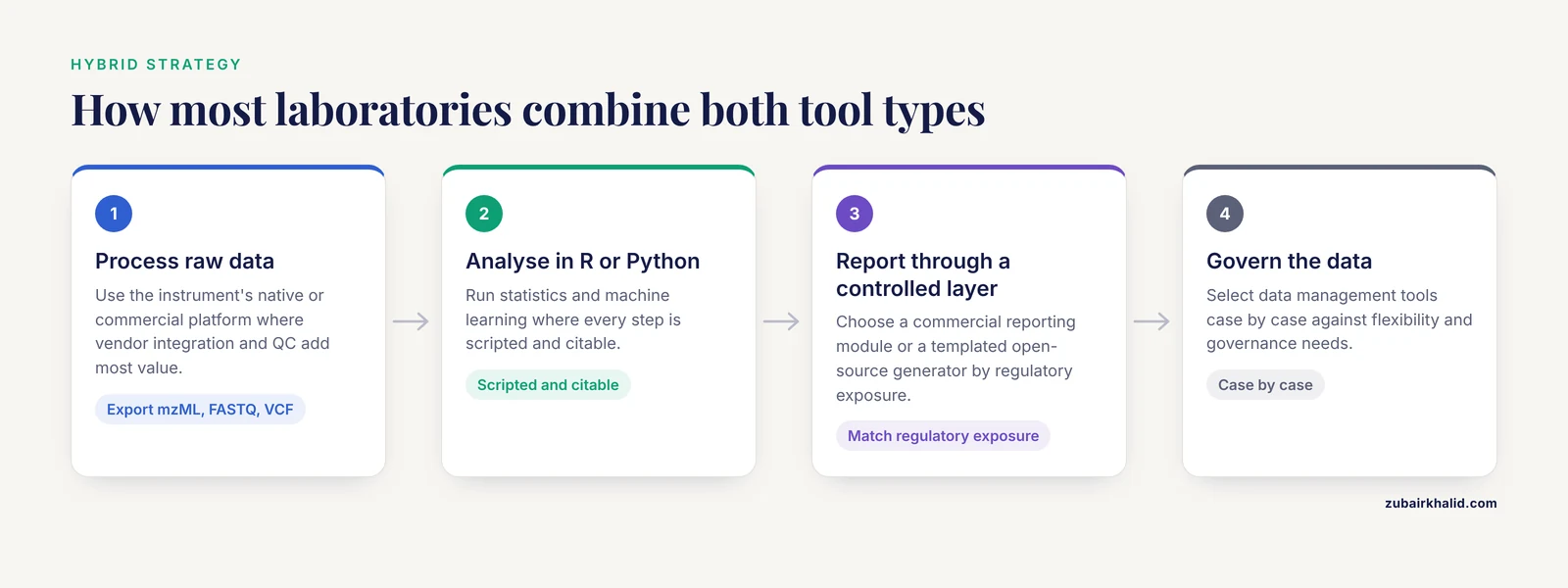
The best-performing computational groups rarely pick one side. A common and defensible architecture looks like this:
- Raw processing on the instrument's native or commercial platform where the vendor's integration and QC tooling add the most value, exporting open formats such as mzML, FASTQ, or VCF.
- Statistical analysis and machine learning in R or Python, where open-source ecosystems are unmatched and every step is scripted and citable.
- Reporting through a controlled layer, either a commercial reporting module or a templated open-source report generator, depending on regulatory exposure.
- Data management with deliberate tool selection. Reviews of bioinformatics data infrastructure assess open-source and commercial solutions side by side against project-specific flexibility and governance requirements [4], and the same case-by-case approach applies at the analysis layer.
The systematic review literature provides a working template for this hybrid discipline. A published guideline for complex systematic reviews built its database and comparison steps using Epi Info and R, both freely available, and organized the work as explicit numbered steps from planning through data comparison so other teams could replicate it [14]. That structure, explicit steps plus free tools plus a written protocol, is precisely the hybrid mindset that produces reliable bioinformatics.
Governance and Compliance: The Boring Section That Prevents Disasters
Whichever category you choose, treat software as a governed asset. Industry research on free and open-source software governance, based on interviews with experts at eleven companies known for advanced open-source practices, established that ungoverned use of open-source components creates legal, financial, and intellectual-property risks, and that mature organizations manage this through defined processes, license scanning tools, and component tracking in product bills of materials [13]. Translated into a bioinformatics laboratory:
- Maintain an inventory of every tool and version in your production pipelines.
- Record the license of each component and confirm it permits your use, especially redistribution or embedding in deliverables.
- Pin versions in containers and record container digests so that "we used BWA version whatever" becomes a reproducible fact rather than a memory.
- Re-validate after every upgrade, open source or commercial, because both can change results between releases.
Commercial products reduce some of this burden because the vendor handles component tracking internally, but they do not eliminate it. Your organization still owns the decision to upgrade and the documentation proving that yesterday's results and today's results were produced by the same method.
Common Mistakes and Limitations
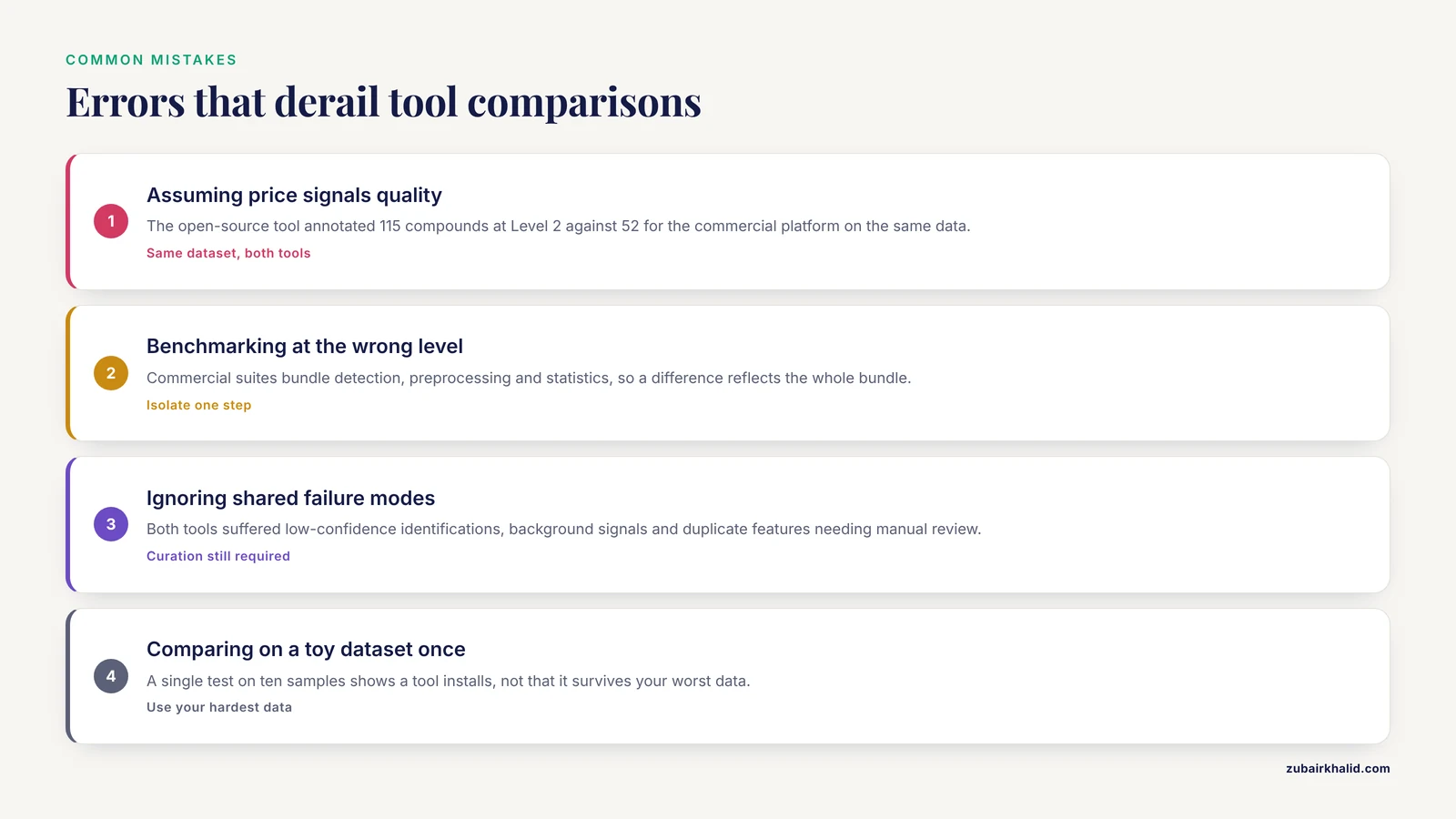
These are the errors that most frequently derail tool decisions in real laboratories.
Assuming price signals quality. The metabolomics benchmark found the open-source tool annotated more compounds at the stricter confidence level than the commercial platform on the same dataset [1]. License cost tells you about business model, not analytical power.
Benchmarking at the wrong level. When comparing a commercial suite against an open-source pipeline, differences often reflect the entire workflow (detection, preprocessing, statistics) rather than the single algorithm under study, as demonstrated in the GC×GC-MS alignment benchmark [2]. Compare one step at a time, or state clearly that you compared workflows.
Ignoring shared failure modes. In the metabolomics study, both tools suffered from the same core problems: low-confidence identifications, background signals, and duplicate features requiring manual review [1]. Switching tools does not eliminate the need for expert curation of results, regardless of license.
Comparing on a toy dataset once. A single test on ten samples tells you whether a tool installs, not whether it survives your worst data. Benchmark on your hardest real dataset, including the degraded samples, the controls, and the edge cases.
Treating "free" as "free of obligations." Open-source licenses carry terms, and ignoring them creates real legal exposure for any group that redistributes or commercializes its work. Read the license before embedding a tool in a product, not after.
Forgetting staff time in cost calculations. The cheapest license can be the most expensive total solution if it demands expertise you do not have. The costliest license can be a bargain if it removes three days of debugging per month. Model total cost of ownership, including the hours of your most senior people.
Locking data into closed formats. Before adopting any commercial platform, verify that every intermediate and final output can be exported in an open, documented format. Your data must outlive any vendor relationship.
Skipping validation for open tools. Peer-reviewed publication of a tool is evidence of plausibility, not proof it works on your data with your parameters. Validate on known-positive and known-negative material before production use, the same discipline applied in the clinical segmentation study that measured agreement against a manual ground truth before declaring the open-source algorithm fit for practice [6].
A general limitation. Every benchmark cited here was run on specific instruments, datasets, and versions, and results can shift with new releases on either side. Individual laboratories should benchmark candidate tools on their own data before committing, and cases with clinical or regulatory stakes need review by the responsible professional in that setting.
Frequently Asked Questions
Is open-source bioinformatics software reliable enough for publication?
Yes, and it dominates the genomics literature, but reliability is earned through your own validation, version pinning, and reproducible pipelines rather than through the license. Head-to-head studies have repeatedly shown open-source tools matching or exceeding commercial results on the same data [1], [5], [7].
What is the main difference between open source and commercial bioinformatics software?
The main difference is control versus convenience: open source gives you inspectable, modifiable code with community support and no license fees, while commercial software gives you vendor accountability, validated interfaces, and documented support in exchange for payment and restricted access to the code itself.
Can I mix open-source and commercial tools in one pipeline?
Yes, and this is standard practice, provided the commercial product exports open formats at each handoff and you record versions and licenses of every component so the combined workflow remains reproducible and license-compliant [13].
When should a small laboratory choose open source?
A small laboratory should choose open source when it has at least one person comfortable with command-line work and scripting, when its output is research that benefits from transparency, and when license budgets would otherwise crowd out instruments or reagents, which is the situation imaging studies highlighted for small institutions [5].
Does commercial software always come with better support?
No, commercial support is contractual and usually responsive, but community support for major open-source projects can be faster and deeper on technical questions. Support quality varies by product and project, so ask current users of both before you decide.
How should I benchmark tools before choosing one?
Run both candidates on your own hardest real dataset, compare one pipeline step at a time where possible, predefine your success metrics such as recall of known positives, and document versions and parameters, following the same benchmark discipline used in published head-to-head evaluations [1], [2].
Sources
- Comparison of data processing strategies using commercial vs. open-source software in GC-Orbitrap-HRMS untargeted metabolomics analysis for food authentication: thyme geographical differentiation and marker identification as a case study.
- Evaluation of peak alignment performance of commercial and open-source tools for GC×GC-MS based non-targeted screening.
- Modeling of chemical processes using commercial and open-source software: A comparison between Aspen Plus and DWSIM
- Review of open-source software for developing heterogeneous data management systems for bioinformatics applications.
- Comparison of STL skull models produced using open-source software versus commercial software
- Clinical evaluation of semi-automatic open-source algorithmic software segmentation of the mandibular bone: Practical feasibility and assessment of a new course of action
- Assessment of 5 kW Induction Motor Finite element computations with a Commercial and an Open-source software
- Comparison of Commercial and Open-Source FEM Software: A Case Study
- An empirical comparison of commercial and open-source web vulnerability scanners
- Evaluation and Analysis of the Accuracy of Open-Source Software and Online Services for PPP Processing in Static Mode
- Evaluation and comparison of open source software suites for data mining and knowledge discovery
- A Comparison Framework for Open Source Software Evaluation Methods
- Industry requirements for FLOSS governance tools to facilitate the use of open source software in commercial products
- Data extraction and comparison for complex systematic reviews: a step-by-step guideline and an implementation example using open-source software