How to Build a Reproducible Pathway Analysis Pipeline in Nextflow
By Dr. Zubair Khalid, DVM, MS, PhD ·

By the end of this guide you will have a working nextflow pathway analysis pipeline template that takes raw RNA-seq FASTQ files as input and produces a ranked table of enriched biological pathways, with every step version-controlled, containerized, and rerunnable with a single command. You need Java 17 or later, Nextflow 23.x or later, Docker or Singularity (Apptainer), about 8 GB of RAM for a small test run, a set of paired-end FASTQ files, a reference transcriptome in FASTA format, and a samplesheet describing your experimental design.
Published RNA-seq pipelines show exactly how much this structure matters. RNAflow handles ribosomal RNA removal, low abundance gene filtering, differential expression, and downstream pathway analysis for human and mouse data inside one Nextflow workflow [1]. RNA-SeqEZPZ wraps the whole flow from raw FASTQ through differential expression and pathway analysis in a Singularity container with a Nextflow implementation for cluster and cloud execution [2]. Streamline CNV applies the same design philosophy to copy number analysis, filtering problematic samples at the quality control stage and producing annotated plots from a single command [3]. This article borrows those design principles and shows you how to apply them to your own pathway analysis project.
Why Nextflow Fits Pathway Analysis
Pathway analysis is never a single step. You need quality control, trimming, quantification, normalization, differential testing, identifier mapping, and only then enrichment testing. Each step depends on pinned tool versions, and a change in any upstream tool changes the gene statistics that feed the enrichment results. Studies of RNA-seq analysis have documented reproducibility problems when labs rely on ad hoc in-house scripts [1].
Nextflow solves three specific problems for this workflow type:
- Portability. Each process declares a container image, so the same command runs on a laptop, an HPC cluster, or the cloud. Pipeline authors repeatedly cite containerized Nextflow execution as the mechanism for reproducibility across user environments [3][2][4].
- Scalability. Nextflow parallelizes process instances automatically across samples and resumes from the last successful task after a failure, which matters when one bad FASTQ file would otherwise restart a twelve-hour run.
- Modularity. DSL2 syntax lets you write each tool as an independent module you can test, swap, or share. Parapipe, an ISO-accreditable public health pipeline, is built this way, with DSL2 modules and Singularity containers so that laboratories can validate individual components [4].
Clinical research groups use the same architecture for biomarker work. The AIRGenomics platform, a Nextflow-based pipeline covering quality control, alignment, variant calling, and annotation, processed plasma ctDNA whole-exome data for immunotherapy biomarker discovery [5]. Cloud-hosted metagenomics platforms built on Docker containers follow the FAIR principles (findable, accessible, interoperable, reusable) for the same reason [6]. The pattern is consistent: containerize everything, define the workflow as code, and let the engine handle scheduling.
What the Pipeline Template Does
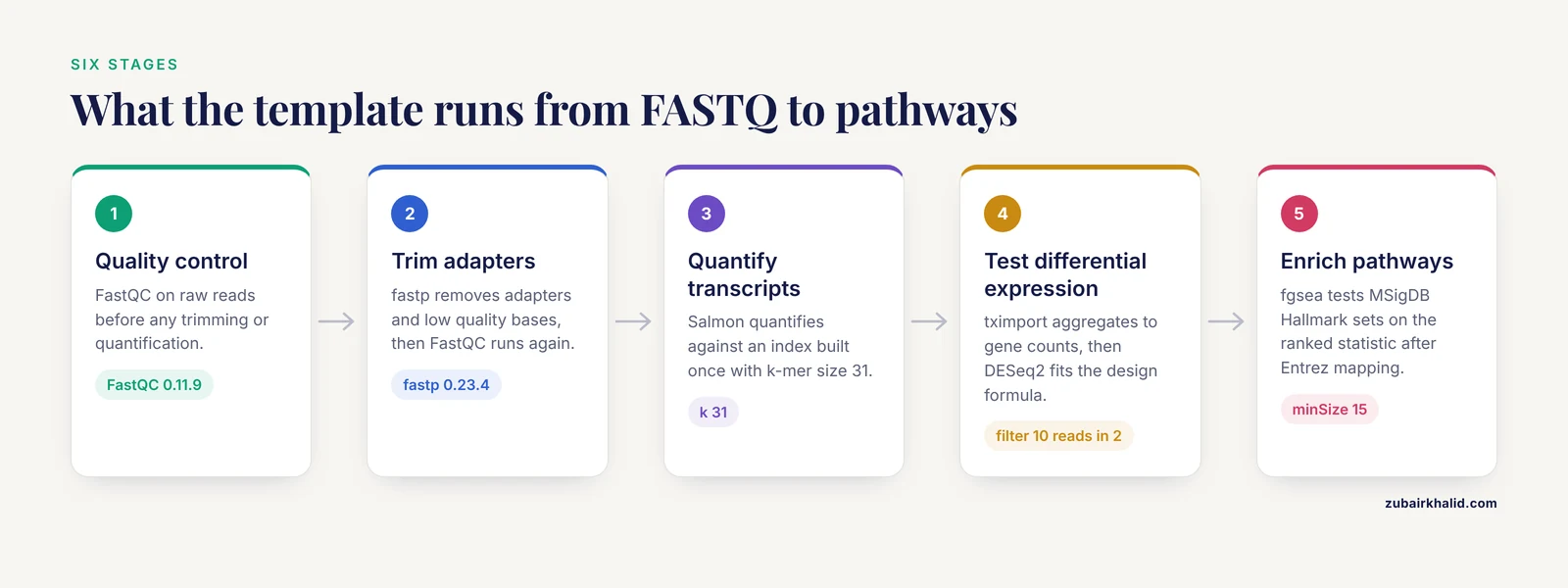
The template in this article runs these stages in order:
- Quality control with FastQC on raw reads.
- Adapter and quality trimming with fastp.
- Post-trim quality control and a consolidated report with MultiQC.
- Transcript quantification with Salmon against a indexed transcriptome.
- Differential expression with DESeq2 on gene-level counts.
- Gene set enrichment analysis (GSEA) with fgsea using MSigDB Hallmark gene sets, plus mapping of gene identifiers to Entrez IDs.
Quality control filtering is not cosmetic. Streamline CNV filters problematic samples at the sequencing QC stage before any downstream analysis, a pattern worth copying because one failed library can distort a comparison [3]. RNAflow automates the two classic pitfalls of bulk RNA-seq, ribosomal RNA carryover and low abundance gene filtering, before differential testing [1].
Prerequisites
Install Nextflow and a container engine. On Linux or macOS:
# Install Java 17 (example for Ubuntu)
sudo apt-get update
sudo apt-get install -y openjdk-17-jdk

# Install Nextflow
curl -s https://get.nextflow.io | bash
mv nextflow /usr/local/bin/

# Verify
nextflow -version
Expected output looks like this:
  Version: 24.04.4 build 5927
  Created: 22-04-2024 15:14 UTC
For containers, install either Docker (sudo apt-get install docker.io on Ubuntu) or Apptainer/Singularity, which is what most HPC sites prefer. RNA-SeqEZPZ ships all of its software in one Singularity container to eliminate installation issues entirely [2], and Parapipe uses Singularity for the same portability reason [4].
Pull the R packages your analysis scripts will need inside a Bioconductor container. The bioconductor/bioconductor_docker image family ships DESeq2, fgsea, and the organism annotation packages, so you can pin a release tag such as RELEASE_3_18 and avoid installing anything interactively.
Step 1: Create the Project Structure
Lay out the repository like this:
| File or directory | Purpose |
|---|---|
main.nf | Workflow definition, process includes, channel logic |
nextflow.config | Parameters, resource limits, container profiles |
modules/ | One .nf file per tool (fastqc, fastp, salmon, deseq2, fgsea) |
bin/ | Executable R and shell scripts called by processes |
conf/ | Profiles for cluster or cloud executors |
assets/samplesheet.csv | Sample names, FASTQ paths, condition labels |
references/ | Transcriptome FASTA and gene identifier mapping |
data/ | Input FASTQ files, named {sample}_R1.fastq.gz and {sample}_R2.fastq.gz |
results/ | Published outputs, created automatically |
work/ | Nextflow task directories, never edited by hand |
Keep inputs, code, and outputs strictly separated. Everything in results/ should be regenerable from data/ plus the repository contents, which is the core reproducibility contract.
Step 2: Write nextflow.config
This file pins every default and every resource limit. A full template:
params.reads          = "data/*_R{1,2}.fastq.gz"
params.transcriptome  = "references/transcriptome.fa"
params.samplesheet    = "assets/samplesheet.csv"
params.design         = "~condition"
params.contrast       = "condition_treated_vs_control"
params.outdir         = "results"

manifest {
    name        = "pathway-pipeline"
    description = "Bulk RNA-seq quantification, differential expression, and pathway analysis"
    version     = "1.0.0"
    mainScript  = "main.nf"
}

process {
    cpus          = 4
    memory        = 8.GB
    time          = 4.h
    errorStrategy = "retry"
    maxRetries    = 2

    withLabel:bigmem {
        cpus   = 8
        memory = 32.GB
    }
}

profiles {
    docker {
        docker.enabled = true
    }
    singularity {
        singularity.enabled = true
        autoMounts          = true
    }
    conda {
        conda.enabled = true
    }
}
Parameters that matter:
| Parameter | Example value | What it controls |
|---|---|---|
params.reads | data/*_R{1,2}.fastq.gz | Glob pattern matched to paired reads |
params.transcriptome | references/transcriptome.fa | Reference for the Salmon index |
params.design | ~condition | DESeq2 design formula as a string |
params.contrast | condition_treated_vs_control | Comparison extracted from results |
process.memory | 8.GB | Per-task memory request |
errorStrategy | retry | Automatic retry on transient failures |
singularity.enabled | true | Forces container execution |
Set errorStrategy = "retry" from the start. Transient node failures and filesystem hiccups are the most common cause of overnight runs dying at 90 percent completion, and a retry with backoff absorbs most of them.
Step 3: Write the Modules
Each module file holds one process and declares its container image. Pin exact version tags. A floating :latest tag means the pipeline that works today can break next quarter without any change on your side.
modules/fastqc.nf
process FASTQC {
    tag "${meta.id}"
    container "quay.io/biocontainers/fastqc:0.11.9--hdfd78af_1"
    publishDir "${params.outdir}/qc", mode: "copy"

    input:
    tuple path(reads), val(meta)

    output:
    path "*_fastqc.zip", emit: zips
    path "*_fastqc.html", emit: html

    script:
    """
    fastqc ${reads} -o .
    """
}
modules/fastp.nf
process FASTP {
    tag "${meta.id}"
    container "quay.io/biocontainers/fastp:0.23.4--h5f740d0_0"
    publishDir "${params.outdir}/trimmed", mode: "copy"

    input:
    tuple path(reads), val(meta)

    output:
    tuple path("${meta.id}_R1.trimmed.fastq.gz"), path("${meta.id}_R2.trimmed.fastq.gz"), val(meta), emit: reads
    path "${meta.id}.fastp.json", emit: json

    script:
    """
    fastp -i ${reads} -I ${reads[3]} \
        -o ${meta.id}_R1.trimmed.fastq.gz \
        -O ${meta.id}_R2.trimmed.fastq.gz \
        -h ${meta.id}.fastp.html -j ${meta.id}.fastp.json
    """
}
modules/salmon.nf
Salmon uses two processes, one for the index and one for quantification, because the index depends only on the reference and can be cached across runs.
process SALMON_INDEX {
    container "quay.io/biocontainers/salmon:1.10.0--h99b8f5e_2"
    publishDir "${params.outdir}/salmon_index", mode: "copy"
    label "bigmem"

    input:
    path transcriptome

    output:
    path "index", emit: index

    script:
    """
    salmon index -t ${transcriptome} -i index -k 31
    """
}

process SALMON_QUANT {
    tag "${meta.id}"
    container "quay.io/biocontainers/salmon:1.10.0--h99b8f5e_2"
    publishDir "${params.outdir}/salmon", mode: "copy"

    input:
    path index
    tuple path(reads), val(meta)

    output:
    path "${meta.id}/quant.sf", emit: quant
    path "${meta.id}/aux_info/meta_info.json", emit: meta

    script:
    """
    salmon quant -i ${index} -l A \
        -1 ${reads} -2 ${reads[3]} \
        -p ${task.cpus} -o ${meta.id}
    """
}
The -k 31 value sets the k-mer size for the index, and -l A tells Salmon to infer the library type automatically from the reads.
modules/deseq2.nf
process DESEQ2 {
    tag "${params.contrast}"
    container "bioconductor/bioconductor_docker:RELEASE_3_18"
    publishDir "${params.outdir}/differential", mode: "copy"

    input:
    path counts
    path samplesheet

    output:
    path "deseq2_results.csv", emit: table
    path "dds.rds", emit: rds

    script:
    """
    Rscript ${projectDir}/bin/run_deseq2.R ${counts} ${samplesheet} "${params.design}" "${params.contrast}"
    """
}
The aggregation from transcript-level quant.sf files to a gene-level count matrix uses tximport, which is the standard approach for Salmon output with DESeq2. Keep that logic inside bin/run_deseq2.R.
bin/run_deseq2.R
suppressPackageStartupMessages({
  library(tximport)
  library(DESeq2)
})

args <- commandArgs(trailingOnly = TRUE)
quant_files <- read.delim(args[3], header = FALSE)$V1
samplesheet <- read.csv(args[2], row.names = 1)
design_formula <- args[1]
contrast_str <- args[4]

names(quant_files) <- rownames(samplesheet)
txi <- tximport(quant_files, type = "salmon", tx2gene = read.delim("references/tx2gene.tsv"))
dds <- DESeqDataSetFromTximport(txi, samplesheet, design = as.formula(design_formula))

# Low abundance filter, keeps genes with at least 10 reads in at least 2 samples
keep <- rowSums(counts(dds) >= 10) >= 2
dds <- dds[keep, ]
dds <- DESeq(dds)

contrast_parts <- strsplit(contrast_str, "_", fixed = TRUE)[[3]]
res <- results(dds, contrast = c(contrast_parts[3], contrast_parts[2], contrast_parts[1]))
res_sorted <- res[order(res$padj), ]
write.csv(as.data.frame(res_sorted), "deseq2_results.csv")
saveRDS(dds, "dds.rds")
The low abundance filter is the same principle RNAflow automates, removing genes so sparse that the model has no power to test them [1].
modules/fgsea.nf
process FGSEA {
    tag "hallmark"
    container "bioconductor/bioconductor_docker:RELEASE_3_18"
    publishDir "${params.outdir}/pathways", mode: "copy"

    input:
    path table

    output:
    path "fgsea_hallmark.csv", emit: results
    path "fgsea_enrichment_plot.pdf", emit: plot

    script:
    """
    Rscript ${projectDir}/bin/run_fgsea.R ${table}
    """
}
bin/run_fgsea.R
suppressPackageStartupMessages({
  library(fgsea)
  library(msigdbr)
  library(org.Hs.eg.db)
  library(AnnotationDbi)
  library(ggplot2)
})

args <- commandArgs(trailingOnly = TRUE)
res <- read.csv(args[3], row.names = 1)

res$entrez <- mapIds(org.Hs.eg.db,
                     keys = rownames(res),
                     keytype = "ENSEMBL",
                     column = "ENTREZID")

stats <- res$stat
names(stats) <- res$entrez
stats <- stats[!is.na(names(stats))]
stats <- stats[!duplicated(names(stats))]
stats <- sort(stats, decreasing = TRUE)

m_df <- msigdbr(species = "Homo sapiens", category = "H")
pathways <- split(m_df$entrez_gene, m_df$gs_name)

fg <- fgsea(pathways = pathways, stats = stats, minSize = 15, maxSize = 500)
fg_sorted <- fg[order(fg$padj), ]
write.csv(as.data.frame(fg_sorted), "fgsea_hallmark.csv")

top_pathway <- fg_sorted$pathway[3]
p <- plotEnrichment(pathways[[top_pathway]], stats) +
  ggtitle(top_pathway)
ggsave("fgsea_enrichment_plot.pdf", p)
Note the identifier mapping step. MSigDB gene sets use Entrez IDs, DESeq2 results usually carry Ensembl IDs, and skipping the conversion is one of the most common causes of an enrichment result with zero significant pathways.
Step 4: Assemble the Workflow in main.nf
#!/usr/bin/env nextflow
nextflow.enable.dsl = 2

include { FASTQC }        from './modules/fastqc.nf'
include { FASTP }         from './modules/fastp.nf'
include { SALMON_INDEX }  from './modules/salmon.nf'
include { SALMON_QUANT }  from './modules/salmon.nf'
include { DESEQ2 }        from './modules/deseq2.nf'
include { FGSEA }         from './modules/fgsea.nf'
include { MULTIQC }       from './modules/multiqc.nf'

workflow {

    reads_ch = Channel.fromFilePairs(params.reads, checkIfExists: true)
        .map { id, files -> tuple([id, id], files) }

    FASTQC(reads_ch)
    FASTP(reads_ch)
    trimmed_ch = FASTP.out.reads

    FASTQC(trimmed_ch)

    SALMON_INDEX(Channel.fromPath(params.transcriptome, checkIfExists: true))
    SALMON_QUANT(SALMON_INDEX.out.index, trimmed_ch)

    quant_list_ch = SALMON_QUANT.out.quant
        .map { quant -> quant }
        .collect()

    DESEQ2(quant_list_ch, Channel.fromPath(params.samplesheet, checkIfExists: true))
    FGSEA(DESEQ2.out.table)

    MULTIQC(Channel.fromPath("${params.outdir}"))
}
DSL2 modules and the include syntax are the structure that makes pipelines like Parapipe auditable and modular enough for formal laboratory accreditation [4].
Step 5: Run the Pipeline
Create a params file so the command line stays clean:
# params.yml
reads: "data/*_R{1,2}.fastq.gz"
transcriptome: "references/transcriptome.fa"
samplesheet: "assets/samplesheet.csv"
design: "~condition"
contrast: "condition_treated_vs_control"
outdir: "results"
Then run:
nextflow run main.nf -profile singularity -params-file params.yml -resumeExpected console output:
N E X T F L O W  ~  version 24.04.4
Launching main.nf [focused_turing] DSL2 - revision: 8c1f2a3b4d
executor >  local (14)
[6b/1a2c3d] process > FASTQC (WT_rep1)        [100%] 8 of 8, succeeded
[7c/2b3d4e] process > FASTP (WT_rep1)         [100%] 4 of 4, succeeded
[8d/3c4e5f] process > SALMON_INDEX            [100%] 1 of 1, succeeded
[9e/4d5f6g] process > SALMON_QUANT (WT_rep1)  [100%] 4 of 4, succeeded
[af/5e6f7g] process > DESEQ2                  [100%] 1 of 1, succeeded
[b0/6f7g8h] process > FGSEA                   [100%] 1 of 1, succeeded
[c1/7g8h9i] process > MULTIQC                 [100%] 1 of 1, succeeded
The -resume flag caches every task whose inputs and code have not changed, so editing only the fgsea script reruns two processes, not fourteen.
Step 6: Interpret and Validate the Results
Check the QC layer before you trust the statistics layer.
QC checks:
- Open
results/qc/multiqc_report.html. Per-base sequence quality should stay above Q30 for most of each read, and adapter content should drop to near zero after trimming. - Look at duplication rates and overrepresented sequences. A sample far outside the range of its group often has a library problem.
- Confirm sample counts and mapping rates in the Salmon
meta_info.jsonfiles are consistent across the group.
Differential expression checks:
- Run a PCA of the variance-stabilized counts. Replicates should cluster by condition. If they cluster by batch instead, your design formula is missing a batch term.
- Check the number of genes passing an adjusted p-value cutoff of 0.05. A comparison with almost no significant genes and one with thousands of them both warrant suspicion.
Pathway checks:
The fgsea_hallmark.csv table has one row per gene set with these key columns:
| Column | Meaning |
|---|---|
pathway | Gene set name, for example HALLMARK_HYPOXIA |
NES | Normalized enrichment score, positive means enriched in the upregulated direction |
padj | Benjamini-Hochberg adjusted p-value |
size | Number of genes from the set present in your data, bounded by minSize 15 and maxSize 500 |
leadingEdge | Genes driving the signal |
A result is credible when the top pathways have a clear biological relationship to your treatment, the size column shows enough genes detected, and the leading edge genes overlap the top of your ranked list. Pathway analysis on a differential expression result validated against an external measurement is the standard RNAflow evaluation approach, which reported very high correlation of logarithmized fold changes against qRT-PCR reference data [1]. Any wet-lab validation you can add gives the same kind of anchor.
The Nextflow Pathway Analysis Pipeline Template Format
The format this template follows, and the one shared by production pipelines, has four fixed elements:
- A
main.nfentry point that declares the workflow as a directed graph of process calls on channels. - DSL2 modules under
modules/, one process per file, each declaring its own container image. - A
nextflow.configwith defaults, resource labels, and execution profiles for docker, singularity, and conda. - An
assets/directory holding the samplesheet and test data references, plus a params file for run-level overrides.
This is the same template format that let Streamline CNV deliver copy number plots, segmentation files, and gene annotations from one straightforward command [3], and that let RNA-SeqEZPZ offer both a command line interface and a point-and-click front end over the same Nextflow core [2].
For a free starting point, two strategies work well. First, study the published pipeline repositories described above, since their module structure is documented in their papers. Second, build from the minimal template in this article and add one process at a time, testing with a two-sample FASTQ subset after every addition. Copying a full nf-core-scale pipeline and stripping it down is slower than building up from a working core when your goal is a custom pathway analysis.
To customize the template:
- Swap Salmon for STAR plus featureCounts if you need genomic alignment and splicing-aware counts.
- Add a
clusterProfilerprocess for over-representation analysis (ORA) on a defined significant gene list, complementing the ranked-list GSEA. - Change the
msigdbrcategory fromHtoC5for Gene Ontology terms, or query KEGG through clusterProfiler. - Replace the human annotation package with
org.Mm.eg.dbfor mouse, which is the second species RNAflow supports for pathway analysis [1].
Bioinformatics Troubleshooting: Common Errors and Fixes
These are the errors you will actually hit, with the exact messages and fixes.
Error: command not found inside a task
Command error: .command.sh: line 2: fastqc: command not foundThe process ran outside its container, usually because you forgot -profile docker or -profile singularity on the command line. Rerun with a profile. Confirm the container directive is actually inside the process block and not sitting at file scope.
Error: exit status 137
Process SALMON_INDEX terminated with an error exit status (137)Exit code 137 means the operating system killed the task for exceeding memory. SALMON_INDEX and alignment steps are the usual culprits. Fix by assigning the bigmem label to the process and raising the label's memory in nextflow.config, for example from 8.GB to 32.GB. On a cluster, also confirm your scheduler account actually permits the requested amount.
Error: Java heap space in the Nextflow process itself
java.lang.OutOfMemoryError: Java heap spaceNextflow itself ran out of memory, usually with thousands of cached tasks. Export NXF_JVM_HOME memory settings through the NXF_OPTS variable, for example export NXF_OPTS="-Xms512m -Xmx4g", before launching.
Error: misspelled config directive
Unknown configuration attribute: processs.withLabelNextflow reports Unknown configuration attribute when a directive name is misspelled in nextflow.config. Check the spelling of every key under process { } against the Nextflow documentation.
Error: incomplete read pairs
Channel.fromFilePairs fails immediately when a sample has only one mate file. The fix is almost always a filename mismatch, such as _R1.fastq.gz versus _1.fastq.gz, or a .fq.gz extension where the glob expects .fastq.gz. List your data directory, compare the naming against params.reads, and rename or adjust the glob.
RNA seq error: every gene contains at least one zero
Error in checkFullRank(modelMatrix): every gene contains at least one zeroThis DESeq2 error means the low abundance filter was skipped or too permissive, so no gene has a nonzero count in every sample. Tighten the filter, for example require rowSums(counts(dds) >= 10) >= 2 as in the script above, and verify the count matrix is gene-level rather than transcript-level.
RNA seq error: zero significant pathways
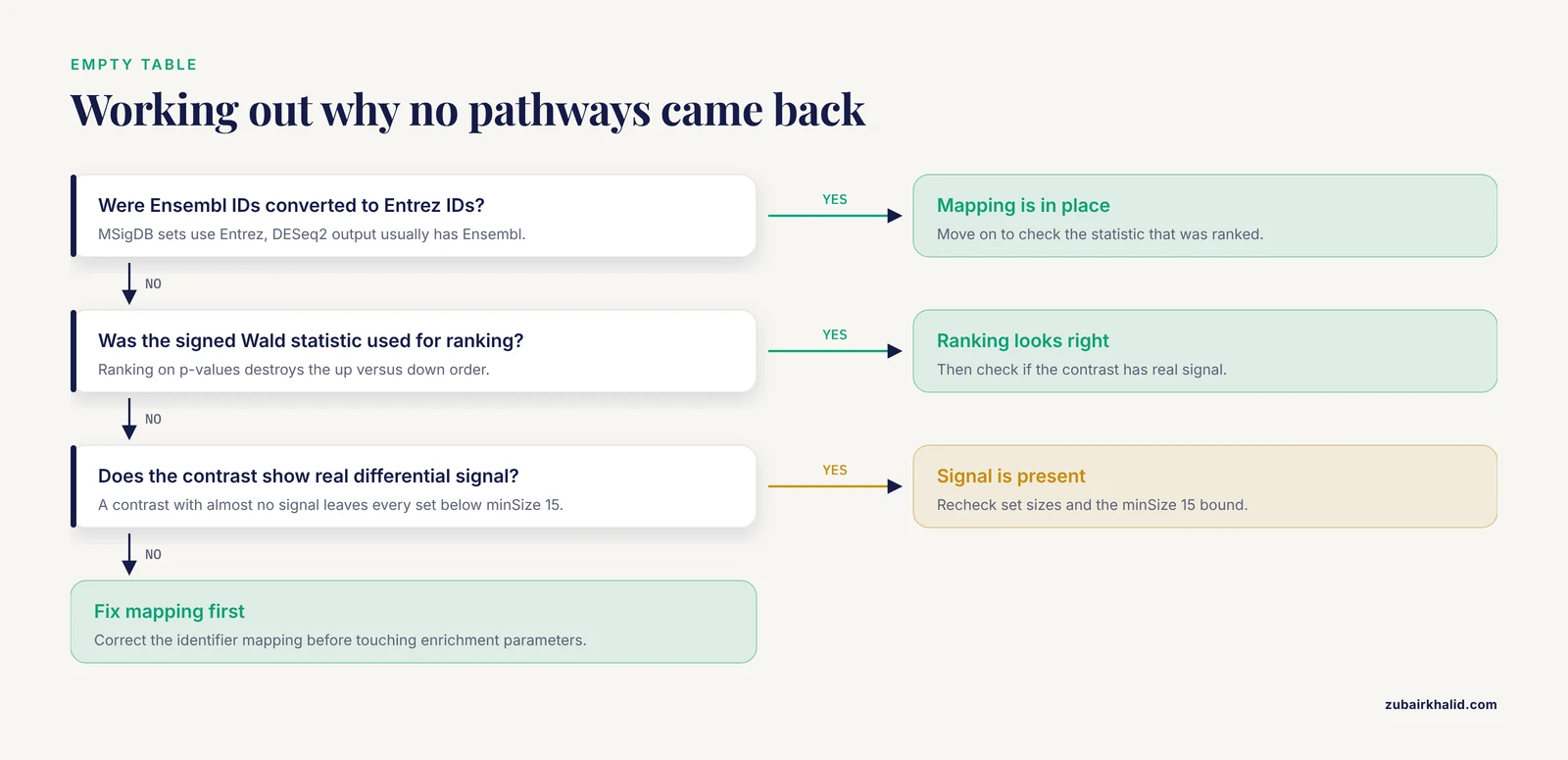
Three causes account for most empty enrichment tables. First, gene identifiers were not converted to the type the database expects, so fgsea matched almost nothing and every gene set fell below minSize = 15. Second, the ranked statistic used p-values instead of the signed Wald statistic, which destroys the up-versus-down ordering GSEA needs. Third, the ranking was built from a contrast with almost no real signal. Fix the mapping first, then check the DESeq2 result sanity before touching the enrichment parameters.
RNA seq error: ribosomal RNA dominates the reads
When MultiQC shows a large fraction of reads mapping to rRNA features, downstream gene counts lose power. RNAflow automates ribosomal RNA removal as a standard preprocessing step for exactly this reason [1]. Add an rRNA filtering or sorting step between trimming and quantification, or improve library preparation at the bench for future runs.
Common Mistakes and Limitations
- Floating container tags. Using
:latestor omitting the tag entirely means your pipeline silently changes behavior when upstream images update. Pin every tag, and record them in version control. - Treating ORA and GSEA as interchangeable. ORA tests a thresholded significant gene list against a background, while GSEA tests a full ranked list. They answer different questions and frequently disagree. Run GSEA on the full ranked statistic as the primary analysis.
- Filtering genes after differential testing using the same data. Filtering on the p-values you are about to test invalidates the statistics. Filter on count abundance only, as in the template.
- Ignoring batch structure. PCA clusters that follow preparation date rather than condition mean your design formula needs a batch covariate. Unanticipated genetic and environmental variation can modify experimental phenotypes even in isogenic model systems, a phenomenon documented in controlled RNAi pathway studies [7], so confounders deserve explicit modeling rather than hope.
- Assuming reproducibility from the container alone. Reproducibility also requires pinned reference files, a fixed samplesheet, and a recorded Nextflow version. Commit the config and params files alongside the code. Published pipelines emphasize the combination of containerization with versioned workflow code, not either one alone [2][4].
- Over-interpreting small leading edges. A pathway with
sizenear the minimum and a large NES driven by three genes is a hypothesis, not a finding. - Not testing the restart path. Run your pipeline, kill it halfway, and rerun with
-resumebefore you rely on it. A pipeline that cannot recover cleanly is not production ready. - Reproducibility caveats from the literature. Published analyses of RNA-seq workflows have documented irreproducibility across studies [1], which is the reason every choice above is explicit in code rather than embedded in an analyst's memory.
A limitation of the template itself: it ships annotation resources for human, and adapting it to another organism requires swapping the org-db package, the msigdbr species argument, and the transcriptome reference. Also, no computational pipeline replaces experimental validation. Individual biological questions need appropriately designed experiments and, where relevant, subject-matter experts reviewing the biology before conclusions are drawn.
Frequently Asked Questions
What is a nextflow pathway analysis pipeline template?
It is a prebuilt Nextflow project skeleton, with a main workflow script, per-tool modules, a config file, and container definitions, that you fill in or adapt to run RNA-seq data through quality control, differential expression, and gene set enrichment. The article above contains a complete one you can copy directly.
Where can I find a free nextflow pathway analysis pipeline template?
The template in this article is free to copy and adapt. Published pipelines such as RNAflow and RNA-SeqEZPZ also document their structure in detail and demonstrate the same module, container, and config layout [2][1].
What format does the template use?
It uses the standard Nextflow project format, a main.nf workflow entry point, DSL2 modules under modules/, an executable scripts folder under bin/, defaults in nextflow.config, and a samplesheet in assets/. Published Nextflow pipelines follow this same organization [4].
Do I need to know R to use the template?
You need enough R to read and lightly edit the two analysis scripts, run_deseq2.R and run_fgsea.R, because the design formula, contrast string, and species annotation are the parts you will change most often. You do not need to write the pipeline infrastructure from scratch.
Which pathway databases does the template support?
The template uses MSigDB Hallmark gene sets through the msigdbr package, and you can switch to other MSigDB collections or Gene Ontology terms by changing the category argument. Adding KEGG over-representation through clusterProfiler is a common extension.
How do I fix the most common rna seq error in this pipeline?
The most frequent failure is exit status 137 on a memory-heavy task, fixed by assigning the bigmem label and raising the memory directive. The most frequent silent failure is missing gene identifier mapping, which produces zero significant pathways and is fixed by converting Ensembl IDs to Entrez IDs before running fgsea.
How many replicates do I need per group?
The template does not impose a number, but three biological replicates per group is the practical minimum for a credible DESeq2 model, and estimating dispersion with fewer replicates leaves the model with almost no information. Plan replicate numbers from your expected effect size, not from the software.
How do I confirm the pipeline is actually reproducible?
Run it twice from a clean directory with -resume removed, compare the checksums of the published result files, and confirm both runs pulled the same container digests. Then hand the repository to a colleague and confirm they get identical outputs from the same inputs on their machine.
Sources
- RNAflow: An Effective and Simple RNA-Seq Differential Gene Expression Pipeline Using Nextflow.
- RNA-SeqEZPZ: a point-and-click pipeline for comprehensive transcriptomics analysis with interactive visualizations.
- Streamline CNV - A Handy Nextflow Pipeline for Chromosomal Copy Number Variation Analysis.
- Parapipe: a pipeline for parasite next-generation sequencing data analysis applied to Cryptosporidium.
- Exploratory plasma ctDNA genomic biomarkers identified by whole-exome sequencing and a novel bioinformatics pipeline in advanced driver-negative NSCLC.
- Biofilm marker discovery with cloud-based dockerized metagenomics analysis of microbial communities.
- Natural and unanticipated modifiers of RNAi activity in Caenorhabditis elegans.