How to Use the UniProt Search Bar
By Dr. Zubair Khalid, DVM, MS, PhD ·

The UniProt search bar looks like a plain Google-style box, but underneath it runs a structured query language over one of the most heavily used protein databases in biology. If you learn ten lines of syntax, you can go from a gene symbol to a reviewed, organism-specific protein record with the exact sequence, features, and cross-references you need, and you can pull those results straight into a script. By the end of this guide you will be able to build field-restricted queries, filter out redundant entries, download results as FASTA or TSV, repeat the same search from the command line with curl, and sanity-check what you get back.
What you need: a web browser for the web interface, and optionally a terminal with curl (any Linux or macOS machine, or Windows with WSL) if you want to automate retrieval. No installation or account is required. Everything in the walkthrough uses the public UniProt website at uniprot.org and its REST API.
What the UniProt Search Bar Actually Searches
UniProt is a collaboration between the European Bioinformatics Institute (EMBL-EBI), the SIB Swiss Institute of Bioinformatics, and the Protein Information Resource. Its core product, the UniProt Knowledgebase (UniProtKB), contains two sections with very different levels of curation.
Swiss-Prot holds reviewed entries. Human curators read the literature, verify sequences, annotate function, and assign stable accessions. There are on the order of hundreds of thousands of these entries across all species.
TrEMBL holds unreviewed entries, generated computationally from nucleotide database translations. It is far larger, and any given protein can appear several times under slightly different accessions because different nucleotide submissions produce near-identical translations.
When you type a word into the search bar with no field qualifiers, the engine searches across all of this, in both sections, across many fields. That is why a naive search for a gene name like BRCA1 returns thousands of hits spanning every organism and both sections. Almost every frustrating first experience with UniProt comes from not realizing this. The fix is not a better keyword, it is field-restricted syntax, which is the subject of the walkthrough below.
A single UniProtKB entry contains several identifiers you will see constantly, so define them now:
- Accession. The stable primary identifier, for example
P04637. It survives entry merges and renames, so cite it in papers and pipelines. - Entry name. A mnemonic like
P53_HUMAN. It is human-readable but not guaranteed stable. - Protein name. The descriptive name, for example "Cellular tumor antigen p53". This is what the
protein_namefield searches. - Gene name. The gene symbol, for example
TP53, plus synonyms.
How to Use UniProt Search Step by Step
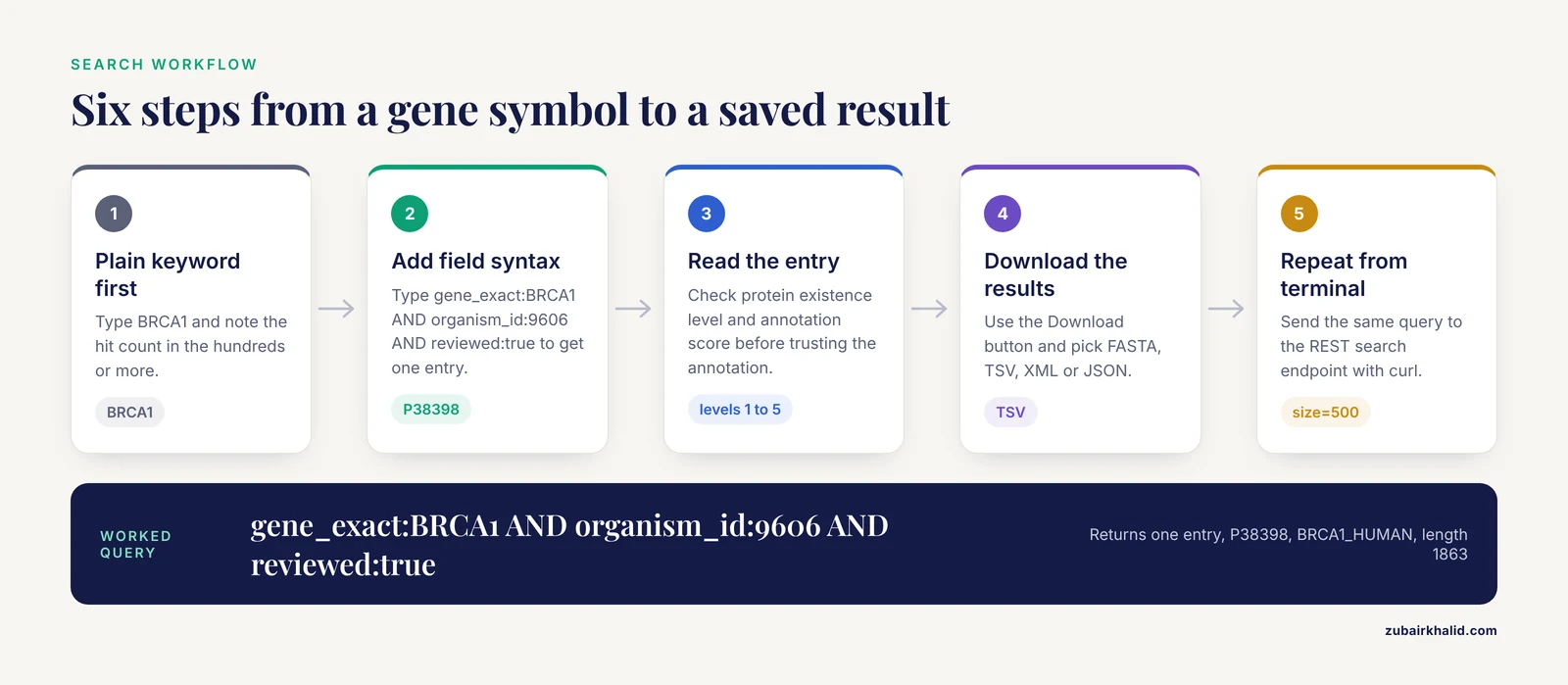
This walkthrough uses a real worked example, human BRCA1, and shows what to type, what the engine does, and what output to expect. The same pattern works for any gene or protein.
Step 1. Run a plain keyword search and look at the hit count
Go to uniprot.org and type BRCA1 into the search bar. Press Enter. You will land on a results page showing a hit count in the hundreds or more, because the free-text search matches the symbol in gene fields, protein descriptions, publications, and unreviewed entries from many organisms.
Look at the top of the results page. Two filters matter immediately:
- Reviewed. A filter for
Reviewed (Swiss-Prot)versusUnreviewed (TrEMBL). - Organisms. A facet list where
Human (Homo sapiens)usually sits near the top for a human gene.
Click both. The hit count collapses to a handful, often exactly one. This two-click operation is equivalent to the query you will learn to type directly in Step 2.
Step 2. Type a field-restricted query instead of clicking
The search bar accepts boolean and field syntax directly. Replace your keyword with this:
gene_exact:BRCA1 AND organism_id:9606 AND reviewed:trueBreak that down:
gene_exact:BRCA1matches the gene symbol field exactly, without stemming or partial-word matching. The looser formgene:BRCA1also matches longer symbols and synonyms, which is useful when you do not know the exact symbol.organism_id:9606restricts to the NCBI taxonomy ID for Homo sapiens. Using the taxon ID removes the ambiguity of organism name spelling.reviewed:truerestricts to Swiss-Prot, the manually curated section.AND,OR, andNOTmust be uppercase. Parentheses group terms, and double quotes protect multi-word phrases.
For this query, UniProt returns exactly one entry, P38398, entry name BRCA1_HUMAN, described as "Breast cancer type 1 susceptibility protein". When a query like this returns a single curated entry, you have your answer. Anything broader risks pulling paralogs, pseudogenes, or redundant TrEMBL translations into your analysis.
Try the same pattern with a different gene to confirm the behavior:
gene_exact:TP53 AND organism_id:9606 AND reviewed:trueThis returns one entry, P04637, "Cellular tumor antigen p53", a 393 amino acid protein. One query, one authoritative record.
Step 3. Read the results page and the entry view
The results page shows one row per entry with columns you can configure through the Columns button. At minimum, display Accession, Entry Name, Protein Names, Gene Names, Organism, and Length. The left panel exposes facets you can also express as query terms, including reviewed status, organism, taxonomy, annotation score, and sequence length.
Click the accession to open the entry view. The tabs across the top organize everything a search bar cannot show you in a snippet:
- Function. Curated descriptions, catalytic activity, pathways, and keywords.
- Sequence. The canonical sequence, splice isoforms, and processed variants.
- Features. Domain boundaries, active sites, post-translational modifications, topological annotations, all with residue numbers.
- Cross-references. Links out to PDB structures, Ensembl, RefSeq, Gene Ontology, InterPro, and dozens of other resources.
Two fields on the entry deserve a habit-forming check. The protein existence line (evidence levels 1 through 5, where 1 is experimental evidence at the protein level) tells you whether the protein has actually been observed, not just predicted. The annotation score (1 to 5) summarizes how much curated information the entry carries. Both are queryable, which matters when you search large families.
Step 4. Download the results from the browser
Above the results table, the Download button lets you pick a format and, for tabular formats, which columns to include. The formats you will use most:
- FASTA. One header line and one sequence per entry. Use this as input to BLAST, alignment tools, or predictors.
- TSV (tab-separated values). A spreadsheet-ready table of the selected columns.
- XML and JSON. Full structured records for programmatic parsing.
For the BRCA1 query above, choose TSV with the columns Accession, Entry Name, Gene Names (primary), Protein names, and Length. The file contains one data row, because your query was narrow. That is the goal.
Step 5. Repeat the search from the command line
Every search you build in the web interface maps directly onto a REST URL. This is what makes UniProt searches reproducible in a pipeline. The search endpoint is https://rest.uniprot.org/uniprotkb/search, and the query string must be URL-encoded, so spaces become %20 and double quotes become %22.
Retrieve the same BRCA1 result as a TSV table:
curl -s "https://rest.uniprot.org/uniprotkb/search?query=gene_exact:BRCA1%20AND%20organism_id:9606%20AND%20reviewed:true&format=tsv&fields=accession,id,gene_primary,protein_name,length"Expected output, a header line plus one data row:
accession	id	gene_primary	protein_name	length
P38398	BRCA1_HUMAN	BRCA1	Breast cancer type 1 susceptibility protein	1863
Fetch the sequence itself in FASTA format, using the accession directly:
curl -s "https://rest.uniprot.org/uniprotkb/P38398.fasta"The output begins with a header line in this format:
>sp|P38398|BRCA1_HUMAN ...The sp prefix marks a Swiss-Prot entry. The sequence follows on subsequent lines at 60 characters per line. The >sp| versus >tr| prefix is a fast visual check of review status when you concatenate many sequences into one file.
Three API parameters cover most automation needs:
format=tsv,fasta,json, orxml.fields=...a comma-separated list for TSV output, for exampleaccession,id,length.size=500for the number of results per request, the maximum page size for the search endpoint. Use the cursor-based pagination the response headers describe when a query returns more entries than one page holds.
A practical pattern for a real project is a family-level query such as:
curl -s "https://rest.uniprot.org/uniprotkb/search?query=organism_id:9606%20AND%20reviewed:true%20AND%20go:0006915&format=tsv&fields=accession,id,gene_primary,protein_name,length&size=500"The GO term go:0006915 is the apoptotic process term, and this query returns the first page of every reviewed human protein annotated with it.
Step 6. Search by sequence when text search fails
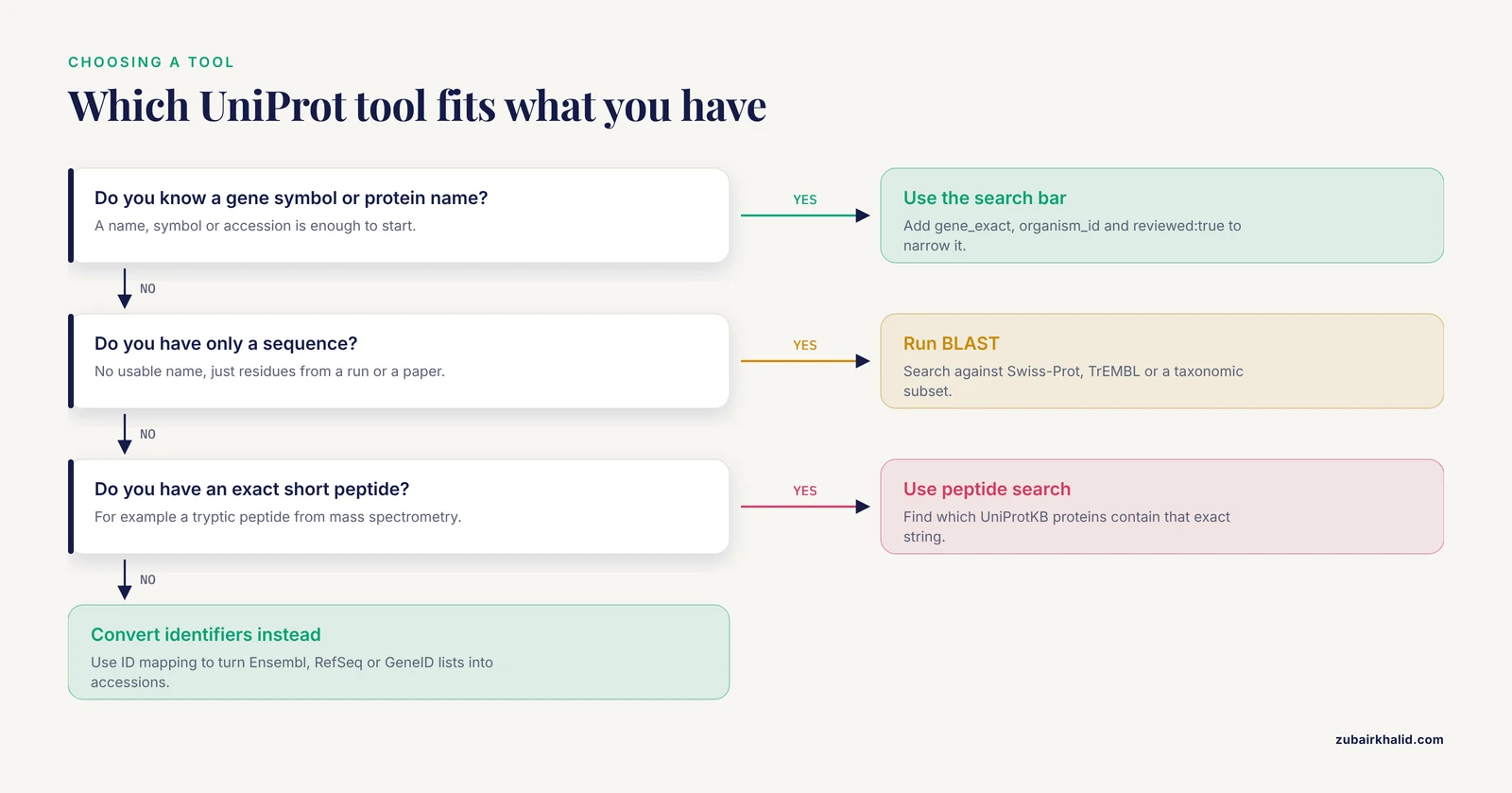
Text search assumes you know a name or symbol. When all you have is a sequence, or a peptide from a mass spectrometry run, UniProt provides dedicated tools linked from the main navigation:
- BLAST. Paste a protein sequence and search against Swiss-Prot, TrEMBL, or a taxonomically restricted subset. Use this to identify an unknown sequence or find orthologs.
- Peptide search. Paste an exact peptide string and find which UniProtKB proteins contain it. This is the right tool for matching tryptic peptides from proteomics against the protein database.
- ID mapping. Paste a list of identifiers from Ensembl, RefSeq, GeneID, or dozens of other sources and convert them to UniProt accessions. Any pipeline that starts from RNA-seq differential expression results and needs protein sequences runs through this tool.
As a rule, use the search bar when you know something about the protein's identity, and use BLAST or peptide search when all you know is sequence.
UniProt Query Syntax Reference
The search engine supports the same field names whether you type them in the browser or send them to the REST API. These are the fields that cover day-to-day work.
| Field | What it matches | Example |
|---|---|---|
accession | Stable primary identifier | accession:P04637 |
gene_exact | Exact gene symbol match | gene_exact:BRCA1 |
gene | Gene symbol, including partial and synonym matches | gene:BRCA1 |
protein_name | Descriptive protein name, quote multi-word phrases | protein_name:"tumor protein p53" |
organism_id | NCBI taxonomy ID of the source organism | organism_id:9606 |
reviewed | Swiss-Prot only when true | reviewed:true |
annotation_score | Curation depth, 1 (low) to 5 (highest) | annotation_score:5 |
length | Sequence length in amino acids, supports ranges | length:[100 TO 500] |
go | Gene Ontology term ID | go:0006915 |
keyword | Controlled vocabulary keywords shown on entries | keyword:Acetylation |
ft_* | Feature-level searches, such as chains or modification sites | feature-specific terms shown on entries |
| Boolean operators | Combine or exclude terms | (a OR b) AND c NOT d |
Two syntax rules prevent most errors. Operators must be uppercase, so and without capitals behaves unpredictably in some contexts. And any phrase containing spaces, such as a multi-word protein name, must sit inside double quotes, otherwise the parser treats each word as a separate unqualified term.
UniProt Search Tips That Save Time
These tips address the questions that come up most often once someone knows the basic syntax.
Restrict to reviewed entries unless you need prediction-only coverage. For most downstream work, reviewed:true is the single highest-value filter. You lose coverage of rarely studied organisms, but you gain consistent annotation and one entry per protein rather than several near-duplicates.
Use annotation_score:5 for quality-critical bulk queries. When you are pulling hundreds of entries for a screen or a training set, this filter keeps only the most thoroughly curated records. Combine it with a length range to avoid fragment entries: reviewed:true AND annotation_score:5 AND length:[100 TO 2000].
Quote phrases, use taxon IDs, and prefer gene_exact when the symbol is confirmed. These three habits eliminate the bulk of noisy results. Keep the looser forms (gene:, organism by name) for the exploratory pass where you are not yet sure of the exact symbol or species.
Think in one canonical sequence plus isoforms. A UniProt entry presents a canonical sequence and, where relevant, alternative splice isoforms and annotated sequence variants. This matters when you map positions or design experiments: a residue number refers to the canonical sequence unless you state otherwise, and an isoform may differ by whole exon-length blocks.
Copy the query URL, not just the query text. The browser address bar after a search contains the full encoded query. Saving that URL into a lab notebook or a README reproduces the exact search later, including filters and sorting, which is far more reliable than trying to reconstruct what you clicked.
Check protein existence before trusting an entry. If a search result has protein existence level 5 (uncertain) or 4 (predicted), treat its annotation as provisional. This one glance prevents a surprising number of dead ends when working outside well-studied model organisms.
From Search Results to Structures and Peptides
The search bar gets you the entry. Two research workflows worth knowing in detail start from exactly the fields that search exposes.
Structure cross-references and residue-level mapping
Every well-studied UniProt entry carries cross-references to Protein Data Bank (PDB) structures in its structure section. The alignment underlying those links, which maps each PDB residue onto a position in the UniProtKB sequence, comes from the SIFTS framework (Structure Integration with Function, Taxonomy, and Sequences), historically produced through internal pipelines at the Protein Data Bank in Europe. A recent open-source reimplementation, PDBe-SIFTS, packages the full mapping workflow as a Python toolkit: it builds a sequence search database, ranks candidate UniProtKB matches with a bounded scoring scheme, and refines residue-level mappings using backbone connectivity. At the scale of the complete PDB archive, its MMseqs2-based search runs approximately 22 to 36 times faster than BLASTP, and curated mappings are recovered at the top rank in 93.1 percent of cases, with the remaining disagreements concentrated in biologically ambiguous situations such as highly conserved proteins, chimeric constructs, and closely related orthologs [1].
The practical consequence for search-bar users is twofold. First, the PDB cross-reference list on a UniProt entry is a curated mapping, so you can trust the residue numbering it implies without building your own alignment for routine work. Second, if you need to run this mapping at scale in your own infrastructure, for example aligning thousands of structures against UniProtKB sequences, PDBe-SIFTS can be deployed locally rather than reimplemented from scratch [1].
Isoforms and variants in proteomics workflows
The sequence annotations you see in a search result are not decoration. Mass spectrometry based proteomics traditionally matches spectra against a limited set of peptide sequences, usually derived from canonical sequences only. ProtGraph addresses this by representing UniProtKB entries as graphs that encode not just the canonical sequence but also known isoforms and annotated amino acid variations, producing a comprehensive peptide search space that spans all available annotations in a protein database, more than 10^200 possible sequence combinations in combination, with fast extraction of the relevant subset filtered by peptide mass [2].
For someone running UniProt searches, the takeaway is concrete. Before you design targeted assays or interpret peptide-to-spectrum matches, check the Features and Sequence tabs of the relevant entries for isoform and variant annotations. A peptide that maps only to a specific isoform, or spans a documented variant, is invisible to a canonical-sequence-only search space, and tools in the ProtGraph mold exist precisely to make that space explicit [2].
Common Mistakes and Limitations
These are the errors that cost people real time, listed with the exact fix for each.
- Searching unqualified and drowning in results. A bare keyword searches all fields in both Swiss-Prot and TrEMBL across all organisms. Fix: always start with at least
gene_exact:orprotein_name:plusorganism_id:for any known species.
- Mixing redundant TrEMBL entries into downloads. Unreviewed sections contain many near-identical translations of the same protein. Fix: add
reviewed:true, or deduplicate by sequence identity after download if you genuinely need unreviewed coverage.
- Treating
gene:as an exact match. Thegene:field does partial and synonym matching, sogene:BRCApulls in unrelated symbols. Fix: usegene_exact:once you have confirmed the symbol.
- Leaving multi-word names unquoted. Typing
cellular tumor antigen p53without quotes searches each word as a separate free term. Fix:"cellular tumor antigen p53"inside double quotes, or search the gene symbol instead.
- Confusing lowercase and uppercase operators. Lowercase
andandordo not reliably act as boolean operators. Fix: always writeAND,OR,NOTin capitals.
- Using the search bar for similarity questions. Text search cannot tell you whether a sequence you have in hand matches something in the database. Fix: switch to the BLAST tool for identification tasks and the peptide search tool for exact peptide matching.
- Ignoring isoforms when mapping residue numbers. A position from a paper may refer to an isoform rather than the canonical sequence. Fix: check the Sequence tab of the entry and confirm which isoform numbering scheme the source used before propagating coordinates.
- Assuming one page equals all results. Command-line requests return a maximum page of results per call. Fix: paginate with the cursor mechanism, and verify that the total count your script processed matches the hit count shown on the website for the same query.
- Citing entry names instead of accessions. Entry names like
P53_HUMANcan change when entries merge. Fix: always cite and store the accession, for exampleP04637.
Two broader limitations deserve one honest paragraph. UniProt annotations reflect the literature at the time of curation, so a rapidly moving protein family can carry lagging functional descriptions, and cross-references out to other databases are only as current as each partner's pipeline. And as with any database-driven analysis, individual results deserve verification against the primary literature before they inform a conclusion, since no search interface replaces domain judgment.
How to Check Your Search Results Are Right
Verification takes under a minute per entry and catches nearly all of the mistakes above.
- Resolve the accession directly. Append the accession to
uniprot.org/uniprotkb/in the browser, for exampleuniprot.org/uniprotkb/P04637, and confirm the entry that loads matches what you intended. - Read the FASTA header. Run
curl -s "https://rest.uniprot.org/uniprotkb/P38398.fasta" | head -1and confirm the prefix isspfor reviewed content, the accession matches, and the organism suffix matches your target species. - Cross-check the sequence length. Compare the
lengthfield against the size reported in the literature or in your downstream tool output. A mismatch of a few residues often indicates an isoform, a processing event, or the wrong entry. - Check organism, twice. Confirm the organism in the entry header and in the TSV output row agree with your intended species, especially for gene symbols shared across mammals.
- Confirm review status and existence level. For any entry feeding a figure, a claim, or a primer design, confirm it is reviewed and check its protein existence level on the entry page.
If a query returns results that look wrong in bulk, for example a length distribution clustered around implausibly small values, add NOT fragment:true or a length:[...] range and compare counts. The goal of checking is not paranoia, it is making the search a documented, reproducible step in your workflow rather than a one-off click.
Frequently Asked Questions
How do I search UniProt for an exact gene name?
Use the gene_exact: field with the symbol plus an organism filter, for example gene_exact:BRCA1 AND organism_id:9606. The gene_exact field prevents partial and synonym matches, and the organism filter collapses the result set to the single curated entry you want.
What is the difference between reviewed and unreviewed entries in UniProt?
Reviewed entries (Swiss-Prot) are manually curated by human annotators with literature-backed function, features, and stable accessions. Unreviewed entries (TrEMBL) are computationally generated, much larger, and redundant, so add reviewed:true whenever your analysis needs consistent annotation.
How do I download all results from a UniProt search?
In the browser, use the Download button above the results table and choose FASTA, TSV, or another format. From the command line, send the same query to https://rest.uniprot.org/uniprotkb/search with format=fasta or format=tsv and size=500, then paginate with the cursor to collect every page.
How do I find a protein by its sequence instead of its name?
Use the UniProt BLAST tool to identify an unknown protein sequence by similarity, or the peptide search tool if you have an exact short peptide and need to know which proteins contain it. Text search in the bar matches names and annotations, not sequences.
How do I limit a UniProt search to human proteins?
Add organism_id:9606 to the query, where 9606 is the NCBI taxonomy ID for Homo sapiens. You can also click the Human filter in the Organisms facet on the results page, which produces the same restriction.
Why does my UniProt search return so many results?
A plain keyword matches every field, including synonyms, descriptions, and citations, across both the reviewed and unreviewed sections and every organism. Restrict with field qualifiers such as gene_exact:, organism_id:, and reviewed:true, and quote any multi-word phrase.
How do I find UniProt entries that have an experimental structure?
Open the entry and look at the structure section, which lists PDB cross-references, or filter results using the structure-related facets on the results page. The residue-level alignment between the UniProt sequence and each PDB chain comes from the SIFTS mapping framework, so the cross-references imply trustworthy residue numbering without manual alignment.
Can I use UniProt search from the command line or in Python?
Yes. The REST endpoint at https://rest.uniprot.org/uniprotkb/search accepts the same query syntax as the web bar, with parameters for output format, selected fields, and page size, and any Python HTTP library can call it the same way curl does. Build and verify your query in the browser first, then reuse the encoded URL in your script.
Sources
- PDBe-SIFTS: An open-source tool for Structure Integration with Function, Taxonomy, and Sequences, featuring improved alignment, scoring scheme, and accelerated search.
- ProtGraph: a tool for the quick and comprehensive exploration and exploitation of the peptide search space derived from protein sequence databases using graphs.