Git LFS vs. DVC for Scientific Data
By Dr. Zubair Khalid, DVM, MS, PhD ·
Git LFS replaces large files in a Git repository with small pointer files and stores the real content on a dedicated server run by your Git host. DVC keeps your repository small by storing data and model files in a separate, content-addressed cache that you push to object storage such as Amazon S3, and it records data versions and processing pipelines in Git. The rule of thumb is simple. If you mainly need to host a handful of large binary assets alongside code, use Git LFS. If you need to version datasets that change over time, tie data versions to analysis pipelines, and push terabytes to storage you control, use DVC.
Many research groups arrive at this question after the same painful experience. A principal investigator creates a repository on GitHub for the lab. Someone commits a 300 MB BAM file. Clones slow down for everyone, the host rejects pushes above its per-file limit, and the repository history has to be rewritten. The question "git lfs or dvc for research" is really a question about what you are versioning, where the data should live, and who needs to reproduce your work. A 2024 survey of tools for managing different types of research data makes the point directly. Tool fit depends on the type of data, the size of the data, and the workflow around it, and no single tool wins every case. This article explains the difference between git lfs and dvc for research in concrete terms, gives you the comparison table that decides real choices, and walks through scenarios that resemble actual lab situations.
Why Large Files Break Plain Git
Git, the distributed version control system created for the Linux kernel, stores the full history of every file as a series of snapshots. Text files compress well and diff well. Binary files do neither. When you commit a 2 GB FASTQ file and later replace it with an updated version, Git keeps both copies forever in the object database. Every collaborator who clones the repository downloads every historical version of every large file, whether they need those versions or not.
For scientists, this design creates three predictable problems.
First, hosting limits. GitHub, GitLab, and Bitbucket enforce per-file size limits and repository size recommendations on ordinary Git data. GitHub's documented limits warn about files above 50 MB and block files above 100 MB. A single uncompressed genome assembly exceeds that limit many times over.
Second, clone weight. A laboratory repository with a few years of sequencing runs, imaging data, and statistical outputs can grow to tens or hundreds of gigabytes of history. A new student cloning the repository to edit a plotting script inherits all of it.
Third, provenance. Plain Git tells you which commit changed a file, but it says nothing about which script, which container, and which input data produced that file. Reproducing a figure from a paper then depends on institutional memory. The provenance problem is serious enough that clinical data warehouse projects have built dedicated systems around it. The gitOmmix approach, published in 2025, aligns Git versioning information with a PROV-O provenance knowledge graph so that a clinical interpretation can be traced back to the patient sample through its supporting data and analyses [1]. That project chose git and git-annex as its versioning foundation, a choice this article returns to later.
What Git LFS Is and How It Works
Git Large File Storage (LFS) is an open-source Git extension, originally developed at GitHub, that swaps large files for pointer files inside the repository. The pointer is a tiny text file that records the file size and a SHA-256 object identifier. The actual file content lives in an LFS store operated by your Git host or on a server you run yourself. Git hooks, small scripts that fire at defined points in Git's operation, transparently download the real file content when you check out a commit and upload new content when you push. From the researcher's point of view, the workflow still looks like ordinary Git.
Setting up LFS in a project takes three commands.
git lfs install
git lfs track "*.cram"
git add .gitattributes
The git lfs track command writes a pattern into the .gitattributes file, which tells Git which paths are LFS-managed. From then on, any file matching the pattern, here CRAM files (the compressed, reference-based alignment format used for sequencing data), is replaced by a pointer when committed. You then add and push files the way you always would.
git lfs ls-fileslists the files currently managed by LFS, which is a quick sanity check before your first push.
The strengths of LFS follow from its design. It is minimally invasive. Your existing Git commands, your existing hosting, and your existing review workflow on a pull request keep working. GitHub for researchers is attractive precisely because issues, pull requests, and code review already live there, and LFS extends that same platform to binary assets such as figures, trained model checkpoints, small reference archives, and media files. If your lab already trusts the host, adopting LFS is an afternoon of work.
The limitations are equally important to understand.
LFS versions files, not processes. It records that results.h5 changed between commit A and commit B, but it knows nothing about the script that produced the file. If you regenerate the file, LFS happily stores the new version, and your repository history fills with near-duplicate binaries that nobody can regenerate from the repository alone.
Every checkout materializes LFS files. When a collaborator checks out an old commit to reproduce a figure, the LFS filter downloads every large file attached to that commit. For a repository with hundreds of gigabytes of historical data, this is slow and, on hosted services, billable. Hosted LFS plans come with a data quota covering both uploads (bandwidth in) and downloads (bandwidth out), with paid data packs beyond the free allowance. A lab that lets automated jobs pull multi-gigabyte files on every continuous integration run can exhaust a quota quickly. GitHub's LFS storage is also not a general-purpose backup service. It is part of your hosting plan, subject to that plan's terms.
Finally, access control is coarse. Anyone who can clone the repository can fetch the LFS objects attached to it. LFS is the wrong home for patient-level data with access restrictions.
What DVC Is and How It Works
DVC, short for Data Version Control, is an open-source command-line tool written in Python. It treats Git as the system of record for metadata while the actual data lives in a separate cache and in remote storage that you choose. The separation is the core of the design. Git holds code, small configuration files, and DVC's bookkeeping files. Object storage holds the data. This is the essential difference between git lfs and dvc for research, and it drives almost every practical consequence discussed below.
Getting started looks like this.
pip install dvc
dvc init
dvc add data/raw/reads
dvc init creates a .dvc directory in your repository. dvc add computes a hash of the file or directory, moves the content into DVC's local cache (a content-addressed store, meaning each file is stored once under its hash, so identical files never occupy space twice), and writes a small .dvc metadata file into your repository. The original path is added to .gitignore, because Git must not track the data directly. You commit the .dvc file and the updated .gitignore with Git.
To share data, you register a remote. DVC speaks to Amazon S3, Google Cloud Storage, Azure Blob Storage, SSH servers, network-attached storage, plain directories on a shared machine, and HTTP or WebDAV servers.
dvc remote add s3remote s3://my-lab-bucket/dvcstore
dvc push
dvc push uploads the contents of your local cache to the remote. A collaborator who clones the repository gets the code and the .dvc metadata, then runs dvc pull to fetch the data versions that commit refers to. dvc status reports whether local data matches what Git and the remote expect. Because the remote is your own bucket, storage costs follow object-storage pricing, and you can point different projects at different buckets or accounts. Data that must stay on institutional infrastructure can stay there.
The second half of DVC is the pipeline layer. A dvc.yaml file defines stages, each with a command, its dependencies, and its outputs.
stages:
  trim:
    cmd: python scripts/trim_reads.py data/raw/reads data/trimmed
    deps:
      - data/raw/reads
      - scripts/trim_reads.py
    outs:
      - data/trimmed
  align:
    cmd: python scripts/align.py data/trimmed results/alignments
    deps:
      - data/trimmed
      - scripts/align.py
    outs:
      - results/alignments
Running dvc repro executes only the stages whose dependencies changed, using content hashes to detect change. The dvc.lock file records the exact versions of dependencies and outputs for the last run, which gives you a reproducible snapshot of an entire analysis, not just of its final files. DVC also tracks metrics and supports an experiments workflow for comparing parameter sets, which matters for machine-learning projects but is genuinely useful for any parameterized analysis, for example reprocessing a pipeline under different quality thresholds.
The costs of this power are real. DVC adds a conceptual layer on top of Git, and team members must understand the split between Git history, the DVC cache, and the remote. Data sharing requires access to the remote storage, so a public repository with a private S3 bucket produces repositories that strangers cannot fully reproduce. There is no hosted "DVC store" with a free quota the way hosted LFS works. You administer the storage. Windows support is functional but has historically been rougher than on Linux and macOS, mostly around paths and symlinks in the cache.
Git LFS vs. DVC for Scientific Data: The Core Comparison
The table below condenses the choice. Each row is a criterion that has decided the question in real laboratories.
| Criterion | Git LFS | DVC |
|---|---|---|
| Primary purpose | Version large binary files inside a Git workflow | Version datasets, models, and multi-step pipelines alongside code |
| What Git history contains | Pointer files plus all code | Code, configuration, .dvc metadata, dvc.yaml, dvc.lock |
| Where file content lives | LFS store run by your Git host or your own server | DVC cache plus a remote you configure (S3, GCS, Azure, SSH, NAS, HTTP, local disk) |
| Storage cost model | Bundled quota with your Git host, paid data packs beyond it | Object storage you provision and pay for directly |
| Typical comfortable file sizes | Kilobytes to low gigabytes per file | Megabytes to terabytes, limited by your storage and bandwidth |
| Pipeline and reproducibility support | None. Versions files only | First-class. Stages, dependency tracking, selective reruns, metrics |
| Experiment comparison | None | Built in (parameters, metrics, experiment branches) |
| Hosting requirements | A Git host with LFS support (GitHub, GitLab, Bitbucket, self-hosted) | Any Git host for code, plus any reachable storage endpoint for data |
| Access control | Tied to repository access | Independent per remote, so private data can back a public repo or vice versa |
| Workflow change for users | Nearly zero, same Git commands | New commands to learn, a mental model with three layers |
| Typical failure mode | Quota exhaustion, history bloat from re-generated binaries | Missing cache after forgetting dvc push, confused collaborators, cache filling local disks |
Reading the table row by row shows why the tools are not really competitors. LFS is a storage patch for Git. DVC is a data management system that uses Git for coordination. A 2024 survey of research data management tools organized the field exactly this way, by matching tool capabilities to data types and workflow requirements rather than by declaring a single winner.
When to Use Git LFS
The question "when to use git lfs" has a clean answer. Use LFS when all of the following hold.
- Your large files are assets, not pipeline outputs. Figures, trained checkpoints you distribute rather than retrain, compressed documents, small test datasets, microscope images attached to a manuscript repository.
- The total volume of large-file history is bounded. A few gigabytes, perhaps tens of gigabytes, not hundreds.
- Your team lives in one Git platform and wants to keep using its pull requests, issues, and permissions without adding tooling.
- Every version of a large file is genuinely worth keeping, and old versions are rarely checked out.
Under those conditions, LFS is the least disruptive option available. The learning curve is nearly flat for anyone who already knows git for scientists' daily workflow of branch, commit, push, and pull request. The command surface is small. Nothing about your review process changes.
Use something else when any of those conditions fail. If regenerated pipeline outputs land in the repository every week, LFS history balloons and bandwidth quotas bleed. If data must stay on institutional hardware for governance reasons, LFS tied to a commercial host is awkward. If the data volume is measured in terabytes, the hosted quota model collapses.
When to Use DVC
Choose DVC when data versioning needs to connect to computation.
- Your analysis has stages, and rerunning everything after a small change wastes hours or dollars.
- Datasets evolve, and you need to say precisely which data version produced which result.
- Results must be reproducible on another machine, including intermediate files.
- You want data on storage you control, whether that is a lab S3 bucket, a university server over SSH, or a shared network drive.
- You are running experiments that vary parameters and want to compare outcomes.
A genomics example makes the workflow concrete. Raw reads arrive as paired FASTQ files totaling 40 GB per sample. A trimming stage cleans adapters, an alignment stage produces BAM files, a calling stage produces variant calls, and a QC stage produces a metrics table. With DVC, each stage is an entry in dvc.yaml. Change the trimming script, run dvc repro, and only the affected stages rerun. Commit the updated dvc.lock, and the exact data versions behind the result are pinned in Git. Six months later, dvc checkout on that commit plus dvc pull restores the full state of the analysis. The same pattern serves machine learning labs that iterate on feature sets and model configurations, and it serves imaging analyses where a corrected segmentation mask must propagate through downstream statistics.
The tradeoff is administrative. Someone on the team owns the remote storage, its credentials, its lifecycle rules, and its backup policy. Team members must internalize that dvc push is part of finishing work, the same way git push is.
Worked Scenarios
Scenario 1. A methods paper repository with figures and a small test dataset. A postdoc is writing a methods paper. The repository holds R scripts, a 200 MB compressed test dataset, and final figure exports as TIFF files. Total large-file volume across all versions will stay under 5 GB. The lab uses GitHub for everything. Git LFS is the right choice here. Two track commands cover the patterns, review of figures happens in ordinary pull requests, and nobody needs to learn a new mental model. DVC would work, but its pipeline layer would sit unused, and the team would take on cache and remote administration for no benefit.
Scenario 2. A reprocessing pipeline for a multi-year sequencing cohort. A core facility reprocesses hundreds of samples whenever the alignment reference or the variant caller is updated. Intermediate BAM and CRAM files for each run are worth keeping because downstream teams build on them. Volume is in the tens of terabytes. Institution policy requires genomic data on university-managed storage. DVC fits. Code and dvc.lock files live on a Git host, data lives on the university's S3-compatible endpoint, and dvc repro reruns only samples affected by a reference change. LFS would be a poor fit on every axis. Quota-based hosting cannot absorb the volume, the host cannot hold restricted genomic data, and nothing in LFS manages the pipeline itself.
Scenario 3. Clinical provenance in a hospital data warehouse. A hospital clinical data warehouse must follow patients longitudinally and manage large files from whole genome sequencing, transcriptomic analyses, and imaging, while tracing every clinical interpretation back through its supporting data and analyses. The gitOmmix project addresses exactly this combination and builds on Git plus git-annex, an extension that handles large files by storing them outside the Git object store and tracking their location, combined with a PROV-O provenance knowledge graph aligned to Git's version history [1]. The lesson for ordinary labs is not that they should adopt git-annex tomorrow. The lesson is that the tool choice follows the requirement. When the requirement is auditable provenance across clinical data, the ecosystem around git-annex (which also underlies DataLad, a data management tool popular in neuroscience) has demonstrated it at scale [1].
Scenario 4. A teaching repository for a workshop. An instructor wants students to clone a repository containing code, notebooks, and a 50 MB example dataset. Nothing changes during the course. Plain Git inside the host's limits is sufficient, and neither tool is needed. Adding LFS for a single 50 MB file adds setup friction for every student machine for no gain. Knowing when to use neither tool is part of the skill.
Criteria That Decide Real Choices
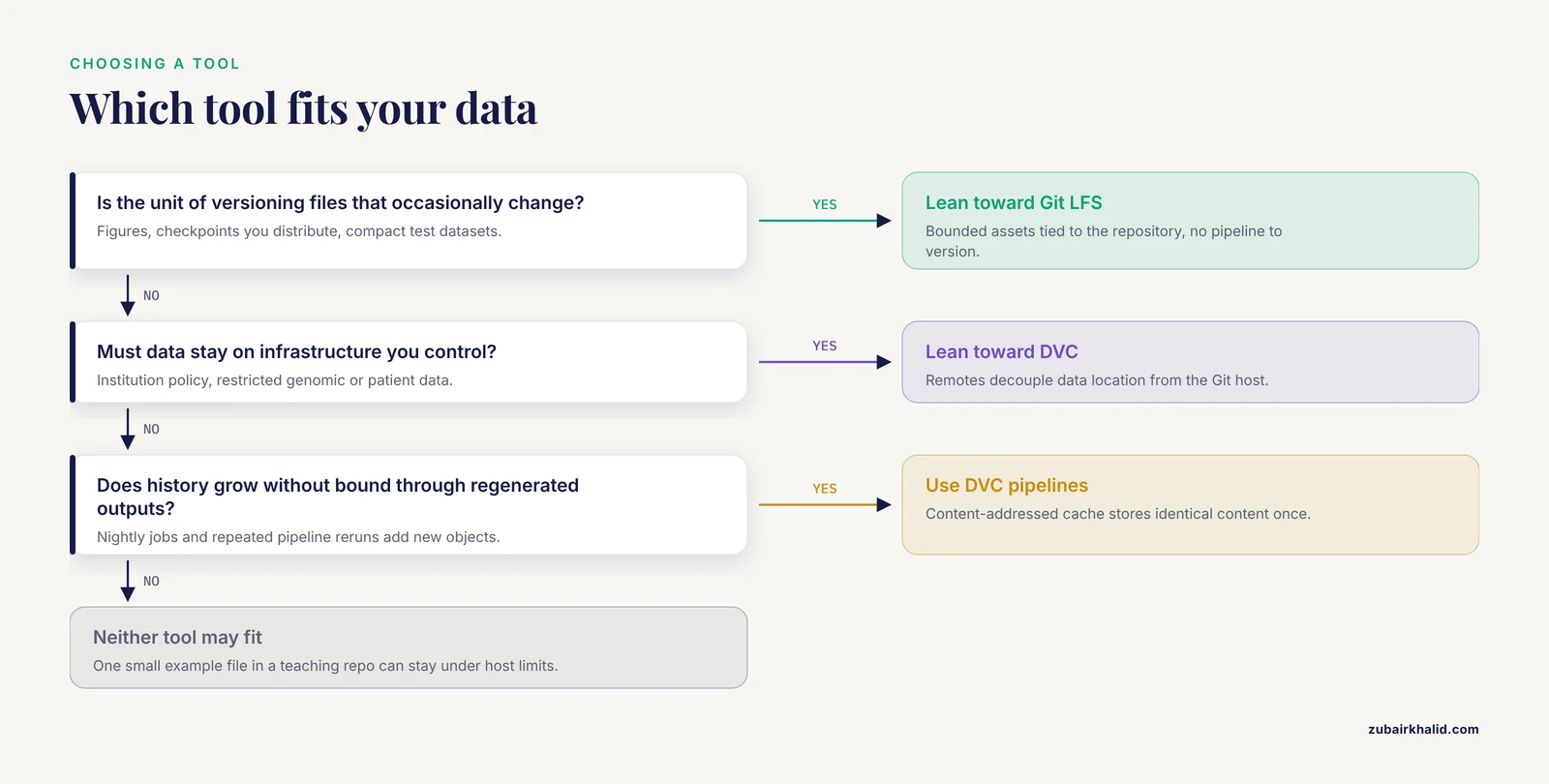
When a team asks "git lfs or dvc for research," walk these five questions in order.
1. What is the unit of versioning? If the answer is "files that occasionally change," lean LFS. If the answer is "datasets plus the steps that produced them," lean DVC. This single question resolves most cases, because it distinguishes asset management from workflow management.
2. Where must the data live? Commercial Git host storage is acceptable, or data must stay on infrastructure you control? The second answer points to DVC or git-annex, which decouple data location from the Git host.
3. How much history accumulates? Bounded and modest favors LFS. Growing without bound, especially through regenerated outputs, favors DVC's content-addressed cache, where identical content is stored once and unchanged outputs are never re-uploaded.
4. Who needs access, and to what? If everyone with repository access should get all data, LFS's simple model is fine. If access must be split, for example code public and patient data restricted, DVC's independent remotes are the cleaner mechanism.
5. What does the team tolerate learning? LFS asks almost nothing of users beyond the initial configuration. DVC asks for a genuine shift in habits, and teams that skip dvc push or hand-edit dvc.lock files create the confusion that makes people blame the tool. Honest self-assessment here prevents an abandoned rollout.
A 2024 evaluation of existing tools for managing different types of research data emphasizes that data characteristics, such as size, structure, and rate of change, interact with team workflow to determine fit, and recommends matching tools to the data type rather than adopting whatever a neighboring lab uses. That framing is the best defense against cargo-cult infrastructure decisions.
Where Git-Annex Fits
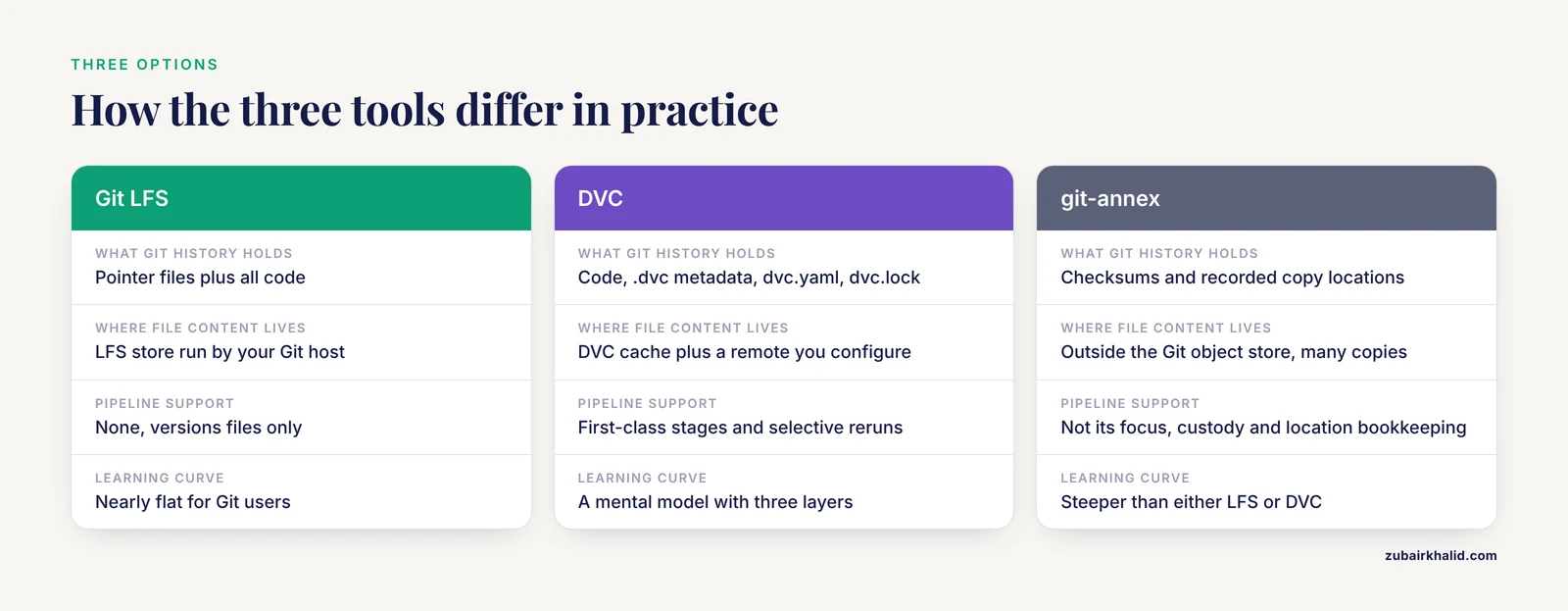
No comparison of this topic is complete without mentioning git-annex, because the most demanding production deployments of Git-based data management use it. git-annex, like DVC, keeps file content out of the Git object store and tracks it by checksum, with the location of each content copy recorded in the repository. Where it differs is in its model of many repositories holding many copies of many files, with explicit bookkeeping of which copy lives where. That model scales to archival use cases and to strict custody requirements, which is why a clinical provenance system adopted it as its large-file layer [1]. The practical cost is a steeper learning curve than either LFS or DVC and a smaller user community. Most laboratories deciding between LFS and DVC will not need git-annex, but teams with archival or custody requirements should evaluate it alongside the two main options.
Common Mistakes and Limitations
These are the errors that actually occur in laboratories adopting either tool.
Committing the large file before configuring the tool. Adding a pattern to .gitattributes or running dvc add does nothing about file versions already in Git history. The file bloat remains until history is rewritten. For LFS, git lfs migrate info shows the largest files in your history, and the migrate command rewrites history so those files become pointers. History rewriting changes every commit identifier, so all collaborators must coordinate, open pull requests must be rebased, and anyone with a stale clone will make a mess if they push. Plan the migration before the repository has many active contributors.
Tracking the wrong patterns. git lfs track ".fastq.gz" covers compressed reads but not .fastq or *.fq.gz. Loose patterns sweep in files you never intended, such as operating-system junk, and each tracked file consumes quota on every push. Review .gitattributes in pull requests the way you review code.
Treating dvc push as optional. A collaborator who commits a .dvc file and forgets to push the cache leaves a repository that points at data nobody else can fetch. Make dvc push part of the definition of "done," and enforce it in review or continuous integration checks where possible.
Letting the DVC cache consume the wrong disk. The default cache location sits inside the project on the same filesystem. On a laptop with a 512 GB drive, a few pulls of a large cohort fill it. Point the cache at a larger volume in the DVC configuration, and remember that the cache is a local convenience, not a backup. The remote is the durable copy.
Hand-editing dvc.lock or .dvc files. These files encode hashes. Editing them by hand desynchronizes Git's record from reality, and dvc status will report drift that nobody can explain. Change data or code, run the DVC commands, and let the tools write the files.
Assuming hosted LFS is backup and archival. LFS storage is governed by your hosting plan, including quota and retention terms. A lab that treats it as the only copy of irreplaceable sequencing data has confused version control with data preservation. Version control systems and backup systems answer different questions, and primary research data belongs in institutional or domain repositories with their own preservation commitments.
Using LFS for frequently regenerated outputs. Each regenerated binary becomes a new LFS object permanently. A nightly job that refreshes a 500 MB summary file produces 30 new objects a month and pays bandwidth for each. Move such outputs into a DVC pipeline or generate them on demand.
Ignoring Windows path and symlink friction. Both tools work on Windows, but caches, symlinks, and path length limits generate more support friction there than on macOS or Linux. If part of the team runs Windows, test the full workflow, including dvc pull and checkout of LFS files, before standardizing.
Conflating reproducibility with either tool. DVC pins data versions and pipeline structure. It does not pin the versions of Python packages, system libraries, or reference genome builds unless you capture those separately, for example in a container image or a locked environment file. A dvc.lock alongside a container gives strong reproducibility. A dvc.lock alone does not.
A Short Decision Checklist
- Assets attached to code, bounded size, one Git platform. Git LFS.
- Datasets plus pipelines, evolving data, terabyte scale, self-owned storage, reproducible reruns. DVC.
- Archival custody, many replicas, strict provenance across clinical or multi-site data. Evaluate git-annex and DataLad-style workflows, the family demonstrated in clinical provenance systems [1].
- One small example file for a teaching repo. Neither tool, just stay under your host's ordinary limits.
Frequently Asked Questions
Can I use Git LFS and DVC in the same repository?
Yes, and it is a sensible combination in some labs. DVC ignores files it manages itself, and LFS ignores files not matched by its patterns, so code and small documents can go through LFS while datasets and pipeline outputs go through DVC. Keep the two pattern sets clearly documented so nobody has to guess which system owns a given file.
Does DVC replace Git?
No. DVC depends on Git. Git records code, configuration, and DVC's metadata files, and DVC uses Git commits to anchor which data versions belong together. If your team removed Git, DVC would have nothing to coordinate with.
Is Git LFS free on GitHub?
Git LFS itself is free, open-source software. On GitHub, hosted LFS storage and bandwidth come with a free quota per account, with paid data packs available beyond it. Check GitHub's current LFS documentation for the exact figures before planning a large repository, because quota details are hosting-plan terms that change over time.
Which tool handles large genomics files like FASTQ and BAM better?
DVC, in most laboratory situations. Genomic datasets grow without bound, belong on institution-controlled storage, and sit inside multi-step pipelines that need selective reruns, all of which match DVC's design. Git LFS handles the files technically, but quota-based hosted storage and the absence of pipeline support make it a poor match for the actual workflow.
When should a research team choose Git LFS over DVC?
Choose LFS when your large files are bounded-size assets tied to the repository, such as figures, checkpoints you distribute, and compact test datasets, and when your team wants to keep an unchanged Git workflow on a single platform. If there is no pipeline to version and no independent storage requirement, LFS gives you the result with the least ceremony.
What is git-annex and when does it fit?
Git-annex is an open-source extension that manages large files by storing their content outside the Git object store and tracking checksums and locations across multiple repositories. It fits archival and custody-heavy use cases with many replicas and strict provenance requirements, and it underlies production systems in clinical data management, including a published approach that aligns Git history with a PROV-O provenance graph for clinical interpretation [1].