Galaxy Bioinformatics Workflow Integration: A Step-by-Step Guide
By Dr. Zubair Khalid, DVM, MS, PhD ·

By the end of this guide you will be able to build a multi-tool analysis in the Galaxy platform, connect individual tools into a reusable workflow, import a published workflow into your own Galaxy account, run it on real sequencing data, monitor the run, verify the outputs, and, if you administer your own Galaxy server, install and wrap new tools so they become part of an integrated pipeline. You need nothing installed on your laptop except a browser for the public-server workflow, and a Python 3.7 or later environment if you want to automate Galaxy through its API.
Galaxy bioinformatics workflow integration solves a specific problem. Modern analyses chain many programs together, each with its own installation quirks, file formats, and parameters. A published whole-genome sequencing (WGS) workflow for bacterial characterization, for example, chains genome annotation, species identification, serotype prediction, antimicrobial resistance prediction, virulence gene detection, and phylogenetic clustering in a single sequence of steps [1]. Running each program by hand invites error. Wiring them into one reproducible workflow is what integration means in practice, and Galaxy is currently one of the most widely used platforms for doing it.
The literature makes the case repeatedly. Clinical metaproteomics workflows that combine custom protein database generation, peptide identification, quantification, taxonomic annotation, and statistics have been deployed end to end inside Galaxy [2]. Proteogenomic studies, which would otherwise require researchers to juggle disjointed software with per-tool parameters, are distributed as Galaxy workflows so reproducibility does not depend on each researcher's local setup [3]. Even protein-ligand docking, a task requiring several programs and substantial compute, has been packaged as an automated Galaxy workflow called PLIDflow that runs from binding-site identification through to predicted binding affinities [4]. This guide shows you how to do the same for your own analysis.
What Galaxy Bioinformatics Workflow Integration Means
Galaxy is an open-source, web-based platform for data-intensive biomedical research. Three concepts matter:
- Tool: a single analysis step wrapped in Galaxy's XML format so it can be run from the browser. Wrappers define the inputs, outputs, and parameters, and they are what make a command-line program usable without a terminal [5].
- Dataset: a file Galaxy manages for you. Datasets have states such as
queued,running, andok, and Galaxy tracks provenance, meaning every output remembers which tool and which inputs produced it. - Workflow: a saved, ordered graph of tools. When you run a workflow, Galaxy schedules the jobs in dependency order, so a mapper only starts after the fastp step finishes, and a variant caller only starts after the mapper finishes.
Integration, in this context, has two layers. The first is composing existing tools into a workflow. The second is bringing new tools into Galaxy so they can participate in workflows. Both layers matter, and both are covered below.
The alternative to integration is fragmentation, and the literature documents its costs. A review of CRISPR guide RNA design tools describes four separate algorithmic layers (rule-based, alignment-based, machine learning, and deep learning) that require manual integration across multiple platforms, with poor reproducibility as a direct consequence [6]. Multi-omics researchers face the same problem: many integration tools exist, but comparing them across datasets is difficult without a common framework, which is exactly why one comparative study evaluated integration methods across four heterogeneous respiratory disease datasets under standardized preprocessing [7]. A workflow platform is the remedy for that kind of fragmentation.
What You Need Before You Start
- A browser. The public Galaxy servers at usegalaxy.org, usegalaxy.eu, and usegalaxy.org.au host thousands of tools and require no local installation [5].
- A Galaxy user account on your chosen server (registration is free).
- Your data. For the worked example below, that means paired-end Illumina FASTQ reads from bacterial isolates. If you have no data yet, Galaxy provides example datasets you can import by URL.
- Optional, for API automation: Python 3.7 or later with the
bioblendlibrary. - Optional, for server administrators: shell access, an Ansible-managed or Docker-based Galaxy installation, and the
ephemerisandplanemocommand-line utilities.
Step-by-Step: Building and Running an Integrated Workflow
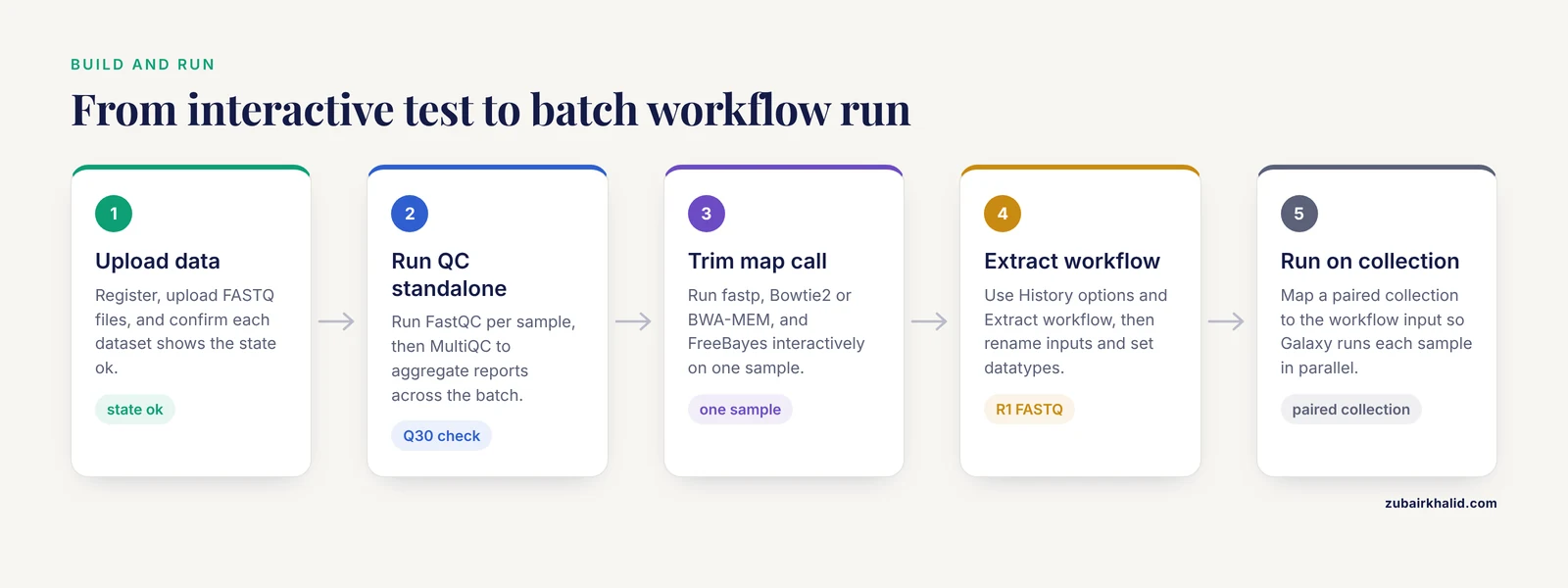
The worked example is a bacterial WGS characterization workflow modeled on a published, validated design: annotation, species identification, antimicrobial resistance (AMR) prediction, virulence and plasmid detection, and phylogenetic clustering from Illumina reads [1]. The same construction process applies to any domain, including the metaproteomics [2] and proteogenomics [3] workflows that already run in Galaxy.
Step 1: Create an Account and Upload Data
Register at usegalaxy.org. Click Upload Data in the Tools panel, then either drag files in or paste a URL.
For files larger than about 2 GB, or many files at once, use the FTP upload link shown in the upload dialog. From a terminal:
lftp usegalaxy.org
login: your_username
password: your_password
put sample_A_R1.fastq.gz
put sample_A_R2.fastq.gz
Expected result: each uploaded file appears in your History panel with the state ok and a green checkmark. If a dataset shows orange or red, hover over it and click the eyeball icon to inspect the content before proceeding.
A useful tip from laboratory practice: upload a reference genome and a positive-control sample alongside your test data. The published MTB workflow validation relied on a reference collection extensively characterized with conventional methods, tested on a per-assay basis against 238 in-house-sequenced isolates [8]. You will not have 238 isolates, but one known control catches most silent configuration errors.
Step 2: Run Quality Control as Standalone Tools First
Before building a workflow, run each step interactively so you understand its parameters. Start with read-level QC.
Open FastQC (under NGS Analysis or search in the tool panel) and run it on sample_A_R1.fastq.gz. Then summarize across tools with MultiQC, which aggregates output from many QC tools into a single report across all samples so batch effects and outlier samples are caught early rather than after the full analysis [9].
In a command-line environment the equivalent is:
multiqc fastqc_raw/ -o reports_raw/Expected output ends with:
[Info] multiqc : Report written to reports_raw/multiqc_report.htmlIn Galaxy, MultiQC takes the FastQC output datasets from every sample in your history and returns one interactive HTML report. Check three things: per-base sequence quality above Q30 for most of the read length, per-sequence GC content matching your organism's expectation, and adapter contamination flagged but tolerable.
Step 3: Trim, Map, and Call Variants Interactively
Run each remaining step once, in order, accepting the interactivity that workflows will later remove.
- fastp or Trimmomatic for adapter and quality trimming. A typical fastp invocation (command-line form shown for clarity):
fastp -i sample_A_R1.fastq.gz -I sample_A_R2.fastq.gz \
      -o trimmed_R1.fastq.gz -O trimmed_R2.fastq.gz \
--qualified_quality_phred 20 --length_required 50- Bowtie2 or BWA-MEM to map trimmed reads to your reference. In Galaxy, select your reference from the built-in index list rather than uploading your own, unless you need a custom reference.
- FreeBayes or bcftools call for variant calling on the mapped BAM.
- A typing or resistance-prediction tool appropriate to your organism. For tuberculosis isolates, the command-line tool TBProfiler predicts resistance across 16 anti-tuberculosis drugs from a marker database assessed against more than 17,000 clinical isolates with phenotype data [10], and comparable Galaxy tools exist for species confirmation and SNP-based AMR prediction in MTB workflows [8]. For Salmonella and similar pathogens, Galaxy's bacterial WGS toolset covers serotype prediction, sequence typing, and core-genome phylogenetics [1].
Step 4: Capture the Steps into a Workflow
Once the interactive run works, convert it. Click the History options (gear) menu and choose Extract workflow. Galaxy walks you through each history step, lets you rename outputs, and produces a workflow containing every tool in the order executed.
Practical tips at this stage:
- Rename the workflow inputs (the initial datasets) to meaningful labels like
R1 FASTQandR2 FASTQ. Anyone who imports your workflow later will see these labels. - Set the input dataset "type" explicitly. FASTQ versus FASTQ.GZ mismatches are a frequent cause of downstream tool failures.
- Connect steps manually in the workflow editor only when Galaxy has not inferred the connection. In the editor, click the small dot on a tool's output and drag to the input dot of the next tool. A valid connection snaps into place and turns solid.
- Use the "Post-job actions" panel to rename outputs with patterns such as
${input.name}.bam, so a 20-sample run produces self-describing files instead ofUntitled dataset 47.
Step 5: Run the Workflow on a Batch of Samples
Click a workflow's play button, map each workflow input to a history dataset or collection, and choose an execution option:
| Option | What it does | When to use it |
|---|---|---|
| , - | , - | , - |
| Single dataset input | Runs the workflow once for one sample | Testing a new workflow before a real run |
| Dataset list (collection) input | Runs the workflow once per sample, in parallel | Batches of 2 to hundreds of samples |
| Paired collection | Supplies matched R1 and R2 per sample through the whole workflow | Paired-end sequencing data |
| Run on server at submission | Jobs queue immediately, up to your server's quota | Standard runs |
| Interactive execution (Galaxy Interactive Environments) | Opens tools such as Jupyter inside Galaxy | Exploratory work inside the same history |
Batch execution over a collection is the reason workflows exist. The published Salmonella workflow processed 22 outbreak isolates plus 182 public genomes with no execution errors reported during the run, and it is distributed as an uploadable file for the Galaxy platform [1]. That scale is routine on Galaxy once your workflow is correct.
Expected result during a run: datasets move from queued (gray) to running (yellow) to ok (green). A red dataset means the job failed, and Galaxy's error report button shows the tool's standard error, which almost always names the actual problem.
Step 6: Import and Reuse Published Workflows
You do not have to build everything yourself. Published workflows can be imported by URL or from shared histories. The standard practice in Galaxy publications is to make the workflow itself the deliverable. The bacterial WGS workflow is freely available for academic and non-profit use as an uploadable Galaxy file [1], the clinical metaproteomics workflow is deployed within the Galaxy ecosystem for dissemination to other laboratories [2], and the proteogenomic workflows are distributed so researchers without computational expertise can run multistep analyses [3].
To import one:
- In the top menu choose Workflow, then Import.
- Paste the workflow URL, or upload the
.gafile that the authors provide. - Open the imported workflow, check that every tool version is available on your server, and run it on your control dataset first.
For programmatic import via the Galaxy API:
from bioblend.galaxy import GalaxyInstance
gi = GalaxyInstance("https://usegalaxy.org", key="YOUR_API_KEY")

# List workflows shared with you
shared = gi.workflows.get_shared_workflows()

# Import from a published URL
wf = gi.workflows.import_workflow_from_uri(
    "https://example.org/workflow/bacterial_wgs.ga"
)
print(wf["id"])
Expected output is a JSON dictionary whose id field is a hex string such as f2db41e1fa331b3e. Keep that identifier. It is what you pass to export, run, and update calls.
Step 7: Verify the Result Is Correct
Verification is per-assay, not per-workflow. The MTB workflow authors validated each assay (species identification, AMR prediction, spoligotyping, SNP barcoding, core genome MLST) separately against isolates with conventional phenotypic or molecular characterization [8]. Apply the same logic at your scale:
- Species identification on a known isolate should return that species.
- A control with a known resistance mutation should be called resistant for the corresponding drug.
- Core-genome SNP distances between replicate isolates of the same strain should be near zero, and isolates from the same outbreak should cluster together, as they did in the Salmonella outbreak workflow evaluation [1].
- For proteomics outputs, check that the number of identified peptides is in a plausible range for your instrument and sample type rather than accepting whatever number appears.
If an output fails these checks, the bug is almost always in an upstream parameter, a wrong reference genome, or a data swap between samples.
Installing New Tools into Galaxy (Server Administrators)
Public servers choose which tools to install. If a tool you need is missing, you have three options: use a different public server that hosts it, request the tool from the server administrators, or run your own Galaxy instance.
Wrapping a Tool: The XML Wrapper
Every Galaxy tool is defined by an XML wrapper declaring inputs, outputs, and the command line. The planemo utility scaffolds and tests wrappers:
# create a skeleton wrapper
planemo tool_init --id my_snp_filter --name "SNP Filter" \
      --input_file bam --output_file vcf

# check it
planemo lint my_snp_filter.xml

# run its tests in a disposable environment
planemo test --conda_channel bioconda my_snp_filter.xml
Expected output of a passing lint starts with:
Applying linter tests... ... OKThe complexity here is real, and the literature names it explicitly. Integrating R packages into Galaxy requires XML wrappers that can be time-consuming to write, plus dependency management across CRAN and Bioconductor, which hosts 2,289 software packages as of release 3.20 [5]. Managing that dependency surface is the main engineering cost of integration.
Frameworks for R and Bioconductor Integration
The R2G2 framework was developed specifically to ease this path, providing a Python-R framework for seamless integration of R and Bioconductor tools into Galaxy and addressing wrapper generation and dependency resolution directly [5]. If your desired tool is an R package, check whether an existing Galaxy wrapper already exists on the ToolShed before writing your own. Several R and Bioconductor-based tools already run on usegalaxy.org and usegalaxy.eu [5].
Installing Tools with Ephemeris
On your own server, install ToolShed tools in bulk:
pip install ephemeris

shed-tools install -g http://localhost:8080 \
  -a YOUR_ADMIN_API_KEY \
  -t tools.yaml
where tools.yaml lists each tool, its owner in the ToolShed, and a revision hash. Pinning exact revisions is what makes the installed tool set reproducible months later, which is the same reproducibility motivation that drives researchers toward integrated computing environments rather than ad hoc local installations [11].
Comparing Integration Options: Bioinformatics Tools Comparison
Choosing between Galaxy, raw command line, and workflow managers is a genuine decision, and the honest answer is that the best bioinformatics software depends on the team, not the tool. A useful bioinformatics tools comparison on the criteria that actually matter:
| Criterion | Galaxy | Raw command line | Snakemake / Nextflow |
|---|---|---|---|
| , - | , - | , - | , - |
| Prerequisites | Browser only | Linux, scripting skills | Linux, Python or Groovy skills |
| Reproducibility | Built-in provenance, exportable workflows | Manual, depends on discipline | Strong, code-based |
| Batch handling | Collections, one click | Loops you write yourself | Native scatter-gather |
| Publishing a workflow for others | Excellent, import by file or URL | Poor, requires documentation | Good, but users need compute |
| Adding new tools | XML wrapper plus ToolShed | Immediate | Rule definitions |
| Ceiling on customization | High, but constrained by wrappers | Unlimited | Unlimited |
Researchers without programming backgrounds consistently benefit from Galaxy's web interface, which is a stated reason platforms integrate powerful tools this way, fostering collaboration across skill levels [5]. The metaproteomics and proteogenomics teams that published Galaxy-based workflows did so explicitly to serve researchers lacking computational expertise and to stop reproducibility from suffering under disjointed per-tool setups [2] [3]. Conversely, if you are writing novel algorithms, Galaxy's wrapper layer adds overhead with less payoff, and a workflow manager or plain scripts serve better.
When comparing tools inside a domain, integration again pays. A comparative evaluation of ten single-cell annotation algorithms found that wrapping them in one framework (scAnnoX) streamlined testing and comparison, with SingleR and sciBet showing superior prediction accuracy among the ten [12]. Similarly, evaluating multi-omics integration methods under one protocol identified NEMO as the most consistent performer across heterogeneous datasets, with MOFA and intNMF performing well in specific contexts [7]. Tool choice is empirical, and an integrated framework is what makes the empirical comparison feasible.
One caution from the pipeline literature: a single tool rarely wins outright. The FindDNAFusion project evaluated three DNA-based fusion callers and found sensitivities of 94.1, 88.3, and 62.7 percent for JuLI, FACTERA, and GeneFuse respectively, then combined them with filtering and annotation logic into a pipeline that reached 98.0 percent for intron-tiled genes [13]. Expect to compose, not to crown a single winner.
Galaxy Bioinformatics Workflow Integration Tips
These are the habits that separate smooth runs from week-long debugging sessions.
- Always run a control first. Validate per assay, not per pipeline, the way the MTB workflow was validated against conventionally characterized isolates [8].
- Pin tool versions. Record the exact tool revision for every workflow step. A workflow whose mapper changes version between runs is not reproducible.
- Use collections for batches. A dataset list input turns a 200-sample run into one submission instead of 200.
- Name outputs at generation time. Post-job rename actions with
${input.name}prevent the classic "which file belongs to which sample" failure. - Aggregate QC across the batch. MultiQC exists precisely because per-sample QC reports hide global trends and batch effects when reviewed one at a time [9].
- Keep the interactive run before the workflow. Build, test interactively, extract, then batch. Debugging inside a 200-sample batch costs far more time than debugging one sample interactively.
- Do not write wrappers for tools that already exist. Search the ToolShed first, since thousands of wrappers, including the R and Bioconductor family, are already published and in use on public servers [5].
- Document parameters in the workflow description field. Six months from now, the reason you chose a specific minimum read length will not survive without a note.
- Match the platform to the team. If wet-lab collaborators need to run analyses themselves, Galaxy's browser interface is the lowest-friction option [5]. If your team lives in the terminal, a code-first manager may fit better.
- For multi-omics work, standardize preprocessing before integration. Dataset-specific filtering, imputation, and normalization steps materially changed how integration methods performed in comparative testing [7], so make preprocessing explicit workflow steps rather than undocumented habits.
Common Errors and Their Fixes
Dataset stays gray and queued for hours. On public servers this usually means your job is waiting behind quota-limited resources or large community jobs. Fix: wait, or move large jobs to a dedicated server or your own instance. A job stuck for more than a day warrants a support ticket.
"Input dataset is not in FASTA format" or a similar format mismatch. Galaxy assigns datatypes on upload and sometimes guesses wrong. Fix: click the dataset's pencil (edit) icon, set the datatype explicitly, and rerun. Declaring correct input types in the workflow editor prevents this at the source.
Job fails with a memory error on a public server. Large variant calling or assembly jobs exceed per-user job limits. Fix: reduce input size, split the job, or run on a server or instance sized for the workload. High-performance computing resources have long been part of the conversation here, since consistency-based alignment tools consume serious compute at scale [14].
401 Unauthorized from the API. Your API key is wrong, expired, or you are pointing at the wrong URL. Fix: regenerate the key under User, Preferences, Manage API key, and confirm the instance URL has no trailing slash mismatch.
Tool ... not found when running an imported workflow. The workflow references a tool revision your server does not host. Fix: open each step in the workflow editor and use the tool-version selector to remap to an available revision, or move to a server that hosts the tool.
Downstream tools run on stale or swapped inputs. Usually caused by manual history edits mid-run. Fix: use collections and fixed connections so data flows by construction, and never rearrange a history while a workflow is running.
Proteomics or database searches return implausibly few identifications. In metaproteomics, microbial proteins sit at low abundance against a dominating host background, and huge protein databases impede sensitivity during identification [2]. Fix: use the database construction step the published workflows provide rather than searching against an unfiltered, oversized database.
Common Mistakes and Limitations
- Treating a validated workflow as automatically valid for your samples. The MTB workflow was validated per assay on a defined collection [8]. Your sample types, sequencing platforms, and variant spectra may differ. Re-validate the assays that matter for your data.
- Testing only on your real data. Without a control sample with known answers, a wrong reference genome can produce complete-looking results that are simply wrong.
- Ignoring QC aggregation. Reviewing 40 separate FastQC reports one by one is how batch effects get missed. One MultiQC report exists to prevent this.
- Chaining tools without checking intermediate outputs. Peek at the trimmed reads and the BAM before trusting the variant calls. Silent upstream problems propagate.
- Assuming one tool is best without comparison. The fusion-detection study showed a 31-point sensitivity gap between individual callers and a better result from combining them [13]. Comparison, then composition, beats faith.
- Building workflows interactively and never versioning them. Export the workflow file after every meaningful change. Galaxy's history gives provenance for datasets, but only an exported workflow gives you a versioned artifact.
- Underestimating the human factor. Surveys of clinical integration note that limited informatics competencies and time constrain adoption even when the technology works [11]. Budget for training, not just compute.
- Expecting Galaxy to eliminate parameter decisions. Galaxy hides the terminal, not the science. Every variant caller, annotator, and integration method still requires choices that affect results.
- Individual cases still need expert judgment. Computational outputs, especially clinical predictions such as AMR, inform decisions but do not replace professional interpretation of the specific case.
Frequently Asked Questions
Is Galaxy free to use?
Yes. The public servers, including usegalaxy.org and usegalaxy.eu, are free, host thousands of tools including many built on R and Bioconductor, and require only registration [5]. Heavy or sustained use may be better served by your own instance or a cloud deployment.
Do I need to know how to program to integrate workflows in Galaxy?
No for composing and running workflows, since the browser interface and workflow editor handle composition, execution, and provenance [5]. Yes for server administration, API automation, or writing wrappers for new tools, where command-line tools like planemo and ephemeris are involved.
What is the difference between a Galaxy workflow and a Nextflow or Snakemake pipeline?
A Galaxy workflow is composed visually from pre-wrapped tools and executed on Galaxy-managed compute with built-in provenance, which suits mixed-skill teams. Nextflow and Snakemake pipelines are code, which suits programmer-centric teams with their own infrastructure. Both achieve reproducibility. Choose by team skills and publishing model, and remember that even inside a single analysis, comparing and combining multiple tools often outperforms relying on any single one [13].
How do I add a tool that is not on my Galaxy server?
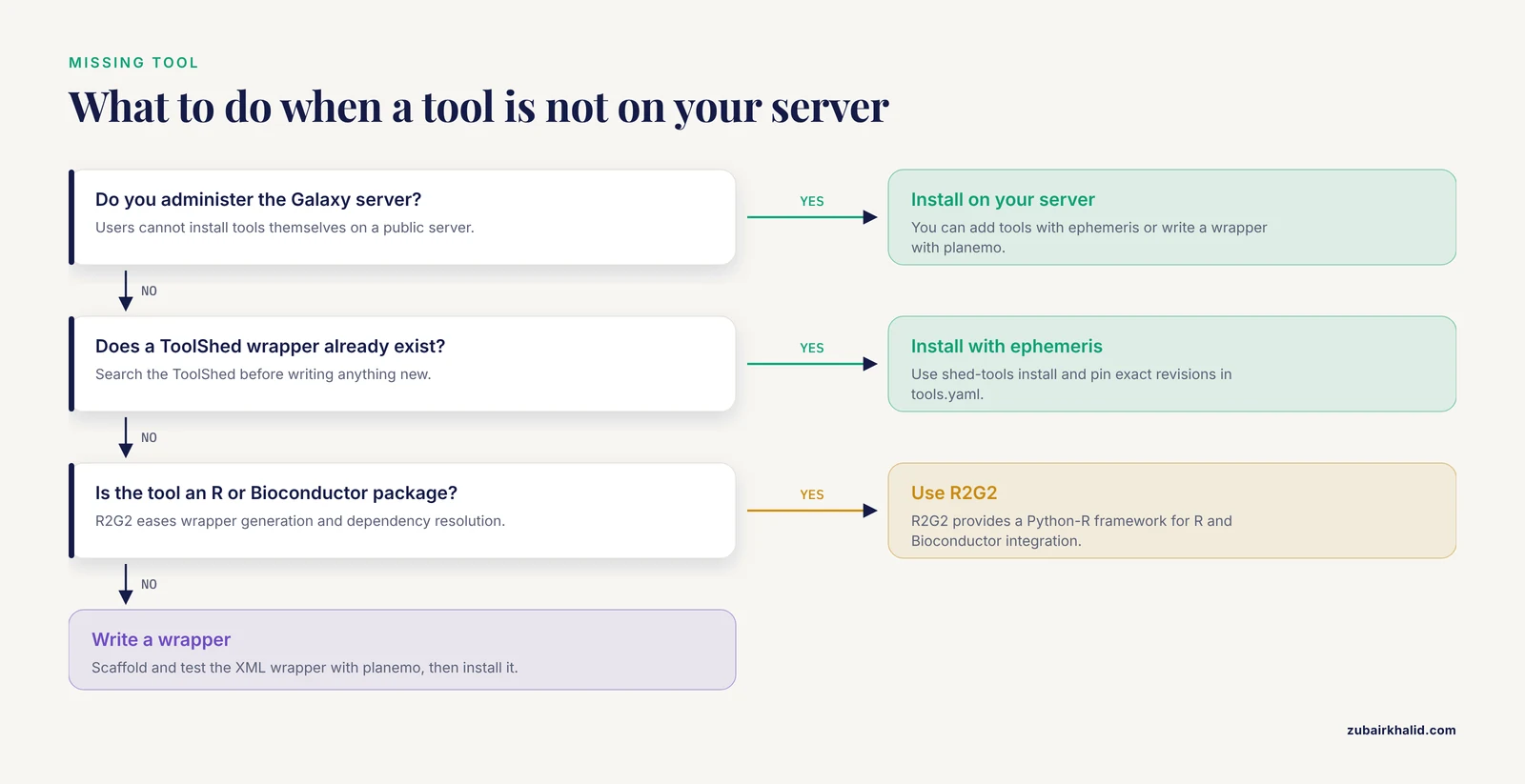
If you are a user, either request it from the server administrators or move to a server that hosts it. If you administer the server, install the existing ToolShed wrapper with ephemeris, or write one with planemo, with frameworks such as R2G2 available to ease R and Bioconductor integration [5].
Can I import workflows published in papers?
Yes, and it is the intended workflow. Authors commonly distribute workflows as uploadable Galaxy files or shared URLs, as the bacterial WGS workflow does for academic and non-profit use [1], along with published metaproteomics [2] and proteogenomics [3] workflows. Import, remap tool versions if needed, and validate on a control before trusting outputs.
How do I verify my integrated workflow is producing correct results?
Validate per assay against samples with known answers, the approach used for an MTB workflow tested per assay against 238 isolates characterized by conventional methods [8]. Species calls, resistance calls, and clusterings should match known truth. For outbreak or phylogenetic work, same-strain isolates should show near-zero SNP distances [1].
How do I handle hundreds of samples?
Put samples into a dataset collection and map the collection to the workflow input. Galaxy runs the workflow per sample in parallel, which is how published workflows processed 204 Salmonella genomes in a single execution with no reported errors [1]. Use MultiQC afterward to review QC across the entire batch at once [9].
What domains does Galaxy cover beyond read mapping?
Far more. Published Galaxy-based workflows span clinical metaproteomics of host-microbiome interactions [2], proteogenomic discovery of novel proteoforms [3], protein-ligand docking from binding-site identification through affinity prediction [4], MTB and bacterial WGS characterization [8] [1], and single-cell annotation method comparison [12]. If your analysis is a chain of tools, Galaxy can likely integrate it.
Sources
- A Practical Bioinformatics Workflow for Routine Analysis of Bacterial WGS Data.
- A Clinical Metaproteomics Workflow Implemented within Galaxy Bioinformatics Platform to Analyze Host-Microbiome Interactions Underlying Human Disease.
- Discovering Novel Proteoforms Using Proteogenomic Workflows Within the Galaxy Bioinformatics Platform.
- PLIDflow: an open-source workflow for the online analysis of protein-ligand docking using galaxy.
- R2G2: A Python-R Framework for Seamless Integration of R/Bioconductor Tools into Galaxy
- From Rules to Learning: Unifying the Algorithmic Layers of CRISPR Bioinformatics Tools
- Multi-omics integration in allergy, viral infections and asthma: a comprehensive analysis of bioinformatics tools
- A Bioinformatics Whole-Genome Sequencing Workflow for Clinical Mycobacterium tuberculosis Complex Isolate Analysis, Validated Using a Reference Collection Extensively Characterized with Conventional Methods and In Silico Approaches.
- MultiQC: summarize analysis results for multiple tools and samples in a single report
- Integrating informatics tools and portable sequencing technology for rapid detection of resistance to anti-tuberculous drugs
- Issues of integrating medical bioinformatics technologies into otorhinolaryngology: challenges and software solutions
- scAnnoX: an R package integrating multiple public tools for single-cell annotation
- FindDNAFusion: An Analytical Pipeline with Multiple Software Tools Improves Detection of Cancer-Associated Gene Fusions from Genomic DNA.
- High Performance computing improvements on bioinformatics consistency-based multiple sequence alignment tools