How to Fetch and Preprocess Genomic Data with Biopython and pandas
By Dr. Zubair Khalid, DVM, MS, PhD ·

By the end of this guide you will be able to fetch genomic data with Python, parse it into structured records with Biopython, and turn it into clean, analysis-ready tables with pandas. The full path looks like this: query the NCBI databases over the network, download sequence records in GenBank or FASTA format, extract the parts you care about (species, sequence length, genes, features), filter and transform them in a pandas DataFrame, and write the result back out as FASTA and CSV files.
This tutorial is written for people who know basic Python (functions, loops, dictionaries) and have heard of GenBank but have not built a scripted fetch-and-preprocess workflow before. Everything runs on a standard laptop with no cluster access required.
What You Need Installed and On Hand
Before starting, confirm you have the following:
- Python 3.10 or newer. Check with
python -Vin a terminal. You should see output likePython 3.12.4. - A Python environment manager. The built-in
venvmodule is enough for this tutorial. - Biopython 1.83 or newer. Older versions lack
gc_fractionand some modern Entrez conveniences. - pandas 2.0 or newer.
- An internet connection, because fetching data means talking to the NCBI servers.
- A text editor or IDE such as VS Code.
Install everything in one step inside a fresh virtual environment:
python -m venv bioenv
source bioenv/bin/activate        # On Windows: bioenv\Scripts\activate
pip install biopython pandas
Verify the installs:
python -c "import Bio; print(Bio.__version__)"
python -c "import pandas; print(pandas.__version__)"
Expected output on a current setup:
1.84
2.2.2
Exact minor versions will differ. Any Biopython release at 1.83 or higher and any pandas release at 2.0 or higher supports every command in this article.
Why Biopython and pandas Belong in the Same Workflow
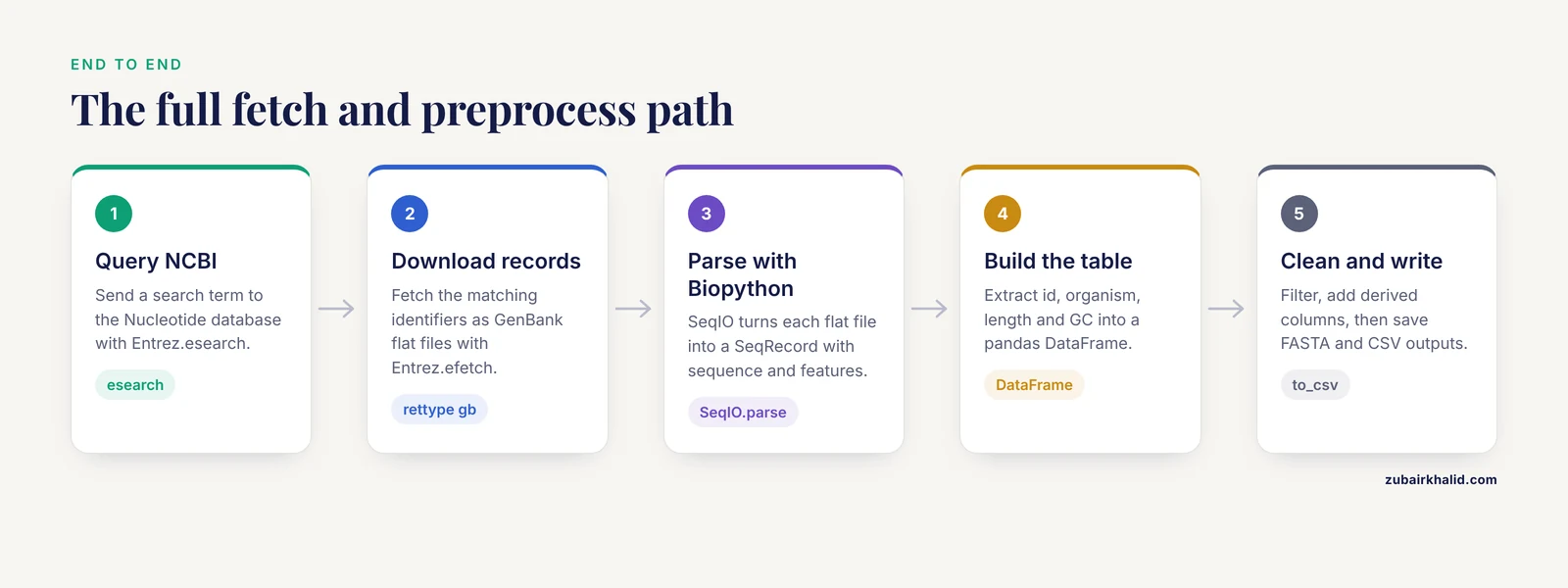
These two libraries solve different halves of the same problem in python for bioinformatics.
Biopython understands biological data formats. Its SeqIO module reads and writes FASTA, GenBank, and dozens of related formats. Its Entrez module wraps the NCBI E-utilities, the application programming interface (API, a way for programs to query a server) that gives programmatic access to PubMed, GenBank, the Nucleotide database, and the rest of the NCBI collection. The Biopython project documents these modules in the Biopython Tutorial and Cookbook, which remains the canonical reference for exact function behavior.
pandas understands tabular data. A DataFrame is a labeled two-dimensional table, similar to a spreadsheet with named columns. Sequence records carry a surprising amount of tabular metadata: organism, taxonomy identifier, sequence length, molecule type, gene names, coding sequence coordinates. Once that metadata lives in a DataFrame, filtering, sorting, grouping, and exporting become one-liners.
The division of labor is simple. Biopython talks to the network and parses biological formats. pandas organizes, filters, and summarizes what Biopython parsed. Trying to do both jobs in one library is the most common source of friction in a first biopython tutorial.
Step 1: Create a Working Project Layout
Keep fetch scripts, downloaded files, and processed tables in separate folders so reruns never overwrite good data by accident:
genomics_project/
    scripts/
        fetch_records.py
        build_table.py
    data/
        raw/
        processed/
Create it from the command line:
mkdir -p genomics_project/scripts genomics_project/data/raw genomics_project/data/processed
cd genomics_project
Run all Python commands that follow from inside genomics_project, with the virtual environment active.
Step 2: Configure Entrez the Right Way
The NCBI Entrez system is the gateway to the Nucleotide, Protein, and related databases. NCBI asks every programmatic user to identify themselves with an email address, and it offers an API key (a short string tied to your NCBI account) that raises your permitted request rate. The NCBI E-utilities documentation describes the current rate guidance for programmatic users, and Biopython exposes both settings as attributes on the Entrez module.
Create scripts/fetch_records.py and start it with this header:
from Bio import Entrez

Entrez.email = "[email protected]"
Entrez.api_key = "your_api_key_here"   # optional but recommended
To get an API key, register for a free NCBI account, sign in, and open the Account Settings page, where the API Key Management option generates the string. Paste it into the assignment above.
Two rules worth internalizing now:
- Never share a script with your real email and API key committed to a public repository. Read them from environment variables in shared code:
import os
Entrez.email = os.environ.get("NCBI_EMAIL", "[email protected]")
Entrez.api_key = os.environ.get("NCBI_API_KEY", "")- Always set
Entrez.emailbefore any network call. If you omit it, Biopython prints a warning and NCBI may throttle you sooner.
Step 3: Fetch a Single Genomic Record with efetch
The workhorse function is Entrez.efetch. It downloads records from a named database. The parameters that matter most are summarized in this table.
| Parameter | What it does | Common values |
|---|---|---|
db | Which NCBI database to query | nucleotide, protein, pubmed, assembly |
id | One or more accession numbers or internal UIDs | "NC_000913.3" or "AY851612,AY851613" |
rettype | Output format flavor | fasta, gb (GenBank flat file), ipg |
retmode | Output mode | text for flat files, xml for structured parsing |
seq_start, seq_end | Optional sub-range for nucleotide records | integer coordinates, 1-based |
strand | Strand for nucleotide sub-ranges | 1 plus strand, 2 minus strand |
The two formats carry different information. FASTA stores a header line plus the raw sequence. GenBank flat files store the sequence plus rich annotation: source organism, taxonomy, molecule type, and a features table listing genes, coding sequences (CDS regions, the segments that encode protein), and other elements with their coordinates. For preprocessing work, request rettype="gb" first, because you can always extract the sequence from a GenBank record but not the annotation from a FASTA file.
Here is a complete first fetch. This script downloads the annotated record for accession NC_000913.3 (the Escherichia coli K-12 MG1655 chromosome) and prints basic facts:
from Bio import Entrez, SeqIO

Entrez.email = "[email protected]"

with Entrez.efetch(
    db="nucleotide",
    id="NC_000913.3",
    rettype="gb",
    retmode="text",
) as handle:
    record = SeqIO.read(handle, "genbank")

print(record.id)
print(record.description)
print(f"Sequence length: {len(record.seq)}")
print(f"Number of features: {len(record.features)}")
Run it:
python scripts/fetch_records.pyExpected output:
NC_000913.3
Escherichia coli K-12 MG1655 chromosome, complete genome
Sequence length: 4641653
Sequence length: 4641653
Number of features: 2846
The exact feature count depends on the current annotation release and may differ slightly when you run it. The sequence length should match what the NCBI Nucleotide web page shows for that accession, which is the first sanity check that you fetched the right thing.
A few parameter notes:
rettype="gb"withretmode="text"yields the GenBank flat file, whichSeqIOparses with the format name"genbank".- If you only need the raw sequence, use
rettype="fasta"and parse with"fasta". seq_startandseq_endlet you download a single gene region instead of a 4.6 million base chromosome, which cuts transfer time dramatically on slow connections.
Step 4: Search First, Fetch Second with esearch
Most real workflows start with a question, not an accession number. Entrez.esearch runs a query against a database and returns matching identifiers. You then feed those identifiers to efetch. This two-step pattern (search, then fetch) is the standard shape of nearly every NCBI scripting workflow.
from Bio import Entrez

Entrez.email = "[email protected]"

query = 'Streptococcus pyogenes[Organism] AND cas9[Gene Name] AND srcdb_refseq[PROP]'

with Entrez.esearch(db="nucleotide", term=query, retmax=20) as handle:
    results = Entrez.read(handle)

ids = results["IdList"]
print(f"Found {results['Count']} matching records")
print("First identifiers:", ids[:5])
Expected output shape:
Found 17 matching records
First identifiers: ['1234567890', '1234567888', ...]
Parameter notes that matter:
termuses the same query syntax as the NCBI web search bar. Field qualifiers like[Organism],[Gene Name], and[PROP](a property filter, here restricting to RefSeq records) narrow results dramatically.retmaxcaps how many identifiers come back. The default is small, so set it explicitly if you expect more.Entrez.read(handle)returns a parsed Python object from the XML response. The identifiers inIdListare internal numeric UIDs, not accession numbers. Pass them toefetchdirectly.
A companion function, Entrez.esummary, returns short summaries (title, organism, length) for identifiers without downloading full records. Use it to preview a result set before committing to full fetches.
Step 5: Fetch Records in Batches Without Tripping Rate Limits
NCBI advises programmatic users to limit request frequency, and Biopython provides Bio.Entrez.EUtilsBase style handling plus explicit exceptions for server responses. In practice, two habits keep you safe: batch many identifiers into a single efetch call, and pause between calls.
Batching works because efetch accepts comma-separated identifiers. Here is a complete, robust batch fetcher for scripts/build_table.py:
import time
from Bio import Entrez, SeqIO

Entrez.email = "[email protected]"
Entrez.api_key = "your_api_key_here"

def search_ids(term, db="nucleotide", retmax=100):
    with Entrez.esearch(db=db, term=term, retmax=retmax) as handle:
        results = Entrez.read(handle)
    return results["IdList"]

def fetch_records_in_batches(ids, batch_size=50):
    records = []
    for start in range(0, len(ids), batch_size):
        chunk = ids[start:start + batch_size]
        with Entrez.efetch(
            db="nucleotide",
            id=",".join(chunk),
            rettype="gb",
            retmode="text",
        ) as handle:
            records.extend(SeqIO.parse(handle, "genbank"))
        time.sleep(0.5)   # be a good citizen
    return records

ids = search_ids('Streptococcus pyogenes[Organism] AND cas9[Gene Name]')
records = fetch_records_in_batches(ids)
print(f"Fetched {len(records)} records")
Expected output:
Fetched 17 recordsNotes on the batching logic:
- A batch of 50 identifiers per request is a widely used, comfortable size. Larger batches risk server timeouts on big records.
SeqIO.parsereturns an iterator over records in the file-like handle, soextendunpacks all records from each batch into one list.time.sleep(0.5)keeps you comfortably under the frequency guidance NCBI publishes for unkeyed access. With an API key you may go somewhat faster, but sleeping briefly is rarely the bottleneck in real workflows.- Wrap each
efetchin atry/exceptblock forHTTPErrorandURLErrorin production scripts, so one transient network hiccup does not lose the whole run.
Step 6: Turn Parsed Records into a pandas DataFrame
Every SeqRecord object carries .id, .description, .seq, .annotations (a dictionary of record-level metadata), and .features (a list of SeqFeature objects with coordinates and qualifiers). Extracting these into dictionaries, then letting pandas build a table from the list, is the central preprocessing pattern.
Add this to build_table.py:
import pandas as pd
from Bio.SeqUtils import gc_fraction

def record_to_row(record):
    lengths = {}
    for feature in record.features:
        if feature.type == "CDS":
            lengths.setdefault(feature.qualifiers.get("gene", ["?"])[0],
                               len(feature.location))
    return {
        "accession": record.id,
        "description": record.description,
        "organism": record.annotations.get("organism", ""),
        "molecule_type": record.annotations.get("molecule_type", ""),
        "sequence_length": len(record.seq),
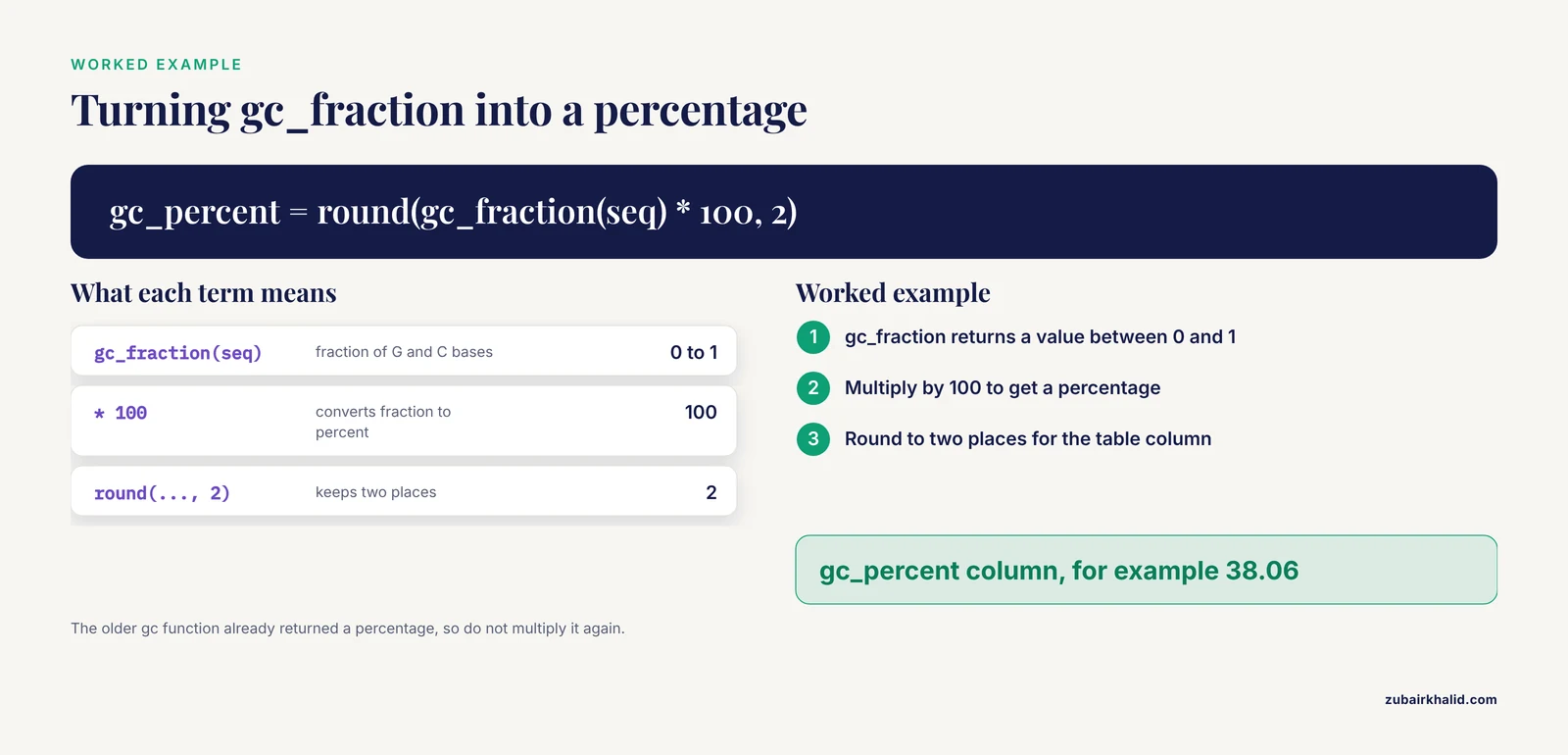
        "gc_percent": round(gc_fraction(record.seq) * 100, 2),
        "n_cds_features": sum(
            1 for f in record.features if f.type == "CDS"
        ),
        "first_cds_bp": lengths.get("cas9", None),
    }

df = pd.DataFrame([record_to_row(r) for r in records])
print(df.head())
Expected output (values illustrative, your organism set determines rows):
      accession                                        description         organism molecule_type  sequence_length  gc_percent  n_cds_features
0  NC_002745.2  Streptococcus pyogenes M1 GAS SF370 genome, co...  Streptococcus ...         DNA          1852450       38.06             1986
1  NC_002748.2  Streptococcus pyogenes MGAS315 genome, complet...  Streptococcus ...         DNA          1898120       38.14             2019
Key details in this extraction step:
gc_fraction(seq)returns the fraction of G and C bases as a number from 0 to 1, so multiply by 100 for a percentage. In older Biopython releases this function was namedgc()and returned a percentage, which is a classic source of confusion when following older biopython tutorial material. If you see aDeprecationWarningmentioningBio.SeqUtils.gc, switch togc_fraction.feature.qualifiersvalues are always lists, even for single items. The patternfeature.qualifiers.get("gene", ["?"])handles both the present and absent cases safely.feature.locationcan be converted to a Python slice withint(feature.location.start)andint(feature.location.end), and its span islen(feature.location)..annotationsis a plain dictionary. Different record types populate different keys, so use.get()with defaults rather than direct indexing.
Step 7: Preprocess and Clean the Table
Raw fetched metadata is rarely analysis-ready. Typical cleaning tasks: drop records with unexpected molecule types, flag sequences containing ambiguous bases, compute derived columns, and sort.
# 1. Keep only linear DNA records
df = df[df["molecule_type"] == "DNA"]

# 2. Flag sequences with ambiguity codes (N, R, Y, and similar)
def count_ambiguous(seq):
    return sum(1 for base in seq.upper() if base not in "ACGT")

records_by_id = {r.id: r for r in records}
df["ambiguous_bases"] = df["accession"].map(
    lambda acc: count_ambiguous(records_by_id[acc].seq)
)

# 3. Compute a derived column
df["cds_density"] = df["n_cds_features"] / (df["sequence_length"] / 1000)

# 4. Sort and reset the index
df = df.sort_values("gc_percent").reset_index(drop=True)

print(df[["accession", "gc_percent", "ambiguous_bases", "cds_density"]].head())
print(df[["gc_percent", "sequence_length"]].describe())
Expected output for the describe block on bacterial chromosomes:
        gc_percent  sequence_length
count   17.000000        1.700000e+01
mean    38.310588        1.868760e+06
std      0.221154        6.104200e+04
min     38.010000        1.769319e+06
max     38.710000        1.962058e+06
The describe() call is your fastest structural check. Mean GC content near 38 percent for S. pyogenes matches what published descriptions of this organism report, and chromosome lengths near 1.9 megabases are in the expected range for the species. If describe() shows a min of 0 or a maximum in the thousands instead of millions, a fetch or parse step went wrong.
Sequence-level transformations happen on the Seq objects before they reach the table:
rec = records[0]

# Reverse complement (the opposite strand, read 5-prime to 3-prime)
rc = rec.seq.reverse_complement()

# Translate a coding sequence. Table 11 is the standard bacterial code
first_cds = next(f for f in rec.features if f.type == "CDS")
sub = first_cds.extract(rec.seq)
protein = sub.translate(table=11, to_stop=True)

print(protein[:20])
Expected output shape:
MKKLKKKNLRKLKLSLNKISThe table=11 argument selects the bacterial, archaeal, and plant plastid genetic code. Using the default (table 1, the standard code) on bacterial genes can produce wrong amino acids at alternative start codons and in-recoding positions. Specifying the translation table appropriate to your organism is standard practice, as described in the Biopython documentation on translation.
Step 8: Write Clean Outputs
Persist both the sequences and the table. Biopython writes FASTA files, pandas writes CSV or Parquet files:
from pathlib import Path

raw_dir = Path("data/raw")
proc_dir = Path("data/processed")
raw_dir.mkdir(parents=True, exist_ok=True)
proc_dir.mkdir(parents=True, exist_ok=True)

# Write sequences as FASTA
SeqIO.write(records, raw_dir / "cas9_records.fasta", "fasta")

# Write the table
df.to_csv(proc_dir / "cas9_summary.csv", index=False)

# Optional, faster reload for large tables
df.to_parquet(proc_dir / "cas9_summary.parquet")
Verify the outputs:
head -2 data/raw/cas9_records.fasta
head -3 data/processed/cas9_summary.csv
Expected output:
>NC_002745.2 Streptococcus pyogenes M1 GAS SF370 genome, complete genome
AGAGATTTTTATTTATAGTTAATAATTTATTAGATTTTAGTATTAAT...
accession,description,organism,molecule_type,sequence_length,gc_percent,n_cds_features
NC_002745.2,Streptococcus pyogenes M1 GAS SF370 genome,Streptococcus pyogenes,DNA,1852450,38.06,1986
Reading everything back in a fresh session confirms reproducibility:
from Bio import SeqIO
import pandas as pd

loaded_records = list(SeqIO.parse("data/raw/cas9_records.fasta", "fasta"))
loaded_df = pd.read_csv("data/processed/cas9_summary.csv")
assert len(loaded_records) == len(loaded_df)
That assertion is a cheap consistency check worth copying into every workflow: the number of sequence files written must equal the number of table rows.
Step 9: Fetch Whole Genomes with the Assembly Database
Single nucleotide records work for genes and small genomes. For complete genome assemblies, the assembly database plus Entrez.elink and efetch on the assembly accession gets you the structured metadata, and the assembly record links to the actual sequence files hosted on the NCBI FTP site.
A lighter pattern that covers most needs: search nucleotide for complete genomes of an organism and fetch them by identifier, exactly as in the batch example, using a query like Escherichia coli[Organism] AND complete genome[Title]. For very large genomes (human, at roughly 3.1 billion bases per haploid set), efetch over the E-utilities is the wrong tool. Download the pre-built FASTA files from the NCBI genome FTP area instead, then parse them locally with SeqIO.parse, which streams records one at a time without loading the whole genome into memory at once.
Streaming matters for memory safety:
import gzip
from Bio import SeqIO

lengths = {}
with gzip.open("data/raw/human_chr22.fa.gz", "rt") as handle:
    for record in SeqIO.parse(handle, "fasta"):
        lengths[record.id] = len(record.seq)
print(lengths)
Because the for loop consumes one record at a time, peak memory stays proportional to the largest single sequence, not the whole file.
Practical Tips for Reliable Fetching
These are the habits that separate a one-off script from a reusable workflow:
- Cache aggressively. Save every raw download to
data/rawbefore parsing. Rerunning a parse is free, refetching is not, and NCBI will notice heavy repeat traffic. - Prefer GenBank format during exploration. Switch to FASTA only for final, stripped-down sequence output.
- Use
Entrez.esummaryto preview a result set before downloading full records. It costs far less bandwidth. - Record the query string and fetch date alongside your outputs. GenBank annotations are updated over time, so a table built today can differ from the same query next year.
- Keep sequences out of the DataFrame when they are large. Store accessions and paths in the table, keep sequences in FASTA files, and join the two by accession when needed. A DataFrame holding dozens of megabase genomes copies that data on every filter operation.
- Test with one small record first. Run the full pipeline on a single accession before pointing it at a 500-record result set.
Common Mistakes and Limitations
These failures account for most of the debugging time people spend on their first fetch-and-preprocess workflow.
Missing email and API key. Without Entrez.email set, Biopython emits a warning and NCBI may enforce stricter rate limits. Symptom: repeated HTTPError 429 or connection resets after a few requests. Fix: set the email and API key attributes at the top of every script, and add time.sleep between batched calls.
Parsing format mismatch. SeqIO.read(handle, "fasta") fails on a GenBank file with ValueError: No records found in handle (or a parse error pointing at the first LOCUS line). The format string must match what the server returned. Symptom and fix: check what you requested in rettype. gb pairs with "genbank", fasta pairs with "fasta".
Expecting annotations in FASTA records. A FASTA-parsed SeqRecord has an essentially empty .annotations dictionary and no features. This is a property of the format, not a bug. Fix: request rettype="gb" when you need organism, molecule type, or feature tables.
Treating feature qualifiers as scalars. feature.qualifiers["gene"] is a list. Direct indexing ` raises IndexError on qualifiers that are absent or, in rare cases, empty. Always use .get(key, [default])`.
Using deprecated GC functions. Calling Bio.SeqUtils.gc on Biopython 1.79 or newer raises a deprecation warning, and behavior differs from gc_fraction (percentage versus fraction). Fix: use gc_fraction and multiply by 100 for a percentage.
Exceeding the access frequency guidance. NCBI publishes explicit frequency guidance for the E-utilities (three requests per second without an API key, ten with one). Loops that fire hundreds of requests in quick succession produce HTTPError 502 or dropped connections. Fix: batch identifiers, sleep between requests, and download whole genomes from the FTP site rather than efetch.
Confusing UIDs with accessions. esearch returns numeric UIDs. efetch accepts both UIDs and accession numbers, but mixing them mid-list produces HTTPError 400 Bad Request. Keep the two identifier types separate in your code.
Assuming the data is current or complete. RefSeq annotations are revised. A gene count you computed last year can change. Sequence data deposited in public archives is submitted by researchers, and while NCBI applies validation and curation standards to RefSeq, the accuracy and completeness of any given record depend on its submission history and curation status. For critical analyses, verify key records against the current NCBI web display and record the retrieval date.
Memory blowups on large genomes. Loading a multi-gigabyte genome with SeqIO.read exhausts RAM. Fix: stream with SeqIO.parse inside a loop, or slice a single region with seq_start and seq_end.
Semantics drift between organism types. Feature types that exist in bacterial GenBank files (prophages, mobile elements) differ from those in eukaryote files. Code that assumes a fixed feature vocabulary will break across taxa. Inspect Counter(f.type for f in record.features) on your actual data before writing filters.
Frequently Asked Questions
Do I need an NCBI API key to fetch genomic data with Biopython?
No, but you should get one. Scripts work without a key if you set Entrez.email and respect NCBI's frequency guidance, and the key simply raises your allowed request rate after free registration on the NCBI website.
What is the difference between esearch and efetch?
esearch runs a query and returns matching database identifiers. efetch downloads the actual records for given identifiers. Almost every workflow pairs them: search to find, fetch to download.
Can I fetch a whole genome with efetch?
Yes for small and mid-size genomes, using the complete chromosome accession. For very large genomes such as human, download the prebuilt FASTA files from the NCBI genome FTP area instead, then parse them locally.
Why is my parsed record missing annotations?
You most likely requested and parsed FASTA, which stores only a header and the raw sequence. Request rettype="gb" from efetch and parse with format "genbank" to get organism metadata and feature tables.
Should I put DNA sequences directly into pandas?
No, keep large sequences in FASTA files and store accessions, lengths, and computed metrics in the DataFrame. Joining the two by accession keeps memory use reasonable and operations fast.
How do I handle a search that returns hundreds of records?
Split the identifier list into batches of roughly 50, fetch each batch in one efetch call, and pause briefly between batches. Save raw responses to disk as you go so failures cost one batch, not the whole run.
What does gc_fraction return and how is it different from the old gc function?
gc_fraction returns the fraction of G and C bases as a value between 0 and 1. The older gc function returned a percentage, so multiply gc_fraction output by 100 to compare results across versions.
How do I verify my fetched sequences are correct?
Compare the reported sequence length against the NCBI web page for the accession, check that the organism and description match your query, and confirm the row count in your summary table equals the record count in your FASTA file.