Ensembl Variant Search vs. VEP: Which Tool Should You Use
By Dr. Zubair Khalid, DVM, MS, PhD ·

Ensembl Variant Search is a web lookup for variants that Ensembl already stores in its database, while VEP (the Variant Effect Predictor) is an annotation engine that computes functional consequences for any variant list you supply, including variants no database has ever seen. The rule of thumb is simple. If you have a variant identifier, such as an rsID from a paper, and you want curated background on it, use the Ensembl browser search. If you have a file of your own variants, especially novel ones from sequencing, or you need a scriptable and reproducible annotation step inside a pipeline, run VEP.
The confusion between the two is understandable because they are related. The consequence annotations you see on an Ensembl variant page are calculated with the same underlying Ensembl logic that powers VEP, so the two tools usually agree when they look at the same variant on the same assembly. The difference is not the biology. The difference is input, scale, and control. This article explains each tool on its own terms, compares them on the criteria that actually decide which one to use, walks through both with real commands, and finishes with worked scenarios and the mistakes that trip people up most often.
The Terminology Problem: What "Ensembl Variant Search" Actually Means
Before comparing anything, pin down what each name refers to, because "Ensembl variant search" gets used loosely in at least three ways.
The browser search box. On any Ensembl page, the search box at the top accepts gene names, rsIDs, coordinates, and phenotype names. When you type an rsID such as rs334 and press enter, Ensembl routes you to the matching variant page. You can also restrict the search to a category such as genetic variation from the dropdown, which helps when a term is ambiguous between a gene and a variant.
The Variant page itself. Every variant that Ensembl stores gets its own page. These pages are built from variants imported into the Ensembl variation database, most prominently from dbSNP, plus phenotype and clinical resources. The page shows the variant's genomic position, its alleles, its predicted consequence for each transcript, population allele frequencies, clinical significance where submitted, and links out to phenotype resources.
Variant search in third-party pipelines. Some people also say "variant search" when they mean querying the Ensembl REST API or BioMart for variants in a region. That is a related but distinct activity, closer to data retrieval than annotation, and this article touches on it only where it affects the choice between the browser and VEP.
VEP, by contrast, is a single well-defined tool with three delivery modes: a web form at the Ensembl site, a standalone command-line program you install yourself, and a REST API endpoint. All three run the same consequence-calculation logic, described in the 2016 Genome Biology paper by the Ensembl team. When you see the phrase "Ensembl variant search vs VEP" in forum posts, it usually means one of two real comparisons: browser lookup versus VEP annotation, or web VEP versus command-line VEP. Both comparisons are covered below.
Ensembl Variant Search on Its Own Terms
The variant search and the variant pages it leads to are the fastest way to answer a specific question about a specific known variant. According to the Ensembl documentation, the variation database behind these pages aggregates variants from dbSNP and other imported sources, along with clinical and phenotype annotations.
What a variant page gives you
When you land on a variant page, you get a structured summary rather than a raw computation. The typical content includes:
- Location and alleles. The chromosome, start and end position on the current reference assembly, and the reference and alternative alleles.
- Consequence per transcript. For each overlapping transcript, the Sequence Ontology consequence terms, the protein change if the variant is coding, and whether the transcript is the canonical one. These consequences are precomputed with VEP logic.
- Population allele frequencies. Frequencies from resources such as 1000 Genomes and gnomAD, broken down by population, so you can see whether your allele is common somewhere in the world or rare everywhere.
- Clinical significance. Where ClinVar or a similar resource has submissions for the variant, the page summarizes the reported interpretations and links to the source record.
- Phenotype links. Associations from genome-wide association studies and curated disease databases, where they exist for the variant.
- Flanking sequence and links. The sequence context of the variant and connections to the overlapping genes and genomic region views.
Because all of this is precomputed and curated, the page loads in seconds and requires no setup, no installation, and no command-line skill. For a single variant, nothing beats it.
The hard limits of variant search
The same properties that make the browser fast make it unsuitable for most analysis work, and the Ensembl genome browser tutorial material is explicit that these pages are a view of stored data, not a computation service.
First, the variant must already exist in Ensembl's variation database. Novel variants from your own sequencing run are invisible to the search box. You cannot type in a coordinate pair for a variant Ensembl has never imported and get a consequence back.
Second, the browser is a human-paced interface. You look up one variant at a time, read the page, and move on. There is no supported way to paste five million variants into the search box and get five million pages of results back. Bulk retrieval of stored variants is a job for the REST API or BioMart, and bulk annotation of new variants is a job for VEP.
Third, you get what the database stores, nothing more. You cannot add plugins, you cannot tune the output, and you cannot attach your own custom annotation tracks to the consequence calculation. The page shows the Ensembl release's snapshot, and when a new Ensembl release comes out the annotation may shift under you without any action on your part.
None of these are flaws. They are design choices for a browsing tool. The mistake to avoid is treating the browser as an annotation service when it is a reference library.
VEP on Its Own Terms
VEP is the computation engine. You hand it variants, it tells you what each one does to transcripts, proteins, regulatory regions, and existing annotation, and it writes the result back out in a machine-readable format.
The four ways to run VEP
Web form. At the Ensembl website's Tools section, the VEP form accepts pasted or uploaded variants in several formats. You pick the species and assembly, tick the annotation options you want, submit, and collect the results when the job finishes. This is the right mode when you have a modest number of variants, want the convenience of a point-and-click interface, and do not need the job to be reproducible as code. The form enforces an upper limit on input size, so large jobs belong on the command line.
Standalone command line. VEP is a Perl program distributed by Ensembl, installable through Conda from the bioconda channel as the package named ensembl-vep, through the official Docker image, or from the GitHub repository using its bundled installer. Once installed, it runs against a local cache of Ensembl annotation, which means no network calls during annotation, fast processing, and full control over every option. The human cache, which bundles transcript models, regulatory annotations, frequency data, and protein predictions, runs to tens of gigabytes on disk. This is the mode used in production pipelines.
REST API. The Ensembl REST service exposes VEP endpoints where you POST variants and receive JSON annotations back. The official REST documentation shows the pattern with examples such as posting the variant string "9 22125503 C T" to the human region endpoint. This mode fits applications that need to annotate variants on demand, one request or one small batch at a time, with the caveat that public service rate limits apply.
Docker or Singularity container. The official container image wraps the command-line program, which makes versions easy to pin in workflow engines such as Nextflow and Snakemake.
What VEP actually computes
For each input variant, VEP intersects the variant with transcript models and other annotation from Ensembl Core, and assigns Sequence Ontology consequence terms. The consequences follow standard definitions: a single base substitution that changes a codon from one amino acid to another is a missense_variant, a substitution that creates a stop codon is a stop_gained, a single or two base indel within coding sequence is a frameshift_variant, and so on.
Each consequence carries an IMPACT category of HIGH, MODERATE, LOW, or MODIFIER. Splice donor and acceptor variants, stop gained, and frameshifts are HIGH. Missense and in-frame indels are typically MODERATE. Synonymous coding changes are LOW. Intronic, intergenic, and upstream or downstream variants are MODIFIER. VEP considers transcripts within a configurable distance of the variant, five thousand bases by default, so a variant between two genes gets upstream_gene_variant and downstream_gene_variant consequences for each nearby transcript.
Beyond the basic consequence call, options and plugins extend the output substantially:
- HGVS nomenclature. The hgvs option adds HGVSc and HGVSp strings, the standardized coding and protein descriptions clinicians expect, such as the notation forms used in ClinVar submissions. Offline runs need a reference genome FASTA file to compute these.
- Protein predictions. The human cache bundles SIFT and PolyPhen predictions for missense variants, and a subset of other species include SIFT predictions.
- Existing identifiers. The check_existing option matches your variants against variants already in Ensembl's database and reports the overlapping rsIDs, which connects your novel calls back to public knowledge.
- Allele frequencies. The af option pulls the population frequency data bundled with the human cache into your output columns.
- Custom annotation. The custom option accepts any bgzipped, tabix-indexed VCF, so you can overlay your own variant database, a ClinVar extract, or a publication's variant list directly into the output.
- Plugins. A large, documented plugin library extends VEP further, including plugins for loss-of-function confidence, conservation scores, pathogenicity scores such as CADD, and clinical databases such as ClinVar.
- Output shape. Output can be tab-delimited text, VCF with INFO fields appended, JSON, or a native VEP format, and filtering flags such as pick collapse the per-transcript results to one representative line per variant.
A concrete command-line example
A typical production command against the human GRCh38 cache looks like this:
./vep \
  --input_file variants.vcf \
  --output_file annotated.tsv \
  --tab \
  --cache \
  --offline \
  --assembly GRCh38 \
  --species homo_sapiens \
  --symbol --canonical --biotype --numbers \
  --hgvs --fasta Homo_sapiens.GRCh38.dna.primary_assembly.fa.gz \
  --check_existing --af \
  --plugin LoF,gnomADe \
  --fork 4 \
  --force_overwrite
Breaking that down: the tab option produces a flat table, the cache and offline options run entirely against the downloaded cache without database access, the symbol and canonical options add gene symbols and canonical transcript flags, the hgvs option requires the FASTA in offline mode, check_existing adds rsIDs, af adds allele frequencies, and fork parallelizes across four processes. A whole-genome VCF with tens of millions of single nucleotide variants is a realistic overnight job on a server in this configuration, and a whole-exome VCF is typically much faster.
The tab output carries a header row with well-defined column names, including Uploaded_variation, Location, Allele, Gene, Feature, Consequence, cDNA_position, Protein_position, Amino_acids, Codons, IMPACT, SIFT, PolyPhen, EXON, INTRON, HGVSc, HGVSp, and the columns added by each option. Downstream tools and your own scripts can parse this deterministically, which is exactly what a pipeline needs and exactly what a web page cannot provide.
Side-by-Side Comparison
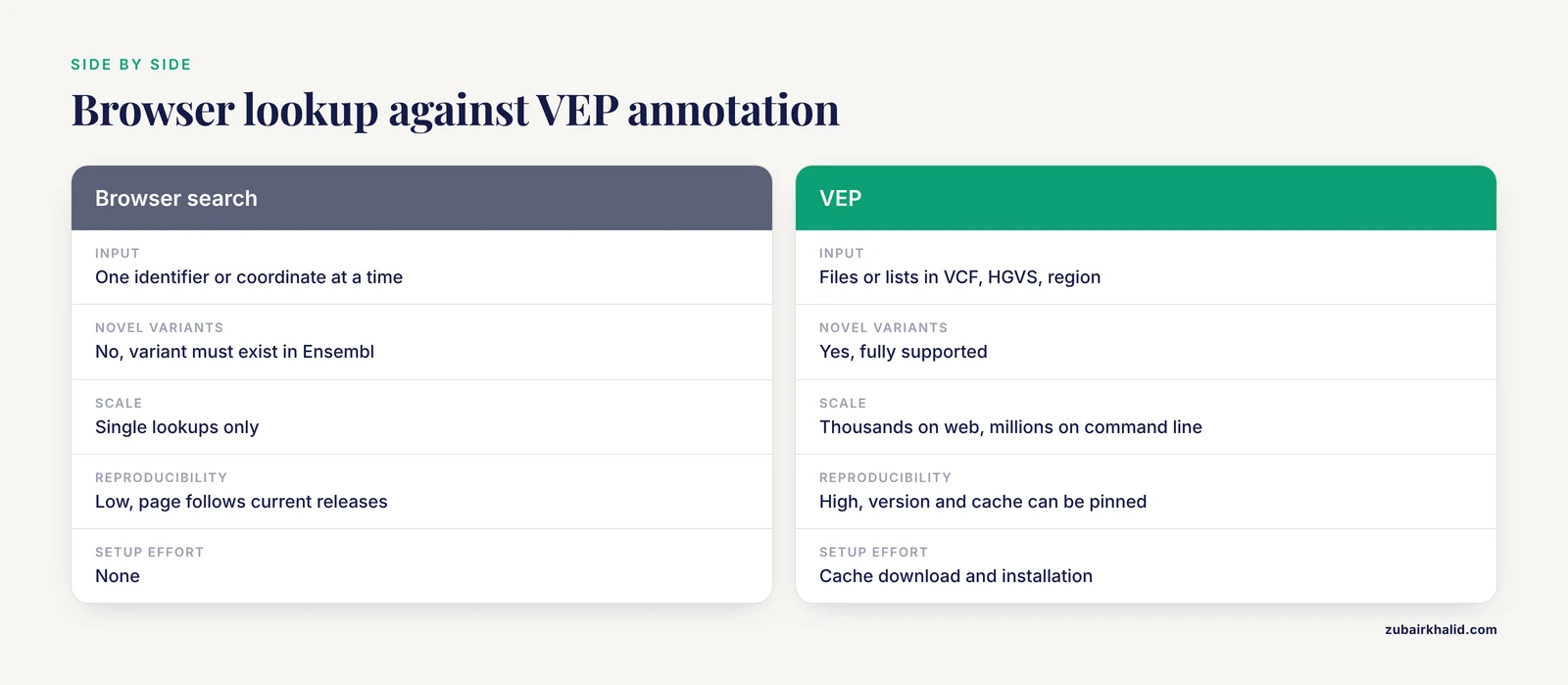
The table below is the core of the ensembl variant search vs VEP decision. It assumes the standalone or web VEP for the VEP column, with notes where the web and command-line modes differ.
| Criterion | Ensembl Variant Search (browser lookup) | VEP (web form, command line, REST) |
|---|---|---|
| What it does | Retrieves precomputed annotation for stored variants | Computes fresh annotation for any variant you supply |
| Input | One identifier or coordinate at a time | Files or lists in VCF, Ensembl, HGVS, region, or ID formats |
| Novel variants | No, variant must exist in the Ensembl variation database | Yes, fully supported, this is VEP's central purpose |
| Scale | Single lookups | Thousands via web form, millions via command line |
| Interface | Point and click | Point and click, Perl command line, REST API, container |
| Species | Any species on the Ensembl sites | Any species with a cache, or any species with a GFF or GTF plus genome FASTA |
| Assembly control | Whatever the site currently serves, with archive access to older assemblies | Explicit assembly choice, including GRCh38, GRCh37, and custom genomes |
| Custom genomes | Not supported | Supported through gff and gtf options with a FASTA |
| Plugins | None | Large documented plugin library |
| Custom annotation overlay | No | Yes, via bgzipped tabix VCF |
| Output | Web page, manual export | Tab, VCF, JSON, machine-readable by design |
| Reproducibility | Low, page content follows current releases | High, version and cache release can be pinned |
| Setup effort | None | Cache download and installation for command-line use |
| Best for | Quick background on a known variant | Annotating your own data, pipelines, bulk work |
Read the table by column and by row. Reading down the Variant Search column describes a reference library. Reading down the VEP column describes an annotation service. Choosing a row tells you which property decides your case. If the deciding row is "novel variants" or "scale," the answer is VEP. If the deciding row is "setup effort" or "best for quick background," the answer is the browser search.
How the Two Tools Relate Under the Hood
The relationship matters for interpreting results. Ensembl's variant pages display consequences calculated with the VEP logic described in the Genome Biology publication, running against the Ensembl release's transcript set and the assembly the site is currently serving. When you run VEP yourself with the same release cache and the same assembly, you should get the same consequence terms for the same variant, and small differences usually trace to one of three causes: a release mismatch, an assembly mismatch, or different options switched on.
This agreement is a feature. It means the browser can serve as a sanity check for your VEP setup. Pick a handful of well-known variants from your VEP output, look them up in the browser, and confirm the consequences and protein changes match. If they do not, look for the release, assembly, or strand explanations in the mistakes section below.
The relationship also flows the other way. The check_existing option in VEP links your variants to the same stored identifiers the browser displays, and the ClinVar-related plugins and custom tracks bring browser-visible clinical data into your command-line output. In practice, mature workflows use both: VEP for the bulk computation, the browser for spot-checking and for human-readable follow-up on the interesting variants.
How to Use Ensembl: A Practical Walkthrough
This section is the hands-on part. It covers the browser lookup path first, then the web VEP, then the command-line VEP, so a newcomer can follow the full path from a variant ID to a reproducible annotation run.
Looking up a known variant in the browser
- Go to the Ensembl website for your species of interest. For human work, use the main Ensembl site, which currently serves GRCh38, or the GRCh37 archive if you need the older assembly.
- Type the rsID into the search box and press enter. For the sickle cell variant, rs334 takes you directly to the variant page. If a term is ambiguous, choose the genetic variation category from the search dropdown.
- Read the variant page from the top down. Confirm the location and alleles match your expectations and the assembly is the one your other data uses.
- Check the consequence table. Note which transcripts are affected, the consequence terms, and the protein change. The canonical transcript row is usually the one to quote.
- Review allele frequencies by population if the page lists them. A variant can be common in one ancestry and rare in another, and the breakdown matters for interpretation.
- Follow the clinical and phenotype links where they exist, and use the export options on the page if you need the underlying records.
The same flow works for species other than human. Searching a dog variant takes you to the canine genome context, on the dog reference assembly, with canine transcript consequences. Ensembl covers a broad set of vertebrates and, through the Ensembl Genomes sites, plants, fungi, protists, and bacteria.
Using the web VEP
- Open the VEP tool from the Ensembl Tools menu.
- Paste variants or upload a file. Accepted formats include VCF, the Ensembl default format (chromosome, start, end, allele pair, strand), and region or HGVS strings. A VCF file from a variant caller works directly.
- Choose the species and assembly. For human, GRCh38 is the default, and the assembly choice must match the coordinates in your file.
- Select annotation options. Common choices are HGVS notation, gene symbol, canonical transcript, protein predictions, and checking against existing variants.
- Submit and wait for the email or results page, then download the output in your preferred format.
The web form is a fine way to learn the option space, because each checkbox maps to a command-line option you will later use in scripts.
Installing and running command-line VEP
The fastest installation path for most users is Conda:
conda install -c conda-forge -c bioconda ensembl-vepAlternatively, clone the official repository and run the bundled installer, which can install Perl prerequisites and download the cache in one step:
git clone https://github.com/Ensembl/ensembl-vep.git
cd ensembl-vep
perl INSTALL.pl
During the installer prompts, choose the species and assembly you need. The human cache is large, so budget disk space and download time accordingly, and note that a merged cache covering both Ensembl and RefSeq transcript sets is available for species where RefSeq models matter to you.
A first test run after installation should use a tiny input file with one or two variants in VCF format, so you can verify the setup in seconds before pointing VEP at a real dataset. Then scale up with the fork option for parallel processing, and use the stats option to generate a summary report of consequence distributions, which is a quick quality check on your input data.
Querying VEP through the REST API
For programmatic use, the Ensembl REST documentation documents the VEP endpoints. A representative pattern posts a list of variants and receives JSON:
curl -H "Content-Type: application/json" \
     -H "Accept: application/json" \
     -X POST \
     -d '{"variants": ["9 22125503 C T", "9 22125504 C A"]}' \
     https://rest.ensembl.org/vep/human/region
The response contains per-transcript consequence objects with the same fields the command line produces. Use this mode for interactive applications and small on-demand batches. For large files, the command line with a local cache is faster, avoids network rate limits, and keeps the job reproducible.
Choosing Between the Tools: The Criteria That Decide Real Cases
With both tools understood, the decision usually comes down to five criteria.
Input you hold. An rsID in your notes points to variant search. A VCF from a sequencer points to VEP. If you hold a coordinate with alleles but no database identifier, VEP accepts region format input directly, which the browser search cannot annotate for novel variants.
Novelty. If the variant might not be in any public database, VEP is the only option of the two. Reciprocal transplants aside, the browser cannot annotate what it does not store.
Scale. One variant, browser. Ten variants, web VEP. Ten million variants, command-line VEP with cache and forking. There is no scale at which the browser lookup is the right bulk tool.
Reproducibility. Any result you intend to publish, share, or recompute later needs pinned software and annotation versions. VEP command line with a pinned release and cache version gives you that. A browser page is a moving target across Ensembl releases, which is appropriate for browsing and inappropriate for a methods section.
Species and assembly. Human on the current assembly favors both tools equally. Non-human species work in both, since VEP ships caches for many Ensembl species, but a custom or de novo genome assembly is VEP-only territory through the gff and gtf options. Older human assemblies such as GRCh37 remain available for VEP through dedicated caches and for the browser through the archive site.
A useful heuristic that captures most cases: the browser answers "what does Ensembl know about this variant," and VEP answers "what do these variants do to the genome." Match your question to the phrasing and the tool choice follows.
Worked Scenarios
Scenario 1. A variant ID from a paper. You are reading a study that reports a missense variant as rs1234567 and want context before citing it. Search the rsID in the Ensembl browser, read the consequence, population frequencies, and clinical links on the variant page, and you are done in minutes. VEP would give you the same terms but add setup time for no gain.
Scenario 2. A whole-exome VCF from a sequencing run. You have called variants from thirty exomes and need consequences, gene symbols, and frequency columns for filtering. Command-line VEP with the human cache is the correct choice. Run with the tab output, check_existing, af, hgvs, and the fork option, then filter the output on IMPACT and the frequency columns. The browser cannot participate at this scale.
Scenario 3. A candidate variant in a dog or livestock genome. You have a handful of candidate variants from a canine whole-genome study and want transcript consequences. Two paths work. Search each variant's coordinates in the Ensembl browser on the dog assembly to see stored annotations, or run web VEP with the dog species selection for your own novel calls. If the variants are novel, VEP is the only path of the two.
Scenario 4. A de novo genome assembly. Your team assembled a breed or line not represented in reference databases and called variants against that assembly. Browser search is irrelevant, since there is no Ensembl accession for your assembly. Run VEP with a GFF or GTF annotation file you have mapped to the assembly, plus the assembly FASTA, and VEP will compute consequences against your transcript models.
Scenario 5. A clinical or diagnostic setting. A laboratory needs per-variant HGVSp strings, transcript identifiers, and a stable record of the exact software and annotation versions used, because reports must be reproducible. Command-line VEP with a pinned cache release, the hgvs option, and a saved log of the version output fits the requirement. The browser page can support interpretation afterward but cannot anchor the record.
Scenario 6. A web application that annotates user-submitted variants. You are building a small tool where users paste a variant and get consequences. The REST VEP endpoint is the fit, with attention to rate limits and a fallback message when the service is busy. For heavy traffic, hosting the command-line VEP behind your own service removes the dependency on the public endpoint.
Common Mistakes and Limitations
Assuming the variant page is complete. The browser shows variants from imported sources. Variants absent from those sources have no page, and their absence tells you nothing about their biology. Novel is not benign and novel is not pathogenic.
Mixing assemblies. GRCh37 and GRCh38 coordinates are not interchangeable, and T2T coordinates are a third system. Annotating a GRCh37 VCF against a GRCh38 cache produces silent nonsense, because VEP will happily compute consequences at the wrong loci. Check the assembly of your input file against the assembly of your cache or web selection every time you switch datasets.
Unpinned versions in methods sections. "We used VEP" is not reproducible. Record the VEP version, the cache release, the assembly, and the option string. Because Ensembl updates releases on a regular cycle, the same command run a year later can yield different transcript sets and slightly different consequences.
Trusting the pick output blindly. The pick option collapses results to one representative transcript per variant, which is convenient for filtering but can hide a consequence on a noncanonical transcript that matters for your question. Keep the full per-transcript output alongside the picked view until you know what you are discarding.
Equating IMPACT with pathogenicity. IMPACT is a computational severity label for the molecular consequence. A HIGH-impact variant can be benign and common, and a MODIFIER variant can be disease-causing through a regulatory mechanism. Clinical interpretation requires frequency evidence, disease knowledge, and formal criteria, which are separate from VEP's output.
Using frequencies without checking the population. Aggregate allele frequencies can bury a variant that is common in one ancestry group. Read the population breakdowns, whether on the variant page or in the frequency columns VEP writes.
Skipping check_existing. Without it, your VEP output drops the rsIDs that connect your calls to public databases, which makes cross-referencing with papers and clinical resources needlessly hard.
Sending large jobs through the web form. The web form has size limits and queue waits. Past a few thousand variants, switch to the command line, which is faster, parallelizable, and scriptable.
Forgetting the FASTA in offline mode. The hgvs option and some checks need the reference genome sequence. If the output lacks HGVS strings after an offline run, the missing FASTA is the usual cause.
Strand and orientation errors in hand-built inputs. When you type variants manually rather than exporting from a caller, the reference allele must match the forward strand of the reference assembly. A reverse-complemented allele will either fail to match the reference or silently change the interpretation. Spot-check a few variants against the browser before trusting a hand-built input file.
Treating browser and VEP differences as bugs. When a spot check against the browser disagrees with your VEP run, the usual causes are release mismatch, assembly mismatch, or differing options, not an error in either tool. Diagnose those three first.
One limitation that applies to everything here. Consequence annotation is a computational step, not a diagnosis. Individual variant interpretation, in human or veterinary contexts, needs the relevant domain expertise and should be handled case by case by a qualified professional.
Frequently Asked Questions
What is the difference between Ensembl Variant Search and VEP?
Variant Search retrieves precomputed annotation for variants already stored in Ensembl's database, while VEP computes functional consequences for any variant list you provide, including novel variants. The browser answers questions about known variants, VEP annotates your own data at scale.
Can VEP annotate variants that are not in Ensembl?
Yes, and that is VEP's central purpose. It intersects your input against transcript models and computes consequences fresh, so variants absent from dbSNP and other imported sources are annotated the same way as known ones.
When should I use Ensembl Variant Search instead of VEP?
Use it when you have a single variant identifier and want quick curated background, such as consequence, allele frequencies, and clinical links, with zero setup. Use VEP the moment you have a file of your own variants or need scriptable, reproducible output.
Does VEP work for species other than human?
Yes. VEP runs against caches for many Ensembl species, including dog and other vertebrates, and for any species with a GFF or GTF annotation file plus a genome FASTA it can annotate against custom assemblies as well.
Is the Ensembl web VEP the same as running VEP on the command line?
The same consequence logic runs in both, but the command line offers larger inputs, more options, plugins, local caching, and pinned versions, while the web form offers convenience for smaller jobs. Production work should use the command line.
How do I get ClinVar information in my VEP output?
Use the ClinVar plugin or supply a ClinVar VCF through the custom option, which appends the clinical records to your output. On the browser side, variant pages show ClinVar submissions directly where they exist.