Ensembl Gene and Transcript Pages: A Quick Reference Card
By Dr. Zubair Khalid, DVM, MS, PhD ·
What You Will Be Able to Do
By the end of this guide, you will know how to find a gene on Ensembl, read every section of its gene page, drill down into individual transcripts, export sequences and annotations in standard formats, and query the same data programmatically through the REST API and BioMart. You will also know which genome build you are looking at, how to switch between builds, and how to avoid the most common errors that cost researchers hours.
You need a web browser for the interactive walkthrough. For the API section, you need curl (preinstalled on macOS and most Linux distributions) or Python 3 with the requests library. No local Ensembl installation is required. Every example uses the human gene BRCA2 (Ensembl ID ENSG00000139618) so you can follow along on the live site.
This walkthrough serves as a practical Ensembl genome browser tutorial focused on the gene and transcript pages, the two views researchers use most often.
Quick Reference at a Glance
This table maps the most common tasks to the page section and action required. Bookmark this page and return to it whenever you need to look up a specific step.
| Task | Where to Look | What to Do |
|---|---|---|
| Find a gene by symbol | Search bar | Type the symbol (e.g., BRCA2) and press Enter |
| Find a gene by ID | Search bar | Paste the Ensembl ID (e.g., ENSG00000139618) |
| See all transcript models | Gene page, Transcripts section | Scroll to the transcripts table |
| Get coding sequence | Transcript page, Sequence section | Select CDS, click download FASTA |
| Get protein sequence | Transcript page, Sequence section | Select Peptide, click download FASTA |
| Check if a transcript encodes protein | Gene page, Transcripts table | Read the biotype column |
| Find orthologues in other species | Gene page, Comparative Genomics | Click the section in the left menu |
| Find disease associations | Gene page, Phenotype | Click the section in the left menu |
| Convert to UniProt or RefSeq ID | Gene page, External References | Click the database link |
| Export many genes at once | BioMart (separate tool) | Set filters, choose attributes, export |
| Query data programmatically | REST API | Use curl or Python with JSON endpoints |
| Check the genome build | Gene page, Genomic Context | Read the assembly name (e.g., GRCh38) |
| Access an older genome build | Archive site | Navigate to grch37.ensembl.org |
| Check transcript confidence | Gene page, Transcripts table | Read the support level (TSL) column |
| Customize displayed data | Configure this page link | Toggle sections on or off |
What Ensembl Is
Ensembl is a genome browser and annotation database maintained by EMBL-EBI (the European Bioinformatics Institute) in partnership with the Wellcome Sanger Institute. It provides reference gene models, transcript annotations, variant data, comparative genomics, and regulatory information for vertebrate species. The companion site Ensembl Genomes extends coverage to plants, fungi, protists, bacteria, and non-vertebrate metazoa.
Ensembl operates on a rolling release cycle, publishing a new version roughly every two to three months. Each release updates genome annotations, adds new species, and refines gene models based on new evidence. The current release number appears in the site header on every page.
The gene and transcript pages are the primary interface most researchers use. They aggregate annotation from multiple sources into a single view per gene, cross-referenced to external databases such as UniProt, RefSeq, HGNC, and OMIM. For researchers who need to compile sets of genes across multiple studies or identifier systems, tools such as The Gene Set Builder have been designed to work with Ensembl gene catalogs, reducing the manual effort of collecting identifiers one gene at a time [1].
When The Gene Set Builder was published in 2005, it supported 17 eukaryotic genomes from Ensembl version 32, spanning species from yeast to human [1]. Ensembl has since expanded to annotate hundreds of species, but the core workflow of using Ensembl pages to identify, annotate, and export gene information remains the same.
How to Use Ensembl: A Numbered Walkthrough
This section walks through the complete workflow from landing on the site to exporting a sequence. Follow along in your browser with BRCA2 as the example gene.
Step 1: Open the Site and Select a Species
Navigate to https://www.ensembl.org. The landing page presents a search bar and a grid of popular species. Click "Homo sapiens" or select it from the species dropdown next to the search bar. The species choice determines which genome assembly and annotation set your searches query.
Step 2: Search for a Gene
Type BRCA2 into the main search bar and press Enter. Ensembl returns a results page listing matches across species, with the human BRCA2 entry at or near the top. Click the entry labeled "BRCA2 (Human Gene)".
If you already know the Ensembl gene ID, paste ENSG00000139618 directly into the search bar. Ensembl recognizes stable IDs and jumps straight to the gene page without intermediate results.
You can also reach a gene page directly by constructing the URL:
https://www.ensembl.org/Homo_sapiens/Gene/Summary?g=ENSG00000139618Replace the species name and gene ID as needed. This URL pattern works for any species and gene in the database.
Step 3: Orient Yourself on the Gene Page
The gene page opens with a summary panel showing:
- Gene symbol: BRCA2
- Full name: BRCA2 DNA repair associated
- Ensembl gene ID: ENSG00000139618
- Biotype: protein_coding
- Source: ensembl_havana (merged automated and manual annotation)
- Location: chromosome 13
Above the summary, the breadcrumb trail reads: Homo sapiens > Gene: BRCA2. Clicking "Homo sapiens" returns you to the species home page. Clicking "Gene: BRCA2" reloads the gene page from its start.
Step 4: Explore the Genomic Context
Click the "Genomic Context" section in the left-hand menu or scroll down to it. This panel shows the gene rendered on its chromosome with neighboring genes, coding regions drawn as thick blocks, and untranslated regions and introns drawn as thinner elements. The coordinate ruler above the graphic shows positions in base pairs.
You can zoom in and out using the buttons above the view. Clicking any exon or transcript in the graphic opens a popup with more detail and a link to the full transcript page.
The assembly version (GRCh38 for current human releases) is stated in this section. Note it down. Coordinates are meaningless without knowing which assembly they refer to.
Step 5: Review the Transcripts Table
Scroll to the "Transcripts" section or click it in the left menu. This table lists every transcript model for the gene. Each row shows:
- Transcript ID (for example, ENST00000380152)
- Biotype (protein_coding, retained_intron, nonsense_mediated_decay, etc.)
- Genomic coordinates (chromosome, start, end, strand)
- cDNA length in base pairs
- Exon count
- Protein length in amino acids (for protein-coding transcripts)
- Support level (TSL1 through TSL5)
- A flag marking the canonical transcript
The canonical transcript is the model Ensembl considers most representative of the gene. For BRCA2, ENST00000380152 is flagged as canonical. Click any transcript ID to open its dedicated transcript page.
Step 6: Open a Transcript Page
Click ENST00000380152 in the transcripts table. The transcript page opens with its own summary panel showing the transcript ID, parent gene, biotype, genomic location, exon count, and cDNA length. For protein-coding transcripts, the panel also shows the protein ID (beginning with ENSP) and protein length.
Step 7: View and Export the Sequence
On the transcript page, click "Sequence" in the left-hand menu. The sequence view displays the transcript sequence with exons, coding regions, and untranslated regions color-coded. At the top of the view, download links let you export:
- cDNA sequence (spliced transcript, introns removed)
- CDS sequence (coding sequence only, from start codon to stop codon)
- 5' UTR and 3' UTR sequences
- Peptide sequence (translated protein)
- Genomic sequence (unspliced, including introns)
Click "Download sequence" or "FASTA" next to your chosen sequence type. The file downloads to your computer.
Step 8: Explore Cross-References
Return to the gene page by clicking the gene ID in the breadcrumb. Click "External References" in the left menu. This section lists links to:
- HGNC (HUGO Gene Nomenclature Committee): the official gene symbol and name
- UniProt: curated protein sequence and functional information
- RefSeq: NCBI's independently curated transcript models
- OMIM: Online Mendelian Inheritance in Man, for disease associations
- PubMed: links to key publications
- Gene Ontology: functional annotations
- WikiGene and other resources
Each link opens the corresponding entry in the external database. These cross-references are how you convert an Ensembl ID to other identifier systems without a separate mapping tool.
Step 9: Configure the View
At the top of the gene page, click "Configure this page" to customize which sections appear and how data is displayed. You can toggle variation tracks, regulatory features, comparative genomics panels, and sequence display options. Changes apply immediately and persist for your session. This feature is useful when you want a cleaner view focused on specific data types.
The Gene Page: Section by Section
The gene page is organized into sections accessible from the left-hand menu. Each section answers a different question about the gene. This part of the Ensembl gene and transcript pages reference covers what each section contains and when to use it.
Summary
The summary shows the gene symbol, full name, Ensembl stable ID, biotype, source, and genomic location. The biotype field classifies the gene as protein_coding, lncRNA (long non-coding RNA), pseudogene, miRNA (microRNA), snoRNA (small nucleolar RNA), or one of several other categories. The source field indicates whether the annotation comes from the Ensembl automated pipeline, from the Havana manual annotation project, or from a merged model combining both.
Genomic Context
This section displays the gene's position on its chromosome, flanking genes, and the coordinate range. The assembly version (GRCh38 for current human releases) is stated here. Knowing the assembly is essential because coordinates change between builds. A gene at position 32,315,478 on GRCh38 chromosome 13 may sit at a different coordinate on GRCh37.
Transcripts
The transcripts table lists every transcript model for the gene. Columns include the transcript stable ID, biotype, genomic position, cDNA length, exon count, protein length (where applicable), and support level. The canonical transcript is flagged with a label.
The transcript support level (TSL) is a five-tier score reflecting the strength of evidence for the transcript model. TSL1 is highest confidence, indicating support from full-length transcript evidence. TSL5 is lowest confidence. Transcripts marked "NA" lack a calculated score. Checking TSL before designing experiments against a specific transcript prevents wasted effort on poorly supported models.
Sequence
This section provides the genomic sequence of the gene locus with exons highlighted. You can toggle display of untranslated regions, coding sequence, and variations overlaid on the sequence. Export links at the top provide FASTA downloads for genomic, cDNA, CDS, and peptide sequences. The variety of output formats available from Ensembl pages, including FASTA and annotation formats, has been a key feature enabling downstream analysis tools to work with Ensembl data [1].
External References
This section cross-references the gene to external databases. Each entry shows the external database name, the identifier in that database, and a link. Databases include:
- HGNC: the official gene symbol and HGNC ID
- UniProtKB/Swiss-Prot: curated protein entries with functional annotations
- RefSeq: NCBI transcript and protein models (NM_, NP_ prefixes)
- OMIM: disease-gene relationships
- PubMed: key publications
- GO: Gene Ontology terms
- InterPro: protein domain predictions
- PDB: protein structures where available
Converting between identifier systems is one of the most frequent tasks in genomics workflows. The External References section on the gene page handles this for individual genes without requiring a separate ID conversion tool. For bulk conversion across many genes, BioMart (covered below) or the REST API /xrefs endpoint is more efficient. This addresses a workflow bottleneck that tools like The Gene Set Builder were designed to solve, where researchers compiling gene sets had to repeatedly convert between identifier types [1].
Gene Ontology
This section lists Gene Ontology (GO) terms assigned to the gene, organized by the three GO categories: molecular function (what the gene product does at the molecular level), biological process (the cellular program it participates in), and cellular component (where in the cell it localizes). Each term links to the GO consortium website for its definition, parent terms, and evidence codes.
Phenotype
This section lists diseases and traits associated with the gene, sourced from OMIM, GWAS Catalog, and model organism databases. Each entry shows the phenotype name, the source database, and links to specific variants where applicable. For BRCA2, this section lists breast cancer, ovarian cancer, and Fanconi anemia among associated conditions.
Variation
This section tabulates known genetic variants within the gene from the Ensembl Variation database. Columns show variant IDs (rs numbers from dbSNP), genomic location, reference and alternate alleles, and clinical significance where available from sources such as ClinVar. You can filter by variant class (SNV, insertion, deletion, structural variant) and by clinical significance.
Comparative Genomics
This section shows orthologues (genes in other species descended from a common ancestor) and paralogues (genes duplicated within the same genome). Each entry links to the corresponding gene page in the other species, with percent identity scores where calculated. For multi-gene comparative analyses, this section provides the starting point for identifying corresponding genes across species. Tools that analyze sets of genes for sequential, functional, and expressional relationships often begin with orthologue identification from Ensembl comparative data [1].
Regulation
For species with regulatory data (primarily human and mouse), this section shows transcription factor binding sites, enhancers, promoters, and open chromatin regions overlapping the gene. Data comes from projects such as ENCODE and FANTOM, integrated by Ensembl's regulatory build. Each regulatory feature links to a detail page with cell type specificity, evidence, and associated transcription factors.
The Transcript Page: Section by Section
Clicking any transcript ID in the gene page opens the transcript page. This page focuses on a single RNA model and its protein product (if any).
Transcript Summary
The top panel shows the transcript ID, the parent gene, the biotype, the genomic location with strand, the number of exons, and the cDNA length. For protein-coding transcripts, the panel also shows the protein ID (ENSP prefix), protein length in amino acids, and a link to the UniProt entry.
Exon Structure
A graphical view renders the exon-intron structure. Exons are drawn as blocks, with coding portions filled and untranslated portions outlined. Introns appear as connecting lines. The strand (forward or reverse) is indicated. Clicking any exon opens a popup with its genomic coordinates, phase (for coding exons), and sequence.
The exon phase indicates where the exon falls within a codon. Phase 0 means the exon starts at a codon boundary. Phase 1 means one base of a codon precedes the exon. Phase 2 means two bases of a codon precede the exon. Phase matters when predicting the effect of exon skipping or frame-shifting events.
Translation
For protein-coding transcripts, this section shows the open reading frame: start codon, stop codon, and the amino acid sequence. The translation table maps codons to amino acids. Links to UniProt and the Ensembl protein page are provided. The start and end coordinates of the coding sequence within the transcript are stated.
Sequence
The sequence section displays the transcript sequence with options to view or export:
- cDNA: the full spliced transcript sequence (all exons joined, introns removed)
- CDS: the coding sequence only (from start codon to stop codon, excluding UTRs)
- 5' UTR: the untranslated region upstream of the start codon
- 3' UTR: the untranslated region downstream of the stop codon
- Peptide: the translated protein sequence in single-letter amino acid code
- Genomic: the unspliced genomic sequence of the transcript locus including introns
Each is available as FASTA for download. The FASTA header encodes the transcript ID, sequence type, assembly, chromosome, start coordinate, end coordinate, and strand.
Support Level
The transcript support level (TSL) is repeated on the transcript page for easy reference. TSL is calculated by Ensembl based on the amount and quality of transcript evidence (full-length cDNAs, ESTs, protein alignments) supporting the model. The scale runs from TSL1 (highest confidence) to TSL5 (lowest confidence). Models with insufficient evidence for scoring are marked NA.
Transcript History
This section shows how the transcript model has changed across Ensembl releases. Each row lists a release number, the date, and a summary of what changed. If a published primer set or construct was designed against an earlier version of a transcript, check this section to see whether the model has since been modified.
Exporting Data and Building Gene Sets
Single Sequence Export
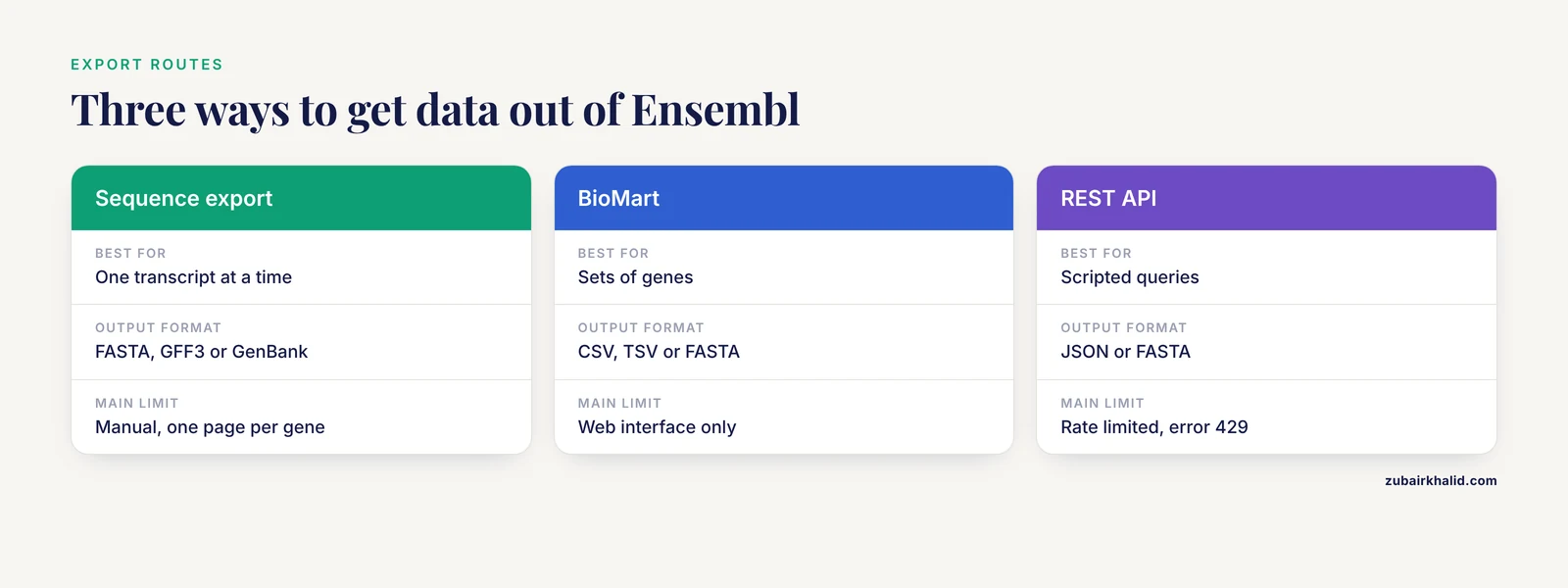
From any gene or transcript page, navigate to the Sequence section. At the top of the sequence view, click the format links. Available formats include FASTA (for sequences), GFF3 (for annotation features), and GenBank (for annotated flat files).
For a single transcript, the FASTA output looks like this:
>ENST00000380152 cds chromosome:GRCh38:13:32315478:32399672:1
ATGCCTATT...
The header line encodes:
- Transcript ID: ENST00000380152
- Sequence type: cds
- Assembly: GRCh38
- Chromosome: 13
- Start coordinate: 32315478
- End coordinate: 32399672
- Strand: 1 (forward)
This structured header means you can parse the file programmatically to extract coordinates without a separate lookup.
Bulk Export with BioMart
For sets of genes, BioMart is the tool of choice. It queries the Ensembl database through a web interface and returns tabular results. Navigate to https://www.ensembl.org/biomart.
Then follow these steps:
- Choose "Ensembl Genes" as the database from the left panel.
- Choose the species dataset (for example, "Homo sapiens genes").
- Click "Filters" in the left panel. Expand "GENE" and set filters such as chromosome, gene type, or paste a list of gene IDs.
- Click "Attributes" in the left panel. Choose which columns to return: gene stable ID, transcript stable ID, gene name, biotype, chromosome, start, end, strand, sequence, external references, and more.
- Click "Results" in the top bar. Preview the first 10 rows to verify your filters and attributes are correct.
- Export all rows as CSV (comma-separated values), TSV (tab-separated values), or FASTA sequence.
BioMart handles the identifier conversion and coordinate extraction that would otherwise require manual lookup on each gene page. This addresses a long-standing bottleneck in genomics workflows, where researchers compiling gene sets historically had to find identifiers for each gene individually and convert between identifier types repeatedly [1]. The Gene Set Builder, for example, was designed specifically to reduce this tedium by leveraging Ensembl gene catalogs to compile, store, and export gene sets in a variety of output formats [1].
REST API for Programmatic Access
The Ensembl REST API provides the same data as the web pages in JSON format over HTTP. Base URL: https://rest.ensembl.org
Key endpoints for gene and transcript data:
| Endpoint | What It Returns | Example Call |
|---|---|---|
| /lookup/id/{id} | Gene or transcript metadata | /lookup/id/ENSG00000139618 |
| /lookup/id/{id}?expand=1 | Metadata plus transcript list | /lookup/id/ENSG00000139618?expand=1 |
| /sequence/id/{id} | Genomic sequence in FASTA | /sequence/id/ENSG00000139618 |
| /sequence/id/{id}?type=cds | CDS sequence | /sequence/id/ENST00000380152?type=cds |
| /sequence/id/{id}?type=protein | Protein sequence | /sequence/id/ENST00000380152?type=protein |
| /sequence/id/{id}?type=cdna | cDNA sequence | /sequence/id/ENST00000380152?type=cdna |
| /xrefs/id/{id} | External database cross-references | /xrefs/id/ENSG00000139618 |
Example curl command to fetch gene metadata with expanded transcripts:
curl -H "Content-Type:application/json" "https://rest.ensembl.org/lookup/id/ENSG00000139618?expand=1"Expected output (abbreviated):
{
  "id": "ENSG00000139618",
  "biotype": "protein_coding",
  "start": 32315478,
  "end": 32399672,
  "strand": 1,
  "assembly_name": "GRCh38",
  "seq_region_name": "13",
  "display_name": "BRCA2",
  "Transcript": [
    {
      "id": "ENST00000380152",
      "biotype": "protein_coding",
      "is_canonical": 1
    },
    {
      "id": "ENST00000544455",
      "biotype": "retained_intron",
      "is_canonical": 0
    }
  ]
}
Example curl command to fetch the CDS of the canonical transcript:
curl -H "Content-Type:text/plain" "https://rest.ensembl.org/sequence/id/ENST00000380152?type=cds"Expected output (FASTA format, abbreviated):
>ENST00000380152 cds chromosome:GRCh38:13:32315478:32399672:1
ATGCCTATT...
Example curl command to fetch external cross-references:
curl -H "Content-Type:application/json" "https://rest.ensembl.org/xrefs/id/ENSG00000139618"Expected output (abbreviated):
[
  {
    "primary_id": "HGNC:1101",
    "display_id": "BRCA2",
    "dbname": "HGNC"
  },
  {
    "primary_id": "P51587",
    "display_id": "BRCA2_HUMAN",
    "dbname": "UniProtKB/Swiss-Prot"
  },
  {
    "primary_id": "NM_000059",
    "display_id": "NM_000059.4",
    "dbname": "RefSeq_mRNA"
  }
]
Python equivalent using the requests library:
import requests
import json

server = "https://rest.ensembl.org"
ext = "/lookup/id/ENSG00000139618?expand=1"

r = requests.get(server + ext, headers={"Content-Type": "application/json"})

if not r.ok:
    r.raise_for_status()

data = r.json()
print(json.dumps(data, indent=2))
The API enforces rate limits (a maximum number of requests per second per client). Exceeding the limit returns HTTP error 429 (Too Many Requests). For bulk queries, add a small delay between requests or use the BioMart interface instead. For very large datasets, download the full annotation files via FTP from ftp.ensembl.org.
Verifying Your Results
After exporting a sequence or annotation, verify it is what you intended.
Check the FASTA Header
The FASTA header line contains the sequence type, assembly, chromosome, coordinates, and strand. Confirm each field matches your expectation. A common error is exporting the genomic sequence when you wanted the CDS, or vice versa. The header tells you immediately which type you have.
Check the Sequence Length
Compare the reported length (number of bases or amino acids) against the expected length from the transcripts table. For BRCA2, the canonical protein is approximately 3,418 amino acids. If your exported peptide is a very different length, you likely exported the wrong transcript or the wrong sequence type.
Check the Strand
For genes on the reverse strand, the genomic sequence export reads in the forward chromosome orientation (left to right along the plus strand). The cDNA, CDS, and peptide exports are already in the correct 5' to 3' orientation of the transcript. If you extracted genomic sequence manually and expected it to read along the gene, reverse complement it.
Cross-Check with a Second Source
For critical applications, verify the sequence against a second database. UniProt provides independently curated protein sequences. RefSeq provides independently curated transcript models. If the Ensembl and UniProt protein sequences match, you have high confidence in the data.
Working with Genome Builds
Ensembl currently annotates the human genome on GRCh38 (Genome Reference Consortium Human Build 38). This is the default assembly for all current Ensembl releases. Older publications and datasets may reference GRCh37 (also called hg19 in UCSC conventions).
Coordinates are not interchangeable between builds. A variant at position 32,315,478 on GRCh38 chromosome 13 may sit at a different position on GRCh37. LiftOver tools (from UCSC) and Ensembl's assembly converter can convert coordinates between builds, but conversions can fail in regions where the assemblies differ structurally.
To access GRCh37 data on Ensembl, use the archive site at http://grch37.ensembl.org. The interface is identical but serves the older assembly. Ensembl maintains archive sites for previous releases at http://apr2022.archive.ensembl.org (replace the date string with the release you need).
Always note the assembly version when reporting coordinates in publications or sharing data with collaborators. A coordinate without an assembly version is ambiguous and potentially misleading.
Common Mistakes and Limitations
Confusing Gene IDs and Transcript IDs
Ensembl gene IDs begin with ENSG. Transcript IDs begin with ENST. Protein IDs begin with ENSP. Exon IDs begin with ENSE. Pasting an ENST ID into a field expecting an ENSG ID produces no result or an error. Check the prefix before searching. This is the single most common identifier mix-up in genomics workflows.
Assuming All Transcripts Are Protein-Coding
A gene annotated as protein_coding may have multiple transcript models, some of which are retained introns, nonsense-mediated decay candidates, or non-coding. The biotype column in the transcripts table distinguishes them. Exporting the wrong transcript gives you a sequence that does not encode the expected protein. Always check the biotype of the specific transcript you are working with, not just the gene-level biotype.
Ignoring Strand Direction
Genes on the reverse strand are transcribed from the higher coordinate to the lower coordinate. The genomic sequence as stored is always reported in the forward orientation (5' to 3' along the plus strand). If you extract genomic sequence and expect it to read 5' to 3' along the gene, you may need to reverse complement it. The cDNA and CDS exports from the transcript page are already in the correct orientation.
Using Outdated Transcript Versions
Ensembl transcript IDs may carry version suffixes (for example, ENST00000380152.9). The version number increments when the model changes between releases. If a published primer set or construct was designed against version 3 of a transcript and the current release is version 9, the model may have changed. Check the transcript history on the transcript page under the "History" section.
Confusing Ensembl and RefSeq Models
Ensembl and RefSeq (maintained by NCBI) use independent annotation pipelines. A gene may have different transcript models, different exon boundaries, and different canonical transcripts in each database. Cross-references on the gene page link between them, but the models themselves are not identical. When reproducing a published experiment, check which database the authors used.
Not Checking the Release Version
Gene models change between Ensembl releases. A result that held in release 90 may not hold in release 110. The release number appears in the site header and on every page. Record it alongside your results for reproducibility.
Coordinate System Confusion
Ensembl uses 1-based, fully closed coordinates. The first base of a chromosome is position 1. This differs from the 0-based, half-open convention used by UCSC and some file formats (BAM, BED). Converting between systems without accounting for the offset introduces off-by-one errors. A variant reported at position 32,315,478 in Ensembl coordinates corresponds to position 32,315,477 in 0-based coordinates.
Rate Limits on the REST API
The REST API limits requests per second per client. Exceeding the limit returns HTTP error 429 (Too Many Requests). For bulk data retrieval, use BioMart or download the full dataset via FTP from ftp.ensembl.org. The API is designed for interactive queries, not for downloading entire genomes.
Manual Gene Set Compilation Is Error-Prone
Collecting gene identifiers one at a time from individual gene pages introduces transcription errors, inconsistent identifier versions, and incomplete sets. Tools designed for gene set compilation, such as The Gene Set Builder, were created specifically because this manual process is tedious and error-prone [1]. For any set larger than a handful of genes, use BioMart or the REST API instead of manual page-by-page lookup.
Frequently Asked Questions
What is the difference between an Ensembl gene ID and a transcript ID?
An Ensembl gene ID (prefix ENSG) identifies the genomic locus, while a transcript ID (prefix ENST) identifies one specific RNA model at that locus. A single gene typically has multiple transcripts with different exon combinations.
How do I get the coding sequence for a specific transcript?
Open the transcript page, click "Sequence" in the left menu, and select the CDS option for download as FASTA. Alternatively, use the REST API endpoint /sequence/id/{transcript_id}?type=cds.
What does the biotype field mean?
Biotype classifies the biological type of a gene or transcript, such as protein_coding, lncRNA, pseudogene, or miRNA. It tells you whether the model is expected to produce a protein product.
How current is the data on Ensembl?
Ensembl publishes a new release roughly every two to three months. The current release number appears in the site header. Gene models, variant annotations, and comparative data are updated in each release.
Can I use Ensembl data in my published research?
Yes. Ensembl data is released under an open license. Cite the Ensembl release number and the appropriate Ensembl publication in your methods section.
How do I convert Ensembl IDs to other identifier systems?
Use the External References section on the gene page for one gene at a time. For bulk conversion, use BioMart with the appropriate external reference attributes selected, or the REST API /xrefs/id/{id} endpoint.
What is the difference between Ensembl and Ensembl Genomes?
Ensembl covers vertebrate species at ensembl.org. Ensembl Genomes at ensemblgenomes.org covers plants, fungi, protists, bacteria, and non-vertebrate metazoa. The interfaces are similar but the species sets differ.
How do I download an entire gene set rather than one gene at a time?
Use BioMart to filter by your criteria and export all matching genes with their sequences or annotations. For complete genome annotation files, use FTP at ftp.ensembl.org to download GTF or GFF3 files for the entire genome.