How to Automate Ensembl Data Integration with Python
By Dr. Zubair Khalid, DVM, MS, PhD ·

By the end of this guide you will be able to write Python scripts that pull gene annotations, nucleotide and protein sequences, cross-references to UniProt and NCBI, and variant consequence predictions from Ensembl, store the results locally, verify them, and slot the whole workflow into a reproducible pipeline. You will also know which access route fits which job, where integrations usually break, and how published tools solve the same problems.
Before you start, have the following on hand:
- Python 3.9 or newer installed on Linux, macOS, or Windows
- The
requests,pandas, andrequests-cachepackages, pluspyensemblandbiopythonfor the later sections - A terminal and a working internet connection
- A project directory where you can save scripts and cached files
Install the core dependencies with one command:
python -m pip install requests requests-cache pandas pyensembl biopythonEverything in this guide works against the public Ensembl services. You do not need an account, a license key, or a local Ensembl install to follow along.
How to Use Ensembl Before You Automate It
Ensembl, maintained by EMBL-EBI, publishes genome assemblies, gene annotation, variation data, and comparative genomics for vertebrates and a long list of other species. Most automation work goes better if you spend fifteen minutes in the web interface first, because the browser shows you exactly which data types and identifier systems Ensembl uses for your organism of interest.
A short Ensembl genome browser workflow that pays off later:
- Open the Ensembl main site and type a gene symbol such as BRCA2 into the search box.
- Open the gene page. The URL contains the Ensembl stable ID, for example a gene ID beginning with
ENSGfor humans. This is the identifier your scripts will use. - On the gene page, check the assembly name in the header. For the current human release this is GRCh38. Any script you write must target the same assembly or your coordinates will not match other data sources.
- Open the transcript view and note the canonical transcript ID, which begins with
ENST. Transcript-level work such as variant annotation depends on this choice. - Use the Export data menu on any view to see which formats Ensembl offers, including FASTA, GTF-style tabular output, and BED. This tells you whether an API call is even necessary or whether a one-time file download covers the whole task.
The browser is a discovery tool, not a production data source. Screen scraping HTML pages is fragile and slow. Every data type visible in the browser is available through programmatic routes, which are the real subject of this guide.
The Four Routes Into Ensembl From Python
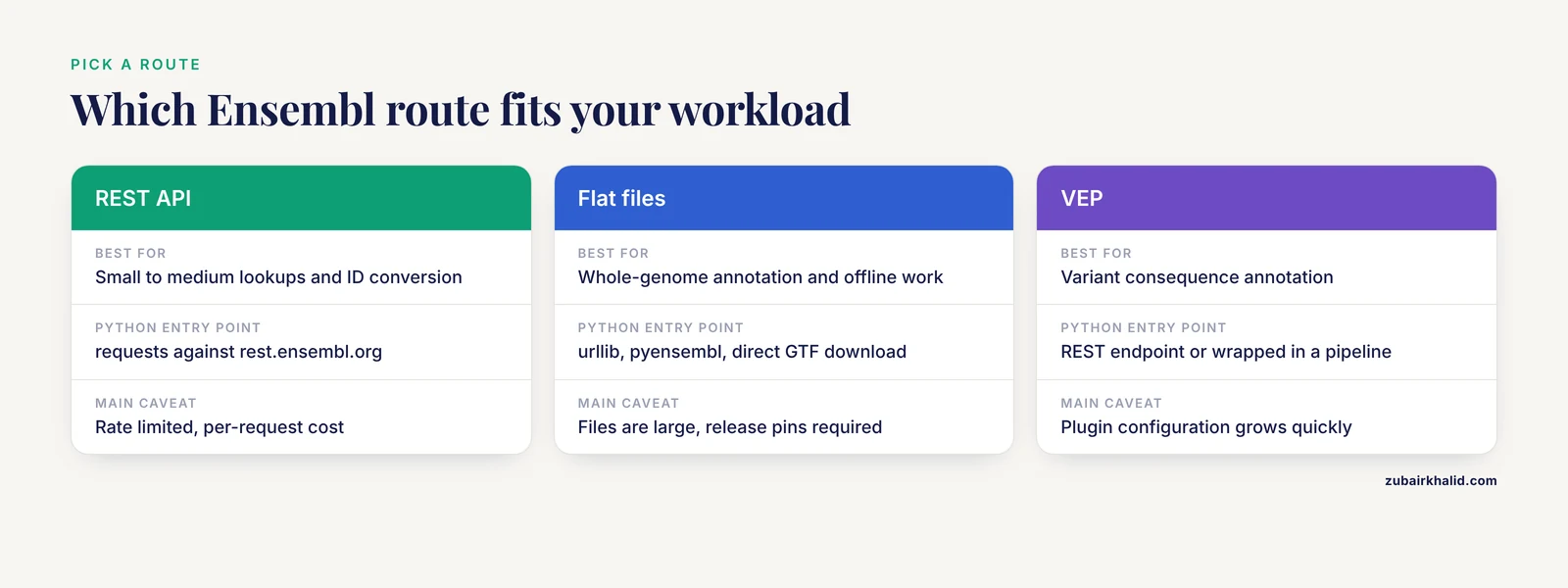
Ensembl exposes the same underlying data through four practical channels. Choosing the right one up front is the single biggest time saver in any Ensembl data integration with Python project.
| Route | Best for | Typical Python entry point | Main caveat |
|---|---|---|---|
| , - | , - | , - | , - |
| REST API | Small to medium lookups, variant annotation, ID conversion | requests against rest.ensembl.org | Rate limited, per-request cost |
| BioMart | Bulk tabular queries across genes, variants, orthologs | biomart Python client or the BioMart web query | Complex filters can time out on very large sets |
| Flat file downloads | Whole-genome annotation and sequence, offline work | urllib, pyensembl, or direct download of GTF and FASTA | Files are large, release pins required |
| Public MySQL servers | Complex relational queries against a fixed release | mysqlclient or pymysql | Host and port change by release, schema knowledge needed |
| VEP (REST or command line) | Variant consequence annotation | REST endpoint in requests, or wrapped in a pipeline | Plugin configuration grows quickly |
The published literature reflects this same split. pyGeno, a Python package for precision medicine and proteogenomics, integrates reference sequences and annotations from Ensembl with polymorphisms from dbSNP and next-generation sequencing data into a memory-efficient framework usable in both short scripts and genome-wide studies [1]. That project chose packaged local data rather than repeated web calls, and that choice is the right one once your workload exceeds a few thousand requests.
The rest of this guide follows a step-by-step order: build a small REST-based fetcher first, then layer in bulk files, cross-database joins, and finally pipeline-level automation.
Step 1: Install and Configure Your Environment
Create an isolated environment so that package versions stay pinned:
python -m venv ensembl_env
source ensembl_env/bin/activate
python -m pip install --upgrade pip
python -m pip install requests requests-cache pandas
On Windows, replace the source line with ensembll_env\Scripts\activate adapted to your shell, or simply run ensembll_env\Scripts\activate.bat from cmd. Verify the setup:
python -c "import requests, pandas; print(requests.__version__, pandas.__version__)"You should see two version numbers printed and no traceback.
Create a project layout that separates code, cached responses, and exported tables. A layout like this scales cleanly:
ensembl_project/
    scripts/
    cache/
    output/
From the beginning, treat the Ensembl release number as part of your data. Ensembl reannotates genomes between releases, so a gene's coordinates, transcript structure, and even its stable ID can shift. Record the release in every output file you produce. The sections below show how to read the release directly from the API.
Step 2: Your First Ensembl REST Call
The REST API is the fastest way to get interactive access. Every endpoint accepts and returns well-defined formats, and the core lookup endpoint converts a stable ID into a full annotation record.
Save this as scripts/lookup_gene.py:
import requests

SERVER = "https://rest.ensembl.org"
HEADERS = {"Content-Type": "application/json"}

def lookup_gene(stable_id):
    r = requests.get(
        f"{SERVER}/lookup/id/{stable_id}",
        headers=HEADERS,
        params={"expand": "0"},
    )
    r.raise_for_status()
    return r.json()

gene = lookup_gene("ENSG00000139618")
print(gene["display_name"])
print(gene["seq_region_name"], gene["start"], gene["end"])
print(gene["biotype"], gene["assembly_name"])
Run it:
python scripts/lookup_gene.pyExpected output looks like this for the human BRCA2 gene on GRCh38. Exact coordinates depend on the current Ensembl release, so small differences from your own run are normal:
BRCA2
13 32315368 32400068
protein_coding GRCh38
What each part means:
/lookup/id/{stable_id}resolves any Ensembl stable ID, including gene IDs starting withENSG, transcript IDs starting withENST, and protein IDs starting withENSP.Content-Type: application/jsontells the endpoint to return JSON. If you requesttext/x-fastaon sequence endpoints, you get FASTA text instead.expandcontrols how much nested structure comes back. Withexpand=1on a gene lookup, the response includes every transcript, and with higher values it includes translation and exon objects. Expand liberally during exploration, expand minimally in production because large responses cost time and rate budget.r.raise_for_status()converts HTTP errors into Python exceptions so a silent failure cannot poison a downstream analysis.
Two response fields deserve immediate attention. assembly_name tells you which genome build the coordinates refer to. strand is 1 for the forward strand and -1 for the reverse strand. Ensembl REST coordinates are one-based and inclusive, which matches the GTF annotation format but not the zero-based half-open convention used in BED files.
Step 3: Fetch Sequences and Cross-References
Sequence retrieval uses the same server with a different content negotiation:
def fetch_sequence(stable_id):
    r = requests.get(
        f"{SERVER}/sequence/id/{stable_id}",
        headers={"Content-Type": "text/x-fasta"},
    )
    r.raise_for_status()
    return r.text

print(fetch_sequence("ENSG00000139618")[:120])
Expected output is a FASTA record whose header carries the stable ID, followed by the sequence in lines of sixty characters:
>ENSG00000139618 chromosome:GRCh38:13:32315368:32400068:1
GTTCAGAGCTATCACATTCT...
Cross-references are where Ensembl data integration starts to pay off. The xref endpoint maps an Ensembl ID into other databases:
def get_xrefs(stable_id, external_db=None):
    params = {}
    if external_db:
        params["external_db"] = external_db
    r = requests.get(
        f"{SERVER}/xrefs/id/{stable_id}",
        headers={"Content-Type": "application/json"},
        params=params,
    )
    r.raise_for_status()
    return r.json()

uniprot_hits = get_xrefs("ENSG00000139618", external_db="Uniprot_gn")
for hit in uniprot_hits:
    print(hit["primary_id"], hit["dbname"])
The external_db filter accepts names you can discover with the /info/external_dbs/:species endpoint. Common useful values include Uniprot_gn for UniProt accessions, EntrezGene for NCBI Gene IDs, and HGNC for approved symbols. Running the filter server-side rather than filtering after download keeps your requests small.
Step 4: Batch Requests Without Getting Rate Limited
One request per gene is fine for ten genes and painful for ten thousand. The lookup family supports POST requests with a list of IDs:
def lookup_many(stable_ids, chunk_size=500):
    records = []
    for i in range(0, len(stable_ids), chunk_size):
        chunk = stable_ids[i:i + chunk_size]
        r = requests.post(
            f"{SERVER}/lookup/id",
            headers=HEADERS,
            json={"ids": chunk, "expand": "0"},
        )
        r.raise_for_status()
        records.extend(r.json().values())
    return records

ids = ["ENSG00000139618", "ENSG00000012048", "ENSG00000141510"]
for rec in lookup_many(ids):
    print(rec["id"], rec["display_name"])
Expected output:
ENSG00000139618 BRCA2
ENSG00000012048 BRCA1
ENSG00000141510 TP53
The API caps the number of IDs per POST request, so the loop chunks the input. Ensembl enforces a fair-use rate limit on anonymous traffic. When you exceed it, the server responds with HTTP status 429 and includes a retry hint in a response header. A production fetcher should sleep on that signal rather than hammering the endpoint:
import time

def polite_get(url, params=None, headers=HEADERS):
    while True:
        r = requests.get(url, params=params, headers=headers)
        if r.status_code == 429:
            retry_after = float(r.headers.get("X-Retry-After", 1))
            time.sleep(retry_after)
            continue
        r.raise_for_status()
        return r
Three habits keep you inside the limits:
- Send one request type per script run and batch everything the endpoint allows.
- Keep connections alive. The
requestslibrary reuses connections automatically within a session, so instantiate arequests.Session()and pass it around instead of calling the module-level functions. - Cache aggressively. The next step covers this.
Step 5: Cache Every Response
A rerun of an analysis should not cost another thousand network calls. requests-cache stores responses on disk keyed by URL, method, and body:
import requests_cache

requests_cache.install_cache(
    "cache/ensembl_cache",
    backend="sqlite",
    expire_after=-1,
)

# Every requests.get and requests.post in this process now hits the cache first
Setting expire_after to a negative value means cached entries never expire, which is correct for release-pinned annotation data but wrong for anything you expect to change. If your scripts run against the current release, set an expiry in seconds and clear the cache when you adopt a new Ensembl release. Either way, write the release number into your output files, which you can get with an info call:
r = polite_get("https://rest.ensembl.org/info/data", headers=HEADERS)
releases = {item["species"]: item["release"] for item in r.json()["releases"]}
Then attach the release to every exported row. A CSV column named ensembl_release costs nothing and resolves arguments months later.
Step 6: Annotate Variants With the VEP REST Endpoint
Variant Effect Predictor, VEP, is Ensembl's tool for classifying sequence variants. It reports consequences such as missense_variant, synonymous_variant, and splice_acceptor_variant, together with affected transcripts, SIFT and PolyPhen predictions where applicable, and existing variant identifiers. A Nextflow pipeline called MuSA demonstrates how far this can be taken in production, wrapping Ensembl VEP with twenty-two curated plugins including AlphaMissense, CADD, SpliceAI, and Enformer, alongside ANNOVAR and automated ACMG/AMP classification, all inside a containerized workflow [2]. For exploration, though, the REST endpoint is enough.
The region-based VEP endpoint accepts variants in a whitespace-delimited format of chromosome, start, end, reference allele, alternate allele:
def annotate_variants(variant_strings):
    r = requests.post(
        f"{SERVER}/vep/homo_sapiens/region",
        headers=HEADERS,
        json={"variants": variant_strings},
    )
    r.raise_for_status()
    return r.json()

results = annotate_variants(["21 26960070 26960070 A G"])
first = results
print(first["id"])
print(first["transcript_consequences"]["consequence_terms"])
Expected output is a list of results, one per input variant, each carrying transcript-level consequences:
21_26960070_A/G
['missense_variant']
Each transcript consequence record includes the transcript ID, the amino acid change, and scores from prediction tools the endpoint enables. If your variant string is malformed, the response carries an error key describing the problem, so check for that key before trusting the results.
For more than a few hundred variants, move to the standalone VEP tool or a pipeline. MuSA exists precisely because standalone VEP runs accumulate manual configuration, verbose transcript-level outputs, and ad hoc format-conversion scripts that hinder reproducibility, and the pipeline solves that by standardizing inputs and consolidating annotation branches into one containerized run [2]. The lesson generalizes to any Ensembl integration: scripts are for exploration, workflow managers are for anything someone else must rerun.
Step 7: Move to Bulk Files When Volume Grows
Once you need whole-genome data, stop making web requests. Ensembl publishes GTF annotation files and genome FASTA files per release per species. Two Python tools make these convenient.
pyensembl downloads a chosen release, indexes it locally, and exposes a queryable object:
from pyensembl import EnsemblRelease

release = EnsemblRelease(110)
release.download()
release.index()

gene = release.genes_by_name("BRCA2")
print(gene.gene_id, gene.contig, gene.start, gene.end)
print(len(release.genes()), "genes indexed")
This gives you thousands of lookups per second with no network traffic at all, which is the correct architecture for anything genome-wide.
pyGeno goes further for proteogenomics work. It packages Ensembl reference sequences and annotations together with dbSNP polymorphisms and sequencing data into a framework designed for exploring subject-specific genomes and proteomes, supporting both quick scripts and large-scale studies [1]. If your project involves personal genomes, tumor-normal comparisons, or peptide prediction against customized sequences, pyGeno removes most of the glue code you would otherwise write yourself.
A third option is direct SQL against Ensembl's public read-only MySQL servers. This suits complex relational questions, such as joins across exon, translation, and protein-feature tables, that neither REST nor BioMart expresses naturally. The connection details change between releases and are published on the Ensembl help pages, so fetch them at runtime or store them per release rather than hard-coding them.
Step 8: Integrate Ensembl With Other Databases
Real analyses rarely live inside one database. Three published projects show the recurring integration patterns and the pitfalls.
Pattern one: join Ensembl annotation to population genetic data
interPopula, a Python API for the HapMap dataset, was built because HapMap offered no programmatic access and no standard relational interface, and it explicitly provides integration with Ensembl gene annotation and UCSC Known Genes alongside the Python ecosystem of Biopython and matplotlib [3]. The authors also publish guidelines and code examples for handling inconsistencies across heterogeneous data sources [3]. The durable lessons from that work:
- Different sources key on different identifier systems. Decide early which identifier, for example Ensembl gene ID versus gene symbol versus dbSNP rs number, is the join key in your project, and build explicit mapping tables rather than string-matching symbols.
- Coordinate versions must agree. Population data keyed to one assembly will silently misalign against annotation from another.
- Store source provenance per record, not per file.
Pattern two: enrich feature tables with Ensembl and UniProt properties
In a 2024 skeletal muscle proteomics meta-analysis, the authors preprocessed datasets with MaxQuant and then used a Python script to fetch structural and compositional details from UniProt and Ensembl, using those features to stratify the data into five categories by cellular composition and train a separate Random Forest model per category [4]. The integration reduced dimensionality, increased the signal-to-noise ratio, and preserved biologically relevant features, which improved model performance [4]. A minimal version of that pattern in Python:
import pandas as pd

intensities = pd.read_csv("output/protein_intensities.csv")

def ensembl_to_uniprot(peptide_id):
    hits = get_xrefs(peptide_id, external_db="Uniprot_gn")
    return hits["primary_id"] if hits else None

intensities["uniprot_acc"] = intensities["ensembl_protein_id"].apply(
    ensembl_to_uniprot
)
With the accessions mapped, you can join per-protein properties such as sequence length or subcellular location from UniProt and use them as model features or stratification variables.
Pattern three: consolidate annotation in a pipeline
The MuSA design shows the end state of Ensembl integration for clinical-scale variant work: standardized VCF inputs, parallel annotation branches, containerized execution, and a single consolidated output table [2]. You do not need clinical scope to borrow the design. Any time three or more scripts chain together in your project, define one intermediate tabular format, write each step to read and write that format, and pin every tool and database version.
Verifying That Your Integration Is Correct
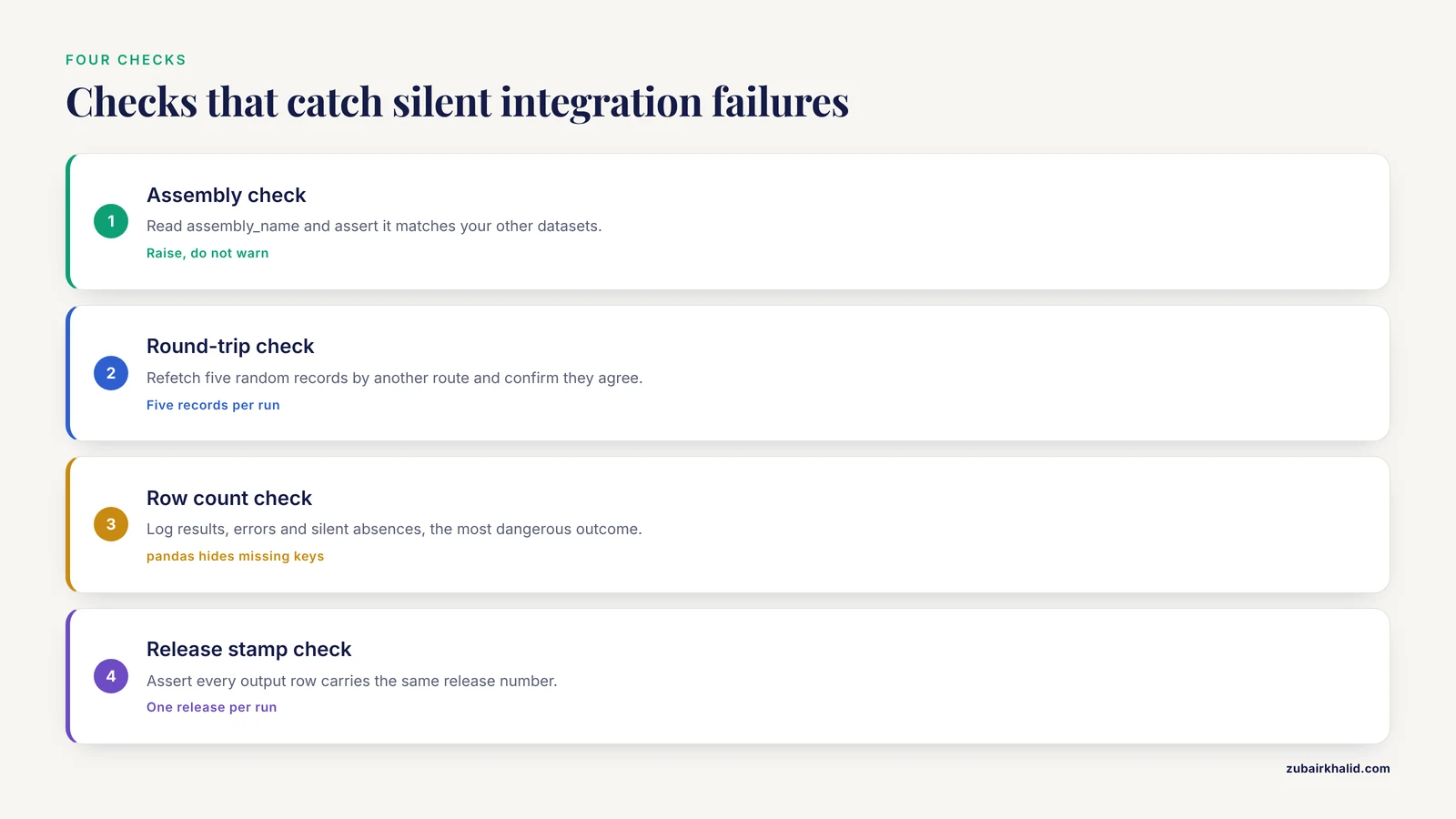
Automated pipelines fail quietly. Build these four checks into every script:
- Assembly check. Read
assembly_namefrom a lookup response and assert it equals the assembly your other datasets use. A mismatch should raise an exception, not a warning. - Round-trip check. Pick five random records per run, fetch their sequences or cross-references a second time by a different route, for example via
pyensemblagainst the downloaded GTF, and confirm they agree. - Row count check. Log how many input IDs produced results, how many produced errors, and how many were silently absent. Silent absence is the most dangerous outcome because pandas fills missing keys without complaint.
- Release stamp check. Assert that every output row carries a release number and that the number is identical across the run.
A compact assertion block you can reuse:
def validate_records(records, expected_assembly="GRCh38"):
    bad = [r for r in records if r.get("assembly_name") != expected_assembly]
    if bad:
        raise ValueError(
            f"{len(bad)} records returned assembly "
            f"{bad.get('assembly_name')}, expected {expected_assembly}"
        )
Common Mistakes and Limitations
These are the failures that consume the most debugging time in practice.
Mixing GRCh37 and GRCh38 coordinates. Ensembl serves the current assembly by default and maintains a separate GRCh37 mirror for legacy coordinate systems. Scripts that quietly hit one or the other produce off-by-megabases errors that look like clean, plausible results. Always read assembly_name from the response and assert on it. If you must work in GRCh37, call the GRCh37 REST mirror explicitly and record that choice in your provenance.
Ignoring stable ID versions. Ensembl identifiers carry optional version suffixes such as .17 after a transcript ID. Requests without the version resolve to the current object, which may be a different transcript than the one you analyzed originally. For archival work, store versioned IDs.
Treating the gene as the unit of analysis. One human gene commonly has many transcripts with different exons and proteins. VEP results are per transcript consequence. Collapse them consciously, for example by filtering to the canonical transcript, and record the rule in your code rather than leaving it implicit.
Assuming one-based coordinates everywhere. Ensembl REST and GTF are one-based inclusive. BED files are zero-based half-open. Converting a region for BED output without adjusting the start position shifts every interval by one base.
No caching and no backoff. Anonymous REST traffic is rate limited, and scripts that retry instantly on 429 responses make the wait longer. Sleep on the retry header, batch with POST where the endpoint allows it, and never re-fetch data you already have on disk.
Parsing the browser HTML. The web interface changes constantly and was never meant as an API. Everything visible there is available through REST, BioMart, or flat files. If you find yourself writing string splits against Ensembl HTML, stop and find the endpoint instead.
Hard-coding release numbers in half the files. Data drift between releases is real. Gene symbols change, transcripts merge or split, and coordinates move. Pin one release per project, download the matching flat files once, and bump the pin deliberately.
Expecting different databases to agree on identifiers. The interPopula authors documented this problem across human population resources and gene annotation systems and shipped explicit guidelines for handling the inconsistencies [3]. The same discipline applies to any Ensembl integration: mapping tables, not fuzzy joins.
Scale mismatch. The REST API is not a bulk export system. For genome-scale needs, download GTF and FASTA files once or query the public MySQL servers, and reserve the API for point lookups and annotation. pyGeno took exactly this route for personalized genome analysis, packaging Ensembl data locally to keep the framework fast and memory-efficient [1].
Overextending scripts into pipelines. A five-script chain with manual order of operations will break the first time a colleague runs it. When annotation logic grows past a handful of steps, adopt a workflow manager with containerized steps, the approach MuSA uses to make multi-source variant annotation reproducible [2].
Frequently Asked Questions
Do I need an API key to query Ensembl from Python?
No. The Ensembl REST API works anonymously for standard fair-use volumes. If your application needs higher throughput, Ensembl provides a registered-key mechanism described in its REST documentation, but every example in this guide runs without one.
What is the difference between Ensembl REST and BioMart?
REST returns small, structured, per-identifier responses suited to scripts and interactive work. BioMart answers bulk tabular queries, such as every mouse gene ortholog of a set of human genes, in one shot. Use REST for point lookups and BioMart when you want a table.
How do I automate Ensembl data integration in Python without getting rate limited?
Batch identifiers into POST requests where the endpoint supports it, reuse HTTP sessions, sleep on 429 responses using the retry header, and cache every response on disk. For genome-scale work, switch from the API to flat file downloads.
Which Ensembl release and assembly should my scripts target?
Target the assembly your collaborating datasets use, usually GRCh38 for current human work, and pin a specific Ensembl release number. Record the release in every output file so results remain interpretable after Ensembl updates.
Can Python pull data directly from the Ensembl genome browser pages?
No, and it should not. Browser pages are presentation HTML that changes without notice. Every dataset shown in the browser is available through the REST API, BioMart, flat file downloads, or the public MySQL servers.
How do I map Ensembl gene IDs to UniProt or NCBI identifiers?
Use the /xrefs/id/{stable_id} endpoint with the external_db filter, for example Uniprot_gn or EntrezGene, and store the mapping as a table. Published proteomics work follows this same approach, fetching identifiers and annotation from UniProt and Ensembl in a Python script before model building [4].
When should I use VEP or a pipeline instead of the REST API?
Use the REST VEP endpoint for dozens to a few hundred variants during exploration. Move to the standalone VEP tool or a containerized pipeline such as MuSA when variant counts grow or when plugins, consistent configuration, and reproducibility become requirements [2].
How do I keep my Ensembl integration reproducible across releases?
Pin the release number, download the matching annotation and sequence files, version your identifiers, stamp outputs with the release, and run the workflow in containers. Cross-database inconsistencies should be handled with explicit mapping tables and documented guidelines, as the interPopula project demonstrated for human population data [3].
Sources
- pyGeno: A Python package for precision medicine and proteogenomics.
- MuSA: a Nextflow pipeline for deep, reproducible annotation and clinical ranking of genomic variants.
- interPopula: a Python API to access the HapMap Project dataset.
- Proteomics and machine learning: Leveraging domain knowledge for feature selection in a skeletal muscle tissue meta-analysis.