Ensembl Compara vs. NCBI HomoloGene: Which Database Should You Use
By Dr. Zubair Khalid, DVM, MS, PhD ·

Ensembl Compara predicts orthologs and paralogs with phylogenetic gene trees across a large set of species and is updated on every Ensembl release, while NCBI HomoloGene was a curated-plus-sequence-similarity homology resource for eukaryotes that NCBI retired and folded into the orthology data you now see in the Gene database. The rule of thumb is simple: for any new analysis that must be reproducible, use Ensembl Compara, or use the orthologs served through NCBI Gene. Treat HomoloGene as a legacy resource that you consult only when you need to reproduce or interpret older published analyses that used it.
This article explains what each resource actually is, how its orthology calls are made, where the two differ in ways that change your results, and how to pull data from both with real commands. The goal is that after reading it you can make the ensembl compara or ncbi homologene decision for your own project in a few minutes and justify it in your methods section.
The One-Sentence Difference and the Rule of Thumb
If you take nothing else from this page, take this. The core difference between Ensembl Compara and NCBI HomoloGene is methodological. Compara builds gene trees with an explicit phylogenetic method and derives orthology and paralogy from the topology of those trees. HomoloGene grouped eukaryotic genes by combining curated homology information with protein sequence similarity searches, without full phylogenetic reconstruction.
The rule of thumb follows directly.
- New project, needs reproducibility, needs gene trees or one-to-one versus one-to-many distinctions: use Ensembl Compara.
- New project, NCBI-centric workflow, you just need a human ortholog for a gene in another model organism: use NCBI Gene orthologs, not HomoloGene.
- Reproducing a paper or pipeline from before HomoloGene's retirement: pull the archived HomoloGene files, document the version, and do not substitute Compara silently, because the ortholog sets will not be identical.
- Cross-database sanity check: run both, count agreements and disagreements, and investigate the genes that differ before trusting either list.
A benchmarking study of seven phylogenomic databases, including Ensembl Compara, found generally high specificity of orthology assignments for well-conserved protein families and concluded that the differences between databases stem mostly from differences in the underlying database concepts rather than from the prediction methods themselves [1]. That finding frames the whole comparison. You are not choosing between right and wrong. You are choosing between two different definitions of "ortholog" that both behave sensibly in the well-conserved case and diverge in the messy case.
What Ensembl Compara Is
Ensembl Compara is the comparative genomics division of the Ensembl project, run jointly by EMBL-EBI and the Wellcome Sanger Institute. Compara stores and computes several kinds of comparative data, and homology prediction is the part most people interact with.
How Compara builds orthology calls
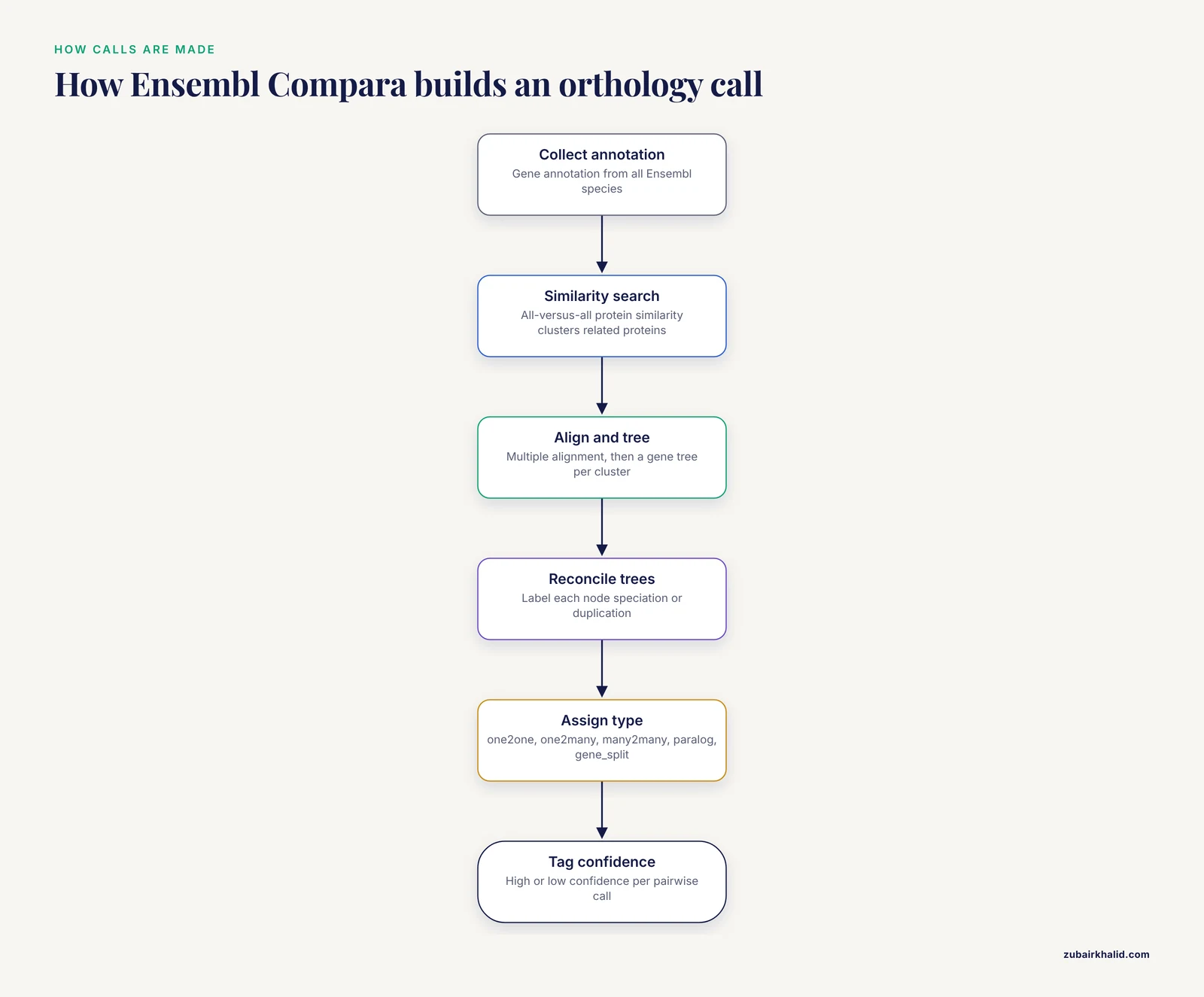
The Compara homology pipeline works in layers.
- Gene annotation from all Ensembl species is collected, and proteins with high sequence identity are collapsed into gene trees where appropriate.
- An all-versus-all protein similarity analysis clusters related proteins across species.
- For each cluster, a multiple alignment is built and a gene tree is inferred. The trees are reconciled against the species tree so that every node is labeled as a speciation or a duplication event.
- From the reconciled trees, Compara derives pairwise relationships between genes and classifies each pair with an orthology type.
That classification is one of Compara's most useful features because it matches the assumptions of common downstream analyses. The orthology types you will encounter are:
- one2one, a single gene in each species with a direct one-to-one relationship
- one2many, one gene in one species related to multiple genes in the other, typically after a duplication in the second lineage
- many2many, multiple genes on both sides, the case that breaks naive reciprocal-best-hit orthology
- within_species_paralog, paralogs inside the same species
- gene_split, genes split across a genomic assembly gap, used where annotation or assembly artifacts make interpretation tricky
Each pairwise call also carries a confidence tag, high confidence or low confidence, reflecting support from the tree. This gives you a natural filter: many groups restrict their downstream analyses to one2one high-confidence orthologs when they want unambiguous cross-species gene mapping.
Scope and taxonomic coverage
Compara covers the species annotated by Ensembl and Ensembl Genomes, which together span vertebrates, invertebrates, plants, fungi, protists, and bacteria. The exact species list changes with every release, and new genomes are added continuously. For well-annotated model organisms, coverage is deep. For less-characterized species, coverage depends on how the genome entered the Ensembl annotation system.
Versioning and reproducibility
Every Ensembl release is numbered and permanently archived. You can query the current release, or pin your analysis to an archived release years old, and get the same tables back. Compara's database dump is versioned, for example ensembl_compara_110, and the FTP site keeps homology dumps per release. This matters more than most people expect. A 2021 analysis and a 2026 analysis of the same gene pair can legitimately disagree, because gene annotations and genome assemblies change. If you cannot say which release you used, your ortholog list is not reproducible.
What else Compara provides
Homology is one product among several. Compara also provides whole-genome alignments across species, synteny information, and gene gain and loss analysis across the species tree. If your question involves where a gene family expanded or contracted, the gene trees and the species-tree reconciliation in Compara give you a starting point that HomoloGene never attempted.
What NCBI HomoloGene Was
HomoloGene was the National Center for Biotechnology Information's resource for homologous genes in eukaryotes. It has a fundamentally different construction history, and understanding that history explains both its strengths and why it no longer fits most modern workflows.
How HomoloGene was built
HomoloGene groups were assembled from two inputs. The first was curated homology data, including NCBI's own curation and information from model organism databases. The second was automated protein sequence comparison. Genes were clustered based on protein similarity, and clusters were refined into homology groups that typically contained the orthologs of a gene across eukaryotic species, with in-paralogs appearing within a group where appropriate. The public data files listed each group with a HomoloGene group identifier, a taxonomy identifier, and gene identifiers for the members.
The design was pragmatic. For a gene with clean, well-conserved single-copy orthologs across mammals, HomoloGene gave you a tidy group: human, mouse, rat, zebrafish, and so on, all in one record. That made it a popular lookup for bench scientists converting a human hit list into mouse orthologs for a qPCR panel or a knockout experiment.
Scope and coverage
HomoloGene covered eukaryotes only. Bacterial and archaeal homology was never in scope. Coverage concentrated on organisms with decent gene annotation in NCBI's Gene database at the time, which in practice meant model organisms and medically or agriculturally relevant species. Species with sparse annotation were largely absent.
Retirement and where the data went
NCBI retired HomoloGene, and the resource no longer receives updates. Orthology information now appears within the Gene database, where NCBI computes and presents orthologs for genes, and the historical HomoloGene data files remain on the NCBI FTP site for download. If you reference HomoloGene in current work, cite it as a retired resource and name the archive date of the files you used.
Side-by-Side Comparison
The table below is the core of this comparison. Read it row by row when you make the ensembl compara vs. ncbi homologene choice for a specific task.
| Criterion | Ensembl Compara | NCBI HomoloGene |
|---|---|---|
| Status | Actively maintained, updated every Ensembl release | Retired, static archive only |
| Core method | Phylogenetic gene trees reconciled with a species tree | Curated homology plus protein sequence similarity clustering |
| Orthology granularity | one2one, one2many, many2many, within_species_paralog, gene_split | Flat homology groups, orthologs and in-paralogs within a group |
| Confidence annotation | High and low confidence per pairwise call | Not provided as a pairwise confidence value |
| Taxonomic scope | Vertebrates, invertebrates, plants, fungi, protists, bacteria | Eukaryotes only |
| Gene trees available | Yes, full trees with speciation and duplication node labels | No trees, groups only |
| Identifier system | Ensembl gene, transcript, and protein IDs, with cross-references | NCBI GeneIDs |
| Bulk access | FTP dumps, BioMart, REST API, MySQL server, Perl API | Static FTP files, historical only |
| Reproducibility | Versioned releases with permanent archives | Versioned at the time, now frozen |
| Web display | Gene trees and homology views in the Ensembl genome browser | Retired web interface |
| Best modern use | New orthology analyses, gene-tree based questions, multi-species mapping | Interpreting or reproducing older analyses that used it |
Two rows deserve emphasis. The status row decides most choices by itself, because a retired resource cannot track annotation updates, and gene annotation changes constantly. The granularity row decides the rest, because if your statistical method or your downstream pipeline requires one-to-one orthologs, a flat homology group does not give you that distinction cleanly, while Compara hands it to you as a filterable field.
The Criteria That Decide Real Choices
Method and phylogenetic rigor
The difference between Ensembl Compara and NCBI HomoloGene is most visible when gene families get complicated. Sequence similarity clustering treats homology as a similarity problem. Phylogenetic reconstruction treats it as a history problem. For a single-copy, well-conserved gene, both approaches converge, which is why the benchmarking study of seven phylogenomic databases observed generally high specificity for well-conserved families [1]. For a family with recent duplications, lineage-specific losses, or differential gene loss after duplication, the two approaches can disagree, and the tree-based method is the one that can tell you whether two similar genes in human and mouse are orthologs, paralogs from an ancient duplication, or products of gene loss.
This is not a claim that trees fix everything. The same study found that none of the databases it evaluated, Compara included, provides a fully correct and comprehensive protein classification [1]. Compara's advantage is transparency. You can inspect the gene tree for a family, see where the speciation and duplication nodes sit, and decide for yourself whether a particular one2many call fits your biological question.
The definition of orthology in practice
Textbook orthology is straightforward, genes related by speciation. Practice is not, because after a duplication followed by reciprocal gene loss, the surviving genes are orthologs by history even though many people intuitively want to call them one-to-one. Compara's type system forces you to confront these cases. HomoloGene's flat groups hid them. If your analysis sums expression across a gene family or computes conservation of a drug target, the difference between one2one and many2many is the difference between a defensible result and an artifact. This is a real, common source of error in cross-species RNA-seq analyses, and it is a stronger argument for database choice than any accuracy metric.
Data access and programmatic reproducibility
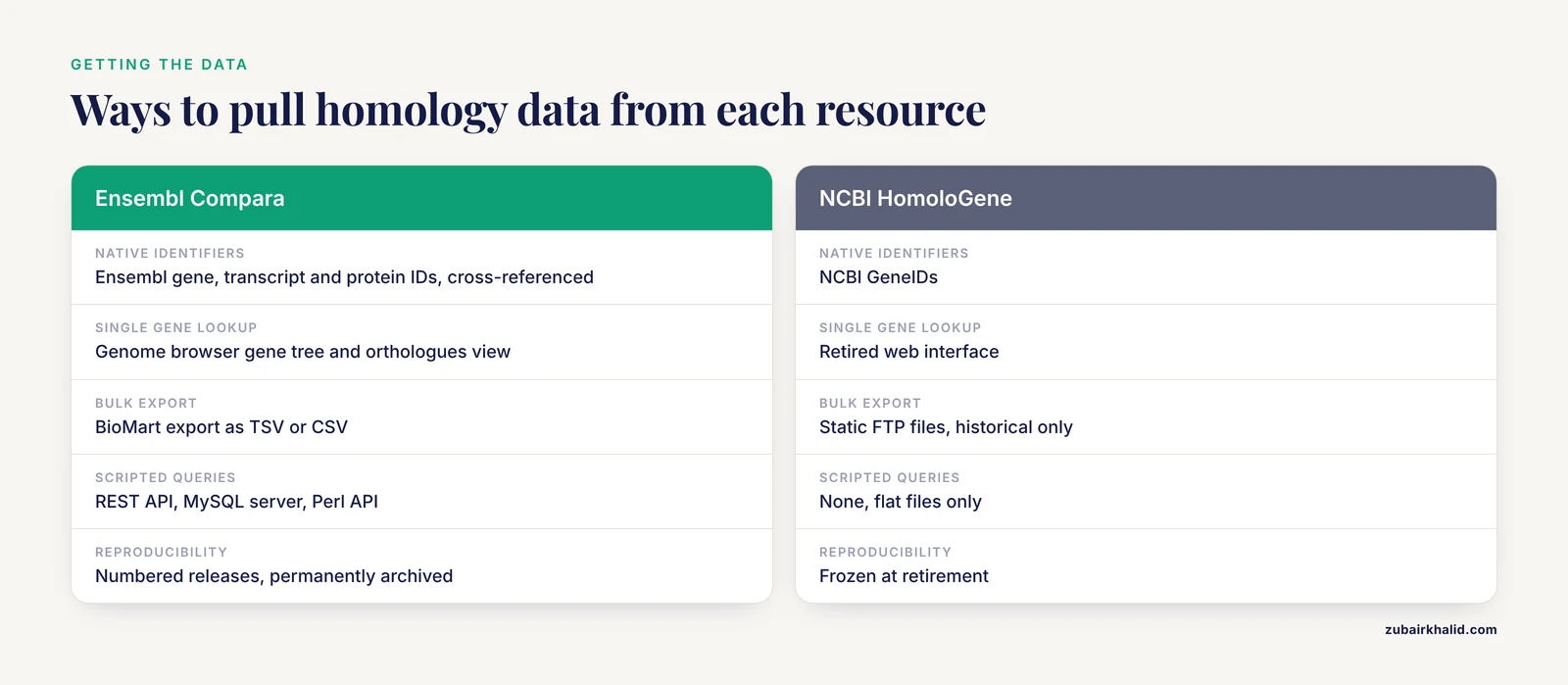
Compara exposes data through at least five channels: the Ensembl genome browser, BioMart, the REST API, the public MySQL server, and the Perl API, plus FTP dumps of the homology tables. HomoloGene exposed static flat files and a web search. For a modern pipeline, flat files are workable, but a retired pipeline that you cannot regenerate against current annotation is not. When a reviewer asks how you derived your ortholog list, "HomoloGene, circa its final release" is a valid historical answer, but "Compara release 110, one2one high-confidence only" is a defensible current one.
Identifier systems and mapping overhead
Compara speaks Ensembl IDs natively and cross-references them to NCBI Gene, UniProt, and others. HomoloGene speaks NCBI GeneIDs natively. If your upstream analysis is NCBI-based, for example a differential expression table keyed on GeneIDs, an NCBI-native resource avoids one mapping step. If your analysis is Ensembl-based, the reverse holds. Identifier mapping is a source of subtle errors in every cross-database workflow, so minimize the number of conversions rather than adding one "just in case."
How to Use Ensembl Compara: A Practical Walkthrough
This section answers the practical question behind the search phrase how to use ensembl. Everything here works with a plain shell and standard tools.
Finding homology in the Ensembl genome browser
For a quick check of a single gene, the browser is fastest. A short ensembl genome browser tutorial for this task looks like this.
- Go to the Ensembl website and type your gene name or Ensembl ID into the search box. For BRCA1, the ID ENSG00000012048 resolves directly to the human gene page.
- On the gene page, open the left-hand menu and choose Gene tree under Comparative genomics. The tree shows your gene in the context of its family across species, with duplication nodes marked.
- Still under Comparative genomics, choose Orthologues. The display lists orthologs by species and tags each pair with its type, one2one, one2many, or many2many, and its confidence.
- Click any ortholog pair to see the pairwise view, which includes sequence alignment and conservation details.
Use the browser for one gene at a time. For anything more, use the methods below.
Bulk export with BioMart
BioMart is the point-and-click bulk export tool and the right choice when you need a few thousand rows rather than millions.
- Open BioMart from the Ensembl site and choose Database Ensembl Genes, Dataset Human genes.
- In Filters, expand GENE and set your input list, for example a list of Ensembl gene IDs.
- In Attributes, expand GENE and keep Gene stable ID. Then expand the HOMOLOG section, choose the target species, for example Mouse, and select the associated gene ID, the orthology type, and the homology confidence fields.
- Click Results, then Export, and download as TSV or CSV.
The orthology type column in this export is the same one2one and one2many vocabulary used in the browser, so filters you build here match filters you build anywhere else in Compara.
The REST API for scripted queries
For automated workflows, the REST API is the lightest option. This example fetches all homologs of human BRCA1.
curl -H "Content-Type: application/json" \
  -H "Accept: application/json" \
  "https://rest.ensembl.org/homology/id/human/ENSG00000012048?compara=vertebrates&type=orthologues"
Add a filter parameter to restrict to one2one if that is what your analysis needs. Rate limits apply, so for thousands of genes either batch your identifiers, since the homology endpoint accepts POST with multiple IDs, or use the MySQL route below. Always send a contact address in the headers for bulk use so the Ensembl helpdesk can reach you if your usage causes problems.
Direct MySQL access for large jobs
The public MySQL server gives you raw SQL access to the Compara schema, which is the right tool when BioMart is too slow or the REST API would need too many calls.
mysql --host mysql.ensembl.org --port 3306 \
  --user anonymous --database ensembl_compara_110
Once connected, the key tables are method_link_species_set, which defines each homology analysis, homology, which holds the pairwise calls including orthology type and confidence, and homology_member, which maps each call to gene members. A typical query for human to mouse one-to-one orthologs looks like this.
SELECT hm1.gene_stable_id, hm2.gene_stable_id
FROM homology h
JOIN homology_member hm1 ON hm1.homology_id = h.homology_id
JOIN homology_member hm2 ON hm2.homology_id = h.homology_id
WHERE h.method_link_species_set_id = <mlss_id>
  AND h.orthology_type = 'ortholog_one2one'
  AND hm1.genome_db_id = <human_genome_db_id>
  AND hm2.genome_db_id = <mouse_genome_db_id>
  AND hm1.homology_member_id <> hm2.homology_member_id\G
You need the method_link_species_set identifier for the human to mouse homology relationship and the two genome_db identifiers, both of which you can list with simple SELECT queries against method_link_species_set and genome_db. Replace the angle-bracket placeholders with the values you find. Note that the query ends with \G rather than a semicolon so the MySQL client formats the output vertically.
For reproducibility, record the release number in your methods, keep the exact SQL in your repository, and store the row counts you obtained. When release 120 changes some annotations, you will want to know that your table came from release 110.
Working with HomoloGene Data Today
If you are reproducing an older analysis, the historical data files are still on the NCBI FTP site under the HomoloGene directory. The main flat file, homologene.data, is tab-delimited with fields for the HomoloGene group number, the NCBI taxonomy identifier, the GeneID, and symbol information for each member gene. A typical workflow to reproduce an old mapping looks like this.
- Download the archived homologene.data file and record its timestamp.
- Filter rows by your taxa of interest, for example taxonomy ID 9606 for human and 10090 for mouse.
- Group by HomoloGene group number and select groups containing exactly one human and one mouse gene for a strict one-to-one-like mapping, which is how many older pipelines approximated the one-to-one constraint.
- Join your input identifier list against the GeneID column, using NCBI's gene_history and gene_info files to map retired or current GeneIDs.
Expect collisions. Because HomoloGene groups could contain multiple genes per species when recent duplications were involved, step 3 is an interpretation you are imposing on the data, and you should say so in your methods. If the old paper did not specify how it handled multi-gene groups, your reproduction will differ slightly, and that is usually acceptable as long as you report it.
Worked Scenarios
Scenario 1: Convert a human gene hit list to mouse orthologs for a validation experiment
You ran a screen, you have 400 human gene symbols, and you need mouse orthologs to design an experiment. This is the classic use case that made HomoloGene popular.
Choice: Ensembl Compara through BioMart. Filter by your human gene list, pull mouse homologs with orthology type and confidence columns, and check the one2one fraction. If most pairs are one2one, proceed. If a gene of interest is one2many, look at the gene tree before choosing which mouse paralog to target, because targeting the wrong paralog is a classic cause of a negative validation result. For an NCBI-centric alternative, the ortholog section of the current NCBI Gene entries serves the same purpose, and both sources will agree for the vast majority of well-conserved single-copy genes.
Scenario 2: Phylogenomic analysis of a gene family across vertebrates
You want to know whether a gene family expanded in a particular lineage, and you need orthology and paralogy relationships for every member.
Choice: Ensembl Compara, without question. This is the use case HomoloGene was never designed for. Pull the gene tree for the family through the browser or the API, extract the duplication and speciation node labels, and combine that with the species tree to reason about gains and losses. The reconciled trees are exactly the artifact this question needs. If you need maximum rigor, use the Compara tree as a starting scaffold and rebuild the tree yourself from a curated multiple alignment, because a benchmarking framework for phylogenomic databases showed that different resources differ in both the completeness of predicted relationships and the phylogenetic information they carry [1].
Scenario 3: Cross-species identifier mapping for a multi-species RNA-seq meta-analysis
You have expression datasets from human, mouse, rat, and chicken, each keyed on its own gene IDs, and you need a common key to merge them.
Choice: Ensembl Compara, filtered to one2one high-confidence orthologs. Merging on many2many relationships multiplies rows and distorts differential expression statistics, so the strict filter is the point. Use the MySQL route for this job, since you are joining large tables and BioMart would be cumbersome. Document the release number, keep the SQL, and spot check a handful of familiar genes against the browser gene trees before committing. If you must include species whose orthology calls in Compara are sparse, consider dropping those species rather than loosening the filter, because a silent loosening of orthology criteria is very hard to detect downstream.
Scenario 4: Reproducing a 2015 paper whose methods say "HomoloGene"
Choice: archived HomoloGene files, as described above, because silently substituting a different database changes the gene set. After the reproduction is complete, optionally redo the analysis with Compara and report both. Agreement between the two builds confidence. Disagreement points at the genes with complicated duplication histories, which are often the interesting ones.
Common Mistakes and Limitations
- Assuming HomoloGene is current. It is retired. Any pipeline that queries it live today is either erroring or silently using stale mirrors. Check before you build.
- Treating homology groups as one-to-one orthologs. HomoloGene groups could contain multiple genes per species. If your analysis assumes one gene per species, that assumption fails silently and inflates or deflates family counts.
- Ignoring orthology type in Compara. Pulling all homologs without filtering by type, then computing cross-species conservation on the unfiltered set, mixes orthologs and paralogs. Filter on one2one when your statistics require it.
- Ignoring the confidence tag. Compara's low-confidence calls exist for a reason. Genes in poorly assembled regions or fast-evolving families get weaker tree support. Restrict to high confidence or at minimum report the fraction of low-confidence calls.
- Mixing releases within one project. Ortholog lists from Compara release 100 and release 110 differ because annotations moved. Pick one release, record it, and use it everywhere in the project.
- Comparing counts between databases and calling the difference an error. The benchmarking work on phylogenomic databases showed that differences between resources mostly reflect differences in underlying database concepts, not mistakes [1]. A count difference between Compara and an NCBI-based resource is usually a definitional difference about where one gene ends and another begins, or about how recent duplications are handled.
- Trusting any single database as ground truth. The same benchmarking effort concluded that no database in its comparison provided a fully correct and comprehensive classification of protein relationships [1]. For critical genes, inspect the gene tree and the underlying evidence rather than trusting a single pairwise label.
- Assuming coverage symmetry. A species with good NCBI gene annotation might have thin Ensembl annotation, or the reverse. Before committing to one resource, check that both your query and target organisms are represented at the annotation depth you need.
- Mapping identifiers without versioning. GeneIDs and Ensembl IDs both get retired and merged. When you join on identifiers, use the ID history files on the respective FTP sites to handle retired IDs explicitly.
- Using one2many orthologs in tests that assume independence. A single human gene mapping to three mouse paralogs gives you three correlated data points, not three independent ones. Collapse or model the family deliberately.
One general limitation applies to all cross-species work in this area. Orthology databases describe relationships between annotated genes, and annotation quality varies by species and release. Individual genes in poorly characterized organisms may need manual curation of their models and relationships before any database call should be trusted, and that curation is specialist work.
Frequently Asked Questions
Is NCBI HomoloGene still available?
No, HomoloGene is retired and no longer receives updates from NCBI. The archived data files remain downloadable from the NCBI FTP site, and current orthology information for genes is presented within the NCBI Gene database instead.
When should I use Ensembl Compara?
Use Compara when you need current, reproducible orthology calls with explicit type and confidence labels, when you need gene trees with speciation and duplication information, or when your species include plants, fungi, or bacteria outside HomoloGene's eukaryotic scope.
What is the difference between Ensembl Compara and NCBI HomoloGene in method?
Compara infers phylogenetic gene trees and derives orthology and paralogy from tree topology, while HomoloGene built flat homology groups from curated homology data combined with protein sequence similarity clustering. The tree-based approach distinguishes one-to-one from one-to-many relationships explicitly.
How do I download all human-mouse orthologs from Ensembl in bulk?
Use BioMart with the homolog attributes for the target species, or query the homology and homology_member tables on the public Compara MySQL server filtered to the one2one orthology type, or batch identifiers through the REST API homology endpoint.
Can I still use HomoloGene files for a new project?
You can download and parse the archived files, but they reflect frozen annotations, so they are appropriate only for reproducing older analyses. For new projects, use Compara or the orthologs in NCBI Gene so your mapping reflects current annotation.
Do Ensembl Compara and NCBI orthology resources agree with each other?
They agree well for well-conserved single-copy genes, and a benchmarking study of phylogenomic databases found generally high specificity of orthology assignments in that regime. Differences between resources stem mainly from different underlying database concepts, so check genes with complex duplication histories individually.