How to Use NCBI Gene to Find Orthologs Across Species: A Guide
By Dr. Zubair Khalid, DVM, MS, PhD ·

By the end of this guide you will be able to pull the curated orthologs of any eukaryotic gene out of NCBI Gene, read the ortholog table without misreading it, download complete ortholog sets for one gene or hundreds, verify a borderline call with BLASTP and synteny, and hand a clean table to downstream expression or annotation work. The core workflow needs nothing more than a web browser. The bulk and scripted sections add three free tools: the NCBI Datasets command-line client, the EDirect utilities, and Python 3 with pandas.
An ortholog is a gene in one species that descended from the same ancestral gene as a gene in another species, where the split came from speciation rather than gene duplication. Orthologs usually retain related functions, which is why comparative genomics is built on them [1]. NCBI computes these relationships with a dedicated pipeline and integrates the results directly into Gene, so the fastest route to a trustworthy cross-species gene list is to start from one well-annotated gene record and let NCBI hand you the rest. Learning how to use NCBI well is largely a matter of matching each question to the right database, and this guide doubles as a compact NCBI databases guide for the orthology workflow: Gene for records, Datasets for bulk files, BLAST for sequence evidence.
What NCBI Gene Stores About Orthologs
Three terms anchor everything that follows. Homologs are genes that share a common ancestor. Orthologs are homologs that separated when a speciation event split their lineage. Paralogs are homologs produced by duplication inside a genome. A one-to-one ortholog pair has exactly one gene on each side. After a lineage-specific duplication, one gene can face two co-orthologs in the other species, a one-to-many relationship, and rounds of duplication such as ancient whole-genome duplications can produce many-to-many sets.
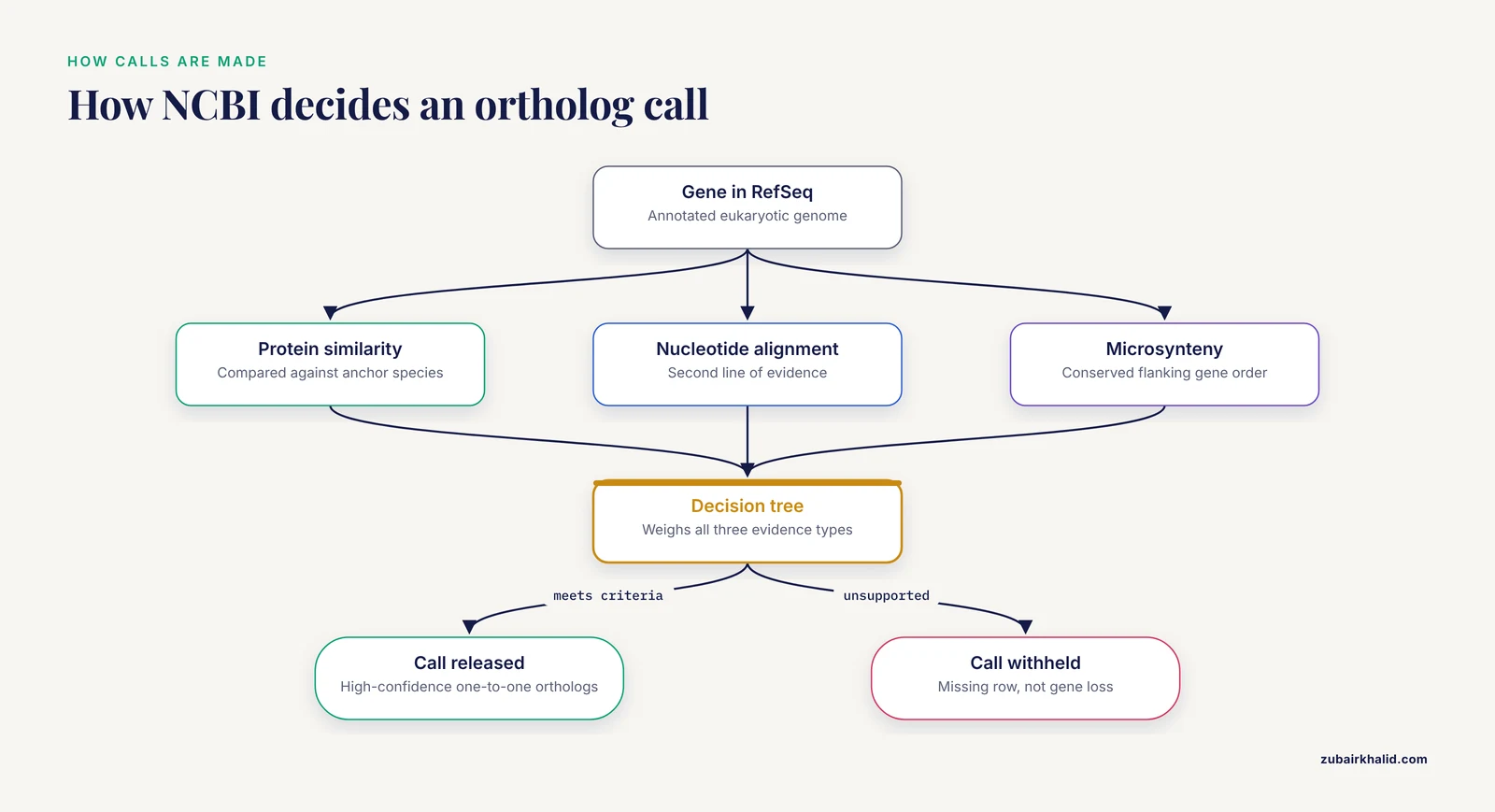
The resource behind the Gene orthologs table is NCBI Orthologs, a pipeline built inside the RefSeq framework, which is NCBI's curated, non-redundant set of annotated genomes and transcripts. For each gene the pipeline weighs three kinds of evidence: protein similarity, nucleotide alignment, and microsynteny, meaning conservation of gene order among the neighbors flanking a gene along the chromosome. Genomes are processed individually against selected anchor species, and the results are organized into gene-level anchored sets, a design that keeps the computation scalable as high-quality eukaryotic assemblies accumulate at an unprecedented pace. A decision tree then weighs the evidence and releases the calls that meet its precision criteria, with particular attention to high-confidence one-to-one orthologs [1].
Two practical consequences follow from that design. First, the anchored sets let curated function propagate across a set, so a sparsely annotated gene in a newly sequenced species inherits the functional summary of its better-studied orthologs [1]. Second, the decision tree withholds calls it cannot support, so a species missing from the ortholog table represents a missing call, not proof that the gene was lost.
NCBI Orthologs covers eukaryotes with RefSeq annotation. It replaced the retired HomoloGene resource, and the ortholog data are exposed from several entry points: the Orthologs table on each Gene record, the NCBI Datasets web interface, and bulk download through a command-line client and an application programming interface (API) [1].
What You Need on Hand
- A web browser for the website workflow.
- The NCBI Datasets command-line client for bulk downloads. Installers for macOS, Linux, and Windows are linked from the Datasets command-line documentation, and
datasets, versionconfirms the install. - EDirect for scripted Entrez searches. On a system with conda:
conda install -c bioconda entrez-direct- Python 3 with pandas for parsing the downloaded reports:
pip install pandasFinding NCBI Gene Orthologs on the Website: Step by Step
Step 1: Find the gene with a field-tagged search
Open the Gene database at https://www.ncbi.nlm.nih.gov/gene/ and search with field tags rather than a bare symbol. Gene is one database inside Entrez, NCBI's integrated search system across its databases.
TP53[gene] AND Homo sapiens[orgn]The expected result is a single record: TP53, tumor protein p53, Homo sapiens, GeneID 7157. A GeneID is the stable integer identifier NCBI assigns to every gene record. The [gene] tag restricts the match to the gene symbol field and [orgn] restricts it to the organism. A bare TP53 search returns genes from many organisms and assemblies, and measured searches of NCBI databases show that Entrez and BLAST return different result sets with different precision and recall, so the program and settings you choose shape what you find [2].
Step 2: Open the record and scroll to the Orthologs table
From the record at https://www.ncbi.nlm.nih.gov/gene/7157, scroll to the Orthologs section. The table lists orthologs grouped by taxonomic clade, with the species, the orthologous gene symbol linked to its own Gene record, and the GeneID. For a gene like TP53 the table spans primates, rodents, other mammals, birds, fish, and invertebrates. Only eukaryotes with RefSeq annotation appear, and only calls the pipeline released.
Step 3: Read the relationship types
Treat one-to-one rows as the high-confidence core of the set. One-to-many and many-to-many rows are legitimate biology, usually recent duplications, but they need different handling in downstream analysis. If your method assumes a single ortholog per species, filter to one-to-one rows before anything else.
Step 4: Open two or three ortholog records and compare
Click into the mouse ortholog and compare records. Expect symbol drift: human TP53 (GeneID 7157) is Trp53 (GeneID 22059) in mouse, and zebrafish orthologs follow lowercase conventions such as tp53. Symbols are labels, not identifiers. The GeneID is the stable key that works in every NCBI database and in the Datasets API.
Step 5: Cross-check with BLASTP
BLAST remains the standard way to ask whether a sequence is common or rare across public repositories, which is one reason the web BLAST service is among the most heavily used tools in bioinformatics. To verify a specific ortholog call:
- Copy the human TP53 protein sequence in FASTA format (a plain-text sequence format whose header line starts with the greater-than character) from the Gene record's protein link, or fetch it with the Datasets command shown below.
- Open https://blast.ncbi.nlm.nih.gov/ and choose Protein BLAST.
- Paste the sequence. Set the database to Reference proteins (refseq_proteins). In the Organism box, type the target species, for example mouse, which resolves to Mus musculus (taxid:10090).
- Set the Expect threshold to 1e-10 for a clean report between close species. The Expect value estimates how many alignments with a similar score you would see by chance, so smaller is stronger evidence. When the species are deeply diverged, relax the threshold and judge by coverage and reciprocity instead.
- Run the search and read the top alignment.
Expected result: the mouse Trp53 protein as the top hit, with near full-length query coverage and an Expect value far below threshold. If a paralog outranks the expected ortholog, the locus has duplicated in that lineage and the one-to-one assumption fails. Set the database, organism filter, and threshold deliberately rather than accepting whatever the form presents. If you must search whole genomes or another very large nucleotide database instead of a protein database, seed and word-size settings control the sensitivity and speed tradeoff and deserve explicit tuning [3].
Downloading Orthologs in Bulk with NCBI Datasets
The Gene table is fine for reading. For analysis you want a file, and NCBI Datasets provides orthology data through the web interface, a command-line client, and an API [1].
Parameters that matter
- Identifier type:
gene-idtakes NCBI GeneIDs,symboltakes a gene symbol and pairs with-taxon. -includeselects the data blocks.gene-orthologsadds the ortholog set,proteinadds protein FASTA sequences,rnaadds transcript FASTA.-taxonrestricts symbol searches to one organism.-ortho-reportwrites a tab-separated values (TSV) ortholog report alongside the JSON data report.-onames the output archive, which makes dated, per-gene archives easy to keep.
Flag names occasionally shift between client releases, so run datasets download gene, help to confirm what your version supports.
Download one gene's ortholog set
datasets download gene gene-id 7157 --include gene-orthologs --ortho-report -o tp53_ortho.zip
unzip -o tp53_ortho.zip
ls ncbi_dataset/data
Expected listing (file names shift slightly between CLI releases, so run ls if a path differs):
gene.jsonl
ortholog_report.tsv
The ortholog report is the analysis-ready artifact. Abridged example:
GeneID  Symbol  Taxon         Ortholog_GeneID  Ortholog_Symbol  Ortholog_Taxon
7157    TP53    Homo sapiens  22059            Trp53            Mus musculus
7157    TP53    Homo sapiens  ...              ...              ...
Real rows carry additional columns such as taxon identifiers, and column names vary a little between versions, so print the header before you parse.
Download by symbol and taxon
When you know the symbol but not the GeneID:
datasets download gene symbol TP53 --taxon "Homo sapiens" --include gene-orthologs -o tp53_ortho.zipFetch the ortholog protein sequences
datasets download gene gene-id 7157,22059 --include protein -o tp53_prot.zip
unzip -o tp53_prot.zip
head -2 ncbi_dataset/data/protein.faa
Expected output, abridged:
>NP_000537.1 tumor protein p53 [Homo sapiens]
MEEPQSDPSVEPPLSQETFSDLWKLLPEN...
The mouse record follows with its own RefSeq accession. These FASTA files feed BLAST, primer design, and alignment work directly.
Parse the report
import pandas as pd

ortho = pd.read_csv("ncbi_dataset/data/ortholog_report.tsv", sep="\t")
print(ortho.shape)
print(ortho.head())
A typical run prints the row count of the ortholog set and the first few rows, which you can filter to one-to-one calls or join to your own gene list on GeneID.
Errors you will actually hit
zsh: command not found: datasets(or the bash equivalent): the client is not on your PATH. Reinstall or add its directory to PATH.replace ncbi_dataset/data/gene.jsonl? [y]es, [n]o, [A]ll, [N]one, [r]ename:from unzip: you are re-running into an existing folder. Add-oto overwrite.- An error of the form
Could not resolve id: 123456789: the identifier is wrong or was retired. Re-check the GeneID on the Gene website. - An empty report after a successful download: the gene has no released ortholog set, which is a data limitation, not a syntax problem.
The Datasets REST API returns the same orthology data as JSON for automated pipelines.
Scripted Access with E-utilities and EDirect
E-utilities are the URL-based API behind every Entrez search, and EDirect wraps them as Unix tools that pipe cleanly. They excel at finding genes, pulling summaries, and fetching sequences. They do not serve the ortholog set directly, so the division of labor is: Gene and Datasets for orthology, E-utilities for everything around it.
conda install -c bioconda entrez-direct
export NCBI_API_KEY=your_key_here
esearch -db gene -query "TP53[gene] AND Homo sapiens[orgn]" | esummary -format json
The summary JSON confirms the symbol, GeneID 7157, organism, and chromosome location, which is the cheapest way to validate identifiers before a bulk run. Keep request rates at or below three per second without an API key and ten per second with one, the official E-utilities policy, or the service will throttle you with HTTP 429 errors.
For triaging long gene lists by topic, Annokey annotates a gene list with keyword search results from Entrez Gene and linked PubMed records, and in its published test against a 176-gene DNA repair gold standard it reached 97 percent sensitivity and 96 percent specificity [4].
A Worked Example: Rice Seed-Size Genes to Groundnut Candidates
A groundnut study shows the full loop from public comparative resources to a bench result [5]. The researchers started from well-annotated rice seed-size genes, then searched for their counterparts in groundnut (Arachis hypogaea), an allotetraploid crop with no comparable functional catalog. In silico screening through PeanutBase identified 31 putative homologous sequences corresponding to the rice seed-size genes, complemented by NCBI transcriptome searches. They then designed PCR primers against eight of the rice genes and tested developing kernels from two contrasting genotypes, the bold-seeded Bheema (TG 47) and the smaller-seeded TPT 4 (TCGS 30), sampled at 60 and 85 days after sowing out of a 30-genotype field evaluation. All eight genes amplified, expression differed between genotypes and stages, and GW5, GW7, GS3, and GS2 showed comparatively higher expression in the bold-seeded genotype at 60 days after sowing, marking them as candidate seed-size genes in groundnut.
The pattern transfers directly: pick query genes in a well-annotated species, pull their orthologs or homologs in the target species from curated resources, convert the list into primers or probes, and validate expression in the tissue and stage you care about.
How to Verify an Ortholog Call
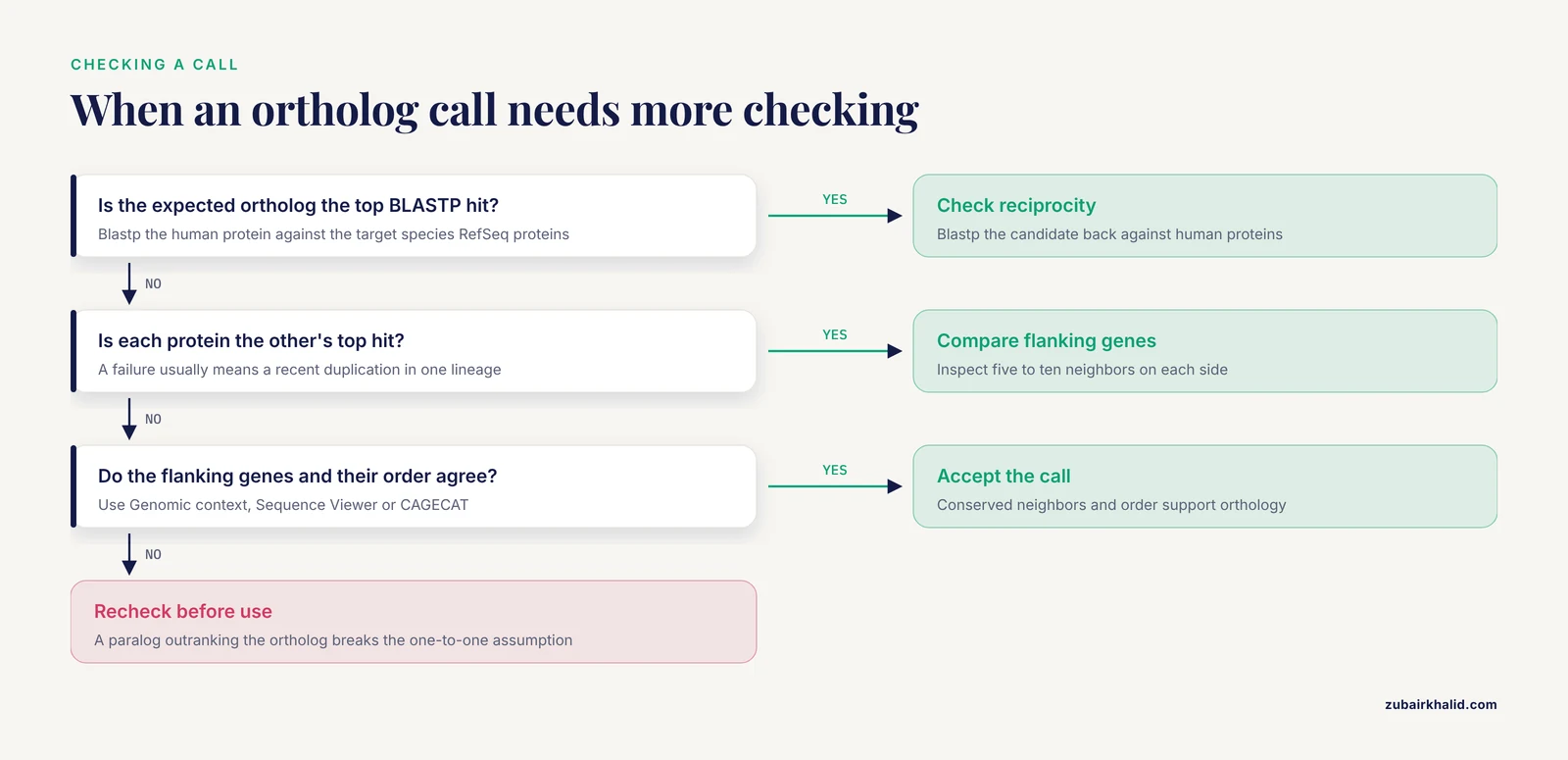
Reciprocal best hit. Run blastp of the human protein against the target species' RefSeq proteins, then blastp of the candidate target protein back against human proteins. If each is the other's top hit, the call is supported. A failure usually means a recent duplication in one lineage.
Synteny. NCBI's own pipeline uses microsynteny as evidence, so you can apply the same standard by eye [1]. Open both Gene records, inspect the Genomic context and Sequence Viewer panels, and compare five to ten flanking genes on each side. Conserved neighbors and conserved order support orthology. For cluster-scale comparisons, CAGECAT wraps the cblaster and clinker pipelines, searches remote BLAST databases that stay current, and visualizes homologous gene neighborhoods without requiring command-line expertise [6].
Cross-resource agreement. Ensembl-based tools reach the same goal by a different route. OrthologAL, for example, converts non-human single-cell and spatial transcriptomics data to human ortholog space through Ensembl BioMart [7]. Agreement between NCBI and Ensembl calls strengthens confidence. Disagreement is informative too, because annotation method alone produces markedly different orthology inferences: a comparison across the NCBI Eukaryotic Genome Annotation Pipeline, the Ensembl Gene Annotation System, UniProt Reference Proteomes, and the ab initio predictor Augustus found significant discrepancies in the proportion of orthologous genes per genome, the completeness of hierarchical orthologous groups, and accuracy on a standard orthology benchmark [8].
Sanity metrics. Both genes should be protein-coding, similar in protein length, and share recognizable domains. A candidate that fails all three deserves a second look before it enters your analysis.
Common Mistakes and Limitations
- Searching a bare symbol with no organism restriction. A bare TP53 search returns genes from many organisms. Use field tags:
TP53[gene] AND Homo sapiens[orgn]. - Treating symbols as identifiers. Human TP53 is mouse Trp53, and zebrafish symbols run lowercase. Join datasets on GeneID, and map symbols only at the final presentation step.
- Reading every row of the ortholog table as one-to-one. Lineage-specific duplications create co-orthologs. Filter to one-to-one rows when your method requires a single counterpart.
- Reading an absent ortholog as gene loss. The decision tree withholds unsupported calls, and annotation quality varies widely across species, which directly changes orthology calls [8]. Check the assembly status and run a BLASTP against the whole proteome before claiming loss.
- Using nucleotide BLAST across distant species. Protein-level comparison absorbs synonymous codon changes and is the right default for cross-species questions. When a nucleotide search against a large genome is unavoidable, tune the seed and word-size parameters noted above rather than accepting defaults.
- Trusting default settings everywhere. Default search settings are not optimal for all searches, and result sets differ by program and by setting [2]. State your database, organism filter, and thresholds in your methods.
- Applying the resource outside its scope. NCBI Orthologs is computed across eukaryotic genomes [1]. For bacteria and archaea, use reciprocal best-hit searches or a dedicated microbial orthology tool instead.
- Following stale HomoloGene links. HomoloGene is retired, and old scripts, bookmarks, and papers may still point at it. Route orthology queries through Gene and Datasets.
- Overrunning rate limits in scripts. Unthrottled loops against E-utilities get throttled with HTTP 429 errors. Set the API key environment variable and pace requests.
- Skipping provenance. Gene and Datasets update continuously. Record the access date, the CLI version from
datasets, version, and the named archive from-ofor every download. - Mixing ortholog sources silently. NCBI and Ensembl-based calls can disagree, often for annotation reasons [8]. Pick one source per analysis and document it.
One general limitation sits above all of these: an ortholog call is computational evidence, not proof of identical function. Experimental validation, as in the groundnut workflow above, remains the standard for functional claims.
Tips for Faster, Cleaner NCBI Gene Orthologs Work
- Work in GeneIDs. They are stable across species, databases, and API versions, and they join cleanly against the ortholog report.
- Batch and date-stamp downloads. Pass comma-separated GeneIDs and name archives with
-oso a pipeline directory fills with self-describing files. - Set the API key once.
export NCBI_API_KEY=...in your shell profile keeps EDirect sessions fast and unthrottled. - Sample-verify. Reciprocal BLASTP on a random handful of calls catches systematic problems, such as a species whose gene models are ab initio only.
- Prefer NCBI-annotated genomes. Genes from the NCBI Eukaryotic Genome Annotation Pipeline sit in the same annotation framework the ortholog pipeline uses.
- Keep the ortholog report as the single source of truth. Re-derive symbols, descriptions, and taxon names from the report at the end, never by hand in the middle.
- Save the query strings. The exact Entrez query, the CLI command, and the download date belong in your methods section, and they make the analysis reproducible.
Key Commands and Entry Points at a Glance
| Goal | Tool or page | Command or action | Output |
|---|---|---|---|
| Locate a gene and its GeneID | NCBI Gene | TP53[gene] AND Homo sapiens[orgn] | Gene record, GeneID 7157 |
| Read curated orthologs | Gene record | Scroll to the Orthologs table | Cross-species table grouped by clade |
| Download one gene's orthologs | Datasets CLI | datasets download gene gene-id 7157, include gene-orthologs, ortho-report -o tp53_ortho.zip | ZIP with a TSV ortholog report |
| Download by symbol | Datasets CLI | datasets download gene symbol TP53, taxon "Homo sapiens", include gene-orthologs | Same package |
| Fetch ortholog proteins | Datasets CLI | datasets download gene gene-id 7157,22059, include protein | protein.faa FASTA |
| Verify a call | BLASTP | blastp against Reference proteins with an organism filter | Top-hit alignment, Expect value, coverage |
| Compare gene neighborhoods | Sequence Viewer or CAGECAT | Inspect flanking genes on each record | Conserved or disrupted synteny |
| Annotate a gene list by keyword | Annokey | Point Annokey at your GeneID list and keywords | Table with Gene and PubMed matches |
What to Do with the Ortholog List Next
Propagate annotation. Because the sets are anchored, functional information moves across them, so an under-annotated gene inherits the curated summary of its orthologs [1].
Design experiments. The groundnut workflow above is the template: ortholog list, primers, expression test in the tissue and stage of interest.
Move to expression. The Gene Expression Omnibus archives gene expression and epigenomics data from over 200,000 studies and 6.5 million samples, and it now provides consistently computed gene expression count matrices for thousands of RNA-seq studies, which makes cross-study expression comparison practical once your ortholog map exists [9].
Humanize non-human data. For pharmacotranscriptomic work, OrthologAL converts non-human Seurat objects into human ortholog space through Ensembl BioMart, a useful complement when your analysis must land in human gene space [7].
Summarize locally. GeneBase 1.1 parses, structures, and indexes NCBI Gene data locally and computes summary statistics for gene structure parameters, handy when you want descriptive statistics over a large gene set without hammering the API [10].
Frequently Asked Questions
What is the difference between orthologs and paralogs in NCBI Gene?
Orthologs are genes in different species that split through speciation, while paralogs are copies created by duplication within a genome. The orthologs table in NCBI Gene lists cross-species relationships computed by a pipeline that weighs protein similarity, nucleotide alignment, and microsynteny [1].
Does NCBI Gene include orthologs for bacteria and archaea?
No. NCBI Orthologs is computed across eukaryotic genomes within the RefSeq framework [1]. For prokaryotes, use reciprocal best-hit BLAST or a dedicated microbial orthology tool.
How do I download all orthologs for one gene at once?
Run datasets download gene gene-id 7157, include gene-orthologs, ortho-report -o tp53_ortho.zip with your GeneID substituted. The archive contains a tab-separated ortholog report that opens in any spreadsheet program.
Why does my gene show no ortholog in a species I expected?
The most common reasons are a missing or low-quality gene model in that species, a fragmented assembly, or genuine gene loss. Annotation method alone produces markedly different orthology inferences, so check the assembly and search the proteome with BLASTP before concluding the gene is absent [8].
Is HomoloGene still available?
No. HomoloGene was retired, and NCBI Orthologs took over as the orthology resource integrated into Gene [1]. Update old scripts and bookmarks.
How reliable are NCBI Gene orthologs?
The pipeline was built for high precision and combines protein similarity, nucleotide alignment, and microsynteny through a decision tree that emphasizes high-confidence one-to-one calls [1]. For a critical experiment, confirm the call with reciprocal BLASTP and a synteny check.
Can I use NCBI Gene orthologs for crop or wildlife species?
Yes, whenever the species has RefSeq eukaryotic annotation. Crop and wildlife genomes in RefSeq pass through the same ortholog pipeline as model organisms [1].
Should I use gene symbols or GeneIDs when working with orthologs?
Use GeneIDs. Symbols change between species and over time, while GeneIDs are stable identifiers that work across every NCBI database and the Datasets API.
Sources
- NCBI Orthologs: Public Resource and Scalable Method for Computing High-Precision Orthologs Across Eukaryotic Genomes.
- Entrez and BLAST: Precision and Recall in Searches of NCBI Databases.
- Mastering seeds for genomic size nucleotide BLAST searches.
- Annokey: an annotation tool based on key term search of the NCBI Entrez Gene database
- Cross-genera marker transferability, expression dynamics and in silico identification of rice seed size gene orthologs in contrasting groundnut genotypes.
- CAGECAT: The CompArative GEne Cluster Analysis Toolbox for rapid search and visualisation of homologous gene clusters
- OrthologAL: a Shiny application for quality-aware humanization of non-human pre-clinical high-dimensional gene expression data.
- Annotation matters: the effect of structural gene annotation on orthology inference.
- NCBI GEO: archive for gene expression and epigenomics data sets: 23-year update.
- GeneBase 1.1: a tool to summarize data from NCBI gene datasets and its application to an update of human gene statistics