Ensembl BioMart vs. UCSC Table Browser: Which Tool Should You Use
By Dr. Zubair Khalid, DVM, MS, PhD ·

Ensembl BioMart is a query builder that starts from biological identifiers such as gene IDs and returns attribute tables, sequences, and cross-species homology data, while the UCSC Table Browser is a text interface to the coordinate-based track databases that power the UCSC Genome Browser. The difference between Ensembl BioMart and the UCSC Table Browser comes down to where your question starts. Start in BioMart when your question begins with a gene, protein, or variant identifier and you want attributes, sequences, or orthologues. Start in the Table Browser when your question begins with a genomic region, or when you need interval arithmetic against browser tracks such as conservation, repeats, or ENCODE features.
Both tools occupy the same tier of the genomics tooling hierarchy. They are flexible web interfaces for querying multiple genes, variants, or regions without writing code, sitting below workflow engines such as Galaxy and programmatic interfaces such as the Ensembl API [1]. The literature on these tools makes the practical point directly: choosing the appropriate tool for the job is critical [1]. This article gives you the decision criteria, step-by-step walkthroughs of both interfaces, five worked scenarios, and the mistakes that cost people hours.
What Each Tool Actually Is
Ensembl BioMart in one page
Ensembl is the genome annotation and comparative genomics resource operated by EMBL-EBI, the European Bioinformatics Institute. BioMart is its bulk query interface, and it is also a general data access architecture that other databases adopt. A study of research data access systems describes BioMart as one of the common web-based access mechanisms for scientific data, exposing both a web form and a web service so that users can reach the same data through the route that suits their task [2].
The web interface follows a fixed four-step flow:
- Choose a database. The main marts are Ensembl Genes (gene annotation), Ensembl Variation, Ensembl Regulation, and Ensembl Comparative Genomics.
- Choose a dataset. For Ensembl Genes this is a species, for example Homo sapiens genes, which is tied to the current GRCh38 human assembly.
- Set filters. Filters define which rows you get. Concrete examples include pasting a list of Ensembl gene IDs into the "Gene stable ID(s)" filter, restricting to a chromosome region, pulling genes carrying a GO term accession such as GO:0006915 (apoptotic process), or filtering to one-to-one orthologues.
- Choose attributes. Attributes define which columns you get. Standard choices are Ensembl gene and transcript IDs, HGNC symbol, chromosome, start and end coordinates, gene biotype (the Ensembl classification of a gene as protein coding, lincRNA, miRNA, and so on), description, GO terms, protein domains, cDNA, CDS, or peptide sequences, and orthologue fields for a target species.
A Count button reports how many rows the filters will return before you export anything, and using it every time is the single most useful habit in BioMart. Results export as HTML, TSV, CSV, XLS, or FASTA, the plain-text sequence format with a header line beginning with ">".
Federation is the feature that separates BioMart from most query interfaces. Other resources implement BioMart on top of their own data, and federated queries can join them in one session. The PRIDE proteomics resource is the standard illustration: its Database on Demand tool builds custom sequence databases for mass spectrometry searches, and federated BioMart queries integrate PRIDE identifications with Ensembl, Reactome, or UniProt [3].
UCSC Table Browser in one page
The UCSC Genome Browser, maintained at the University of California, Santa Cruz, displays genome annotations as horizontal tracks. The Table Browser is the text query interface over the same databases that draw those tracks. Anything you can see as a browser track you can generally export as a table.
The interface follows its own fixed flow:
- Choose clade, genome, and assembly. For example, Mammal, Human, hg38. hg38 is UCSC's name for the GRCh38 human assembly, and mm39 is its name for the GRCm39 mouse assembly. Older assemblies remain available, which matters for legacy projects.
- Choose group, track, and table. The Genes and Gene Predictions group holds NCBI RefSeq, GENCODE, and UCSC Genes tables. The Variation and Repeats group holds dbSNP, the NCBI database of single nucleotide polymorphisms and small variants, and RepeatMasker, the annotation of repetitive elements such as Alu and LINE1. The Comparative Genomics group holds chain and net alignments plus the Most Conserved table of phastCons conserved elements, phastCons being a method that scores evolutionary conservation across multi-species alignments. The Regulation group holds ENCODE data, ENCODE being the Encyclopedia of DNA Elements project.
- Define the region. Type a position string such as chr17:43,000,001-43,130,000, list several ranges, or select the whole genome. Alternatively, paste gene symbols or accessions into the identifier box and click convert to map them to table rows.
- Optionally filter and intersect. A filter restricts rows by field values. The intersect option cross-references the selected table against another table or a custom track, with options for the minimum overlap in base pairs.
- Choose the output. All fields from the selected table, selected fields, BED (a tab-delimited format with chromosome, zero-based start, and end columns), GTF for gene tracks (a one-based annotation format for features such as exons and CDS), or sequence output as FASTA.
The sequence output deserves special mention. You choose a position type (whole gene, exon, CDS, intron, 5' UTR, 3' UTR, where UTR means untranslated region) and a repeat masking option (mask repeats to lower case, mask repeats to N, or no masking). That combination is a standard way to prepare inputs for alignment and primer design.
Ensembl BioMart vs. UCSC Table Browser at a Glance
| Criterion | Ensembl BioMart | UCSC Table Browser |
|---|---|---|
| Home organization | Ensembl project at EMBL-EBI | UCSC Genome Browser project, University of California, Santa Cruz |
| Underlying data | Ensembl gene annotation, variation, regulation, and comparative genomics databases | The track databases behind the UCSC Genome Browser (RefSeq, GENCODE, UCSC Genes, dbSNP, RepeatMasker, conservation, ENCODE) |
| Query orientation | Identifier and attribute centric | Coordinate and track centric |
| Typical inputs | Gene ID lists, GO terms, phenotypes, orthologue filters, chromosome regions | Position strings, gene name lookups, whole genome, track selections |
| Interval intersection | Not supported beyond a single region filter | Built in, against other tables or custom tracks with minimum overlap options |
| Cross-species orthology | Strong, orthologue IDs and types as filters and attributes | Comparative tracks only, no orthologue tables |
| ID mapping | One pass to HGNC, UniProt, RefSeq, and GO terms | Identifier lookup within a single table |
| Sequence retrieval | cDNA, CDS, peptide, and UTR sequences per transcript | Genomic sequence by position type, with repeat masking |
| Output formats | HTML, TSV, CSV, XLS, FASTA | Plain text, BED, GTF, HTML, FASTA |
| Programmatic access | BioMart web service, Perl API, biomaRt in R | Public MySQL server, REST API, Kent command-line tools |
| Federation | Yes, BioMart portals across many databases | No, one assembly database at a time |
| Visual checks | None, results only | Send the query to the genome browser |
| Best for | Batch annotation, ID mapping, orthologues, sequence sets by ID | Region extraction, interval intersection, conservation, repeats, ENCODE |
| Weak at | Interval arithmetic, track-style data | Orthology, GO and phenotype filters, attribute breadth |
The row that predicts most real decisions is query orientation. BioMart asks "given these identifiers, what attributes and sequences belong to them?" The Table Browser asks "given this region and this track, which features fall inside?" The scope row matters too. The Table Browser is bound to one genome assembly at a time, while BioMart spans species-level comparative data and, through federation, resources outside Ensembl entirely [2], [3].
How to Use Ensembl BioMart, Step by Step
This walkthrough uses the human genes mart. The same pattern applies to every dataset.
- Open BioMart and pick your data. Go to the BioMart page on ensembl.org. Under "Choose Database" select Ensembl Genes, then under "Choose Dataset" select Homo sapiens genes. The dataset name records the assembly, so note it for your methods section.
- Set the filter. Open the Filters panel. For a gene list, find the ID list section, choose "Gene stable ID(s)", and paste your IDs one per line. For a region, use the chromosome region filter and enter chromosome, start, and end. For a functional set, enter a GO accession. For cross-species work, the homology filters restrict results to specific orthologue types.
- Choose attributes. Open the Attributes panel. The default columns are minimal. Add external gene name (the HGNC symbol for human), chromosome name, gene start, gene end, gene biotype, and description. Under the sequences category you can add cDNA, CDS, UTR, or peptide sequence. Under the homology category you add orthologue columns for a chosen species.
- Click Count. The row count appears before you export. If it is far from what you expect, fix the filter first. A filter that matches 19,000 genes when you expected 50 usually means the pasted ID list failed to parse.
- View and export. Click Results. The preview shows the first rows only. Choose your format, TSV for spreadsheets and R, CSV for other tools, and export all rows. When a sequence attribute is selected, set the output format to FASTA, and the header line will carry the IDs you chose, which keeps every sequence traceable back to its gene.
- Automate with biomaRt. The biomaRt package in R, part of Bioconductor, speaks to the same server:
library(biomaRt)
mart <- useEnsembl(biomart = "genes", dataset = "hsapiens_gene_ensembl")
getBM(
  attributes = c("ensembl_gene_id", "hgnc_symbol", "chromosome_name",
                 "start_position", "end_position", "gene_biotype"),
  filters    = "hgnc_symbol",
  values     = c("BRCA1", "TP53", "EGFR"),
  mart       = mart
)
The functions listDatasets(), listFilters(), and listAttributes() show what the current dataset supports, which prevents most "filter not found" errors.
- Go cross-species when needed. For orthology, keep the human dataset, add the mouse orthologue attributes, and filter to one2one homologues if you want unambiguous pairs. For multi-species sets, the Ensembl Comparative Genomics mart handles whole clades.
- Federate when the data lives elsewhere. Advanced users can join Ensembl with other BioMart-enabled resources in a single query. The PRIDE case is the standard illustration, where federated queries bring proteomics identifications together with Ensembl, Reactome, and UniProt data [3].
If you are working through an Ensembl genome browser tutorial, treat BioMart as the companion query layer. The browser answers "what does this locus look like", while BioMart answers "give me this attribute for all of these genes".
How to Use the UCSC Table Browser, Step by Step
- Set clade, genome, and assembly. Open the Table Browser from genome.ucsc.edu. Choose Mammal, Human, hg38 for current human work, or Mouse, mm39 for mouse. Record the assembly in your methods.
- Pick group, track, and table. For gene models, choose the Genes and Gene Predictions group and the GENCODE track, then the gene table. For repeats, choose Variation and Repeats, then RepeatMasker. For conserved elements, choose Comparative Genomics, then Most Conserved.
- Define the region. Type "chr17:43,000,001-43,130,000" to scope to the BRCA1 region of hg38, or "genome" for everything. For a gene list, paste symbols into the identifier box and click convert.
- Filter if needed. Filters operate on table fields, for example keeping only rows whose name matches a pattern or whose strand is plus.
- Intersect if needed. Under the intersect section, select a second table or a custom track and set the minimum overlap. Any overlap of at least one base pair is the default behavior, and larger thresholds are available when you need a stricter definition of "overlapping".
- Choose the output format. BED with "create one BED record per: exon" gives one interval per exon. GTF gives a full annotation view. "All fields from selected table" gives the raw table, best for R or pandas.
- Or retrieve sequence. Set the output format to sequence, choose the position type (exon, CDS, intron, UTR), and choose repeat masking. Masking repeats to lower case keeps the sequence usable for alignment while marking low-complexity regions, and masking to N hard-masks them.
- Sanity check in the browser. Use the option to send the query to the genome browser and confirm visually that you selected the intended track, region, and rows.
- Automate. The Table Browser fronts a public MySQL server, so scripted queries look like this:
mysql -u genome -h genome-mysql.cse.ucsc.edu hg38 -e "select name, chrom, strand, txStart, txEnd from refGene limit 5"UCSC also offers a REST API for programmatic access without a MySQL client. For BioMart, the equivalent automation routes are the web service and the biomaRt package, part of the same multiple-access-point design that lets users pick the route matching their needs [2].
Choosing Between Them: The Criteria That Decide Real Jobs
Where your question starts
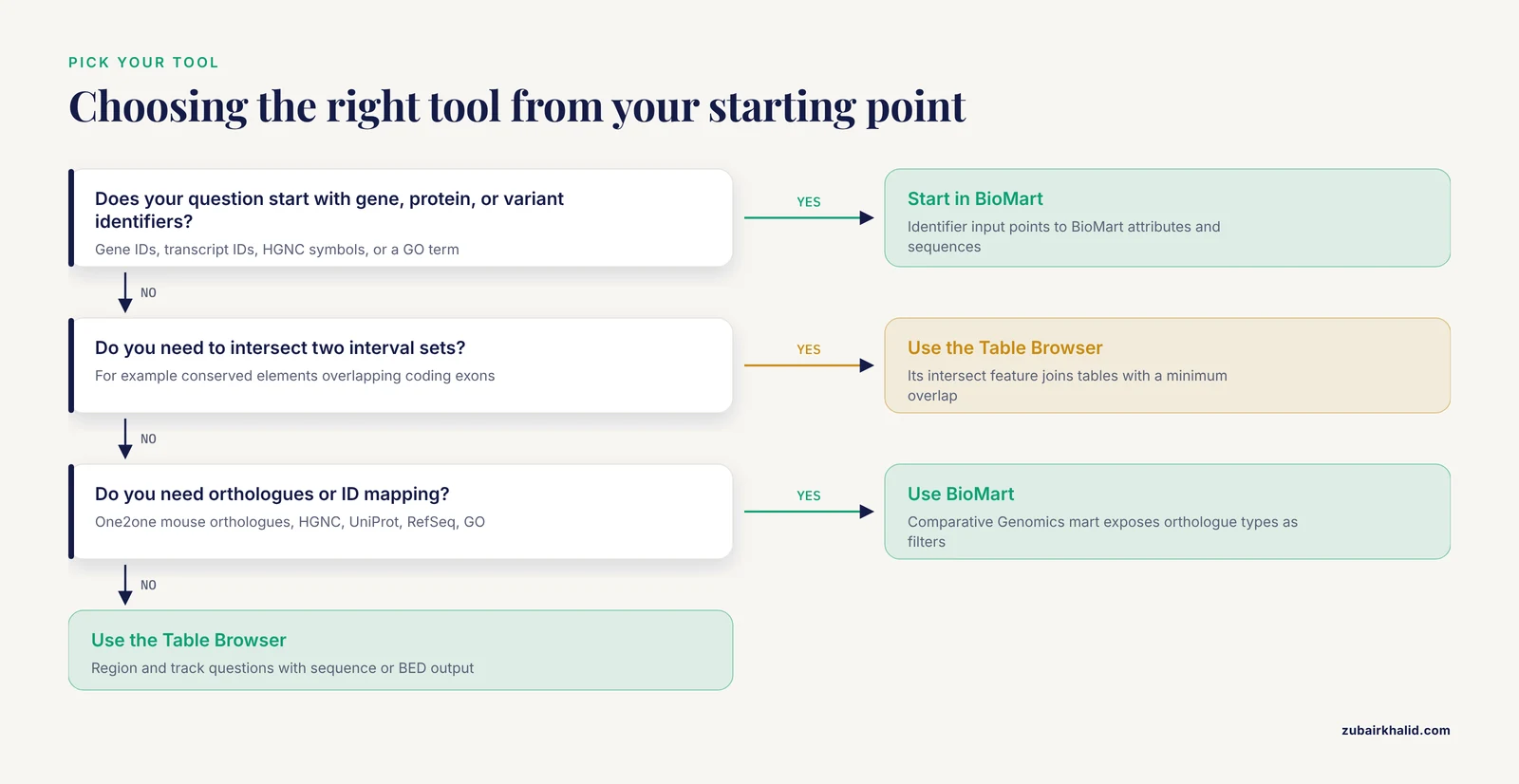
When to use Ensembl BioMart has a short answer: when your input is identifiers. Gene IDs, transcript IDs, protein IDs, HGNC symbols, or a GO term all point to BioMart. When your input is a set of coordinates, or you want "everything in this interval from this track", the Table Browser points to itself. Mixed questions exist, and the usual pattern is to run the identifier-centric part in BioMart, export coordinates, and finish the interval part in the Table Browser.
Cross-species orthology and ID mapping
BioMart wins decisively here. Ensembl Comparative Genomics classifies homologues as one2one, one2many, or many2many, and BioMart exposes both the orthologue identifiers and their type as filters and attributes. You can ask for "human genes with exactly one mouse orthologue" and receive the mouse IDs, coordinates, and homology type in the same table. The Table Browser serves comparative genomics as tracks, chain and net alignments and conservation scores, which describe alignment relationships between assemblies rather than curated gene orthologues. For ID mapping, BioMart attributes translate Ensembl IDs to HGNC symbols, UniProt accessions, RefSeq IDs, and GO terms in one pass.
Interval arithmetic against browser tracks
The Table Browser wins decisively here. Its intersect feature joins the selected table against any other table or a custom track with a configurable minimum overlap. BioMart's region filter accepts a chromosome range but cannot intersect two interval sets. If your analysis sounds like "conserved elements that overlap coding exons" or "dbSNP variants in repeat-free regions", you are describing an intersection, and the Table Browser is built for it.
Sequence retrieval and repeat masking
Both tools export FASTA. BioMart returns cDNA, CDS, peptide, and UTR sequences tied to specific Ensembl transcript versions, which is ideal when sequences must match a documented annotation release. The Table Browser returns genomic sequence for a chosen position type and adds RepeatMasker masking, lower case or N, which BioMart does not offer in the same way. When masking matters, for primer design, alignment inputs, or motif searches, the Table Browser is the practical choice.
Which annotation you are implicitly choosing
The tool you pick constrains the annotation you get. BioMart serves Ensembl annotation, and GENCODE, the gene set produced in alignment with Ensembl, appears in both resources. The Table Browser serves RefSeq, GENCODE, and UCSC Genes side by side. These sets differ in gene models, so a gene count from one tool is not comparable to a gene count from the other. Choose one annotation per project, record the exact track or dataset and version, and do not mix.
Scale, reproducibility, and automation
Both tools script cleanly. biomaRt and the BioMart web service cover Ensembl [2]. The public MySQL server and REST API cover UCSC. For very large jobs, chunk BioMart queries by chromosome or ID batches, and prefer direct MySQL for whole-genome UCSC table dumps. For multi-step analyses, neither tool is a workflow engine, Galaxy or scripted pipelines are the right layer for that, and the most complex genome-scale questions may require the Ensembl API [1].
Worked Scenarios
Scenario 1: Annotate a differential expression hit list (use BioMart)
You have 200 Ensembl gene IDs from an RNA-seq differential expression analysis and need symbols, biotypes, descriptions, and GO terms for a results table. In BioMart, choose Ensembl Genes and the human dataset, paste the IDs into the Gene stable ID filter, select the attribute columns, click Count to confirm roughly 200 rows, and export TSV. The same query in biomaRt is one getBM call. The Table Browser is the wrong tool here because your input is identifiers rather than coordinates, and because GO terms and biotypes are not UCSC table fields.
Scenario 2: One-to-one mouse orthologues with coordinates (use BioMart)
Starting from the same list, you want the mouse orthologue of each gene plus its mouse coordinates. Keep the human dataset, add the mouse orthologue attributes, and set the homology filter to one2one. Export the human and mouse IDs and coordinates together. Genes with one2many or many2many relationships drop out of a one2one filter by design, so report the filter in your methods. The Table Browser has no equivalent orthologue table.
Scenario 3: Conserved elements overlapping exons in a region (use the Table Browser)
You want phastCons conserved elements that overlap coding exons within a 2 Mb window on chr22. Choose the Most Conserved table, set the region, and under intersect select the GENCODE gene table with a minimum overlap of at least one base pair. Output BED. This is an intersection between two interval sets, which is exactly the operation BioMart lacks.
Scenario 4: Repeat-masked CDS sequences for a gene panel (use the Table Browser)
You need CDS sequence for 30 genes with repeats marked. Paste the gene symbols, click convert, choose the gene track, set output format to sequence, position type CDS, and mask repeats to lower case. BioMart can export CDS sequences too, but without RepeatMasker masking, so the Table Browser is the pick whenever masking matters.
Scenario 5: A proteomics search database tied to Ensembl (use BioMart federation)
A proteomics team needs a custom sequence database for search engines and wants identifications mapped to Ensembl genes and Reactome pathways. The PRIDE Database on Demand tool builds custom sequence databases for this purpose, and federated BioMart queries integrate PRIDE identifications with Ensembl, Reactome, or UniProt in a single session [3]. Building the same join by hand means separate downloads from each resource and a fragile mapping script.
Common Mistakes and Limitations
- Mixing assemblies. hg38 equals GRCh38 and hg19 equals GRCh37, but coordinates are not interchangeable between them. If a project started in GRCh37, use the Ensembl GRCh37 archive site or the matching UCSC assembly, and lift over explicitly if you must move between assemblies.
- Off-by-one errors between BED and everything else. BED coordinates are zero-based with an exclusive end, while GTF, browser position strings, and BioMart coordinates are one-based and inclusive. A BED start of 42,999,999 corresponds to a one-based start of 43,000,000. Add one to BED starts before pasting coordinates into a BioMart region filter.
- Chromosome naming mismatches. UCSC names chromosomes "chr1", Ensembl uses "1". Strip or add the prefix before any cross-tool join, and watch for special cases such as the mitochondrial chromosome.
- Ignoring ID versions. Ensembl stable IDs carry version suffixes in GTF files, for example ENSG00000141510.x, while BioMart returns unversioned IDs by default with a version attribute available separately. RefSeq accessions are versioned as well. Decide whether joins happen at the unversioned gene level or the versioned transcript level and stay consistent.
- Trusting gene symbols. Symbols change and aliases accumulate. Map symbols to stable IDs at the start of a project, save the mapping file, and use stable IDs from then on.
- Skipping the Count button. In BioMart, Count tells you the result size before export. A filter that silently matches tens of thousands of rows usually means a pasted list failed to parse. For large jobs, chunk by chromosome or in ID batches to avoid timeouts. For whole-genome UCSC table dumps, the public MySQL server is faster than the web form.
- Assuming both resources use the same gene models. Ensembl, GENCODE, RefSeq, and UCSC Genes differ in transcript structures and gene counts. The Table Browser serves several side by side, BioMart serves Ensembl annotation. Record exactly which track or dataset and version you used.
- Misreading intersect semantics. "Overlapping" can mean at least one shared base pair, a minimum run of bases, or reciprocal coverage. The Table Browser default is any overlap, so set an explicit threshold when a loose definition would change your conclusions.
- Assuming filters and attributes transfer between datasets. A filter that exists in the human genes dataset may not exist in the mouse dataset or in the variation mart. In biomaRt, listFilters() and listAttributes() are the ground truth.
- Using either tool as a pipeline. Both are single-query interfaces. Multi-step analyses belong in Galaxy or scripts, and the most complex genome-scale questions may require the Ensembl API [1]. BioMart's web service keeps automated queries on the same footing as the web form [2].
Frequently Asked Questions
Can I use Ensembl BioMart and the UCSC Table Browser together?
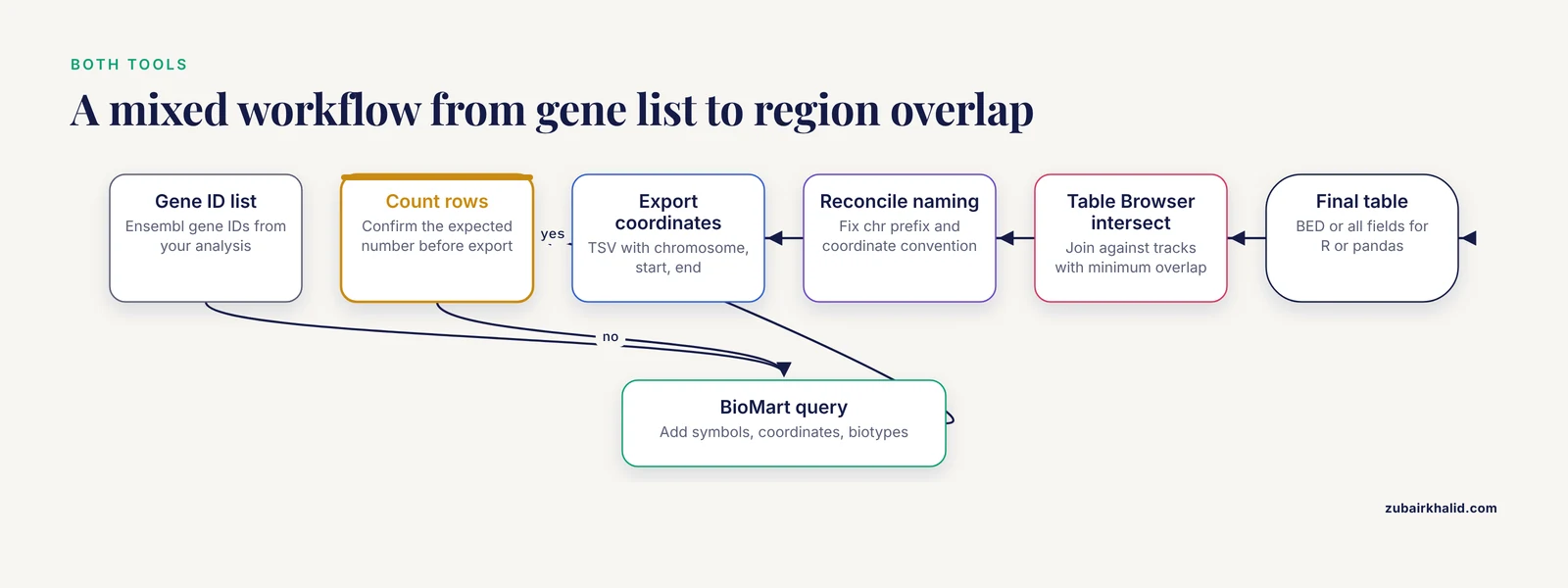
Yes, and many workflows do. Run the identifier-centric step in BioMart, export coordinates, then finish region or intersection work in the Table Browser. Reconcile assembly, coordinate convention, and chromosome naming before joining the outputs.
Which tool should I use for cross-species orthology?
Use BioMart. Ensembl Comparative Genomics provides orthologue identifiers and types as filters and attributes, and the Table Browser has no equivalent orthologue table.
Does the UCSC Table Browser support FASTA output?
Yes. Set the output format to sequence, choose a position type such as exon, CDS, or UTR, and pick a repeat masking option.
How do I automate these tools?
Use biomaRt or the BioMart web service for BioMart, and the public UCSC MySQL server or REST API for the Table Browser.
Is BioMart exclusive to Ensembl?
No. BioMart is a data access architecture that other databases implement, and federated queries can join resources such as PRIDE, UniProt, and Reactome with Ensembl.
Which tool is better for beginners?
The one that matches your question. BioMart's database, dataset, filter, attribute flow suits identifier questions, while the Table Browser suits region questions if you already read the genome browser.