How to Convert Bash Script to Snakemake
By Dr. Zubair Khalid, DVM, MS, PhD ·

By the end of this guide you will be able to take a loop driven bash pipeline, turn every stage of it into a Snakemake rule, and run the result with parallel execution, automatic dependency tracking, and reliable reruns. You will do this on a concrete example: a small RNA-seq preprocessing script that runs FastQC, fastp, HISAT2, samtools, featureCounts, and MultiQC over a set of samples.
Here is what you need on hand before you start:
- A Linux or macOS machine, or a cluster with the SLURM scheduler, with Python 3.11 or newer available.
- Conda or Miniforge installed, which is the cleanest way to install Snakemake and manage per-rule software environments.
- The example data layout described below, or your own project with the same shape of files.
- About an hour for the first conversion, less for every pipeline after that.
Everything in this guide follows the conventions of the official Snakemake documentation, and the example uses standard command line tools from the FastQC, fastp, HISAT2, samtools, subread, and MultiQC projects.
Why Convert a Bash Script to Snakemake at All
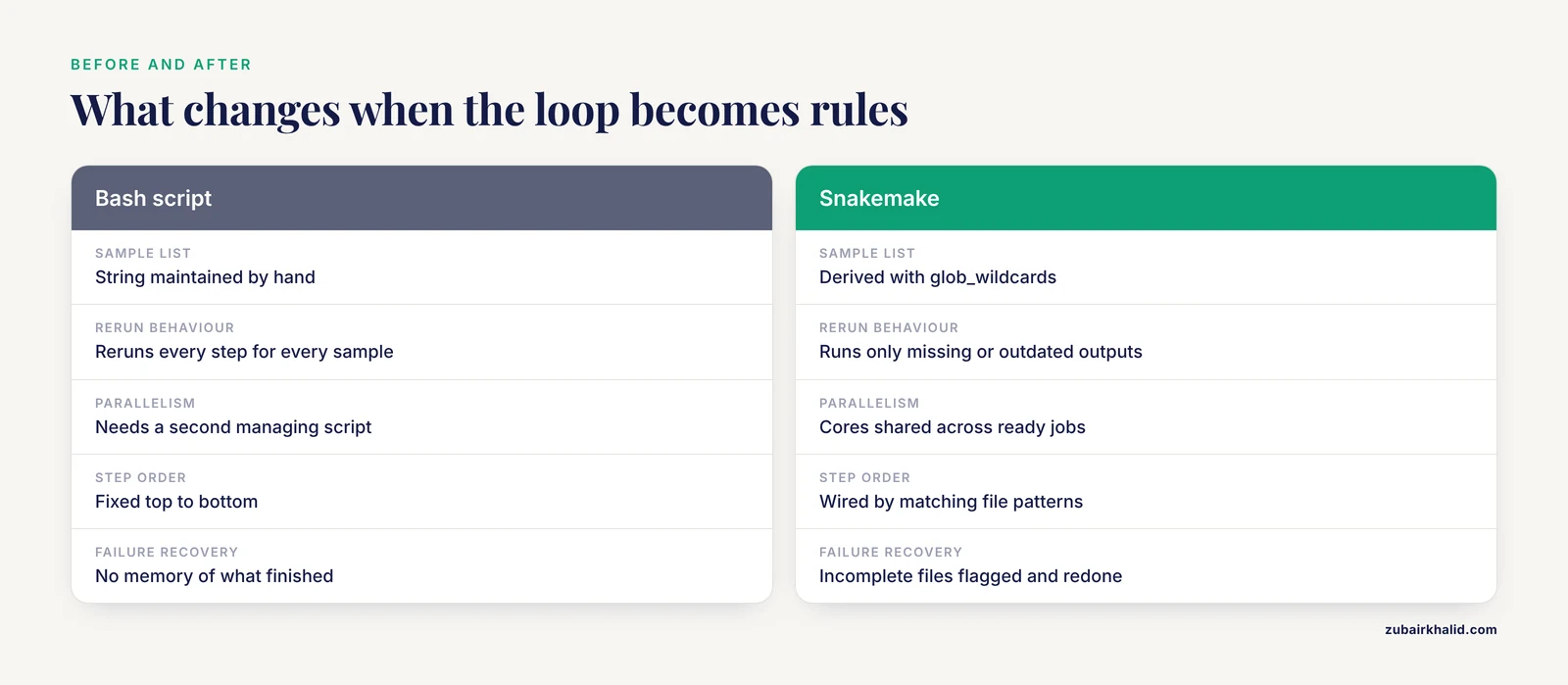
A bash script is a list of commands that runs top to bottom. That is fine until one of three things happens.
First, you add samples. A for loop handles that, but the loop reruns every step for every sample even when only one sample changed. Second, a step fails halfway. Bash gives you no memory of what finished, so the next run starts from the top unless you add your own bookkeeping. Third, you want to use more than one core. Parallelizing a bash loop safely, with per-sample logs and sensible core allocation, means writing a second script whose only job is managing the first.
A bioinformatics workflow manager solves all three problems at once. Snakemake, a Python based workflow manager developed originally at the Free University of Berlin and now widely used across genomics, reads a file of rules, builds a directed acyclic graph (a DAG, meaning a dependency chart where nothing points back at itself), figures out which outputs are missing or older than their inputs, and runs only what is needed, in parallel where the graph allows it.
When you convert bash script to Snakemake, you trade a fixed script for a declarative description: each rule says what files it needs, what files it produces, and what shell command connects them. Snakemake handles the rest, including ordering, parallelism, and reruns.
How Snakemake Thinks: Rules, Wildcards, and Targets
Three concepts carry you through almost every conversion.
Rules are the steps. Each rule has a name, optional input files, output files, a shell command, and optional settings such as thread count or a log file. A rule never names a specific sample. It names a pattern.
Wildcards are the placeholders in those patterns. In the output "trim/{sample}_1.trim.fastq.gz", the part in braces is the wildcard {sample}. When Snakemake needs that file, it reads the wildcard value from the filename and substitutes it everywhere in the rule. This single idea replaces the entire for loop in your bash script.
The all rule is the target. Snakemake works backwards from the files the final rule requests, through the dependency graph, to the raw data. You ask for the final report, and Snakemake discovers that it needs the count files, which need the sorted BAMs, which need the trimmed reads, and so on.
This is the reverse of bash, which runs forward from data to results. Once that clicks, every conversion becomes mechanical.
Nextflow vs Snakemake: A Brief, Honest Comparison
Because the phrase comes up whenever someone picks a workflow manager, here is the short version of nextflow vs snakemake.
Snakemake defines workflows in Python flavored syntax with shell commands inside rules. It feels natural if you write Python, and it is the dominant manager in pure bioinformatics labs that run on SLURM clusters or a single server. Nextflow defines workflows in a Groovy based DSL, has strong built in support for containers and for streaming partial results between processes, and is the foundation of the nf-core collection of community pipelines.
Both are excellent, mature, and free. The practical differences:
| Aspect | Snakemake | Nextflow |
|---|---|---|
| Language | Python-like DSL | Groovy-based DSL |
| Mental model | Rules match file patterns | Processes connected by channels |
| Sweet spot | Pattern-driven file pipelines, cluster and server use | Container-heavy pipelines, cloud execution, large shared workflows |
| Community catalogs | Snakefacts and many published Snakefiles | nf-core collection |
| Learning curve | Gentle if you know Python | Gentler if you know neither Python nor Groovy |
If your pipeline is a set of file transforms, which most QC, trimming, alignment, and counting pipelines are, Snakemake conversions from bash tend to be the most direct. If your roadmap includes heavy cloud or container orchestration, weigh Nextflow seriously before you invest. Nothing in this guide changes if you later switch, because the tool definitions themselves port well.
The Starting Point: A Typical Bash Script
Here is the script we will convert. It is trimmed down but realistic, the kind of script that lives in a lab analysis/ folder.
#!/bin/bash
set -e

SAMPLES="SRR1014863 SRR1014864 SRR1014865"

mkdir -p qc trim bam counts multiqc

for s in $SAMPLES
do
  fastqc -o qc data/${s}_1.fastq.gz data/${s}_2.fastq.gz

  fastp -i data/${s}_1.fastq.gz -I data/${s}_2.fastq.gz \
        -o trim/${s}_1.trim.fastq.gz -O trim/${s}_2.trim.fastq.gz \
        -h trim/${s}.fastp.html -j trim/${s}.fastp.json

  hisat2 -x index/grch38 -1 trim/${s}_1.trim.fastq.gz \
         -2 trim/${s}_2.trim.fastq.gz \
    | samtools sort -o bam/${s}.sorted.bam -

  samtools index bam/${s}.sorted.bam

  featureCounts -a annotation/genes.gtf -o counts/${s}.counts.txt \
                bam/${s}.sorted.bam
done

multiqc -f -o multiqc qc trim
The input directory looks like this:
data/SRR1014863_1.fastq.gz
data/SRR1014863_2.fastq.gz
data/SRR1014864_1.fastq.gz
data/SRR1014864_2.fastq.gz
data/SRR1014865_1.fastq.gz
data/SRR1014865_2.fastq.gz
Everything the script does well, it does by accident of ordering. Everything it does badly, reruns, parallelism, failure recovery, is what the conversion fixes.
Step 1: Install Snakemake in Its Own Environment
Do not install Snakemake into your base conda environment. Give it its own.
conda create -n snakemake -c conda-forge -c bioconda "snakemake>=8"
conda activate snakemake
snakemake --version
Expected output:
8.x.xTwo flags in that command matter. -c bioconda points at the Bioconda channel, the community repository for bioinformatics software, and -c conda-forge supplies the generic Python dependencies. Snakemake 8 and later separate the executor plugins from the core, so if an older tutorial tells you to use -cluster, you are reading Snakemake 7 documentation and should expect the newer -executor interface instead.
Step 2: List Your Samples the Snakemake Way
In bash, the sample list is a string you maintain by hand. In Snakemake, you derive it from the files on disk, which means adding a sample to data/ is all it takes to add it to the pipeline.
Create an empty file named Snakefile in the project root and put this at the top:
SAMPLES, = glob_wildcards("data/{sample}_1.fastq.gz")glob_wildcards scans the directory for files matching the pattern and collects the part matching {sample} into a list. The trailing comma after SAMPLES unpacks a single wildcard column into a plain list rather than a tuple of lists. After this line, SAMPLES equals ["SRR1014863", "SRR1014864", "SRR1014865"], discovered automatically.
Step 3: Write the Target Rule First
Snakemake conventions name the final rule all. Write it before the individual steps, because it forces you to decide what the pipeline delivers.
rule all:
    input:
        "multiqc/report.html",
        expand("counts/{sample}.counts.txt", sample=SAMPLES)
expand is Snakemake's list comprehension for filenames. That second line expands into the three count file paths, one per sample. The MultiQC report is the single file that summarizes everything, so both belong in the final target.
A rule body is indented, and Snakemake accepts either spaces or tabs as long as you are consistent within the file. Mixing them produces a confusing parser error, covered later in the mistakes section.
Step 4: Convert One Loop Iteration Into One Rule
Here is the core of how to convert bash script to Snakemake step by step. Take one iteration of the bash loop, strip out the ${s} and replace it with {sample} in every filename, and wrap the command in a rule.
The fastp step becomes:
rule fastp:
    input:
        r1="data/{sample}_1.fastq.gz",
        r2="data/{sample}_2.fastq.gz"
    output:
        r1="trim/{sample}_1.trim.fastq.gz",
        r2="trim/{sample}_2.trim.fastq.gz",
        html="trim/{sample}.fastp.html",
        json="trim/{sample}.fastp.json"
    threads: 4
    shell:
        "fastp -i {input.r1} -I {input.r2} "
        "-o {output.r1} -O {output.r2} "
        "-h {output.html} -j {output.json} "
        "--thread {threads}"
Read this against the bash version. The loop variable s is gone, replaced by the wildcard. The named inputs (r1, r2) and outputs (html, json) let the shell command reference files by meaning instead of position. The {threads} placeholder inserts whatever Snakemake allocates to this job, which you will see running in Step 8. Adjacent string literals in Python concatenate automatically, which is why long shell commands stay readable.
Every output a rule promises must actually be produced by its shell command. FastQC silently produces different filenames than you might guess, and that mismatch is the single most common conversion failure, so let us handle it next.
Step 5: Handle Tools That Name Their Own Outputs
FastQC writes <basename>_fastqc.html and <basename>_fastqc.zip into the directory given by -o. You cannot choose the names, so the rule's outputs must spell out exactly what the tool will create:
rule fastqc:
    input:
        r1="data/{sample}_1.fastq.gz",
        r2="data/{sample}_2.fastq.gz"
    output:
        html1="qc/{sample}_1_fastqc.html",
        zip1="qc/{sample}_1_fastqc.zip",
        html2="qc/{sample}_2_fastqc.html",
        zip2="qc/{sample}_2_fastqc.zip"
    shell:
        "fastqc -o qc {input.r1} {input.r2}"
If you had declared an output named qc/{sample}.fastqc.html, the run would fail at the end of the job with a message about a missing output file, because Snakemake checks every promise after each job. The fix is always the same: run the tool once by hand, look at what it actually wrote, and make the rule's output pattern match.
Step 6: Convert the Pipe With a Multi Step Shell Command
The bash script pipes HISAT2 output into samtools sort. Pipes work fine inside a rule's shell command, and Snakemake passes the whole string to bash by default:
rule align:
    input:
        r1="trim/{sample}_1.trim.fastq.gz",
        r2="trim/{sample}_2.trim.fastq.gz"
    output:
        bam="bam/{sample}.sorted.bam"
    threads: 8
    log:
        "logs/align/{sample}.log"
    shell:
        "hisat2 -p {threads} -x index/grch38 "
        "-1 {input.r1} -2 {input.r2} "
        "2> {log} "
        "| samtools sort -@ {threads} -o {output.bam} -"
Two things changed beyond the pipe. First, HISAT2 writes its summary to stderr, so the rule declares a log file and redirects stderr there with 2> {log}. Snakemake creates the logs/align/ directory for you. Second, notice that trim/{sample}_1.trim.fastq.gz appears here as an input and in the fastp rule as an output. That match is the whole contract: Snakemake sees that the align rule needs a file the fastp rule can make and wires the dependency automatically. You never list step order anywhere.
The samtools index and featureCounts steps follow the same pattern:
rule index_bam:
    input:
        "bam/{sample}.sorted.bam"
    output:
        "bam/{sample}.sorted.bam.bai"
    shell:
        "samtools index {input}"

rule counts:
    input:
        bam="bam/{sample}.sorted.bam",
        bai="bam/{sample}.sorted.bam.bai"
    output:
        "counts/{sample}.counts.txt"
    shell:
        "featureCounts -a annotation/genes.gtf "
        "-T {threads} -o {output} {input.bam}"
    threads: 4
The index rule exists for a reason that has nothing to do with featureCounts needing the .bai file. It documents that the index is a real output of the pipeline, which lets Snakemake rebuild it correctly if it is deleted, and it makes the dependency explicit rather than implied.
Step 7: Finish With the Aggregation Rule
The MultiQC rule is the mirror image of the loop pattern. Where per-sample rules fan out from one wildcard, the summary rule fans in, taking expanded lists of all per-sample files as input:
rule multiqc:
    input:
        expand("qc/{sample}_1_fastqc.html", sample=SAMPLES),
        expand("trim/{sample}.fastp.json", sample=SAMPLES)
    output:
        "multiqc/report.html"
    shell:
        "multiqc -f -o multiqc {input}"
The -f flag tells MultiQC to overwrite its previous report, which matters on reruns.
The Complete Snakefile
Assembled in order, here is the full converted pipeline. In real files, the SAMPLES line, all, and every rule live together in one Snakefile:
SAMPLES, = glob_wildcards("data/{sample}_1.fastq.gz")

rule all:
    input:
        "multiqc/report.html",
        expand("counts/{sample}.counts.txt", sample=SAMPLES)

rule fastqc:
    input:
        r1="data/{sample}_1.fastq.gz",
        r2="data/{sample}_2.fastq.gz"
    output:
        html1="qc/{sample}_1_fastqc.html",
        zip1="qc/{sample}_1_fastqc.zip",
        html2="qc/{sample}_2_fastqc.html",
        zip2="qc/{sample}_2_fastqc.zip"
    shell:
        "fastqc -o qc {input.r1} {input.r2}"

rule fastp:
    input:
        r1="data/{sample}_1.fastq.gz",
        r2="data/{sample}_2.fastq.gz"
    output:
        r1="trim/{sample}_1.trim.fastq.gz",
        r2="trim/{sample}_2.trim.fastq.gz",
        html="trim/{sample}.fastp.html",
        json="trim/{sample}.fastp.json"
    threads: 4
    log:
        "logs/fastp/{sample}.log"
    shell:
        "fastp -i {input.r1} -I {input.r2} "
        "-o {output.r1} -O {output.r2} "
        "-h {output.html} -j {output.json} "
        "--thread {threads}"

rule align:
    input:
        r1="trim/{sample}_1.trim.fastq.gz",
        r2="trim/{sample}_2.trim.fastq.gz"
    output:
        bam="bam/{sample}.sorted.bam"
    threads: 8
    log:
        "logs/align/{sample}.log"
    shell:
        "hisat2 -p {threads} -x index/grch38 "
        "-1 {input.r1} -2 {input.r2} "
        "2> {log} "
        "| samtools sort -@ {threads} -o {output.bam} -"

rule index_bam:
    input:
        "bam/{sample}.sorted.bam"
    output:
        "bam/{sample}.sorted.bam.bai"
    shell:
        "samtools index {input}"

rule counts:
    input:
        bam="bam/{sample}.sorted.bam",
        bai="bam/{sample}.sorted.bam.bai"
    output:
        "counts/{sample}.counts.txt"
    threads: 4
    shell:
        "featureCounts -a annotation/genes.gtf "
        "-T {threads} -o {output} {input.bam}"

rule multiqc:
    input:
        expand("qc/{sample}_1_fastqc.html", sample=SAMPLES),
        expand("trim/{sample}.fastp.json", sample=SAMPLES)
    output:
        "multiqc/report.html"
    shell:
        "multiqc -f -o multiqc {input}"
Step 8: Dry Run Before You Run
Never launch a converted pipeline blind. The dry run flag builds the whole dependency graph and prints the job plan without executing anything:
snakemake -n --cores 8Expected output:
Building DAG of jobs...
Job stats:
job         count
all             1
align           3
counts          3
fastp           3
fastqc          6
index_bam       3
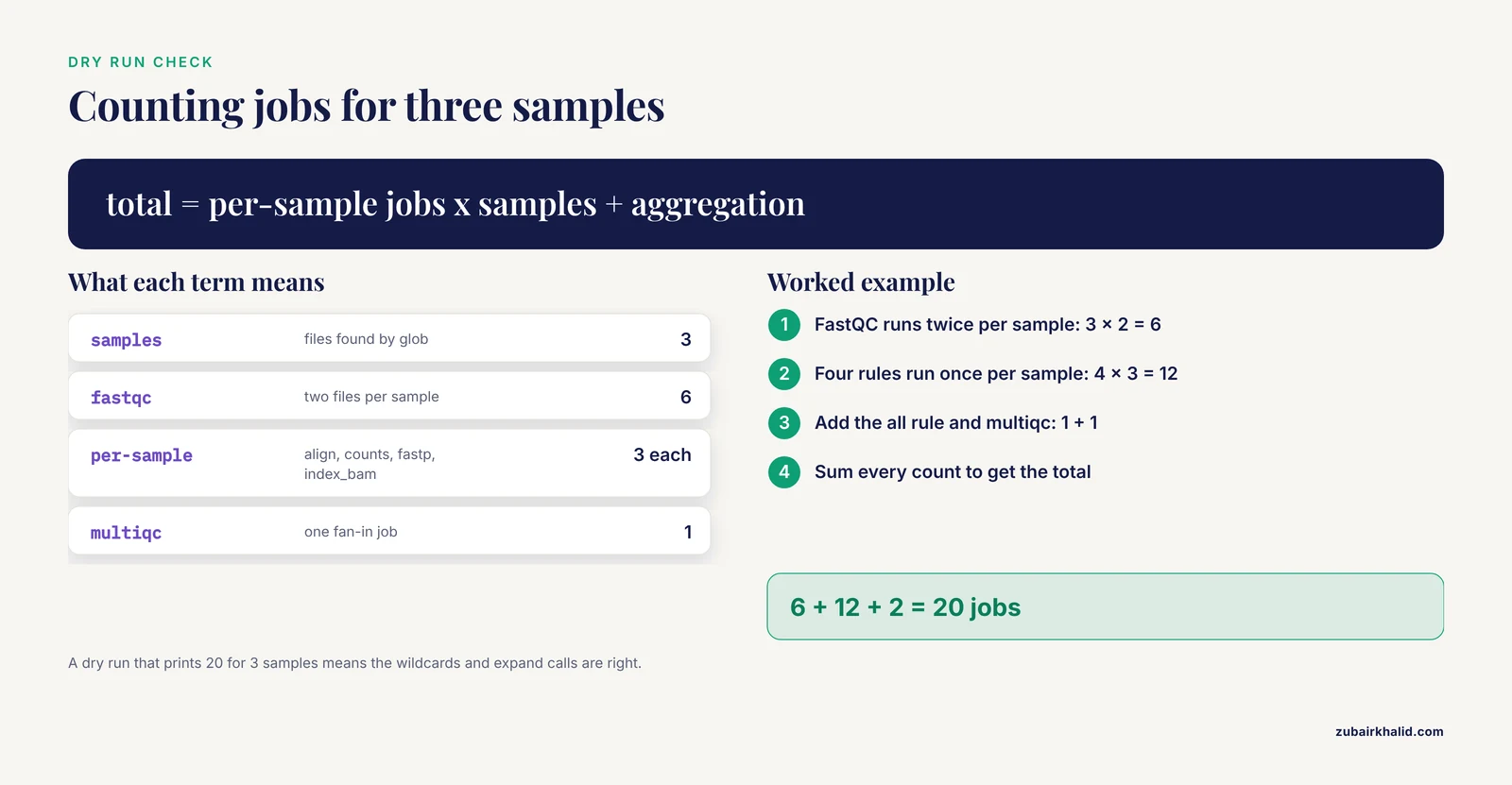
multiqc         1
total          20

This was a dry-run (flag -n). The order of jobs does not reflect
the order in which they will be scheduled in practice.
Reading that output is the fastest correctness check in the whole conversion. Six FastQC jobs means three samples times two files. Three of everything else means one per sample. One MultiQC job means the fan-in worked. If the counts look wrong, the wildcard pattern or the expand calls are wrong, and you have found it without wasting an hour of compute.
For a picture of the graph, render the DAG:
snakemake --dag -n | dot -Tpdf > dag.pdfStep 9: Run It
snakemake --cores 8Expected output, abbreviated:
Building DAG of jobs...
Using shell: /usr/bin/bash
Provided cores: 8
Rules claiming more threads will be scaled down.
Job stats:
job         count
all             1
align           3
counts          3
fastp           3
fastqc          6
index_bam       3
multiqc         1
total          20

Select jobs to execute...
[Mon Nov 11 10:12:01 2026]
rule fastp:
    input: data/SRR1014863_1.fastq.gz, data/SRR1014863_2.fastq.gz
    output: trim/SRR1014863_1.trim.fastq.gz, ...
    jobid: 5
    reason: Missing output files: trim/SRR1014863_1.trim.fastq.gz
    resources: tmpdir=/tmp

6 of 20 steps (30%) processed
Snakemake scales each rule's declared threads down to what -cores allows, runs as many jobs in parallel as the graph and cores permit, and prints a reason line for every job explaining why it ran. Run the same command again immediately afterward and you should see Nothing to be done, which is the rerun test passing.
Step 10: Pin Software With Per Rule Conda Environments
Your bash script worked because the right versions of ten tools happened to be on your PATH. Snakemake can make that reproducible instead of lucky, with a conda environment declared per rule. First add the directive:
rule fastp:
    input:
        r1="data/{sample}_1.fastq.gz",
        r2="data/{sample}_2.fastq.gz"
    output:
        r1="trim/{sample}_1.trim.fastq.gz",
        r2="trim/{sample}_2.trim.fastq.gz",
        html="trim/{sample}.fastp.html",
        json="trim/{sample}.fastp.json"
    threads: 4
    conda:
        "envs/fastp.yaml"
    shell:
        "fastp -i {input.r1} -I {input.r2} "
        "-o {output.r1} -O {output.r2} "
        "-h {output.html} -j {output.json} "
        "--thread {threads}"
Then write envs/fastp.yaml:
channels:
  - conda-forge
  - bioconda
dependencies:
  - fastp =0.24.0
Run with the conda flag enabled:
snakemake --cores 8 --use-condaSnakemake creates each environment once, caches it, and runs the rule's shell command inside it. Repeat this for each tool in the pipeline. A version pin like fastp =0.24.0 is what separates a pipeline that reruns cleanly next year from one that breaks when a tool changes its output format. Give the environment file a real version constraint rather than an unpinned package name, and record the versions you actually validated with.
Key Command Line Options Reference
These are the Snakemake options that matter most in day to day conversion work:
| Option | What it does | When you reach for it |
|---|---|---|
-n | Dry run, builds the DAG and prints the plan without executing | First command after every edit to the Snakefile |
-cores N | Total cores available to the run | Always required in Snakemake 8 and later |
-use-conda | Materialize and activate per-rule conda environments | Once environments are declared, every run |
-F | Force re-execution of all jobs, including up to date ones | Validating the conversion end to end |
-R some_rule | Re-execute the given rule and everything downstream | A rule's code changed but outputs exist |
-rerun-incomplete | Redo jobs that were interrupted mid-write | After a killed or crashed run |
-summary | Table of every output, its status, and why | Asking "what will happen if I rerun" |
-list | List the rules in the Snakefile | Confirming the file parses and rules registered |
-dag -n | Print the DAG in Graphviz DOT format | Visual check of wiring before the first run |
-touch | Mark outputs as up to date without rerunning | Recovering from a reorganization where outputs are still valid |
Verifying the Conversion Is Correct
A converted pipeline is correct when three checks pass.
The dry run counts check. Per-sample job counts equal the number of samples, aggregation rules count as one, and the total equals the sum. We saw 20 jobs for 3 samples in the example.
The rerun check. Run the pipeline twice in a row. The second run must print Nothing to be done (all requested files are present and up to date) or equivalent. If the second run re-executes jobs, something in the rule is producing a nondeterministic output name or touching an extra file, and you should find it before trusting the pipeline.
The partial rerun check. Delete one intermediate file, say trim/SRR1014864_1.trim.fastq.gz, and dry run again. Exactly the fastp job for that sample plus the downstream align, index, counts, and multiqc jobs should appear. Nothing for the other two samples should be scheduled. This proves the dependency graph matches your bash script's logic rather than merely resembling it.
As a final check, spot compare one output against what your original bash script produced, for example the fastp JSON summary metrics for one sample. Numbers should match within tool-version variance.
Exact Error Messages and Their Fixes
These are the errors you will actually hit during a first conversion, with the real message text and the fix for each.
Missing input files.
MissingInputException in line 14 of /path/Snakefile
Missing input files for rule fastp:
    data/SRR1014863_1.fastq.gz
Snakemake resolved every wildcard but the file does not exist. Check spelling, check the actual filenames with ls data/, and remember that glob_wildcards only finds samples whose files already exist. The {sample} value comes from matching the pattern, so a file named data/srr1014863_1.fastq.gz in lowercase will not match a pattern built from different sample strings.
Target rules may not contain wildcards.
TargetRules may not contain wildcards.You ran snakemake with no target and the first rule in the file, which becomes the default target, used {sample}. Keep rule all with plain filenames and expanded lists at the top of the Snakefile as the default target.
Wildcards cannot be determined from output files.
WildcardError in line 22 of /path/Snakefile
Wildcard(s) 'sample' missing in input files for rule fastp
Every wildcard in a rule's output must appear in its inputs so Snakemake can infer the value. If your rule outputs trim/{sample}.fastp.json but its inputs are hardcoded paths, Snakemake cannot know which sample the job is for. Make sure each input pattern contains the same wildcards as the output pattern.
Ambiguous rules.
AmbiguousRuleException in line 22 of /path/Snakefile
Rules fastp and fastqc are ambiguous for the file ...
Two rules can produce the same file. This usually happens when output patterns overlap, for example a catch-all copy rule that outputs trim/{sample}_1.trim.fastq.gz alongside the real fastp rule. Make output patterns mutually exclusive or set a ruleorder: fastp > fastqc line, though fixing the pattern overlap is almost always the better fix.
Cyclic dependency.
CyclicDependencyException in line 22 of /path/Snakefile
Cyclic dependency on rule fastp
A rule's input pattern matches its own output pattern. The classic case is writing output: "trim/{sample}.gz" and input: "trim/{sample}.gz" in the same rule. Give intermediates distinct names so the graph has a direction.
NameError on your sample list.
NameError: name 'SAMPLES' is not definedThe SAMPLES assignment sits below the rule that uses it. Snakemake executes the Snakefile top to bottom like a Python script, so all definitions must precede their first use.
Environments declared but not enabled.
CondaEnvironmentsNotUsedException: ...
Conda environments were defined, but "--use-conda" is not enabled.
Exactly what it says. Add -use-conda or remove the conda: directives.
Interrupted run leaves incomplete files.
IncompleteFilesException:
Files marked as incomplete:
    trim/SRR1014863_1.trim.fastq.gz
A job was killed between creating a file and finishing it. Snakemake remembers and refuses to proceed. Rerun with -rerun-incomplete and the affected jobs redo cleanly.
Mixed indentation.
SyntaxError: ...
IndentationError: unexpected indent (line 14)
Python, which parses the Snakefile, rejects a file that mixes tabs and spaces in the same rule body. Configure your editor to insert spaces for tab and reindent the file. This error most often appears the first time you paste rules from a website.
Convert Bash Script to Snakemake Tips That Save Hours
These tips separate a working conversion from a maintainable one.
Keep the bash script commented out nearby while you convert. Do the conversion in one sitting, rule by rule, with the original open beside you. Each rule maps to one line or block of bash, and keeping the mapping visible means nothing gets silently dropped. Delete the old script only after the rerun and partial rerun checks pass.
Declare a log directive for every rule that writes to stderr. Tools like HISAT2, STAR, and BWA write useful summary text to stderr, and without a redirect it disappears into Snakemake's console stream. A per-sample log file costs one line and pays for itself the first time you debug a bad sample.
Use benchmark: for timing data you will want later. It costs one line per rule and writes runtime and memory use to a tab separated file, which turns "how long does this step take" from a guess into a fact.
Mark intermediates with temp() when disk matters. Writing temp("bam/{sample}.sorted.bam") makes Snakemake delete that file once nothing downstream needs it. Trimmed FASTQs and intermediate BAMs are the usual candidates. Leave temp() off while debugging, because deleted intermediates force reexecution.
Add -restart-times 3 for flaky steps on clusters. Transient node failures kill long runs. This option retries a failed job up to three times before giving up. Use it deliberately for steps with known flakiness, not as a blanket excuse for nondeterministic bugs.
Move parameters into a config file early. Replace hardcoded paths like index/grch38 with a config.yaml file read through config["hisat2_index"] and a -configfile config.yaml flag. Converting a second pipeline or rerunning on new reference data becomes an edit to YAML rather than an edit to code. The pattern is one line in the Snakefile:
configfile: "config.yaml"with config.yaml containing:
hisat2_index: index/grch38
annotation: annotation/genes.gtf
and the rules referencing config["hisat2_index"] and config["annotation"].
Run snakemake, list after every structural edit. It takes a second and confirms the file parses and every rule registered, which catches indentation and syntax problems before a costly dry run.
Convert the fan-out steps first, the fan-in steps last. Per-sample rules are independent and easy to test individually. Aggregation rules fail noisily if any upstream pattern is wrong. Building in that order means each piece is testable when you write it.
Common Mistakes and Limitations
These are the mistakes that account for most failed conversions, followed by an honest note on what the conversion does not fix.
Declaring outputs the tool does not actually create. FastQC, MultiQC, and many Bioconda tools choose their own output filenames. Run each tool once on one sample by hand, list the directory, and copy the real names into the rule. Snakemake's post-job output check will catch any mismatch, but catching it by hand first is faster.
Forgetting that the second run should do nothing. If a rerun re-executes everything, look for timestamps being touched, output filenames containing run dates, or a tool that rewrites an output it should leave alone. A pipeline that always reruns has lost its main advantage over bash.
Keeping manual mkdir calls as rules. Snakemake creates output directories automatically. A rule make_dirs with no inputs confuses the graph and adds nothing. Delete those lines during conversion.
Hardcoding the sample list in the Snakefile. The SAMPLES = "..." string translated directly from bash defeats the point. Derive samples with glob_wildcards so file additions propagate automatically.
Using {wildcards.sample} where {input} formatting would do. Inside expand() you reference wildcard names bare. Inside shell: you may need {wildcards.sample} when the value appears in a flag rather than a filename. Mixing the two up produces a key error at parse or run time. When a string is a file path built from wildcards, prefer expand() at the top and pass whole paths through input and output.
Expecting Snakemake to fix a broken pipeline. If your bash script had a logic bug, wrong annotation file, wrong trimming parameters, mismatched sample metadata, the Snakemake version will reproduce that bug efficiently and reproducibly. The conversion improves orchestration, not scientific decisions.
Assuming dry run success means the pipeline is right. A dry run validates graph structure and file existence, not that your commands produce the biology you intend. The partial rerun check and a spot comparison of one output against the original script's results remain necessary.
One scope note: this guide covers single machine and SLURM-style execution. Cloud executors, container backends beyond conda, and Snakemake's full scripting API are each large topics that deserve their own treatment, and none of them change the conversion principles covered here.
Frequently Asked Questions
Do I need to convert my entire bash script in one go?
No, and you should not. Convert one step, dry run it, run it on one sample, and repeat. Snakemake can call your remaining bash script from a single rule while you work, so you can migrate incrementally without a frozen pipeline.
How does Snakemake decide which steps to rerun?
It compares timestamps and content metadata between each output and its inputs. If an input file is newer than the output, or a job previously failed, that job and everything depending on it reruns. Unaffected branches are skipped entirely.
Can I keep using my existing bash commands inside rules?
Yes. The shell: directive contains ordinary bash, including pipes, redirects, and loops within a single job. The conversion is about file plumbing and dependency management, not about rewriting your tool invocations.
How many threads should each rule declare?
Declare the number of cores the underlying tool actually uses well, which is documented per tool. Trimmers like fastp scale to a handful of threads, aligners like HISAT2 scale further. Snakemake scales your declaration down to fit -cores, so overdeclaring wastes nothing, but underdeclaring limits parallel efficiency.
Is Snakemake or Nextflow the better choice for my pipeline?
For pattern-driven file pipelines on a server or SLURM cluster, especially if you know Python, Snakemake conversions from bash tend to be fastest. For container-heavy, cloud-first, or large shared community pipelines, Nextflow and the nf-core ecosystem have the edge. Both are sound choices, so pick by your compute environment and team skills.
Where does the Snakefile go and what must it be named?
Name it Snakefile and put it in the working directory where you invoke snakemake. Snakemake finds it automatically. With a different name or location, pass it explicitly with -snakefile path/to/myfile.
How do I test the converted pipeline without running everything?
Use snakemake -n, cores 8 to build the DAG and print the job plan, use snakemake, dag -n with Graphviz to visualize it, and test single rules with snakemake -n, cores 1 rulename. Full execution on one small sample is the final test.
Do I need conda installed to use Snakemake at all?
No. Snakemake runs with tools already on your PATH if you skip the conda: directives and the -use-conda flag. You lose version pinning and reproducibility, so treat that as a development mode and add environments before you consider the conversion finished.