Commit Message Templates for Lab Notebooks
By Dr. Zubair Khalid, DVM, MS, PhD ·

By the end of this article you will have three things working in your repository: a commit message template that fills the editor with a structured notebook entry every time you commit, a git hook that rejects entries missing required fields, and commands that let you search months of history by experiment ID, sample set, or manuscript figure. You will need git installed (any version from the last several years works), access to a terminal, and about 20 minutes. A GitHub account is optional until the section on sharing conventions with a lab.
This guide is written for researchers who use a git repository as an electronic lab notebook. The repository might hold analysis scripts, small data files, protocols, or markdown notes. The commit messages, not the code alone, are what make that repository behave like a notebook. A commit message template is the cheapest way to force those messages into a shape you can search later.
Why Git for Scientists Needs a Notebook Convention
Most scientists who adopt version control start by committing with short, improvised messages. "fixed bug", "rerun", "final version 2 REAL". Six months later, when a reviewer asks which parameter set produced the figure in panel B, those messages are useless. The problem is not discipline or intelligence. It is that an unstructured text field invites unstructured content, and the moment of committing is usually the moment you are busiest.
A commit message template solves this by pre-filling the editor. When you run git commit, git opens the message file with your skeleton already in place. You fill in the blanks instead of inventing a format from scratch at 6 p.m. on a Friday. The template turns a habit problem into a fill-in-the-blanks problem, and fill-in-the-blanks is something a busy researcher can actually sustain.
The payoff is search. Git indexes every message, so once your entries carry consistent keys like Experiment: and Notebook-Entry:, commands such as git log, grep="EXP-042" retrieve the full history of one experiment in seconds. That retrieval step, not the writing step, is where structured notebook commits earn their keep. It is also what distinguishes a versioned notebook from a folder of dated Word documents, which you cannot query at all.
There is a second audience for these messages beyond you. Collaborators who join a project read commit history to reconstruct decisions. Repositories hosted on GitHub for researchers are often read by reviewers, students, and future lab members who were not present when the work happened. A message that names the pipeline version and the seed value answers questions before they are asked.
The Anatomy of a Lab Notebook Commit Message Format
Git's own documentation has long recommended a two-part message shape: a short subject line, a blank line, then a body with longer lines wrapped around 72 characters. This shape exists because the subject line is displayed alone in log views, pull-request lists, and GitHub's interface, while the body is only read on demand. Nearly every git tooling convention, including the widely used Conventional Commits specification, builds on it. The lab notebook format below keeps that structure and adds a fixed footer block for metadata.
A complete entry has four zones.
1. Subject line. Fifty characters or fewer, written in the imperative mood ("add" not "added"), with no trailing period. It starts with a type tag and an optional scope in parentheses. This is the line that appears in git log, oneline and in GitHub's commit list.
2. Body. Three to ten lines answering three questions: what changed, why it changed, and how to reproduce the run. Wrap lines at 72 characters so the message reads cleanly in terminal tools. Put actual commands in the body when they are short enough to rerun.
3. Footer keys. Machine-readable lines in Key: value form. These are the fields your template guarantees on every entry and the fields your future searches will target. Pick the smallest set your lab actually needs. A workable starter set:
Notebook-Entry:a date plus a lowercase letter for multiple entries in one day, for example2026-03-04-b. This mirrors how paper notebooks have always worked and gives you a stable citation-style handle.Experiment:the experiment ID from your lab's register, for exampleEXP-042.Method:pipeline or protocol name with version, for examplenf-core/rnaseq v3.9orprotocol pcr-q5 v1.2.Params:the handful of parameters that actually varied, for examplemin_reads=1000, seed=42.Data:where raw inputs or large outputs live, for examples3://lab-bucket/run42orarchive:RUN42_2026-03-03.tar.gz.Linked:a GitHub issue number or manuscript reference, for example#12orfig3-revision1.
4. Comments. Any line beginning with # is guidance for the writer. Git strips these lines automatically before saving, so you can keep instructions visible in the editor without polluting the stored message.
The subject-line types I recommend for lab work are deliberately few. Fewer types means the format survives contact with real usage.
| Type | Use it when | Footer keys you require | Example subject |
|---|---|---|---|
| EXP | A wet-lab or observational experiment entry | Experiment, Samples, Data | EXP(DNA-extract): switch to bead-beating lysis |
| ANALYSIS | Running or re-running a computational analysis | Method, Params, Data | ANALYSIS(rnaseq): rerun quant with new gtf |
| DATA | Adding, moving, or documenting data files | Data, Samples | DATA(serum): import cohort B metadata |
| FIG | Generating or revising a figure | Linked, Params | FIG(fig3): add batch-corrected PCA panel |
| DOC | Protocol, README, or notebook prose changes | none | DOC(protocol): update thaw steps after QC |
| CHORE | Configuration, CI, environment changes | none | CHORE(env): pin samtools to 1.19.2 |
The one-line summary rule of thumb: fifty characters is a target, not a hard limit. If you exceed it regularly, your scope tag is probably too broad. Split ANALYSIS(rnaseq-proteomics-integration) into ANALYSIS(rnaseq) and ANALYSIS(proteomics) entries rather than widening the line.
A Free Commit Message Template for Lab Notebooks (Copy and Use)
The template below is the one the walkthrough installs. It contains uncommented placeholder lines, which git treats as the actual message until you replace them, plus commented guidance lines, which git strips automatically. Copy it into a plain text file. If you want a different field set, edit the footer block now, because every step later in this article assumes these key names.
<type>(<scope>): <subject, 50 chars max, imperative, no period>

<Body: what changed and why. Wrap at 72 characters.>
<How to reproduce: command, input file, random seed if applicable.>

Notebook-Entry: YYYY-MM-DD-x
Experiment: EXP-000
Samples: n=0, source
Method: pipeline vX.Y
Params: key=value
Data: location
Linked: #000

# Types: EXP, ANALYSIS, DATA, FIG, DOC, CHORE
# Delete any footer line you do not need. Keep at least Notebook-Entry.
# Lines starting with # are removed automatically when you save.
Two design choices here matter and deserve explanation.
First, the placeholder line Notebook-Entry: YYYY-MM-DD-x is deliberately left uncommented. If the whole template were commented out, git would strip every line, judge the message empty, and abort the commit. A skeleton with visible placeholders is harder to forget than guidance you must remember to un-comment.
Second, the footer block sits at the bottom because git treats trailing Key: value lines as commit message footers, the same convention GitHub uses to link commits to issues. A line reading Linked: #12 in the last paragraph block of a message becomes a clickable link in the GitHub interface and, when you write fixes #12 or closes #12, automatically closes that issue when the commit lands on the default branch.
Walkthrough: Installing the Template in One Repository
This section walks through setup from an empty directory to a first structured entry. Run the commands in order and compare your output against the expected output shown.
Step 1. Confirm git and create the repository
$ git --version
git version 2.43.0

$ mkdir lab-notebook && cd lab-notebook
$ git init
Initialized empty Git repository in /home/you/lab-notebook/.git/
If git, version prints a message about the command not being found, install git first. On macOS, xcode-select, install provides it. On Windows, install Git for Windows, which also gives you Git Bash, the terminal I assume for the rest of this walkthrough.
Step 2. Save the template file
Create the file with any editor. The conventional location is your home directory for global use, or the repository root for project use. Save the template from the previous section as ~/.gitmessage-lab. Verify it exists:
$ ls -l ~/.gitmessage-lab
-rw-r--r-- 1 you you 412 Mar  4 09:15 /home/you/.gitmessage-lab
Use an absolute path. Git resolves a relative commit.template value in ways that surprise people when they commit from a subdirectory, and an absolute path removes that entire class of failure.
Step 3. Point git at the template
$ git config commit.template /home/you/.gitmessage-lab
$ git config --get commit.template
/home/you/.gitmessage-lab
Run without -global, this sets the option only for the current repository, which is what you want when different projects need different formats. Run it with -global to make the template the default for every repository on the machine. Many labs install the notebook template globally and then override it per repository where a project has its own needs.
Step 4. Choose an editor you actually like
$ git config --global core.editor "nano"If you use VS Code, the correct value is git config, global core.editor "code, wait". The -wait flag is mandatory. Without it, VS Code returns control to git immediately, git reads a half-written or empty message, and the commit aborts.
Step 5. Make a change and commit
Add any file so there is something to commit:
$ echo "# Lab notebook, 2026" > notes.md
$ git add notes.md
$ git commit
Your editor opens with the template pre-loaded. Replace the placeholders:
DOC(notebook): start 2026 notebook with README

Beginning a versioned notebook for the serum biomarker project.
First entry records the repo purpose and the directory layout.

Notebook-Entry: 2026-03-04-a
Method: manual notes
Data: notes.md in this repo
Save and close the editor. The terminal shows:
[main (root-commit) 1a2b3c4] DOC(notebook): start 2026 notebook with README
 1 file changed, 1 insertion(+)
 create mode 100644 notes.md
Step 6. Verify the stored message
$ git show --stat HEAD
commit 1a2b3c4d... (HEAD, main)
Author: You <[email protected]>
Date:   Tue Mar 4 09:20:11 2026 -0500

    DOC(notebook): start 2026 notebook with README

    Beginning a versioned notebook for the serum biomarker project.
    First entry records the repo purpose and the directory layout.

    Notebook-Entry: 2026-03-04-a
    Method: manual notes
    Data: notes.md in this repo

 notes.md | 1 +
Check three things. The Notebook-Entry: footer survived (comments were stripped, footers were not). The subject line is alone at the top with a blank line under it. The word Date: in git's own header does not collide with any key you chose, which is why the format avoids a bare Date: footer key in favor of Notebook-Entry:.
Step 7. Test the search payoff immediately
$ git log --grep="Notebook-Entry: 2026-03-04"
$ git log --oneline --grep="EXP-042"
The first command prints the entries from that day. The second prints any entry touching experiment 42. From now on, every retrospective question of the form "when did we change X" becomes a grep instead of an archaeology project.
Step 8. Fixing the last entry
If you spot a typo right after committing, git commit, amend reopens the message. Amending replaces the previous commit with a new one. Do this freely before pushing. After pushing to a shared branch, amending rewrites history that collaborators already have, and pushing the amended commit will be rejected. The fix in that case is to make a new commit that corrects the record, which is also the more honest notebook behavior. An electronic notebook, like a paper one, should show that a correction happened.
Walkthrough: Enforcing the Format with a commit-msg Hook
A template asks politely. A hook refuses malformed entries. The commit-msg hook runs after you save the editor and before the commit is created. Git passes it one argument, the path to the file containing your message. If the hook exits with a nonzero status, the commit is aborted.
Step 1. Create the hook
Create a file named .git/hooks/commit-msg in the repository with this content:
#!/bin/sh
msg_file="$1"
first_line=$(head -n 1 "$msg_file")

pattern='^(EXP|ANALYSIS|DATA|FIG|DOC|CHORE)(\([a-z0-9-]+\))?: .{10,72}$'

if ! echo "$first_line" | grep -Eq "$pattern"; then
    echo "REJECTED: subject line does not match the notebook format."
    echo "Required shape: TYPE(scope): summary, 10 to 72 characters after the colon."
    echo "Allowed types: EXP, ANALYSIS, DATA, FIG, DOC, CHORE."
    echo "First line was: $first_line"
    exit 1
fi

if ! grep -q "^Notebook-Entry: " "$msg_file"; then
    echo "REJECTED: missing required footer 'Notebook-Entry:'."
    echo "Use a date plus letter, for example: Notebook-Entry: 2026-03-04-b"
    exit 1
fi

exit 0
The regular expression reads as: the line must start with one of the six types, optionally followed by a scope in parentheses containing lowercase letters, digits, or hyphens, then a colon and space, then a summary between 10 and 72 characters. The second check greps the whole message for the required footer.
Step 2. Make it executable
$ chmod +x .git/hooks/commit-msgHooks that lack the executable bit fail with a permission error covered in the troubleshooting section, so run this step even if you are sure.
Step 3. Test the rejection path
$ echo "test" >> notes.md
$ git add notes.md
$ git commit -m "fixed stuff"
REJECTED: subject line does not match the notebook format.
Required shape: TYPE(scope): summary, 10 to 72 characters after the colon.
Allowed types: EXP, ANALYSIS, DATA, FIG, DOC, CHORE.
First line was: fixed stuff
Confirm the commit was not created:
$ git log --oneline
1a2b3c4 (HEAD -> main) DOC(notebook): start 2026 notebook with README
Only the original commit is present. Your history stays clean.
Step 4. Test the acceptance path
$ git commitIn the editor, write:
EXP(extract): trial bead-beating lysis on cohort A

Compared mechanical lysis against the spin-column protocol.
Yield looked higher on the Nanodrop but wait for Qubit numbers.

Notebook-Entry: 2026-03-04-b
Experiment: EXP-042
Samples: n=6, cohort A serum
Method: manual protocol v1.1
Data: /data/raw/EXP-042
Expected output:
[main 5e6f7a8] EXP(extract): trial bead-beating lysis on cohort A
 1 file changed, 1 insertion(+)
The hook accepted the entry. Note that git commit -m is still available for trivial chores, and the hook will police it, which is exactly the behavior a shared lab repository wants.
One limitation of hooks you should know
Hooks live inside .git/ and are not versioned with the repository. Cloning a fresh copy does not carry them. Labs that standardize on this format either check the hook script into the repository at hooks/commit-msg and instruct members to copy it with cp hooks/commit-msg .git/hooks/, or adopt a hook manager that installs hooks from a checked-in config. For a single-researcher notebook, the manual copy after cloning is enough, and the template itself, which is not a hook, still travels in your global config.
Writing Commit Messages for Lab Notebooks and Manuscripts
The hardest discipline in this format is not typing the footers. It is deciding what the body of the entry should say, especially when the commit feeds a manuscript. The rule I teach: the body should contain enough information for you to regenerate the result, and enough interpretation for you to remember why you cared.
A body for an analysis commit that feeds a manuscript figure should answer, in this order:
- Input. Which dataset version, which reference, which sample subset. Name the file or archive, not "the data".
- Command. The exact command or a pointer to it. If the command is too long for the body, put it in a tracked script and reference the script name and version.
- Parameters that varied. Only the ones that differ from your standing default. A body listing every parameter on every commit trains you to skip the body.
- Result in one sentence. The number you will want in six months, phrased the way you would phrase it in the manuscript.
- Interpretation or open question. One line. "Growth effect disappears after batch correction, consistent with confounding by run date."
A worked example feeding a manuscript figure:
FIG(fig3): batch-corrected PCA for serum metabolomics

Input: metabolomics_batch56 QC-passed features (n=442, 38 samples).
Command: Rscript fig3_pca.R --input batch56_qc.csv --correction ComBat
Seed: 20260304 (for the jitter in panel C).

Result: PC1 separates batches before correction (22% variance),
collapses after correction (4% variance). Figure matches what
the manuscript methods section now describes.

Open question: one sample (S17) still off-axis after correction.
Check its collection date against the shipment log before revising.

Notebook-Entry: 2026-03-05-a
Method: fig3_pca.R v2
Params: correction=ComBat, n_pc=5
Data: archive:batch56_qc_20260305.tar.gz
Linked: #31, manuscript-fig3-rev1
That message contains a to-do ("check shipment log") that survives in searchable history, which is where notebooks earn their keep most often. When you later revise the figure, the Linked: key on both commits ties them to the same manuscript artifact, and git log, grep="manuscript-fig3" assembles the full revision trail.
Two practices prevent the common failure modes. Commit at the granularity of a notebook entry, not at the granularity of a save. If you find yourself writing "misc updates" in the subject, you are batching several notebook entries into one commit, and splitting them with git add -p (which stages selected hunks interactively) restores the one-entry-per-commit property. And write the body while the run details are in your terminal history, not later. The template makes this easier by being there already, but no template survives being filled in from memory two days after the fact.
Sharing the Convention: GitHub for Researchers and Multi-Member Labs
When a notebook repository moves to GitHub, the commit format extends naturally to the platform's workflow objects.
Issues as experiment planning. Open an issue per planned experiment. The issue body holds the design and the sample table. The commit footer Linked: #12 ties entries to the plan, and GitHub renders that footer as a link on both sides.
Pull requests as entry review. If the lab reviews notebook entries before they merge to main, the pull request title should follow the subject-line format, because GitHub populates the title from the first commit's subject. The hook described above runs locally on each member's machine, and the repository can add a CI check that validates commit messages on push, so the convention holds even when someone commits from a machine without the hook.
Default branch as the canonical notebook. Collaborators work on short-lived branches named after the experiment, for example exp-042-lysis, and merge to main. Merge commits should use the default message, because the merge subject on GitHub already names the branch and the pull request.
Release tags as notebook milestones. Tag commits that correspond to manuscript submissions, for example git tag manuscript-v1 5e6f7a8. Tags plus structured messages let you diff the exact state of the notebook that produced a submitted manuscript against the state after reviewer-requested changes.
The hook enforcement question for labs: local hooks protect the author from their own mistakes. CI checks protect the repository from everyone. A lab that wants guaranteed format compliance validates messages in CI, and a lab that trusts its members runs the hook locally and skips CI. Running both is not overkill for repositories that feed publications, because the cost of a non-reproducible history is highest exactly there.
Troubleshooting: Exact Error Messages and Fixes
Aborting commit due to empty commit message. The message file was saved with nothing left in it after comment stripping. This happens when a template consisting entirely of # lines is used, or when you cleared the editor. Fix by keeping the uncommented placeholder skeleton in the template, as the template in this article does. To abandon a commit you no longer want, saving the empty file is the correct move, and git aborting is the correct response.
error: There was a problem with the editor 'vi'. Git tried to launch vi and the launch failed, often on machines where vi is absent or the terminal environment is unusual. Fix by setting an editor you have: git config, global core.editor "nano", or for VS Code, "code, wait" with the -wait flag as described earlier.
error: cannot run .git/hooks/commit-msg: Permission denied The hook exists but is not executable. Fix with chmod +x .git/hooks/commit-msg.
fatal: not a git repository (or any of the parent directories): .git You ran a git command outside a repository. Navigate into the repository directory or run git init if you meant to create one.
nothing added to commit but untracked files present Git has nothing staged. Run git add <file> on the files for this notebook entry, or git commit -a to stage all tracked modified files.
! [rejected] main -> main (non-fast-forward) when pushing after an amend or history rewrite The remote already has the commit you replaced. If the repository is shared, do not force push. Make a new correction commit instead. If it is a private notebook and you accept the history rewrite, git push, force-with-lease is the safer force option because it refuses if someone else pushed in the meantime.
The template does not appear when I commit Check that the config value is set and the path is absolute: git config, get commit.template. A relative path can silently resolve against an unexpected directory depending on where you invoke git from. Also confirm the file is readable by your user account.
Verifying the Whole Setup
A two-minute check covers everything this article installed:
$ git config --get commit.template
/home/you/.gitmessage-lab
$ git config --get core.editor
nano
$ ls -l .git/hooks/commit-msg
-rwxr-xr-x 1 you you 528 Mar  4 09:40 .git/hooks/commit-msg
$ git log --oneline
5e6f7a8 (HEAD -> main) EXP(extract): trial bead-beating lysis on cohort A
1a2b3c4 DOC(notebook): start 2026 notebook with README
$ git log --format="%h %s" --grep="Notebook-Entry: 2026-03-04"
5e6f7a8 EXP(extract): trial bead-beating lysis on cohort A
1a2b3c4 DOC(notebook): start 2026 notebook with README
Every command returned the expected value, the hook file has the execute bit set, and the grep search returns both entries from the day. The setup is complete and correct.
Sensible next steps, in rough order of value: adopt the Data: footer seriously, because the pointer to raw files is the field reviewers and future students ask about most. Add a repository README that documents your lab's type list and required footers, so the convention is written down rather than carried in one person's head. Once the habit has survived a month, extend the hook to validate footer syntax, for example requiring the YYYY-MM-DD-x shape for Notebook-Entry: with a second grep pattern.
Common Mistakes and Limitations
Mistake: a template so heavy nobody fills it in. A template with fifteen required fields produces commits where fields are copied with placeholder values just to satisfy the hook. Five footers filled honestly beat fifteen footers filled performatively. If a field is always blank or always wrong, delete it.
Mistake: treating commit messages as the only notebook. Large protocols, sample tables, and long interpretation belong in tracked files that the commit body points to. Commit messages are an index, not a document store. Searching them works precisely because they stay short.
Mistake: amending pushed commits on shared branches. This rewrites history others have already pulled and produces the rejected push error shown above. The correction-commit pattern is the notebook-appropriate fix.
Mistake: relying on hooks for enforcement on machines that never got the hook. Hooks do not travel with clones. Any enforcement promise the lab makes must assume some member's machine has no hook at all, which is the argument for a CI-side check in shared repositories.
Limitation: the format is a convention, not a guarantee of reproducibility. A well-formed commit message with the wrong parameter value is still wrong. The format makes omissions visible, which helps you catch them, but the numbers must come from your run logs and validated configuration files. Where a claim matters for publication, verify the value in the output artifact, not only in the message.
Limitation: fifty characters is tight for instrument runs. When a run identifier alone eats the budget, move detail to the body and let the subject name the run ID. The subject needs to identify the entry in a one-line list, not describe it exhaustively.
Finally, the general limitation of any infrastructure advice: the format that survives is the one your lab actually keeps. Individual projects and individual researchers may need to adjust the field set, and a field set that matches how your lab already talks is worth more than an elaborate one that matches no one's habits.
Frequently Asked Questions
What should a commit message for a lab notebook contain?
A short imperative subject line with a type tag, a body recording what changed and how to reproduce it, and a footer block with keys such as Notebook-Entry:, Experiment:, Method:, Params:, Data:, and Linked:. The reproducibility information and the pointer to raw data are the two elements you will regret omitting.
How long should the subject line of a notebook commit be?
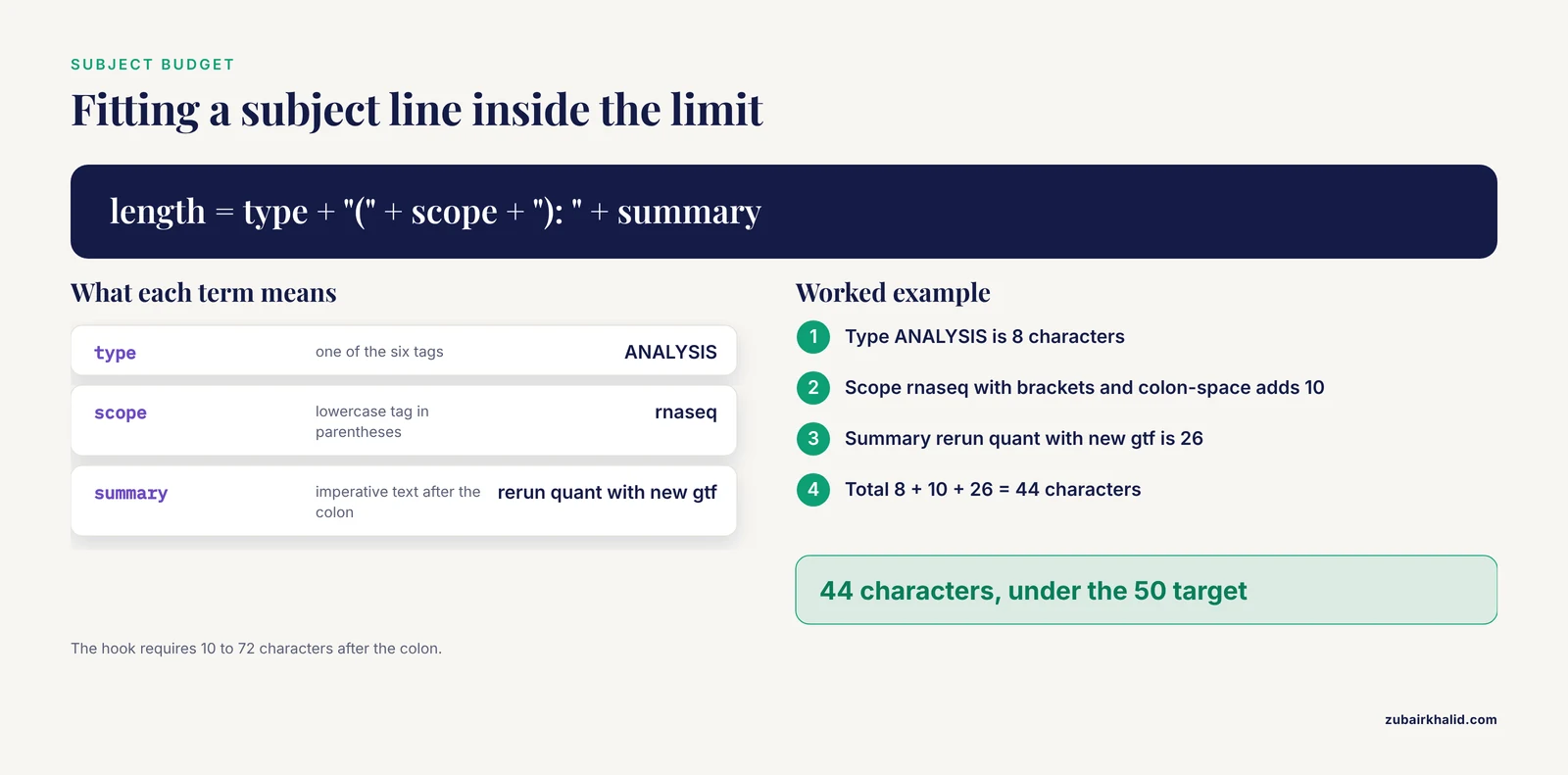
Aim for fifty characters or fewer, and keep it under seventy-two so it never wraps in log views. Git tooling conventions favor this range because the subject line is displayed alone in most list interfaces, where wrapping hides the informative part.
Can I use these commit message templates for lab notebooks with GitHub?
Yes. The template is a local git feature and works regardless of where the repository is hosted, and footer lines such as Linked: #12 render as issue links in GitHub's interface. Hosting on GitHub additionally gives you pull requests, issues, and CI checks for format enforcement across a lab.
Do I need a hook, or is the template enough?
The template alone is enough for a single researcher with good habits. The hook is what enforces the format on everyone, including you on a bad day, and it is the right addition once multiple people commit to the same repository or once messages feed manuscripts.
How do I link commit messages to a manuscript figure?
Use a consistent footer key such as Linked: manuscript-fig3-rev1 on every commit that produces or revises that figure. Then git log, grep="manuscript-fig3" returns the full revision trail for the figure, and a tag at submission time pins the exact notebook state behind the submitted manuscript.
What command shows only my notebook entries from one day?
git log, grep="Notebook-Entry: 2026-03-04" returns every commit whose message contains that footer value. The date-plus-letter scheme gives each entry a unique handle, so adding -x to the search string narrows to a single entry.
Will the template work in GUI clients like GitHub Desktop?
Mostly. GitHub Desktop ignores commit.template for its built-in commit box, so you will not see the pre-filled editor, but commits you make in a terminal still use the template, and hooks run for commits made through the desktop client because hooks execute server-side of the GUI boundary at the git level. For full template fidelity, commit from the terminal.
How do I enforce the format across a whole lab?
Distribute the template file and the hook script through the repository itself, with a setup step in the README that copies the hook into .git/hooks/, and add a CI job that validates commit message subjects on push. Local hooks protect each author, and the CI check protects the repository from machines that never installed the hook.
Further Reading
- Telling our history: a narrative study with Indigenous elders, wisdom for the coming generation.
- Rapid Review of Gender-Affirming Healthcare for Children and Adolescents: Evidence Synthesis (2021-2025) and Recommendations for South Africa.
- The Social Contagion Potential of Pro-Vaccine Messages on Black Twitter.
- Effect of Personalized Messages Sent by a Health System's Patient Portal on Influenza Vaccination Rates: a Randomized Clinical Trial.
- Suicide patterns in children and adolescents: a review from a pediatric institution in England.