Bioinformatics Prerequisites Checklist: Template and Examples
By Dr. Zubair Khalid, DVM, MS, PhD ·
By the end of this guide you will have three working assets: a copy-ready bioinformatics prerequisites checklist template, a filled example showing how one graduate student scored herself before her first chromatin project, and a 30-minute command-line walkthrough that verifies your machine, your package manager, and your version control setup. You will also get exact fixes for the seven errors that stall most beginners on day one.
To follow along you need a laptop or desktop running macOS, Linux, or Windows with WSL2 (Windows Subsystem for Linux) enabled, an internet connection, about 10 GB of free disk space, and one hour. Nothing needs to be installed in advance. The walkthrough installs everything from scratch.
If your goal is to learn bioinformatics, order matters more than speed. A bioinformatics course teaches methods. The checklist below decides whether you are positioned to absorb them.
Why a Prerequisites Checklist Works for Bioinformatics
Bioinformatics is not one skill. It combines molecular biology, statistics, and computing, and gaps in one area compound with gaps in another. A learner who cannot read a FASTQ file will misread every quality report downstream. A learner who cannot tolerate debugging will quit at the first error message, even with perfect study materials.
Education research supports structuring readiness this way. A systematic review of 54 studies on formative assessment found that effective practice depends on three groups of prerequisites: knowledge and skills such as data literacy, psychological factors such as confidence and perceived pressure, and social factors such as collaboration [1]. An earlier systematic review on implementing assessment for learning in classrooms reached a comparable structure [2]. Those three groups translate directly to bioinformatics. Can you do the technical work, do you have the temperament for iterative debugging, and do you have people to ask when you are stuck.
The same lesson appears on the software side. A scoping review of workflow management systems for bioinformatics users examined 21 evaluation papers published since 2018 together with documentation for 55 systems, and extracted twelve recurring themes: Basic Computing, Functions, Security, Scalability, Cost/Efficiency, Sustainability, Usability, Learnability, Reproducibility, FAIRness (Findability, Accessibility, Interoperability, Reusability), Flexibility, and Support [3]. Evaluations written for life scientists favored graphical interfaces and platforms with plenty of guidance, while developer-focused reviews favored text-based tools [3]. Your checklist should record which interface style matches your current level, then plan the climb toward command-line fluency rather than stopping at point-and-click tools.
What the Checklist Covers: Seven Sections
The template in the next section is organized into seven sections. Each traces back to evidence or established practice.
A. Basic computing. Shell navigation, text editing, environment managers, hardware awareness, and version control. The workflow systems review lists Basic Computing as its first theme for a reason, because every downstream tool assumes it [3].
B. Data literacy and management. Core file formats (FASTA, FASTQ, SAM/BAM, VCF, GFF3/GTF), record counting, quality scores, naming conventions, and backup discipline. Bioinformatics data are diverse in format and subject, which is exactly why reviews of data management systems emphasize organized storage, tracking, and responsible sharing from the start [4].
C. Statistics and experimental design. Replicates, distributions, p-values, false discovery rate, and batch effects. High-dimensional biological data make feature selection and multiple-testing awareness prerequisites rather than extras [5].
D. Domain knowledge. The central dogma (DNA to RNA to protein), what sequencing measures and what it does not, reference genomes, and the logic of your specific assay.
E. Tools and reproducibility. Running a published workflow end to end, recording software versions, keeping a text notebook, and evaluating a tool before adopting it. Reproducibility and FAIRness are two of the twelve themes that recur across workflow system evaluations [3].
F. Psychological readiness. Tolerance for errors, the habit of breaking problems into small testable steps, and willingness to ask for help early. These are the psychological prerequisites the education literature identifies.
G. Social supports. A mentor, an active forum, a domain collaborator, and scheduled practice time. Collaboration is the third prerequisite group in that same framework.
Bioinformatics Prerequisites Checklist Template
Copy the block below into a Markdown file, rename the project line, and keep it in the repository or folder for the course or project it describes.
# Bioinformatics Prerequisites Checklist
Project or course: ______
Date: ______
Assessor: ______

## A. Basic computing (target: level 2 before week 1)
- [ ] A1. Navigate the file system from the shell (pwd, ls, cd, mkdir, mv, cp, rm)
- [ ] A2. Read and edit plain text files (nano, vim, or VS Code)
- [ ] A3. Manage software with conda or mamba (create, activate, export environments)
- [ ] A4. Check hardware resources (CPU cores, RAM, free disk)
- [ ] A5. Use version control basics (init, add, commit, log)

## B. Data literacy and management (target: level 2 before first dataset)
- [ ] B1. Recognize core formats: FASTA, FASTQ, SAM/BAM, VCF, GFF3/GTF
- [ ] B2. Inspect files from the shell (head, tail, wc, grep)
- [ ] B3. Explain Phred quality scores and what Q30 means
- [ ] B4. Follow a written naming and folder convention
- [ ] B5. Keep raw data read-only and backed up before any analysis

## C. Statistics and design (target: level 2 before interpreting results)
- [ ] C1. Distinguish biological from technical replicates
- [ ] C2. Explain p-values, false discovery rate, and multiple testing
- [ ] C3. Interpret distributions, variance, and simple linear models
- [ ] C4. Recognize batch effects and confounding

## D. Domain knowledge (target: level 2 in your assay)
- [ ] D1. Central dogma: DNA, RNA, protein
- [ ] D2. What sequencing measures and what it does not
- [ ] D3. Reference genomes and annotation files
- [ ] D4. Assay logic for your domain (RNA-seq, ATAC-seq, metagenomics, other)

## E. Tools and reproducibility (target: level 2 before first pipeline)
- [ ] E1. Run a published workflow end to end on test data
- [ ] E2. Record software versions (conda env export, sessionInfo())
- [ ] E3. Keep a text notebook (README, Markdown)
- [ ] E4. Evaluate a tool before adopting it (benchmarks, docs, support)

## F. Psychological readiness (target: honest self-rating)
- [ ] F1. Tolerance for errors and debugging time
- [ ] F2. Breaks problems into small testable steps
- [ ] F3. Asks for help early instead of stalling silently

## G. Social supports (target: all three in place)
- [ ] G1. A mentor, forum, or community for questions
- [ ] G2. A collaborator for biological interpretation
- [ ] G3. Scheduled, protected practice time

Scoring: rate every item 0 to 4 using the scale below, sum by section,
and write one next action for each section below target.
Rate each item on a five-point scale rather than ticking boxes. A number forces honesty, and the gap between target and current level becomes your study plan.
| Level | Label | Meaning in practice |
|---|---|---|
| 0 | None | Has never used it |
| 1 | Aware | Can describe it, has not done it |
| 2 | Guided | Can do it with documentation or a colleague's help |
| 3 | Independent | Can do it alone and fix routine errors |
| 4 | Teacher | Can do it, debug it, and teach it to someone else |
Targets differ by role. A student entering a bioinformatics course needs level 2 across sections A and B. A project analyst needs level 3 in A, B, and C plus level 2 in E. A pipeline developer needs level 3 or 4 in A and E, and should add Security, Scalability, and Sustainability items drawn from the workflow evaluation themes [3].
Checklist Format: Binary, Scaled, or Evidence-Based
Three formats work, and they serve different moments.
A binary format (done or not done) is fastest and suits a pre-course self-survey where you just need a gap list. Its weakness is flattery, because people tick boxes for skills they used once a year ago.
A scaled format (the 0 to 4 table above) supports comparison over time and across team members. Its weakness is subjectivity, which the evidence column fixes.
An evidence-based format is the recommended default. Add four columns to every item: Target level, Current level, Evidence, and Next action. Evidence means something verifiable, such as a command output, a saved environment file, a commit hash, or a completed tutorial repository. This format turns the checklist from a self-image survey into an audit trail. Review it at project start, at each milestone, and at project close, and store it beside the code so it versions with the work.
Bioinformatics Prerequisites Checklist Example: Filled Templates
Here is a condensed filled example. Maya is a first-year PhD student joining a lab that studies chromatin accessibility. She completed the walkthrough later in this article, then scored herself before starting her first dataset.
| Item | Target | Current | Evidence |
|---|---|---|---|
| A1 Shell navigation | 3 | 2 | Finished a 2-hour shell tutorial, can move and rename files without notes |
| A3 Conda environments | 3 | 1 | Installed Miniforge, has not yet created an environment alone |
| A5 Git basics | 2 | 2 | Made a first commit, hash recorded in notebook |
| B1 Core formats | 2 | 2 | Can draw the four lines of a FASTQ record from memory |
| B3 Phred scores | 2 | 1 | Knows the definition, has not yet inspected a real quality plot |
| C2 FDR and multiple testing | 2 | 1 | Took undergraduate statistics, has not applied a correction |
| D4 Assay logic | 2 | 0 | Reading the ATAC-seq and CUT&Tag analysis review, no hands-on yet |
| E1 Run a workflow | 2 | 1 | Ran FastQC and MultiQC on a test file during setup |
| E2 Record versions | 3 | 2 | Knows conda env export, has not saved an environment file |
| F1 Debugging tolerance | 3 | 2 | Spent 40 minutes fixing a PATH error without quitting |
| G1 Mentor or forum | 3 | 3 | Lab runs a weekly code review, joined a help forum |
Her gaps write her study plan: build three practice conda environments, apply a Benjamini-Hochberg correction to a toy table, and finish the chromatin assay reading before touching real data. That reading choice is deliberate, because a benchmarking study of ATAC-seq and CUT&Tag processing evaluated eight popular software packages and warned that many were originally built for ChIP-seq, so unexamined tool choices can produce biased or misleading conclusions [6].
A second example shows how the template flexes. A metagenomics project team added items for reference database choice and version pinning, contamination awareness, and the standard analysis arc from sequencing through quality control, function-based platforms, and community-level analyses [7]. If the goal includes discovering novel genes, they added assembly and annotation competencies, the entry point for bioprospecting from metagenomic sequence data [8].
Domain-Specific Add-Ons for the Template
The seven core sections stay constant. What changes by domain is section D and part of section E. Use this matrix to extend the template.
| Domain | Add these items | Key caution to record |
|---|---|---|
| RNA-seq | Count matrices, normalization, batch effect checks | Design replicates before sequencing, not after |
| ATAC-seq and CUT&Tag | Tn5 tagmentation logic, peak calling, benchmark awareness | Many tools were built for ChIP-seq, benchmark before use [6] |
| Metagenomics | Taxonomic profiling, assembly, annotation, database versioning | Results are bounded by database completeness [8] |
| Phage bioinformatics | Gene calling, taxonomy, lifestyle and host prediction | More than 80 dedicated tools exist, most since 2020, so check currency [9] |
| Plant genomics | Polyploid assembly concepts, pangenomics | High polyploidy and repeat burdens demand specialized algorithms [10] |
| Immunoinformatics | HLA typing, peptide-binding prediction, allele coverage checks | Predictor performance varies by allotype, verify against benchmarks [11] |
| Machine learning | Feature selection, validation design, label quality review | Mislabeled negatives and black-box models are documented traps [12][13] |
| Cancer omics | Microarray and sequencing analysis basics | Established domain with long tool histories [14][15] |
Three of these deserve short expansions.
For epigenomics, both ATAC-seq (Assay for Transposase-Accessible Chromatin using sequencing) and CUT&Tag (Cleavage Under Targets and Tagmentation) rely on the Tn5 transposase to fragment and tag DNA, and both work on low-input samples such as sorted cells and embryos [6]. A prerequisite item worth writing down is naming the peak caller you will use and the benchmark evidence behind that choice [6].
For phage bioinformatics, the field has moved through three computational paradigms: sequence homology, which is bounded by database completeness, machine learning, which is constrained by labeled training data, and foundation models, which now reach Matthews correlation coefficients above 0.95 in identification tasks and push functional annotation above half of phage genes through structure-informed prediction [9]. The same review proposes web-based and command-line reference workflows calibrated to user expertise and sample type [9], which is precisely the mindset a prerequisites checklist should encode: match the workflow to the person, then grow the person.
For machine learning, add three concepts before any model is trained. Feature selection addresses high dimensionality, a defining property of bioinformatics data [5]. Positive-unlabeled learning handles the common situation where negative examples are unreliable because experimental sensitivity is limited, and a review of 29 applications maps how classifiers learn from positives plus unlabeled data instead [12]. Deep learning methods show top performance on high-dimensional, nonstructured biological data across imaging, biomedicine, and drug discovery, but reviews flag interpretability and data-volume demands as standing challenges [13].
Two awareness notes round out the picture. Data infrastructure is a growing prerequisite in itself, since a 2025 review of open-source software for bioinformatics data management describes how diverse formats strain storage, tracking, and sharing, and evaluates the data lakehouse paradigm, which combines the flexibility of a data lake with the governance of a data warehouse [4]. You do not need a lakehouse on day one, but you do need naming rules, read-only raw data, and a record of what ran, when, and with which versions. Quantum computing is emerging across 10 bioinformatics domains yet remains constrained by noise, limited scalability, and error mitigation needs on current devices [16], so treat it as awareness reading rather than a prerequisite.
Verify Your Setup: A 30-Minute Walkthrough
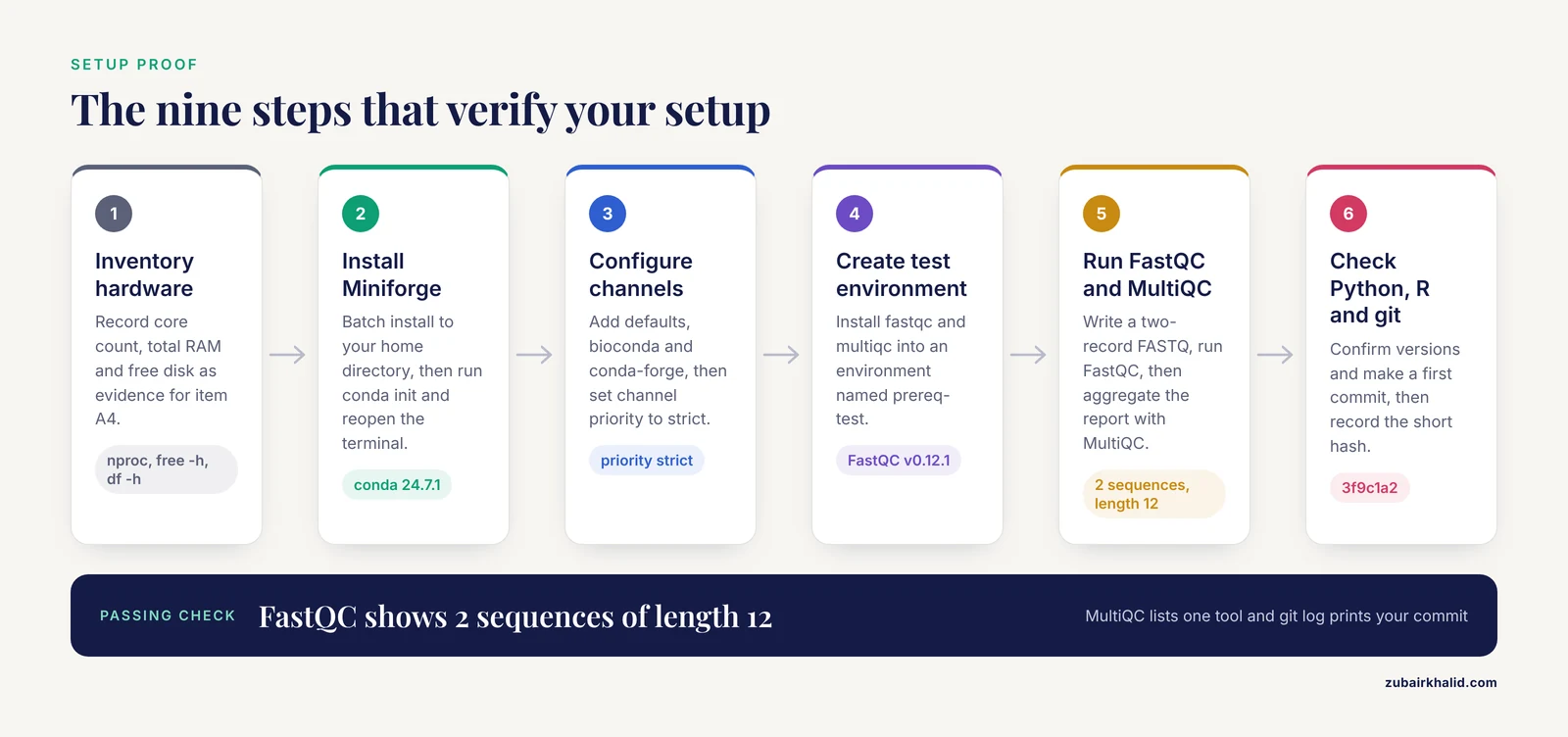
This walkthrough tests the concrete claims in sections A and B of the template. Run it before a course, before onboarding, or before a new project. Every step records evidence for the checklist.
Step 1: Inventory your hardware
nproc
free -h
df -h .
nproc prints the CPU core count available to your user. free -h prints RAM in human-readable units (Linux only, on macOS use sysctl -n hw.ncpu and sysctl -n hw.memsize). df -h . prints free disk space for the current filesystem, where the Avail column is the number that matters.
Example output on an 8-core Linux laptop:
8
               total        used        free      shared  buff/cache   available
Mem:            15Gi       3.1Gi       9.8Gi       210Mi       2.4Gi        12Gi
Filesystem      Size  Used Avail Use% Mounted on
/dev/nvme0n1p2  466G  289G  154G  66% /
Your numbers will differ. Record core count, total RAM, and free disk as evidence for item A4. For learning work, roughly 8 GB of RAM and 10 GB of free disk are workable, and 16 GB of RAM is comfortable.
Step 2: Install Miniforge
Conda is an environment manager that installs software in isolated, reproducible units. Miniforge is a minimal installer for conda and mamba, preconfigured for the conda-forge channel.
wget -O Miniforge3.sh "https://github.com/conda-forge/miniforge/releases/latest/download/Miniforge3-$(uname)-$(uname -m).sh"
bash Miniforge3.sh -b -p "$HOME/miniforge3"
source "$HOME/miniforge3/bin/activate"
conda init "$(basename "$SHELL")"
The wget -O flag saves the installer under a fixed name. The -b flag runs the installer in batch mode with no prompts, and -p sets the install location to your home directory. conda init configures your shell to recognize conda. Close and reopen the terminal, then verify:
conda --version
mamba --version
Example output (versions vary):
conda 24.7.1
mamba 1.5.8
On Windows, run these commands inside WSL2 with an Ubuntu distribution.
Step 3: Configure channels for bioinformatics software
Bioconda is the channel that hosts thousands of bioinformatics packages. Configure it with strict priority, the configuration the Bioconda project recommends.
conda config --add channels defaults
conda config --add channels bioconda
conda config --add channels conda-forge
conda config --set channel_priority strict
Each -add call appends a channel, and the most recently added channel gets highest priority, so the final order should be conda-forge, then bioconda, then defaults. The strict setting prevents conda from silently mixing packages across channels, which is a common source of broken environments. Confirm with:
conda config --show channelschannels:
- conda-forge
- bioconda
- defaultsStep 4: Create a test environment
conda create -y -n prereq-test -c bioconda -c conda-forge fastqc multiqc
conda activate prereq-test
fastqc --version
multiqc --version
-n names the environment, -y auto-confirms the install plan, and -c names the channels for this command. Activation changes your shell prompt to show the environment name. Example output:
FastQC v0.12.1
multiqc, version 1.21
Step 5: Make a tiny FASTQ and run FastQC
A FASTQ record has four lines: a header beginning with @, the sequence, a + separator line, and per-base quality characters. The printf command writes exactly two such records using \n for newlines.
printf '@read1\nACGTACGTACGT\n+\nIIIIIIIIIIII\n@read2\nTTTTAAAACCCC\n+\nIIIIIIIIIIII\n' > tiny.fq
cat tiny.fq
fastqc tiny.fq
FastQC is a quality-control tool that computes per-base quality, GC content, and adapter signals. Example output:
Started analysis of tiny.fq
Approx 50% complete for tiny.fq
Analysis complete for tiny.fq
Step 6: Check the report and aggregate with MultiQC
List the directory, then open the HTML report in a browser:
lstiny.fq tiny_fastqc.html tiny_fastqc.zipIn tiny_fastqc.html, the Basic Statistics module should show Total Sequences of 2 and Sequence length of 12. That confirms the tool read your file correctly. Then run MultiQC, which aggregates reports from many tools into one page:
multiqc .The dot means "scan the current directory." Final lines look similar to:
[ INFO ]         multiqc : Analysis complete for 1 tools
[ INFO ]         multiqc : Report written to multiqc_report.html
Step 7: Check Python and R
python --version
R --version | head -n 1
If R is missing, install it in its own environment and recheck:
conda create -y -n rstats -c conda-forge r-base
conda activate rstats
R --version | head -n 1
Example output (versions vary):
Python 3.12.4
R version 4.4.1 (2024-06-14)
Step 8: Check git
git --version
mkdir -p ~/projects/prereq-demo
cd ~/projects/prereq-demo
git init
echo "# prereq-demo" > README.md
git add README.md
git commit -m "first commit"
git log --oneline
Example output:
Initialized empty Git repository in /home/you/projects/prereq-demo/.git/
[main (root-commit) 3f9c1a2] first commit
 1 file changed, 1 insertion(+)
 create mode 100644 README.md
3f9c1a2 first commit
The short hash on the last line (here 3f9c1a2) is exactly the kind of evidence the checklist format asks you to record.
Step 9: Record the evidence
Fill the Evidence column for items A1 through A5 and B1 through B2 with dates, version numbers, and the commit hash. Store the checklist file in the demo repository and commit it. This single habit, writing down what you ran and what it printed, is the seed of reproducibility.
Common errors and exact fixes
conda: command not found after installation. The shell cannot see the conda binary. Close and reopen the terminal. If it persists, run source "$HOME/miniforge3/bin/activate" and then conda init "$(basename "$SHELL")" again.
CommandNotFoundError: Your shell has not been properly configured to use 'conda activate'. The shell was opened before conda init ran, or init targeted a different shell. Run conda init bash (or conda init zsh on macOS), reopen the terminal, and retry. As a one-session workaround, run source "$HOME/miniforge3/etc/profile.d/conda.sh" first.
PackagesNotFoundError: The following packages are not available from current channels: Either a package name is misspelled or the bioconda channel is missing. Rerun the four conda config commands from Step 3, then confirm availability with conda search -c bioconda fastqc.
zsh: command not found: fastqc (or the bash equivalent). The tool is installed inside the environment but the environment is not active. Run conda activate prereq-test and retry.
OSError: [Errno 28] No space left on device during an install or run. Check df -h ., then reclaim space with conda clean, all and remove environments you no longer use with conda env remove -n ENVNAME.
Killed with no other message during a large run. The system ran out of RAM and the kernel terminated the process. Reduce input size or thread count, test on a small subset first, and move full-scale runs to a server, an institutional cluster, or a cloud instance.
fatal: unable to auto-detect email address (got 'you@machine.(none)') on the first commit. Git needs an identity. Run git config, global user.name "Your Name" and git config, global user.email "[email protected]", then commit again.
How to confirm the walkthrough worked
Four checks, in order. The FastQC report opens and Basic Statistics shows 2 sequences of length 12. The MultiQC report exists and lists one tool. git log, oneline prints your commit. The checklist file sits in the repository with evidence filled in for at least seven items. Passing all four means your toolchain is verified. Competence comes next, through deliberate practice and a structured bioinformatics course.
Common Mistakes and Limitations
Installing tools before learning the shell. Every tool assumes you can move files, read logs, and count records. Fix section A first, because it multiplies the value of everything else.
Treating a graphical interface as the destination. Reviews show GUIs and guided platforms help noncomputational users start [3], but reproducible pipelines are text-based. Plan the transition from buttons to scripts as an explicit checklist item.
Skipping statistics until results exist. Multiple testing, confounding, and dimensionality problems surface during interpretation, when they are most expensive to fix [5]. Put the statistics items before the first real dataset in your timeline.
Adopting a tool because one benchmark ranked it first. Benchmarks are dataset-specific and allele-specific. In the HLA class I binding prediction benchmark, MixMHCpred 2.0.1 performed best overall and NetMHCpan 4.0 led among machine-learning-based tools across 21,101 experimentally verified ligands and 19 allotypes [11], yet the correct procedure is to check whether an independent benchmark covers your specific alleles and assay before adopting anything.
Letting raw data become untracked. Diverse formats strain storage, tracking, and sharing, which is the core problem data management research describes [4]. Set naming rules, read-only raw data, and version records before the first download, not after the first crisis.
Ignoring the human factors. Confidence, tolerance for debugging, and collaboration determine persistence as much as technical skill does. A checklist that rates only software skills is half a checklist.
Assuming a laptop handles everything. Out-of-memory kills print only the word Killed. Budget for a subset-first workflow and identify your escalation path (cluster or cloud) before you need it.
Letting the checklist go stale. Re-rate at every project start. A checklist from two projects ago measures a person who no longer exists.
One limitation applies to the whole template. Projects, datasets, and institutions differ, so review your ratings with a mentor, course instructor, or core facility before committing to an experimental design.
Using the Checklist Before a Bioinformatics Course
Map the template to the syllabus before day one. Ask the coordinator three questions: which weeks assume shell fluency, which assume R or Python, and which assume statistics. Then set targets, aiming for level 2 across sections A and B before the course begins, and use the walkthrough above as your proof.
Instructors can run the same template in week 0 as a diagnostic. Collect scaled self-ratings, form pairs that match strong programmers with strong biologists, and revisit ratings at midterm. That pairing uses the collaboration and social-support prerequisites that the education literature identifies as decisive, and it costs one class session.
For self-learners between courses, the checklist doubles as a curriculum. Every gap with a target level of 2 is a week of focused practice. Every gap at level 3 is a small project. When all sections reach target, choose a domain from the matrix above, read its key review, and start on public data.
Frequently Asked Questions
What are the basic prerequisites to learn bioinformatics?
Shell navigation, one scripting language, core file formats such as FASTA and FASTQ, undergraduate statistics, and molecular biology fundamentals. The template above breaks these into 30 items with target levels and an evidence column.
Do I need programming experience before starting a bioinformatics course?
No for most introductory courses, yes for advanced ones. Level 2, meaning you can work with documentation open, in shell basics and one language is usually enough to start and to keep up.
How much statistics do I need for bioinformatics?
You need replicates versus technical replicates, distributions, p-values, false discovery rate, and simple linear models. Methods development or machine learning work requires more, including feature selection and validation design.
What kind of computer do I need for bioinformatics?
For learning, an 8 GB RAM machine with 10 GB of free disk running macOS, Linux, or WSL2 on Windows is workable, and 16 GB of RAM is comfortable. Full-scale analyses move to servers, clusters, or cloud instances.
Do I need a biology degree to learn bioinformatics?
No. You need the central dogma, an understanding of what sequencing measures, and the assay logic of your domain. Statisticians and software engineers enter bioinformatics constantly and fill their domain gaps with targeted reading.
Should I learn Python or R first for bioinformatics?
Either, and the deciding factor is your target field. Python suits pipelines and general tooling, R suits statistics and publication graphics, and most working analysts eventually use both.
How do I know my prerequisites are good enough to start a real project?
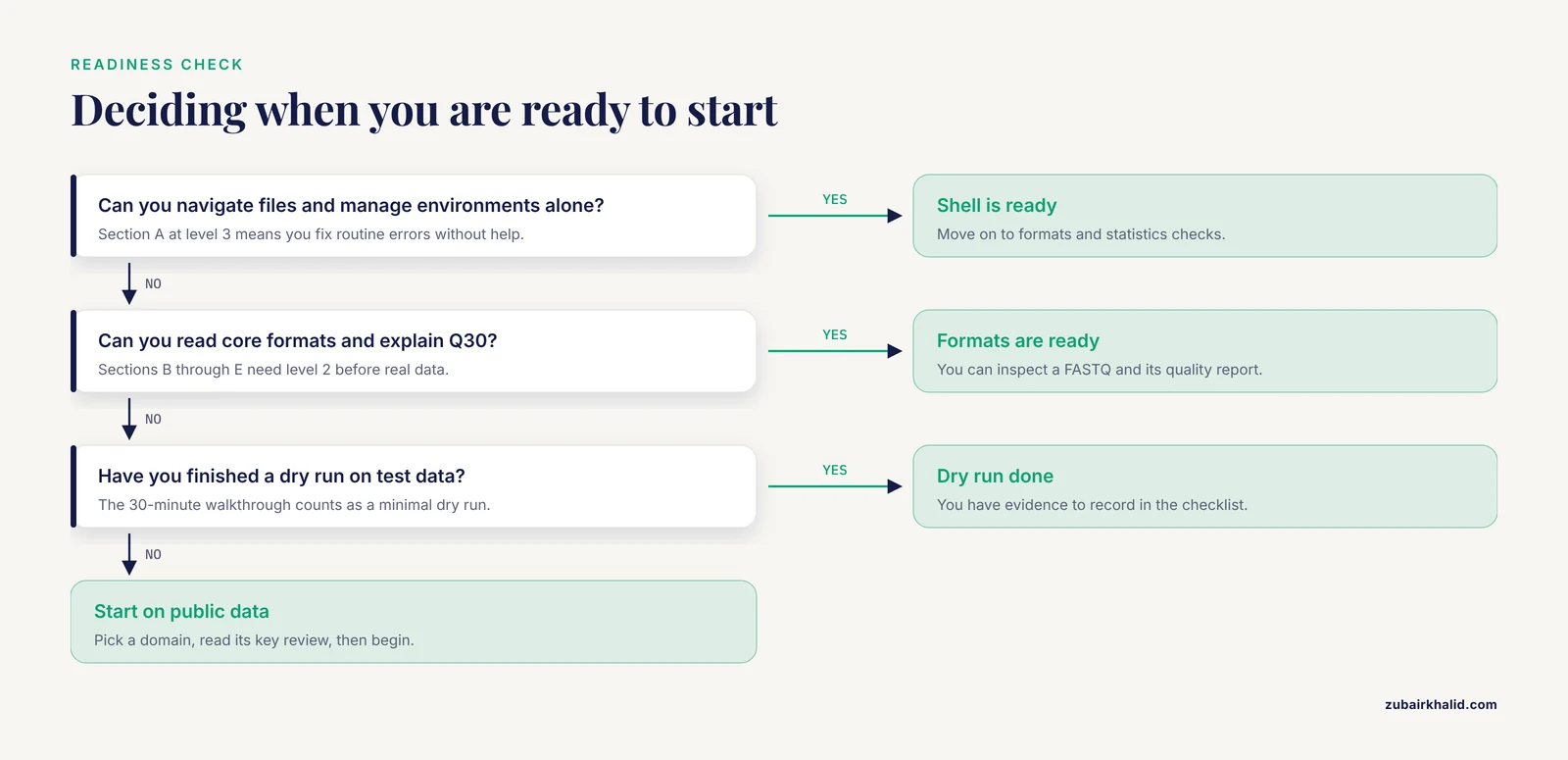
When section A reaches level 3, sections B through E reach level 2, and you have completed a dry run on test or public data. The 30-minute walkthrough in this article is a minimal dry run.
Can I use this checklist to onboard students or trainees?
Yes. Have each trainee self-rate with evidence, review the ratings together, set targets tied to the first project, and re-rate at milestones. Instructors can also use it as a week 0 diagnostic to form balanced pairs.
Sources
- Formative assessment: A systematic review of critical teacher prerequisites for classroom practice
- A systematic review of prerequisites for implementing assessment for learning in classroom practice
- A scoping review of approaches to evaluating workflow management systems for bioinformatics users
- Review of open-source software for developing heterogeneous data management systems for bioinformatics applications
- Bioinformatics Advance Access published August 24, 2007 A review of feature selection techniques in bioinformatics
- Review and Evaluate the Bioinformatics Analysis Strategies of ATAC-seq and CUT&Tag Data
- Bioinformatics analysis of metagenomics data of biogas-producing microbial communities in anaerobic digesters: A review
- A Review of Bioinformatics Tools for Bio-Prospecting from Metagenomic Sequence Data
- Phage bioinformatics tools: a review of computational approaches for bacteriophage research
- Advances and Paradigms in Modern Plant Bioinformatics: A Comprehensive Review
- A comprehensive review and performance evaluation of bioinformatics tools for HLA class I peptide-binding prediction
- Positive-unlabeled learning in bioinformatics and computational biology: a brief review
- Review of the Applications of Deep Learning in Bioinformatics
- Review of Bioinformatics Tools and Techniques to Accelerate Ovarian Cancer Research
- Microarray bioinformatics in cancer- a review.
- Quantum bioinformatics: a systematic review of methods, trends, and challenges