Data Security in Bioinformatics: Web vs. Local Installations
By Dr. Zubair Khalid, DVM, MS, PhD ·

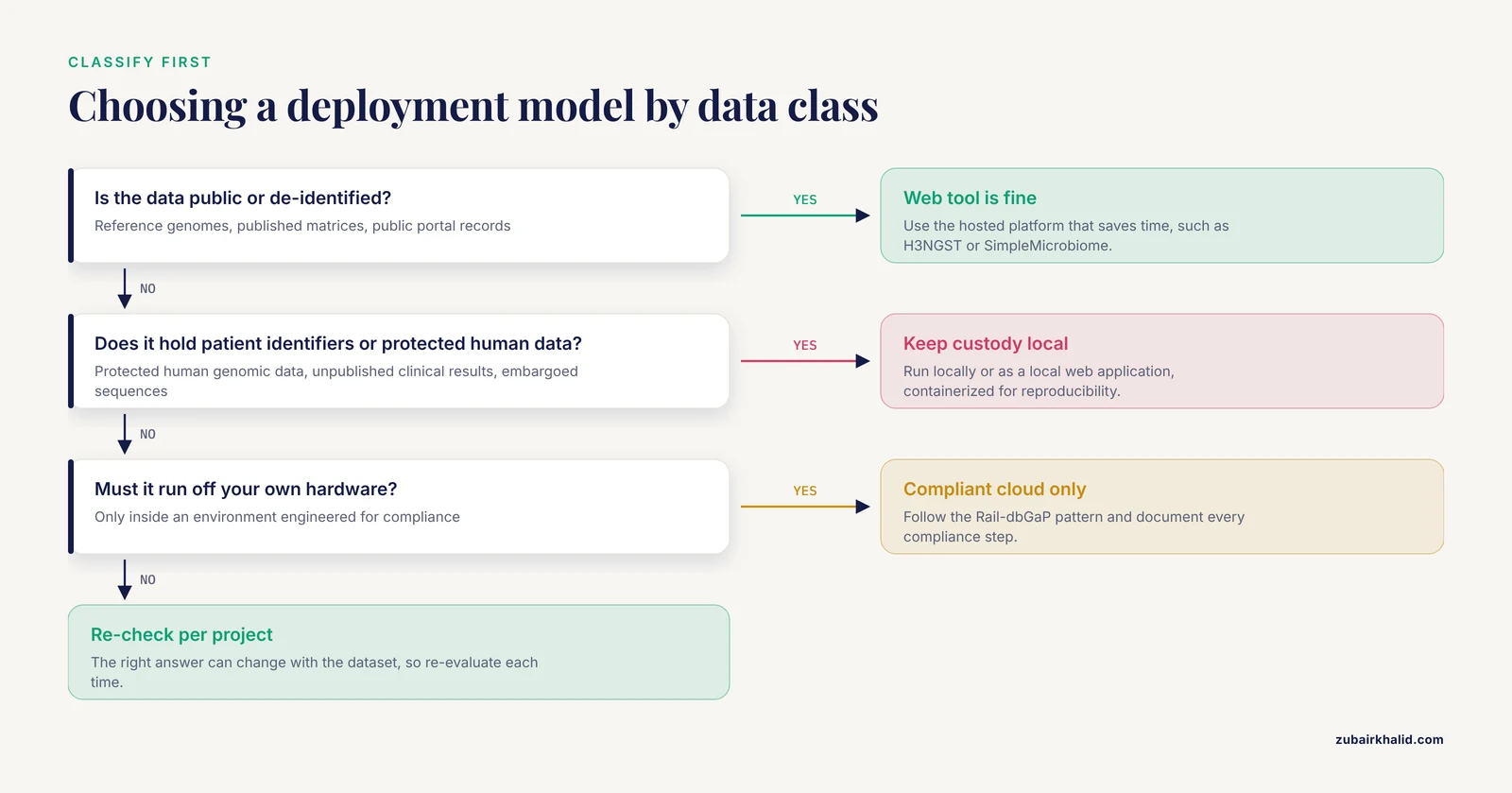
The core difference between web-based and locally installed bioinformatics tools comes down to one question: where does your data physically live while it is being processed, and who controls the machine it lives on. A web-based platform sends your data to infrastructure run by someone else, so security depends on their network, access controls, and terms of service. A local installation keeps data on hardware you or your institution controls, so security depends on your own patching, authentication, and physical safeguards. The rule of thumb is simple. If the data is public, de-identified, or low sensitivity, use the web tool that saves you time. If the data contains patient identifiers, protected human genomic data, unpublished clinical results, or embargoed sequences, keep it local or move it only into a cloud environment that is explicitly configured for compliance.
This article walks through how each model actually handles data, compares them side by side on the criteria that decide real choices, and walks through worked scenarios drawn from published platforms so you can see how researchers resolved the same tension in practice.
Why This Choice Matters More Than It Used To
Two trends have pushed the web-versus-local question to the center of bioinformatics practice. The first is the sheer growth of data. The Cancer Genome Atlas alone passed 1.2 petabytes across whole genome sequence, whole exome sequence, methylation, RNA expression, proteomic, and clinical datasets, which motivated dedicated acquisition and management systems that store data on institutional high-performance computing facilities under federal security and regulatory controls [1]. Data of that scale does not move casually, and neither does the responsibility attached to it.
The second trend is the explosion of friendly web platforms. Recent years have produced web systems for nearly every subfield. H3NGST automates end-to-end ChIP-seq analysis from raw data retrieval through quality control, alignment, peak calling, and genomic annotation with minimal user input [2]. SimpleMicrobiome packages taxonomic profiling, diversity analysis, differential abundance testing with ANCOM-BC2 and MaAsLin2, Random Forest modeling with SHAP interpretation, and network inference with SparCC and SPIEC-EASI into a single interactive workflow [3]. DOCKweb puts a graphical interface on DOCK6 for virtual screening and de novo design, and runs submitted calculations at the Texas Advanced Computing Center so users never need to download or compile the program themselves [4]. TefDB centralizes 77,795 tef-specific biological records behind a React.js, Django, and PostgreSQL stack and explicitly lists security among the benefits of the centralized platform [5]. MSAID consolidates proteomics processing from raw files to biological insight behind API-driven cloud services [6].
Each of these platforms makes analysis dramatically easier. Each also asks you to hand over data, and sometimes large volumes of it. Understanding what you are handing over, to whom, and under what controls is the discipline of data security in bioinformatics.
How Web-Based Platforms Handle Your Data
A web-based bioinformatics platform runs on servers the operator controls. Your role is to prepare inputs, upload or point the service at your data, and retrieve results. The operator handles compute, storage, software updates, and usually authentication. This creates a specific security profile with distinct strengths and weaknesses.
The security strengths of the web model
Centralized platforms concentrate security expertise where the data lives. When a single team maintains the database, the web server, and the analysis pipeline, patches get applied once, on machines that are monitored continuously. This is a large part of why a dedicated crop resource platform like TefDB argues that web-based deployment benefits data accessibility, centralization, security, management, and scalability [5]. A university department running dozens of heterogeneous lab machines cannot match the patch discipline of a professionally operated service.
Web platforms can also enforce access control consistently. A self-hosted version control platform built on the Git ecosystem demonstrated this principle in an academic setting by providing comprehensive repository management and secure user access control in an integrated collaborative environment [7]. The same pattern applies to clinical and community-facing systems. The SEED Health Atlas serves social drivers of health data alongside de-identified and aggregated local electronic health record data to community stakeholders, researchers, and policymakers, which requires curated access rules about who sees what granularity of data [8].
The web model also removes local failure modes. A researcher without a systems administrator does not have to harden a server, configure TLS, or manage user accounts. H3NGST was designed precisely to eliminate the need for local installations, programming skills, or large file uploads, extending usability to researchers with different computational backgrounds [2]. Fewer locally administered systems generally means fewer locally misconfigured systems.
The security costs of the web model
The costs all trace back to one structural fact: your data crosses a network boundary you do not control, and lands on infrastructure you do not administer.
First, there is data in transit. Every upload crosses the public internet or an institutional network, and you depend on the operator's transport encryption. Second, there is data at rest. Once uploaded, your sequences, count matrices, images, or metadata sit on the operator's storage, under their retention policy, in a jurisdiction governed by their terms of service. Third, there is the question of what happens to derived data. Many platforms keep intermediate files, logs, or cached results. Whether those are purged, and when, is a policy question you should ask before uploading anything sensitive.
Fourth, there is the mirror problem. If your data is genuinely confidential, the operator now holds a copy. Their breach becomes your breach. Their subpoena becomes your problem. For most open science data this is irrelevant, and for prepublication but non-sensitive data it is usually an acceptable trade. For protected human data it can be a legal problem, not merely a technical one.
A final cost is availability dependence. A web tool requires connectivity, and an outage on the operator's side stalls your analysis. Real-time pathogen identification workflows illustrate why this matters. During an outbreak, a tool that cannot reach its server is a tool that cannot help you.
How Local Installations Handle Your Data
A local installation runs on hardware you control: your laptop, a lab workstation, a departmental cluster, or a self-hosted server. Data never leaves your custody unless you send it somewhere. This inverts the web security model. You gain control and privacy by default, and you take on every responsibility the operator would have carried.
The security strengths of the local model
The primary strength is custody. Unpublished genomes, patient-linked clinical data, embargoed results, and sensitive metadata can stay inside your institutional boundary. No upload step means no data in transit on networks you do not trust, no operator copy, and no third-party retention policy to read.
Published tools have leaned into this deliberately. The DataHarmonizer, a template-driven spreadsheet application for harmonizing and validating pathogen genomics contextual data, uses a web browser-based JavaScript environment but emphasizes that its offline functionality and local installation increase data security, a design decision made while handling SARS-CoV-2 surveillance data for national public health efforts [9]. The tool looks like a web app, but the validation code runs in your browser and the spreadsheet never leaves your machine unless you submit it to a repository yourself.
Nanometa Live, a real-time metagenomic analysis and pathogen identification application for Oxford Nanopore MinION and Flongle flow cells, is implemented as a local web application using the Dash framework with Snakemake handling data processing, and it runs without constant internet or server access once installed [10]. It ships with Docker and Singularity containerization support, which addresses the other great strength of local deployment: reproducibility. A container pins the exact software environment, so the analysis you ran today runs identically next year, on your terms.
Local deployment also enables architectures that simply cannot exist for hosted services. TCGA Expedition downloads, extracts, harmonizes, versions, and stores more than a petabyte of cancer genomics data, then serves it to high-performance computing facilities, with security and regulatory controls designed to conform to federal best practices [1]. Moving that volume through a browser upload form is not a serious option.
The security costs of the local model
Local security is only as good as the person administering it. The costs are the mirror image of the web strengths.
An unpatched workstation is an unpatched server. A shared lab machine with a shared account has no meaningful access control. A laptop with sequencing reads and a spreadsheet linking reads to patient identifiers is a data breach waiting for a stolen bag. The administrator role that a professional platform operator fills, you now fill yourself, whether or not you have training for it.
Installation friction creates its own risks. Tools that require manual compilation push inexperienced users toward command-line environments they do not fully control, which is exactly the problem DOCKweb set out to solve for DOCK6 users [4]. Frustrated users work around difficult installs, and workarounds, such as emailing large files or copying data to unmanaged cloud drives to share with a collaborator, are themselves security incidents.
Finally, local installations scale poorly. A single workstation cannot process data volumes that a managed cloud pipeline handles routinely, which is a major argument in the proteomics space where fragmented local workflows running on local hardware are described as costly to maintain and scale [6].
Side-by-Side Comparison
The table below is a bioinformatics tools comparison across the two deployment models, evaluated on the criteria that actually drive the decision.
| Criterion | Web-based platform | Local installation |
|---|---|---|
| Data location during processing | Operator-controlled servers, reached over a network | Hardware you or your institution controls |
| Data in transit | Uploaded over the network, every session | None unless you choose to share or back up |
| Third-party copy of your data | Yes, at minimum transiently, sometimes persistent | No, unless you create one |
| Access control | Managed by the operator, usually consistent | Your responsibility, often informal in labs |
| Patching and updates | Operator applies them centrally | Your responsibility, frequently deferred |
| Network dependence | Requires connectivity for each session | Optional. Nanometa Live runs offline once installed [10] |
| Setup expertise required | Minimal. No compilation, no local install [2] | Can require command-line skills and compilation [4] |
| Reproducibility | Depends on operator versioning | Strong with containers such as Docker or Singularity [10] |
| Scalability | Elastic. Cloud-native pipelines scale with data volume [6] | Bounded by your hardware, from laptop to cluster [1] |
| Suitability for protected human data | Needs explicit compliance configuration | Strongest by default, custody stays with you |
| Suitability for public or de-identified data | Usually the faster, easier choice | Often unnecessary overhead |
| Handling very large raw files | May require large uploads or BioProject-based retrieval [2] | Data already local, no transfer bottleneck |
| Failure mode | Operator outage stops your analysis | Your hardware or your misconfiguration fails |
| Audit trail | Often built into the platform | Must be constructed, for example with version control [7] |
Neither column wins outright. Each row is a question about your specific data, your institution, and your analysis.
The Criteria That Decide Real Choices
Data sensitivity and legal protection
This criterion outranks all others. Start by classifying the data, not the tool.
Fully public data, such as reference genomes, published expression matrices, or records retrieved from public portals, carries minimal risk on either model. De-identified research data usually falls in the same category, though de-identification is a spectrum and genomic data resists de-identification in ways that make researchers appropriately cautious.
Protected human data is a different matter. More than 40 percent of the Sequence Read Archive consists of human data protected under provisions such as dbGaP, and researchers who want to analyze such data traditionally had to work with IT administrators and signing officials to implement every required layer of security at their own institution, an obstacle that impeded reproducibility and reduced the usefulness of the archives [11]. Rail-dbGaP addressed this by producing a protocol and software tool for analyzing dbGaP-protected data on Amazon Web Services Elastic MapReduce, making explicit the steps an investigator must take to run pipelines in a manner compliant with NIH guidelines [11]. The lesson generalizes. Protected data can be analyzed off your own hardware, but only inside an environment whose compliance posture has been deliberately engineered, documented, and approved. Uploading such data to an ordinary public web tool does not meet that bar.
Clinical data raises the stakes further. A recent study of explainable machine learning models predicting hospital stay and treatment costs for cardiovascular patients used real-world inpatient records and ultimately deployed a dual-platform clinical decision support application in both web-based and desktop form [12]. Dual deployment of that kind exists precisely because clinical data governance often requires that sensitive computations be able to run locally even when a web interface is convenient.
Data volume and compute requirements
The physics of data movement matters. Modern assays generate files that are awkward to upload and expensive to store on a laptop.
Web platforms built on elastic infrastructure turn this constraint into an advantage. The MSAID platform was motivated by the observation that conventional proteomics pipelines consist of fragmented software packages glued together with complex in-house scripts running on local hardware, which is costly to maintain and scale, and it instead provides cloud-native search, scalable compute instances, and a data lake that supports elastically growing storage and unified queries across longitudinally acquired studies [6]. For a lab accumulating years of raw mass spectrometry data, that architecture is a security improvement, not just a convenience, because it replaces scattered local copies with systematically stored, access-controlled results.
On the other end, some workflows generate data faster than any network can usefully carry it. Real-time nanopore sequencing analysis is the canonical example, which is why Nanometa Live processes data locally as the flow cell runs [10]. Sending each newly sequenced batch to a remote server would add latency, network dependence, and a copy of potentially pathogen-related surveillance data on someone else's infrastructure.
Reproducibility and provenance
Security and reproducibility are more entangled than most researchers assume. A provenance gap is a security gap, because you cannot demonstrate what happened to a dataset if you cannot reconstruct what was done to it.
Local environments excel here when they are containerized. Nanometa Live ships Docker and Singularity support explicitly for ease of use, reproducibility, and portability [10]. Profiler, an open multi-omics platform, makes reproducibility a headline feature, generating fully traceable analysis reports within minutes while offering both a web deployment on high-performance computing and a desktop version for local execution [13]. Version control completes the picture. A self-hosted Git-based platform deployed for teaching bioinformatics and artificial intelligence in medicine lets students and instructors store detailed project documentation at every stage of tool development, with secure user access control over repositories [7]. Whether you choose web or local, provenance infrastructure like this should be part of the design, not an afterthought.
Web platforms can also support reproducibility when the operator builds it in. H3NGST promises high resolution and reproducible results for transcription factor binding and histone modification studies from minimal user input [2]. The practical difference is that with a hosted platform you are trusting the operator's versioning, whereas with a containerized local tool you can verify the environment yourself.
Accessibility, expertise, and the human factor
Security failures are frequently human failures, so the usability of a deployment model is itself a security property.
Web platforms lower the barrier dramatically for experimental researchers. H3NGST reduces technical barriers by eliminating local installations, programming skills, and large file uploads, and its intuitive web interface and mobile accessibility serve researchers with different computational backgrounds [2]. SimpleMicrobiome similarly targets the problem that routine microbiome analysis often depends on command-line workflows, repeated data reformatting, and method-specific scripting, which limits accessibility and complicates consistent analysis across interdisciplinary teams [3]. DOCKweb extends the same logic to molecular modeling, streamlining setup and submission of DOCK6 calculations for users of all skill levels [4]. When the secure path is also the easy path, people take it.
Local tools can reach the same audience when they are packaged well. SCelVis is a flexible, interactive application for visualizing pre-processed single-cell data aimed at users without bioinformatics expertise, and it runs on both desktop and cloud systems [14]. PeptideShaker Online is a user-friendly web-based framework for mass spectrometry proteomics in which storage and processing occur via the Galaxy platform while interaction with results happens through a locally installed web server, letting researchers process and interpret their own data without advanced skills or direct access to compute-intensive infrastructure [15]. Note the architecture of PeptideShaker Online: it is a hybrid that keeps heavy processing on an established platform while running the result-serving layer locally.
The Hybrid Middle Ground
A large share of modern tools refuse the binary. Understanding the hybrid patterns is where the practical answers to the web-versus-local question usually live.
Local web application. The tool runs a web server on your own machine or cluster, so you get a browser interface with local data custody. Nanometa Live is implemented exactly this way, a local web application using the Dash framework with Snakemake behind it [10]. PeptideShaker Online runs its result-serving web server locally while Galaxy handles storage and processing [15]. Historically, this pattern goes back further than most researchers realize. In 1999, a framework integrated bioinformatics application programs through a local web browser using simple inter-process messages from an external process, and the authors explicitly noted it was applicable to a wide range of network computations processing private data using a web browser, precisely because it avoided complicated knowledge of network computation and security issues [16]. The pattern is a quarter century old and still one of the best answers for private data.
Self-hosted server inside your institution. A web platform whose operator is you. The self-hosted Git-based teaching and development platform demonstrates the model, providing web-based collaboration, repository management, and secure access control on a dedicated local server [7]. You inherit the web model's convenience while keeping the hardware inside your security perimeter.
Portable or dual-deployment tools. Profiler ships as both a web platform on high-performance computing and a desktop version for local execution [13]. SCelVis runs on the desktop and in the cloud and accepts input from local and various remote sources using standard open protocols, allowing data hosting in the cloud and locally [14]. ICU-GPT, a large language model system for deploying and querying critical care databases, supports automated deployment of databases in local, cloud, or remote environments without manual setup [17]. The dual clinical decision support application for cardiovascular patients follows the same logic [12]. The security benefit is optionality: you choose the deployment per dataset rather than per tool.
Browser-based tools with no server round-trip. The DataHarmonizer pattern. The application loads in your browser, validation happens in local JavaScript, and data never leaves the machine unless you export it [9]. This is the least appreciated category, because it looks like a web tool and behaves like a local one.
Compliant cloud. The Rail-dbGaP pattern, where analysis moves to commercial cloud infrastructure but inside a protocol that makes every compliance step explicit [11]. This is not the same as uploading to a public web tool, and confusing the two is one of the most consequential mistakes in this space.
Worked Scenarios
Scenario 1: A wet-lab researcher needs ChIP-seq analysis of public data. The dataset is public, the researcher has no command-line experience, and the analysis is a well-established pipeline. H3NGST automates the whole workflow from BioProject retrieval through peak annotation [2]. Data sensitivity is minimal, so the web model wins on speed and usability. This is a textbook case of when to use a web-based platform.
Scenario 2: A clinical group analyzes single-cell RNA-seq from patient samples. The data is patient-derived and the analysis involves cross-institutional collaboration. SCelVis exists for this situation, and its authors explicitly identify data privacy and security as crucial when working with clinical data in cross-institutional and translational settings, offering local and cloud hosting with standard open protocols [14]. The defensible choice is local hosting, or cloud hosting only after the institution reviews the environment. A public web viewer is not.
Scenario 3: A consortium harmonizes SARS-CoV-2 surveillance metadata across many laboratories. Contextual data includes patient demographics and epidemiological information, and different authorities encode it differently. DataHarmonizer validates and transforms this data in the browser, offline, with local installation available, specifically to increase data security for national surveillance and repository submission [9]. The browser-based, offline-capable local pattern fits because many sites handle the data and none of them should be shipping raw identifiers to a shared server.
Scenario 4: A structural biology lab wants virtual screening but has no cluster. DOCK6 is powerful but difficult to deploy for users lacking command-line experience. DOCKweb provides the GUI, and calculations run at the Texas Advanced Computer Center, removing the requirement for a local supercomputer [4]. The structural models are typically not regulated data, so the compute-bounded trade favors the web model, ideally after a quick review of what inputs the lab is uploading.
Scenario 5: A proteomics core processes years of raw mass spectrometry files. The volumes are large, the analyses are repetitive, and longitudinal aggregation matters. The MSAID platform consolidates the fragmented local pipeline into managed, API-driven cloud services with systematic result storage and unified querying [6]. The core is trading local custody for professionally operated infrastructure with elastic scale, a reasonable trade for this data class, and an improvement over unmanaged copies scattered across lab workstations.
Scenario 6: An instructor teaches bioinformatics software development with real projects. Students need version control, access control, and course management. A self-hosted Git platform on a dedicated local server provided all of this while supporting the development of an actual bioinformatics software package [7]. Self-hosting kept the environment inside institutional control while preserving the collaborative web experience.
Scenario 7: A hospital laboratory runs real-time metagenomic pathogen identification during diagnostics. Nanometa Live handles the workflow locally, including custom Kraken2 databases and automated BLAST validation, without requiring constant internet or server access [10]. Diagnostic latency, connectivity risk, and the sensitivity of pathogen findings all point to local deployment.
Common Mistakes and Limitations
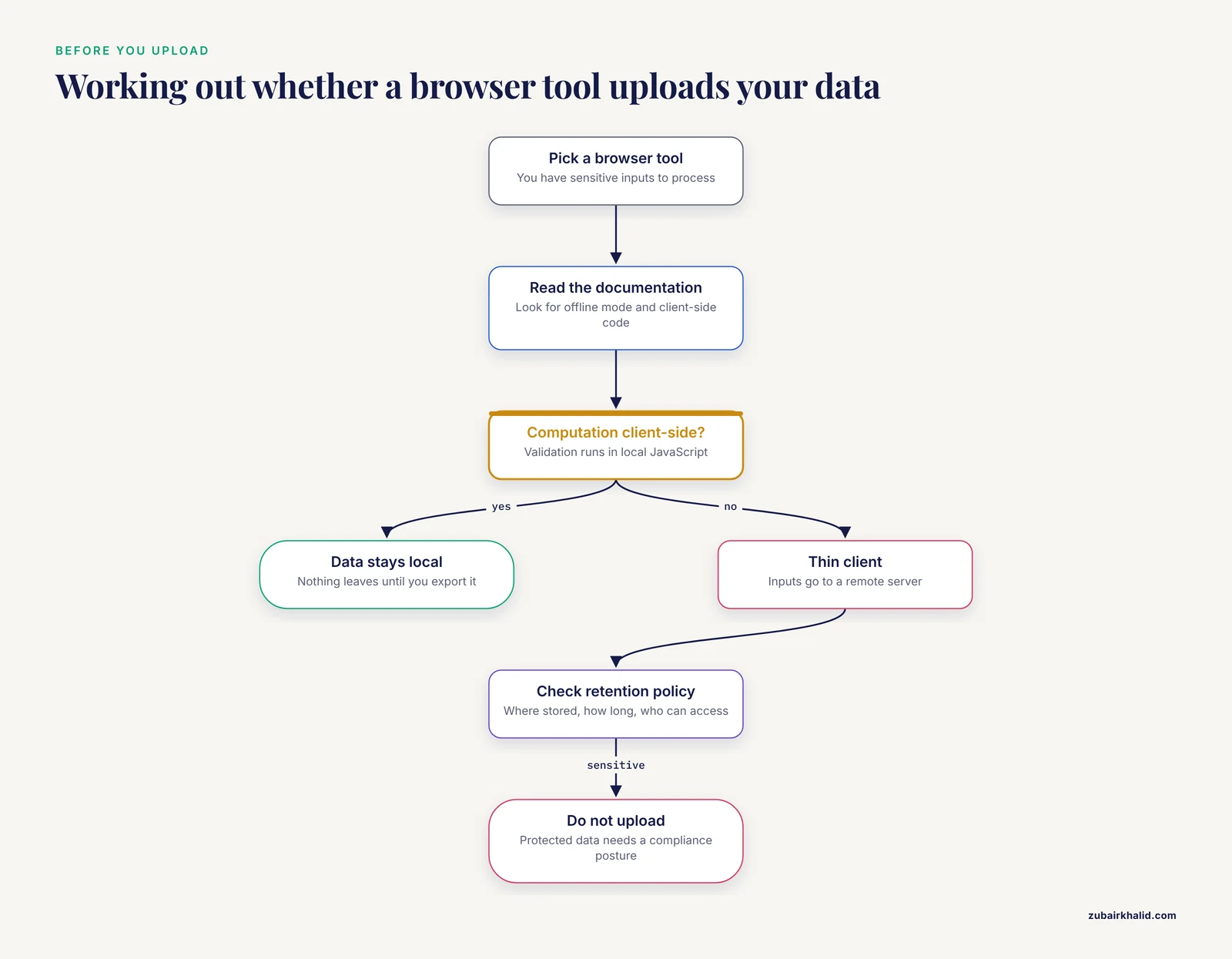
Mistake 1: Assuming browser-based means server-based. DataHarmonizer runs in a browser but processes data locally, which increases data security [9]. The inverse confusion is more dangerous: researchers treat every web-looking tool as harmless because it feels like software, when it is actually an upload to someone else's server. Before using any browser tool with sensitive inputs, determine whether computation happens client-side or server-side.
Mistake 2: Assuming local means secure by default. A local installation removes the third party but adds every administrative burden. Without patching, authentication, disk encryption, and backups, local deployment is a box of unmanaged risk sitting on a lab bench. The DataHarmonizer and Nanometa Live teams did not just install locally, they engineered the deployment with offline capability and containers [10], [9].
Mistake 3: Uploading protected human data to an ordinary public web tool. Protected data requires a compliance posture, not just an encryption checkbox. The Rail-dbGaP work made explicit, for the first time, the steps required to analyze dbGaP-protected data in a commercial cloud in a manner compliant with NIH guidelines [11]. That level of care is the standard, and a typical public webserver does not meet it.
Mistake 4: Ignoring the terms of service and data lifecycle. For any hosted platform, ask where data is stored, how long intermediates are retained, who can access them, and whether uploads are used for other purposes. These questions are answerable only from the operator's documentation and policy, and skipping them is the most common governance gap in academic web tool use.
Mistake 5: Treating the choice as permanent. Profiler, SCelVis, and ICU-GPT all support multiple deployment modes [13], [14], [17]. Teams sometimes lock into one model out of habit. Re-evaluate per project, because the right answer can change with the dataset.
Mistake 6: Neglecting provenance in either model. Whether you analyze in a browser or on a cluster, traceability comes from deliberate design, as in Profiler's fully traceable reports [13] or the documented project stages of a version-controlled platform [7]. A locally installed tool with no version control is less reproducible, and therefore less auditable, than a well-run hosted platform.
Limitations. This comparison describes deployment models and published examples, not a certification of any specific tool. Every institution's data governance rules, contracts, and applicable regulations differ, and a specific deployment decision for protected or clinical data should be reviewed with your institutional IT and compliance officers before data moves. Individual projects can also involve constraints, such as funder data management plans or existing infrastructure agreements, that no general article can adjudicate.
Frequently Asked Questions
Is a web-based bioinformatics tool always less secure than a local installation?
No. A professionally operated web platform with consistent patching, managed access control, and documented data policies can be more secure than a neglected local workstation. The deciding factors are data sensitivity, the operator's controls, and your ability to administer local systems properly, not the deployment model alone.
When should I use a web-based platform for bioinformatics data security?
Use a web-based platform when the data is public, de-identified, or low sensitivity, when the platform demonstrably reduces errors and manual steps, and when its security and retention policies are acceptable to you and your institution. Platforms such as H3NGST and SimpleMicrobiome exist to remove local installation burdens for exactly these situations [2], [3].
What is the difference between bioinformatics data security web and local in practice?
In practice the difference is custody. Web processing places a copy of your data on operator-controlled infrastructure, so security rests on their controls and policies. Local processing keeps data on hardware you control, so security rests on your patching, authentication, and physical safeguards. Everything else in the comparison follows from that single difference.
Can protected human genomic data be analyzed off my own hardware?
Yes, but only inside an environment engineered for compliance. Rail-dbGaP demonstrated the pattern by documenting every step needed to analyze dbGaP-protected data on Amazon Web Services Elastic MapReduce in a manner compliant with NIH guidelines [11]. The compliant cloud and the ordinary public web tool are entirely different things.
Do browser-based tools upload my data?
Some do and some do not, and you cannot tell from the interface alone. DataHarmonizer performs its validation in browser-based JavaScript with offline functionality, so data stays local until you choose to export it [9]. Other browser tools are thin clients for remote computation. Check the tool's documentation to determine which kind you are using.
Which bioinformatics software should I choose for sensitive data?
Prefer tools that run locally or as local web applications, that are containerized for reproducibility, and that keep data under your control, following the pattern of tools like Nanometa Live [10] and SCelVis [14]. For the broad question of the best bioinformatics software overall, the answer depends on your data class, volume, and expertise, which is why the classification-first approach in this article matters more than any single tool name.
Sources
- TCGA Expedition: A Data Acquisition and Management System for TCGA Data.
- H(3)NGST: a fully automated, web-based platform for end-to-end ChIP-seq analysis.
- SimpleMicrobiome: An integrated web-based platform for streamlined microbiome data analysis and visualization.
- DOCKweb: a web-based GUI platform for molecular modeling with DOCK6.
- Developing a web-based platform for Eragrostis tef resource management and analysis.
- A Scalable, Web-Based Platform for Proteomics Data Processing, Result Storage and Analysis.
- Implementing a Version Control Platform as an Interactive Educational Framework for Bioinformatics and Artificial Intelligence in Medicine.
- SEED: A novel web-based data visualization platform to visualize, communicate, and explore social, environmental, and equity drivers of health.
- The DataHarmonizer: a tool for faster data harmonization, validation, aggregation and analysis of pathogen genomics contextual information.
- Nanometa Live: a user-friendly application for real-time metagenomic data analysis and pathogen identification.
- Rail-dbGaP: analyzing dbGaP-protected data in the cloud with Amazon Elastic MapReduce.
- Development and implementation of explainable AI-based machine learning models for predicting hospital stay and treatment costs in cardiovascular patients.
- Profiler: an open web platform for multi-omics analysis.
- SCelVis: exploratory single cell data analysis on the desktop and in the cloud.
- PeptideShaker Online: A User-Friendly Web-Based Framework for the Identification of Mass Spectrometry-Based Proteomics Data.
- Integrating Application Programs for Bioinformatics Using a Web Browser.
- Large Language Model-Based Critical Care Big Data Deployment and Extraction: Descriptive Analysis.