awk vs cut in Bioinformatics: Key Differences
By Dr. Zubair Khalid, DVM, MS, PhD ·
In one sentence: cut extracts fixed columns from delimited text files and does nothing else, while awk is a small programming language that can select columns, filter rows with conditions, apply regular expressions, compute statistics, and reformat output from the same files. Rule of thumb: if your task can be stated as "give me columns 1, 2, and 5 of every line," use cut. If the task contains the words if, only, sum, count, average, match, convert, or when, use awk.
This article explains each tool on its own terms, compares them side by side, walks through the file formats where the choice actually matters (VCF, GTF/GFF, BLAST tabular output, coverage tables), and lists the mistakes that corrupt results in real bioinformatics pipelines.
Why Column Tools Sit at the Center of Linux for Bioinformatics
Most bioinformatics results eventually pass through plain text. An aligner writes SAM text. A variant caller writes VCF text. An annotation pipeline writes GFF or GTF text. BLAST writes tabular text. Even tools that produce rich reports usually also emit a tabular summary, because tabular text is the one format every downstream program can read.
This is why the Linux command line remains the connective tissue of genomics workflows. A review of post-sequencing analysis in DNA barcoding notes that computational tools for post-sequence analysis use command line, graphical, or web-based interfaces, with the command line remaining the common substrate for chaining steps together [1]. Surveys of command-line tools for handling large data files on Linux make the same point from the systems side: text-processing utilities are the standard way to slice, filter, and summarize files that are too large to open in any editor [2]. Practicing groups feel this directly. A metataxonomic pipeline package built for the Windows Subsystem for Linux was motivated precisely by the dependence of modern analyses on Linux-based systems and command-line familiarity [3], and a large-scale tuberculosis workbench project found that limited access to staff adept at the Linux command line was a practical barrier to whole-genome sequencing in public health laboratories [4]. Training programs respond by teaching the command line directly. A three-day antimicrobial resistance genomics workshop in Cameroon included a quick introduction to the Linux command line alongside data file formats, and measured a substantial increase in participant confidence [5]. Recent tool surveys echo that command-line bioinformatics remains essential, while the diversity of syntax across tools is a persistent barrier for many researchers [6].
Within that world, cut and awk are the two tools you reach for when the input is a table of columns and the output is still a table. They overlap heavily, which is exactly why the difference between awk and cut in bioinformatics is worth getting right. Choosing correctly saves debugging time, avoids silent data corruption, and keeps intermediate files honest.
What cut Does, Precisely
cut removes selected fields (columns) or byte ranges from each line of a text file. It has no concept of headers, data types, or logic. It reads a line, splits it on a delimiter, prints the fields you asked for, and moves on.
The core syntax:
cut -f 2 file.tsv
cut -f 1,3,5 file.tsv
cut -f 1-4 file.tsv
cut -d ',' -f 2 file.csv
The flags you will actually use:
-fselects fields. You can give a single field (-f 2), a comma-separated list (-f 1,3,5), a range (-f 1-4), or open ranges (-f 3-for "field 3 through the last field").cutprints the fields in the order you list them, and repeated fields are printed once.-dsets the delimiter. It must be exactly one character. The default delimiter is the tab character, so for tab-separated files you can omit-dentirely.-ssuppresses lines that contain no delimiter at all, which is a convenient way to drop stray header lines in a pure tab file.-cselects character positions, occasionally useful for fixed-width outputs.
A concrete example with a BLAST tabular output (the standard output of blastn -outfmt 6, where column 1 is the query ID, column 2 is the subject ID, and column 3 is percent identity):
cut -f 1,2,3 blast_hits.tsvThat one line does the job, runs at memory-speed, and streams, meaning it never loads the whole file into RAM. For a 50 GB tabular alignment file, cut will typically finish faster than almost anything else you could run.
The limits follow directly from the design:
- The delimiter must be one character. You cannot tell
cutto split on multiple spaces, on a two-character string, or on a regular expression. cutcannot filter rows. If you want variants on chromosome 12 only,cutcannot express that condition.cutcannot compute. It cannot divide column 9 by column 10, sum a column, or count anything.cutcannot easily handle files where the delimiter appears inside a field, such as quoted CSV values.cuthas no notion of "the last field." You must know the field number.
What awk Does, Precisely
awk reads input line by line, splits each line into fields ($1, $2, and so on, with $0 being the whole line), tests the line against patterns, and runs an action block for every line whose pattern matches. It is a full, small programming language, standardized by POSIX and present on essentially every Linux and macOS system.
The three ideas that make awk indispensable in bioinformatics:
1. Field splitting you can control. By default awk splits on any run of spaces and tabs, which is a blessing and a trap (more on that in the mistakes section). You usually set an explicit tab delimiter and matching output delimiter:
awk -F '\t' '
BEGIN { OFS = "\t" }
NR > 1 { print $2, $1 }
' counts.tsv
This extracts two columns, swaps their order, and skips the header, all in one pass.
2. Filtering with conditions. Awk can express row logic that cut cannot. Keeping only high-quality variants from a VCF (Variant Call Format, the standard text format for genomic variants, and per one tool survey the most widespread genomics file type [7]) looks like this:
awk -F '\t' '
/^#/ { next }
$1 == "chr12" && $6 > 30 { print $1, $2, $4, $5 }
' variants.vcf
The /^#/ { next } pattern skips the metadata and header lines that every VCF begins with. cut cannot do this, which is why pure cut pipelines on VCF files usually need a grep -v '^#' bolted on the front.
3. Computation and aggregation. Awk keeps variables across lines, which turns it into a streaming statistics engine. Summing a per-base depth column from samtools depth output and reporting the mean:
awk '
{ sum += $3, n++ }
END { print sum / n }
' depth.txt
Counting feature types in a GFF annotation file (the standard format for genome features such as genes and exons) uses an associative array, awk's equivalent of a dictionary keyed by strings:
awk -F '\t' '
$3 != "" { counts[$3]++ }
END { for (type in counts) print type, counts[type] }
' annotation.gff3
Awk also has regular expressions built into the language, string functions such as sub(), gsub(), split(), and substr(), arithmetic, formatted output with printf, and the NR and FNR variables that make two-file joins possible. An annotation-quality workflow for a fungal pan-genome project, where annotation handling is described as a major bottleneck for comparative genomics [8], is exactly the kind of context where these awk abilities get used daily on GFF and tabular annotation exports.
Side-by-Side Comparison: awk vs cut
The table below is the core of the comparison. Keep it next to your terminal.
| Criterion | cut | awk |
|---|---|---|
| Core purpose | Extract fields, characters, or bytes per line | Pattern scanning, filtering, transformation, and computation |
| Delimiters | Exactly one character (-d), tab by default | Any single character via -F, multi-character strings, regular expressions, or default whitespace runs |
| Row filtering | None | Full conditionals (==, >, ~, &&, regex patterns) |
| Computation | None | Arithmetic, running sums, min/max, means, formatted output |
| Aggregation | None | Variables, associative arrays, BEGIN and END blocks |
| Regular expressions | None | Built into patterns and functions |
| Last field | Must know the index | $NF directly |
| Header handling | None built in (combine with grep or tail, or use -s for pure tab files) | Trivial (NR > 1, /^#/ { next }) |
| Two-file operations | None | Possible via NR == FNR pattern |
| Reordering columns | Yes, in the order given | Yes |
| Output delimiter control | Prints with the input delimiter | Independently settable via OFS |
| Speed on huge text files | Very fast, minimal C program | Fast, and mawk is typically the fastest awk for bulk text processing |
| Memory use | Streaming, constant | Streaming and constant unless you build large arrays |
| Learning curve | Minutes | Hours to days, a lifetime to exhaust |
| Availability | Every POSIX system | Every POSIX system (gawk, mawk, busybox awk, BSD awk) |
| Failure mode | Wrong or missing output for tricky delimiters | Wrong output if you trust default whitespace splitting or forget OFS rules |
The short version: cut is a knife, awk is a kitchen. For a pure column extraction on a clean tab file, the knife is faster and simpler. Anything involving judgment belongs in the kitchen.
When to Use cut: Worked Scenarios
These are the situations where cut is the correct answer, not just an acceptable one.
Scenario 1. Stripping columns from a well-formed tabular file
You ran BLAST with -outfmt 6 and want only the query, subject, and e-value columns (columns 1, 2, and 11 in the standard 12-column layout):
cut -f 1,2,11 blast_hits.tsv > hits.minimal.tsvNo header to skip (outfmt 6 emits none), one delimiter everywhere, no logic. This is cut's home turf.
Scenario 2. Extracting a fixed column from a large table inside a loop
If you are processing hundreds of per-sample count tables inside a for loop, cut starts faster and runs faster than awk, because awk pays a small startup cost to parse its program and, depending on the implementation, more per-line work. For pure extraction in a hot loop:
for f in counts/*.tsv
do
  cut -f 2 "$f" > "out/$(basename "$f")"
done
Scenario 3. Pulling columns from a samtools-style summary table
Tools in quality-control pipelines emit clean tab summaries. A methylation sequencing best-practices protocol, for example, embeds preprocessing and methylation-extraction stages whose tabular outputs (per-read or per-cytosine tables) are commonly sliced column-wise during spot checks [9]. When all you need is "column 4 of every row," cut is the right tool:
cut -f 4 cytosine_report.txtScenario 4. Quick delimiter conversion as one step of a pipe
cut composes well in pipelines. Extract a column and hand it downstream:
cut -f 1 hits.tsv | sort -u | headThe general pattern for linux commands in bioinformatics is small tools joined by pipes, and cut is often the cheapest possible first link in that chain [2].
The test for using cut: if you can write the whole requirement without the word "if," and the delimiter is a single consistent character, reach for cut first.
When to Use awk: Worked Scenarios
Awk earns its place the moment the requirement contains any logic. These are scenarios drawn from the files bioinformaticians actually process.
Scenario 1. VCF filtering and column extraction in one pass
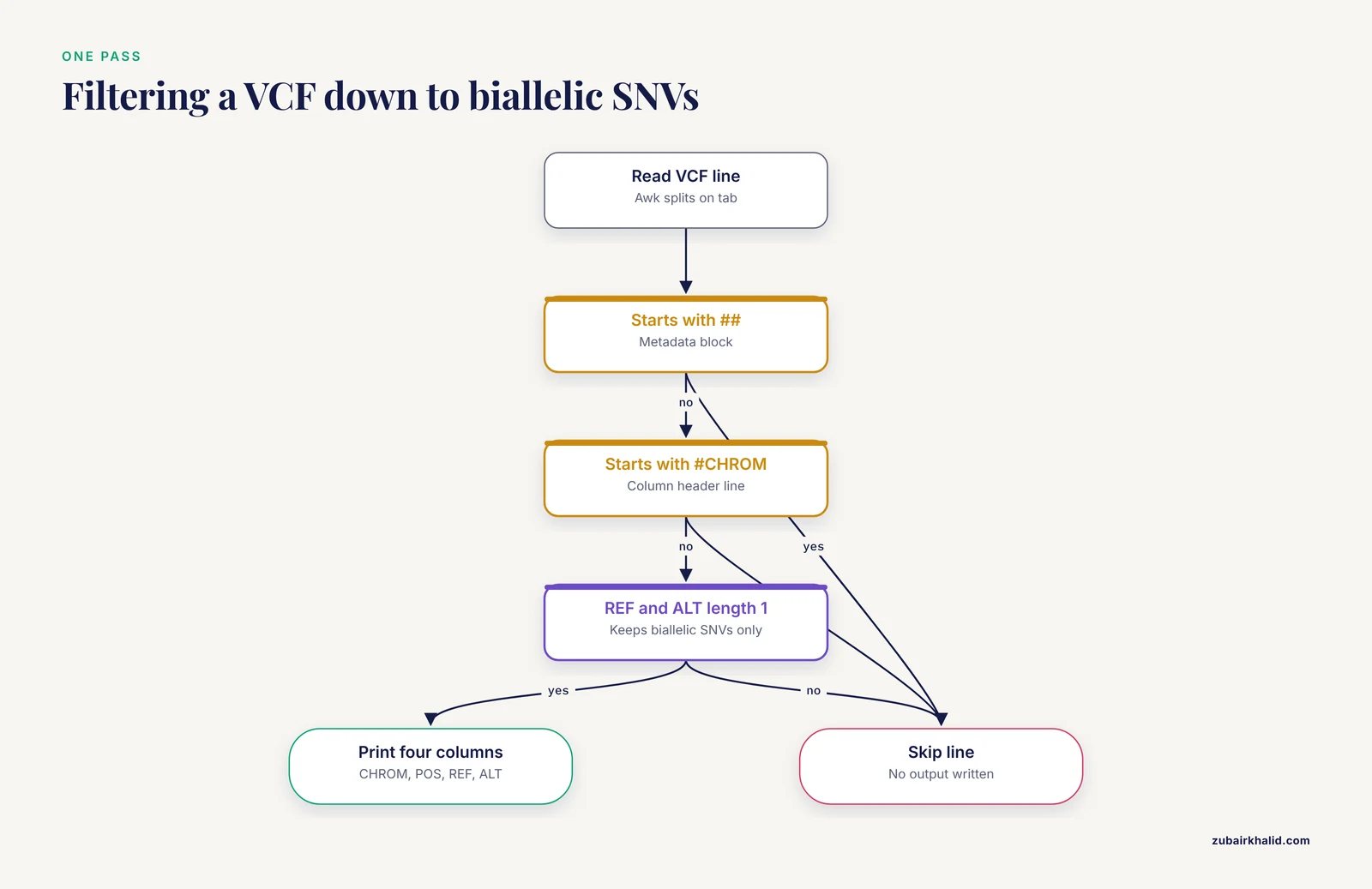
Variant Call Format files begin with a block of lines starting with ## and one header line starting with #CHROM. The standard columns are CHROM, POS, ID, REF, ALT, QUAL, FILTER, INFO, and optional FORMAT and sample columns. A robust one-pass extraction that skips headers, keeps biallelic SNVs on any chromosome, and prints a clean tab result:
awk -F '\t' '
/^##/ { next }
/^#CHROM/ { next }
length($4) == 1 && length($5) == 1 { print $1, $2, $4, $5 }
' variants.vcf > snvs.tsv
This single awk program replaces a grep plus cut chain, and it is the pattern you will reuse constantly. The VCF-centric tool literature notes that existing command-line processing of VCF can be challenging for many biomedical users [7], and precise awk idioms like the header skip are the difference between a clean result and a corrupted one.
Scenario 2. GTF and GFF parsing with attribute extraction
GTF column 9 is a semicolon-separated attribute string such as gene_id "ENSG00000223972"; gene_name "DDX11L1";. Extracting gene names for exon rows is a classic awk job because it needs both a condition (feature type equals exon) and a regex on the attribute column:
awk -F '\t' '
$3 == "exon" {
  match($9, /gene_id "[^"]+"/)
  id = substr($9, RSTART + 9, RLENGTH - 10)
  print id
}
' annotation.gtf | sort -u > exon_genes.txt
cut cannot touch this, because the selection depends on the content of another column and on a pattern inside a field. Given that genome annotation is widely described as a critical and error-prone step that bottlenecks comparative analyses [8], awk-level control over annotation files is a genuinely practical skill, not an academic one.
Scenario 3. FASTA and FASTQ manipulation
FASTA records alternate a > header line and sequence lines, so there are no "columns" at all. cut is useless here. Awk handles it naturally. Computing GC content across a FASTA file:
awk '
!/^>/ {
  gc += gsub(/[GC]/, "")
  total += length($0)
}
END { printf "%.2f\n", gc / total * 100 }
' assembly.fasta
Converting FASTQ to FASTA (used constantly in marker-gene and barcoding pipelines, where review literature places sequence processing squarely in the command-line world [1]):
awk '
NR % 4 == 1 { sub(/^@/, ">"); print $1 }
NR % 4 == 2 { print }
' reads.fastq > reads.fasta
The metabarcoding field explicitly notes that the volume of high-throughput sequencing data requires in-house command-line competence for downstream analysis [10], and these awk idioms are precisely that competence in its most portable form.
Scenario 4. Per-gene and per-chromosome aggregation
Counting how many variants fall on each chromosome from a VCF:
awk -F '\t' '
!/^#/ { counts[$1]++ }
END { for (c in counts) print c, counts[c] }
' variants.vcf
This is three lines, streams at disk speed, and needs no R or Python session. Aggregate-and-report is where awk's END block shines, and it applies equally to coverage tables, alignment summaries, and taxonomic abundance tables.
Scenario 5. Joining two files on a shared key
Awk can join two files on a common column without loading either into a database. Reading the first file into an array, then enriching the second:
awk -F '\t' '
NR == FNR { map[$1] = $2, next }
{ print $0, map[$1] }
' ids_to_names.tsv results.tsv
Note the newline-separated statements inside the braces, a style that keeps one-liners readable. For text-scale joins (up to a few million keys) this is often faster to write and run than starting a database session, and it fits the pattern of command-line text tools handling large files directly [2].
Scenario 6. Quick QC arithmetic inside a pipeline
A pathogen surveillance QC workflow emphasizes that raw-read quality assessment and robust, multi-tool consensus on results are core to trustworthy genomic surveillance [11]. When you want a fast independent check on a tool's numbers, awk gives you the arithmetic directly. Mean Phred score across a summary table, counts of positions above a depth threshold, the fraction of reads passing a length filter, all are one-liners:
awk '
$2 >= 20 { kept++ }
{ total++ }
END { printf "%.4f\n", kept / total }
' depth.txt
This kind of independent recomputation is a cheap, high-value habit in any pipeline, including the bash-driven, SLURM-batched pipelines that have become standard for viral and bacterial genomics [12].
The Performance Question: Is awk Faster Than cut?
The honest answer: cut is faster for what it does, and the difference only matters at scale. cut is a tiny C program that does one thing, while awk is an interpreter that parses its program and evaluates a language on every line. For pure column extraction on a multi-gigabyte file, cut will typically outpace awk.
But the comparison changes when you pick your awk. The awk ecosystem has several implementations:
- gawk, the GNU implementation, is the most feature-rich and the default on most Linux distributions. It supports field-parsing extensions and network functions you will rarely need.
- mawk is a fast, minimal awk that is typically the quickest implementation for bulk line-oriented text processing. Many pipelines install mawk explicitly for large-file work.
- busybox awk and BSD awk are smaller and leaner, common in containers and on macOS.
The practical guidance: if a job is pure extraction, use cut regardless of file size. If a job needs awk logic on a very large file, use mawk if it is available, and avoid constructs that force awk to buffer whole files. Both tools stream, which is why they remain viable even on files far too large for memory, a property that the command-line tool literature identifies as central to handling large biological data on Linux [2].
One more performance note: neither tool replaces a real binary for the heavy lifting. Parsing a 100 GB SAM file with awk is feasible, but converting it to the binary, indexed BAM format and using samtools is the correct production choice. Awk and cut are for the tabular text that surrounds the binaries, and for the checks you run on binary-tool output.
Common Mistakes and Limitations
These are the specific errors that produce silently wrong results. Each one has burned real pipelines.
1. Assuming cut's default delimiter is whitespace. It is the tab character. Running plain cut -f 2 on a space-separated file returns the entire line, because the line is a single tab-delimited field. If your file uses spaces, either switch to awk (which splits on whitespace runs by default) or pass a delimiter explicitly.
2. Trusting awk's default whitespace splitting on real data. The flip side of the same trap. Awk's default behavior collapses runs of spaces and tabs into one delimiter. That is convenient for human-readable tables, but wrong for files where empty fields matter. A tab-separated table with two consecutive tabs represents an empty field, and default awk will swallow it, shifting every later column by one. Set -F '\t' explicitly whenever the file is defined as tab-delimited, which covers most bioinformatics formats.
3. Setting OFS without rebuilding the record. If you assign OFS = "\t" but only print unchanged fields, awk has no reason to rebuild the line. The canonical fix is to touch a field, for example $1 = $1, which forces awk to rejoin fields with the output delimiter. Forgetting this produces output joined by the input delimiter, which then breaks the next step in the pipe.
4. Feeding CSV files with quoted commas to either tool. A field like "Smith, John" contains a comma, and both cut -d ',' and naive awk splitting will break the field in half. Neither tool parses quoting rules. Use a real CSV parser (Python's csv module, or mlr from Miller) for quoted-delimiter data. Bioinformatics files are overwhelmingly tab-delimited precisely to avoid this problem, so honor that convention in your own outputs.
5. Skipping VCF headers incorrectly. A grep -v '#' removes legitimate data lines whose INFO or ID fields contain a hash character, which is rare but legal. The correct idiom is awk's /^#/ { next }, or for pure extraction, grep -v '^##' | grep -v '^#CHROM' with anchored patterns. Unanchored filtering is a silent-data-loss class of bug.
6. Ignoring Windows line endings. Files edited on Windows carry carriage returns (\r). In awk, that carriage return attaches to the last field, so $NF compares as "value\r" and fails equality tests. Strip them with tr -d '\r' at the top of the pipeline, or normalize the file once. This single character causes a remarkable number of "the script works on her machine but not mine" failures, particularly in collaborative settings where materials pass between operating systems, a portability concern that Windows-oriented workflow packages were designed to address [3].
7. Using cut on record-based formats. FASTA, FASTQ, and multi-line SAM records have no meaningful columns per line in the way a table does. Running cut on them produces fragments that look plausible and are biologically meaningless. Match the tool to the file structure: column tools for tables, awk or dedicated tools for record-based formats.
8. Forgetting that awk arrays iterate in unspecified order. In standard awk, for (key in array) gives no ordering guarantee. If you need sorted output, pipe through sort, or use gawk's asorti() if portability to other awks does not matter. Unsorted associative output is not an error, but it will fail a diff against a reference file and fail reproducibility checks.
9. Overusing awk where a specialized tool exists. Awk can parse VCF, but bcftools exists. Awk can slice SAM, but samtools exists. Awk can compute read statistics, but dedicated QC tools exist and are validated. The role of awk is glue, filtering, and quick arithmetic between established tools, not their replacement. Modern workflow design assigns each step to the purpose-built program and uses text tools for the joints, a division of labor visible in the structure of published end-to-end pipelines [12] [9].
10. Inheriting a delimiter assumption from someone else's file. | Files shared between groups sometimes change delimiters between versions, or acquire a trailing delimiter that creates an empty final field. Before a first-pass cut -f or awk extraction on an unfamiliar file, inspect the delimiter structure with a quick check such as head -1 file | od -c | head or awk -F '\t' '{print NF, exit}'. Thirty seconds here prevents an hour of debugging downstream.
Choosing awk or cut in a Bioinformatics Pipeline: A Decision Procedure
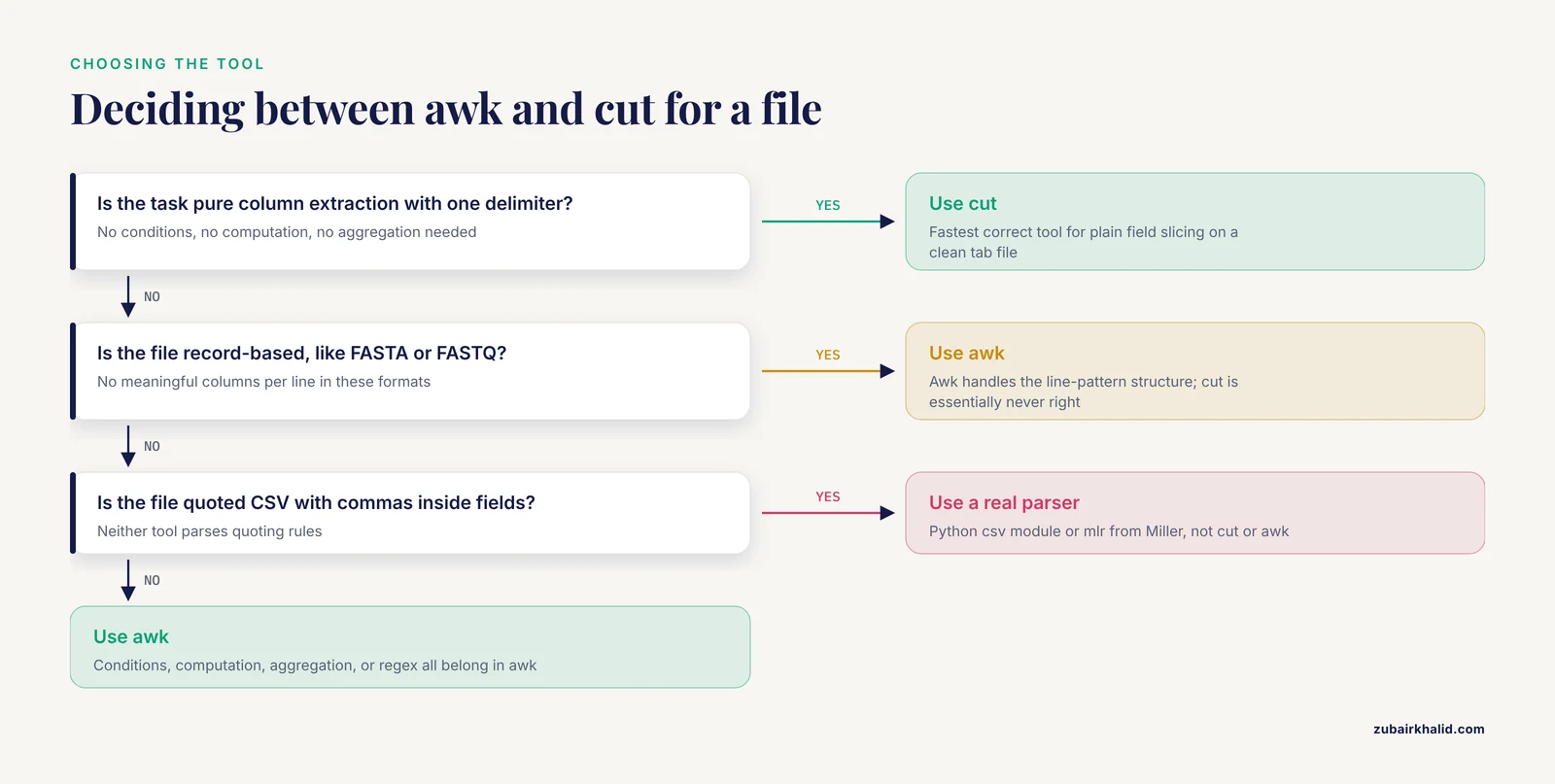
When you sit down with a tabular file and a goal, run through this sequence:
- Is the task pure column extraction, with one single-character delimiter and no conditions? Use
cut. It is the fastest correct tool. - Does the task involve conditions, content-dependent selection, computation, or aggregation? Use awk. The logic lives in one place, the command is reproducible as written, and there is no intermediate file to manage.
- Is the file record-based (FASTA, FASTQ) rather than column-based? Neither tool is a general fit, but awk handles the line-pattern structure of these formats well.
cutis essentially never right here. - Is the file quoted-CSV? Use a dedicated parser. Neither tool is correct.
- Is this step part of a permanent pipeline? Whatever you choose, write it into the pipeline script with the delimiter made explicit and the header rule stated. Pipelines that encode implicit format assumptions in untyped one-liners are the ones that break silently when a file changes. Workflow engineering papers in bioinformatics make the same argument at scale: explicit, scripted, automated steps exist to replace fragile ad-hoc scripts [13], and the same principle applies at the scale of one awk command inside your analysis.
A final note on where these tools sit relative to the rest of the field. Text-processing tools do not appear in tool lists as headline software the way aligners or variant callers do, yet the literature on computational workflows repeatedly returns to command-line fluency as the enabling skill [2] [5] [6] [4]. Learning cut takes ten minutes. Learning awk well takes a focused week, and it pays for itself for the rest of a career, because the pattern-matching-plus-columns model maps directly onto the majority of tabular problems in genomics, transcriptomics, and metabarcoding.
Frequently Asked Questions
Is awk harder to learn than cut?
Yes, dramatically. cut has four flags and can be learned in minutes. Awk is a programming language with variables, arrays, functions, and pattern-action rules, so real fluency takes days of practice. The payoff is that awk covers nearly everything cut does plus filtering, computation, and reformatting, so the learning investment compounds across every script you write afterward.
Can I always replace cut with awk?
Functionally, almost always. Any cut -f expression has an awk equivalent with -F and print. The main reasons to keep cut in your toolbox are speed on very large pure-extraction jobs and brevity in quick shell one-liners. Neither is a strong reason to avoid awk when logic is involved, but for plain column slicing, cut remains the leaner choice.
How do I handle space-separated files with cut?
You generally should not. cut accepts only a single-character delimiter, so space-separated files with irregular spacing break it. Awk handles these files natively, because its default behavior treats any run of spaces and tabs as one delimiter. If the file is single-space separated and strictly regular, cut -d ' ' works, but treat that as an exception rather than a plan.
Do I need to learn awk if I already use cut?
For bioinformatics work, yes. cut covers a narrow slice of the column-processing jobs in real pipelines, and the moment you need header handling, row filtering, per-group counting, arithmetic on columns, or regex-based field extraction, you need awk or a scripting language. Awk sits closer to the data than Python or R for these tasks, which is why it remains a standard part of the linux commands bioinformatics toolkit [2].
Which awk implementation should I use, gawk, mawk, or busybox awk?
Use whatever your system provides by default for everyday work, since all conform to the POSIX awk standard. Install mawk if you process very large text files regularly, because it is typically the fastest awk implementation for line-oriented work. Reach for gawk when you need its extensions, such as asort() and asorti() for array sorting. In Docker containers, busybox awk is often the only one present, so keep your scripts within standard awk when you intend to share them.
How do I skip header lines in cut or awk?
Awk handles this directly with NR > 1 for single-header tables, or /^#/ { next } for VCF-style headers where header lines begin with hash characters. cut has no header concept, so combine it with a filter, such as grep -v '^#' for VCF metadata or tail -n +2 to drop a single first line. Anchoring the pattern (the ^) matters, because an unanchored filter can delete legitimate data lines that merely contain the character.
Sources
- Bioinformatics and computational tools for post-sequencing data analysis in DNA barcoding studies - A review
- Command-Line Tools in Linux for Handling Large Data Files
- BTW-Bioinformatics Through Windows: an easy-to-install package to analyze marker gene data
- The COMBAT-TB Workbench: Making Powerful Mycobacterium tuberculosis Bioinformatics Accessible
- Enable, empower, succeed: a bioinformatics workshop Harnessing open web-based tools for surveillance of bacterial antimicrobial resistance
- oxo-call: Documentation-grounded Skill Augmentation for Accurate Bioinformatics Command-line Generation with Large Language Models
- re-Searcher: GUI-based bioinformatics tool for simplified genomics data mining of VCF files
- Leveraging existing data to maximise quality and consistency across gene model annotations: a Fusarium pan-annotation
- A Guide to Enzymatic Targeted Methylation Sequencing Bioinformatics Workflow: Best Practices
- User-friendly bioinformatics pipeline gDAT (graphical downstream analysis tool) for analysing rDNA sequences
- PathoSeq-QC: a decision support bioinformatics workflow for robust genomic surveillance
- ‘PePApipe’: A complete bioinformatics analysis pipeline for African Swine Fever Virus genome
- Kworkflow A Linux kernel Developer Automation Workflow System