AlphaFold Server Queue Times and Job Limits: How to Work Around Them
By Dr. Zubair Khalid, DVM, MS, PhD ·

The most common cause of a long AlphaFold server queue time is simple demand. The AlphaFold Server is a free, shared web service run by Google DeepMind, and every user on the planet shares the same compute pool and the same per-account limits. If your job has been sitting in the queue far longer than expected, the first thing to check is your job history panel on the server itself. If the status reads queued rather than running, the delay is on the server side and nothing about your input is wrong. If the status shows the job was rejected or never submitted, the problem is your input size, your entity types, or your daily quota, and that is a different fix.
This article walks through how the queue works, what the published job limits are and why they exist, a symptom-by-symptom troubleshooting table, a short diagnostic sequence you can follow in under ten minutes, and then the practical workarounds, from adjusting when and how you submit, through using the precomputed AlphaFold database, to running prediction locally on your own hardware or an institutional cluster. A short worked tutorial near the end shows a complete submission-to-download cycle and a local alternative so you can compare.
One caution before anything else. The AlphaFold Server is a public web service. Do not submit confidential, embargoed, or unpublished sequences unless you have read the current terms of use and are comfortable with how Google states that submissions and results may be handled. For sensitive projects, the local options described later in this article are the appropriate route, not the public server.
How the AlphaFold Server queue works
The AlphaFold Server went live in May 2024 as the free web front end for AlphaFold 3, the model described by Abramson and colleagues in Nature that year. Unlike the older AlphaFold 2, which predicted structures of protein monomers and protein complexes, AlphaFold 3 models interactions across a broader range of molecule types, including proteins, DNA, RNA, common ligands, ions, and certain chemical modifications. That broader scope is exactly why demand on the shared server is so high and why the alphafold server queue time can stretch during busy periods.
The queue itself is a first-in, first-out system that you cannot influence. When you submit a job, it joins a global pool with everyone else's jobs. There is no paid priority tier, no academic fast lane, and no flag you can set to jump ahead. Your position depends on when you submitted relative to others, how big your job is once it reaches a GPU, and how many workers the service is running at that moment.
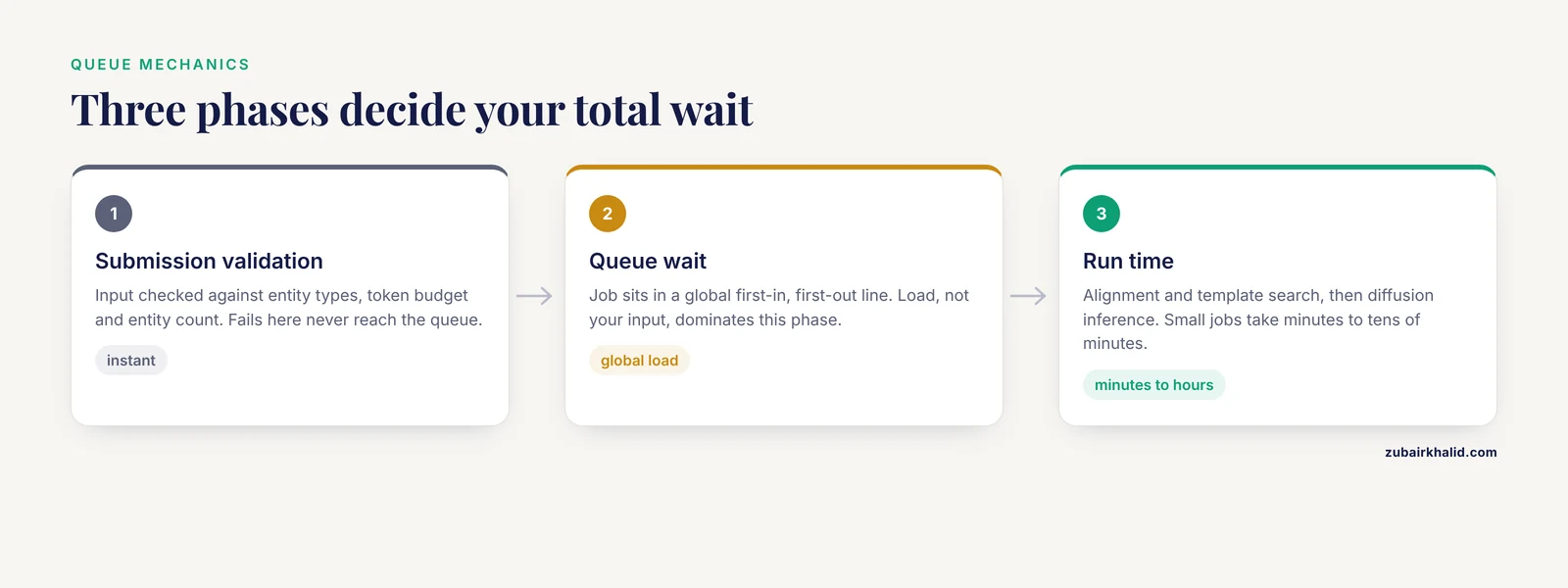
Three separate phases determine your total wall-clock wait, and mixing them up causes most confusion:
- Submission validation. The server checks your input against its rules, including entity types, the total input budget measured in tokens, and the number of molecular entities. A job that fails validation never reaches the queue at all. This is instant, so an immediate rejection is a sign of an input problem, not a queue problem.
- Queue wait. The job sits in line. This phase is dominated by global load and has nothing to do with your input. A five-token job and a five-thousand-token job can wait a similar amount of time here, although larger jobs may be scheduled onto specific workers and can therefore wait differently in practice.
- Run time. Once the job starts, AlphaFold 3 runs a multiple sequence alignment and template search, then performs inference with a diffusion-based structure module. Small two-chain protein jobs typically finish in minutes to tens of minutes under normal conditions. Large complexes with long nucleic acids, many ligands, and many copies of the same chain take correspondingly longer, sometimes hours of compute after the wait.
Queue load follows human working hours. In practice, the periods shortly after business hours begin in the United States and Europe are the busiest, and weekends and overnight hours in those time zones tend to move faster. This pattern is the single biggest lever most users have over their own wait time, and it costs nothing to exploit.
AlphaFold server queue times and job limits, explained
The limits on the AlphaFold Server exist because the service is free, in high demand, and funded as a research contribution rather than a commercial product. Understanding each limit tells you which workaround applies.
The daily job quota. Each Google account gets a fixed number of jobs per day. The exact number has changed over time, so treat any figure you read in a blog post, including older versions of this guidance, as possibly out of date and check the official FAQ on the AlphaFold Server site for the current value. When you hit the quota, further submissions are blocked until the allowance resets. Because the quota counts submissions rather than successful runs, failed and rejected jobs matter differently: a job rejected at validation generally does not consume quota in the same way a queued job does, but a job that runs and produces a bad result does.
The token budget per job. AlphaFold 3 represents every residue, nucleotide, ligand, ion, and modification as input tokens, and the server enforces a cap on the total per job. A thousand-residue protein plus a long RNA plus a dozen ligands can exhaust the budget quickly. Note that the budget scales with the size of each entity, so a long disordered tail burns tokens while contributing little structural information.
The queue depth cap. You cannot stack an unlimited number of pending jobs on one account. Once you have the maximum number of jobs waiting, additional submissions are blocked until earlier jobs finish, which is a separate and often misdiagnosed form of being "limited."
Entity and molecule restrictions. The server supports a defined set of molecule types and modifications. Anything outside that set, or inputs that do not parse correctly, are rejected at validation rather than queued.
Non-commercial terms. Access requires a Google account and acceptance of terms that restrict use to non-commercial purposes. This is a licensing limit rather than a technical one, but it determines whether the server is an option for your project at all, and it is the reason multiple-account workarounds described later are off the table.
The mechanism connecting all of these limits to queue time is throughput. The service has finite GPU capacity. Every job that reaches a worker occupies it for the full run. Quotas and token caps exist to keep any single account from monopolizing that capacity, and the queue is simply the visible symptom of demand exceeding capacity at any given moment.
Troubleshooting table: symptoms, causes, confirmation, fixes
This table is the core of the article. Work down it in order, because the most common causes are at the top.
| Symptom | Likely cause | How to confirm | Fix |
|---|---|---|---|
| Status shows queued for hours with no movement | Global queue load at peak hours | Submit a tiny two-chain test job. If it also waits, the queue is congested, not your input | Resubmit during off-peak hours or batch jobs overnight. Do not delete and resubmit the same job repeatedly, it wastes quota |
| Message that your daily limit is reached | Per-account job quota exhausted | Open the job history panel and count submissions in the current day | Wait for the reset, then submit highest-priority jobs first. Batch the rest overnight |
| Job rejected immediately at submission | Token budget exceeded or too many entities | Add up residues, nucleotides, ligands, ions, and repeated copies in your input | Trim disordered tails, remove redundant ions and waters, reduce repeated copies, or split the complex into smaller overlapping jobs |
| Job rejected with an unsupported molecule message | Entity type outside the supported set | Check the supported entities and modifications list in the official documentation | Omit the problematic entity, model it separately, or move to a local pipeline that accepts arbitrary inputs |
| Job starts, then fails partway | Stochastic inference failure or poor alignment depth | Resubmit the identical input once. Check whether the failed run's outputs show a very shallow multiple sequence alignment | Retry. If failures repeat, simplify the input or run the alignment-heavy steps locally where you can inspect them |
| Job finished but no email arrived | Mail filtering or delivery delay | Log in and check the job history page in the browser | Download results directly from the history page. Add the notification sender to your safe-sender list for next time |
| Cannot sign in or submit at all | Account, regional, or terms restrictions | Confirm you are signed in with a Google account and that your use case is non-commercial | Resolve the account issue or use the alternatives described later in this article |
| Protein-only result looks worse than an old AlphaFold 2 prediction | Model and sampling differences, not a queue problem | Compare per-residue confidence and the predicted alignment error between versions | Generate all available sample structures, rank by confidence, and consider a ColabFold AlphaFold 2 run for direct comparison |
A short diagnostic sequence
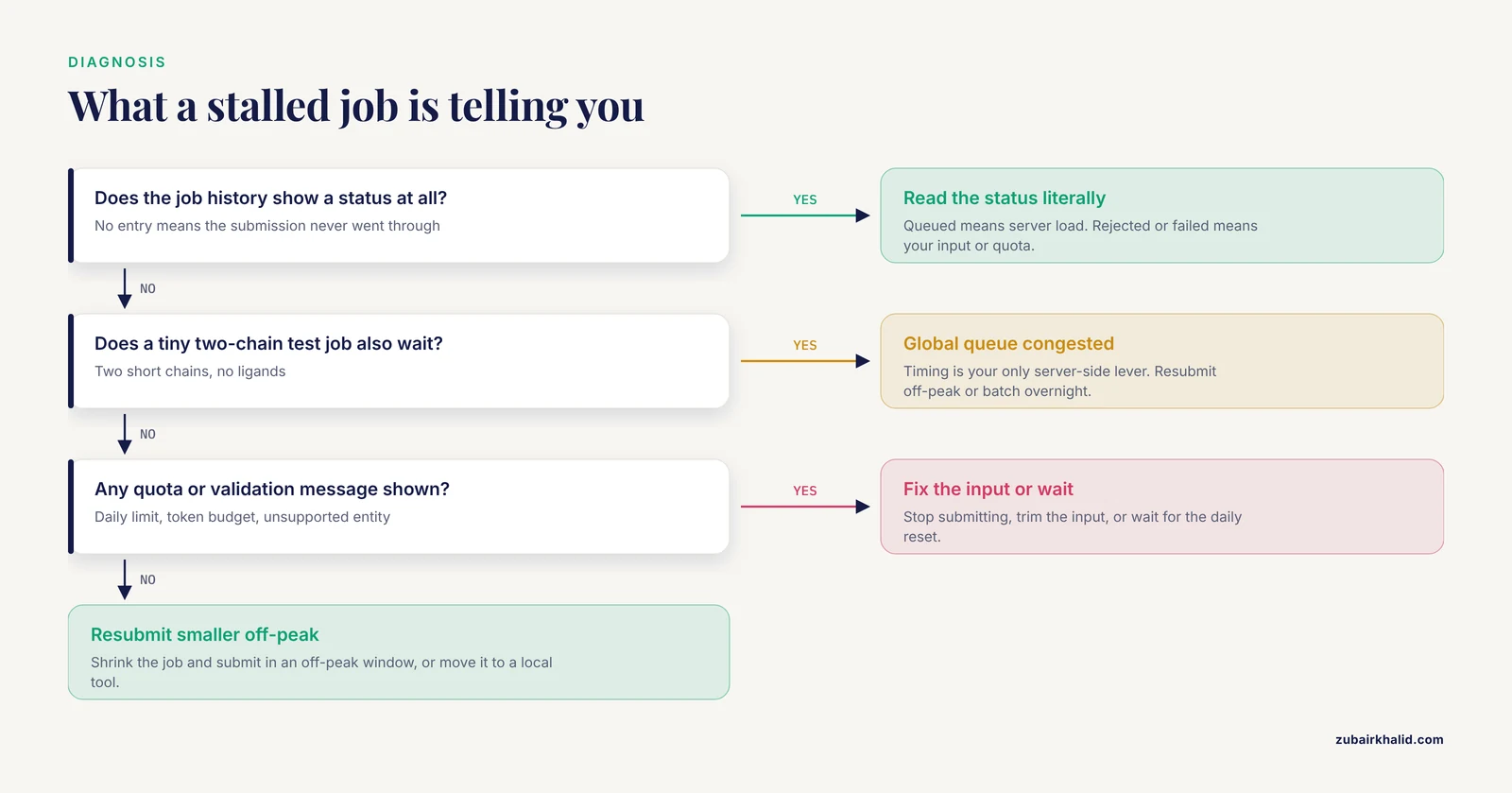
If you are staring at a stalled job right now, follow these steps in order. The whole sequence takes under ten minutes.
- Open the job history panel and read the status literally. Queued means server load. Rejected or failed means your input. No job at all means submission did not go through.
- If the status is queued, note the submission timestamp. Compare the wait so far against the typical few minutes to a few hours range for small jobs. Under one hour with no other symptoms usually deserves patience rather than action.
- Submit one deliberately tiny job, for example two short protein chains with no ligands. If the tiny job moves through the queue quickly while your real job sits, resubmit the real job later or reduce its size. If the tiny job also waits, the global queue is congested and timing is your only server-side lever.
- If you see any quota message, stop submitting. Every submission you burn while the quota is nearly exhausted is a submission you will wish you had saved for the job you actually care about.
- Check the email connected to your Google account, including spam, for completion notices from earlier jobs. Results remain available from the history page, and jobs frequently finish without the email ever arriving.
- If validation keeps rejecting the job, rebuild the input from scratch in the server interface rather than editing a copied spec, because malformed copied inputs are a frequent source of immediate rejections that look like limits but are not.
How to fix AlphaFold server queue time: solutions from cheapest to most involved
These solutions are ordered by effort. The first three require no new tools. The later ones require computing resources but remove the queue entirely.
Submit off-peak and batch your jobs
The simplest alphafold server queue time solution is to stop competing with the peak. Write your jobs in a batch during your working day, then submit the whole batch in the evening or overnight in United States and European time zones, when global demand is lowest. Because the daily quota refreshes, a disciplined overnight batch effectively multiplies your useful throughput without touching the limits at all. Keep a simple spreadsheet with the job name, input summary, submission time, and job identifier for every submission. When a batch finishes overnight, download everything in the morning, including failures, so you can diagnose them later without resubmitting.
Shrink each job before you submit
The token budget is per job, so anything you remove from the input buys room. Practical reductions include:
- Remove ions, cofactors, and water molecules that are not central to the question you are asking. Each consumes tokens and adds inference cost.
- Drop crystallographic or literature copies of the same chain unless the stoichiometry itself is the hypothesis. Model one copy first, then test stoichiometry in a dedicated job.
- Trim long disordered or low-complexity termini if they are not part of the interface you care about. These regions consume budget and typically come back with low confidence anyway. Validate afterward that the truncation does not affect the interface residues you are studying.
- For very large assemblies, split into overlapping fragment jobs that share the interface of interest, then reconcile the pieces using the predicted alignment error maps.
Each reduction changes the biology you are modeling, so record exactly what you removed and why. A prediction of a trimmed complex is a hypothesis about the trimmed complex, not about the full assembly.
Check the precomputed AlphaFold database first
A large fraction of server submissions are unnecessary. The AlphaFold Database, hosted by EMBL-EBI in partnership with DeepMind, contains predicted structures for more than 200 million proteins covering nearly the full UniProt reference proteomes, generated with AlphaFold 2. If your question involves a single protein chain of a cataloged organism, the answer may already be sitting there with per-residue confidence values, downloadable in milliseconds. Searching this database costs nothing and consumes no quota, which means every database hit frees a server slot for a job that genuinely needs it, such as a complex with a novel ligand.
Route monomer questions away from the server entirely
If your jobs are single-chain protein predictions, the AlphaFold Server is often the slowest acceptable tool rather than the fastest. ColabFold, the free notebook implementation of AlphaFold 2 described by Mirdita and colleagues in Nature Methods, runs in a browser on Google Colab with no local installation and typically returns monomer structures in minutes. For sequences with no good homologs, single-chain language-model methods such as ESMFold and OmegaFold skip the alignment step entirely and run in seconds to minutes. None of these consume AlphaFold Server quota, which is the real point. Keep the server for the job class it is uniquely good at, namely complexes spanning proteins, nucleic acids, ligands, and ions.
Run AlphaFold 3 locally or on your institutional cluster
Since November 2024, DeepMind has released the AlphaFold 3 source code on GitHub, with model weights available after requesting access and accepting the terms, which permit non-commercial use. Running the full pipeline locally requires a capable NVIDIA GPU, a reasonable number of CPU cores, and substantial storage for the genetic sequence databases used in alignment. In exchange, you get no queue, no daily quota, no token cap beyond what your hardware can hold, and full control over the multiple sequence alignment step, which matters for unusual organisms and engineered proteins.
On a shared institutional cluster, wrap the run in a SLURP-style scheduler script. The pattern looks like this, with exact argument names taken from the repository README at the time you install, because they change between releases:
#!/bin/bash
#SBATCH --job-name=af3_complex
#SBATCH --gres=gpu:1
#SBATCH --cpus-per-task=16
#SBATCH --time=12:00:00

python run_alphafold.py \
  input_complex.json \
  databases/ \
  results/
Note the two practical details that trip up most first-time local installs. First, the sequence databases are a large one-time download, so plan the disk and the transfer window. Second, the model weights require an access request that can take time to approve, so start that step weeks before you need it. Safety note for this route: the database download and the reference data staging are the steps where people lose work. Verify checksums or file counts after download before deleting anything, and run your first job on a small test input before committing an evening of cluster time to a real batch.
Consider open alternatives for complex prediction
For researchers who cannot obtain AlphaFold 3 weights or who want fewer licensing constraints, open models with similar complex-prediction scope have emerged, including Boltz and Chai Discovery's Chai-1, along with community reimplementations. These run locally on comparable hardware and accept protein-nucleic acid-ligand inputs. They are not drop-in identical to AlphaFold 3, and confidence calibration differs between models, so treat cross-model agreement as a robustness check rather than expecting identical outputs. For many queue-bound users, the pragmatic pattern is to use the public server for one carefully chosen prediction of each complex and an open local model for parameter sweeps and variant screens.
What not to do
Two workarounds circulate that you should not use. Creating additional Google accounts to multiply quotas violates the terms of service and risks losing access for your group. And paying a third party that resells server access does not exist as a legitimate option, because the service has no priority tier. Both shortcuts risk your access to a genuinely valuable free resource. The legitimate versions of the same ideas are batching within the quota and moving volume to local hardware.
A worked walkthrough: submission, wait, and the local fallback
This short alphafold tutorial ties the previous sections together with a concrete cycle you can repeat.
Step 1. Define the minimal question. Suppose you want the structure of a 180-residue kinase domain bound to a known ATP-competitive inhibitor and you also care about a kinase-substrate interaction. These are two different jobs with different sizes. Submit the small one first.
Step 2. Build the input in the server interface. Paste the kinase sequence as a protein entity, add the inhibitor as a ligand entity by name, and add the magnesium ion if it is mechanistically relevant. Do not add speculative ions or waters. Check the input against the token budget indicator the interface provides before submitting.
Step 3. Submit during an off-peak window. If it is mid-morning in Boston or London, consider drafting the second job now and submitting both after dinner in those time zones. Note the submission timestamp and the job identifier in your tracking sheet.
Step 4. Interpret the output correctly. AlphaFold 3 returns several sample structures with per-residue confidence scores on a 0 to 100 scale and a predicted alignment error matrix in angstroms. Rank samples by confidence, inspect the error matrix around the ligand-binding pocket specifically, and remember that high global confidence does not certify ligand pose. Treat the predicted binding geometry as a hypothesis for docking or experiment, not as a measurement.
Step 5. If the queue ate your day, switch tools for the next job. The kinase domain alone is almost certainly already in the AlphaFold Database. The kinase-substrate pair is a protein-protein complex that a local ColabFold run can model in minutes on a free Colab session, preserving your server quota for jobs that genuinely require AlphaFold 3, such as the ligand-bound prediction.
This cycle, database check first, server job second, local tool for volume, is the prevention strategy described in the next section in general form.
Prevention practices for chronic queue problems
Users who never seem to wait share a set of habits, none of which require new hardware:
- Always check the AlphaFold Database and your own previous predictions before any new submission.
- Maintain an input library as text files so every submission is reproducible and can be rerun locally without retyping.
- Batch submissions into one or two daily windows aligned with off-peak hours rather than submitting ad hoc.
- Rank your questions by importance before the quota resets, and spend the first slots of each day on the jobs whose results change a decision.
- Download and archive every result, including failures, the day it appears, because retention policies on free services change without notice.
- Keep one tiny standard test job in your notes. When the queue seems stuck, the test job tells you within minutes whether the problem is global load or your input.
- Track your group's server usage on a shared sheet so two people do not burn the same account's quota on duplicate jobs the same morning.
Common Mistakes and Limitations
The most frequent errors, in rough order of how often they cause avoidable pain:
- Resubmitting a queued job. Deleting and resubmitting does not improve your position in a first-in, first-out queue and can waste quota. Patience at the queue stage is usually correct.
- Treating every stall as a server problem. Roughly half of the complaints that look like queue problems are validation rejections that the user never noticed. Read the status text literally before troubleshooting the queue.
- Ignoring confidence metrics. A structure with high global confidence can still have a poorly resolved ligand or interface. Always inspect the predicted alignment error around the region your hypothesis concerns.
- Comparing AlphaFold 2 and AlphaFold 3 outputs as if they were the same method. The models differ architecturally, and the diffusion-based sampling in AlphaFold 3 means variability between samples. Use all returned samples and compare within a version before comparing across versions.
- Truncating inputs without recording it. Trimmed disordered regions save tokens, but an unrecorded truncation makes the prediction irreproducible and can mislead collaborators who assume the full-length protein was modeled.
- Assuming server availability equals license to use. The terms restrict use to non-commercial purposes. A commercial project that submits jobs through a personal account is not compliant, and the correct route is a licensed local deployment or a commercial-terms provider if one is available to you.
- Expecting the server to handle every molecule type. The supported entity list is specific. Unusual modifications, noncanonical linkages, and large multi-copy assemblies are better served by local pipelines where you control preprocessing.
On limitations more broadly. The AlphaFold Server's quotas, token budgets, and supported molecule list are set by Google DeepMind and change over time, and this article deliberately avoids pinning numbers that may be stale by the time you read it. Queue behavior varies with global demand in ways no guide can predict on a given day. And as with any prediction method, outputs are computational hypotheses whose quality depends on your input choices and must be validated experimentally where the stakes justify it.
Frequently Asked Questions
Why is my AlphaFold server queue time so long?
Most likely the global queue is congested, because the free server is shared by all users with fixed GPU capacity. Check your job status panel first, since a status of queued means server load, while a rejection or failure means your input or quota is the issue.
How many jobs can I submit to the AlphaFold Server per day?
Each Google account gets a fixed daily quota, and the exact number has changed since launch, so check the official FAQ on the AlphaFold Server site for the current figure. Rejected inputs do not consume quota the way completed jobs do.
How long does a job take once it starts running?
Small protein-protein jobs typically finish in minutes to tens of minutes, while large complexes with long nucleic acids, many ligands, or many repeated chains can take hours of compute after the queue wait ends.
Why was my job rejected before it even reached the queue?
Immediate rejection means validation failed, most often because the input exceeded the per-job token budget, contained too many entities, or included a molecule type the server does not support. Trim the input or check the supported entities list in the documentation.
Does the AlphaFold Server quota reset at a specific time?
The quota resets on a daily schedule, and the server interface or official FAQ is the reliable place to see when your allowance returns. Batch your next day's jobs so the first reset slots go to your highest-priority questions.
Can I pay to skip the queue or get priority placement?
No, the AlphaFold Server is free with no paid priority tier, so any offer to sell queue priority is not a legitimate option. Your legitimate levers are off-peak submission, smaller inputs, and moving volume to local tools.
Is using multiple Google accounts to get around the daily limit allowed?
No, creating additional accounts to multiply quota violates the terms of service and risks access for your whole group. Batch within the rules or run predictions locally instead.
What is the fastest free alternative for single-chain predictions?
The precomputed AlphaFold Database at EMBL-EBI is instant if your protein is already modeled, and ColabFold runs AlphaFold 2 in a browser notebook in minutes for sequences that are not yet in the database. Neither consumes your AlphaFold Server quota.