AlphaFold PDB File Errors: Causes and Fixes
By Dr. Zubair Khalid, DVM, MS, PhD ·

Most AlphaFold PDB file errors come down to one fact: the file is usually not a PDB-format file at all. The AlphaFold Database distributes predicted structures in mmCIF format, while a large amount of existing software still expects the legacy PDB format. Rename a .cif file to .pdb, hand it to a strict parser, and you get zero atoms, scrambled coordinates, or a cryptic parse failure.
The first thing to check takes five seconds. Run head -1 on the file. If the first line starts with data_, you are holding an mmCIF file, and the fix is a proper format conversion rather than a repair job.
The volume of traffic behind these errors is enormous. The AlphaFold Database (AlphaFold DB) grew from roughly 300,000 predicted structures at its 2021 launch to more than 214 million protein structures, and its models are now surfaced inside primary resources such as PDB, UniProt, Ensembl, InterPro, and MobiDB [1]. Every one of those touchpoints drops a predicted structure into software built for experimental files. This guide walks through the failure modes in order of frequency, explains the mechanism behind each one, gives a short diagnostic routine, and closes with habits that keep the problems from coming back.
What an AlphaFold Structure File Actually Contains
The PDB format is a fixed-column text format dating from the 1970s. Every line is 80 characters wide and each field lives at a fixed character position: the atom name in columns 13 through 16, the residue number in columns 23 through 26, the x, y, z coordinates in columns 31 through 54, and the occupancy plus B-factor (the atomic displacement column) in columns 55 through 66. Nothing marks the field boundaries except position, so any edit that inserts, deletes, or shifts characters corrupts every field to the right of the change.
mmCIF (macromolecular Crystallographic Information File) is the modern successor. It stores data as tagged key-value pairs and loops, so parsers read labels instead of counting characters, and the format imposes no practical limits on chain count, atom count, or residue numbering.
An AlphaFold prediction file is minimal by experimental standards. It contains ATOM records for one model, a TER record marking the end of each chain, and an END record. The model holds protein heavy atoms only: no hydrogens, no ligands, no glycans, no ions, no waters, and no alternate conformations. Occupancy is 1.00 for every atom, and the unit cell record is a placeholder because a predicted structure has no crystal environment.
Three pieces of information matter more than anything else in the file:
- pLDDT (predicted local distance difference test) is a per-residue confidence score from 0 to 100, stored in the B-factor column. The standard interpretation bands are above 90 for very high confidence, 90 to 70 for a confident backbone, 70 to 50 for low confidence, and below 50 for very low confidence, which usually signals disorder.
- PAE (predicted aligned error) is a per-residue-pair error matrix in angstroms. Local runs write it to a scores JSON file, and AlphaFold DB embeds it in the mmCIF as a quality-metric category.
- Residue numbering follows the UniProt canonical sequence used for the prediction, starting at 1 for that sequence.
Files from the database follow the pattern AF-{UniProt accession}-F1-model_v{version}.cif, for example AF-P69905-F1-model_v4.cif for human hemoglobin subunit alpha, where the accession is the stable UniProt identifier. Successive database releases have added model organism proteomes, global health proteomes, Swiss-Prot coverage, and curated protein datasets [1].
How to Fix an AlphaFold PDB File Error: The First Five Checks
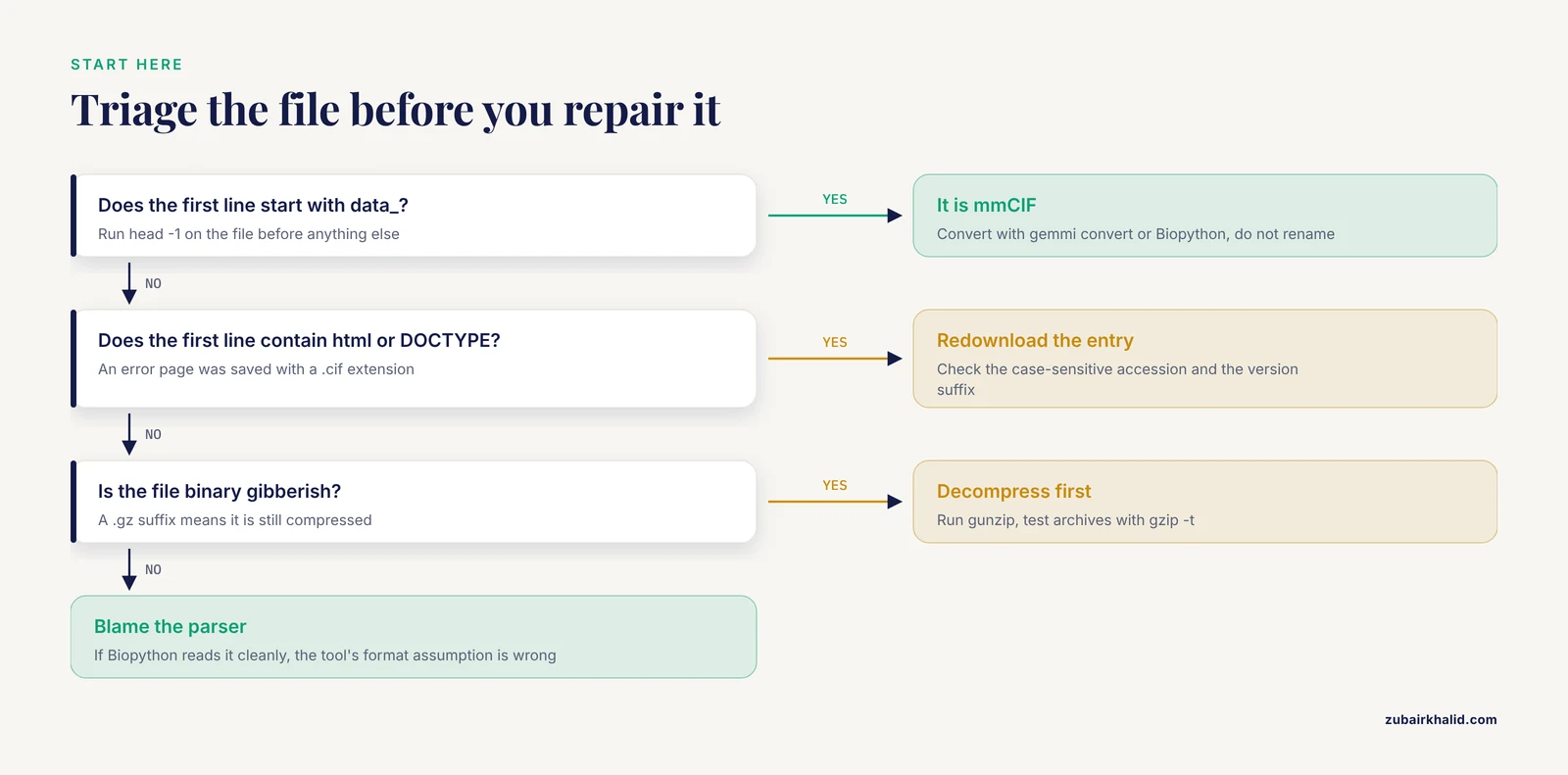
Work through these checks in order. Most errors die at step 1 or 2.
1. Identify what you actually downloaded.
file AF-P69905-F1-model_v4.cif
head -3 AF-P69905-F1-model_v4.cif
Read the result like this: a first line starting with data_ means mmCIF. A line starting with ATOM or HEADER means PDB format. A line containing <html or <!DOCTYPE means the download returned an error page. Binary gibberish means the file is still gzip-compressed.
2. Decompress if needed. A .gz suffix requires gunzip before any parser sees plain text. Test an archive without extracting it using gzip -t.
3. Check completeness. tail -3 should show a clean ending: an END record for PDB format, or the final loop values for mmCIF. Count the atom records with grep -c '^ATOM' on a PDB-format file, or convert first and then count.
4. Sanity-check the atom count. Standard residues contribute roughly eight heavy atoms each, so a 300-residue prediction should land near 2,400 ATOM lines. A count far below that means truncation. A count near zero with a healthy file size usually means the parser read the wrong format.
5. Cross-check with a second parser before blaming the file.
from Bio.PDB import MMCIFParser
structure = MMCIFParser(QUIET=True).get_structure("af", "AF-P69905-F1-model_v4.cif")
print(len(list(structure.get_residues())), "residues")
If Biopython reads the file cleanly and your primary tool does not, the file is fine and the tool's format assumption is the problem. With triage finished, match your symptom to the table below.
AlphaFold PDB File Error Symptoms at a Glance
Every row in this table is a failure mode that appears repeatedly in lab channels and issue trackers. Confirm before you fix, because several symptoms share causes.
| Symptom | Likely cause | How to confirm | Fix |
|---|---|---|---|
| Viewer reports zero atoms or unreadable coordinates | mmCIF loaded as PDB, or the reverse | First line starts with data_ | Convert with gemmi convert or load with the correct format |
| Saved file opens as a web page | Download returned an error page | First line contains <html or <!DOCTYPE | Redownload with the correct, case-sensitive accession |
| Parser stops partway with an incomplete-record error | Truncated transfer | tail -3 shows no END record, atom count is low | Redownload, test archives with gzip -t |
| Structure looks stretched, overlapping, or garbled | Fixed-column damage from a spreadsheet or word processor | Lines vary in length, tabs present, numbers in scientific notation | Discard the edited copy, restart from the original, edit with scripts |
| Force-field preparation aborts on residue UNK | Ambiguous or non-standard residues in the input sequence | grep -c ' UNK ' returns a nonzero count | Replace or remove UNK residues, rebuild side chains |
| Docking or simulation setup complains about missing hydrogens | Predictions contain heavy atoms only | Toggle hydrogens in a viewer, the count stays zero | Add hydrogens with your preparation tool of choice |
| Two chains collapse into one after merging multimer outputs | One-letter chain ID collision | cut -c22 on ATOM lines shows duplicate IDs | Renumber chains with pdb_chain or keep mmCIF |
| Annotations no longer line up with UniProt | Numbering follows the canonical sequence, or low-confidence residues were deleted | Compare the first residue number with the UniProt position | Map numbering explicitly, record any offset |
| A tool filters or weights atoms strangely | pLDDT sits in the B-factor column | B values span 0 to 100 and match viewer confidence colors | Treat B as confidence, strip or remap before downstream use |
| Crystallographic operations fail or behave oddly | Placeholder unit cell in a predicted model | CRYST1 shows a trivial cell | Skip symmetry operations, predictions have no packing context |
| Local run folder contains no PDB file | An upstream stage failed (MSA, memory, disk) | Logs show the last completed stage, artifacts stop early | Fix the failing stage, shorten the construct, or rerun with lower memory settings |
| Converted file loses chains or atoms | Legacy PDB limits (62 chain IDs, 99,999 atom serials, 9,999 residue numbers) | Compare chain and atom counts before and after conversion | Keep mmCIF as the working format |
Causes and Fixes, From Most Common to Rarest
1. Format confusion: mmCIF masquerading as PDB
This is the dominant error, and it has a structural reason rather than a user-error reason. The legacy PDB format allows one character for the chain ID, which permits 62 distinct identifiers (26 uppercase letters, 26 lowercase letters, 10 digits). It allows five digits for the atom serial number (up to 99,999 atoms) and four digits for residue numbers (up to 9,999). Large AlphaFold entries exceed all three ceilings, which is why the database ships mmCIF. Renaming the file does not convert it. A parser that reads mmCIF text as fixed columns produces garbage coordinates or silently drops atoms.
Convert properly instead:
gemmi convert AF-P69905-F1-model_v4.cif AF-P69905.pdbgemmi is a lightweight toolkit for macromolecular file formats, and its convert subcommand handles the translation, including chain and residue bookkeeping. Biopython does the same from Python:
from Bio.PDB import MMCIFParser, PDBIO
structure = MMCIFParser(QUIET=True).get_structure("af", "AF-P69905-F1-model_v4.cif")
PDBIO().save("AF-P69905.pdb", structure)
In ChimeraX, open the mmCIF file and write it back with a .pdb extension:
open AF-P69905-F1-model_v4.cif
write #1 AF-P69905.pdb format pdb
Keep the mmCIF as your archival master. Conversion to legacy PDB is lossy for entries with more than 62 chains or more than 99,999 atoms, and no converter can restore what the format cannot express.
2. Broken downloads and URL mistakes
A failed download usually masquerades as a parsing error. The common variants: the UniProt accession is typed in the wrong case (accessions in AlphaFold DB URLs are case sensitive, so p69905 fails where P69905 works), the version suffix points at a release that no longer exists, an error page gets saved with a .cif extension, or an FTP transfer stops partway and leaves a truncated file. A double extension such as .cif.gz also trips people who rename without decompressing.
Build URLs from the canonical pattern and verify what landed on disk:
wget https://alphafold.ebi.ac.uk/files/AF-P69905-F1-model_v4.cif
head -1 AF-P69905-F1-model_v4.cif
The first line should start with data_. If it starts with <html, redownload. For bulk work, the database supports FTP access, Google Cloud Public Datasets, and programmatic endpoints, which are far more reliable than scraping pages one accession at a time [1].
3. Spreadsheet and word-processor corruption
Opening a PDB file in Excel or Word destroys it in ways that are hard to see. Excel strips leading spaces (which carry the fixed-column alignment), converts long numbers to scientific notation, and rewrites the file with commas if saved as CSV. Word wraps long lines, replaces straight quotes with curly ones, and inserts markup. Windows editors may also add a byte order mark (BOM, an invisible three-byte prefix) and switch line endings from the Unix convention to CRLF, both of which choke strict parsers.
Confirm the damage before assuming the file was bad at the source:
file AF-P69905.pdb
grep -P '\t' AF-P69905.pdb | head
hexdump -C AF-P69905.pdb | head -2
Tabs in the output, a CRLF verdict from file, or the bytes ef bb bf at the start all point to editor damage.
Fix by discarding the edited copy and starting from the original download, then make any modification with scripts rather than interactive editors. The pdb-tools collection normalizes common problems: pdb_tidy tidies record layout, pdb_chain renames chain identifiers, and pdb_reres renumbers residues sequentially.
Treat original prediction files as read-only. A corrupted prediction cannot be repaired, only regenerated, and a local rerun costs hours of compute.
4. Chain ID collisions in multimer workflows
AlphaFold-Multimer predicts complexes and labels chains A, B, C, and onward. Trouble starts when outputs are merged, concatenated, or converted. Two files that both use chain A overwrite each other in downstream bookkeeping, and a converter squeezing more than 62 chains into the one-character PDB field must reuse or truncate identifiers, silently gluing distinct chains together.
Confirm with a one-liner:
grep '^ATOM' merged.pdb | cut -c22 | sort | uniq -cDuplicate identifiers with large counts reveal the collision. mmCIF avoids the problem because it carries two chain identifiers: label_asym_id, an internal identifier unique to each chain instance, and auth_asym_id, the author-facing label that usually matches PDB-style letters. Stay in mmCIF for anything with many chains, or renumber deliberately with pdb_chain before merging.
5. Residue numbering mismatches
AlphaFold numbering starts at 1 for the UniProt canonical sequence used as input. That sequence often includes a signal peptide, a propeptide, an initiator methionine, or affinity tags, so residue 1 in the model may not be residue 1 of the mature, functional chain your literature uses. The reverse surprise also happens: annotations that expect mature-chain numbering land dozens of positions off.
A second, self-inflicted variant comes from trimming. Deleting low-confidence residues (a reasonable cleanup) leaves gaps in numbering, and tools that assume contiguous numbering then misbehave or shift every downstream annotation.
Two rules prevent both problems. First, never renumber an AlphaFold model casually. Keep the original numbering, which is the key that ties the file back to UniProt and to the database entry. Second, when a downstream tool demands contiguous numbering, renumber deliberately with pdb_reres and record the offset in your project notes so every mapping stays reversible.
6. UNK residues that break force fields
Sequence letters outside the twenty standard amino acids (X for unknown, B and Z for ambiguous asparagine or glutamine assignments, U for selenocysteine, O for pyrrolysine) have no side-chain geometry the network can output. AlphaFold writes those positions as UNK residues carrying backbone atoms and no side chain. Viewers display them fine, which is why the error surfaces late, at the force-field step:
grep -c ' UNK ' AF-XXXXX-F1-model_v4.pdbGROMACS stops with a message in the style of "Residue 'UNK' not found in residue topology database", and PDBFixer or OpenMM setups raise similar complaints.
Resolve each UNK deliberately. Check the UniProt entry to learn what the ambiguous position actually is, then either mutate the UNK to the intended residue and rebuild the side chain, delete the residue and close the gap, or exclude that segment from your model and say so in your methods. Leaving UNK residues in place and hoping the tool skips them is the one approach guaranteed to waste an afternoon.
7. Confidence values sitting in the B-factor column
In experimental structures, the B-factor column reports atomic displacement, thermal motion in rough terms. AlphaFold repurposes the column for pLDDT, on a 0 to 100 scale. Software that filters atoms by B-factor, averages B per chain, or feeds temperature factors into a simulation pipeline therefore processes confidence values as if they were physics. Validation services may also flag the file for unusual B-factors, which is expected rather than pathological.
The fix is interpretive and procedural. Read the column as confidence everywhere in analysis. Color by B-factor in a viewer to reproduce the standard AlphaFold confidence coloring. Before any step that consumes B-factors numerically, decide explicitly: keep them as confidence metadata, zero them out, or copy them to a custom field. Keep the untouched original so the confidence information survives your preprocessing.
8. Missing hydrogens, ligands, and binding partners
An AlphaFold2 prediction is an unliganded, heavy-atom protein chain. No protons, no cofactors, no metal ions, no glycans, no waters, no bound drug. Pipelines for docking or molecular dynamics that assume a ligand-bound starting structure then fail, or worse, run quietly on a system that never contained the ligand of interest.
Standard preparation tools handle the parts they can. GROMACS pdb2gmx, Amber tleap, reduce, and PDBFixer all add hydrogens and normalize termini. What they cannot do is invent chemistry the prediction never contained. Model ligands and cofactors from experimental structures or dedicated tools, and treat any statement about binding derived from an unliganded prediction as a hypothesis, not a result.
9. A local run that never wrote a PDB file
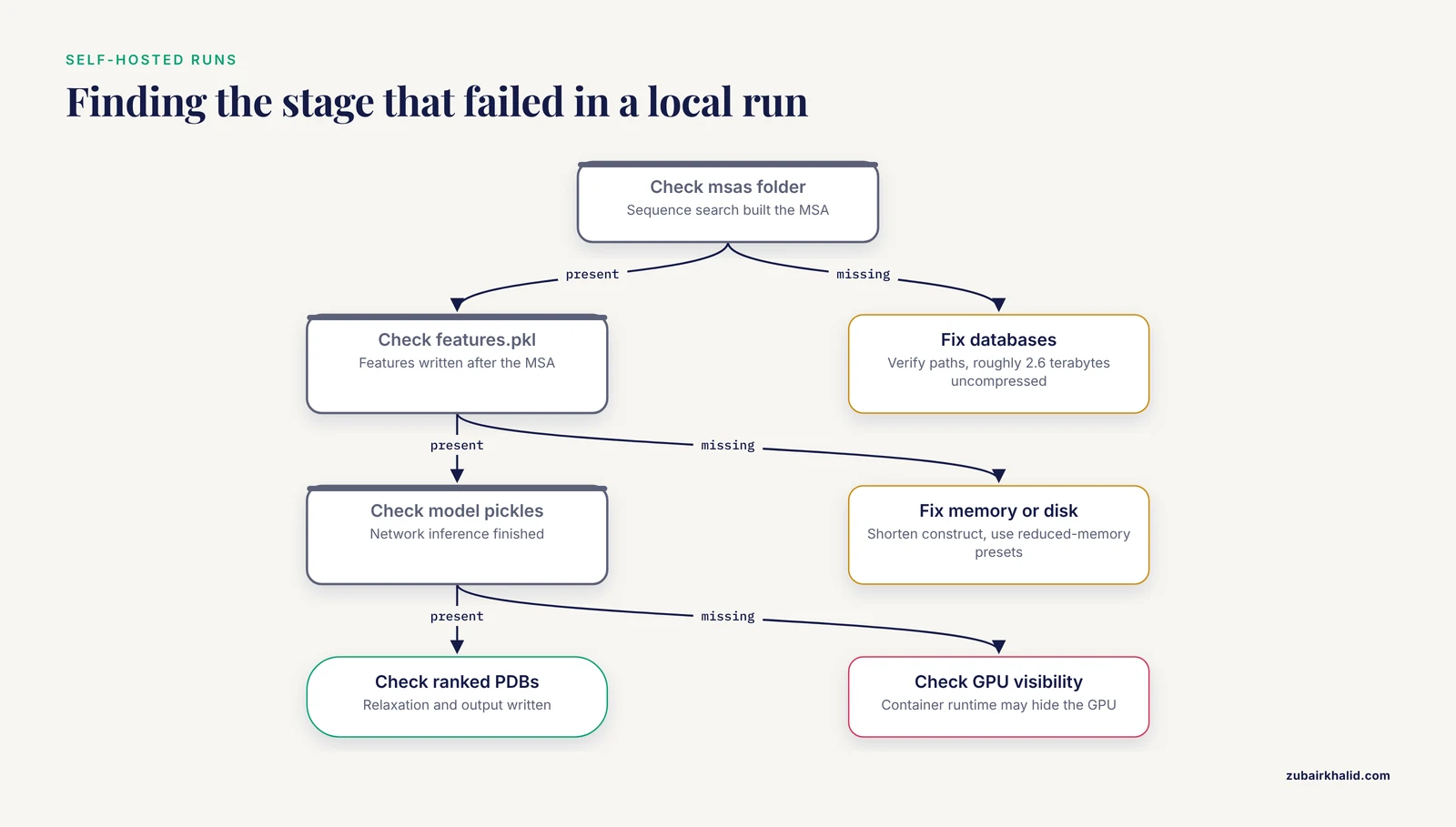
When a self-hosted AlphaFold run finishes without a structure in the output folder, the failure almost always happened upstream. The pipeline runs in stages: sequence search against genetic databases to build the MSA (multiple sequence alignment, the evolutionary profile that drives the prediction), network inference, then optional relaxation with a molecular mechanics force field. Each stage writes artifacts in order: the msas directory, features.pkl, per-model result pickles, then the unrelaxed and relaxed PDB files plus a scores JSON. Find the last artifact that exists and you have found the stage that failed.
The usual culprits:
- Genetic databases not downloaded, incompletely downloaded, or misconfigured paths. The full set runs to roughly 2.6 terabytes uncompressed.
- Memory exhaustion. Attention layers scale with roughly the square of sequence length, and the reference implementation is comfortable up to about 2,700 residues depending on hardware.
- Disk quota exhausted mid-run.
- GPU not visible inside the container runtime.
Fixes follow the diagnosis: verify database paths, shorten the construct or split it into chains, use reduced-memory presets, or move the job to ColabFold, a community-maintained implementation with friendlier resource behavior. Confirm free disk space and quotas before downloading multi-terabyte databases onto a shared filesystem, because filling a volume mid-run corrupts the download and wastes a day.
10. Opening the wrong output file
A local AlphaFold2 run produces five predictions, ranked by an internal score, written as ranked_0.pdb through ranked_4.pdb, alongside unrelaxed and relaxed variants of each and a ranking_debug.json that records the ordering. Two classic mistakes follow. Opening ranked_3 instead of ranked_0 and reporting it as the model. Or comparing an unrelaxed file from one run with a relaxed file from another and attributing the differences to biology.
Default to ranked_0 as the representative prediction, consult the scores JSON for confidence, and keep all five models when the question involves uncertainty between alternatives rather than a single best guess.
11. Hard format limits on giant complexes (rare)
Entries with more than 62 chains, more than 99,999 atoms, or residue numbers above 9,999 cannot exist in legacy PDB format. Converters respond by renumbering or truncating, sometimes silently. The symptom appears days later as a complex that lost chains, or as atom counts that refuse to reconcile. The fix is architectural: keep mmCIF end to end for large assemblies, and after any conversion, compare chain counts and atom counts between source and target as a standing check.
12. Strict or outdated parsers (rare)
Some tools assume experimental-file conventions that predicted files never satisfy: header records, HETATM blocks for ligands, anisotropic displacement tensors, alternate locations. Others shipped before current mmCIF dictionaries and stumble on newer tags. Update the parsing library first (Biopython and gemmi release fixes regularly), triage in a tolerant viewer such as PyMOL or Mol* to establish whether the file or the tool is at fault, and report genuine bugs upstream with a minimal reproducing file.
A Compact AlphaFold Tutorial: Download, Convert, Validate
This walkthrough takes a raw database entry to a validated PDB-format file in about two minutes.
Step 1: find the entry. Search AlphaFold DB by protein name or sequence. The search engine has been improved across successive releases [1]. Because the database is integrated with UniProt, following the structure link from a UniProt entry lands on the same model with the accession already resolved.
Step 2: download the file.
wget https://alphafold.ebi.ac.uk/files/AF-P69905-F1-model_v4.cifStep 3: convert to PDB format.
gemmi convert AF-P69905-F1-model_v4.cif AF-P69905.pdb
head -3 AF-P69905.pdb
grep -c '^ATOM' AF-P69905.pdb
Human hemoglobin subunit alpha has 142 residues, so a healthy conversion shows a bit over a thousand ATOM lines at roughly eight heavy atoms per residue.
Step 4: inspect visually. Open the file in PyMOL and color by B-factor to see the pLDDT gradient, or use the 3D viewer embedded in the database entry page, which gained customization options in recent updates [1].
Step 5: extract confidence numerically.
from Bio.PDB import MMCIFParser
structure = MMCIFParser(QUIET=True).get_structure("af", "AF-P69905-F1-model_v4.cif")
plddt = [res["CA"].get_bfactor() for res in structure.get_residues() if "CA" in res]
print(f"mean pLDDT: {sum(plddt)/len(plddt):.1f}")
Step 6: review domain relationships. Open the predicted aligned error viewer on the entry page, which received enhancements alongside the recent database updates [1], and check whether your regions of interest sit in a confidently packed domain or in a weakly coupled tail.
Step 7: record provenance. Write the model version (v4 in the filename), the accession, and the retrieval date into your lab notebook or workflow log. Database entries are reprocessed as the underlying system improves, so coordinates for the same accession change between versions.
AlphaFold Server Errors and Self-Hosted Runs
The phrase AlphaFold server means two different things, and each has its own failure modes.
The hosted AlphaFold Server is Google's web interface for AlphaFold 3 predictions. You enter proteins, nucleic acids, ligands, and ions, the service runs the prediction, and you download the result as a bundled mmCIF file with confidence measures. Typical errors are operational rather than file-level: the daily usage quota is exhausted, a requested molecule type or modification falls outside what the service accepts, or the complex exceeds the size the interface allows. Limits change as the service evolves, so read the current documentation on the server itself rather than trusting secondhand numbers. Because the output is mmCIF, every format issue described earlier applies unchanged.
A self-hosted AlphaFold server means running the pipeline on your own hardware, usually through Docker containers on a GPU machine. The dominant errors are resource errors: genetic databases that occupy roughly 2.6 terabytes uncompressed, GPU memory that limits feasible sequence length (the reference implementation is comfortable up to about 2,700 residues), and container configurations that hide the GPU from the pipeline. Diagnose by artifact, as described in the local-run section above. For many groups, ColabFold offers a middle path with lower setup cost and sensible defaults.
Common Mistakes and Limitations
Mistakes that recur across labs:
- Reading pLDDT as an experimental quality metric. It is a model confidence score, not a resolution estimate and not a measure of agreement with experiment.
- Treating a prediction as evidence of a binding event. Nothing except the protein chain is modeled, so contacts with ligands, ions, or partners are assumptions.
- Trusting a file because it opened. A misparsed mmCIF can render plausible-looking garbage. Verify atom counts against sequence length.
- Renumbering residues to satisfy one tool, then wondering why UniProt annotations no longer align. Record every offset.
- Adding hydrogens twice by stacking preparation tools, which produces duplicate atoms and cryptic force-field errors.
- Editing prediction files interactively. Scripted edits on read-only originals are reproducible, interactive edits are not.
Limitations to keep in view. AlphaFold output is a prediction with quantified confidence, not a measurement. Regions with very low pLDDT frequently correspond to genuine disorder, and no preprocessing trick makes them structured. The database does not cover every UniProt entry, and coverage decisions favor entries likely to yield useful models. Individual research decisions, especially anything feeding drug discovery or publication claims, deserve domain expertise and experimental validation where the stakes justify it.
Prevention Practices
A short checklist that eliminates most AlphaFold PDB file errors before they happen:
- Download only from official endpoints: the website, the FTP mirror, or the cloud and API routes.
- Keep mmCIF as the archival master and convert on demand, never the reverse.
- Treat original files as read-only. Make edits with version-controlled scripts on copies.
- Never open structure files in spreadsheet or word-processor software.
- Automate a five-second QC: file type, END record, atom count versus sequence length, unique chain IDs, no unexpected UNK residues.
- Store confidence data (pLDDT and PAE) alongside coordinates in every project archive.
- Record model version and retrieval date for every entry used in a project.
- Pin parser and preparation tool versions in your workflow environment, and validate the whole pipeline once against a known-good accession such as P69905.
Teams that adopt this checklist stop treating AlphaFold files as fragile and start treating them as what they are: well-defined data products with known failure modes.
Frequently Asked Questions
Why does my AlphaFold structure open with zero atoms?
Almost always a format mismatch. The file is mmCIF being read as legacy PDB, or it is still gzip-compressed, or the download saved an error page. Run head -1: data_ means mmCIF, <html means a failed download, binary noise means compression.
Does the AlphaFold Database still provide PDB-format files?
No. Current releases distribute mmCIF only, because the legacy format cannot represent the largest entries. Convert on demand with gemmi, Biopython, or ChimeraX, and keep the mmCIF as your master copy.
Why are the B-factors in my AlphaFold file so large?
They are not B-factors. AlphaFold stores pLDDT, a per-residue confidence score from 0 to 100, in the B-factor column. Interpret the column as confidence, not as thermal motion.
Can I repair a corrupted AlphaFold PDB file in Excel?
No. Excel destroys the fixed-column layout, converts long numbers to scientific notation, and wrecks line endings. Redownload the file and make edits with scripts such as the pdb-tools collection.
Why does GROMACS reject my AlphaFold structure with an UNK error?
Positions in the input sequence with non-standard letters (X, B, Z, U, O) are written as UNK residues with no side chain, and force fields have no topology for them. Check what the position should be in UniProt, then mutate, delete, or exclude it before running pdb2gmx.
Where is the PDB file after a local AlphaFold run?
In the output directory, named ranked_0.pdb through ranked_4.pdb, with ranked_0 the best-ranked of the five predictions. Unrelaxed and relaxed variants and a scores JSON sit alongside them.
Why do residue numbers in my AlphaFold model disagree with UniProt?
They usually do not disagree, they start at 1 for the canonical UniProt sequence, which can include signal peptides or propeptides absent from the mature chain. Map numbering explicitly rather than renumbering the file.
How do I convert an AlphaFold mmCIF file to PDB format without losing data?
Use gemmi convert, Biopython's MMCIFParser with PDBIO, or ChimeraX, then verify that chain and atom counts match the source. Entries exceeding legacy limits (62 chains, 99,999 atoms) cannot convert losslessly, so keep those in mmCIF.