AlphaFold Out of Memory Error: Causes and Fixes
By Dr. Zubair Khalid, DVM, MS, PhD ·

The most common cause of an AlphaFold out of memory error is a sequence or protein complex that is too long for the graphics card running the neural network. AlphaFold stores a pairwise representation of every residue against every other residue, so memory demand grows roughly with the square of the total sequence length. A 300 residue protein fits comfortably on a modest 8 GB card. A 1,500 residue monomer or a multi-chain complex can exhaust a 24 GB or even a 40 GB card.
The first thing to check is which memory actually ran out. Open the end of the log file from the failed run. Three different failures hide behind the phrase "out of memory" and each one has a different fix:
- A JAX or TensorFlow message such as
RESOURCE_EXHAUSTEDorCUDA_ERROR_OUT_OF_MEMORYmeans the GPU ran out of video memory (VRAM, the dedicated memory on the graphics card). - A plain
Killedmessage with no traceback, or a line in the system log readingOut of memory: Killed process, means the operating system's OOM killer terminated the job because host RAM (the ordinary system memory) was exhausted. - A
RESOURCE_EXHAUSTEDmessage that mentions host memory or a failed host allocation means the central processing unit side of the pipeline ran out of RAM.
Run nvidia-smi and free -h right after the crash. nvidia-smi reports GPU memory use and free -h reports host RAM. Whichever number was near its ceiling tells you which half of the problem you have. Everything else in this article follows from that one observation.
How AlphaFold Uses Memory
Understanding where the memory goes makes every fix below obvious rather than superstitious. AlphaFold is a neural network for protein structure prediction, published by DeepMind and distributed as open source code with inference (prediction) running under the JAX framework on GPUs. Two resources matter: GPU VRAM during the network forward pass, and host RAM plus disk during the earlier sequence search stage.
Before the network ever runs, AlphaFold builds a multiple sequence alignment (MSA, a set of evolutionarily related sequences aligned to your input) with tools such as JackHMMER and HHblits, and searches structural templates. These steps are CPU and disk heavy but modest in RAM. The network then processes the MSA through an architecture called the Evoformer. Inside the Evoformer, the model maintains an MSA representation (one vector per sequence per residue) and a pair representation (one vector per pair of residues). The pair representation is the memory hog. For a protein of length N, the pair object holds on the order of N by N entries, and the triangle multiplication and attention layers that operate on it dominate both compute time and VRAM. This is why memory scales with the square of length and why a chain twice as long needs roughly four times the memory.
For multi-chain predictions with AlphaFold-Multimer, all chains are treated as one concatenated token sequence with a small number of extra tokens between chains, so a ten-chain complex behaves like one very long protein. Recycling (running the whole network several times and feeding the output back as input, typically three times) refines the prediction. Each recycle recomputes the network from scratch into the same buffers, so recycling adds time, not peak memory. Keep that fact in mind, because one of the most repeated pieces of bad advice online is that lowering the recycle count will rescue an out of memory run. It will not.
Troubleshooting Table
This table is the core of the article. Find the symptom that matches your log, confirm the cause, and apply the fix.
| Symptom | Likely cause | How to confirm | Fix |
|---|---|---|---|
CUDA_ERROR_OUT_OF_MEMORY or RESOURCE_EXHAUSTED early in the first model, on a long sequence | Sequence or complex too long for GPU VRAM | Sum residue lengths of all chains. Lengths above roughly 1,000 to 1,500 residues routinely exceed a 16 GB card | Crop, split into domains, cap the MSA with -max-msa in ColabFold, or use a larger GPU |
| Crashes partway through the job, after the first model finishes | All five neural network models plus multimer copies run in one process, and memory fragmentation accumulates | Log shows progress through model_1 to model_5 then a crash | Run one model per invocation, or split the FASTA into one file per target |
| Fails immediately at startup even on a small protein | Another process occupies the GPU, or JAX preallocated the whole card | nvidia-smi shows memory already in use before your job starts | Stop other jobs, or set XLA_PYTHON_CLIENT_PREALLOCATE=false |
No GPU error at all, just Killed in the log | Operating system OOM killer ended the process because host RAM ran out | dmesg -T shows Out of memory: Killed process | Add RAM, close other jobs, run the MSA stage separately, or use a machine with more memory |
| Fails on a shared cluster node but works on your workstation | Another user's job or a stale process holds GPU memory | nvidia-smi lists PIDs from other users | Use srun or sbatch with exclusive GPU allocation, or request a node with more VRAM |
| Fails only in the ColabFold web notebook, not locally | Colab free-tier GPU has limited VRAM and the runtime disconnects on long jobs | Runtime type shows T4-class GPU with limited memory | Use a ColabPro-class runtime, cap the MSA, or switch to a dedicated ColabFold server |
| Fails during template search or MSA generation with heavy disk activity | Insufficient free disk space for the data directory, databases, or temporary files | df -h shows a nearly full volume | Free space or move the data directory to a larger volume |
AlphaFold Out of Memory Error Causes, From Most Common to Rarest
Cause 1: The sequence or complex is too long for the GPU
This cause accounts for the vast majority of reports. The pair representation and the Evoformer's triangle operations scale with the square of the total token count, where a token is one residue in the concatenated input. In practice, community experience reported across the AlphaFold issue tracker and ColabFold discussions is consistent: monomers up to about 1,000 residues generally fit on a 16 GB consumer card, monomers in the 1,500 to 2,000 residue range push past 24 to 40 GB, and large complexes exhaust anything smaller than an A100-class data center card. These are rules of thumb, not hard boundaries, because MSA depth and multimer configuration also matter.
The mechanism is structural, not a bug. The triangle multiplication layers explicitly compute interactions over all triples of residues in a way that materializes large intermediate tensors. No setting in the reference AlphaFold implementation changes that scaling. When a job fails here, the fix is to reduce the number of tokens, reduce the MSA depth, or find more VRAM.
Cause 2: The job runs five models plus multimer copies in one process
The reference AlphaFold pipeline runs five network models by default. In multimer mode it additionally generates five predictions per model preset, so a multimer job can involve twenty five network evaluations in a single process. Each evaluation should release its memory, but JAX keeps compiled programs and buffers cached, and fragmented allocation across twenty five evaluations can push a marginal job over the edge partway through, after model_1 or model_2 already succeeded.
Confirm this by reading the log. If you see completed predictions followed by an out of memory error in a later model, fragmentation across models is the likely story. The fix is to run each model separately, feeding each invocation the same precomputed features, then merge the outputs. Reusing precomputed MSA features across these invocations also avoids repeating the expensive sequence search.
Cause 3: Another process shares the GPU
On shared workstations, lab servers, and multi-tenant clusters, someone else's job may hold most of the VRAM before yours starts. AlphaFold then fails almost immediately, even on a small protein that you know fits. Confirm with nvidia-smi: if memory is already committed to processes you did not start, that is the answer. On SLURM clusters, requesting a GPU without an exclusive allocation can land you on a node where another job shares the same card.
The fix is administrative, not computational. Stop the other process if it is yours, coordinate with the other user, or request an exclusive GPU allocation through your scheduler.
Cause 4: JAX preallocation grabs the whole card
JAX, the numerical framework underlying AlphaFold, preallocates about three quarters of GPU memory at startup by default and holds it whether or not the model needs it. On a card that is shared or that also runs relaxation or other work, this preallocation alone can trigger an out of memory error that the actual model size would not have caused. You can confirm it by watching nvidia-smi at startup: memory jumps to a large fraction of the card before any real computation begins.
Set the environment variable XLA_PYTHON_CLIENT_PREALLOCATE=false (or, in older JAX versions, cap the fraction with XLA_PYTHON_CLIENT_MEM_FRACTION) before launching the container or script. The job then allocates memory on demand. This is the standard remedy documented in the JAX project's own guidance on GPU memory allocation, and it is the correct fix whenever you need to run more than one prediction process on the same card.
Cause 5: Host RAM exhaustion during sequence search or feature generation
If the log ends with a bare Killed and no Python traceback, the kernel's OOM killer (the operating system component that terminates processes when physical memory and swap are exhausted) ended the job. This happens most often on machines with 16 to 32 GB of RAM when running the full database presets, or when several jobs run concurrently on one login node. JackHMMER iterations against large sequence databases and HHblits against template databases hold substantial alignments in memory.
Confirm with dmesg -T | grep -i "out of memory" or by looking for oom-kill entries in the system journal. The fixes are to add RAM, run jobs sequentially rather than concurrently, run the MSA stage on a memory-rich machine and the network stage on a GPU machine, or reduce concurrency. Swap will technically prevent the kill but slows the pipeline so badly that it is rarely worth it for full database searches.
Cause 6: Colab and web notebook limits
Google Colab assigns notebook runtimes a class of GPU with limited VRAM. A prediction that fits on a local 24 GB card can fail in the free Colab runtime simply because the assigned card is smaller. ColabFold, the popular notebook and command line reimplementation of AlphaFold maintained by the ColabFold development team, documents this behavior and provides the knobs that make long sequences fit on small cards, chiefly the -max-msa option discussed below. Disconnections during long jobs are a separate, unrelated failure that users often mistake for a memory crash.
Cause 7: A runaway MSA from an unusual input
The rarest cause. A low complexity region, a repetitive construct, or a contaminant sequence in the input can produce an enormous MSA. The network samples a fixed maximum number of MSA sequences, so an oversized alignment mostly costs preprocessing time, but in multimer configurations and in ColabFold the effective MSA depth passed to the model is user controllable, and a very deep MSA does raise peak VRAM in the MSA-bearing parts of the Evoformer. If a protein that should be easy crashes and its MSA is far deeper than homologs of similar length, cap the MSA depth and rerun.
Diagnostic Sequence
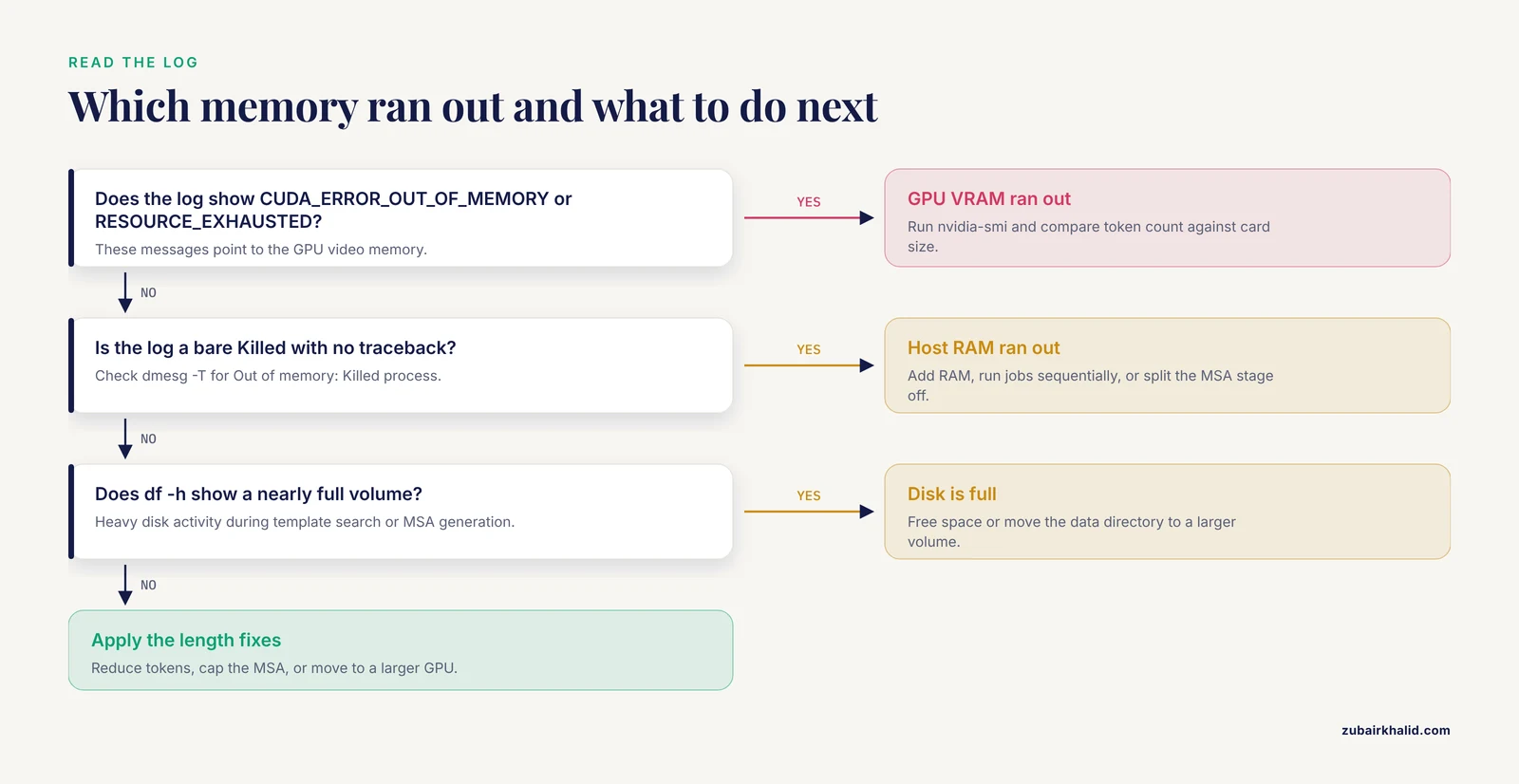
Follow this order every time. It takes five minutes and prevents hours of blind parameter tweaking.
- Read the last 30 lines of the log. Classify the failure as GPU (
CUDA_ERROR_OUT_OF_MEMORY,RESOURCE_EXHAUSTED), kernel kill (Killed,oom-kill), or host allocation failure. - Run
nvidia-smi. Note total VRAM, current usage, and which processes hold memory. - Run
free -hto see host RAM and swap. - Run
dmesg -T | grep -i "out of memory"to confirm or exclude the OOM killer. - Run
df -hon the output directory and the data directory to exclude disk exhaustion. - Compute the total token count of your input. For a monomer this is the residue count. For a multimer, add the lengths of every chain plus a small per-chain overhead.
- Compare the token count against your card size using the rules of thumb above. If the count is high for your card, go straight to the length related fixes. If the count is low for your card, look at causes 3 and 4.
How to Fix the AlphaFold Out of Memory Error
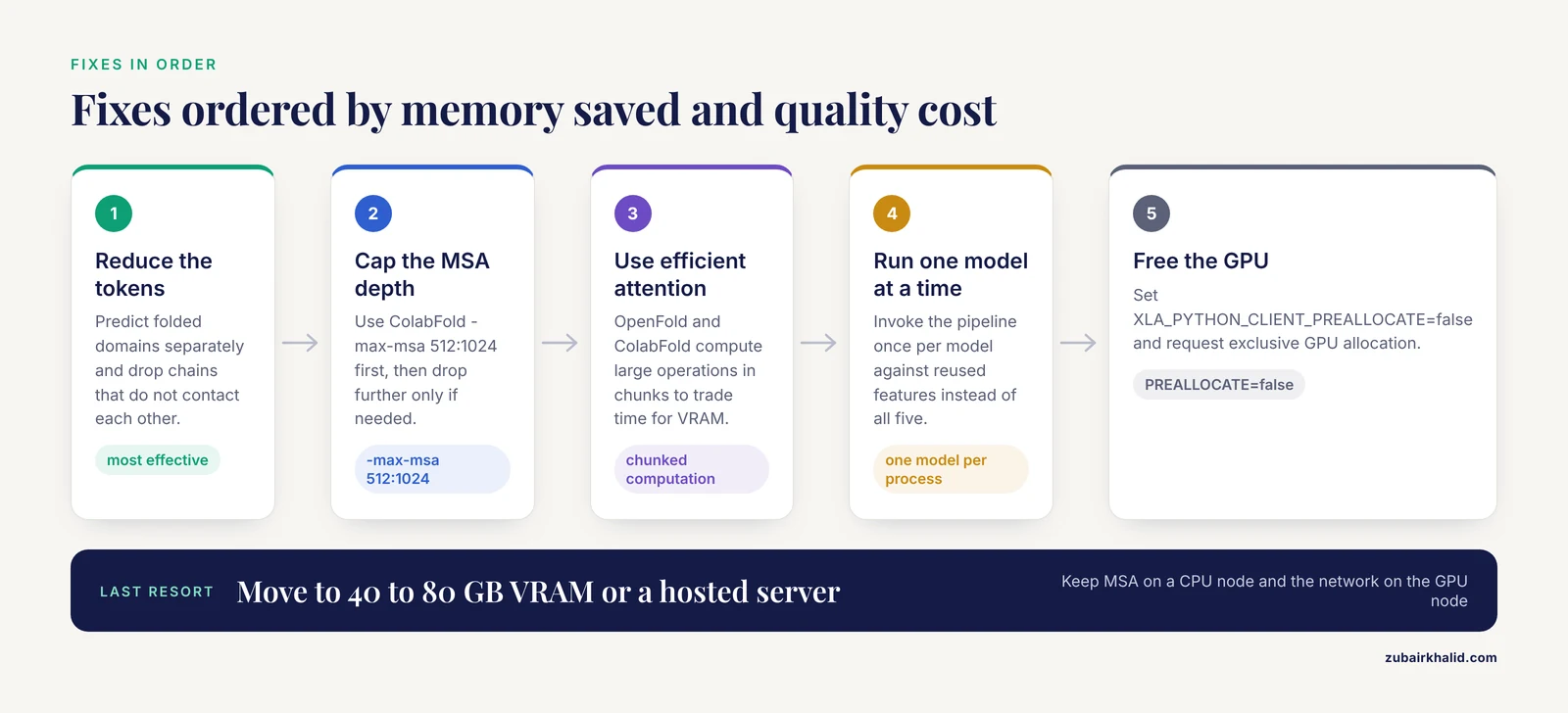
The fixes below are ordered by how much memory they save and how little quality they cost. Apply the first one that resolves the error.
Reduce the number of tokens
Splitting the target is the single most effective fix. For a very long monomer with disordered or linker regions, predict the folded domains separately. Multi-domain proteins often consist of independently folding units connected by flexible linkers, and predicting each unit alone costs a fraction of the memory of the full construct. After prediction, examine the per-residue confidence scores (pLDDT, a per residue confidence measure from 0 to 100 reported in the output PDB B-factor column). Regions with low pLDDT in a domain-only prediction usually correspond to linkers and termini, which tells you where the true boundaries are.
For multi-chain complexes, consider whether you actually need all chains in one prediction. Interfaces between chains are what Multimer adds, so keep chains that contact each other and drop chains that are known to be spatially separate. A five-chain job where only chains A and B interact can become a two-chain job.
Truncating unstructured termini before prediction is legitimate and common. Replacing long low-complexity linkers with short flexible linkers preserves domain geometry while cutting tokens. Do not delete residues whose structure you care about, and always report in your methods exactly which residues you predicted.
Cap the MSA depth with ColabFold
ColabFold exposes an -max-msa option (for example -max-msa 256:512, meaning at most 256 deeply clustered sequences and 512 total sequences) that directly reduces the size of the MSA stack the Evoformer processes. Lowering MSA depth cuts VRAM meaningfully and speeds the run. The tradeoff is real: predictions for proteins whose fold depends on remote homologs can lose accuracy with a shallow MSA, while single-domain proteins with deep, clean alignments are usually unaffected. Try -max-msa 512:1024 first, then drop further only if needed. The exact syntax and accepted values are documented in the ColabFold repository and notebook.
Use implementations with memory-efficient attention
The reference AlphaFold code materializes full attention tensors. Community reimplementations such as OpenFold (from the AlQuraishi laboratory) and ColabFold incorporate chunked computation, where large operations are computed in blocks and reassembled, trading compute time for VRAM. If you routinely predict long targets, running ColabFold instead of the reference pipeline is the cheapest hardware upgrade you will ever make, because the same card simply fits larger inputs.
Run one model and one prediction at a time
Run a single network model per process instead of all five. With the reference pipeline this means invoking the pipeline multiple times against reused features or using the model selection options the pipeline supports. With multimer jobs, reduce the number of predictions per model from the default of five to one or two while you are debugging. Once the pipeline is stable and memory is comfortable, restore the full ensemble for your final production runs, because model diversity improves final structure selection.
Free the GPU from preallocation and other tenants
Set XLA_PYTHON_CLIENT_PREALLOCATE=false when sharing a card, and verify with nvidia-smi that your job is the only one running. On clusters, always request exclusive GPU nodes for prediction jobs. These two habits eliminate an entire class of confusing failures.
Move to larger hardware
When a target genuinely needs the full length and full MSA, more VRAM is the answer. Data center cards with 40 to 80 GB of VRAM handle monomers and complexes that consumer cards cannot touch. Cloud spot instances make this affordable for occasional large jobs. Keep the MSA and feature generation on a CPU-rich node and the network stage on the GPU node, because the two stages have opposite hardware appetites.
Move the job off local hardware entirely
Running an AlphaFold server instead of local hardware sidesteps memory management completely, at the cost of control and flexibility. Two options dominate. The AlphaFold Server operated by Google DeepMind is a web service for predicting interacting complexes from sequences and, in supported cases, known ligands and modifications. It enforces a total input size limit well below what a GPU cluster can handle, so it suits typical biological complexes rather than giant assemblies. ColabFold offers both free community notebooks and command line batch prediction on your own hardware, which is the middle ground: server convenience with parameter control.
If your work depends on reproducibility and audit trails, a local or institutional installation still wins, because a web server does not let you pin versions, cap the MSA, or rerun a single model.
A Short AlphaFold Tutorial for Debugging Memory
This walkthrough shows a realistic debugging session for a 1,300 residue monomer on a 16 GB GPU.
Confirm the card and its current state:
nvidia-smiLaunch the prediction with the reference pipeline in a Docker container, following the invocation pattern in the DeepMind AlphaFold repository:
docker run --gpus all \
  -v /data/alphafold:/data \
  -v $PWD/inputs:/inputs \
  -v $PWD/output:/output \
  alphafold:latest \
  --fasta_paths=/inputs/target.fasta \
  --max_template_date=2022-01-01 \
  --data_dir=/data \
  --output_dir=/output \
  --model_preset=monomer
The job dies with CUDA_ERROR_OUT_OF_MEMORY. Token count is 1,300, which is above the comfortable range for 16 GB. First attempt the lowest-friction fix, switching to ColabFold with a capped MSA:
colabfold_batch --max-msa 512:1024 --num-recycle 3 inputs/target.fasta ./output_cfIf that still fails, watch memory while a shorter construct runs, to verify the pipeline itself is healthy:
watch -n 5 nvidia-smiThen split the target. Extract the two folded domains, residues 1 to 640 and residues 900 to 1300, into separate FASTA files, predict each, and inspect the pLDDT scores in the output PDB B-factor column. If the domain models score high and the full-length construct was the only failure, you have your answer and your structures.
For host RAM failures, the equivalent sequence is:
free -h
dmesg -T | grep -i "out of memory"
A safety note on cleanup: never free disk space with rm -rf against the AlphaFold data directory unless you have the original download instructions at hand, because the sequence and template databases take a long time to re-download and the pipeline will fail confusingly if the directory is only partially populated. Remove temporary outputs instead, and confirm paths with ls before deleting anything.
Common Mistakes and Limitations
- Lowering the recycle count does not fix out of memory errors. Each recycle reuses the same memory buffers, so recycling costs time and not peak VRAM. People burn hours on this because the advice is everywhere online.
- Two GPUs do not double the size of protein you can predict. The reference implementation runs one prediction on one device. A second GPU helps you run two predictions in parallel, not one prediction across two cards.
- The reduced database preset saves disk and download time, not GPU memory. The network stage never sees the databases. Switching presets is a fine idea for setup convenience but it will not rescue a VRAM crash.
- Disabling relaxation (the energy minimization step applied to predicted structures after the network finishes) saves a little time and little memory, because relaxation operates on one structure at a time. It is not a memory fix.
- A single failure does not characterize your hardware. Memory use varies with MSA depth, model preset, and multimer configuration, so a protein that failed last week can fit today after a parameter change. Keep records of token counts and settings that succeeded on your card.
- Individual projects still need judgment. Domain boundaries, which chains to include, and whether a shallow MSA is acceptable for your specific biology are scientific decisions, not software settings, and they deserve a look at the literature for your protein family.
Prevention Practices
Record the token count and the settings of every successful run in a lab notebook or a job manifest. Within a few weeks you will know exactly where the ceiling is for your card, and new targets can be triaged before they waste an hour of compute.
Standardize on ColabFold for batch work if your group predicts long targets regularly. Its memory options and its active development make it the pragmatic default for constrained hardware, while the reference DeepMind implementation remains the reference for reproducing published results exactly.
Run the sequence search stage and the network stage on separate machines when possible. The search stage wants CPU cores, RAM, and fast disk. The network stage wants VRAM. Splitting them lets you size each machine for its actual job and lets you reuse MSAs across many predictions of the same target.
Set XLA_PYTHON_CLIENT_PREALLOCATE=false in your group's standard run scripts by default. The handful of cases where preallocation helps are rare compared to the cases where it causes mysterious failures on shared hardware.
Check df -h before launching long jobs. A full disk during feature generation produces errors that look nothing like disk problems and everything like mysterious crashes.
Frequently Asked Questions
Why does AlphaFold run out of memory on long sequences?
Because the network stores a pair representation covering every residue against every other residue, and the Evoformer's triangle and attention layers operate on it, memory demand grows roughly with the square of sequence length. Doubling the length roughly quadruples the memory, so long monomers and multi-chain complexes exceed fixed VRAM quickly.
How do I tell whether the GPU or the host RAM ran out?
Read the end of the log. A CUDA_ERROR_OUT_OF_MEMORY or RESOURCE_EXHAUSTED message points to the GPU, while a bare Killed with no traceback points to the operating system OOM killer and host RAM. Confirm with nvidia-smi and dmesg -T.
Does reducing the number of recycles fix the out of memory error?
No. Recycling reruns the network into the same memory buffers, so it adds compute time but not peak memory. Lowering recycles shortens the run without changing whether it fits.
Can I run AlphaFold on CPU when the GPU runs out of memory?
Technically yes, but CPU inference is far slower and shifts the memory burden to host RAM, so a target that overflowed VRAM will usually need a very large amount of RAM on CPU. Treat CPU mode as a fallback for small targets, not a fix for large ones.
Does the reduced databases preset save memory?
It saves disk space and download time only. The reduced preset changes which databases the sequence search uses, and the prediction network never reads those databases, so it has no effect on GPU memory.
Can I split a long protein into domains and still get a good model?
Usually yes, and it is the standard fix for oversized monomers. Predict the folded domains separately and use the per-residue pLDDT scores to judge quality. The main loss is any domain orientation information that depends on the missing linker, so interpret relative domain placement from a full-length prediction when one is possible.
Is ColabFold better than the reference AlphaFold for low-memory hardware?
Yes for constrained hardware. ColabFold includes chunked computation and the -max-msa option, which let the same card fit substantially larger inputs. Use the reference implementation when you need to reproduce published results exactly.
When should I use a hosted AlphaFold server instead of local hardware?
Use a hosted service such as the DeepMind AlphaFold Server when your target is a typical-sized complex, you want results without any setup, and you do not need parameter control or version pinning. Move to local or institutional hardware when targets are large, when batch throughput matters, or when reproducible methods reporting is required.