AlphaFold Job Submission Errors: Causes and Fixes
By Dr. Zubair Khalid, DVM, MS, PhD ·

The most common alphafold job submission error has nothing to do with AlphaFold itself. On a typical high-performance computing (HPC, a shared cluster of compute nodes) cluster, the job either never starts or dies within the first minutes because the submission script did not request a GPU, requested too little memory, or pointed at a file path that does not exist on the node that picked up the job. The first thing to check is therefore not the AlphaFold code but the scheduler: look at the queue state of your job and read the log file it wrote before you touch anything else.
This article walks through the full range of alphafold job submission errors, from the everyday resource mistakes to the rare filesystem and quota failures. Each cause comes with the mechanism behind it, a way to confirm it, and the fix. It closes with a short alphafold tutorial style worked script, a set of prevention practices, and answers to the questions people ask most often.
How an AlphaFold Job Actually Runs, and Where Submission Fits In
Understanding the pipeline makes the error patterns predictable. AlphaFold 2 (the original DeepMind release, distributed as an open-source repository) runs a sequence of stages:
- Sequence preprocessing. The input protein sequence is read from a FASTA file (a plain-text format where a header line starts with
>and is followed by the amino acid sequence). - Multiple sequence alignment (MSA) search. Tools such as jackhmmer and HHblits search the input sequence against large genetic databases (UniRef90, MGnify, BFD or a reduced set) to find homologous sequences. This stage is CPU heavy, network heavy if the databases live on a remote filesystem, and can take hours for long sequences.
- Template search. The sequence is compared against known experimental structures from the Protein Data Bank (PDB).
- Feature generation. The alignments and templates are converted into numerical features.
- Model inference. The neural network runs on a graphics processing unit (GPU, the accelerator hardware AlphaFold requires for practical runtimes) and produces 3D coordinates.
- Relaxation. An energy minimization step (AMBER force field) cleans up physical clashes in the predicted structure.
A submission error is a failure in steps that happen before or around the pipeline: getting the job onto a node, getting the right hardware allocated, getting the software environment loaded, getting input files and databases visible. Runtime failures inside the neural network are a separate category, although on a cluster they usually show up through the same submission log.
The full AlphaFold 2 sequence and template databases total on the order of 2.6 terabytes, as documented in the official repository. That size matters for submission because database location, read permissions, and filesystem speed all become failure points before the model ever runs.
First Response: A Five-Step Diagnostic Sequence
When an alphafold job submission error appears, follow this sequence in order. It resolves the majority of cases in under ten minutes and produces the information you need for everything else in this article. The examples use SLURM, the workload manager (the software that queues and assigns jobs) used on most academic clusters. Equivalent commands exist on PBS and LSF systems, and your local HPC documentation will list them.
- Check the queue state. Run
squeue -u $USER. Look at the ST (state) column and the NODELIST or REASON column. A state ofPD(pending) with reasonResourcesmeans the job is waiting for hardware. A reason ofInvalidAccount,QOS*, orPartitionConfigmeans the submission was rejected by policy. A missing job entirely means it finished or failed already. - Pull the accounting record. Run
sacct -j <JOBID> -o JobID,State,ExitCode,Elapsed,MaxRSS,AllocCPUS. The State and ExitCode columns tell you whether the job completed (COMPLETED), failed (FAILED), was killed (OUT_OF_MEMORY,CANCELLED,TIMEOUT), or died before launch. MaxRSS (the peak memory actually used) tells you how far off your memory request was. - Read the logs. Open the file your batch script directed output to, commonly
slurm-<JOBID>.outplus any stderr file. The last 20 lines usually contain the decisive Python traceback, CUDA message, or scheduler notice. - Verify the hardware you got. If the job reached a node, run
nvidia-smiinside an interactive allocation (srun, gres=gpu:1, pty bash) to confirm a GPU is visible and that the driver and CUDA versions are sane. - Check files and disk. Confirm the FASTA file exists from the job directory, the output directory exists and is writable, and that you are under your storage quota (
quota -sorlfs quotaon Lustre filesystems). Disk exhaustion mid-job is a frequent and easily missed killer.
If the job never appears in the queue at all, the submission itself was rejected. Run sbatch again and read its immediate output, which usually names the offending option or account.
Troubleshooting Table: Symptom, Cause, Confirmation, Fix
The table below is the core reference for alphafold job submission errors. Rows are ordered roughly from most to least common.
| Symptom | Likely cause | How to confirm | Fix |
|---|---|---|---|
| Job fails within seconds with exit code 1 and a Python traceback | Input file path wrong, environment not activated, or missing Python module | Read last lines of slurm-<JOBID>.out for FileNotFoundError or ModuleNotFoundError | Use absolute paths, activate the conda environment or load modules inside the batch script |
Job dies after minutes to hours with OUT_OF_MEMORY or slurmstepd: error: Detected 1 oom-kill event | Requested RAM below what the MSA and model stages need | sacct shows OUT_OF_MEMORY, MaxRSS near the request | Raise -mem (start at 64 GB for typical monomers, more for long sequences or complexes) |
CUDA out of memory. Tried to allocate ... in the log | GPU memory too small for the sequence length or complex size | Error text in the log, check nvidia-smi output for the card model | Use a GPU with more memory, reduce -num_multimer_predictions_per_model, or split into monomers |
no CUDA-capable device is detected or Could not create cudnn handle | No GPU allocated, or CUDA toolkit and cuDNN mismatched | nvidia-smi shows nothing inside the job | Add -gres=gpu:1 to the submission, load the CUDA module matching the installed framework |
Job stuck in PD for hours with reason Resources | Partition busy, or the request is impossible (more GPUs than exist on any node) | squeue -u $USER, sinfo -p <partition> | Reduce the request, pick a less busy partition, or ask administrators if the request is impossible |
TIMEOUT state after hours of useful work | Walltime (requested run time) shorter than the actual run | sacct shows TIMEOUT and Elapsed equals the requested limit | Raise -t, and checkpoint MSA results so reruns skip finished work |
FileNotFoundError or Permission denied on the FASTA or output directory | Relative path, unwritable directory, or path that only exists on the login node | Check the exact path in the traceback from the log | Use absolute paths under a shared or scratch filesystem |
| Log ends with hhblits or jackhmmer errors, or MSA depth is zero | Databases missing, moved, partially downloaded, or -data_dir points elsewhere | Compare the path in the log with the actual database location | Fix -data_dir, rerun the official download script, verify database files exist and are uncompressed |
quota exceeded or No space left on device during the run | Scratch or home quota exhausted by MSA output | Quota command on your filesystem | Delete stale outputs, request more space, or write to a project scratch area |
Job fails with InvalidAccount, InvalidQOS, or Access denied | Wrong account, partition, or quality-of-service string in the script | The sbatch rejection message names the field | Correct the -A, -p, or QOS line against your cluster documentation |
| Web notebook (Google Colab) disconnects mid-run or reports no GPU available | Runtime quota exhausted or idle disconnect | Colab status message | Retry later, use Colab Pro tiers, or run ColabFold locally with colabfold_batch |
| AlphaFold Server submission rejected | Input JSON malformed, sequence or token limits exceeded, or daily quota reached | The web interface error message names the field | Fix the JSON structure, shorten the input, resubmit after the quota window |
AlphaFold Job Submission Error Causes, Class by Class
The rest of the article explains each family of errors in depth, ordered from the most common to the rarest.
Cause 1: Resource Requests That Do Not Match the Job
Memory is the number one killer of AlphaFold jobs on clusters. The mechanism is well understood: the attention layers in the network scale quadratically with sequence length, so peak memory grows steeply as your protein gets longer or as you add chains to a complex. The MSA stage adds its own footprint because alignment arrays for a 1,000 residue protein against deep homology searches are large.
The failure signature is characteristic. The job starts, log output begins, and then the process vanishes with no Python traceback. sacct reports OUT_OF_MEMORY, or a line such as slurmstepd: error: Detected 1 oom-kill event appears in the log. On some SLURM versions the exit code is 173, which specifically signals that the operating system killed the process for memory.
How to fix alphafold job submission error of this type:
- Request memory generously. For a typical monomer of a few hundred residues, 64 GB is a reasonable starting request. Long single chains, antibody-antigen complexes, and anything above roughly 1,000 total residues should start at 128 GB or more. The MaxRSS column from
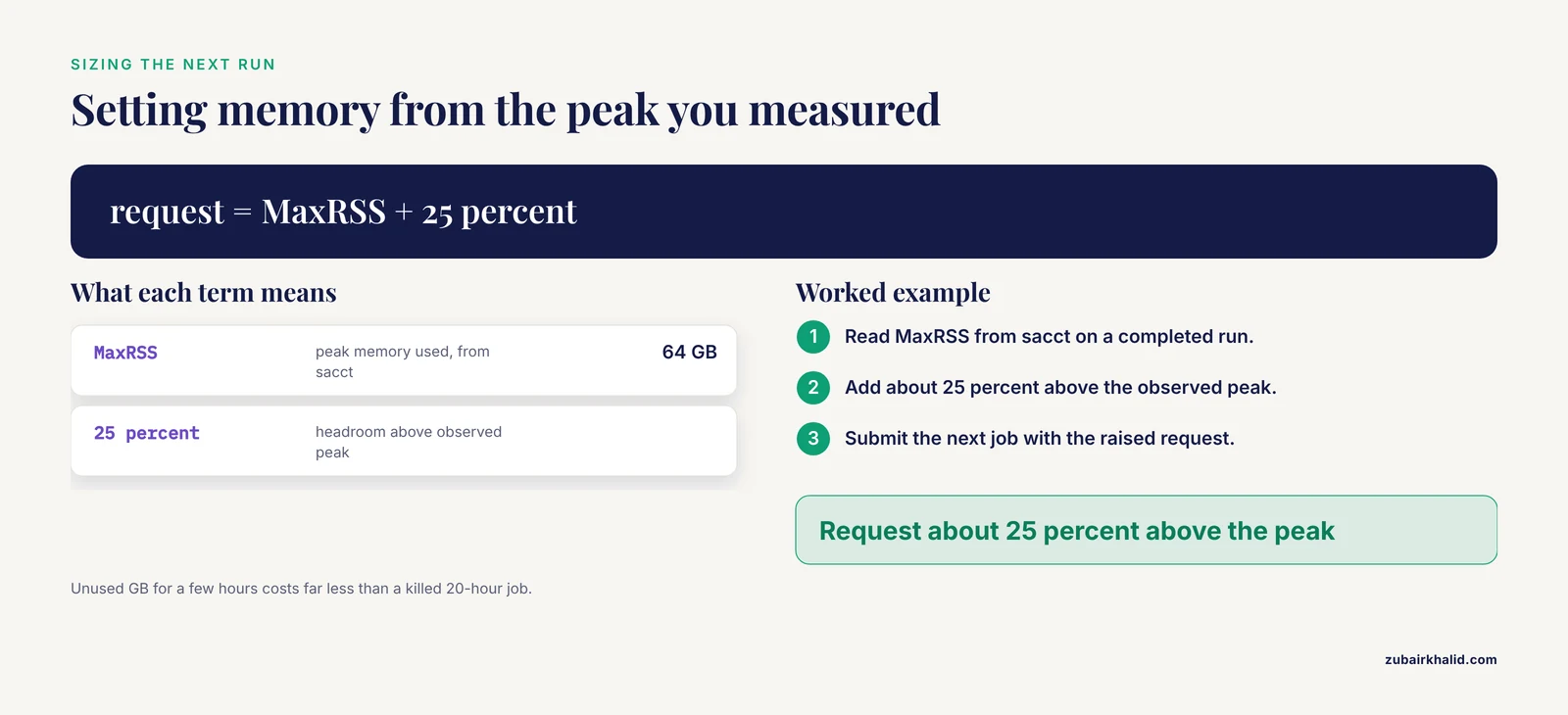
saccton a completed run tells you the true peak, which lets you set headroom of about 25 percent on future submissions. - Request enough CPU cores. The jackhmmer and HHblits searches parallelize across cores, so a request of 8 to 16 cores keeps the MSA stage from dominating walltime.
- Request walltime realistically. A full monomer run with deep databases commonly takes several hours depending on hardware.
TIMEOUTat 95 percent finished is a waste, but so is requesting a week when your partition policy penalizes long jobs. Check the Elapsed time of previous successful runs and add margin. - Consider the reduced database preset (
-db_preset=reduced_dbs) for quick tests. It shortens the MSA search dramatically at some cost in accuracy and is the right choice for debugging submissions.
Cause 2: Missing or Wrong GPU Allocation
AlphaFold 2 requires a CUDA-capable NVIDIA GPU for the inference stage. On a CPU-only node the model either fails outright or runs so slowly that the job hits its walltime. The single most frequent configuration mistake in alphafold job submission errors is a batch script that requests CPUs and memory but never asks for a GPU.
Three distinct failure modes live in this category:
- No GPU requested. The scheduler places the job on a CPU node. The log shows a message such as
no CUDA-capable device is detectedor a JAX error about no devices. Fix by adding#SBATCH, gres=gpu:1(gres means generic resources, the scheduler's term for GPUs and similar hardware) and submitting to a partition that actually contains GPUs. - Wrong GPU type or count. Some clusters expose several GPU families across partitions. A card with 16 GB of GPU memory handles typical monomers, while large multimer jobs can need far more. If the job reports
CUDA out of memory, request a larger card or a node with more of them. - Software and driver mismatch. The GPU is allocated but the deep learning stack cannot use it. Log messages such as
Could not create cudnn handle,CUDA driver version is insufficient for CUDA runtime version, orCUDA_ERROR_UNKNOWNpoint here. The fix is to load the CUDA and cuDNN module versions that match the TensorFlow and JAX builds in your AlphaFold environment, not the newest versions on the cluster.
Confirmation is direct. Inside an allocation, run nvidia-smi. You should see the allocated card, its memory, and a driver version. If you see nothing, the allocation or the environment is the problem, not AlphaFold.
Cause 3: Input Sequence File Errors
Input errors fail fast, which makes them easy to diagnose and easy to overlook because the traceback looks like generic Python noise. The common variants:
- The path problem. The batch script references
./myprotein.fasta, but the job starts in a different working directory than your shell session. Batch jobs start in the directory you submitted from only if the scheduler supports it (SLURM does, PBS does not by default). Use absolute paths and the fix disappears. - The format problem. AlphaFold's FASTA parser expects standard format. Common violations include stray characters before the first
>header, sequence lines merged with the header, Windows line endings in some edge cases, and nonstandard amino acid letters (only the 20 standard residues plus common ambiguity codes are accepted in practice). A single blank line before the header is enough to break some parsers. - The multimer confusion. For protein complexes, the monomer preset treats a multi-entry FASTA file differently than the multimer preset expects. In the original AlphaFold 2 interface, multiple chains are given as separate FASTA entries in one file, and the
-model_preset=multimerflag enables the multimer network. In ColabFold, chains within one record are separated by a colon. Mixing these conventions is a classic alphafold job submission error cause that produces either a one-chain result or an immediate validation failure. - The length problem. Very long sequences (several thousand residues) can exhaust GPU memory during inference even when the submission itself succeeded. If your target exceeds what a single inference pass handles, split domains or model them as separate chains.
The fix routine: open the FASTA in a plain-text editor, confirm exactly one header per chain, confirm the sequence alphabet, confirm the path from the job's working directory, then resubmit.
Cause 4: Database Paths and Missing Databases
AlphaFold needs several genetic databases plus its trained parameters, and it discovers them through the -data_dir argument and the configuration bundled with the repository. Errors in this family produce tracebacks that mention hhblits, jackhmmer, or specific database filenames such as the UniRef90 files.
The mechanisms:
- The download never finished. The full database set is several terabytes, and interrupted downloads leave partial files that tools fail on in confusing ways. The official download script fetches and unpacks each database. Rerunning it and comparing against the checksums it verifies is the reliable repair.
- The path moved. Cluster administrators relocate large databases without notice. If your script carries a hardcoded
-data_dirfrom a colleague's setup or another cluster, it points at nothing. - The wrong preset for the data present. If only the reduced database set is installed but the script requests
full_dbs, the search tools fail on missing files. - Permissions. A shared database directory readable only by the group that installed it produces permission errors on other users' jobs.
A short safety note applies here. Download databases only with the script provided in the official AlphaFold repository and let it complete. Third-party mirrors and prepackaged archives have been a recurring source of corrupted or outdated databases, and a corrupted database does not always fail loudly, it can silently produce shallow or wrong MSAs. The same caution applies to web servers: treat unofficial AlphaFold web mirrors with care for unpublished sequences, because anything you paste is disclosed to whoever operates that server.
Cause 5: Software Environment Errors
AlphaFold depends on a specific stack: Python, JAX or TensorFlow (depending on version and preset), CUDA, cuDNN, and a set of command-line tools (jackhmmer, HHblits from the HH-suite, kalign). The submission script runs in a noninteractive shell that does not inherit the environment from your terminal. Everything you set up interactively must be repeated inside the script.
The recurring variants:
- Environment not activated. The log shows
ModuleNotFoundError: No module named 'jax'or similar. The script never activated the conda environment (conda is a package manager that creates isolated software environments). A robust pattern is to source the conda profile script and activate the environment explicitly at the top of the batch script. - Modules not loaded. On clusters with environment modules, the CUDA, cuDNN, and compiler modules must be loaded inside the script. Loading them interactively does nothing for the batch job.
- Container runtime needed. Many HPC centers run AlphaFold through a container image (Docker on standalone systems, Apptainer or Singularity on clusters because plain Docker needs privileges users do not have). Errors mentioning
apptainer: command not found, image pull failures, or bind-mount paths belong here. Container binds must include the databases, the input, and the output directories. - Version drift. After an environment update, previously working jobs fail with import errors or CUDA errors. Pin your environment, document the module versions, and revalidate after any cluster maintenance window.
Cause 6: Scheduler and Policy Errors
Sometimes the error is purely administrative. The scheduler rejects or holds the job before any compute happens.
- Wrong partition or account.
-pnames a partition (a subset of nodes with a policy) that does not exist, or-Anames an account you are not a member of. The rejection message at submission time names the field. - Quality-of-service (QOS) limits. A QOS defines ceilings on resources per user or per job. Asking for 8 GPUs when the QOS allows 2 produces a pending state with a QOS reason or an immediate rejection.
- Priority and fair share. Reason
Prioritysimply means other users are ahead of you. This is not an error, and deleting and resubmitting the job makes it worse, not better. - Walltime above the partition maximum. Requests longer than the partition limit are rejected or silently capped depending on configuration.
- License or maintenance gates. Some centers gate licensed software with scheduler licenses, and maintenance drains partitions.
sinfoshows node states such asdrainormaint.
The fix is to read the exact rejection string, compare it against your cluster's user documentation, and correct the named field. Cluster policy varies enough that no generic script survives contact with a new HPC system unchanged.
Cause 7: Web Server and ColabFold Submission Errors
Not every alphafold server or notebook failure happens on a cluster, and the causes differ.
Google Colab and ColabFold. The ColabFold notebooks wrap AlphaFold 2 with accelerated MSA search. Free-tier Colab enforces GPU usage quotas and disconnects idle runtimes, so errors are often environmental rather than computational: the runtime lost its GPU allocation, the session timed out mid-run, or a quota window closed. The durable fixes are to keep sessions short, cache MSA results between sessions, and for serious work move to colabfold_batch on hardware you control, which accepts the same input format (chains separated by colons within a record) and runs the whole pipeline headlessly.
The AlphaFold Server (AlphaFold 3). DeepMind's web service for AlphaFold 3 accepts structured input descriptions of protein, nucleic acid, ligand, and ion entities, and it returns predicted structures with confidence measures. Submission errors on this service come from a small set of causes: the input JSON (a structured text format describing each molecule) violates the schema, the combined input length exceeds the token limit the service enforces, the entity type is unsupported, or the daily job quota is exhausted. The interface message names the offending field. Because the service is free and quota-limited, a rejection is usually resolved by correcting the input or waiting for the quota window rather than by changing any local setup. Note that the service terms restrict how outputs may be used, for example around commercial claims, so read them before building a workflow on the results.
Third-party mirrors. University-hosted and commercial frontends to AlphaFold fail with their own queue, upload, and format rules. Two habits prevent most of their errors: submit sequences in plain FASTA with standard characters only, and never rely on a third-party frontend for confidential unpublished sequences.
Cause 8: Filesystem, Quota, and Permission Failures (the Rarest Family)
These are the alphafold job submission errors that survive the first five diagnostic steps without an obvious answer.
- Quota exhaustion mid-run. The MSA stage writes large feature files. A job that starts cleanly can hit
No space left on devicehours later when the features outgrow a home-directory quota. Fix by writing to scratch space (a large, often purged, fast storage area) and confirming quota headroom before submission. - Parallel filesystem races. Clusters mount storage on shared parallel filesystems. Hundreds of concurrent jobs hammering the same database directory can slow the MSA stage to a crawl and trigger read timeouts. Staging features locally per node, or scheduling MSA-heavy jobs off peak hours, mitigates this.
- Concurrent jobs colliding on one output directory. Two jobs writing features for the same target into the same path corrupt each other's files. Give every job a unique output directory, ideally named by target and date.
- Corrupted parameters or databases. A failed download that passed unnoticed shows up as hash mismatches or model initialization failures weeks later. The official download script verifies checksums, which is exactly why you use it rather than copying files by hand.
- Stale environment variables. A CUDA_VISIBLE_DEVICES value exported in your shell profile can override or conflict with scheduler allocations inside the job. Unset it in the batch script unless you have a specific reason to keep it.
An AlphaFold Tutorial for Cluster Submission: A Minimal Worked Example
The following script shows the structural elements every submission needs. Adjust partition names, module names, and paths to your cluster, and test it with a short, well-studied protein such as lysozyme (about 130 residues) before committing long jobs.
#!/bin/bash
#SBATCH -J af2_lysozyme
#SBATCH -p gpu
#SBATCH -N 1
#SBATCH -c 16
#SBATCH --mem=64G
#SBATCH -t 12:00:00
#SBATCH --gres=gpu:1
#SBATCH -o af2_%j.out
#SBATCH -e af2_%j.err

module load cuda/11.8
source /opt/miniconda/etc/profile.d/conda.sh
conda activate alphafold

python /home/youruser/alphafold/run_alphafold.py \
  --fasta_paths=/home/youruser/input/lysozyme.fasta \
  --output_dir=/scratch/youruser/af2_out/lysozyme_2026-11-11 \
  --data_dir=/shared/databases/alphafold \
  --db_preset=full_dbs \
  --model_preset=monomer \
  --max_template_date=2021-11-01 \
  --use_gpu_relax=True
Points worth noticing, each of which prevents a real submission error class:
- Every path is absolute. Relative paths are the top source of
FileNotFoundErrorin batch jobs. - The conda environment activation happens inside the script, so the noninteractive shell inherits it.
- The output directory is unique to this target and date, so concurrent jobs cannot collide.
- Memory, cores, GPU, and walltime are all explicit. Nothing is left to defaults that may differ between partitions.
Submit with sbatch af2_lysozyme.sh, then walk the five-step diagnostic sequence the first time even if the job succeeds, because reading a clean run's MaxRSS and Elapsed values is how you calibrate every future submission.
Common Mistakes and Limitations
These are the errors people make while debugging, distinct from the errors AlphaFold or the scheduler makes.
- Blaming AlphaFold first. The overwhelming majority of alphafold job submission errors live in the scheduler request, the environment, or the paths. Read the log before suspecting the pipeline.
- Fixing memory by guessing once and giving up.
sacctreports the peak memory actually used. Use it to size the next request instead of doubling numbers blindly or abandoning the cluster. - Testing on the biggest job first. Debug submissions with a small protein and the reduced database preset. Debug science with the full pipeline. Mixing the two wastes hours of queue time per iteration.
- Copying scripts between clusters. Partition names, module names, database locations, and container runtimes differ everywhere. Treat every script as cluster-specific.
- Repeating the download inside compute jobs. Long download scripts belong on login nodes or dedicated data-transfer jobs, wrapped so a finished database is not re-downloaded on every submission.
- Treating a clean run as a good model. A job that completes without error can still return a low-confidence model if the sequence has poor homology coverage or disorder. Check the confidence outputs (plDDT, the per-residue confidence score, and the predicted aligned error) as a separate step from debugging submissions.
- Assuming uniform hardware. GPU memory and driver versions vary across nodes and clusters. A script that ran last quarter may fail after hardware refreshes, so revalidate after maintenance.
- A structural limit to remember. No fix in this article overcomes the physical scaling of the network. Memory demand grows steeply with length, and there is no submission setting that removes that constraint, only allocation sizes and input splits that accommodate it.
Prevention Practices
A handful of habits eliminate most future alphafold job submission errors before they happen.
- Version-control a submission template. Keep one annotated batch script per cluster in a repository, with comments marking every cluster-specific line. Copy from the template, never from memory.
- Record real resource usage. After each successful run, log MaxRSS and Elapsed in a small file keyed by sequence length. Within a few runs you will have a reliable sizing table instead of guesses.
- Leave headroom. Set memory requests about 25 percent above observed peaks. The cost of unused GB for a few hours is trivial compared with a killed 20-hour job.
- Separate MSA from inference. Run the MSA stage once, store the features, and reuse them across model reruns. This halves debugging cost, because a failed inference stage can retry in minutes instead of hours.
- Validate inputs before submission. A two-line check that the FASTA parses, the residues are standard, and the output directory is writable catches the fastest-failing error class.
- Re-verify the environment after maintenance. A one-minute smoke test with the reduced database preset after any cluster update catches driver and module drift before it eats a queue slot.
- Read the rejection message literally. Schedulers and AlphaFold both write precise error strings. Nine times out of ten the message names the exact field, file, or version at fault.
Frequently Asked Questions
Why does my AlphaFold job fail immediately after I submit it?
In most cases the script failed to find a file, activate its software environment, or get a GPU, and the Python traceback in the job log names which one. Read the last lines of slurm-<JOBID>.out first. Immediate failures almost never involve the model itself, because the model stage only starts after MSA and template searches complete.
How do I request a GPU for AlphaFold with SLURM?
Add #SBATCH, gres=gpu:1 to the batch script and submit to a partition that contains GPUs. Confirm inside the job with nvidia-smi. If the job lands on a CPU node or nvidia-smi shows nothing, the partition or the resource line is wrong, and the fix belongs in the submission header rather than in AlphaFold settings.
Why does my job run for hours and then get killed?
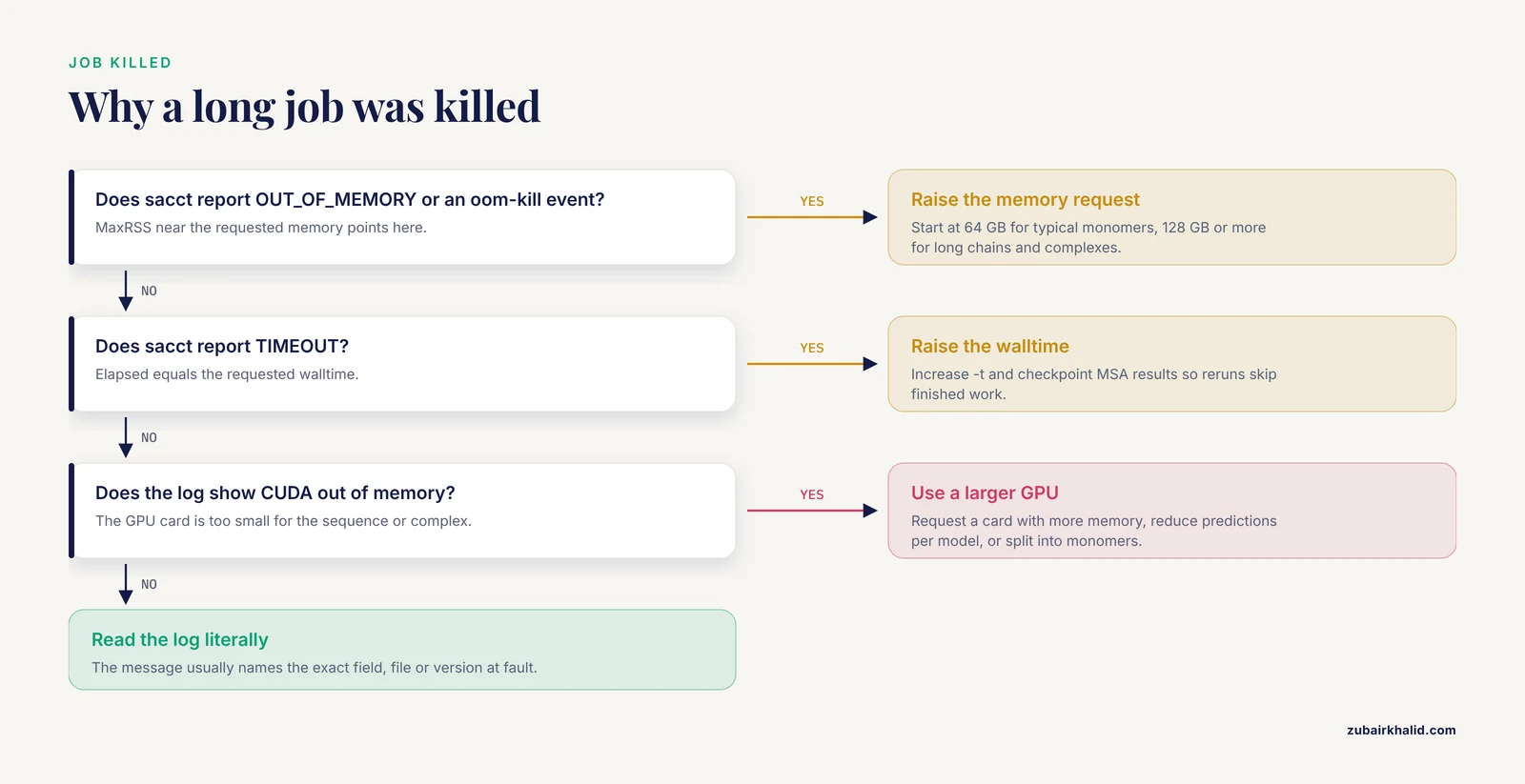
Two usual culprits. If sacct reports OUT_OF_MEMORY or an oom-kill event, the memory request was below the job's real peak, so raise -mem. If it reports TIMEOUT, the walltime was shorter than the run, so raise -t. The Elapsed and MaxRSS columns from sacct tell you exactly how far off each request was.
What does a CUDA out of memory error mean and how do I fix it?
The GPU ran out of memory during model inference, which happens when the sequence or complex is too large for the allocated card. Fixes in order of preference are requesting a GPU with more memory, reducing the number of predictions per model, or modeling the target as smaller separate chains. This is a GPU-size issue, not a submission-syntax issue.
Can I run AlphaFold without a GPU?
The original AlphaFold 2 release targets CUDA GPUs, and CPU-only inference is impractically slow for real targets, so treat a GPU as a requirement. If no GPU is available, the practical alternatives are the AlphaFold Server web service for AlphaFold 3 predictions within its usage limits, ColabFold on a hosted notebook when quota allows, or requesting time on a national cyberinfrastructure resource that grants GPU access to researchers without local hardware.
Why is my MSA search producing empty or failed results?
Empty MSAs almost always mean the search tools could not find or read their databases, either because -data_dir points to the wrong location, a download is incomplete, or permissions block reading. Check the traceback for hhblits or jackhmmer errors and the exact database filenames mentioned, then compare those paths against the filesystem. Rerun the official download script if any file is missing or fails its checksum.
What limits apply when I submit a job to the AlphaFold server?
The AlphaFold Server enforces a maximum combined input length measured in tokens (its unit for sequence and modification content), a daily job quota per user, restrictions on entity types such as certain ligands, and terms that limit how outputs may be used. Rejections name the violated limit. The remedies are to shorten or split the input, fix the JSON structure, or resubmit after the quota window resets.
How do I submit multiple AlphaFold jobs at once?
Wrap the pipeline in a script that takes a FASTA path as an argument and submit one SLURM array job (an array indexes many similar jobs under one ID) or a loop of individual submissions, each with a unique output directory. Keep memory and time requests calibrated to your longest sequence, since the array will inherit a single resource profile. Ensure the databases and conda environment are read-only and shared, and that no two jobs write to the same feature directory.