Pipeline Design Patterns for Reproducible Research
By Dr. Zubair Khalid, DVM, MS, PhD ·

Most analyses in modern life science are not single scripts. They are chains of steps that move raw data through quality control, processing, statistical modeling, and visualization. A reproducible pipeline is a chain like that which anyone can rerun, on a different computer, months or years later, and get the same results. The difference between a folder of loose scripts and a reproducible pipeline is rarely the science. It is a handful of recurring design decisions, or design patterns, that show up again and again in well-built computational studies.
By the end of this article you will be able to name the seven design patterns that recur across published reproducible pipelines, build a small containerized pipeline with Nextflow step by step, resume it after a failure, verify that its outputs are correct, debug the most common error messages, and archive a versioned release that others can cite. You need a computer with a Unix-style shell (macOS or Linux, or the Windows Subsystem for Linux), Java 11 or newer, Git, and either Docker or Apptainer installed. The worked example uses Nextflow, which you can install with one command, and conda is optional for local testing.
What Reproducibility Means in Pipeline Terms
Three levels of reproduction come up in the literature, and they demand different things from your pipeline.
Repeatable means you can rerun your own pipeline on your own machine and get the same numbers. This requires pinned software versions, fixed random seeds, and stable input data.
Reproducible means someone else can rerun your pipeline on their machine and get the same numbers. This adds requirements for portability (the same software runs elsewhere) and complete documentation of every parameter.
Replicable means an independent group can reach the same scientific conclusion using their own data or their own implementation of the analysis. This is a property of the study design more than the code, and it is why patterns like harmonized outputs and cross-biobank meta-analysis exist [1].
The tools that make the first two levels achievable are now standard across fields. A workflow engine is a program that executes your pipeline steps, tracks their dependencies, and reruns only what changed. Nextflow and Snakemake are the two engines that dominate published life-science pipelines. A container is a lightweight package that bundles a tool together with its exact dependencies and libraries, so the tool behaves identically on a laptop, a high-performance computing (HPC) cluster, or a cloud platform. Docker and Apptainer (formerly Singularity) are the two container formats you will encounter most often [1][2].
Seven Design Patterns That Recur Across Published Pipelines
The table below summarizes the patterns. The subsections after it explain each one with examples drawn from published pipelines in genomics, imaging, microbiology, and machine learning.
| Pattern | Core idea | Typical implementation | Failure it prevents |
|---|---|---|---|
| Modular stages | Small, single-purpose steps with defined inputs and outputs | Named processes or rules, each with one job | Monolithic scripts that must be rerun from scratch |
| Engine orchestration | A workflow engine executes and tracks steps | Nextflow, Snakemake | Lost dependency tracking, manual reruns |
| Containerized software | Every tool pinned in a container image | Docker or Apptainer images per process | Works-on-my-machine version drift |
| Configuration separate from code | Parameters live in config files, not in the script body | nextflow.config, YAML, recipe files | Hidden hardcoded settings that no one can see |
| Standardized inputs and outputs | Fixed input formats and harmonized result tables | Validation, unified matrices, common schemas | Silent data-format breakage between steps |
| Leak-free evaluation | Splits that respect the real structure of the data | Cluster-wise, subject-wise, or zone-wise splits | Inflated accuracy from test-set contamination |
| Provenance and archiving | Code, versions, and parameters preserved and citable | Git tags, Zenodo DOI, container digests | Unrecoverable analyses after lab turnover |
Pattern 1: Modular stages with fixed interfaces
A modular pipeline is a sequence of stages, each of which reads defined inputs and writes defined outputs. SACOB, a Python pipeline for counting vascular buds at the cartilage-bone interface in histology sections, is built this way: image import, user-defined path annotation along the interface, intensity-profile extraction, and algorithmic peak detection each run as a discrete, testable stage [3]. An image-analysis pipeline for stroma-rich tumors combines automated nuclei segmentation with StarDist, QuPath-based classification, and custom Python scripts as separable modules [4], and a FlowCam processing pipeline is explicitly modular and multi-platform so that different instrument versions and VSP releases can be handled without rewriting the analysis [5].
Modularity has a practical payoff you will feel immediately: when a step fails or a reviewer asks you to change one parameter, you rerun one stage instead of the whole analysis. It also makes the pipeline testable, because each stage can be checked against a small input dataset on its own.
Pattern 2: Engine-driven orchestration
Published pipelines overwhelmingly delegate bookkeeping to a workflow engine. The PMBB Geno-Pheno Toolkit, a suite of pipelines for genome-wide, exome-wide, and phenome-wide association studies across linked biobanks, orchestrates all of its components with Nextflow [1]. PUDU, a microbiome pipeline that unifies amplicon, shotgun metagenomics, and long-read 16S profiling, is a modular Snakemake workflow [6]. MuSA, a clinical variant-annotation pipeline, is an nf-core-compliant Nextflow pipeline that runs several annotation branches in parallel before consolidating results [2]. The engine is what turns a pile of tools into a single artifact that other people can execute with one command.
Pattern 3: Containerized software
Containers are the single most impactful pattern for cross-machine reproducibility. The PMBB toolkit runs unmodified on local HPC clusters, cloud platforms, and the All of Us Research Workbench precisely because every component is containerized with Docker or Apptainer and orchestrated with Nextflow [1]. MuSA executes its annotation tools, which include Ensembl VEP with 22 curated plugins such as AlphaMissense, CADD, SpliceAI, and Enformer, inside a fully containerized workflow [2]. Without containers, a pipeline that works on your workstation can fail on the cluster because of a different library version, and that failure is often invisible until results subtly change.
Pattern 4: Configuration separate from code
Everything that varies between runs belongs in a configuration file, not in the script body. QuNex recipes take this pattern furthest in the neuroimaging literature: an entire study workflow, covering data onboarding, preprocessing, and analysis, is written as a machine- and human-readable recipe, so a fully reproducible study can be replicated by providing only the QuNex version used, the recipe file, and the data [7]. PUDU applies the same idea at a smaller scale with simplified configuration across three sequencing modalities [6]. The test for this pattern is simple: a reader should be able to see every parameter of your analysis by opening one or two files, without reading your code.
Pattern 5: Standardized inputs and harmonized outputs
Pipelines that accept heterogeneous inputs spend most of their code compensating for variation. MuSA standardizes input variant call format (VCF) files before annotation and consolidates results into a single annotated output, because verbose transcript-level outputs from standalone tools are unsuitable for downstream review [2]. Mito_Plot accepts standard mitochondrial VCF files and aggregates mutant allele frequency values from many samples into a unified matrix aligned by genomic position, which is what makes direct cross-sample comparison possible [8]. PUDU harmonizes outputs across classifiers so standard ecological analyses can run directly on pipeline results [6]. The pattern is to define, once, what a valid input looks like and what the output schema will be, then enforce both.
Pattern 6: Leak-free evaluation design
Pipelines that train or evaluate models need splits designed to match the true structure of the data. A benchmark of intrabody-communication biometric identification showed how badly this can go wrong: prior reports of over 99 percent identification accuracy resulted from data leakage, where samples from the same subject appeared in both training and evaluation sets. A strict subject-wise 80/20 split, repeated five times, brought the best classical configuration down to 54.0 percent accuracy [9]. The food-insecurity prediction pipeline for Nigeria takes the same care with survey data: because the demographic survey is a two-stage cluster sample, all evaluation uses cluster-grouped splits in which no enumeration area contributes households to both training and test sets, and a leave-zone-out validation additionally tests entire regions the model never saw [10]. Build the split logic into the pipeline itself so it cannot be bypassed.
Pattern 7: Provenance, archiving, and a citable version
A pipeline you cannot point to does not exist for citation purposes. The Emu-based microbiome workflow for HPC clusters ships automated SLURM scripts and documentation in a public GitHub repository with a numbered release, and archives that release on Zenodo with a digital object identifier (DOI) [11]. This three-part habit, a tagged release in version control, an archived copy with a DOI, and the exact engine and container versions recorded, is what lets a reviewer or collaborator reconstruct your run years later.
Choosing Between Nextflow, Snakemake, and a Single Script
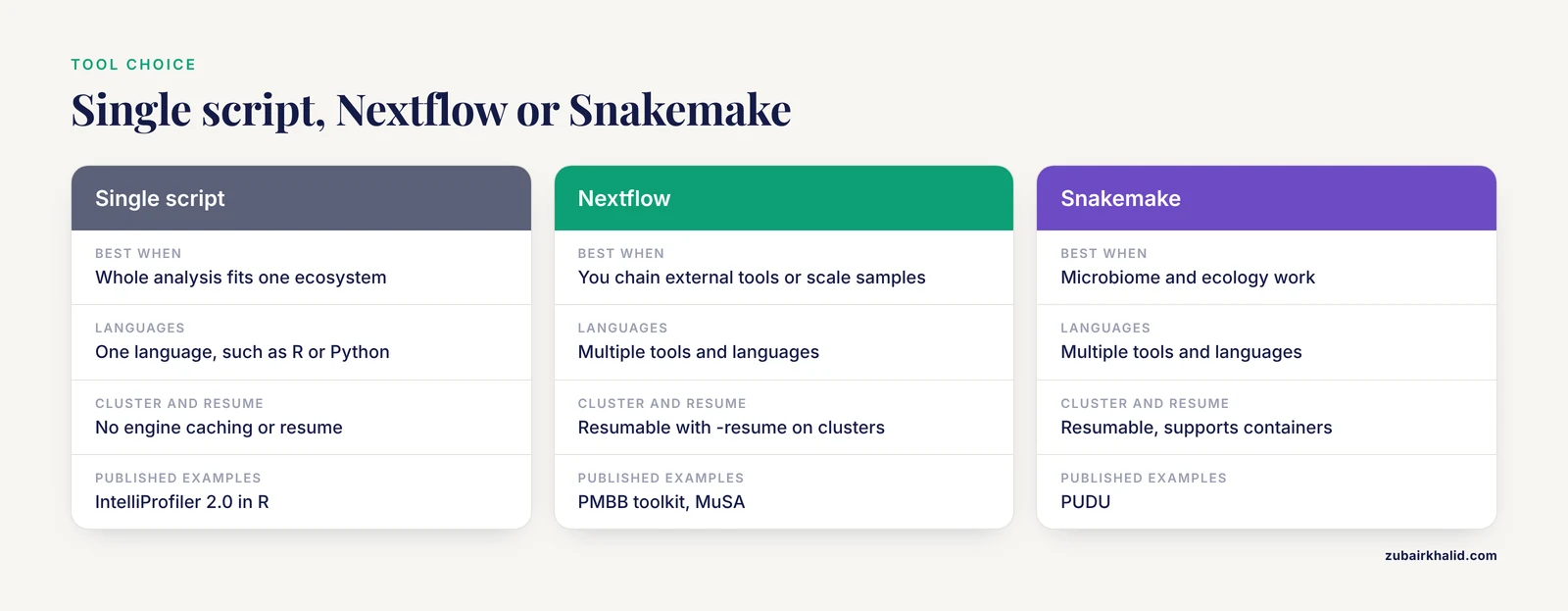
Match the tool to the scale of the problem. A consolidated single-language pipeline can be the right choice when the whole analysis fits in one ecosystem: IntelliProfiler 2.0 performs import, preprocessing, coordinate reconstruction, feature extraction, statistics, and visualization for home-cage mouse behavior data entirely in R, and its authors explicitly note that consolidating a multi-tool workflow into a single script-based pipeline reduced operational complexity and improved reproducibility [12]. Many small image-analysis and histology pipelines follow the same logic in Python, documented step by step with pinned environments, as in the neuroradiomics pipeline chapter that walks through dataset preparation, preprocessing, segmentation, feature extraction, and modeling in reproducible Python environments [13].
Once you chain multiple external tools, use multiple languages, or run on a cluster, move to an engine. Nextflow dominates genomics and clinical pipelines [1][2], while Snakemake is common in microbiome and ecology work [6]. Both support containers, per-step resources, and resumable execution. This article's walkthrough uses Nextflow.
Step-by-Step: Building a Reproducible Pipeline
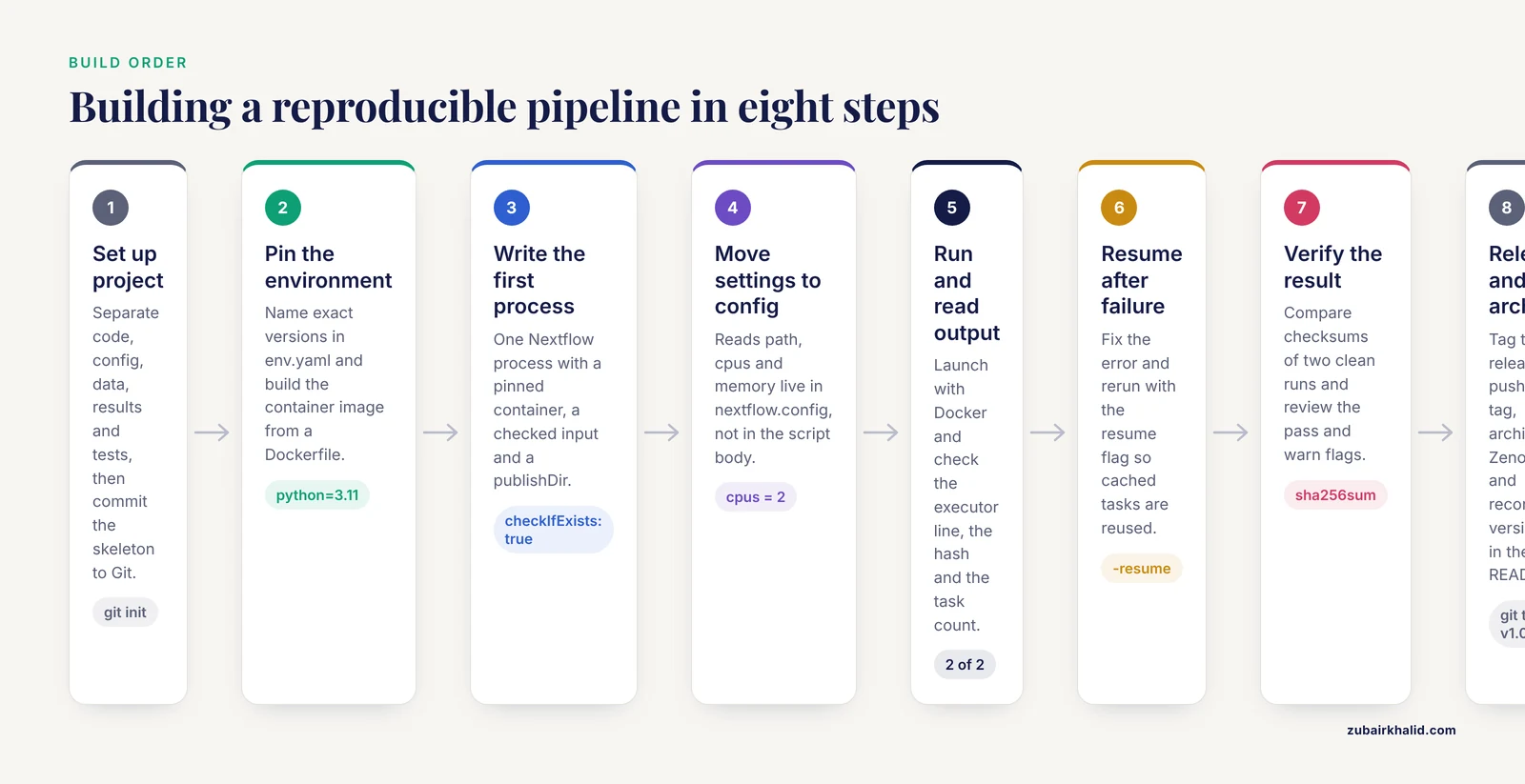
The worked example runs a minimal quality-control stage on FASTQ sequencing reads. The same skeleton extends to any domain: swap the tool inside the process and keep the surrounding structure.
Step 1. Set up the project
Create a layout that separates code, configuration, data, and results.
my-pipeline/
├── main.nf
├── nextflow.config
├── env.yaml
├── data/            # input files, never modified in place
├── results/         # everything the pipeline writes
├── tests/           # small test data
└── .gitignore
Initialize version control now, not later.
cd my-pipeline
git init
git add main.nf nextflow.config env.yaml .gitignore
git commit -m "initial pipeline skeleton"
Step 2. Pin the software environment
Write a conda environment file that names exact versions. Versions are the difference between repeatable and accidental results.
# env.yaml
name: repro-env
channels:
  - conda-forge
  - bioconda
dependencies:
  - python=3.11
  - pandas=2.2.2
  - r-base=4.3.2
For the container image that the pipeline itself will use, define it in a Dockerfile so it is versioned with the code.
FROM mambaorg/micromamba:1.5.10
COPY env.yaml /tmp/env.yaml
RUN micromamba install -y -n base -f /tmp/env.yaml
Two rules apply here. First, never rely on the latest tag in production, because a tag that moves under you will silently change your software. Second, keep the environment definition in the repository so the container and the code move together.
Step 3. Write the first process
Install Nextflow if you have not already.
curl -s https://get.nextflow.io | bashCreate main.nf with one process. A process is Nextflow's unit of work, and each one gets its own container, resources, and retry rules.
// main.nf
nextflow.enable.dsl = 2

process QC {
    container "quay.io/biocontainers/fastqc:0.11.9--hdfd78af_0"

    input:
    path reads

    output:
    "*_fastqc.html"
    publishDir "results/qc", mode: "copy"

    script:
    """
    fastqc ${reads}
    """
}

workflow {
    reads = channel.fromPath(params.reads, checkIfExists: true)
    QC(reads)
}
Each line matters. The container directive pins the exact biocontainer image, so every machine runs the same FastQC build. checkIfExists: true makes the pipeline fail fast with a clear message if the input data are missing. publishDir copies outputs to a user-visible folder while the engine keeps its own working directories intact for caching.
Step 4. Add configuration
Create nextflow.config so parameters live outside the code.
// nextflow.config
params.reads = "data/*.fastq.gz"

process {
    withName: QC {
        cpus   = 2
        memory = "4 GB"
    }
}
This is Pattern 4 in action. To run the same pipeline with different data, you change one line in a config file, and the change is recorded in Git like any other edit.
Step 5. Run and read the output
Execute the pipeline with containerization enabled.
nextflow run main.nf -with-dockerExpected output (identifiers and hashes vary per run):
N E X T F L O W  ~  version 24.10.0
Launching `main.nf` [gloomy_pasteur] DSL2 - revision: 1a2b3c4d5e
executor >  local (2)
[6f/1a2b3c] process > QC (1) [100%] 2 of 2 ✔
Read that output as a checklist. The executor line tells you where work ran (local here, a cluster scheduler name on HPC systems). The bracketed hash is the working directory for that task. The 2 of 2 line tells you every input file was processed. HTML reports land in results/qc/.
Step 6. Resume after a failure
Add a second process, then deliberately introduce an error, say a typo in the tool name. Nextflow stops at the failed task and leaves completed work untouched. Fix the typo and rerun with the resume flag.
nextflow run main.nf -with-docker -resumeExpected output shows completed work being pulled from cache instead of recomputed:
[cached] process > QC (1)
[d2/8e4f1a] process > ALIGN (1) [100%] 2 of 2 ✔
This is the engine doing what a shell script cannot: it fingerprints each task from its inputs, code, and container, and only reruns tasks whose fingerprint changed. On a genomics pipeline that takes hours per stage, this is the feature that keeps iteration from becoming a day-long cycle [1].
Step 7. Verify the result is right
Verification has three layers. First, confirm mechanical success: nextflow log lists every executed task with its status, and each task directory contains a .command.err file with anything the tool printed to standard error. Second, confirm content quality: pipeline reports such as FastQC output have explicit pass and warn flags per module, and established practice is to review those flags against expectations for your data type before trusting downstream numbers [13]. Third, confirm determinism: run the pipeline twice from a clean state and compare checksums of the outputs.
sha256sum results/qc/*.html > first.txt
rm -rf work results
nextflow run main.nf -with-docker
sha256sum results/qc/*.html > second.txt
diff first.txt second.txt
Empty diff output means the two runs produced byte-identical results. If they differ and no data changed, you have nondeterminism somewhere, which is the first thing a skeptical reviewer will find.
Step 8. Release and archive
When the pipeline works on your test data, tag a release and archive it.
git tag v1.0.0
git push origin v1.0.0
Then create a Zenodo archive of the release to obtain a citable DOI, exactly as the published HPC microbiome workflow did with its numbered GitHub release [11]. Record in your README the Nextflow version, the container registry, and the command used, so the run is reconstructible from three facts: the engine version, the code version, and the data [7].
Common Mistakes and Limitations
Hardcoded paths and parameters. A pipeline that reads /home/alice/project/data is not reproducible in any meaningful sense. Every path, threshold, and model setting belongs in the config file. The exact Nextflow error you will hit at runtime is a name collision, which looks like this:
Process `QC` input file name collision -- There are multiple input files
for each of the following file names: sample.fastq
This happens when two input channels deliver files with the same name into one process. The fix is to combine the channels with a unique key, for example the sample ID, so each process instance receives one coherent set of files.
Unpinned dependencies. Writing pip install pandas or pulling a container tagged latest means your pipeline changes underneath you. The classic symptom appears weeks later as a traceback like ModuleNotFoundError: No module named 'pandas' on a collaborator's machine, or as silently different model results after a library update. Pin exact versions in env.yaml and exact image tags in every process.
Data leakage in evaluation. The most damaging mistake in ML-flavored pipelines is a random split that ignores data structure. The documented consequence is severe: subject-level leakage inflated intrabody-communication identification accuracy above 99 percent, while a leakage-free subject-wise benchmark reached 54.0 percent for the strongest classical configuration [9]. If samples from the same patient, subject, household, or sampling cluster can appear on both sides of the split, design the split around that structure from the start, as the Nigeria food-insecurity pipeline did with cluster-grouped and leave-zone-out validation [10].
Ignoring input validation. A pipeline that accepts any VCF, any image format, or any table will produce confident nonsense on malformed input. Follow the MuSA approach of standardizing inputs before the analysis stages run [2], and fail loudly on nonconforming files.
Manual preprocessing steps outside the pipeline. If a step happens by hand, it does not exist for anyone reproducing your work. Every transformation, including the ones that feel trivial, must live inside the workflow.
Conflating reproducibility with correctness. A deterministic pipeline reliably produces whatever numbers it produces, right or wrong. Deterministic execution, documented parameters, and containerized software make results auditable. Whether the analysis answers the scientific question is a separate judgment, and one pipeline pattern, repetition under different conditions, helps: the peptide-design study that ran 400 nanosecond molecular dynamics simulations in triplicate and compared candidates against an experimentally validated benchmark treated reproducibility across replicates as evidence, not as an assumption [14].
Over-building too early. A five-sample pilot does not need a 40-process nf-core pipeline. Start with a single script, and migrate to an engine when you chain tools, scale samples, or move to a cluster [12]. Pattern complexity should track project size.
A Reproducibility Checklist
Use this checklist before you share a pipeline, submit a manuscript, or onboard a new user. It condenses the seven patterns into verifiable actions.
- [ ] Code lives in version control with a tagged release.
- [ ] Every tool version is pinned, in containers or a lock file.
- [ ] The pipeline runs end to end with one command from a clean checkout.
- [ ] All parameters live in config files, visible without reading code.
- [ ] Input formats are validated before processing.
- [ ] Output schemas are fixed and documented.
- [ ] Random seeds are set and recorded.
- [ ] Data splits respect the structure of the data (subject, cluster, or zone level).
- [ ] Outputs from two clean runs match by checksum.
- [ ] A small test dataset runs in minutes in a continuous-integration job.
- [ ] The release is archived with a DOI or persistent identifier.
- [ ] The README states the engine version, container registry, and the exact run command.
If any box stays unchecked, the pattern it belongs to tells you which fix to prioritize.
Frequently Asked Questions
What exactly is a reproducible pipeline design pattern?
It is a recurring structural solution to a reproducibility problem, such as containerizing every tool, separating configuration from code, or designing data splits that prevent leakage. Individual pipelines combine these patterns rather than inventing new ones, which is why learning the catalog transfers directly across projects.
Do I need Nextflow or Snakemake, or is a Python script enough?
A single, well-documented script in one language is enough for small analyses, and published examples show it can be the more reproducible choice at that scale. Move to an engine when you chain multiple external tools, need resumable execution, or run on a cluster, because the engine handles dependency tracking and caching that scripts cannot.
What is the minimum set of things to share so someone can rerun my analysis?
Three items: the exact software environment, the code as a tagged release, and the input data or a test dataset. Published frameworks are built so that a version, a workflow file, and the data are sufficient for one-command replication.
How do containers actually make my pipeline reproducible?
A container image packages a tool with its dependencies and libraries, so the same image runs identically on a laptop, an HPC cluster, and a cloud platform. Published cross-biobank pipelines run unmodified across all three environments for exactly this reason.
How do I prevent data leakage in a machine-learning pipeline?
Design the train-test split around the real dependence structure of the data before any model fitting. If one subject, patient, household, or sampling cluster contributes multiple rows, keep all of that unit on one side of the split, and verify with a held-out-unit evaluation.
How do I resume a pipeline after something fails?
With Nextflow, rerun the same launch command and add -resume. The engine fingerprints each task from its inputs, code, and container, and only recomputes tasks whose fingerprint changed, pulling everything else from cache.
What is nf-core, and should my pipeline follow it?
nf-core is a community standard for Nextflow pipelines that prescribes structure, testing, containerization, and documentation conventions. You do not have to follow it, but building in its style, as published clinical annotation pipelines do, gives you community tooling, review practices, and a familiar layout for new users.
How do I get a citable DOI for my pipeline?
Tag a release on a public repository hosting service, then archive that release on Zenodo, which mints a DOI for the archived snapshot. Published workflows use this exact combination of a numbered release and a Zenodo archive so papers can point to a frozen, retrievable version.
Sources
- PMBB Geno-Pheno Toolkit: A suite of scalable, reproducible pipelines for cross-biobank association analyses.
- MuSA: a Nextflow pipeline for deep, reproducible annotation and clinical ranking of genomic variants.
- A modular python-based pipeline for quantifying vascular bud density at the chondro-osseous border.
- An image analysis pipeline to quantify the spatial distribution of cell markers in stroma-rich tumors.
- Pipeline for FlowCam data processing with modular open-source software and optional machine learning classification.
- PUDU (pipeline for universal diversity unveiling): an accessible end-to-end workflow for taxonomic profiling and ecological visualization of environmental microbiomes across amplicon, shotgun, and long-read sequencing.
- QuNex recipes: Executable, human-readable workflows for reproducible neuroimaging research.
- Mito_Plot: open-source pipeline for quantification and visualization of mitochondrial DNA heteroplasmy.
- Reproducible benchmark of wavelet-enhanced intrabody communication biometric identification.
- Household-level food-insecurity prediction from experience-scale surveys and open geospatial data: A reproducible machine-learning pipeline for Nigeria.
- Reproducible Emu-Based Workflow for High-Fidelity Soil and Plant Microbiome Profiling on HPC Clusters.
- IntelliProfiler 2.0: An integrated R pipeline for long-term home-cage behavioral profiling in group-housed mice using eeeHive 2D.
- Computational Pipeline in Neuroradiomics.
- Bridging Generative AI and Diffusion Models With Molecular Simulation to Design Anti-Quorum-Sensing De novo Peptides Targeting LasR of Pseudomonas aeruginosa.