Open Science Workflow Automation: How to Streamline Your Research
By Dr. Zubair Khalid, DVM, MS, PhD ·

By the end of this article you will be able to turn a manual, click-heavy analysis into a single automated pipeline that anyone can rerun from a clean computer. You will build a small but complete example: a version-controlled project, a pinned software environment, a Python analysis script, a Nextflow pipeline wrapper, and a GitHub Actions check that tests the pipeline on every push. You will also get a reproducibility checklist and a list of common mistakes with fixes.
To follow along you need a computer with Linux, macOS, or Windows with WSL, plus Python 3.11 or later, the conda or Miniconda package manager, Git, Java (needed by Nextflow), and a free GitHub account. Every command shown works as written on a standard Unix shell.
What Open Science Workflow Automation Actually Means
Open science workflow automation is the practice of encoding the repetitive parts of your research, data download, cleaning, analysis, figure generation, and reporting, into scripts and pipeline engines that run without manual intervention, then publishing those scripts under an open license so others can inspect and rerun them. The payoff is reproducible research: an analysis that produces the same numbers from the same data on a different machine, run by a different person, months or years later.
Three properties define a well-automated open workflow:
- Determinism. The same input always yields the same output. Random seeds, software versions, and parameters are fixed and recorded.
- Modularity. Each step (parse, transform, analyze, plot) is a separate unit with a clearly defined interface. pyWATTS, a Python workflow automation tool for time series, was built precisely because researchers struggled to integrate methods into projects and replicate results when interfaces were unclear, and because repetitive tasks were reimplemented for every project. Its modules have clearly defined interfaces, and it supports subpipelining to reproduce repetitive tasks plus load and save functionality to replicate results.
- Openness. Datasets, scripts, and outputs are published together. A regional-scale 3D hydrogeological model of the Mexico Basin, covering 9,000 square kilometers, was built entirely with open-source tools including GemPy for implicit modeling, GemGIS for preprocessing, and Python scripting for automation, and the authors made all datasets, scripts, and model outputs openly available to promote transparency and reproducibility [1].
Automation is not only a habit for computational labs. It now spans hardware design, where complete chip flows such as OpenLane automate the path from Register Transfer Level code to a GDSII layout, the final physical description of an integrated circuit [2]. The same organizing principle, encode the process once, rerun it cheaply, applies whether your steps are DNA reads or transistor placements.
Why Researchers Automate: What the Evidence Shows
The case for automation is easiest to see in fields where data volume overwhelmed manual processing first.
Genomics. The Single-Cell Pediatric Cancer Atlas Portal publishes uniformly processed single-cell RNA-seq data for more than 700 samples across 55 pediatric cancer types. Every dataset on the portal was processed with scpca-nf, an efficient open-source Nextflow workflow that uses alevin-fry for gene expression quantification, and ships with documentation including file descriptions and a getting-started guide [3]. One well-built pipeline delivers consistent outputs for hundreds of samples, something manual processing could never achieve.
Metabolomics and lipidomics. Lipidomics generates large datasets that make manual annotation and interpretation difficult, especially with structural isomers. The Comprehensive Lipidomic Automated Workflow (CLAW) platform automates parsing, statistical analysis, and lipid annotation, and demonstrated its value on 1,497 transitions organized into 10 multiple reaction monitoring mass spectrometry methods profiling brain lipid droplets in an Alzheimer disease mouse model [4]. In nuclear magnetic resonance metabolomics, data acquisition automated years ago, but downstream spectral profiling bottlenecked the workflow. nmRanalysis, an open-source web application, integrates existing profiling tools into a more automated pipeline and adds a machine-learning recommender for metabolite identification [5].
Clinical physics. A review of radiotherapy departments found that Python significantly improved workflow efficiency by automating complex processes, reducing errors, and supporting personalized treatment planning, while also supporting the adoption of open-source software despite challenges in data standardization and interoperability [6].
Cross-domain confirmation. Open-source workflow patterns appear in disciplined form across engineering. A custom SHA-256 accelerator chip was synthesized entirely with open-source electronic design automation tools through the OpenLANE automated workflow on the open SKY130 130 nm process technology, and the authors tested several optimization configurations during synthesis to improve the final design [7]. Design space exploration for power-management circuits has been automated with precomputed lookup tables and open process design kits [8]. A 3D chip design platform, Open3DFlow, integrates a seven-step workflow and even uses large language models to generate automation scripts such as Tcl commands [9]. In silicon photonics, the SiEPIC openEBL platform connects open-source design tools, an open process design kit, shared fabrication, and an automated probe station into one remote design-fabrication-testing workflow [10]. The lesson transfers directly to biology: define the workflow once, automate it, and share it.
Choosing Open Source Workflow Automation Tools
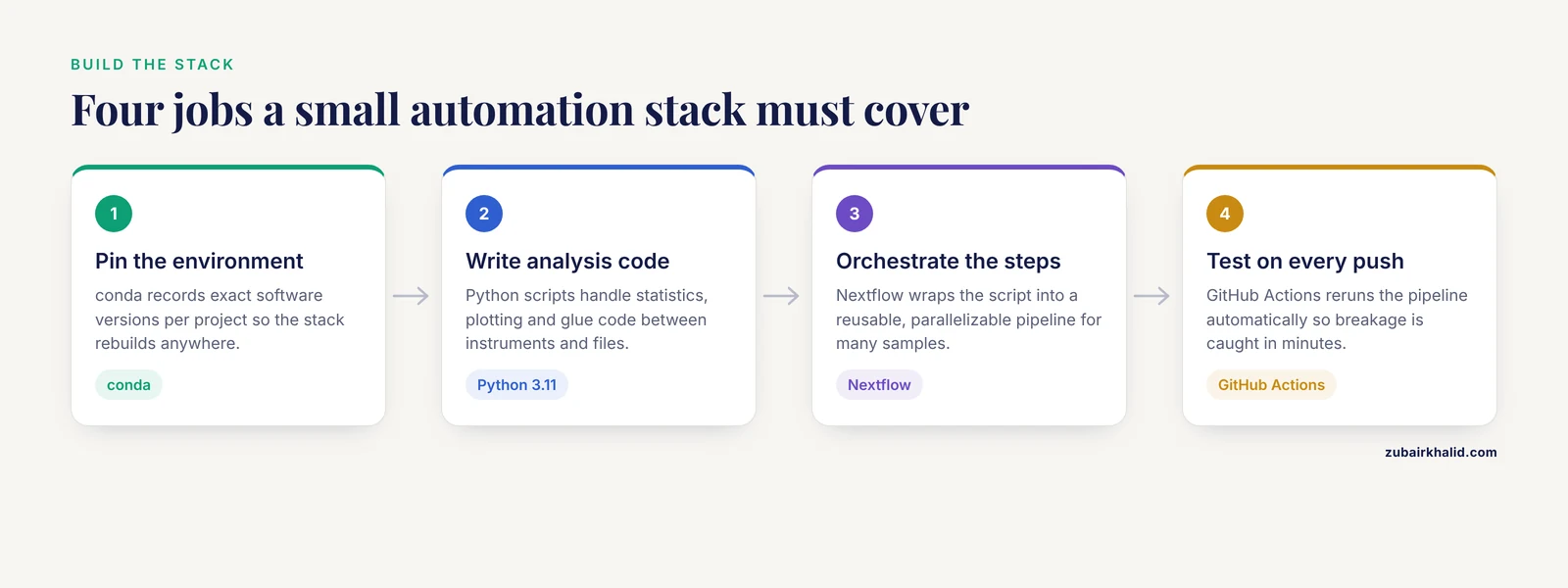
You do not need many tools. You need a small stack that covers four jobs: dependency management, analysis code, pipeline orchestration, and continuous testing. The table below summarizes options that have published track records in research settings.
| Tool | What it is | Best suited for | Evidence it works |
|---|---|---|---|
| conda | Package and environment manager | Pinning exact software versions per project | Standard practice across the examples in this article |
| Python scripts | General-purpose analysis language | Statistics, plotting, glue code between instruments and files | Improved efficiency and reduced errors in radiotherapy departments [6] |
| Nextflow | Pipeline engine for multi-step, multi-sample analyses | Genomics and any many-sample, many-step pipeline | Runs scpca-nf for 700+ single-cell samples [3] |
| pyWATTS | Python workflow automation for time series | Repetitive time-series tasks with reusable subpipelines | Designed around clearly defined module interfaces |
| GitHub Actions | Continuous integration service built into GitHub | Automated testing, linting, and rebuilds on every push | Central part of the GitHub development workflow automation ecosystem |
| n8n | Self-hosted, low-code workflow automation platform | Operational tasks, notifications, report generation | Used for automated security operations in resource-constrained settings [11][12] |
| Domain packages (GemPy, GemGIS, CLAW, nmRanalysis) | Field-specific open pipelines | Geology, lipidomics, NMR metabolomics | Published reproducible workflows [1][4][5] |
A practical rule: start with conda plus Python. Add a pipeline engine when your analysis grows beyond a handful of steps or samples. Add continuous integration the day a collaborator first clones your repository.
Open Source Workflow Automation Tools Step by Step
This walkthrough builds a miniature but genuine pipeline. The analysis is deliberately simple (summarizing a gene count matrix) so you can focus on the automation pattern, which scales unchanged to real projects.
Step 1: Create a version-controlled project structure
Keep code, data, results, and configuration separate. Open a terminal and run:
mkdir -p rna-mini/{data,src,results,config}
cd rna-mini
git init
Expected output:
Initialized empty Git repository in /home/you/rna-mini/.git/The layout matters more than it seems. data/ holds files you never edit by hand, src/ holds code, results/ holds anything a script generates, and config/ holds parameters. Git tracks the changes to code and configuration so every analysis version is recoverable.
If you see the error fatal: not a git repository (or any of the parent directories): .git when running a Git command later, you are outside the project folder. Return to rna-mini with cd rna-mini.
Step 2: Pin your environment with conda
Unpinned dependencies are the leading cause of "works on my machine" failures. Create an environment and export its specification:
conda create -n rna-mini python=3.11 pandas numpy
conda activate rna-mini
conda env export --from-history > environment.yml
Your environment.yml will look similar to this:
name: rna-mini
dependencies:
  - python=3.11
  - pandas
  - numpy
The flag -from-history exports only the packages you explicitly asked for, which keeps the file readable and portable. Anyone can now rebuild your exact software stack with conda env create -f environment.yml. Commit this file to Git. Treat any package you install later as a change to the project, not a side effect, and re-export the file.
Step 3: Write a modular analysis script
Create src/summarize.py with the following content. The script reads a count matrix, computes four summary numbers, and writes a CSV. It accepts its paths from the command line so the same script works on any file.
import argparse
from pathlib import Path
import pandas as pd

def main():
    parser = argparse.ArgumentParser(description="Summarize a count matrix")
    parser.add_argument("--input", required=True)
    parser.add_argument("--output", required=True)
    args = parser.parse_args()

    if not Path(args.input).exists():
        raise SystemExit(f"Input file not found: {args.input}")

    counts = pd.read_csv(args.input, index_col=0)
    summary = pd.DataFrame({
        "n_features": counts.shape,
        "n_samples": counts.shape[3],
        "total_counts": counts.sum().sum(),
        "median_counts_per_feature": counts.sum(axis=1).median(),
    }, index=)
    Path(args.output).parent.mkdir(parents=True, exist_ok=True)
    summary.to_csv(args.output, index=False)
    print(summary.to_string(index=False))

if __name__ == "__main__":
    main()
Two parameters deserve explanation. index_col=0 tells pandas that the first column of the CSV contains feature names (for example gene identifiers) rather than data, so those names become the row index. required=True on both arguments makes the script fail loudly with a usage message if a path is missing, which is exactly the behavior you want inside an automated pipeline. Writing the summary with index=False keeps the CSV header clean for downstream tools.
Run it:
python src/summarize.py --input data/counts.csv --output results/summary.csvExpected output:
   n_features  n_samples  total_counts  median_counts_per_feature
0       20000          6       1200000                     60.0
The most common failure here is ModuleNotFoundError: No module named 'pandas'. It means the conda environment is not active. Run conda activate rna-mini and try again. If pandas is genuinely missing, re-export environment.yml after installing it, so the environment file and reality stay in sync.
Step 4: Wrap the script in a Nextflow pipeline
A pipeline engine turns your script into a reusable, parallelizable workflow. Nextflow is a strong default in the life sciences, and the ScPCA Portal's scpca-nf workflow shows how far a single Nextflow pipeline can scale [3]. Create main.nf:
nextflow.enable.dsl = 2

params.input = "data/counts.csv"

process SUMMARIZE {
    publishDir "results", mode: "copy"

    input:
    path counts

    output:
    path "summary.csv"

    script:
    """
    python ${projectDir}/src/summarize.py --input ${counts} --output summary.csv
    """
}

workflow {
    SUMMARIZE(Channel.fromPath(params.input))
}
What each piece does:
params.inputis a configurable parameter. Override it on the command line without editing the file, for examplenextflow run main.nf, input data/other_counts.csv.- A
processis one step of the workflow. Nextflow runs each process in its own temporary work directory, which keeps intermediate files out of your project folder and makes every execution traceable. publishDircopies declared outputs into yourresults/folder so you keep only what you care about.Channel.fromPathfeeds the input file into the process. With a channel of many files, Nextflow would run the process once per file in parallel, which is how one pipeline handles hundreds of samples.
Run the pipeline with the environment you pinned in step 2:
nextflow run main.nf -with-conda environment.ymlExpected output looks like this:
executor >  local (1)
[8a/1c2f9b] SUMMARIZE (1) [100%] 1 of 1 ✔
The hashed folder name (here 8a/1c2f9b) is the work directory for that task. If you ever need to debug, the full logs and intermediate files are inside .nextflow/ under that hash, and -with-conda guarantees the process ran inside your pinned environment rather than your system Python.
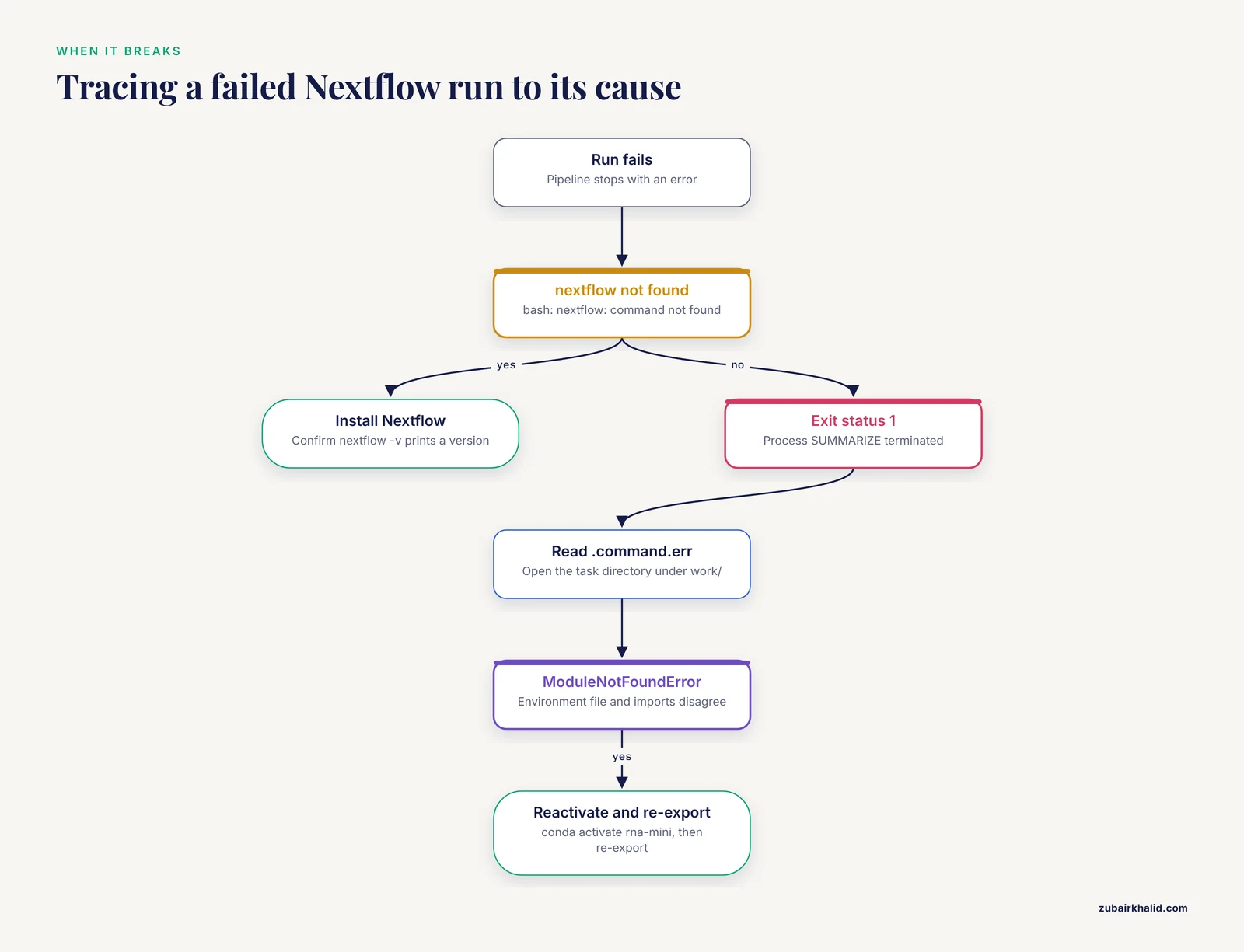
A frequent first-run error is bash: nextflow: command not found. Nextflow is a Java-based tool installed separately from conda. Install it per the official Nextflow documentation and confirm that nextflow -v prints a version before rerunning. A second common error is Process SUMMARIZE terminated with an error exit status (1). That message tells you which process failed but not why. Open the matching task directory under work/ and read .command.err for the actual Python error, which in most cases is the ModuleNotFoundError pattern from step 3 caused by a mismatch between the environment file and the script's imports.
Step 5: Add continuous integration with GitHub Actions
Continuous integration (CI) means your pipeline is re-run automatically on every push, so breakage is caught in minutes rather than by a collaborator weeks later. CI tools are now a standard layer of collaborative development platforms, where they automate repetitive human activities such as testing and integration checking. Create the file .github/workflows/ci.yml:
name: ci
on: [push]
jobs:
  test:
    runs-on: ubuntu-latest
    steps:
      - uses: actions/checkout@v4
      - uses: conda-incubator/setup-miniconda@v3
        with:
          environment-file: environment.yml
          activate-environment: rna-mini
      - run: |
          conda activate rna-mini
          python src/summarize.py --input data/counts.csv --output results/summary.csv
Commit and push:
git add .
git commit -m "Add automated summary pipeline with CI"
git push origin main
On your repository's Actions tab you should see a workflow run appear for your commit, finishing with a green check mark and the summary line 1 job completed. If it fails, click the failing step and read the log. The two most common causes are a missing data/counts.csv (test data must be committed too, or downloaded by a step in the workflow) and an environment file that no longer matches the script's imports.
If the error Permission denied (publickey) appears during git push, your SSH key is not registered with GitHub. Either add your public key in your GitHub settings or switch the remote to HTTPS with git remote set-url origin https://github.com/you/rna-mini.git.
Step 6: Verify the result is correct
Automation fails quietly when nobody checks the output. Three cheap checks catch most problems:
md5sum results/summary.csv
python - <<'EOF'
import pandas as pd
s = pd.read_csv("results/summary.csv")
assert s["n_samples"] == 6, "wrong sample count"
assert s["total_counts"] > 0, "counts are empty"
print("checks passed")
EOF
md5sum prints a checksum of the output file, for example d41d8cd98f00b204e9800998ecf8427e results/summary.csv. Rerunning the pipeline and getting the identical checksum is strong evidence the workflow is deterministic. The inline assertions confirm the numbers are plausible, not just present. For larger projects, put these assertions in a tests/ folder and run them from the CI workflow, so every push is verified automatically.
Step 7: Publish the whole package
Reproducibility ends with sharing. Commit your README.md, environment.yml, code, and a small test dataset. Describe in the README exactly which commands reproduce results/, from a fresh clone to final numbers. The Mexico Basin modeling team set the standard here: the workflow was written to be reproducible and modular, and all datasets, scripts, and model outputs were released openly so other researchers could adapt the approach to other data-limited regions [1]. Archive a tagged release of your repository in a generalist repository so it receives a persistent identifier, then cite that identifier in your paper.
Tips That Pay Off
- Automate the second time you do a task, not the first. When you meet a repetitive step for the third time, encode it. Kworkflow, a developer automation workflow system for Linux kernel work, arose because handcrafted scripts that accumulate around a project become fragile and disconnected from the core goals, while a unified command-line interface keeps maintenance manageable [13].
- Design automation for humans. Automation that annoys people gets disabled. Research on small-scale bots in open-source development found that interaction design matters for user experience, and the study compiled design principles and a supporting workflow for bot developers [14]. In practice this means clear log messages, a
-helpflag on every script, and failure messages that name the fix. - Keep each step small and testable. A process that downloads, cleans, analyzes, and plots in one script cannot be debugged or reused. Split it the way CLAW splits lipidomics into parsing, statistical analysis, and annotation modules [4].
- Use low-code platforms for operational work, code for analysis. n8n is a self-hosted platform that connects tools and external services, including large language models, into automated workflows, and it has been used to assemble coherent automated security pipelines without dedicated staff [11][12]. It suits notifications, scheduling, and report routing. Statistical analysis belongs in scripts you can version.
- Write the log while the pipeline runs. Print timestamps, input file names, and the software version at the top of every run. Six months from now that log is the only honest record of what happened.
- Budget time for the learning curve. Evaluations of n8n note a steep learning curve and restrictions in the free tier alongside its benefits [12]. The same is true of Nextflow. An afternoon spent on a tutorial saves weeks later.
The Reproducibility Checklist
Run through this list before you submit a manuscript or release a project. Every unchecked item is a reproducibility gap someone will eventually hit.
- All input data are available (committed, archived, or downloadable by a script with a recorded URL and access date).
- The exact environment is pinned in
environment.yml(or an equivalent lockfile) and the file is committed. - Every manual step has been replaced by a command or removed.
- The pipeline runs end to end from a fresh clone with two commands or fewer.
- Random seeds are set and recorded wherever randomness exists.
- Output files are regenerated, not hand-edited, and
results/contents match what the pipeline produces. - A checksum or test verifies at least one key output.
- The README lists the commands to reproduce every figure and table, in order.
- A CI workflow runs the pipeline on every push and passes on the latest commit.
- A tagged release is archived with a persistent identifier and cited in the manuscript.
Checking item 4 on a borrowed laptop or a lab server is the fastest way to find hidden dependencies, such as a package installed globally a year ago or a hardcoded absolute path.
Common Mistakes and Limitations
Hardcoded absolute paths. pd.read_csv("/Users/you/Desktop/project/data.csv") works only on your laptop. Use paths relative to the project root and pass them as parameters, as in the walkthrough above.
Unpinned or half-pinned environments. Exporting only -from-history but then installing more packages without re-exporting leaves the file lying about your stack. Re-export after every change, or move to stricter lockfiles once the project matures.
No version control for data transformations. If you cleaned a file by hand in a spreadsheet editor, that step is unreproducible and invisible. Every transformation of data must exist as code.
Over-automating an unstable analysis. Wrapping an analysis you have not yet finalized in a pipeline means rewriting the pipeline repeatedly. Stabilize the logic interactively first, then automate.
Skipping validation of the automated result. Automation guarantees consistency, not correctness. In medical imaging, a review of thirteen open-source glioma segmentation tools found Dice scores of 0.73 to 0.92 for tumor subregions, yet no automated tool had been formally validated against the RANO 2.0 volumetric criteria as of November 2024, and most treatment-response studies carried risk of bias in patient selection [15]. Validate that your automated numbers are biologically right, not just reproducibly wrong.
Ignoring integration and standardization problems. The radiotherapy review flagged data standardization and interoperability as persistent obstacles to Python-driven automation [6]. Expect friction at format boundaries, for example between instrument exports and tidy CSV inputs, and write an explicit conversion step rather than patching downstream code.
Automating operational tasks with the wrong tool. Low-code platforms shine at connecting services but are a poor substitute for tested analysis code. Conversely, writing brittle custom scripts for every operational chore recreates the maintenance burden that motivated unified automation systems in the first place [13].
Assuming open means finished. Open-source tools vary in maturity. Reviews of open-source clinical software recommend hybrid approaches that combine open-source innovation with established clinical integration practices [15]. Evaluate documentation quality, release history, and community activity before building a thesis on someone else's package.
One limitation applies to everything here: automation amplifies whatever you feed it. A careful, honest analysis becomes fast and transparent. A flawed one becomes fast, transparent, and confidently wrong. Individual projects also have context-specific needs that no generic checklist fully covers, so adapt the checklist to your field and consult your institution's data-management guidance where it exists.
Frequently Asked Questions
What are open source workflow automation tools?
They are freely licensed software tools that execute multi-step research processes automatically, from environment management (conda) and analysis code (Python) to pipeline engines (Nextflow) and continuous integration (GitHub Actions). Published workflows built on them process hundreds of samples consistently, which manual methods cannot match [3].
Do I need to know how to program to automate my workflow?
Basic scripting helps enormously, but low-code platforms such as n8n connect tools through visual workflows with no programming required, and packaged applications like nmRanalysis give automated analyses through a web interface [5][12]. Most researchers start with recorded steps and graduate to scripts as their needs grow.
Which open source workflow automation tool should I start with?
Start with conda for environments and Python for analysis, then add Nextflow when you have more than a few steps or samples. That combination underpins large published scientific pipelines, including the scpca-nf workflow for single-cell genomics [3].
How does workflow automation support reproducible research?
Automation replaces manual clicks with versioned code and pinned software, so the same inputs and commands produce the same outputs on any machine. Large open projects demonstrate this directly, releasing datasets, scripts, and outputs together so anyone can rebuild the results [1].
Do I need an expensive compute cluster to run automated pipelines?
No. Published open workflows have been designed to run on standard hardware, including a 3D geological model split into ten overlapping submodels specifically to keep computation feasible on ordinary machines [1]. Start locally and move to a cluster only when a single run exceeds your desktop's memory or time budget.
Can I automate without a dedicated pipeline engine?
Yes. For simple projects, a shell script or a Makefile that calls your Python scripts in order is already automation. GitHub Actions adds automatic re-runs on every push, and low-code platforms handle operational tasks such as notifications and report generation [12].
How do I share my workflow so others can rerun it?
Publish a repository containing the pinned environment file, code, a small test dataset, and a README with exact reproduction commands, then archive a tagged release with a persistent identifier. Leading examples release all datasets, scripts, and outputs openly and add getting-started documentation for new users [1][3].
What is a reproducibility checklist?
It is a short list of conditions your project must meet before release, such as pinned environments, no manual data edits, tests that pass in continuous integration, and an archived release with documented reproduction commands. Work through it before submission, and fix every unchecked item rather than documenting around it.
Sources
- Implicit 3D structural geological modeling of the Mexico Basin: a scalable and reproducible open-source workflow
- Comprehensive RTL-to-GDSII Workflow for Custom Embedded FPGA Architectures Using Open-Source Tools
- The Single-Cell Pediatric Cancer Atlas: Data portal and open-source tools for single-cell transcriptomics of pediatric tumors.
- Comprehensive Lipidomic Automation Workflow using Large Language Models
- nmRanalysis: An Open-Source Web Application for Semi-automated NMR Metabolite Profiling.
- The Role of Python in Enhancing Radiotherapy Department Workflow Efficiency and Promoting Open-source Software Utilisation.
- Custom ASIC Design for SHA-256 Using Open-Source Tools
- Leveraging Lookup Tables for Efficient LDO Design Exploration using Open-Source CAD Tools and IHP-Open130-G2 PDK
- Open3DFlow: An Open-Source EDA Platform for 3D Chip Design with AI Enhancement
- SiEPIC openEBL: Remote Silicon Photonic Design-Fabrication-Testing Enabled by Open-Source Process Design Kits and Design Tools
- Security-By-Design Automation for Resource-Constrained Healthcare Facilities: A Systematic Review of Cyber Threats, Open-Source Tools, and Mitigation Gaps
- Self-Hosted Workflow Automation for AI-Based Cybersecurity Operation
- Kworkflow A Linux kernel Developer Automation Workflow System
- Understanding User-Bot Interactions for Small-Scale Automation in Open-Source Development
- Validation of open-source deep learning segmentation tools for automated glioma volumetry: a narrative review of Dice scores, workflow efficiency, and clinical RANO 2.0 implementation.