Open Notebooks in Research: A Practical Guide to Sharing Your Analysis
By Dr. Zubair Khalid, DVM, MS, PhD ·

By the end of this guide you will be able to turn a data analysis into an open notebook that a colleague, reviewer, or stranger can download, run from top to bottom, and get your exact numbers. You will know how to structure the notebook, pin the software environment, version it with Git, archive it with a persistent identifier, and make it executable in a browser without any installation on the reader's side.
You need Python 3.10 or later with the conda or pip package manager, Git, a terminal, and free accounts on GitHub and Zenodo. If you work mainly in R, the same principles apply in R Markdown or Quarto, and the walkthrough maps onto them directly. Nothing here costs money.
What Open Notebooks in Research Actually Are
An open notebook is a research record that you make publicly readable, and often executable, rather than keeping it private until publication. The term covers two related practices. The first is the open laboratory notebook, where scientists share protocols, raw observations, and negative results online, sometimes in near real time, so that peers can follow and reuse the work. Advocates of this practice argue that rapid disclosure accelerates discovery and benefits science, society, and the scientists themselves, and initiatives such as openlabnotebooks.org have run with more than 20 active contributors within a year of launching [1].
The second, and the focus of this guide, is the computational notebook, an interactive document that mixes narrative text, code, and outputs in a single file. Library guides on open research list open notebooks alongside pre-registration and published protocols as core components of transparent research practice [2][3], and surveys of open science teaching place open notebooks among the key concepts that connect coursework to professional research activity [4].
Why bother? Because publishing data and code alone is not enough. A systematic analysis of research articles that published Jupyter notebooks found that the artifacts often lacked comprehensive documentation and completeness, with missing scripts, incomplete datasets, and unspecified software versions preventing successful reproduction. The notebook format attacks that problem directly, because the code and the narrative live together and the outputs sit next to the commands that produced them.
The Two Tool Families: Computational Notebooks and Electronic Lab Notebooks
Open notebooks in research split into two tool families, and confusing them causes most beginner frustration.
Computational notebooks handle analysis. Jupyter, launched in 2014 by Fernando Pérez and Brian Granger, is now the most widely used technology for scientific calculation, data analysis, and reporting [5]. R Markdown and Quarto serve the same role in the R community. These notebooks are the natural home for statistics, plotting, and modeling, and they have become mainstream enough that whole publishing projects now treat the notebook as the centerpiece of the scientific article, with a static paper as the enduring archive [6].
Electronic lab notebooks (ELNs) handle experiments. An ELN records protocols, sample metadata, instrument runs, and observations, ideally in a structured, searchable form. eLabFTW, an open-source ELN, was introduced into a life science lab without any programming and proved suitable for small academic groups pursuing better data quality management [7]. Systems such as LEO go further and link ELN records to image stores like OMERO so that bioimages, experimental records, and metadata stay connected across the research lifecycle, in line with the FAIR principles of Findability, Accessibility, Interoperability, and Reusability.
| Tool or service | What it does | Best for |
|---|---|---|
| , - | , - | , - |
| Jupyter Notebook / JupyterLab | Interactive Python (and R, Julia) documents mixing text, code, and outputs | Data analysis, statistics, figures [5] |
| R Markdown / Quarto | Literate programming documents that render to reports and papers | R-centered workflows, notebook-based publishing [6] |
| eLabFTW | Open-source electronic lab notebook for experiments | Wet-lab protocol and sample records [7] |
| Git + GitHub | Version control and public hosting of code and notebooks | Tracking changes, collaboration [8] |
| Zenodo | Archiving releases with a persistent DOI | Making the exact version you published citable [8] |
| Binder (mybinder.org) | Launches your repository as a live notebook in a browser | Letting readers execute your analysis with zero installs [8] |
Most research projects need both families. The ELN captures what you did at the bench. The computational notebook captures what you did to the data. A centralized metadata system that links both, even one built on an open-source wiki platform, improves the transparency and rigor that reproducibility depends on [9].
Open Notebooks Research Step by Step: Building a Shareable Analysis
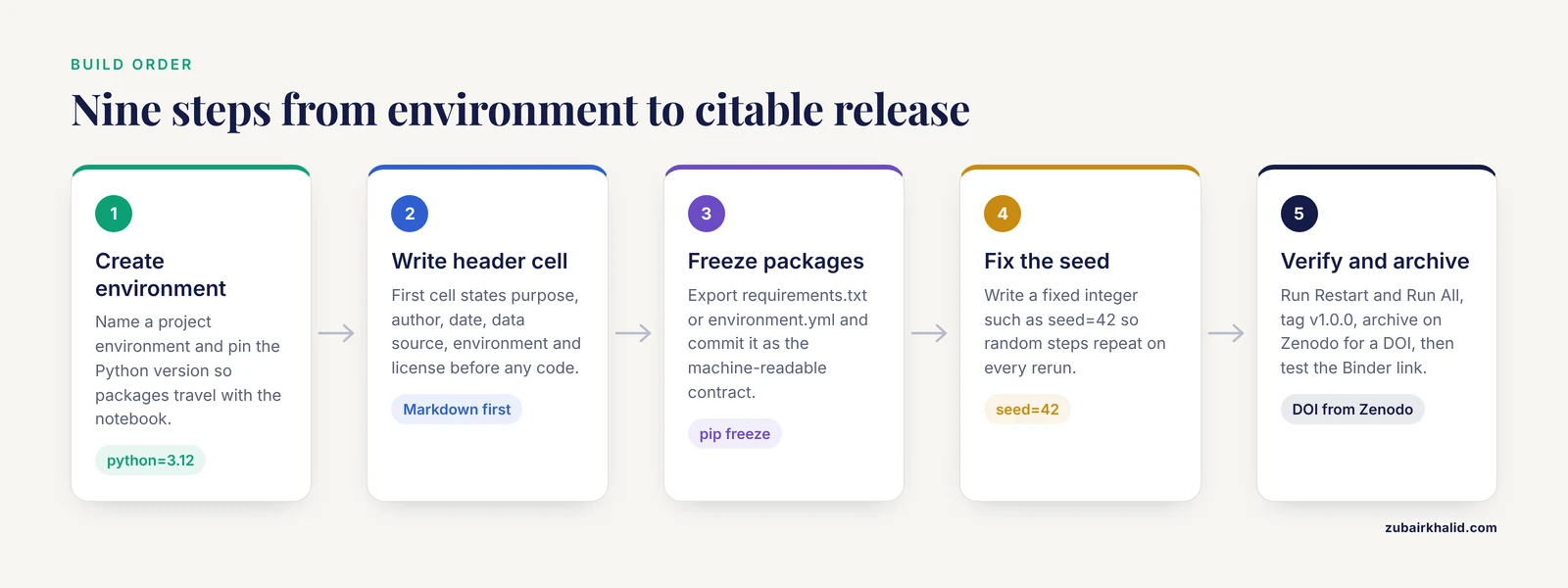
This walkthrough builds a small but complete example. The scenario is a dose-response measurement stored in a CSV file, and the goal is a notebook that anyone can rerun and get identical numbers.
Step 1: Create a dedicated environment
Never analyze in your base installation. Create an environment whose sole purpose is this project, so that the package versions travel with the notebook.
conda create -n open-notebook python=3.12 jupyterlab pandas matplotlib scipy
conda activate open-notebook
The -n flag names the environment. Pinning python=3.12 matters because a notebook written for one Python major version can fail on another. If you prefer pip:
python -m venv .venv
source .venv/bin/activate      # on Windows: .venv\Scripts\activate
pip install jupyterlab pandas matplotlib scipy
Step 2: Start Jupyter and write the header cell first
jupyter labThis opens a browser session, by default at http://localhost:8888. Create a new notebook and make the very first cell a Markdown cell that states what the project is, before any code appears:
# Dose-response analysis of enzyme activity measurements

**Author:** Your Name
**Date:** 2026-11-11
**Data:** `measurements.csv`, archived copy listed in the README
**Environment:** see `requirements.txt` (Python 3.12)
**License:** MIT

Run order matters. Use Kernel > Restart Kernel and Run All Cells.
That header is the cheapest, highest-value reproducibility tool you have. A reader who opens the notebook knows within ten seconds what it contains, what it needs, and how to run it.
Step 3: Freeze the environment into a file
pip freeze > requirements.txtFor conda, use conda env export > environment.yml. Commit this file. It is the machine-readable contract between your notebook and anyone who wants to run it.
Step 4: Load data from a documented, stable source
import pandas as pd

df = pd.read_csv("measurements.csv")
df.head()
Expected output in the notebook:
   sample_id  concentration_um  activity_umol_min
0        S01               0.5               12.3
1        S02               1.0               35.8
2        S03               2.0               61.4
3        S04               4.0              110.2
4        S05               8.0              208.9
Every dataset your notebook touches needs a home that will outlive your laptop. Archive the raw data with the notebook release, or reference a dataset that already has a persistent identifier. If the data is confidential, this is where you stop and split the project: publish the notebook with synthetic or public example data and document the access route to the real data.
Step 5: Fix the random seed and run the analysis
Any step that involves randomness must set a seed, an integer that makes pseudo-random number generation repeatable:
import numpy as np
from scipy import stats

rng = np.random.default_rng(seed=42)

res = stats.linregress(df["concentration_um"], df["activity_umol_min"])
print(f"slope = {res.slope:.3f}, r = {res.rvalue:.3f}, p = {res.pvalue:.2e}")
Expected output:
slope = 24.617, r = 0.994, p = 3.1e-08The seed=42 value is arbitrary. Any fixed integer works. What matters is that the number is written in the notebook, so rerunning the file reproduces the same fit, the same bootstrap interval, or the same train-test split.
Step 6: Verify with Restart and Run All
From the Kernel menu, choose Restart Kernel and Run All Cells. This is the single most important habit in notebook practice. A notebook that produces your figures only because you ran cells in a particular order yesterday is not reproducible, and reviewers who rerun it will discover that quickly. If Restart and Run All fails or produces different numbers, the notebook has hidden state, and you fix it before sharing anything.
You can also execute from the command line, which is what automated testing does:
jupyter nbconvert --to notebook --execute --inplace notebook.ipynbStep 7: Version control the notebook
git init
git add notebook.ipynb requirements.txt measurements.csv README.md LICENSE
git commit -m "Initial reproducible analysis"
git branch -M main
git remote add origin https://github.com/your-username/your-repo.git
git push -u origin main
Combining a version control repository with free infrastructure such as GitHub Pages, Binder, and Zenodo is a recognized pattern for sharing executable models and analyses with audiences of different technical abilities. Two practical habits help. First, clear large outputs before committing so that diffs stay readable, and keep one executed copy archived with each release. Second, if your data files are large, ask your institution's research data service about storage before pushing, since Git is built for text.
Step 8: Archive a release and get a citable identifier
git tag v1.0.0
git push origin v1.0.0
Then connect the GitHub repository to Zenodo and create a release. Zenodo mints a DOI (a persistent digital object identifier) for that exact version. Anyone citing your work points to the DOI, and the archived snapshot cannot drift as you keep editing.
Step 9: Make it executable in the browser with Binder
Append your repository path to the Binder service at mybinder.org in the form https://mybinder.org/v2/gh/your-username/your-repo/HEAD. Binder reads your requirements.txt or environment.yml, builds the environment in the cloud, and hands the reader a live Jupyter session. Frameworks built this way let users preview, validate, and use computational models without installing anything. Test the link yourself from a different device before advertising it.
Step 10: Make the notebook and its contents citable
Add a CITATION.cff file or a citation section in the README. Research on citation practices in astronomy found that references to Jupyter notebooks grew rapidly between 2014 and 2018, yet fewer than half of the referenced notebooks could actually be located and opened, which is why authors are advised to cite individual data and software objects and to stabilize any notebook they cite in a publication [10]. In practice that means the DOI from Step 8, not a bare GitHub link.
How to Check That the Result Is Right
Reproducibility has a simple verification loop, and running it once before sharing takes about fifteen minutes:
- Clone your repository into a fresh directory.
- Create the environment from
requirements.txtin a clean location. - Open the notebook and run Restart and Run All.
- Confirm that every cell executes without error and that the key numbers, such as the slope and r value in the worked example, match the figures you report.
- Open the Binder link in a private browser window and confirm it launches.
If any step fails, you have found a documentation gap before a reviewer did. Projects that apply software best practices, including automated continuous integration testing of notebooks, demonstrate how this verification can run on every change rather than once by hand [11].
A Reproducibility Checklist
Use this reproducibility checklist before you share any notebook. Each item is a one-line fix to a failure mode that researchers hit constantly.
- The notebook runs top to bottom from a fresh kernel with Restart and Run All.
- Every random operation has a fixed seed written in the code.
- Package versions are pinned in
requirements.txtorenvironment.yml. - Every dataset has a persistent identifier or ships with the repository.
- File paths are relative to the notebook, not to your home directory.
- The first cell states the purpose, author, date, data source, and license.
- A LICENSE file exists. Code without a license is legally ambiguous for reuse, and licensing gaps are a documented barrier to reproducibility.
- A README explains what a newcomer should run first.
- A tagged release is archived with a DOI.
- Data and software objects carry their own citations, not just the notebook [10].
- Outputs in the committed notebook match the outputs of a clean rerun.
- Sensitive, confidential, or human-subjects data is absent or handled per your institutional policy.
Items 3, 4, and 7 map directly onto FAIR goals, and studies of notebook practice position notebooks as a concrete lever for making research outputs findable, accessible, interoperable, and reusable [12].
Open Notebooks Research Tips for Labs and Teaching
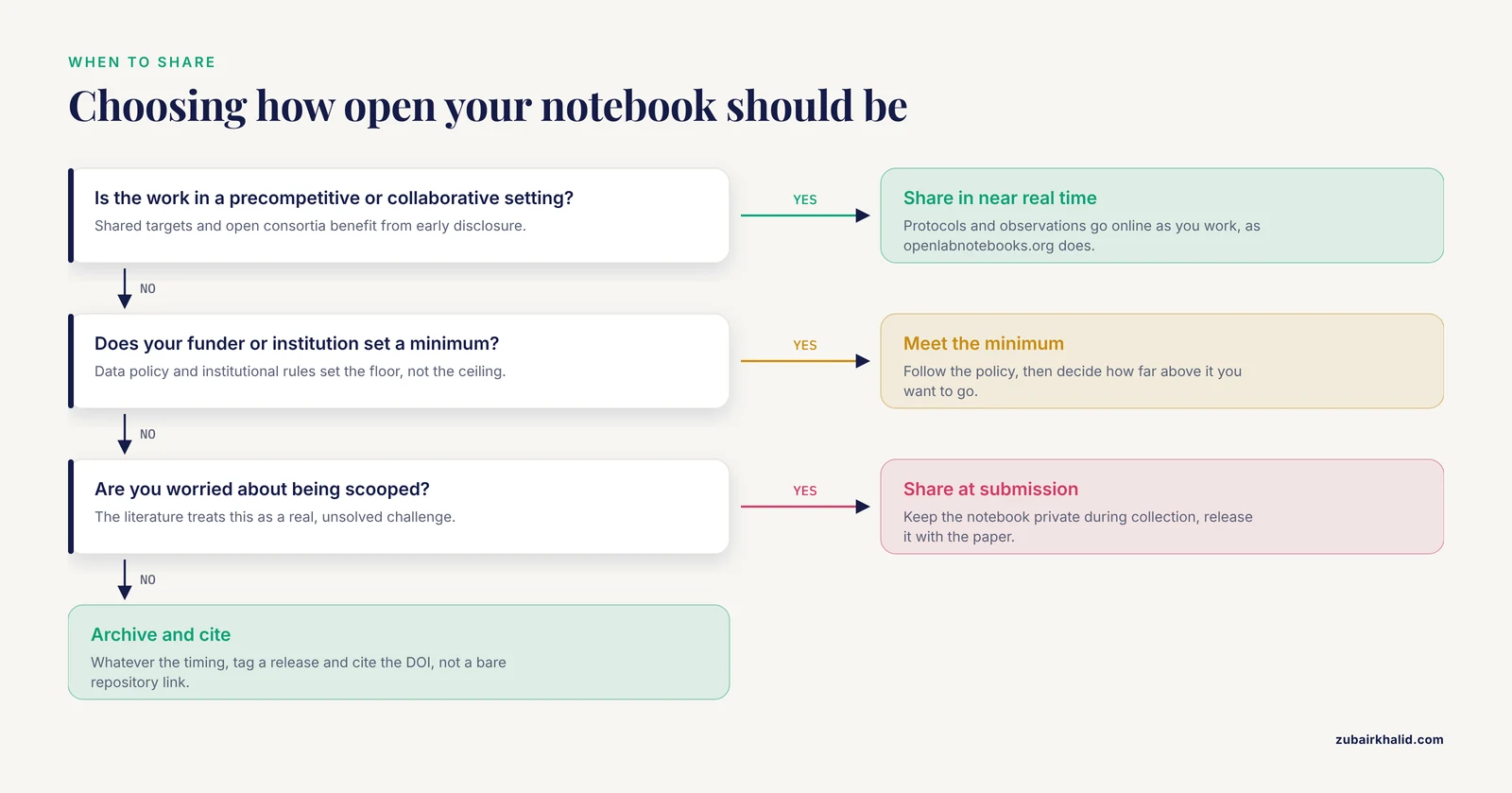
Adapt the depth of sharing to your situation. Full near-real-time open notebook sharing, protocols and all, works well in precompetitive and collaborative settings, and the open notebook movement has grown precisely in fields such as early drug discovery where shared targets benefit everyone [1]. In competitive settings, many labs instead share notebooks at publication time, which still captures most of the reproducibility benefit.
Use notebooks as teaching instruments. Environmental science courses that incorporate open notebook and related open science concepts give students direct practice in finding and reusing data, collaborating, and reading published analyses [4]. Interactive notebooks built around real toolboxes show strong results for training and knowledge transfer, because the reader can change a parameter and immediately see the consequence [13].
Give learners a template, not a blank page. Platforms such as TeachOpenCADD provide Jupyter notebooks that pair theoretical background with hands-on programming and apply software best practices like automated testing, and they function both as coursework and as starting pipelines for real projects [11].
Connect the ELN to the analysis pipeline. Opening electronic lab notebooks to data mining is one of the recommendations from a cross-sector working group on data management in early-stage drug discovery, because structured experimental records feed directly into modeling [14]. Linking tools such as LEO connect ELN records with image data systems so the chain from sample to figure stays intact. Even a simple centralized wiki-based metadata system outperforms scattered spreadsheets for keeping track of what connects to what [9].
Write the notebook for a future version of yourself. Community-driven notebook collections, including those built during collaborative hackathons, show that notebooks function best when they document the reasoning, not just the code [15]. A comment explaining why you chose a filter threshold is worth more than a comment restating the code.
Scale up when the field does. Large collaborative data releases now ship with executable notebooks as the entry point for outside researchers, from basic examples to full analysis packages [16]. If your field has such a release, starting from its official notebooks is usually faster and safer than starting from scratch.
Common Mistakes and Limitations
Mistake 1: Publishing artifacts without documentation. The most common reproducibility failure is not missing code. It is complete-looking code surrounded by missing context: unspecified software versions, undocumented preprocessing steps, datasets with a few files left out. A notebook that runs but never explains parameter choices will reproduce the arithmetic while failing to reproduce the science.
Mistake 2: Unstable links and dead citations. Citing a notebook by URL is fragile. In the astronomy study, fewer than half of the referenced Jupyter notebooks could be located and opened by the study team [10]. Archive first, cite the DOI second.
Mistake 3: Hidden notebook state. Running cells out of order, renaming variables mid-session, and relying on figures drawn earlier produces notebooks that work on your machine and nowhere else. Restart and Run All is the fix, and it only works if you actually do it.
Mistake 4: Treating the ELN as the analysis record. Experimental documentation and data analysis age differently and serve different purposes. Keeping protocol records in an ELN while the analysis lives in versioned notebooks, with a metadata system linking them, avoids the disjointed sprawl that develops when spreadsheets multiply across a lab [7][9].
Mistake 5: Ignoring licensing. Posting code without a license, or building on commercial software whose terms block redistribution, creates legal concerns that can prevent anyone from reusing your work, a problem documented in systematic reviews of published notebooks. Choose an open license for your code and check the terms of every dependency.
Mistake 6: Assuming the notebook replaces the paper. Notebook-first publishing is emerging, with the notebook as the primary object and a static paper as the archive [6]. In most journals today, the paper remains the citable record and the notebook is a supplementary research object. Plan for both.
Limitation: openness has timing costs. Sharing detailed protocols and results in near real time raises legitimate concerns about being scooped, and the open notebook literature treats this as a real challenge rather than a solved problem [1]. Your funder's data policy and your institution's rules set the minimum. Where you land above that minimum is a strategic choice, and it is reasonable to share notebooks at submission rather than during data collection.
Limitation: reproducibility is not validation. A notebook that reruns cleanly proves that your computation is repeatable. It does not prove that the measurements were sound or that the statistical model fits the question. Peer review and domain judgment still carry that weight.
Frequently Asked Questions
What is an open notebook in research?
An open notebook is a research record, either an experimental log or a computational analysis document, that you make publicly accessible rather than private. In computational work it usually means a Jupyter or R Markdown notebook containing narrative, code, and outputs that others can inspect and rerun [2][3].
How is an open notebook different from an electronic lab notebook?
A computational notebook holds code and analysis, while an electronic lab notebook such as eLabFTW holds experimental records like protocols, samples, and instrument runs [7]. Many projects use both, linked through a shared metadata system so the bench record connects to the analysis [9].
Do I need to be a programmer to use open notebooks?
You need basic Python or R, but not professional software experience. Jupyter was designed as a universal interactive scientific environment and is now also a standard educational tool, and many communities publish template notebooks you can adapt rather than write from scratch [5][11].
How do I make my notebook citable?
Tag a release of your repository and archive it on Zenodo to obtain a DOI, then cite that DOI in your paper alongside citations for the underlying data and software objects. Bare repository links go stale, which is why persistent identifiers matter.
Can a reviewer run my notebook without installing anything?
Yes, if you connect the repository to Binder, which builds your environment in the cloud and opens a live notebook session in the reader's browser. Test the link from a clean device first, because Binder is only as reliable as your environment files.
What does Restart and Run All mean?
It is a Jupyter command that restarts the kernel and executes every cell in order from a blank state. It reveals whether your notebook depends on hidden state from earlier sessions, and it is the standard verification step before sharing any analysis.
What goes on a reproducibility checklist?
The essentials are a fresh-kernel run, fixed random seeds, pinned package versions, persistent data identifiers, relative file paths, a stated license, a README, an archived DOI-tagged release, and separate citations for data and software. The checklist in this article gives the full twelve items.
Will sharing notebooks in near real time expose me to being scooped?
That risk is real and is openly discussed in the open notebook movement, which is why many researchers reserve full real-time sharing for precompetitive collaborations and share analysis notebooks at publication instead [1]. Match your level of openness to your field's norms and your funder's requirements.
Sources
- Open laboratory notebooks: good for science, good for society, good for scientists
- Subject Guides: Open Research: a Practical Guide: Pre-registration, open notebooks & protocols
- LibGuides: Open Research at Aston: Open Notebooks
- Using Open Science Tools to Teach Environmental Sciences
- Interactive Jupyter Notebooks with SageMath in Number Theory, Algebra, Calculus, and Numerical Methods
- Notebooks Now! The Future of Reproducible Research
- eLabFTW as an Open Science tool to improve the quality and translation of preclinical research
- A Framework to Share Healthcare Simulations on the Web Using Free and Open Source Tools and Python
- A System to Easily Manage Metadata in Biomedical Research Labs Based on Open-source Software.
- Jupyter Notebooks as Discovery Mechanisms for Open Science: Citation Practices in the Astronomy Community
- TeachOpenCADD 2022: open source and FAIR Python pipelines to assist in structural bioinformatics and cheminformatics research
- Notebook and Open science : toward more FAIR play
- An open-source package with interactive Jupyter Notebooks to enhance the accessibility of reservoir operations simulation and optimisation
- A data science roadmap for open science organizations engaged in early-stage drug discovery
- TORCHLITE: New, Open Analytical Tools and Infrastructure for a Mega-Scale Digital Library
- The First Release of ATLAS Open Data for Research