How to Run a Research Sprint: A Step-by-Step Guide
By Dr. Zubair Khalid, DVM, MS, PhD ·

By the end of this guide you will be able to plan, run, and close a research sprint, which is a short, fixed period of focused work that produces one concrete research output. You will know how to write a sprint question, set success criteria, build a day-by-day plan, hold short daily check-ins, verify your results as you go, and close the sprint with a written deliverable and a retrospective. You will also get a reusable research project plan template and a fully worked example from computational biology.
Here is what you need on hand before you start:
- A single, well-defined research question that can plausibly be answered in one to four weeks
- A calendar or planning tool (a shared spreadsheet, Trello, Notion, or a plain text file all work)
- A notebook or lab notebook entry for decisions, or a version-controlled notes file
- For computational projects, a working analysis environment (for example, Python with pandas, R, or command-line tools) installed and tested before day 1
- For wet-lab projects, approved protocols, reagent inventories, and any institutional approvals already in place
- One person named as the sprint owner, even on a solo project, who makes final calls when trade-offs appear
What a Research Sprint Is
A research sprint is a timeboxed work cycle, usually one to four weeks, in which a person or small team attempts to answer one narrow question and produces a defined output at the end. The concept comes from agile software development, where teams work in fixed-length sprints with a daily standup meeting and a retrospective at the end. Research teams adapted this model because academic projects often drift. A sprint forces three things that open-ended research lacks: a deadline, a single question, and a deliverable that either exists or does not at the end.
The output of a sprint is deliberately small. It might be a cleaned dataset, a figure, a validated protocol, a list of candidate genes, a working code notebook, or a two-page memo summarizing what was learned. A sprint is not a mini-grant proposal and not a paper. It is one verifiable step toward a larger project.
Two ideas from agile practice carry over directly and are worth adopting as-is. The first is timeboxing, which means fixing the duration in advance and cutting scope rather than extending time when work runs long. The second is the retrospective, a short structured meeting at the end where the team asks what worked, what did not, and what to change next time. Both practices come from the Scrum framework described in the original Scrum Guide by Ken Schwaber and Jeff Sutherland, and both translate cleanly to research work.
When a Sprint Fits Your Research (and When It Does Not)
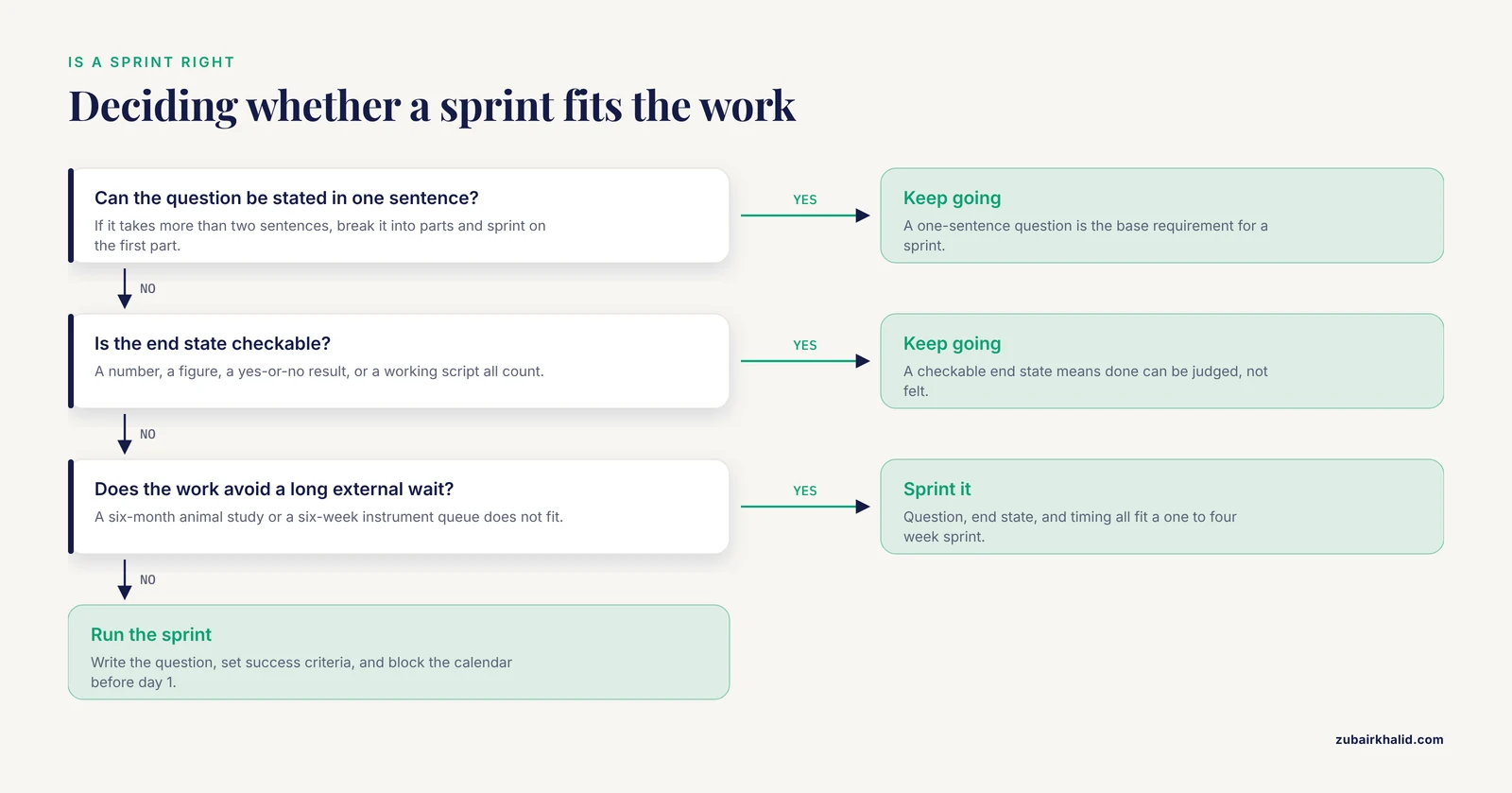
Sprints work well for tasks with these properties:
- The question can be stated in one sentence
- The end state is checkable (a number, a figure, a yes-or-no result, a working script)
- The methods are known or can be learned within the sprint window
- The work does not depend on a long external wait, such as a six-month animal study or an instrument with a six-week queue
Sprints fit exploratory data analysis, literature synthesis on a narrow question, protocol optimization with fast iteration, code and pipeline development, pilot experiments, and metadata or database curation. They fit poorly for long-horizon experiments, work gated by slow approvals, or questions so broad that any answer would be arbitrary. If your question takes more than two sentences to state, break it into parts and sprint on the first part.
Before Day 1: Setup and Preparation
Most failed sprints fail before they start. Do these five things first.
1. Write the sprint question. Use this pattern: "By [end date], determine [specific quantity or decision] using [method], producing [deliverable]." An example from molecular biology: "By March 14, determine which of our 12 candidate genes have annotated zebrafish orthologs, using NCBI and UniProt records, producing a table of gene, ortholog status, and supporting database accession."
2. Define success criteria. Decide before starting what counts as done. For the gene example, done means every one of the 12 genes has a row in the table with a database accession or an explicit "no ortholog found" entry, and the table has been checked by a second person. Note that a sprint can succeed even if the biological answer is negative. If the table is complete and accurate, the sprint delivered.
3. Inventory your inputs. List every dataset, reagent, file, permission, or account the sprint depends on. Confirm each one exists and is accessible. A sprint that stalls on day 3 waiting for a dataset is the most common failure mode in research project management, and it is preventable with a five-minute inventory.
4. Reserve the time. A sprint that competes with everything else on your calendar is not a sprint. Block the hours. For a team, agree on who is committed for how many hours per day and write that down.
5. Choose your tracking tool and stick to it. A shared spreadsheet with columns for task, owner, status, and notes is enough for most research sprints. Do not spend the first day configuring project management software. That is a classic form of productive procrastination.
How to Run a Research Sprint Step by Step
The steps below assume a two-week sprint, which is a good default length for a first sprint. Adjust the proportions, not the sequence, for other lengths.
Step 1: Define One Answerable Question (Day 1, Morning)
Write the sprint question on a single line at the top of your planning document. Then apply the "so that" test: finish the sentence "we are doing this so that ___." If you cannot finish it, the question is not connected to a real goal and the sprint will drift. In the gene-ortholog example, the sentence reads "so that we can prioritize which candidates to test in the follow-up screen."
A good sprint question is falsifiable in the sprint timeframe. "Understand gene expression in our samples" is not answerable. "Determine how many of our 200 RNA-seq genes are significantly differentially expressed between condition A and condition B at a false discovery rate below 0.05" is answerable, checkable, and bounded.
Step 2: Set Success Criteria and Write the Deliverable Description (Day 1, Morning)
Describe the deliverable as if it already exists. For a data deliverable, sketch the table columns. For a figure, sketch the axes. For a memo, write the section headings. This exercise, sometimes called working backward, exposes hidden requirements immediately. If you sketch a figure and realize you need a control sample you do not have, you want to learn that on day 1, not day 9.
Record the success criteria in the plan document with a checkbox for each. Example:
Sprint 07: Candidate gene ortholog survey
Deliverable: gene_orthologs.csv with columns gene_id, ortholog_species,
             ortholog_gene_id, source_database, evidence, date_checked
Success criteria:
  [ ] All 12 candidate genes have a row
  [ ] Each row has a database accession or explicit "no ortholog found"
  [ ] Every accession resolves when clicked or fetched
  [ ] Second reviewer has spot-checked 4 rows
  [ ] One-paragraph summary written in the sprint log
Step 3: Break the Work Into Tasks and Timebox Them (Day 1, Afternoon)
List every task between you and the deliverable, then estimate each in half-day or full-day units. If any task estimates at more than two days, split it. Assign each task to a day. The result is the sprint backlog, the ordered list of tasks the sprint commits to.
A simple backlog for the ortholog sprint looks like this:
Day 1  AM  Write question, success criteria, deliverable spec
Day 1  PM  Confirm gene list file, set up queries, test on 1 gene
Day 2      Query and record orthologs for genes 1-4
Day 3      Query and record orthologs for genes 5-8
Day 4      Query and record orthologs for genes 9-12
Day 5      Cross-check records against a second database, resolve conflicts
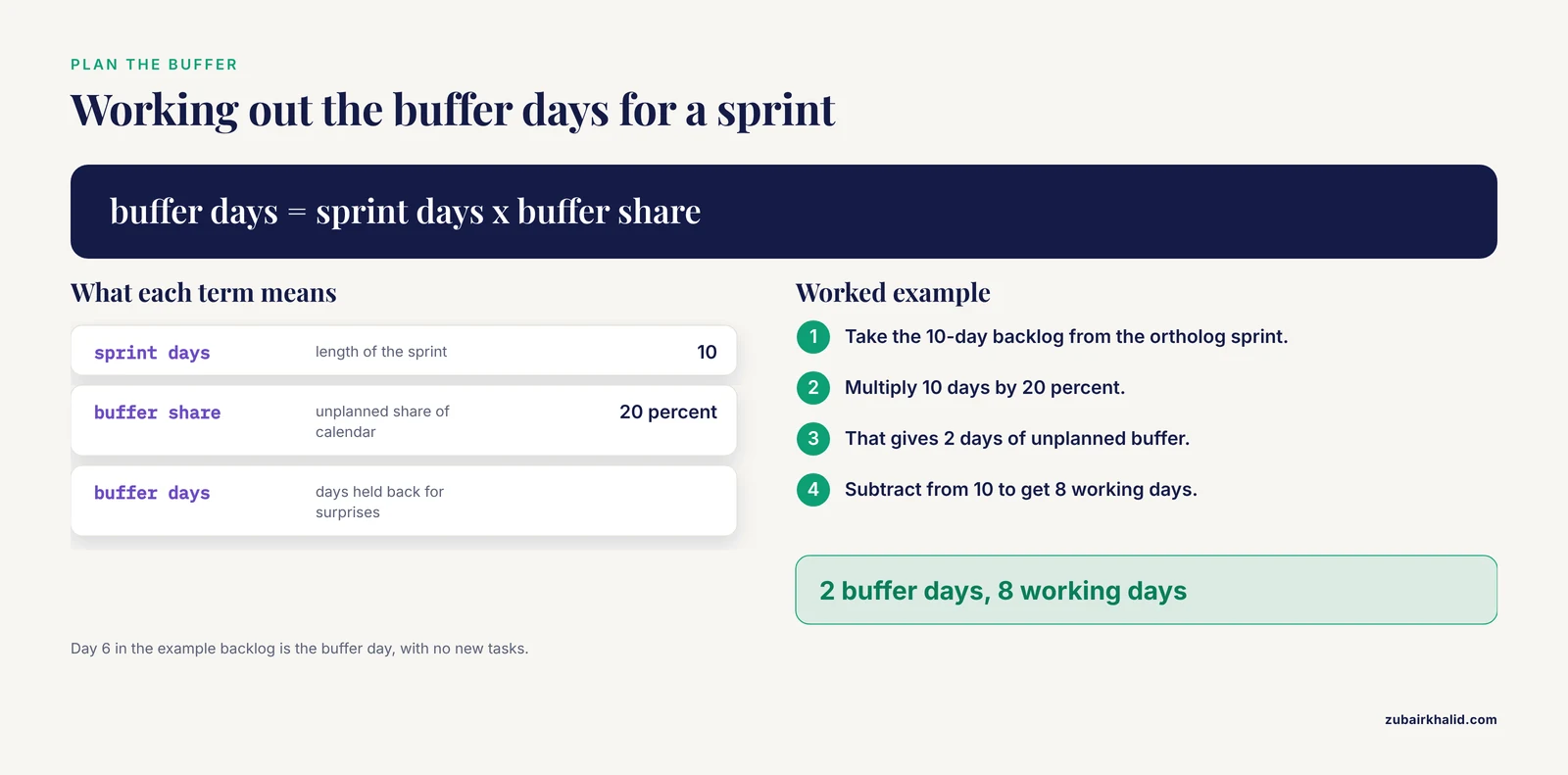
Day 6      Buffer day (no new tasks, clear blockers only)
Day 7      Spot-check pass, fix discrepancies
Day 8      Write summary paragraph and methods note
Day 9      Second reviewer sign-off, final file checks
Day 10     Retrospective and archive
Notice day 6 is a buffer. Planning every hour of a sprint is a mistake, because research always produces surprises. A useful rule of thumb for research sprints is to leave roughly 20 percent of the calendar as unplanned buffer. That is a planning heuristic from practitioner experience, not a measured constant, but teams that skip the buffer almost always slip the deadline.
Step 4: Hold a Short Daily Check-In (Every Day, 10 to 15 Minutes)
For solo sprints, this is a two-minute written note. For teams, stand up or meet briefly and answer three questions: What did I finish yesterday. What am I doing today. What is blocking me. Write the answers down in one shared place.
The check-in exists to surface blockers early. "I cannot get the annotation file to parse" said on day 2 gives you eight days to fix it. The same sentence said on day 9 sinks the sprint. Resist the urge to turn the check-in into a technical discussion. Take detailed problems offline with the relevant person.
A sprint log in a plain text file works well and doubles as documentation:
# Sprint 07 log
## Day 2
Done: orthologs for genes 1-4 recorded, accessions verified.
Today: genes 5-8.
Blocker: none.

## Day 3
Done: genes 5-8 recorded. Gene 7 has conflicting records between
databases, flagged for cross-check pass on day 5.
Today: genes 9-12.
Blocker: none.
Step 5: Do the Work in Short Cycles With Working Output
Do the tasks in day-sized chunks and produce something checkable each day, even if partial. In the example, that means the ortholog table gains four rows per day rather than being assembled in one push at the end. This habit, sometimes called walking skeleton or tracer bullet development in software, has a research equivalent: run the full pipeline end to end on a small subset first, then scale up. A differential expression analysis sprint should run the entire workflow on 10 genes on day 2, not wait until day 8 to discover that the count matrix has a formatting problem.
For computational work, keep every intermediate result. Write scripts rather than typing interactive commands you cannot reproduce. For wet-lab work, record lot numbers, instrument settings, and deviations from the protocol in real time. Deviations discovered later cannot be reconstructed, and undocumented deviations are a leading cause of irreproducible results, a problem documented across the life sciences in consensus reports on research reproducibility.
Step 6: Verify Results as You Go
Build verification into the middle of the sprint, not the end. Three checks cover most research outputs.
Sanity check against a known value. If your analysis touches data with a known answer, run it on that case first. Before running an ortholog search across 12 genes, run it on a gene whose ortholog relationships are already well documented, such as a core housekeeping gene, and confirm the pipeline returns the expected result. Reference databases such as UniProt and the NCBI RefSeq project maintain curated records specifically so that analysts can validate against them, and both are standard verification anchors in bioinformatics work.
Reproduction check. Re-run one day's analysis from scratch, from raw input to output, and confirm you get the same result. If you cannot reproduce day 2's table on day 4, you have an undocumented manual step, and the sprint is the time to find it.
Independent review. Ask a colleague to spot-check a sample of your results against the primary source. In the example sprint, a second person fetches four of the accessions and confirms the recorded ortholog matches the database record.
Step 7: Close With a Deliverable, a Summary, and a Retrospective (Final Days)
A sprint is not finished when the work is done. It is finished when three closing artifacts exist.
The deliverable itself, in its specified format, checked against the success criteria list.
A short written summary, typically one paragraph to one page, stating the question, the method, the result, and the main caveat. This summary is what you will paste into your next grant progress report, lab meeting slide, or manuscript methods section. Write it during the sprint while the details are fresh, not weeks later.
A retrospective. Spend 30 to 60 minutes answering three questions: What worked. What did not. What will we change in the next sprint. Write the answers down and read them before the next sprint starts. The retrospective is the mechanism by which sprints improve, and skipping it means every sprint repeats the same friction.
Close by archiving the plan, log, scripts, and deliverable together in one location with a date-stamped folder or a tagged commit. Six months from now, when a reviewer asks exactly how the ortholog calls were made, everything needed to answer lives in one place.
A Research Project Plan Template
Copy this research project plan template into your planning tool and fill it in before day 1. It fits on one page, which is the point. Plans longer than one page do not get read daily, and a plan nobody reads cannot steer a sprint.
RESEARCH SPRINT PLAN

Sprint name:        ____
Sprint owner:       ____   (single decision-maker)
Team and hours:     ____   (name, hours/day commitment)
Start date:         ____   End date: ____   Length: ____ days

1. SPRINT QUESTION (one sentence)
   By [end date], determine [quantity/decision] using [method],
   producing [deliverable].
   So that: ____ (the decision or next step this enables)

2. DELIVERABLE SPECIFICATION
   Format: ____ (file type, table columns, figure axes, memo sections)
   Location: ____

3. SUCCESS CRITERIA (checkboxes, all must pass)
   [ ] ____
   [ ] ____
   [ ] ____ (include one verification/independent-check criterion)

4. INPUTS INVENTORY
   | Input (data, reagent, permission, account) | Ready? (Y/N) | Owner |

5. SPRINT BACKLOG
   | Day | Task | Owner | Estimate | Status |

6. BUFFER
   Planned buffer: ____ (about 20% of calendar)

7. CHECK-IN SCHEDULE
   Time: ____   Format: ____   Log location: ____

8. VERIFICATION PLAN
   Known-value check: ____
   Reproduction check scheduled for day: ____
   Independent reviewer: ____

9. CLOSING ARTIFACTS
   [ ] Deliverable complete   [ ] Written summary   [ ] Retrospective held
   [ ] Archive location: ____

10. OUT-OF-SCOPE LIST (write these down so you stop worrying about them)
    ____
The out-of-scope list deserves a comment. Writing down what you are deliberately not doing, such as "not validating orthologs experimentally" or "not analyzing genes outside the candidate list," prevents scope creep, which is the slow expansion of a project's boundaries that kills timeboxed work. When a new idea appears mid-sprint, add it to a next-sprint list rather than the current backlog.
Worked Example: A Two-Week Bioinformatics Sprint With Real Commands
Here is the ortholog survey sprint carried out with the NCBI E-utilities, the Application Programming Interface for the NCBI databases, accessed through the command-line tools in the Entrez Direct package. NCBI maintains the documentation for these tools, and they are a standard way to query NCBI records programmatically.
Day 1, afternoon: test the pipeline on one gene. After installing Entrez Direct, confirm the environment works and the query strategy returns sensible records for a single well-characterized gene.
esearch -db gene -term "BRCA1[gene] AND Homo sapiens[orgn] AND refseq[filter]" \
  | efetch -format docsum
Expected output is a structured document summary containing the gene identifier, the official symbol BRCA1, the organism, and a short description, something like:
...
<DocSum>
  <Id>672</Id>
  <Item Name="Name" Type="String">Brca1</Item>
  ...
The exact identifiers you see will differ by query, but the shape of the output, an identifier plus named fields, is what confirms the tool chain works.
Day 2: batch the query over the gene list. With the single-gene test passing, loop over the candidate list and capture the output per gene:
while read gene; do
  echo "=== $gene ==="
  esearch -db gene -term "${gene}[gene] AND Danio rerio[orgn]" \
    | efetch -format docsum > "out/${gene}.docsum.txt"
  sleep 1
done < candidate_genes.txt
The sleep 1 line pauses one second between queries. NCBI asks programmatic users to limit request rate to avoid overloading the service, with posted guidance recommending no more than three requests per second, so a one-second pause is a conservative and standard practice. Writing each result to its own file means a crash on gene 9 does not destroy the results for genes 1 through 8.
Day 3 to 4: parse into the deliverable table. A short Python script extracts the fields from each docsum file and appends a row to the output table:
import csv, pathlib

rows = []
for f in sorted(pathlib.Path("out").glob("*.docsum.txt")):
    text = f.read_text()
    gene = f.stem.split(".")[0]
    # parse the captured record here, then record either the
    # ortholog identifier or an explicit not-found marker
    rows.append([gene, "", "", "", "", ""])

with open("gene_orthologs.csv", "w", newline="") as fh:
    writer = csv.writer(fh)
    writer.writerow(["gene_id", "ortholog_species",
                     "ortholog_gene_id", "source_database",
                     "evidence", "date_checked"])
    writer.writerows(rows)

print(f"Wrote {len(rows)} rows")
Expected output:
Wrote 12 rowsIf the script prints anything other than 12 rows, the mismatch itself is a finding. Track down the missing gene the same day. A partial table at day 4 with an explainable cause is a healthy sprint state. A silent partial table discovered on day 9 is not.
Day 5: cross-check against a second database. Query UniProt for the same genes, using its documented REST interface or web interface, and record agreements and conflicts. A conflict between two curated databases is not an error to hide. Record both accessions in the evidence column and note the discrepancy in the summary paragraph.
Day 7: verification checks. Pick the four genes flagged during the week plus two at random. Refetch their records, confirm the accessions resolve, and confirm the recorded ortholog matches. Re-run the parse script from scratch and confirm the CSV is byte-identical to the archived copy.
Day 8 to 9: write and review. Draft the summary paragraph. Example:
Sprint 07 summary: We surveyed 12 candidate genes for annotated
Danio rerio orthologs using NCBI Gene records, cross-checked
against UniProt. Ten genes have documented orthologs, one has a
conflicting record between databases (details in evidence column),
and one has no annotated ortholog. All accessions were verified to
resolve. Limitation: database annotations reflect current curation
and were not experimentally validated in this sprint.
Day 10: retrospective. In this worked example, a realistic retrospective might record that the single-gene test on day 1 prevented a rate-limiting problem, that the buffer day absorbed a file-format surprise, and that next time the team will write the parser on day 1 rather than day 3.
Key Options and Formulas at a Glance
The table below summarizes the planning quantities and choices that recur in every sprint.
| Item | Options | Guidance |
|---|---|---|
| Sprint length | 1, 2, 3, or 4 weeks | Start with 2 weeks. Shorter for pure analysis, longer when wet-lab hands-on time dominates |
| Buffer share of calendar | 0 to 40 percent | About 20 percent for research work with genuine uncertainty |
| Task size | Half-day to 2 days | Split anything estimated above 2 days |
| Check-in frequency | Daily, 10 to 15 minutes | Daily for teams, written log for solo work |
| Verification checks | Known-value, reproduction, independent review | Include at least two of the three in every sprint |
| Deliverable | Table, figure, script, memo, protocol | One primary deliverable per sprint |
| Scope changes mid-sprint | Accept into backlog or defer | Defer to the next-sprint list in almost all cases |
| Sprint question test | One sentence, falsifiable, has a "so that" | Rewrite until all three hold |
Common Mistakes and Limitations
These are the failure modes that show up again and again when people first learn how to run a research sprint.
Choosing a question too big for the timebox. The most common mistake by a wide margin. The fix is to cut scope, not extend the deadline. If the differential expression analysis cannot cover all 200 genes in two weeks, sprint on the 40 genes with the strongest prior evidence and treat the rest as the next sprint.
Skipping the success criteria. Without written criteria, "done" becomes a feeling, and a sprint that ends on a feeling usually ends late or ends with an unchecked deliverable. Write the criteria before the work starts.
No buffer. Planning 100 percent of the calendar assumes research cooperates. It does not. Teams without buffer either slip the deadline quietly or cut the verification steps, and cutting verification is how wrong results get produced efficiently.
Saving all analysis for the end. Data problems surface during analysis, and analyses that start on day 8 of a 10-day sprint have no room to absorb them. Run the full pipeline on a small subset early.
Confusing effort with output. A sprint that ran 15 experiments and produced no checkable deliverable did not meet its goal. The deliverable, not the hours logged, defines success. This distinction is the core of research project management in a sprint model.
Treating a negative result as a failed sprint. If the success criteria were met and the answer is no, the sprint succeeded and saved the lab from pursuing a dead end. Record it and move on.
Letting the check-in become a meeting. Fifteen minutes is a ceiling, not a target. The moment check-ins exceed 20 minutes, people start silently skipping them, and blockers stop surfacing.
Not writing anything down. Undocumented decisions and undocumented protocol deviations are unrecoverable. Write during the sprint, in the log, in real time.
One limitation applies to the scientific content of any sprint. A sprint is a project management method, not a substitute for domain expertise or institutional review. Wet-lab work requires approved protocols and, where applicable, institutional biosafety and animal care oversight under the frameworks that govern your institution. Individual experimental decisions need review by qualified colleagues or supervisors with the relevant expertise.
Research Sprint Tips That Make the Next One Easier
These tips come from the practices above, distilled to the ones with the highest payoff relative to effort.
Run the first sprint on something small and boring. Your first sprint should target a task you are confident you can finish. The goal of sprint 1 is to learn the method, not to produce a breakthrough. A completed small sprint builds the planning habits that make ambitious sprints work later.
Write the deliverable spec first, every time. Sketching the final table or figure on day 1 catches missing inputs while there is still time to get them.
Keep a parking lot file. Every interesting tangent, new idea, and "we should also" gets one line in a next-sprint file. This satisfies the urge to chase tangents without actually chasing them.
Timebox individual tasks, not just the sprint. If a task exceeds its estimate by 50 percent, stop, log the blocker, and decide explicitly whether to simplify the approach, seek help, or drop the task. Silent overrun is how a two-day task eats a sprint.
Automate the repetitive parts early. Any manual step you will repeat more than about five times in the sprint is worth an hour of scripting on day 1. The loop command in the worked example exists precisely because hand-querying 12 genes invites copy-paste errors.
Schedule the retrospective even when the sprint went badly. Especially then. Failed sprints produce the most useful retrospectives, and the lessons only pay off if they are written down and read before sprint 2.
Pair the sprint log with version control. Commit the plan, scripts, and deliverable at the end of each day with a message naming the day. This gives you a day-level history of the sprint for free, and it makes the reproduction check trivial.
Frequently Asked Questions
How long should a research sprint be?
One to four weeks, with two weeks as the best default for a first sprint. One week suits a tightly scoped analysis task. Three to four weeks suit work with substantial hands-on laboratory time or a learning curve. Beyond four weeks, projects lose the urgency that makes a sprint work and begin behaving like ordinary open-ended research.
How is a research sprint different from a sprint in software development?
Both use a fixed timebox, a prioritized backlog, daily check-ins, and a closing retrospective. The differences are in the deliverable and the uncertainty. A software sprint usually delivers working features against known requirements, while a research sprint delivers a checkable research artifact, such as a figure or dataset, against genuine uncertainty about what the result will be. A research sprint can therefore succeed with a negative or surprising result, provided the agreed success criteria were met.
How many people should be on a research sprint team?
One to four people. Solo sprints work fine and are the easiest way to learn the method. Beyond about four people, coordination overhead grows faster than productive capacity for most research tasks, and a single check-in can no longer surface every blocker. Larger efforts should be split into parallel sprints with separate questions and owners.
What happens if a key experiment or analysis fails in the middle of the sprint?
Surface it at the next check-in, log it, and decide within one day whether to change the method, simplify the deliverable, or stop. Failing fast is a feature of the sprint model, because a mid-sprint failure with nine days remaining has options that the same failure on the final day does not. A sprint that ends early with an honest written account of the blocker is a legitimate outcome.
Do I need special software to run a research sprint?
No. A shared spreadsheet and a text file for the log are enough. Teams that already use tools such as Trello, Notion, Jira, or GitHub Projects can use them, and computational projects benefit from version control such as Git, but none of these are required. Choosing the tool should take minutes, not days.
What does a research project plan template need to include?
Ten elements: the sprint question in one sentence, the reason it matters, the deliverable specification, the success criteria, an inventory of required inputs, the day-by-day backlog, the buffer, the check-in schedule, the verification plan, and an out-of-scope list. The template in this article contains all ten and is designed to fit on a single page so it gets read daily.
How do I fit literature review into a sprint?
Make the literature review itself the deliverable, or restrict it to a targeted background pass in the first two days. A literature sprint should have its own question and deliverable, such as a structured summary table of 20 papers with methods, sample sizes, and key findings. A literature review folded silently into an experimental sprint tends to expand until it consumes the sprint, so either timebox it explicitly at two days or give it its own sprint.
How do I know whether my research sprint succeeded?
Check the success criteria list you wrote on day 1. If every criterion is checked, the deliverable exists in its specified form, and an independent check confirmed a sample of the results, the sprint succeeded regardless of what the science showed. If criteria were not met, the retrospective documents why, and that documentation becomes the input for planning the next sprint.