How to Share Your Data on Figshare, Zenodo, or Dryad
By Dr. Zubair Khalid, DVM, MS, PhD ·

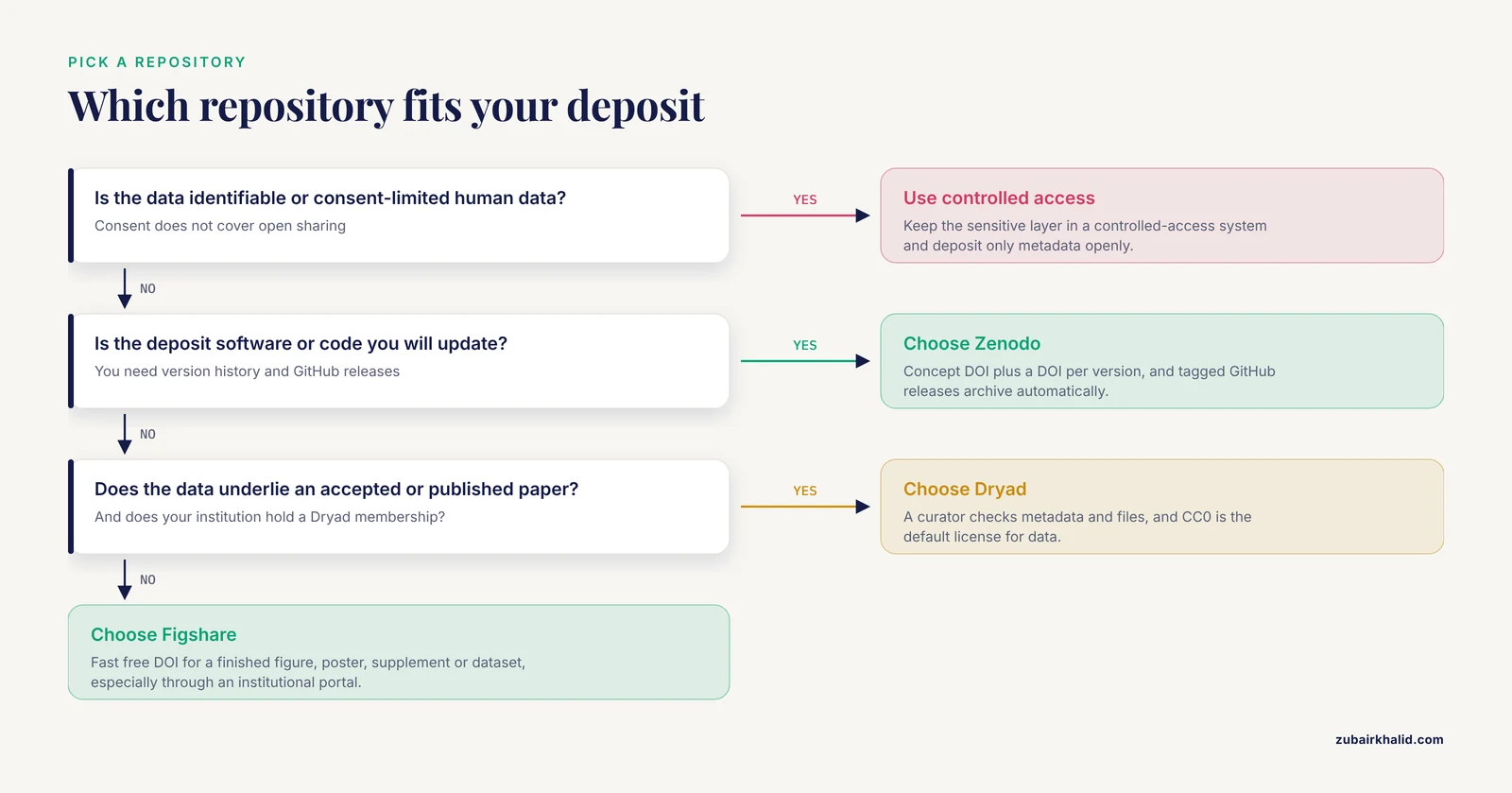
Figshare, Zenodo, and Dryad all put your work online under a citable DOI, but each is built for a different job. In one sentence: Figshare is a generalist outlet for any research output, Zenodo is a free generalist operated by CERN with first-class versioning and software support, and Dryad is a curated repository for data that underlie peer-reviewed papers. If you are weighing Figshare vs Zenodo vs Dryad, use this rule of thumb. Deposit the dataset behind a journal article in Dryad when your institution supports it, publish code and software through Zenodo, and use Figshare for anything else you want public and citable in minutes.
All three are established, widely used services, so the question is rarely whether to use one of them but which one fits the deposit in front of you. The difference between Figshare and Zenodo and Dryad comes down to five things: what each platform accepts, what it costs, how it handles versions, whether a human checks the deposit, and how much space you get. This guide explains each option on its own terms, compares them side by side, works through realistic scenarios, and closes with a reproducibility checklist you can apply to any deposit.
Why the Repository Choice Matters for Reproducible Research
Sharing is only the first step. A deposit supports reproducible research when someone else can find it, understand it, and rerun it. A review of best practices in experimental biomedicine places data management, which covers organization, documentation, storage, sharing, and preservation, at the center of scientific integrity and reproducibility [1]. The same review notes that well-managed data can be revisited for new discoveries, that careful data management builds credibility and trust in the scientific community, and that funding agencies increasingly expect rigorous documentation and widespread sharing of data, code, and auxiliary resources [1]. For students and early-career researchers, a clean public deposit also doubles as inspectable evidence of rigorous practice.
The platform you choose affects all of that. Fragmented tools and inconsistent documentation are recurring causes of irreproducibility in data-intensive fields [2]. Processing choices matter just as much, because the same raw data processed in different ways can produce different final outcomes, which is why reporting frameworks treat the processing pipeline as part of the method itself [3]. A repository with stable DOIs, version support, and structured metadata preserves the links between data, code, and paper. One without them can quietly break those links.
Figshare vs Zenodo vs Dryad at a Glance
All three repositories mint DOIs, accept ORCID identifiers and funder metadata, and make deposits discoverable through scholarly search services. The table shows where they part ways.
| Criterion | Figshare | Zenodo | Dryad |
|---|---|---|---|
| Who runs it | Digital Science, a technology company | CERN, under the OpenAIRE framework | An independent, community-governed nonprofit |
| What it accepts | Any output: datasets, figures, posters, media, slides, code | Any output, with strong software support | Data underlying an accepted or published peer-reviewed paper |
| Cost to deposit | Free for public items | Free | Free at member institutions, per-deposit fee otherwise, waivers on request |
| DOI | One DOI per published item | One DOI per version plus a concept DOI | One DOI per dataset and version |
| Versioning | Supported | Built in, with a concept DOI that tracks the latest version | Supported, with versions linked |
| Curation | Self-service, review varies across institutional portals | Basic metadata checks | Human curators review every submission |
| Size | Per-item caps, higher on institutional plans | About 50 GB per record by default, more on request | No strict cap, contact curators for very large deposits |
| GitHub integration | No | Yes, releases archive automatically | No |
| Licensing | Creative Commons options plus others | Broad list, including software licenses | CC0 default for data |
| Paper required | No | No | Yes |
| Embargo and restricted access | Yes, including private links | Yes, including closed access with requests | Yes, embargo until publication |
Every cell in this table can change as platforms update their policies, so confirm current details in each platform's official documentation before planning a large or unusual deposit. The five rows that decide most real choices are scope, cost, versioning, curation, and size.
A dataset DOI is cited like any other source: authors, year, title, repository name, and DOI. Journals increasingly expect that citation in the reference list rather than a data availability statement that promises data "on request", so plan the deposit before you submit the manuscript.
Figshare: Fast, General Sharing for Any Output
What Figshare is
Figshare, built by the technology company Digital Science, is a generalist repository that accepts almost any file type: datasets, figures, posters, slide decks, videos, supplementary files, and code. Any researcher can create a free account, upload, describe, and publish an item in a single session, and the item receives a DOI the moment it goes public. Universities, funders, and publishers can run their own figshare portals, which many institutions use as the public showcase for their research outputs. Public items display usage metrics such as views and downloads, and items can stay private for collaboration or sit under embargo until you are ready to release them.
When to use Figshare
- You need a citable DOI today for a finished figure, poster, dataset, or supplement.
- Your institution runs figshare, so the deposit appears in institutional reporting and gains a stable, maintained home.
- The output stands on its own and will not need frequent new versions.
- You want public visibility without waiting for, or attaching, a paper.
A published example shows the pattern. The Meta-EEGs project, a structured approach for processing high-volume EEG data, released two annotated, reduced-volume datasets publicly on Figshare, where they were downloaded more than 2,000 times since 2022, while the working code stayed on GitHub [4]. Data and code each live where they work best, and the methods paper links to both.
How a Figshare deposit works
- Prepare a folder with the files and a README that explains what everything is.
- Upload the files and choose a license, typically CC0 or CC BY for data.
- Fill in the metadata: title, description, keywords, categories, funders, and contributor ORCIDs.
- Publish to mint the DOI, or keep the item private or under embargo and share it through a private link until you are ready.
Figshare sets per-item size caps on individual accounts, and institutional plans raise them, so check the current limit before planning a very large upload.
Zenodo: Versioned Records, Software, and GitHub Integration
What Zenodo is
Zenodo was built under the OpenAIRE framework and is operated by CERN, which keeps it free for depositors and readers. It accepts any file type, including datasets, software, reports, preprints, posters, and training materials, and it is designed for the long tail of research outputs that disciplinary repositories do not cover. Records carry structured metadata, and related identifiers let you link a record to the paper, software, or datasets it belongs with. Zenodo allows about 50 GB per record by default, with larger quotas granted on request.
When Zenodo is the right pick
- The deposit is software or code.
- You expect to update the work over time and need a clean version history.
- You develop on GitHub and want automatic DOI archiving of releases.
- You need licenses designed for software.
- The budget is zero.
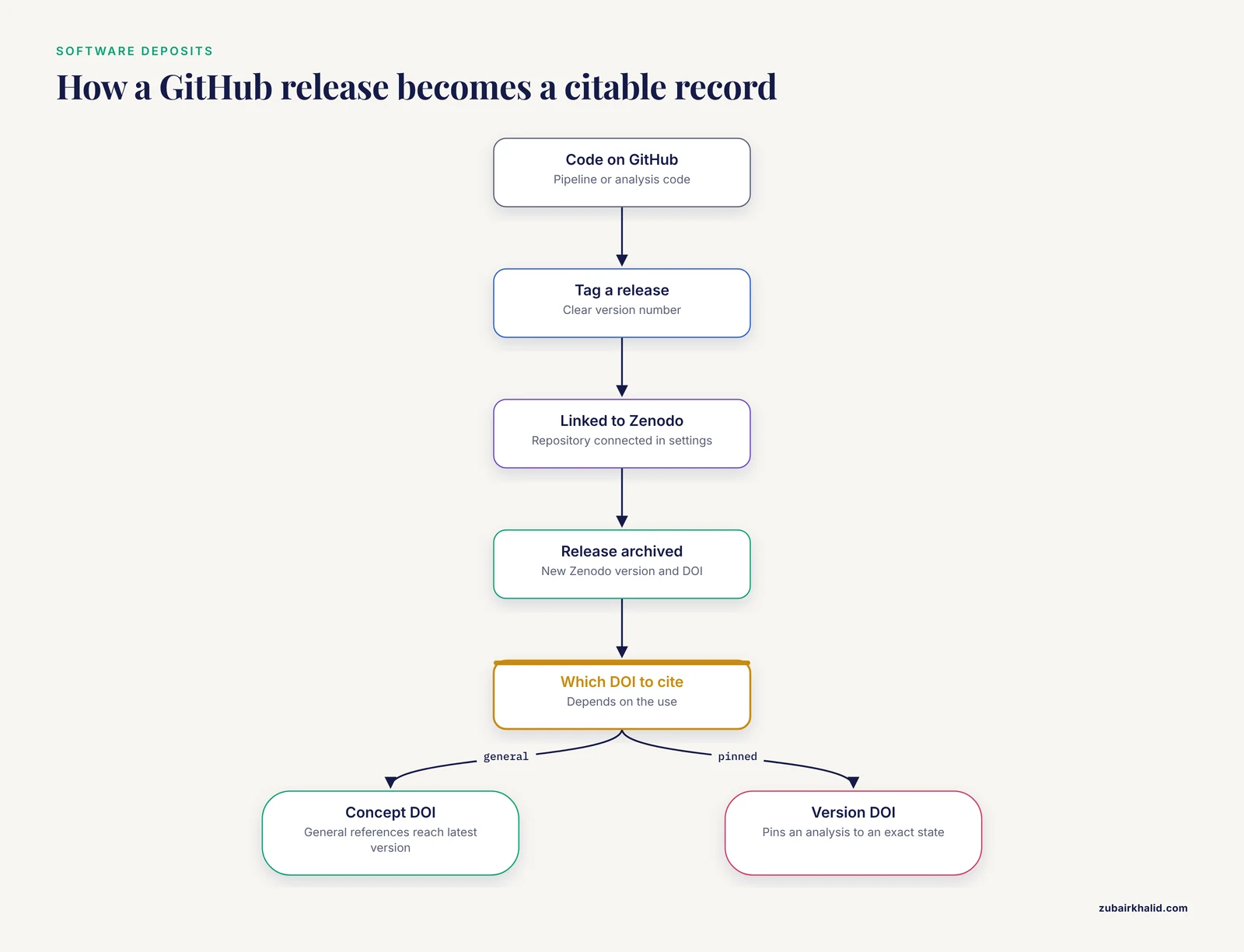
Versioning is Zenodo's signature feature. Every update becomes a new version with its own DOI, and a concept DOI always resolves to the latest version. Cite the concept DOI in general references so readers always reach the current record, and cite a version DOI when an analysis must stay pinned to an exact state.
The GitHub connection makes this concrete. Link a GitHub repository to your Zenodo account, and each tagged release is archived automatically as a new Zenodo version with its own DOI. Workflow projects show why the pairing matters. The ILIAD suite packages genomic processing workflows in Snakemake with Singularity and Docker containers so the same pipeline runs repeatably and portably across systems [5], and whole exome sequencing pipelines built in Snakemake are designed around the same goals of scalability and reproducibility [6]. A tagged release with a Zenodo DOI, together with the container recipes, gives anyone a frozen, rerunnable snapshot of the pipeline your paper describes.
How a Zenodo deposit works
- Sign in with an ORCID or an email account.
- Create a deposit, upload the files, and pick a resource type such as dataset, software, or preprint.
- Add metadata: title, creators with ORCIDs, description, keywords, funding, related identifiers, and license.
- For software, connect the GitHub repository in your Zenodo settings so future releases archive automatically.
- Publish to mint the DOI, or set restricted or closed access with an embargo date.
- Consider adding the record to a Zenodo community so related outputs from a project or conference sit together.
Zenodo also supports restricted and closed access with an access-request workflow, which fits outputs that are public in principle but need a light gate.
Dryad: Curated Data Behind Peer-Reviewed Papers
What Dryad is
Dryad is an independent, community-governed nonprofit repository with its roots in the biosciences. It accepts data from any discipline, but with one firm requirement: every deposit must underlie a peer-reviewed article that is accepted or already published. Human curators review each submission for metadata quality, file organization, and licensing before it goes live, and the default license for data is CC0, the public domain dedication that removes legal barriers to reuse. That curation step is the platform's defining feature, and it is why many journals in biology and medicine route data submissions through Dryad.
When Dryad is the right pick
- The dataset is the evidence base for a paper in revision or newly accepted.
- You want a curator's check before the deposit becomes public.
- Your journal integrates with Dryad, so the data upload happens inside manuscript submission.
- Your institution is a member, so the deposit is free.
Cost is the main friction. Dryad charges a per-deposit publication charge to depositors whose institutions are not members, and it waives the fee on request for researchers who cannot pay. Many universities and funders hold memberships, so check before paying out of pocket.
Curation is the main draw. Low-throughput experiments in biomedicine are especially prone to protocol variation and raw data quality problems, which makes careful documentation and checking essential [1]. A Dryad curator catches missing units, ambiguous file names, and undocumented processing steps before the community hits them. A self-service repository leaves those checks to the reader, who usually has no way to make them.
How a Dryad deposit works
- Check whether your institution or funder holds a membership so the deposit is free.
- Start the submission from the journal's manuscript system where an integration exists, or submit directly on the Dryad site.
- Upload the data files with a README, and enter metadata describing the methods, the file inventory, and the associated manuscript.
- Answer curator questions during review.
- Set the embargo so the dataset publishes when the paper does, and paste the DOI into the manuscript.
Choosing Between Figshare, Zenodo, or Dryad: The Criteria That Decide
Cost and institutional support
Figshare and Zenodo are free for public deposits. Dryad is free where an institutional membership applies and fee-based otherwise, with waivers available. If your university runs a figshare portal or holds a Dryad membership, that often settles the question on its own. If you are choosing between Figshare or Zenodo for a dataset that will not change, cost will not decide it, so move to the other criteria.
Size and file type
All three handle ordinary datasets of several gigabytes without trouble. The ceiling matters more than the floor. Zenodo allows about 50 GB per record by default and grants more on request, Figshare's caps depend on the account type, and Dryad asks you to contact the curation team before very large submissions.
A concrete reference point comes from livestock bioacoustics. A FAIR-compliant bovine vocalization dataset packed 90 hours of raw recordings, 65.6 GB in total, into 569 curated clips spanning 48 behavioral classes, later expanded to 2,900 samples through augmentation [7]. That scale already sits at the edge of a casual generalist upload. Collections much larger than that, or continuous raw instrument streams, usually belong in project infrastructure or domain repositories, with the generalist deposit holding the citable, processed product.
High-throughput projects show the split clearly. A preclinical addiction research consortium phenotyped more than 3,000 rats and accumulated over 100,000 behavioral data files, which it manages through a Dropbox and Azure SQL pipeline with automated quality control and backups [8]. A working database of that scale is not a repository deposit. The repository is where the final, documented dataset is published once the pipeline stabilizes. Field phenomics follows the same logic, with containerized pipelines running on high-performance computing and cloud systems while citable outputs flow to repositories [9].
Versioning and updates
If the work will change, Zenodo is the default. Its concept DOI always points to the latest version, and every version keeps its own DOI, which is exactly what software needs. Figshare and Dryad also support versions with linked DOIs, so a finished dataset that will rarely change is safe on any of the three.
Curation and discoverability
Dryad provides human curation of every deposit. Zenodo runs basic metadata checks. Figshare is self-service, with review practices varying across institutional portals. All three are indexed by scholarly search services and metadata aggregators, and Zenodo adds community collections while figshare portals provide institutional ones. If you want an expert check on metadata before release, Dryad is the only one of the three that guarantees it.
Licensing
Dryad applies CC0 to data by default. Zenodo offers a broad license list that includes software licenses such as MIT and GPL. Figshare offers Creative Commons options for data and additional licenses for some other content types. For data, CC0 or CC BY maximizes reuse unless your funder requires something different. For code, use a recognized software license rather than a Creative Commons license.
Sensitive and human data
None of these platforms is the right home for identifiable or consent-limited human data. Large human cohorts run dedicated infrastructure for a reason. The Swiss HIV Cohort Study built a dedicated viral next-generation sequencing database to handle raw and processed sequencing data, high-performance computing, and reproducibility controls for a cohort of more than 21,000 people with HIV [10]. De-identified, consent-cleared derivatives can go to a generalist repository, with the controlled-access system holding the sensitive layer and the public record pointing to the access procedure.
Worked Scenarios
Scenario 1: The dataset behind a physiology paper
A small lab has 30 GB of processed electrophysiology recordings, a data dictionary, and a paper in revision. Dryad fits. Check whether the institution is a member, upload during revision, apply CC0, set the embargo so the data release coincides with publication, and paste the DOI into the manuscript. If the journal has no integration, submit directly on the Dryad site and link the manuscript there. The curator's review acts as a second pair of eyes on the metadata before reviewers and readers see it.
Scenario 2: A Snakemake pipeline colleagues want to run
Your code lives on GitHub and a paper describing it is in press. Push a tagged release, connect the repository to Zenodo, and let the release mint a version DOI. Cite the concept DOI in the README and the paper, and include the container recipes so the pipeline reruns on someone else's system [5]. Tag releases with clear version numbers so the archived DOIs stay meaningful.
Scenario 3: Derived datasets from a methods paper
A team publishes a new method for structuring EEG recordings and wants the community to adopt it. The Meta-EEGs pattern applies: derived, annotated datasets go on Figshare for visibility and easy download, the code stays on GitHub for development, and the paper links to both [4].
Scenario 4: Human genomic data with consent limits
A cohort study holds viral sequences from thousands of participants whose consent does not cover unrestricted sharing. The sequences belong in a controlled-access cohort database with documented governance [10]. The generalist repository, if used at all, holds only a metadata record describing the dataset and its access procedure. This split, sensitive layer behind controlled access and shareable layer in the open, is the standard pattern for human data.
A Reproducibility Checklist for Any Deposit
Whichever platform you choose, the deposit is reusable only if it is complete and self-describing. Work through this reproducibility checklist before you click publish.
- Deposit raw data, not just final tables. Document every layer between machine output and final result, because the same raw data processed differently can produce different outcomes [3].
- Add a README that lists every file and explains how the files relate to each other.
- Provide a data dictionary with variable names, units, and allowed values.
- Prefer open formats, and include an open conversion when a proprietary format is unavoidable. Medical imaging projects, for example, convert DICOM archives to the Nearly Raw Raster Data (NRRD) format used by deep learning workflows [11].
- Export raw data in standard formats with preprocessing steps and parameters documented, the way methodological protocols for eye tracking specify standard exports and defined detection parameters [12].
- Standardize timestamps and preprocessing, including time zone and daylight saving handling, so sensor and behavioral records align cleanly [13].
- Organize folders to mirror the flow from raw acquisition to processed outcomes, which improves traceability and reduces retrieval time [14].
- Archive the code. Pair a GitHub repository with a Zenodo DOI, and include declarative workflow files that let others rerun the pipeline from configuration alone [15].
- Curate variables with explicit definitions so downstream users, including teams building machine learning datasets, inherit clean inputs [16].
- Choose a license deliberately: CC0 or CC BY for data, a recognized software license for code.
- Link in both directions. The paper cites the dataset DOI, and the deposit lists the paper, the funders, and contributor ORCIDs.
- After publication, revisit the deposit page, confirm the files download correctly, and record the DOI in your CV and any follow-up work.
Common Mistakes and Limitations
Most deposit problems are preventable, and almost all of them trace back to a handful of habits.
Depositing only the polished summary. If the raw layer and the processing steps are missing, others cannot check or extend the result, and different processing of the same raw data can change the outcome [3].
Skipping the README and data dictionary. Documentation is what makes a dataset revisitable years later, and revisitable data is what turns deposits into cumulative knowledge [1].
Using a generalist repository as a working database. Continuous raw streams and hundreds of thousands of files need project infrastructure with automated quality control, and the repository comes at the end of that workflow, not the middle [8].
Depositing identifiable or consent-limited human data. Sensitive cohorts belong behind controlled access, with open deposits limited to de-identified derivatives or metadata.
Confusing version DOIs with the concept DOI. Cite the concept DOI for general reference and a version DOI to freeze an exact state.
Defaulting to restrictive licenses. Noncommercial and no-derivatives clauses block the reuse that most funders and journals want to encourage.
Assuming a DOI equals permanent preservation. A DOI makes work citable, not immortal. Check the platform's retention commitments and your institution's backup arrangements.
Waiting until revision week to organize files. Plan the folder structure during the project, not after acceptance [14].
The clearest limitation of all three platforms is fit. Very large raw collections, live-updating databases, and sensitive data need domain repositories, project infrastructure, or controlled-access systems. Generalist repositories and Dryad are publication endpoints for finished, documented products. Match the tool to the dataset, and the choice between Figshare, Zenodo, and Dryad becomes straightforward.
Frequently Asked Questions
Figshare or Zenodo: which should you choose?
Choose Zenodo when the deposit is software, code, or a work you will update, because its versioned DOIs and GitHub integration are built for that. Choose Figshare when you want the fastest free outlet for a finished figure, poster, supplement, or dataset, especially through an institutional portal. Both are free and both mint DOIs.
What does it cost to deposit on Figshare, Zenodo, or Dryad?
Figshare and Zenodo are free for public deposits. Dryad is free at institutions with a membership and charges a per-deposit fee otherwise, with waivers available on request.
Can I upload code and software to all three repositories?
Yes, all three accept code files. Zenodo is the strongest fit because it archives GitHub releases automatically, gives each version its own DOI, and supports standard software licenses.
What is a concept DOI?
A concept DOI is one identifier that always resolves to the latest version of a record, while every version also keeps its own DOI. Zenodo issues both automatically. Cite the concept DOI in general references and a version DOI when an analysis must stay pinned to an exact state.
Can I share patient or human data on these repositories?
Only if the data are de-identified and the consent covers open sharing. Identifiable or consent-limited data belongs in a controlled-access system, with the open deposit limited to summaries or a metadata record describing the access procedure.
Do I have to wait until my paper is accepted before depositing?
No for Figshare and Zenodo, which accept standalone outputs at any time. Dryad ties each deposit to an accepted or published paper and can hold the data under embargo until the article appears.
Sources
- Best practices for data management and sharing in experimental biomedical research.
- IntegriLAB: a blockchain-enabled electronic lab notebook for reproducible neuroimaging research.
- The long way from raw data to NAM-based information: Overview on data layers and processing steps.
- Meta-EEGs: A structured approach for processing high-volume EEG data.
- ILIAD: a suite of automated Snakemake workflows for processing genomic data for downstream applications.
- A Comprehensive Integrated Pipeline for Detection and Annotation of Variants in Whole Exome Sequencing Data.
- Big data approaches to bovine bioacoustics: a FAIR-compliant dataset and scalable ML framework for precision livestock welfare.
- Automated pipeline for operant behavior phenotyping for high-throughput data management, processing, and visualization.
- PhytoOracle: Scalable, modular phenomics data processing pipelines.
- Addressing data management and analysis challenges in viral genomics: The Swiss HIV cohort study viral next generation sequencing database.
- MedicalDataHandler, a research-oriented graphical user interface for DICOM data management.
- Methodological Protocol for High-Quality Data Collection during Eye Tracking in Human Reading.
- A reproducible R workflow for harmonizing indoor air quality sensor data and cleaning activity logs in school-based field campaigns.
- An Automatic Data Extracting Method for REDCap Folder Mapping: An Example for Cardiological Clinical Case.
- TRaP: An Open-source, Reproducible Framework for Raman Spectral Preprocessing across Heterogeneous Systems.
- A roadmap to artificial intelligence (AI): Methods for designing and building AI ready data to promote fairness.