How to Create a Reproducibility Package: A Step-by-Step Guide
By Dr. Zubair Khalid, DVM, MS, PhD ·

By the end of this guide you will be able to assemble a complete reproducibility package for a life science analysis project. That package will let a colleague, a reviewer, or you yourself in two years run your analysis from raw data to final figures on a machine they have never touched, with a single set of commands and no undocumented manual steps.
You will need the following installed before you start:
- Git (version 2.30 or later) for version control
- Conda or Miniconda for managing software environments, or R with the renv package if your analysis is R-based
- Docker or Apptainer (formerly Singularity) for containerization
- Snakemake or a similar workflow manager (Nextflow and CWL are alternatives)
- A text editor and roughly one hour per build-verify cycle
Reproducible research is now a baseline expectation in biomedical science rather than an optional extra. An editorial in Molecular Endocrinology framed the problem directly, arguing that quality, reliability, and reproducibility in biomedical research depend on deliberate methodological discipline rather than good intentions alone [1]. A reproducibility package is the concrete artifact that discipline produces.
What a Reproducibility Package Contains
A reproducibility package is a self-contained bundle of everything needed to re-run a specific analysis and get the same results. At minimum it includes:
- Raw data, or a documented, versioned pointer to where the data live if they cannot be redistributed
- Analysis code under version control, with a tagged release
- A pinned software environment recording exact package versions
- A workflow definition that specifies the order of every processing and analysis step
- A container image that captures the environment at the operating-system level
- A README with run instructions and expected outputs
- A license and data availability statement
The evidence for packaging this way is strong across life science domains. In neuroimaging, the BIDS Apps framework was built specifically to create, test, version, and archive portable analysis applications, using containers to encapsulate all binary dependencies in one package so that applications run on all three major operating systems without complex setup [2]. In bioinformatics, tools such as CIRCE, a Python package for predicting cis-regulatory DNA interactions from single-cell chromatin accessibility data, are released as open-source software with benchmarking against predecessor methods so users can verify performance claims themselves [3]. The packaging step is what turns a working analysis on your laptop into something a stranger can trust.
Before You Start: Choose Your Stack
The table below summarizes the core decisions and the standard tools for each role. You do not need every tool in each row, only one.
| Package component | Purpose | Common tool choices |
|---|---|---|
| Version control | Track every code change | Git, hosted on GitHub, GitLab, or a self-hosted server |
| Language environment | Pin exact package versions | renv (R), conda (Python, R, mixed), virtualenv with pip freeze |
| Workflow manager | Encode the step order and dependencies | Snakemake, Nextflow, CWL |
| Container | Freeze the OS, system libraries, and environment | Docker, Apptainer/Singularity |
| Checksums | Prove raw data are unaltered | SHA-256 via sha256sum or md5deep |
| Documentation | Explain how to run everything | README.md, plus a methods section draft |
| Archive and release | Make the package citable and permanent | Zenodo, OSF, Figshare, tagged Git release |
If your analysis is statistical rather than pipeline-heavy, a single annotated R script or Jupyter notebook plus a lockfile and container can be enough. A lightweight package that actually re-runs beats a elaborate one that does not.
Step-by-Step: Building the Package
Step 1: Fix the Directory Structure
Create a project layout that separates inputs, code, outputs, and documentation. Outputs must never be written into the raw-data directory.
mkdir -p myproject/{data/raw,data/processed,code,results,figures,doc}
cd myproject
git init
Expected output:
Initialized empty Git repository in /home/you/myproject/.git/Add a .gitignore file so large or derived files do not bloat the repository:
printf "data/raw/*\ndata/processed/*\nresults/*\nfigures/*\n*.pyc\n.Rhistory\n" > .gitignoreThe raw data stay on disk and in your archive, but not in Git. The package will carry checksums proving they are unchanged.
Step 2: Pin the Software Environment
This is the step people skip most often, and the one that most often breaks re-runs. A script that ran with pandas 1.3 can crash or silently produce different numbers under pandas 2.1.
For R projects, use renv:
install.packages("renv")
renv::init()
# install and load the packages your analysis needs, then:
renv::snapshot()
Expected output after renv::snapshot():
* The lockfile is a record of the exact package versions used in this project.
- Lockfile written to 'renv.lock'.
The resulting renv.lock file records the R version and the version of every package. A collaborator restores the identical environment with renv::restore(). If the library is out of sync with the lockfile, renv tells you directly: The following package(s) were installed since the last snapshot. The fix is to run renv::snapshot() again after confirming the new packages are intentional.
For Python or mixed-language projects, use conda:
conda activate myproject
conda env export --no-builds > environment.yml
Then anyone can rebuild the environment with:
conda env create -f environment.yml
conda activate myproject
Many published tools model this discipline. The ROTS package, a Bioconductor package for reproducibility-optimized statistical testing of differential expression in RNA-seq and proteomics data, is distributed through a curated repository so that users install a specific, tested version rather than an unknown mix of dependencies [4]. Its successor method LimROTS, a hybrid of limma and reproducibility-optimized statistics for proteomics differential expression, followed the same pattern, released as an R/Bioconductor package with the analysis code also available in a GitHub repository [5]. Your lockfile plays the same role for your own project that a Bioconductor release plays for these packages.
Step 3: Encode the Workflow
If your analysis involves more than two sequential scripts, write a workflow file so the order of steps is explicit and re-runnable. A minimal Snakemake Snakefile for an RNA-seq-style pipeline looks like this:
rule fastqc:
    input: "data/raw/{sample}.fastq.gz"
    output: "results/fastqc/{sample}_fastqc.html"
    shell: "fastqc {input} -o results/fastqc/"

rule align:
    input: "data/raw/{sample}.fastq.gz"
    output: "data/processed/{sample}.bam"
    shell: "hisat2 -x index/genome -U {input} | samtools sort -o {output}"

rule count_matrix:
    input: expand("data/processed/{sample}.bam", sample=SAMPLES)
    output: "results/count_matrix.csv"
    shell: "featureCounts -a annotation.gtf -o {output} {input}"
Run it with:
snakemake --cores 4 --use-condaExpected output includes lines like:
Building DAG of jobs...
Job count: 6
[Mon Nov 11 12:00:00 2026]
rule count_matrix:
    input: data/processed/sample1.bam, data/processed/sample2.bam
    output: results/count_matrix.csv
Three rules here matter. First, the workflow manager re-runs only steps whose inputs changed, which makes iteration fast. Second, the directed acyclic graph of steps is written down, so no one has to reconstruct it from memory or a methods paragraph. Third, every intermediate file has a defined location, which prevents the "which version of this CSV did the figure use" problem.
Standardization at the workflow level is a recurring theme in successful packages. NeuroNorm, an R package that standardizes multiple structural MRI scans into a shared geometrical and intensity space, was built because bespoke, researcher-tailored preprocessing workflows hinder research reproducibility and transparency, and its adaptive pipeline requires minimal manual interaction while producing images that can be directly compared [6]. Writing your steps into a formal workflow gives your project the same property, regardless of the domain.
Step 4: Containerize
A conda or renv lockfile pins your language packages. A container pins the operating system, compiler toolchain, and system libraries underneath them. For neuroimaging, BIDS Apps achieved portability across operating systems precisely by using container technology to encapsulate all binary and other dependencies in one package, with Singularity support allowing use on multi-tenant high-performance computing systems where Docker is often unavailable [2].
A minimal Dockerfile for a Python analysis:
FROM python:3.11-slim
RUN apt-get update && apt-get install -y --no-install-recommends \
    samtools hisat2 && rm -rf /var/lib/apt/lists/*
COPY environment.yml /tmp/environment.yml
RUN conda env create -f /tmp/environment.yml
COPY code/ /opt/myproject/code/
COPY Snakefile /opt/myproject/Snakefile
WORKDIR /data
Build and test the image:
docker build -t myproject:v1.0 .
docker run --rm -v $(pwd):/data myproject:v1.0 \
    snakemake --cores 4
Expected output ends with:
Finished job 0.
6 of 6 steps (100%) done
For high-performance computing clusters where Docker daemons are not permitted, build a Singularity image instead:
singularity build myproject.sif docker-daemon://myproject:v1.0If your project is a software tool rather than a one-off analysis, the same container principle applies, but you also want the packaging discipline that goes into reusable libraries. MooneyMaker, a Python package that automates generation of ambiguous two-tone Mooney images for vision research, exists because researchers traditionally created these stimuli manually with subjective criteria, which was labor intensive and introduced inconsistencies across studies [7]. Automated, packaged tooling replaced hand-tuned steps and made stimulus properties consistent and comparable across labs. Ask of your own package: which steps are still hand-tuned, and can they be encoded?
Step 5: Freeze Raw Data and Record Provenance
Compute a checksum for every raw input file. SHA-256 is the standard choice.
sha256sum data/raw/* > data/raw/checksums.txtVerify at any later time:
sha256sum -c data/raw/checksums.txtExpected output when everything matches:
data/raw/sample1.fastq.gz: OK
data/raw/sample2.fastq.gz: OK
If a file fails verification, the output is WARNING: 1 computed checksum did NOT match, which means the file changed and the package cannot be trusted until you identify the cause.
Provenance also includes where the data came from. Document the source database, accession numbers, download dates, and any version numbers in doc/data_sources.md. For literature searches embedded in your project, tools exist to make the search itself auditable. CiteSource, an R package for data-driven search strategy development in evidence synthesis, lets users assign metadata across custom fields recording where each record was found, which search string found it, and whether it passed screening, so the search strategy can be reported and evaluated rather than reconstructed from memory [8]. Preparing before you search, including selecting and documenting citation databases up front, is the established practice for getting reproducible results out of literature databases [9].
Step 6: Write the README and the Run Instructions
The README is the front door of the package. It needs, in this order:
- A one-paragraph description of the analysis and its biological context
- System requirements (memory, cores, disk, operating system)
- Exact install commands
- The exact command or commands to run the full analysis
- The list of expected output files and what each contains
- The total expected runtime
- Contact information and the license
A good test: hand the README to a labmate who did not work on the project and watch them run it without asking you a question. Every question they ask is a missing line in the README.
Step 7: Verify with a Clean-Machine Test
A package is not reproducible until it has been re-run by someone who did not write it, on a machine that does not share your environment. Concretely:
- Clone the repository into a fresh directory
- Build the container from the Dockerfile
- Run the full workflow
- Compare key outputs against a frozen reference set using checksums or a numerical tolerance
For results with floating-point arithmetic, exact byte equality is often unrealistic. Compare summary statistics and figures with a stated tolerance instead, for example that a differential expression log fold change matches the reference value to within 0.01. Document the tolerance you used.
Statistical robustness belongs in this verification step too. For sensitive analyses, the WRS2 package in R provides robust statistical methods that let you check whether your parametric conclusions survive under methods with weaker distributional assumptions [10]. If a re-run produces a different biological conclusion, the package should be able to tell you where the divergence begins.
Verification before trust is also the central principle in a protocol developed for national statistical offices adopting AI-assisted and algorithmic methods, which pairs an independent statistical verification step before a method is trusted for production with disciplined documentation, and provides a checklist that any organization can apply when evaluating an algorithmic method for production use [11]. Your clean-machine test is the same principle scaled to a single analysis.
Checklists genuinely change reproducibility outcomes. In a study of transperineal ultrasound measurement of the breech progression angle, interobserver reproducibility across eight operators improved after the team introduced an image-based checklist for measurement quality control, demonstrating that standardizing the steps of a measurement with an explicit checklist raises reproducibility in a clinical setting [12]. The reproducibility checklist below applies the same logic to computational analysis.
Step 8: Version, Release, and Archive
Tag the release in Git and archive it permanently:
git tag -a v1.0 -m "First reproducible release"
git push origin v1.0
Then deposit the package in Zenodo, OSF, or your institutional repository and link the deposit to the GitHub release so that a DOI points to a frozen snapshot. Include in the deposit:
- The tagged repository archive
- The container image or its build files
- The checksums file
- A data availability statement naming repositories and accession numbers for any data you cannot redistribute directly
This is the standard route by which methods become citable and verifiable. EcoNicheS, an R package and Shiny dashboard for ecological niche and connectivity modeling, is hosted publicly on GitHub with a design that emphasizes reproducibility and comparability across statistical methods [13]. A deposited, versioned release is what separates a shared folder from a reproducibility package.
The Reproducibility Checklist
Run through this list before you publish. Each line is a pass or fail.
- [ ] Raw data are frozen, with SHA-256 checksums recorded
- [ ] Every data source, accession number, and download date is documented
- [ ] All code is under version control with a tagged release
- [ ] Exact package versions are pinned in a lockfile (renv.lock or environment.yml)
- [ ] The full step order is encoded in a workflow file, not a methods paragraph alone
- [ ] A container builds from source without errors
- [ ] The package passed a clean-machine run by a person who did not write it
- [ ] Expected outputs and a comparison tolerance are documented
- [ ] The README lets a stranger run the full analysis unaided
- [ ] A permanent archive with a DOI exists
- [ ] The license permits reuse
- [ ] Any AI-assisted or automated analysis step has an independent verification record, following the verify-before-trust protocol [11]
Common Mistakes and Limitations
Building the package at the end of the project. Reconstructing an environment and workflow months after the analysis is the slowest and most error-prone way to do it. Initialize version control and a lockfile on day one and snapshot as you go.
Treating the methods paragraph as the workflow. A prose methods section is a lossy summary. The workflow file is the source of truth, and the methods paragraph should be generated from it, not the other way around.
Pinning the language packages but not the system libraries. A locked R or Python environment running on a different operating system, or against a different BLAS library, can still produce different numerics. The container layer exists to close this gap.
Letting outputs silently overwrite inputs. Every package that has ever been broken by a script writing a filtered CSV back into the raw-data folder shares this root cause. Keep raw, processed, and results directories separate from the first day.
Assuming the clean-machine test is optional because it ran on your machine. The BIDS Apps project built automated testing into its framework for exactly this reason, treating testing and versioning as part of packaging rather than an afterthought [2]. Untested reproducibility is a claim, not a property.
Over-automating an under-documented manual step. Manual image curation, threshold selection, or cell gating that lives only in someone's muscle memory cannot be packaged. Either encode the decision rule or record it explicitly. The Mooney image research cited above found that subjective manual criteria introduced inconsistencies across studies, which is precisely the failure mode [7].
Shipping restricted data inside the package. Human subjects data, licensed data, and data covered by data-use agreements generally cannot be redistributed. Provide the checksums, the documented download procedure, and, where required, a controlled-access pathway. Do not let the inability to ship data become an excuse to skip the rest of the package.
Ignoring computational cost as a reproducibility barrier. If the full analysis takes weeks of compute, say so in the README and provide a reduced test dataset so reviewers can verify the package mechanics without the full run. Scalable implementations make this tractable, as demonstrated by CIRCE processing a dataset of more than 700,000 cells and 1 million DNA regions in less than an hour [3], but your README must set expectations either way.
A final limitation: a reproducibility package demonstrates that the computational analysis is deterministic and portable. It cannot by itself validate the experimental design, the biological interpretation, or the underlying measurements. Individual scientific and clinical judgments still require appropriate domain expertise, and a package that reproduces a flawed analysis reproduces it faithfully.
Frequently Asked Questions
What is a reproducibility package?
A reproducibility package is a self-contained bundle of raw data or documented data pointers, versioned code, pinned software environments, a workflow definition, a container, and run documentation that allows anyone to re-run an analysis and obtain the same results.
How is a reproducibility package different from sharing code on GitHub?
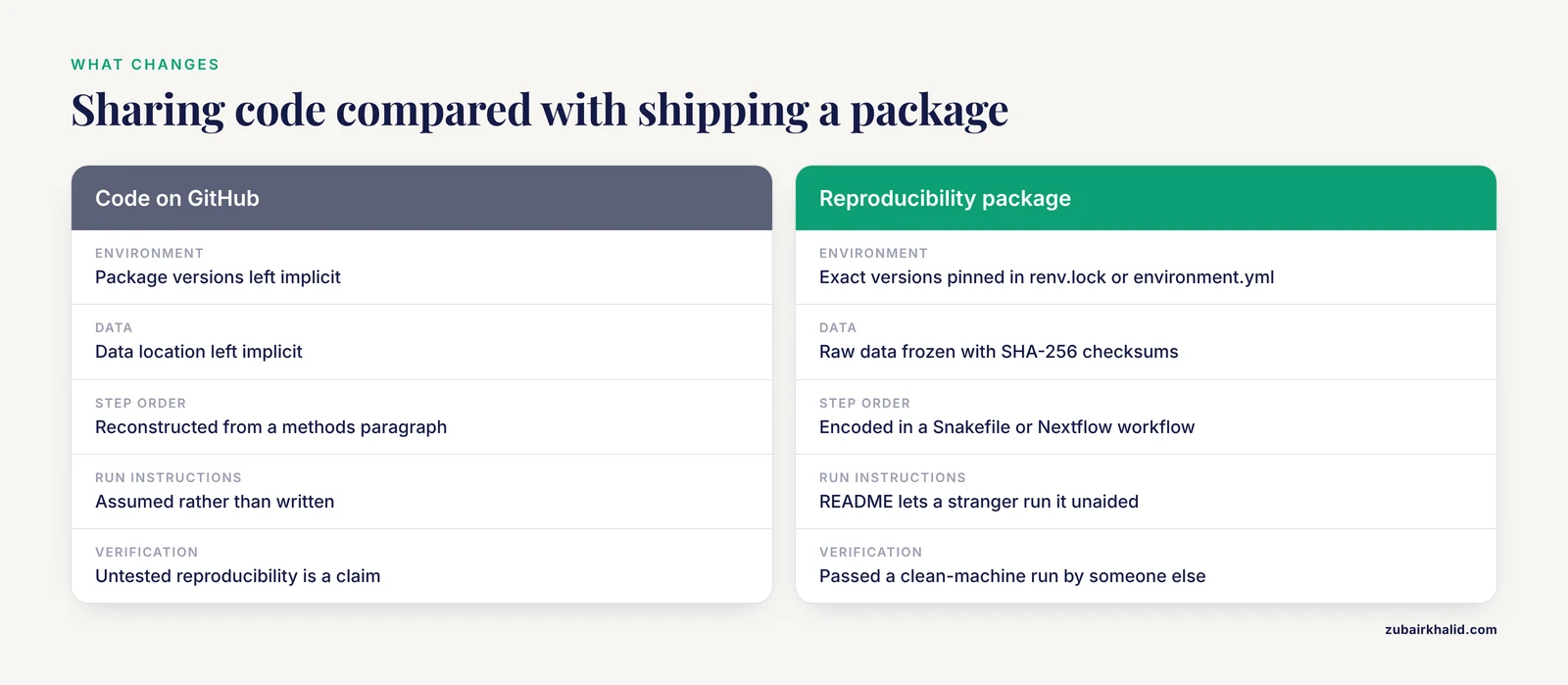
Sharing code shows the logic but leaves the environment, data, step order, and run instructions implicit. The package makes all of those explicit and verified, which is the difference between "here is my script" and "here is how to regenerate my results."
Do I need a container if I have a lockfile?
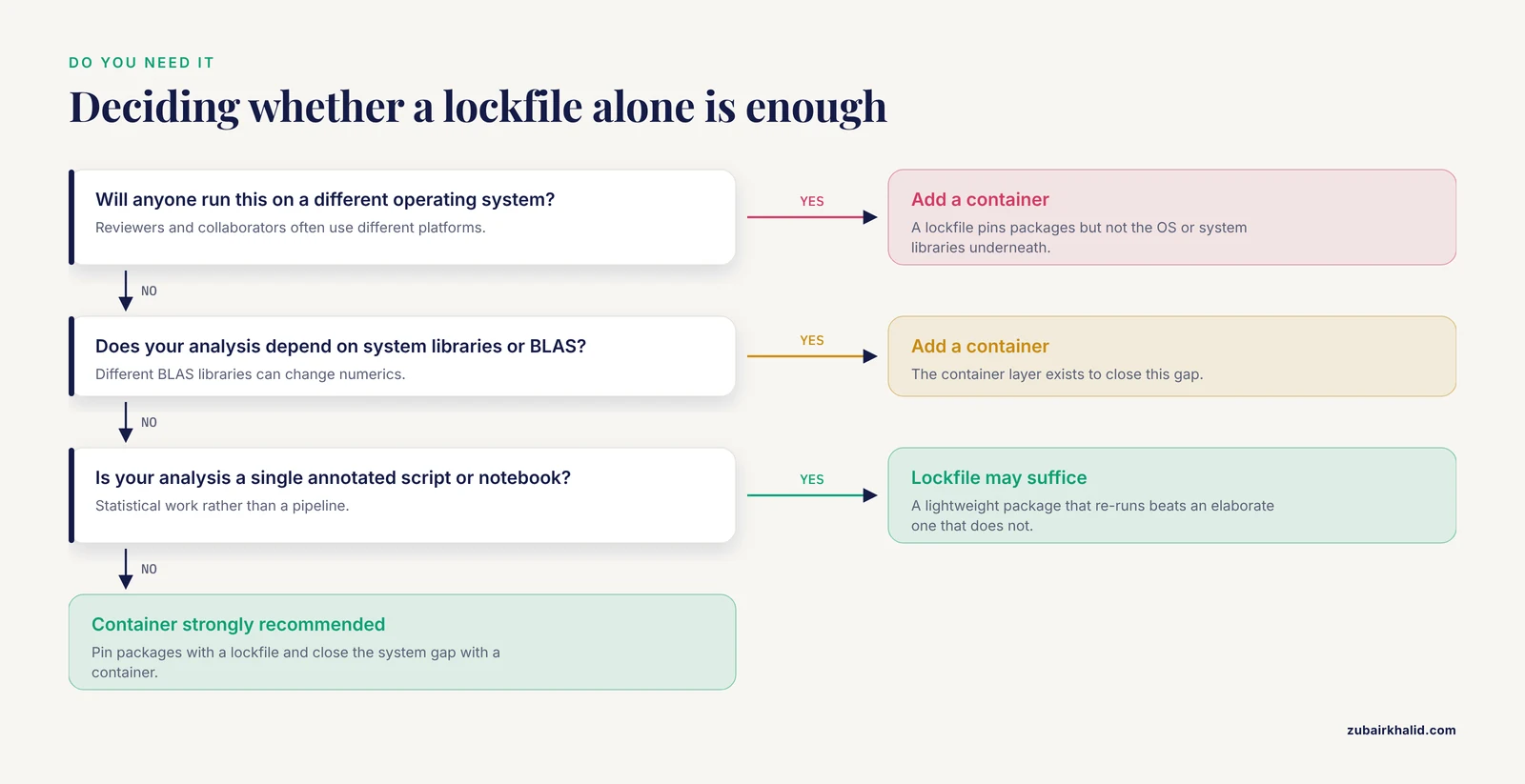
A lockfile pins your language packages, but not the operating system or system libraries underneath them. A container closes that gap and is strongly recommended, particularly when reviewers or collaborators run your analysis on different platforms.
What should I do if my data cannot be shared?
Freeze the data with checksums, document the source repository, accession numbers, and download procedure, and provide a controlled-access route such as dbGaP, the EGA, or a data-use agreement. The rest of the package is built the same way.
When should I start building the package?
Start on day one of the project. Initialize Git and a lockfile when you write the first script, and snapshot the environment every time you add a dependency. Building at the end is possible but slower and more error-prone.
What if my analysis relies on a graphical user interface tool?
Record the exact software name, version number, operating system, every parameter setting, and the sequence of manual operations, ideally with screenshots. For measurement-type protocols, image-based or written checklists have been shown to improve interobserver reproducibility, so converting your manual steps into an explicit checklist is a meaningful improvement.
How do I verify the package actually works?
Run it on a clean machine, or ask a colleague who did not write the code to run it, then compare key outputs against frozen reference values using checksums or a documented numerical tolerance. This clean-machine test is the verification step that turns intent into evidence.
Can a reproducibility package be cited?
Yes. Deposit the tagged release and container in Zenodo, OSF, or an institutional repository to obtain a DOI, cite that DOI in your paper, and update the deposit with new tagged versions as the project evolves.
Sources
- Editorial: Do you see what I see? Quality, reliability, and reproducibility in biomedical research.
- BIDS apps: Improving ease of use, accessibility, and reproducibility of neuroimaging data analysis methods
- CIRCE: a scalable Python package to predict cis-regulatory DNA interactions from single-cell chromatin accessibility data.
- ROTS: An R package for reproducibility-optimized statistical testing
- LimROTS: a hybrid method integrating empirical Bayes and reproducibility-optimized statistics for robust differential expression analysis
- NeuroNorm: An R package to standardize multiple structural MRI
- MooneyMaker: A Python package to create ambiguous two-tone images.
- CiteSource: An R package for data-driven search strategy development and enhanced evidence synthesis reporting.
- Before You Search the Literature: How to Prepare and Get the Most Out of Citation Databases
- Robust statistical methods in R using the WRS2 package
- Verify and protect before you trust: A practical protocol for AI and algorithmic adoption in methodology development for national statistical offices
- Reproducibility of Breech Progression Angle: Standardization of Transperineal Measurements and Development of Image-Based Checklist for Quality Control
- EcoNicheS: enhancing ecological niche modeling, niche overlap and connectivity analysis using the shiny dashboard and R package