How to Write a README for Your Code Repository: A Template
By Dr. Zubair Khalid, DVM, MS, PhD ·

By the end of this guide you will be able to write a complete README for your analysis code, fill in a ready-made code repository README template with your own project details, and verify that a stranger can clone your repository and reproduce your results without emailing you. You need a text editor (VS Code, Nano, or anything that saves plain text), Git installed on your machine, and a repository you want to document. If your analysis runs in R or Python, have that environment on hand so you can capture exact version numbers as you go.
A README is the plain-text front door of a repository. In the standard code repository README template format, it is a Markdown file named README.md that sits at the top level of the repository and is rendered automatically by GitHub, GitLab, and Zenodo. It answers four questions for every visitor: what this code does, whether it is trustworthy, how to run it, and how to cite it.
Why a README is the core of reproducible research
Reproducible research means that other people can independently verify your findings by following the same methods on the same data [1]. Code is usually the missing link. In a meta-research study of aging research funded by the Nathan Shock Centers, 92% of 400 included articles had no code availability statement at all, and only 6% pointed to a code repository [2]. Among studies citing TRIPOD or TRIPOD+AI guidelines for clinical prediction models, only 482 of 3,967 articles (12.2%) included any code-sharing statement [3]. In real-world evidence research published in the International Journal of Population Data Science, none of 41 eligible articles included a link to the analytical code [4].
When code is shared properly, the payoff is measurable. A large reproduction study of 110 articles in leading economics and political science journals, all published under mandatory data and code sharing policies, found that more than 85% of published claims were computationally reproducible, and 72% of statistically significant estimates remained significant under robustness checks [5]. Mandatory policies work, and the README is where a mandatory policy meets your actual code.
The gap is usually documentation, not willingness. In a multidisciplinary survey of 254 researchers, the top barrier to code sharing was lack of time to prepare documentation (65% of respondents), ahead of publication pressure and funding [6]. That survey also found that when researchers tried to reproduce published work, open code was never, rarely, or only sometimes available in 71% of the publications they read [6]. A README template attacks the time barrier directly, because filling in headings takes far less effort than inventing structure from a blank page.
What reviewers, journals, and funders look for
Journal research data policies in materials science, surveyed across 171 journals from 17 publishers, show a clear pattern: data availability statements are now nearly universal, but expectations for research software lag behind, with limited attention to versioning, persistent identifiers, dependency disclosure, and reproducible execution environments [7]. A scoping review of the largest cardiovascular research funders reached a similar conclusion, finding that requirements for code sharing were uncommon compared with data sharing and open access mandates [8].
That gap is closing. A scoping review supporting the development of the TRIPOD-Code reporting guideline assessed repositories against 14 reproducibility-related features and found substantial heterogeneity, underscoring the need for clearer expectations beyond mere code availability, specifically documentation, dependency specification, and executable structure [3]. In other words, depositing code is no longer enough. A reviewer or reproduction team will look for three things in your repository, and your README is the document that provides all three:
- Documentation. What each script does, in what order, and what output to expect.
- Dependency specification. Exact software versions, so your environment can be rebuilt.
- Executable structure. A directory layout and command sequence that actually runs.
A companion principle comes from clinical trial transparency work, which argues that data and code objects should be released with documentation matched to the scientific claims they are meant to support, including reproducibility packages as a distinct release tier [9]. Your README states which tier your repository reaches: can a reader recompute every number in your paper, or only inspect the pipeline?
The free code repository README template
The template below is free to copy into your repository as README.md. It follows the standard code repository README template format used across GitHub-hosted research software, and every heading maps to a reproducibility expectation that a reviewer, editor, or reuser can check. Replace every line in angle brackets.
# <Project Name>

<One-paragraph description: what the code does, the scientific question it
addresses, and the paper it accompanies, if any.>

## Authors and Contact
- <Name, ORCID iD, institution> (<email>)
- <Name, ORCID iD, institution>

## Repository Contents
data/raw/ <description, or note that data are held elsewhere> scripts/ <each script, one line each> results/ <regenerated by the pipeline, do not edit by hand> figures/ <regenerated by the pipeline> environment.yml <conda environment definition>
## Requirements
- <Language and version, for example Python 3.11 or R 4.3>
- <Environment manager, for example Miniconda>
- <Approximate disk and memory needs>
- <Operating systems tested>

## Installation
git clone https://github.com/<org>/<repo>.git cd <repo> conda env create -f environment.yml conda activate <env-name>
## Data
- <Source of each input dataset, with DOI or accession number>
- <Access restrictions and how to request access, if any>

## Running the Analysis
Run the scripts in this order from the repository root:
python scripts/01_clean.py -i data/raw -o results python scripts/02_fit_model.py -i results -o results python scripts/03_make_figures.py -i results -o figures
- <Total runtime on a typical laptop or workstation>
- <Expected output files and what a correct result looks like>

## Software Versions
<Output of `pip freeze` or, in R, `sessionInfo()`, saved as
`results/software-versions.txt` by the pipeline>

## Citation
If you use this code, please cite:
- <Paper citation, with DOI>
- <Code release, with Zenodo DOI and version number>

## License
<MIT, GPL-3.0, or your lab's standard license>

## Acknowledgments
<Funding, grant numbers, and shared resources>
Save this as README.md in the top level of your repository. Markdown headings with # and ## render as section titles on GitHub, and triple-backtick blocks render as copyable commands.
How to write a README for your code repository, step by step
This walkthrough uses a worked example, a small Python project called dose-response-pipeline that fits four-parameter logistic curves to drug screening plate data and reports IC50 values. The same steps apply to an R project, a Snakemake workflow, or a Jupyter notebook collection.
Step 1. Create the file
From your repository root:
cd dose-response-pipeline
touch README.md
If you initialized the repository with GitHub's "Add a README" option, the file already exists. Confirm with:
lsExpected output includes:
README.md environment.yml scripts/ data/ results/Step 2. Write the opening paragraph
State what the code does in one sentence a lab mate outside your subfield could follow, then name the paper. For the example:
# dose-response-pipeline

Fits four-parameter logistic curves to 384-well drug screening data and
reports IC50 values with bootstrap [confidence intervals](/blog/data-analysis/confidence-interval-formula-examples). This repository
reproduces all analyses in Smith et al., "Escape mutations restore
EGFR signaling," Journal of Example Pharmacology (2026).
Reviewers often open a repository before reading the full methods, so this paragraph is your abstract. Write it while the analysis is fresh, not at submission time. Reporting treated as a final-stage manuscript requirement, rather than embedded in study design from the start, is a documented cause of lost methodological detail in AI-heavy research [10].
Step 3. List the repository contents
Every directory gets one line describing what it holds and whether it is input, code, or generated output. Mark generated output explicitly so users do not hand-edit files the pipeline will overwrite.
Step 4. Capture your exact software environment
This is the step most often skipped and most often requested. From inside your active Python environment:
conda env export > environment.yml
pip freeze > requirements.txt
Then record the interpreter version:
python -c "import sys; print(sys.version)"Expected output looks like:
3.11.5 (main, Sep 11 2024, 14:12:03) [Clang 15.0.0]In R, run:
sessionInfo()and paste the full output into results/software-versions.txt. The FAIR principles, originally formulated for research data and later extended to research software and workflows, treat dependency disclosure and persistent identifiers as first-class requirements, not extras [11]. Executable educational workflows in metabolomics make the same argument in practice, running readers from raw instrument files to annotated results with pinned software versions at every step [11].
If you use closed or versioned external services, such as an application programming interface for a large language model, record the model name, version, and access date in the README. Reporting practices for LLM-based research are heterogeneous, with interaction language, model versions, and inference settings frequently unreported [12].
Step 5. Write the installation block as commands, not prose
A reader should be able to select the installation block, paste it into a terminal, and walk away. Commands beat paragraphs. Give the clone command with your actual repository address, the environment creation command, and the activation command. Then test them yourself in a fresh directory, which is the cold-start test described below.
Step 6. Document the data, including what you cannot share
List every input with its source and a persistent identifier where one exists, for example a accession number from a public archive or a DOI for a deposited dataset. If the data are restricted, say so and explain the request path. Privacy-constrained projects show this is standard practice. A framework for deidentified Japanese electronic health record narratives shared derived, deidentified analytic text while documenting that raw narratives could not be released under privacy requirements, preserving auditability within those limits [13]. The three-tier transparency framework for clinical trial data makes the same move explicit, matching what is released to what the release can support [9].
Step 7. Write the run instructions with expected output
Give the exact command sequence, the order scripts must run in, and a sample of what correct output looks like. For the example pipeline:
python scripts/01_clean.py -i data/raw -o resultsExpected output:
Read 24 plates from data/raw
Dropped 116 wells flagged as edge effects
Wrote results/clean_plate_metrics.csv (9,096 rows)
The expected-output block is what separates a usable README from a decorative one. It lets a reuser detect silent failures, wrong column counts, or a mis-specified path before those errors propagate into figures.
Step 8. Add citation and license blocks
Deposit the repository in Zenodo or a similar archival service to obtain a DOI, then cite that DOI in the README alongside the paper. This satisfies the persistent identifier expectation that journal software policies increasingly raise and rarely enforce [7]. Choose a license. Unlicensed code is, by default, all rights reserved, which legally blocks reuse even when the repository is public.
Step 9. Commit and render-check
git add README.md
git commit -m "Add README with setup and run instructions"
git push
Open the repository page on GitHub and read the rendered README. Broken links, mis-nested code blocks, and missing line breaks are far easier to spot rendered than in the raw file.
Key README sections at a glance
| Section | Question it answers | Failure mode when missing |
|---|---|---|
| Opening paragraph | What does this code do and why? | Reusers cannot tell if the repo is relevant to them |
| Repository contents | Where is everything? | Users open generated files and edit them by hand |
| Requirements | What must I install first? | Instant crashes on the first run |
| Installation | How do I build the environment? | Dependency errors that look like code bugs |
| Data | Where do inputs come from and can I get them? | Pipeline cannot run, or provenance is unclear |
| Running the analysis | What do I type and in what order? | Scripts run out of order and overwrite each other |
| Expected output | How do I know it worked? | Silent errors propagate into figures |
| Software versions | Can I rebuild the exact environment? | Results differ across machines for no visible reason |
| Citation and license | How do I credit and reuse this? | Code is legally and academically unusable |
A reproducibility checklist for your README
Run through this checklist before you share the repository. Each item traces to an expectation documented in the reviews of code-sharing practice discussed above: documentation, dependency specification, and executable structure [3], plus versioning and persistent identifiers [7].
- [ ] A reader can tell what the project does from the first paragraph alone
- [ ] Every script is listed with a one-line description
- [ ] The environment file (
environment.ymlorrequirements.txt) is present and current - [ ] Exact interpreter version is recorded, including the R
sessionInfo()output if applicable - [ ] Every external model, package version, or service is named with a version and access date
- [ ] Every input dataset has a source and a persistent identifier, or a documented access path
- [ ] Scripts are numbered or listed in run order
- [ ] At least one command block includes expected output
- [ ] A code archive DOI exists and is cited in the README
- [ ] A license file exists and matches the license named in the README
- [ ] A contact person is named with an email address
Well-maintained research packages model this standard. The eyeris pupillometry preprocessing package, built explicitly around FAIR principles, ships with a fixed file-management schema and generates interactive output reports for record keeping and quality assurance, so preprocessing steps are inspectable after the fact [14]. Your README does not need that infrastructure, but it should make the same promise: everything a reader needs to check your work is either in the repository or reachable through a documented path.
Testing your README: the cold start
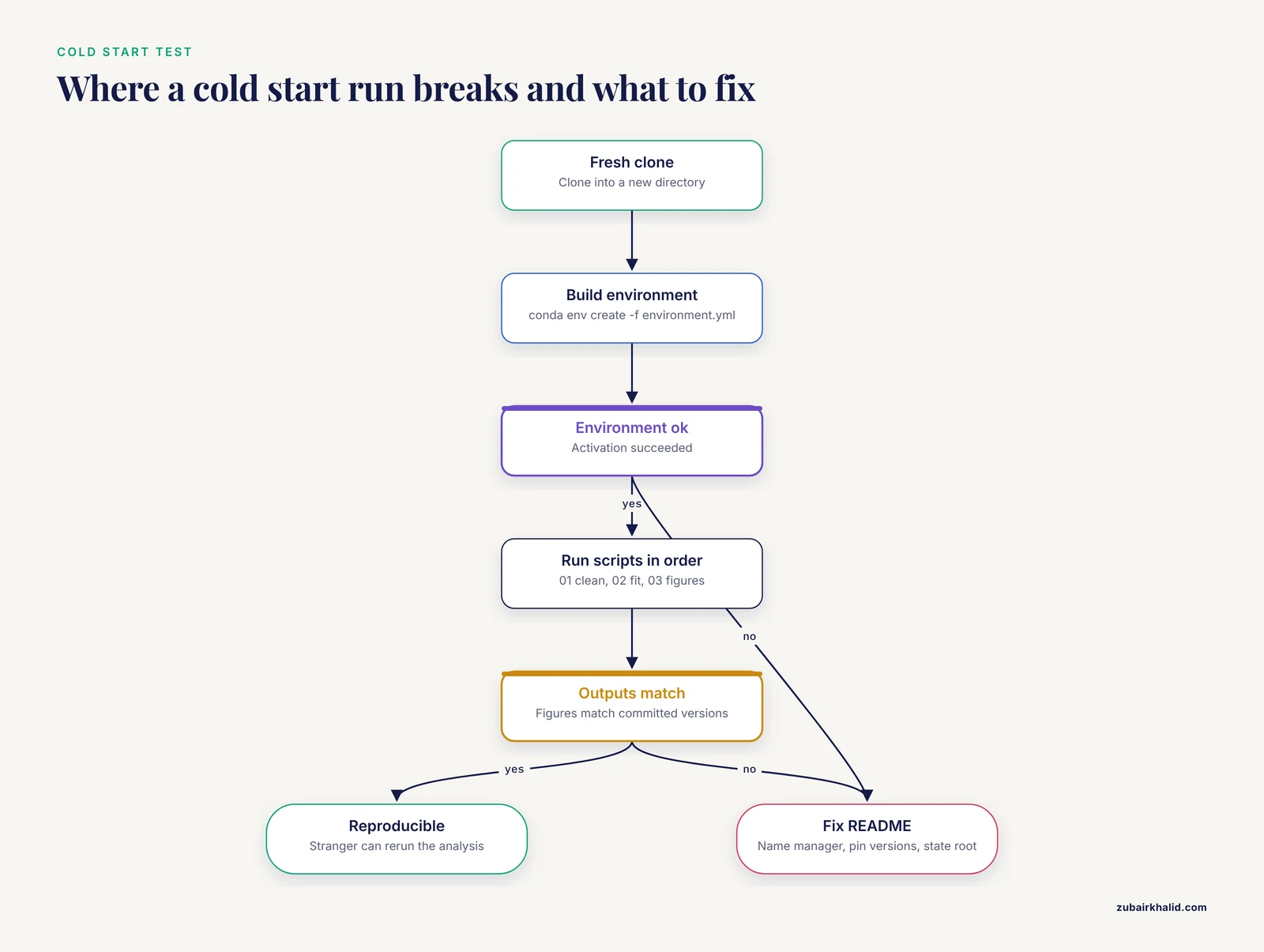
The single most effective quality check is the cold-start test. Move to a fresh directory, follow your README line by line, and record every place you hesitated.
cd ~/Desktop
git clone https://github.com/your-lab/dose-response-pipeline.git
cd dose-response-pipeline
conda env create -f environment.yml
conda activate dose-response
python scripts/01_clean.py -i data/raw -o results
Expected output of the environment creation step:
Preparing transaction: done
Verifying transaction: done
Executing transaction: done
Then run the model step and figure step in order and compare your figures against the versions committed in the repository. If your pipeline is deterministic, the regenerated figures should match bit for bit or at least visually. If they do not, either a dependency is unpinned or a random seed is missing, and your README should say which seeds are set where. Expert reproduction teams, who tend to find lower robustness than less experienced teams, rely on exactly this kind of runnable path when they audit published analyses [5].
Common errors, exact messages, and fixes
These are the errors a reuser hits most often when a README is incomplete, with the exact messages they will see and the README edits that prevent them.
ModuleNotFoundError: No module named 'scipy'
The reuser ran the script outside the documented environment, or the package is missing from environment.yml. Fix in the README by showing the activation command immediately before the run commands, and fix in the code by running conda env export again after installing any new package.
conda: command not found
The reuser has no conda installation on their PATH. The Requirements section should name the environment manager and link its installer. Add one sentence stating which manager you tested, for example Miniconda or Miniforge.
fatal: repository 'https://github.com/your-lab/private-repo.git/' not found
The repository is private. The Data or Installation section must state that access is restricted and give the request procedure. A survey of computational reproducibility barriers found metadata and code frequently unavailable in the literature researchers tried to reuse, and undocumented access restrictions are a major reason [6].
FileNotFoundError: [Errno 2] No such file or directory: 'data/raw/plate1.csv'
The reuser ran the script from the wrong directory, or a restricted dataset was never downloaded. Fix the README by stating the working directory explicitly ("run all commands from the repository root") and by listing every file the pipeline expects in data/raw/.
PermissionError: [Errno 13] Permission denied: 'results/fig1.png'
The output directory does not exist on the reuser's machine. Either create it in the script with os.makedirs("results", exist_ok=True) in Python or dir.create("results", showWarnings = FALSE) in R, or state in the README that results/ must exist first.
there is no package called 'ggplot2' (in R)
The README documented the Python environment but not the R one, or the reuser skipped an install line. Add the exact install command:
install.packages(c("ggplot2", "dplyr", "survival"))Common Mistakes and Limitations
Writing the README at submission time. Documentation written months after the analysis, under deadline pressure, is where methodological detail gets lost. Build the README as you go, updating the run commands each time a script changes.
Documenting the happy path only. If the pipeline has a known failure mode, such as a plate format variant that requires a flag, document it. Reusers trust READMEs that admit edge cases more than READMEs that pretend none exist.
Confusing a README with a methods section. The README gets a reader to your results. The paper explains the science. Do not compress experimental details into the README or, worse, split one explanation across both and leave gaps in each.
Pinning nothing. A README that says "install Python and pandas" without versions guarantees a different environment on every machine. Version pins are the difference between a repository that reproduces and a repository that merely exists.
Sharing code without documentation. Deposit without documentation only reaches the bottom tier of reuse. The tiered transparency framework for trial data makes the point generally: a release supports only the scientific activities its documentation enables [9].
Assuming your own machine is the standard. Paths like /Users/yourname/Projects/... in scripts, undocumented system dependencies, and untested operating systems all fail the cold start. Run the README as written, on a machine (or a fresh user account) that did not build the project.
One honest limitation. A README cannot make an analysis reproducible if the underlying design, data dictionary, or statistical rationale is missing. It is the interface, not the substitute, for a complete methods description, and individual research projects still need domain-specific judgment about what belongs in each document.
Frequently Asked Questions
How long should a README for a research code repository be?
One to three pages of rendered Markdown is typical. Every section in the template above earns its place because a reuser needs it, but padding with generic text dilutes the operational parts. If your README exceeds roughly a thousand lines, move deep detail into a docs/ folder and link to it.
What is the difference between a README and a paper's methods section?
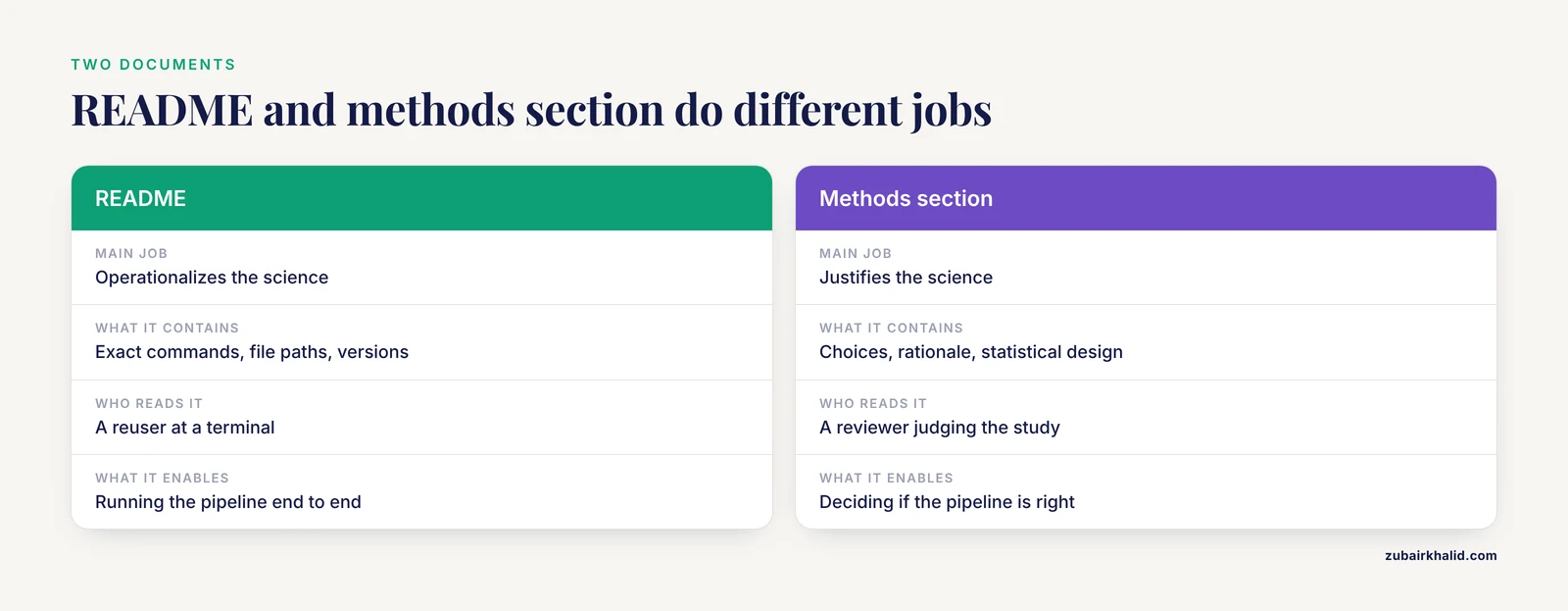
The methods section justifies and explains your scientific choices. The README operationalizes them, with exact commands, file paths, and versions. A reviewer reading the README should be able to run the pipeline, while a reviewer reading the methods should be able to judge whether the pipeline is the right one.
Do I need a README if my code is not published yet?
Yes, and it is easier to write early. A README makes internal collaboration smoother, helps your future self after a semester away from the project, and removes the last-minute documentation crunch that researchers cite as the leading barrier to code sharing [6].
What is the difference between README.md and README.txt?
README.md is written in Markdown and renders with headings, links, and code blocks on GitHub, GitLab, and Zenodo. README.txt is plain text and renders as an undifferentiated wall of characters. Use README.md unless your host cannot render Markdown.
How do I write a README for code that uses restricted or human-subjects data?
Document the data source, the restriction, the request path, and any deidentification or preprocessing the code assumes. Studies with privacy-constrained data show that restricted sharing can still preserve auditability when the released materials and their limits are documented precisely [13]. Sharing the code itself is especially valuable in this setting, since code can be released even when data cannot [4].
Should software versions go in the README or in a separate environment file?
Both, with different jobs. The environment file (environment.yml, requirements.txt, or an renv.lock file) is machine-readable and rebuilds the environment. The README names the environment manager, points to the file, and records anything the file cannot capture, such as the date you accessed an external model interface [12].
Which license should I put in my README?
Pick a standard open license, most commonly MIT or GPL-3.0 for code, and match the license name in the README to a LICENSE file in the repository. If institutional policy or a funder dictates a choice, follow that policy and say so in the License section.
How do I write one README for a project that uses both R and Python?
Document each environment separately in the Requirements and Installation sections, one block per language, and make the handoff point explicit, for example "script 02 exports a CSV that script 03 reads in R." Record sessionInfo() output for the R side and pip freeze for the Python side. Cross-language interoperability is a recognized FAIR practice, and packages such as eyeris demonstrate how versioned, documented toolchains keep mixed workflows inspectable [14].
Sources
- Prioritising measures and interventions to strengthen research reproducibility: a Delphi consultation study.
- An assessment of data and code sharing in research funded by the Nathan Shock Centers, 2017-2022: a meta-research study.
- AI-assisted scoping review of code sharing in clinical prediction model research.
- Extent of Open Science Practices in the Reporting of Real World Evidence Research.
- Reproducibility and robustness of economics and political science research.
- Exploratory Insights into Barriers and Open Practices for Computational Reproducibility in Scientific Research.
- Journal research data policies in materials science.
- Funders' Expectations for Open Science in Cardiovascular Research: A Scoping Review of the Largest Cardiovascular Research Funders.
- Clinical trial data transparency should match data access to scientific purpose: a tiered framework for reproducibility and reuse.
- Transparent reporting is central to reproducible radiological AI research: A call to action.
- Metabonaut: an open educational resource for learning reproducible, script-based untargeted LC-MS/MS metabolomics.
- Large language models in rheumatology-centered research: A scoping review of model openness and reporting practices.
- Balancing Privacy Protection and Reproducible Entity Extraction in Real-World Data in the Development of a Framework for Deidentified Japanese Electronic Health Record Narratives Using BERT: Retrospective Observational Study.
- eyeris: A Flexible, Extensible, and Reproducible Pupillometry Preprocessing Framework in R.