How to Validate Bioinformatics Calculators: A Practical Guide
By Dr. Zubair Khalid, DVM, MS, PhD ·

To validate a bioinformatics calculator, test it against inputs whose correct outputs are already known and independently verifiable, then document the agreement between what the tool returns and what the reference answer should be. A calculator that reproduces hand-checked values for GC content, molecular weight, melting temperature, or a statistical test result can be trusted for routine work, while one that fails even a simple known-answer test should not touch your real data.
This guide explains what these tools are, why validation matters, and walks through a practical workflow you can apply whether the "calculator" is a web form, a spreadsheet, a Python script, or a module inside a larger pipeline. The same logic scales from a two-minute check of an online biology calculator to the formal validation steps that published bioinformatics studies perform on their computational results [1].
What Is a Bioinformatics Calculator?
A bioinformatics calculator is any tool that takes biological data or parameters as input and returns a computed number or classification. Common examples include:
- Sequence calculators. GC content, nucleotide count, reverse complement, codon usage, oligonucleotide melting temperature (Tm), and molecular extinction coefficients for DNA or RNA oligos.
- Protein calculators. Molecular weight, isoelectric point (pI), extinction coefficient, hydropathy, and amino acid composition derived from a protein sequence.
- Laboratory planning calculators. Dilution calculators, PCR master mix calculators, transformation efficiency calculators, and cell counting conversions.
- Statistical and diagnostic calculators. Odds ratios, confidence intervals, chi-square and t-test results, sample size and power calculations, and receiver operating characteristic (ROC) metrics such as sensitivity, specificity, and the area under the curve (AUC).
- Pipeline-level calculators. Tools embedded in larger analyses, for example differential expression calls, gene set enrichment scores, or variant quality filters.
A "biology calculator" and a "bioinformatics calculator" overlap heavily. The difference is mostly the input. A dilution calculator takes volumes and concentrations. A bioinformatics calculator takes sequences, expression matrices, or variant lists. Both share the same core question: does this tool return the right number?
To validate a bioinformatics calculator, in plain terms, means answering that question with evidence rather than assumption. You feed the tool inputs with known answers, record what comes out, and decide in advance how close is close enough.
Why Validation Matters More Than Accuracy Marketing
Almost every online calculator looks credible. Clean layout, institutional logos, and a references tab cost nothing to produce. None of that tells you whether the tool rounds correctly, handles ambiguous characters, or implements the formula variant you think it does.
Three failure modes cause most bad results:
- Formula variant mismatch. There are multiple accepted formulas for the same quantity. Oligonucleotide Tm can be computed by the simple Wallace rule (2 °C for each A or T, 4 °C for each G or C, valid for short oligos under about 14 nucleotides) or by nearest-neighbor thermodynamics that account for salt and sequence context. Both are legitimate. A calculator using one when you expect the other will disagree with your bench results through no fault of your pipetting.
- Input handling errors. Calculators frequently assume clean input. Lowercase letters, whitespace, FASTA headers pasted into the sequence box, ambiguous base calls such as N, or non-integer inputs can produce silent errors, which are worse than crashes because nothing alerts you.
- Scope creep. A tool validated for 20-mer oligos does not automatically hold for 200-mers. A ROC calculator validated on balanced datasets may mislead on heavily imbalanced ones. Validation conclusions are only valid inside the tested range.
Published research faces identical risks, which is why rigorous studies validate their computational findings before relying on them. One recent study combined Mendelian randomization, differential expression analysis across public datasets, protein interaction mapping, and enrichment analysis, then validated its key gene with ROC curve analysis and independent external datasets before confirming the result experimentally in infected T cells [1]. That layered structure, where each computational claim is checked by an independent method, is exactly the mindset to bring to a calculator.
Validate a Bioinformatics Calculator Step by Step
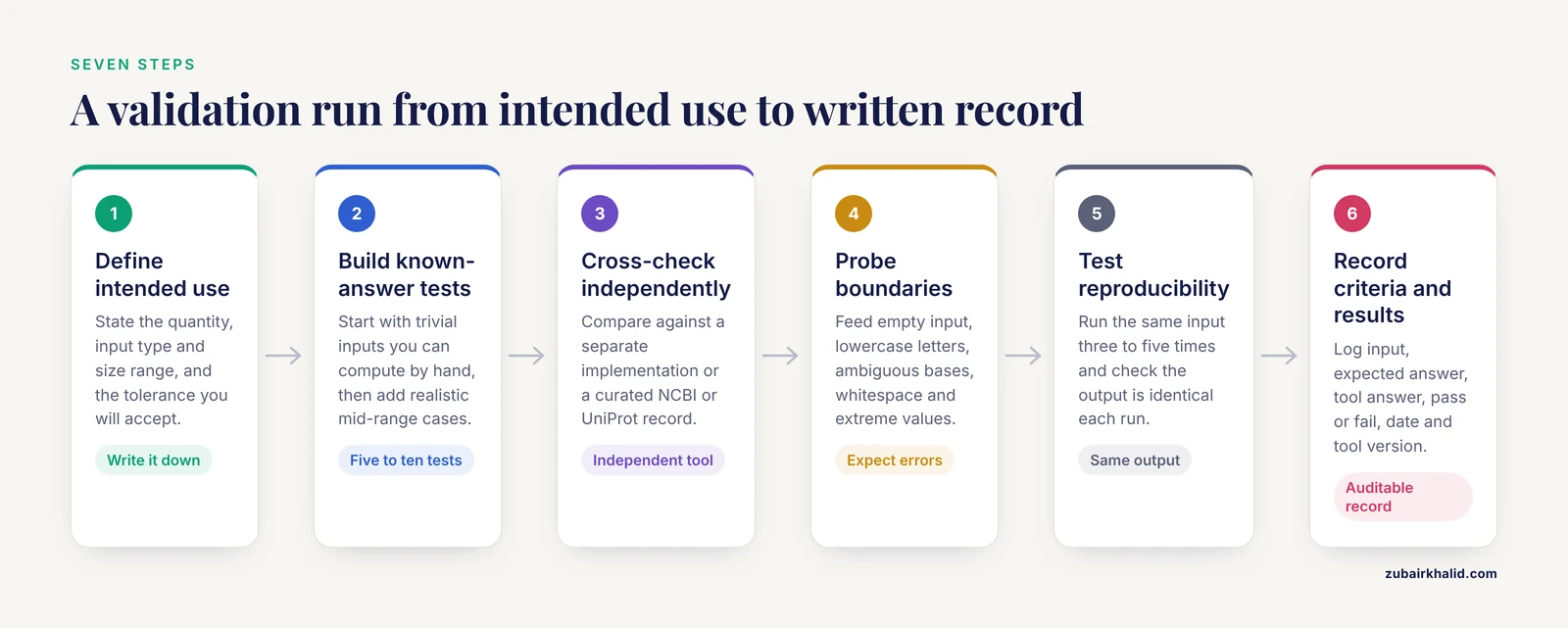
This is the core workflow, the practical heart of the ultimate guide to validating bioinformatics calculators. Each step produces something you write down, because undocumented validation cannot be audited later, by you or by a reviewer.
Step 1. Define the intended use and the output you will check
Write one sentence: "I will use this tool to compute [quantity] for [input type and size range], and I need accuracy within [tolerance]." For example: "I will use this GC content calculator on coding sequences between 100 and 3,000 nucleotides, and I need values within 0.1 percentage points of a hand count."
Tolerances differ by quantity. GC content and nucleotide counts are exact integer arithmetic, so any disagreement is a bug. Molecular weights depend on which mass table (average versus monoisotopic) the tool uses, so a small systematic offset can be legitimate and must match the documented convention. Defining this before testing prevents you from either accepting a real bug or rejecting a correct tool.
Step 2. Build known-answer test cases
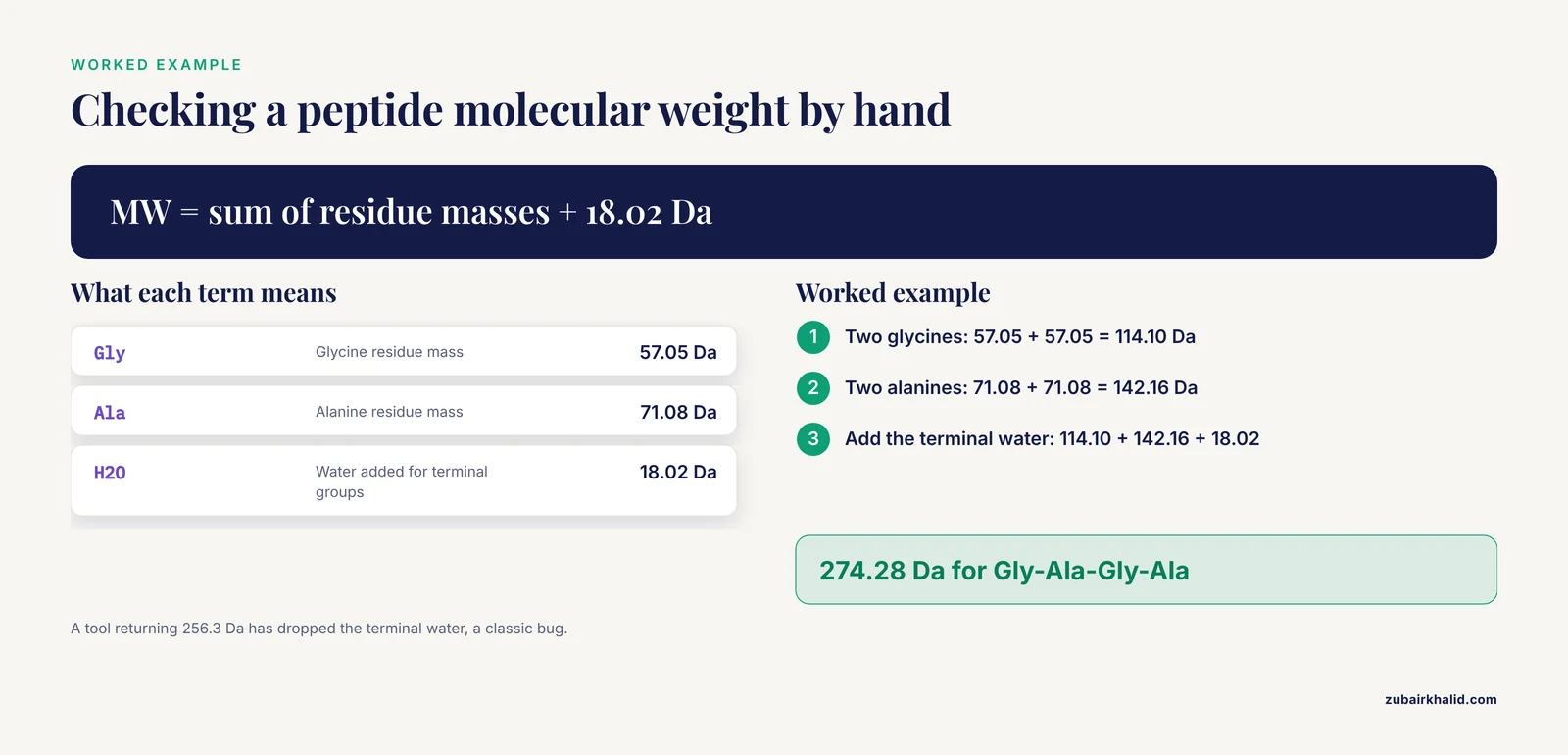
Known-answer tests are inputs where you can compute the correct output yourself, by hand or from first principles. Start with trivial cases, then add realistic ones.
For a GC content calculator:
- Input
GATTACA. There are 7 nucleotides, 2 of which are G or C, so the correct output is 2 divided by 7, which is 28.6 percent. - Input
GGGGCCCC. The correct output is 100 percent. - Input
AAAAAAAA. The correct output is 0 percent.
For a protein molecular weight calculator, use average residue masses, which are standard reference values in protein chemistry. A peptide with the sequence Gly-Ala-Gly-Ala contains two glycine residues (57.05 Da each), two alanine residues (71.08 Da each), and one water molecule (18.02 Da) added back for the terminal groups, giving 57.05 + 71.08 + 57.05 + 71.08 + 18.02, which equals 274.28 Da. A calculator returning 274.3 Da passes. One returning 256.3 Da has forgotten the terminal water, a classic and common bug.
For a dilution calculator, use the definition C1V1 = C2V2. Making 10 mL of 1x buffer from a 100x stock requires 0.1 mL of stock and 9.9 mL of diluent. Any other answer is wrong.
Aim for at least five to ten test cases per output type: one trivial case, one boundary case (an all-zero or maximum input), and several realistic mid-range cases.
Step 3. Cross-check against an independent tool
Hand calculation does not scale to a 3,000-nucleotide transcript, so for realistic inputs compare two independent implementations of the same quantity. If a web calculator and a local script disagree on a sequence's molecular weight, at least one has a problem, and the disagreement tells you where to look.
Choose genuinely independent implementations. Two calculators that both call the same underlying library will agree with each other and will both inherit any bug in that library. When possible, anchor the check to a curated reference database. For a protein calculator, retrieve the sequence and the published molecular weight for a well-characterized protein from UniProt and confirm the tool reproduces the documented value for that exact sequence. For nucleotide work, retrieve reference sequences from NCBI and verify counts against the database record itself.
Step 4. Probe the boundaries and the failure modes
Deliberately feed the calculator inputs it should refuse or flag:
- An empty input.
- Lowercase sequence letters (legitimate input in FASTA format, so a good tool handles them).
- Ambiguous bases such as N or R, which a GC content tool must either exclude from the denominator or report explicitly.
- Whitespace, line breaks, or a FASTA header line in the input box.
- Extreme values: a 0 ng/µL concentration, a 0-count row, a negative dilution factor.
- Numeric edge cases in statistics tools, such as a 2x2 table containing a zero cell, which changes which test or correction is appropriate.
Record what happens. Silent wrong answers are the most dangerous outcome, so a tool that returns an explicit error for invalid input is safer than one that cheerfully returns a number.
Step 5. Test reproducibility and precision
Run the same input three to five times. Deterministic calculators should return byte-identical outputs every run. If a tool involves randomization, simulation, or stochastic algorithms, check instead that the results are consistent within the stated precision and that the tool documents its random seed or number of replicates. Then check precision claims: a tool reporting molecular weight to four decimal places implies higher precision than the underlying mass table supports, which is a soft warning sign about the developers' care.
Step 6. Validate under realistic data conditions, including missing data
Real datasets are messy, and how a tool handles mess can change its conclusions. A review of multi-omics integration methods showed this concretely. When the authors reanalyzed a publicly available chronic lymphocytic leukemia dataset, one data type was missing in roughly one-third of the patients. Early and intermediate integration strategies combined with simple zero imputation dropped prediction agreement to chance and near-chance levels, while late integration, which requires no imputation, was largely unaffected [2]. The practical lesson for calculator validation is direct: test your tool on input that resembles your real data, including missing or ambiguous entries, because a calculator validated only on clean textbook examples can fail badly, and quietly, on real data [2].
Step 7. Write down the acceptance criteria and results
A validation is complete when a third person could reproduce it. For each test case, record the input, the expected answer, the tool's answer, the pass or fail decision, and the date and version of the tool. A simple table in a lab notebook or a versioned text file is enough. If the tool updates, rerun the suite. Commercial software changes silently, and a previously validated calculator can regress after a website redesign.
A Summary Table of Validation Tests
| Test type | What it checks | Example | Pass criterion |
|---|---|---|---|
| Known-answer (trivial) | Basic correctness of the formula | GC content of GATTACA = 28.6% | Exact match |
| Known-answer (realistic) | Correctness on realistic inputs | Peptide Gly-Ala-Gly-Ala = 274.28 Da | Within documented tolerance |
| Independent cross-check | Agreement between two implementations | Web calculator versus local script on a 3,000-nt transcript | Agreement within stated tolerance |
| Reference database check | Agreement with a curated record | Protein MW matches the UniProt-documented value [2] | Exact or within rounding |
| Boundary and invalid input | Input handling and error behavior | Ambiguous bases, empty input, zero cells | Explicit error or documented rule, never a silent wrong number |
| Reproducibility | Same input, same output | Five repeated runs of one input | Identical output, or variance within stated precision |
| Realistic-data check | Performance on messy, incomplete data | Inputs with missing values or ambiguous calls | Documented behavior consistent with intended use |
Validate Bioinformatics Calculator Examples in Published Research
The validation vocabulary above, known-answer tests and cross-checks, applies to small tools. Published bioinformatics studies apply the same principles at a larger scale, and their language is worth learning because it appears in the papers you will read or write.
A recent integrative study on depression and influenza A virus susceptibility illustrates the layered approach [1]. The authors first used Mendelian randomization to ask whether depression causally affects influenza susceptibility, then performed differential expression analysis on public Gene Expression Omnibus datasets, protein-protein interaction analysis, and Gene Ontology and KEGG enrichment to narrow 24 overlapping differentially expressed genes down to 13 hub candidates. To validate the single key gene that emerged, they used ROC curve analysis, meaning they asked whether expression of that gene alone could separate infected from uninfected samples better than chance. They then confirmed the finding in independent external datasets, examined immune cell relationships with single-cell RNA sequencing data and virtual knockout simulation, screened candidate compounds with molecular docking and molecular dynamics simulation, and finally tested the mechanism experimentally in IAV-infected Jurkat T cells [1].
Two lessons transfer directly to calculator validation. First, no single computational check is sufficient, so agreement between independent methods builds confidence the way agreement between independent calculators does. Second, a statistic alone does not validate anything. An ROC curve is only as meaningful as the dataset behind it, which is why the study added external datasets and a wet-lab experiment before drawing conclusions [1].
Common Mistakes and Limitations
- Validating with the same data used to build or tune the tool. A calculator that agrees with the examples on its own documentation page may simply reproduce them by construction. Use inputs you generated independently.
- Trusting agreement between two tools blindly. Agreement only rules out differences, not shared errors. If both tools use the same formula or the same upstream database, they share the same blind spots. Pair every cross-check with at least one known-answer test computed by hand.
- Ignoring the formula variant. Before declaring a Tm, molecular weight, or pI result wrong, check whether the tool documents a different, legitimate convention than the one you assumed. Read the methods or help page first.
- Testing only clean, ideal inputs. Real sequences have ambiguous bases, real matrices have missing values, and the effect can be dramatic. In the multi-omics reanalysis described above, roughly one-third of patients missing one data type was enough to push one integration strategy to chance-level agreement while leaving another essentially unaffected [2].
- Generalizing beyond the validated range. A calculator validated on short oligos says nothing about long templates. A diagnostic metric calculator validated on balanced groups can mislead on imbalanced ones, where accuracy looks artificially good and metrics such as the AUC or sensitivity at fixed specificity carry more information.
- Skipping the rerun after an update. Validation is tied to a version. Revalidate whenever the tool, its underlying database, or your intended use changes.
- Confusing precision with accuracy. Many decimal places do not mean a correct answer. A tool can be precisely wrong if the formula itself is wrong, which is why known-answer tests matter more than decimal places.
One further limitation belongs in any honest checklist. Calculator validation confirms the arithmetic and the input handling, not the biological appropriateness of the quantity. A perfectly validated pI calculator cannot tell you whether pI is the right variable for your experiment, and individual research decisions in clinical or animal-work contexts need professional oversight from a qualified veterinarian, physician, or institutional review process as applicable.
What Is Still Uncertain
Several aspects of calculator validation remain open questions even for experienced practitioners. There is no universal, field-wide certification for small research calculators, so the standard of care is community practice rather than a formal standard, and two laboratories may reasonably use different acceptance tolerances for the same quantity. For tools that embed machine learning models rather than closed-form formulas, validation is harder, because performance depends on training data composition and on how missing inputs are handled, an area where current research is still defining best practices [2]. Finally, for calculators that sit inside large pipelines, the interaction between components can produce failures no individual component test catches, which is why end-to-end validation with a small, fully characterized dataset remains irreplaceable. Ongoing work on integration strategies and biological reasoning across data types is likely to sharpen these recommendations in the next few years [2].
Frequently Asked Questions
What is a bioinformatics calculator?
A bioinformatics calculator is any tool that computes a value from biological data, such as GC content from a DNA sequence, molecular weight from a protein sequence, or an odds ratio from a contingency table. The term covers web forms, spreadsheets, scripts, and modules inside larger analysis pipelines.
What does it mean to validate a bioinformatics calculator?
Validating a bioinformatics calculator means testing it on inputs with independently known answers and confirming its outputs match within a tolerance you defined in advance. It also includes checking how the tool handles invalid or messy input and recording the results so the validation can be repeated later.
How do I validate an online biology calculator without any programming?
Use hand-checkable test cases. Feed in GATTACA for GC content (correct answer 28.6 percent), a short peptide for molecular weight, or a dilution with obvious arithmetic, and compare the returned value with your own calculation. Then try obviously invalid inputs, such as an empty sequence, and note whether the tool reports an error or returns a number anyway.
How many test cases are enough to validate a calculator?
At minimum, use one trivial case, one boundary case, and several realistic mid-range cases, which usually means five to ten tests per output type. More important than the count is coverage: the tests should span the input range you actually plan to use, including messy real-world inputs.
Can I trust a calculator just because two different websites agree?
No. Two tools can share the same bug if they use the same formula, the same library, or the same underlying database. Treat cross-tool agreement as one line of evidence, and always pair it with at least one known-answer test you computed independently.
What reference sources should I use for known-answer values?
Use curated, authoritative databases and standard reference tables. Retrieve well-characterized reference sequences from NCBI or UniProt and compare the calculator's output against the values documented in those records, and use standard published mass tables and thermodynamic parameter sets for molecular weight and melting temperature calculations.
How is validating a calculator different from validating a research result?
A calculator validation confirms the arithmetic is right for a defined input range. A research result validation, as published studies perform it, asks whether the biological conclusion holds under independent methods and data. For example, one study validated its key gene with ROC analysis and external datasets and then confirmed it experimentally in infected cells [1], a depth of evidence no calculator check can substitute for.
How often should I revalidate a calculator I rely on?
Revalidate whenever the tool is updated, when its underlying database or parameter tables change, or when you start using it outside the range you originally tested. Keep your test suite saved, because rerunning a stored set of known-answer cases takes minutes and catches silent regressions.