Hardware vs Software Calculators for Bioinformatics
By Dr. Zubair Khalid, DVM, MS, PhD ·
A software calculator performs a bioinformatics computation as a program running on general-purpose machines, while a hardware calculator implements that computation in dedicated circuitry or across specialized compute infrastructure. The rule of thumb for choosing between them is simple: start with software on the machines you already have, and move to dedicated hardware only when a repetitive, compute-bound task outgrows them.
This guide works through bioinformatics calculator software vs hardware on their own terms, then on the criteria that decide real projects: data size, run frequency, flexibility, skills, and reproducibility. The comparison draws on published work in sequence search, proteomics, metabolomics, machine learning prediction, and genome editing safety, because those fields show precisely where each option wins.
What a Bioinformatics Calculator Actually Is
A bioinformatics calculator is any tool that converts biological input into a computed result. The input might be a DNA sequence, a mass spectrum, or a table of gene counts. The output might be a number, a score, a prediction, or a rendered structure. Much of the confusion around this topic starts with treating all calculators as if they posed the same size of problem.
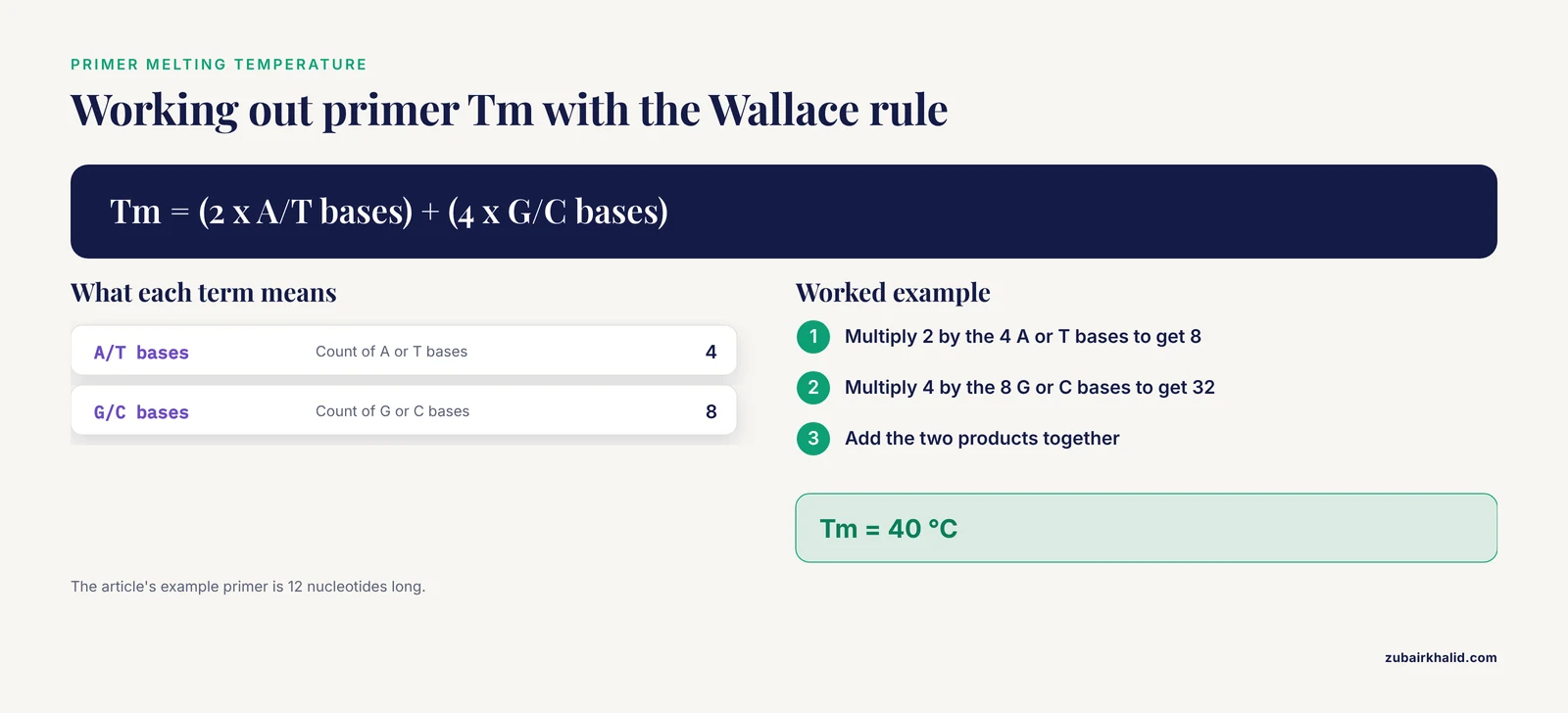
At the simple end sit the classic biology calculators. A primer calculator estimates the melting temperature (Tm) of a short DNA oligonucleotide, the temperature at which half of the double-stranded molecules separate. The standard classroom formula for short oligonucleotides, the Wallace rule, assigns 2 °C for each A or T base and 4 °C for each G or C base. A 12-nucleotide primer with 4 A or T bases and 8 G or C bases therefore has an estimated Tm of (2 × 4) + (4 × 8), which equals 40 °C. A GC content calculator reports the percentage of guanine and cytosine bases, so a 100-base read containing 54 G or C bases has a GC content of 54 percent. Molecular weight calculators sum the masses of bases or amino acid residues. These tools are almost always software, often a web page, and they finish in a fraction of a second on any laptop.
At the heavy end sit production tools. BLAST (Basic Local Alignment Search Tool) is a suite of algorithms for identifying matches between biological sequences, and a single job can involve millions of database and query sequences [1]. Proteome search engines match mass spectrometry spectra against protein databases. Machine learning predictors scan every position of every protein for features such as protease cleavage sites, the exact positions where protease enzymes cut a protein chain [2]. These tools are still software, but their appetite for computation changes the hardware conversation.
The word hardware carries two related meanings here. One is dedicated compute infrastructure, such as a high-performance computing (HPC) cluster, meaning many networked machines managed as a single system. The other is computation implemented in physical circuitry, such as a field-programmable gate array (FPGA), a chip whose internal logic connections can be reconfigured after manufacture. Both exist for the same reason: some calculations, repeated at scale, justify machines built or tuned for exactly those calculations.
The boundary is not absolute. Every software calculator runs on some hardware, and every hardware platform needs a software stack to drive it. The practical question is where the calculation is implemented and what you are buying or configuring: a program you install, or a machine you build, rent, or reprogram.
These distinctions matter to different readers in different ways. A student choosing a calculator for coursework needs the simplest tool that gives a correct answer. A wet-lab researcher acting on a prediction needs to know which software produced a score and on what evidence. A core facility director staring at a queue of jobs needs to know whether new hardware will actually clear it. The same comparison answers all three questions, but at very different scales.
The Two Options at a Glance
Debates about hardware vs. software calculators for bioinformatics usually collapse once the workload is specified. The table summarizes the comparison, and the sections after it explain each row.
| Criterion | Software calculator | Hardware calculator |
|---|---|---|
| What it is | A program that performs the calculation in code | A physical platform, such as a reconfigurable chip or a compute cluster, that runs the calculation |
| Where the computation happens | On general-purpose CPUs or GPUs you already own or rent | In dedicated logic circuits or across many networked nodes |
| Typical examples | Web Tm and GC content tools, R packages such as xcms, BLAST, proteome search engines, PyMOL and Chimera | HPC clusters, FPGA accelerators such as the ReLev overlay in AutoFFinder, GPU workstations, cloud rentals |
| Setup effort | Open a browser, install a package, or run a script | Procure, configure, program, or rent infrastructure, then maintain it |
| Flexibility | Change parameters, thresholds, and models by editing inputs | Historically fixed at compile time, though runtime-reconfigurable designs now accept new inputs without recompilation |
| Speed ceiling | Bounded by one machine or by how well the code parallelizes | Highest throughput for narrow, repetitive, compute-bound kernels |
| Skills required | Browser use, command line, or R basics for advanced tools | Cluster administration, systems programming, or hardware description for custom builds |
| Cost profile | Often free or low cost, paid in analyst time | Capital or rental cost, justified by sustained production workloads |
| Reproducibility | Version pinning and documented software environments | Requires a documented hardware configuration plus the software stack above it |
| Best for | Exploration, teaching, one-off calculations, fast-changing methods | Production-scale, latency-sensitive, or repeated identical computations |
Software Calculators Explained
A software calculator is a program. The calculation lives in code, so the same tool can run on a laptop, a departmental server, or a cloud cluster, and the scientific method it implements travels with the code rather than with any machine. That portability is why software is the default starting point for nearly every analysis.
Web and Desktop Biology Calculators
Browser-based tools handle primer Tm, GC content, molecular weight, dilution, unit conversion, and basic statistics such as the chi-square test. They require no installation, they cost nothing, and they return an answer in seconds. Their limits are fixed formulas, small inputs, and no built-in record of what was run, which matters when a calculation must be defended later. For teaching and quick checks, they remain the right tool.
Command-Line Suites and R Packages
BLAST runs comfortably on a laptop for a few sequences and scales to clusters for database-scale jobs [1]. The same code spans both worlds, which is the core argument for treating software as the default choice.
The xcms R package shows how far a software calculator can evolve. Introduced in 2005 for preprocessing liquid chromatography-mass spectrometry (LC-MS) metabolomics data, it developed through an open-source, community-driven process into the anchor of a modular ecosystem that connects to statistical modeling, visualization, and domain-specific packages across the R and Bioconductor environments [3]. Preprocessing means converting raw instrument output into a clean table of molecular features measured across samples, the step on which every downstream statistical claim rests.
Machine Learning Prediction Platforms
Modern prediction platforms are software workflows with documented infrastructure needs. ProsperousPlus, a protocol platform for predicting protease-specific substrate cleavage sites, ships pre-trained models covering more than 100 proteases and organizes its work into three modules: prediction with those models, training of custom models on user-provided datasets, and deployment for large-scale prediction tasks [2]. Its outputs are probability scores, and its protocol describes the hardware and software environment required to run it [2]. That detail captures the real relationship between the two options. Software defines the method, and the method declares the hardware it needs.
Interactive Visualization Environments
Some calculators compute and draw at the same time. Molecular visualization software has evolved from early vector-based programs such as FRODO and O, through interactive tools such as RasMol and VMD, to modern real-time frameworks such as PyMOL and UCSF Chimera, with virtual reality environments now emerging [4]. That history tracks advances in computational hardware and graphics rendering as much as algorithm design, which is a reminder that software calculators and the machines beneath them have always advanced together [4].
Why the Software Choice Changes the Scientific Answer
Software calculators are not interchangeable. In single-cell proteomics, where proteins are identified from the tiny quantities inside individual cells, a comparative study ran seven popular database-searching programs over datasets generated on three platforms. MSGF+, MSFragger, and Proteome Discoverer were generally more efficient at maximizing protein identifications, MaxQuant was better suited to low-abundance proteins, MSFragger was superior for elucidating peptide modifications, and Mascot and X!Tandem performed better on long peptides [5]. The same data, processed by different software, supports different biological conclusions. Choosing the method is therefore a scientific decision that comes before any performance decision.
Strengths and Limits of the Software Approach
Software calculators share a set of strengths. They are portable across machines, they improve through community development, and their behavior can be documented, versioned, and repeated. The xcms ecosystem, with its expanding collection of tutorials, documentation, and teaching materials, illustrates how a software tool lowers the training cost for new users [3]. The limits are equally consistent. Performance depends on the hardware underneath, so a software calculator cannot outrun the machine it runs on. Generality also has a price: tools built to handle many data types rarely squeeze the last drop of speed from any single workload, and that gap is exactly where hardware accelerators fit.
Hardware Calculators Explained
A hardware calculator is a physical platform configured, built, or rented to run a calculation, either as reconfigurable circuitry or as many machines working in parallel. What you gain is throughput and predictable latency. What you pay is procurement, configuration, and maintenance.
HPC Clusters
An HPC cluster parallelizes one job across many nodes. BLAST suits this well because databases and queries can be partitioned among processors. Profiling work on a heterogeneous cluster measured runtimes of BLASTN, the nucleotide BLAST application, across six node types, six database files, and 15 query files, using three profiling methods: shell-level timing with the Unix time command, code-level profiling with the built-in profiler module, and system-level profiling with gprof [1]. The goal of that work is a performance model, because execution time is a function of database size, query size, and hardware capability together, and good data partitioning depends on that model [1]. Hardware pays off when measurement shows a workload is compute-bound and parallelizable, and size alone does not guarantee that.
FPGA Accelerators
An FPGA implements an algorithm as physical logic. The clearest bioinformatics example is CRISPR safety screening. When the Cas9 enzyme is directed to a target by a guide RNA (gRNA), the short sequence that positions the enzyme, the genome must also be searched for off-target sites, genomic locations similar enough to the intended target for the enzyme to cut there as well. Similarity is measured as edit distance, the minimum number of insertions, deletions, and substitutions separating two sequences.
AutoFFinder is a hardware-software co-designed platform built for this search. It streams genomic data through an FPGA overlay called ReLev, which is constructed from Levenshtein automata, computing structures that recognize every sequence within a given edit distance of a pattern, and it evaluates large panels of gRNAs concurrently. A parallel CPU stage then reconstructs exact alignments under mismatch and bulge constraints, where a bulge is an unpaired base on one side of the alignment. Critically, ReLev accepts runtime updates to both the gRNA sequences and the edit-distance threshold, so users need no FPGA toolchain expertise, which overcame earlier designs that required a full hardware recompilation to change a pattern or threshold [6].
GPUs, Workstations, and the Cloud
Graphics processing units (GPUs) are massively parallel processors that now train most machine learning models and render most molecular graphics. The visualization lineage described above advanced in step with graphics hardware, and the current integration of artificial intelligence, immersive visualization, and cloud computing in structural bioinformatics continues that pattern [4]. For most laboratories, a GPU workstation is the first piece of dedicated hardware worth owning, because it accelerates training, inference, and rendering while remaining a general-purpose computer. Cloud platforms extend the same idea by renting hardware by the hour, which converts a capital purchase into an operating cost.
What Hardware Costs Beyond the Purchase
Hardware calculators carry costs that never appear in a speed benchmark. Clusters need administration, power, cooling, and failure recovery. Custom accelerators need someone who can maintain the design as requirements drift, although runtime-reconfigurable platforms reduce that burden by letting users update guide sequences and thresholds without touching the toolchain [6]. Hardware also ages faster than methods do. A workstation that is several years old may still run current software, while a custom design of the same age may no longer match the workloads it was built for. Renting through cloud providers shifts some of these burdens elsewhere, at the price of an ongoing operating cost.
Bioinformatics Calculator Software vs Hardware: The Decision Criteria
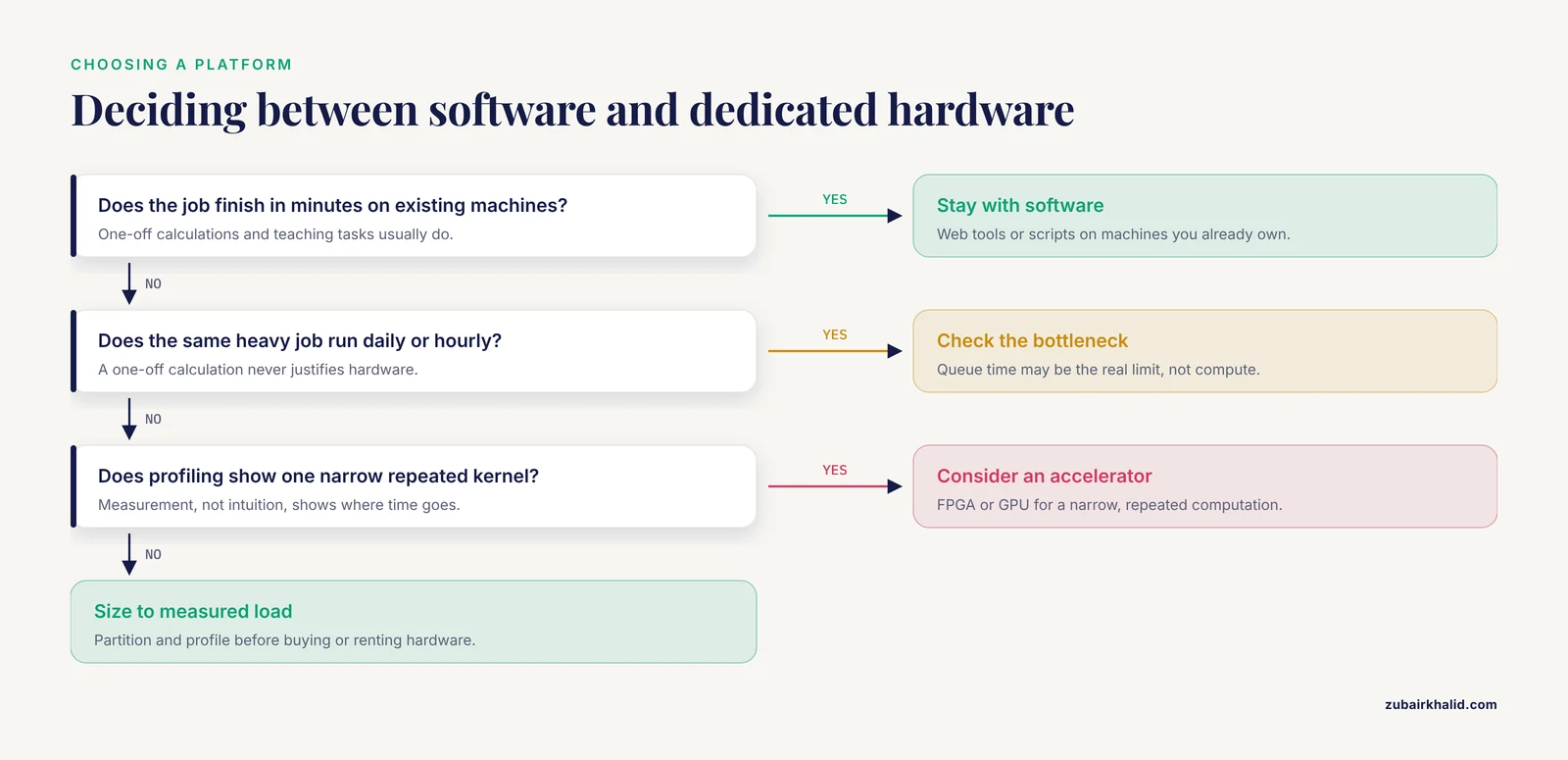
Framed as bioinformatics calculator software or hardware, the question assumes a single pick. In practice the software defines the scientific method, and the hardware sets the ceiling on how fast and how often that method can run. Work through the criteria in order.
When to Use Bioinformatics Calculator Software
- Problem size. If the job runs in minutes on existing machines, software wins. Scale arguments begin only when jobs take hours or days.
- Run frequency. A one-off calculation never justifies hardware. A nightly production job might.
- Method maturity. While parameters, thresholds, or models are still being tuned, software flexibility beats raw speed, because editing an input file costs nothing [6].
- Method sensitivity. Because different programs return different results from the same data, lock the software choice first and scale it second [5].
- Reproducibility. Documented environments and version pinning, which the xcms ecosystem emphasizes, keep results defensible [3].
When Hardware Earns Its Keep
- Sustained production load. The same heavy job runs daily or hourly, and queue time has become the bottleneck.
- Latency requirements. Results are needed within a deadline that general-purpose machines cannot meet.
- A narrow, repeated kernel. Accelerators shine when one computation, such as approximate string matching, dominates the runtime [6].
- Profiling evidence. Measurement, not intuition, shows where the time goes [1].
Common Mix-Ups
Four confusions recur. First, a slow tool is not automatically a hardware problem, because the algorithm or the data handling may be the bottleneck, and only measurement separates them. Second, hardware is not automatically rigid, since runtime-reconfigurable designs now accept new guide sequences and thresholds without recompilation [6]. Third, visualization is not calculation, although modern tools do both, so choosing a viewer for its rendering quality says nothing about the computations surrounding it [4]. Fourth, rented cloud hardware is not automatically cheaper than owning machines. It converts capital cost into operating cost, which suits sporadic workloads and penalizes steady ones.
Worked Scenarios
Scenario 1: A Student Designing PCR Primers
An undergraduate needs Tm and GC content for six primers before ordering them. A web calculator applies the Wallace rule instantly and costs nothing. Dedicated hardware would add nothing to this task. Software wins, and the whole workflow fits in a browser tab.
Scenario 2: A Metabolomics Lab Scaling Up
A laboratory moves from pilot experiments to studies with thousands of samples. Recent xcms releases target exactly this transition, processing large-scale experiments with thousands of samples on standard computing hardware while integrating with the broader R and Bioconductor ecosystems [3]. The right call is software on better standard hardware, meaning more memory and more cores in an ordinary server, rather than a custom accelerator, because the bottleneck is data management and workflow design rather than a single repeated kernel.
Scenario 3: A CRISPR Core Facility Screening Many Guides
A gene-editing core screens large guide panels against the human reference genome hg38 for every project. At an edit-distance threshold of 6, with 128 gRNAs evaluated concurrently, AutoFFinder completed an end-to-end search of hg38 on its FPGA-plus-CPU design [6]. This is the textbook case for a hardware calculator: the kernel is narrow and repeated, the workload is production-scale, and runtime reconfigurability keeps the platform usable without hardware expertise.
Scenario 4: A Recurring BLAST Workload
A researcher runs BLAST against a database that keeps growing. Previous work sped up a BLAST job by 27 times by partitioning the database and query among thousands of processor nodes [1]. That number came from an extreme partitioning study, and it does not prescribe a cluster size for every project. Profiling and partitioning determine what hardware a job actually requires, and the cluster should be sized to the measured workload [1].
Scenario 5: A Teaching Laboratory
An instructor wants thirty students to compute GC content, Tm, and restriction digest fragment sizes during a single class period. Browser-based biology calculators handle this with zero setup, and the instructor can verify every formula the students see. Hardware is irrelevant here, and even command-line tools would add friction without adding insight. The simplest software calculator is the correct professional choice, not a compromise.
Common Mistakes and Limitations
Buying hardware before profiling. Procurement decisions made on intuition waste money. Measure where the time goes before concluding that a cluster or an accelerator is the answer [1].
Treating software packages as interchangeable. The proteomics comparison above showed that different engines return different identifications from identical data. Switching engines to save time can change the science.
Skipping the documented environment. Protocols specify required hardware and software environments for a reason. Running a heavy model on an underspecified machine produces failures that look like software bugs [2].
Reading probability scores as experimental proof. Machine learning predictors output scores that rank candidates. They guide which experiments to run next, and they do not replace those experiments.
Neglecting version control. Undocumented versions and environments make results impossible to reproduce. Pin versions and record the environment alongside every result.
A final limitation. Published comparisons reflect specific datasets and software versions, so any high-stakes analysis deserves review by an experienced bioinformatician, and computational predictions need experimental validation before they drive decisions.
Frequently Asked Questions
What is the difference between bioinformatics calculator software and hardware?
Software calculators perform the computation as a program running on general-purpose machines, while hardware calculators implement the computation in dedicated circuitry or across specialized compute infrastructure such as FPGA accelerators and HPC clusters. Software defines the method, and hardware sets the speed and scale ceiling.
When should I use bioinformatics calculator software instead of dedicated hardware?
Use software first for exploratory work, teaching, one-off calculations, and any method still being tuned, because it is flexible, reproducible, and runs on machines you already own. Move to dedicated hardware when a repetitive, compute-bound task has become a production bottleneck.
Can a bioinformatics calculator run on a regular laptop?
Yes. Simple biology calculators for melting temperature, GC content, and molecular weight run in a browser, and mature packages such as xcms now process large metabolomics experiments on standard computing hardware.
What does an FPGA do in bioinformatics?
An FPGA is a chip whose internal circuits can be reconfigured after manufacture. In bioinformatics it streams data through custom logic to accelerate narrow, repetitive kernels such as approximate sequence matching for CRISPR off-target searches.
Does faster hardware always produce better scientific results?
No. Hardware changes speed and scale, while the software method determines what is computed. Comparative studies show different search programs return different identifications from the same data, so method choice comes first.
Do I need programming skills to use a bioinformatics calculator?
Not always. Web calculators need no code, and runtime-reconfigurable hardware platforms are designed for users without FPGA toolchain experience. Command-line tools and R packages do reward basic scripting skills.
Sources
- Profiling the BLAST bioinformatics application for load balancing on high-performance computing clusters.
- ProsperousPlus: A Bioinformatics Workflow for Protease Substrate Cleavage Site Prediction and Model Construction Utilizing Machine Learning.
- xcms in Peak Form: Now Anchoring a Complete Metabolomics Data Preprocessing and Analysis Software Ecosystem.
- From wireframes to immersive reality: a historical perspective on molecular visualization software.
- Comparison of Database Searching Programs for the Analysis of Single-Cell Proteomics Data.
- AutoFFinder: A reconfigurable hardware-accelerated platform for multi-guide CRISPR/Cas9 off-target search.