# How to Use Spaced Repetition for Reviewing Research Notes: A Template
By the end of this article you will have a working spaced repetition research notes template, a filled-in example, and two ways to run it. Option A uses Anki, the free flashcard program. Option B uses plain markdown files plus a short Python script, so nothing about your notes is locked inside a proprietary app.
You will need:
- Anki 2.1 or later, available free on the Anki website for Windows, macOS, and Linux (a plain text editor and Python 3 work as the alternative)
- Your existing research notes, ideally one file per paper or experiment
- About 20 minutes for initial setup, then a few minutes per day
The core idea is simple. Research note taking usually produces notes you read once and never revisit. Spaced repetition fixes that by scheduling each note for review at the moment you are about to forget it, which pushes the memory into long-term storage.
## Why Spaced Repetition Works for Research Notes
Spaced repetition means reviewing the same material at intervals that grow longer each time you successfully recall it. Active recall means retrieving the material from memory, usually by answering a prompt, rather than re-reading it. Neuroscience research on human learning shows that long-term retention improves when the two are combined, and this pairing now underpins much of modern medical education, including open-source tools such as Anki [1].
The evidence across fields is consistent. Pharmacy students who rely on passive review of lecture notes develop a false sense of familiarity without durable understanding, while spaced repetition paired with active recall improves learning outcomes [2]. In a controlled study in paediatrics, medical students who used an Anki flashcard deck built from their curriculum outperformed peers who studied the same topics with traditional books and lectures over a four-week rotation [3]. Secondary school chemistry students taught with spaced repetition performed better and retained more than students taught by conventional lecture, even though their self-reported interest did not differ between groups [4].
For busy researchers, the most encouraging finding is how little time it takes. In a double-blind study of computer-based spaced repetition, English language students who spent an average of three minutes per day on automatically generated vocabulary activities tripled their long-term retention rate compared with controls [5].
The mechanism behind these results is well characterized. Each review of an item is most efficient when it happens near the point of forgetting, when recall probability has fallen to a target level. Modern spaced repetition systems estimate that probability per item and schedule the next review accordingly, and machine learning models built on massive real-world repetition logs now refine those estimates further [6].
## Where the Template Fits in a Literature Notes System
A [literature notes system](/blog/research-skills/the-ultimate-guide-to-building-a-literature-notes-system-for-research) has layers. Fleeting notes capture quick thoughts while you read. Literature notes summarize what a specific source claims, in your own words, with the citation attached. Permanent notes connect several literature notes into an argument you can later use in a manuscript. Spaced repetition does not replace any of these layers. It adds a scheduled retrieval layer on top of the literature note layer, so each paper you read keeps contributing to your working memory long after the first read.
The template below turns each literature note into one or more retrievable items. If your current research note taking produces paragraph summaries only, you will add two fields: a short claim statement and a set of retrieval prompts.
## The Template Format
Here is the template in full. Save it once and copy it for every new paper you read.
```markdown
---
id: "surname-year-short-title"
title: ""
authors: ""
year:
source: ""
doi: ""
tags: []
stage: literature-note
review_count: 0
next_review:
intervals: [1, 3, 7, 14, 30, 60, 120]
---
## Core claim
One sentence in your own words.
## Key evidence
The numbers, methods, or quotes that support the claim, with units and conditions.
## How it connects
Which other notes, hypotheses, or projects this affects.
## Open questions
What you still doubt or need to check.
## Retrieval prompts
2 to 6 question-and-answer pairs distilled from the sections above.
```
Every field matters:
| Field | Purpose | Rule of thumb |
|--|--|--|
| id | Unique citation key | Surname, year, two or three title words |
| stage | Where the note sits in your system | Set to literature-note for this template |
| review_count | How many successful reviews so far | Start at 0, increment after each recall |
| next_review | The date of the next scheduled review | Computed from intervals, never guessed |
| intervals | The gap between successive reviews | 1, 3, 7, 14, 30, 60, 120 days as a default ladder |
| Core claim | The single sentence you want to remember months later | If you cannot write one, you do not yet understand the paper |
| Retrieval prompts | What becomes your active recall cards | Ask a question, never copy a sentence |
The interval ladder in the template is deliberately conservative. Learners surveyed about spaced repetition in authentic word-learning contexts preferred gradually longer intervals between sessions, with more sessions for unknown material and fewer for familiar material, typically five to seven sessions for unknown items and two to three for known ones over ten- to fourteen-day periods [7]. The 1, 3, 7, 14, 30, 60, 120 ladder produces seven reviews, which matches that preference for difficult material and overshoots it for easy material, which is the safe direction.
## Step-by-Step Walkthrough
### Step 1. Fill in the template for one paper
Work through your note-taking as usual, then complete the retrieval prompts. This is the part most people skip, and skipping it is what turns spaced repetition into passive re-reading. A prompt should force reconstruction, not recognition.
Here is a filled-in example, using a real published study as the source material so every number is grounded:
```markdown
---
id: "blocki-2014-passwords"
title: "Spaced Repetition and Mnemonics Enable Recall of Multiple Strong Passwords"
authors: "Blocki, Komanduri, Cranor, Datta"
year: 2014
source: "Network and Distributed System Security Symposium"
doi: "10.14722/ndss.2015.23094"
tags: [memory, schedules, security]
stage: literature-note
review_count: 0
next_review: 2026-11-12
intervals: [1, 3, 7, 14, 30, 60, 120]
---
## Core claim
A specific mnemonic technique combined with a spaced repetition
schedule lets people recall multiple strong passwords for months.
## Key evidence
Participants memorized 4 Person-Action-Object stories. The best
performing schedule returned them after 12 hours, then used
intervals growing by a factor of 1.5. 77 percent of participants
recalled all 4 stories in 10 tests over 158 days. Much of the
forgetting happened before the first test at 12 hours. Among
participants who passed that first test, 89 percent passed every
later round.
## How it connects
Supports using a 12-hour or 1-day first review for my own notes,
and a growth multiplier near 1.5 instead of doubling.
## Open questions
Does the 1.5 multiplier transfer to verbal material, or only to
imagery-based mnemonics?
## Retrieval prompts
1. Q: What first-review interval worked best in Blocki et al.?
A: 12 hours, before any longer gap was attempted.
2. Q: What growth factor followed the first review?
A: 1.5 per successful review.
3. Q: Where did most forgetting concentrate?
A: Before the first test at 12 hours. After passing it,
89 percent never failed again.
```
### Step 2. Create the Anki deck and note type
Open Anki, choose **File, New** if needed, then create a deck named `Research Notes`. Next choose **Tools, Manage Note Types, Add, Add: Basic**, name it `Research Lit Note`, and add fields: `Prompt`, `Answer`, `Cite`, `NoteID`.
Set the card template to the standard two-sided pattern:
```html
{{FrontSide}}
{{Answer}}
```
and add a small line on the back so every card traces back to its source note:
```html
{{Cite}}
```
with this CSS in the styling section:
```css
.cite { font-size: 0.8em; color: gray; }
```
### Step 3. Import your retrieval prompts
Export the retrieval prompts from your markdown notes into a CSV file, one card per row, with all fields quoted:
```csv
"Prompt","Answer","Cite","NoteID"
"What first-review interval worked best in Blocki et al.?","12 hours, before any longer gap was attempted.","Blocki et al. 2014, NDSS","blocki-2014-passwords"
"What growth factor followed the first review?","1.5 per successful review.","Blocki et al. 2014, NDSS","blocki-2014-passwords"
```
In Anki choose **File, Import**, select the CSV, confirm that the first row is used as headers and that the four columns map to Prompt, Answer, Cite, and NoteID, then import. Anki reports the number of notes and cards added. Three prompts should produce three cards in the `Research Notes` deck.
### Step 4. Configure the deck's schedule
Open the deck options and set:
- **New cards/day** to 10 or 20. Adherence matters more than volume. In a semester-long study of Anki use in a Spanish course, more days spent studying correlated with better performance even after controlling for baseline ability, motivation, and self-efficacy, but students reported low enjoyment and reluctance to use the app, so a load you actually sustain beats an ambitious one.
- **Learning steps** to `10m 1d` for new cards, then let the graduate interval take over.
- **Maximum reviews/day** to a value you can finish in under ten minutes, such as 100.
### Step 5. Review with genuine recall
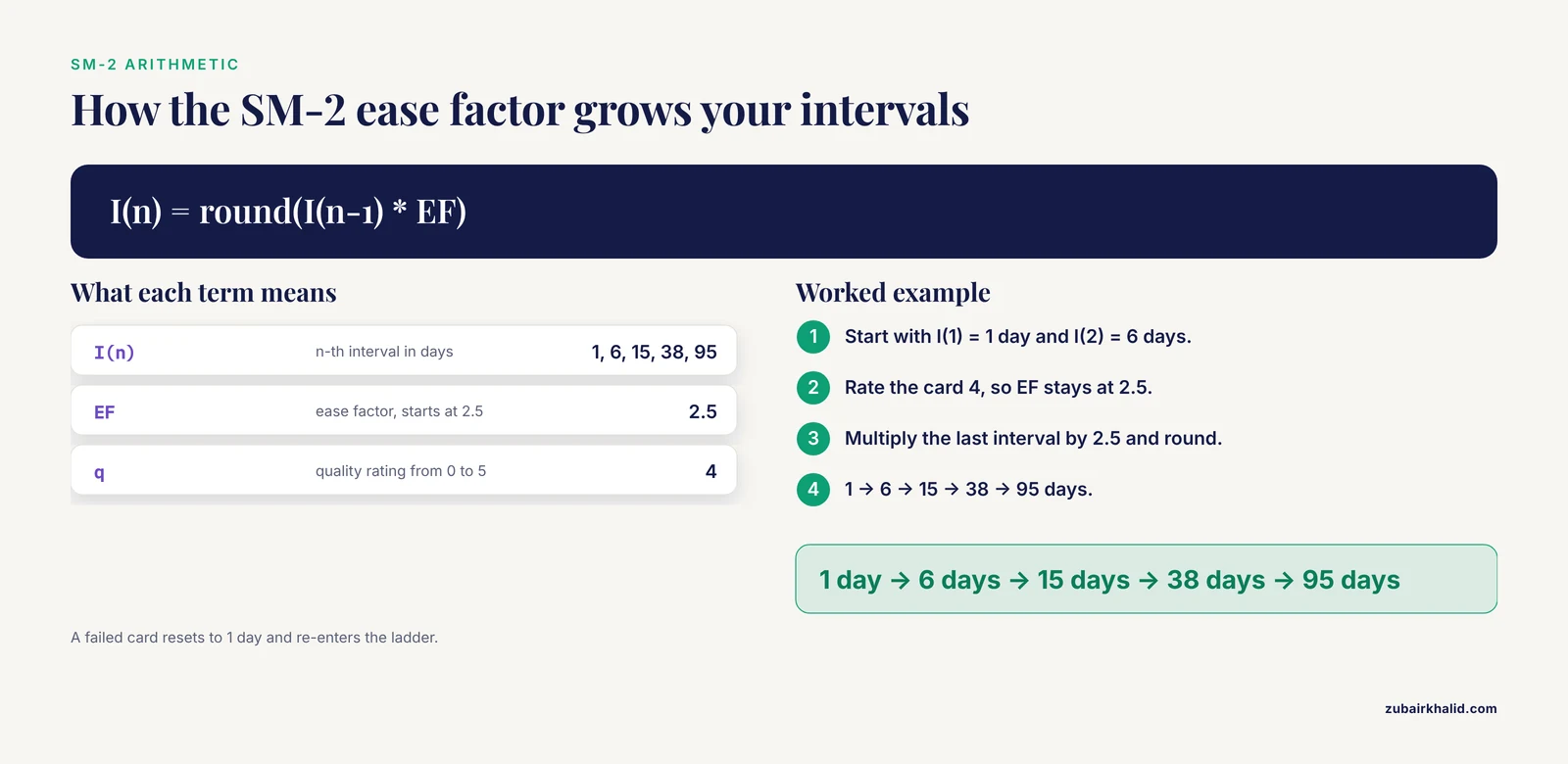
When a card appears, say the answer out loud or write it down before flipping. Then grade honestly. Anki's grading buttons adjust the interval automatically using a variant of the SM-2 algorithm, originally published for the SuperMemo software and still the default scheduling basis in many implementations [9].
The SM-2 arithmetic is short enough to check by hand:
```text
I(1) = 1 day
I(2) = 6 days
I(n) = round(I(n-1) * EF)
EF' = EF + (0.1 - (5 - q) * (0.08 + (5 - q) * 0.02))
```
where I(n) is the n-th interval in days, EF is the ease factor starting at 2.5, and q is your quality rating from 0 to 5. A note you rate 4 every time keeps EF at 2.5, so the intervals grow like this:
```text
1 day -> 6 days -> 15 days -> 38 days -> 95 days
```
If you fail a note, its interval resets to 1 day and you re-enter the ladder. The crucial property is the early reviews. A study of spaced repetition schedules found that most forgetting happened before the first test, after which successful recall became very stable, which is why missing the first scheduled review is far more costly than missing a later one [10].
### Step 6. Run the plain-text alternative
If you prefer markdown files over Anki, the same template runs on your file system. Save this as `schedule.py` in your notes folder:
```python
from datetime import date, timedelta
from pathlib import Path
import re
INTERVALS = [1, 3, 7, 14, 30, 60, 120]
def next_review(review_count: int) -> date:
n = max(0, review_count)
gap = INTERVALS[min(n, len(INTERVALS) - 1)]
return date.today() + timedelta(days=gap)
for md in Path(".").glob("*.md"):
text = md.read_text(encoding="utf-8")
m = re.search(r"^review_count:\s*(\d+)", text, re.M)
count = int(m.group(1)) if m else 0
due = next_review(count)
print(f"{md.stem}: review_count={count} next_review={due.isoformat()}")
```
Run it with:
```bash
python3 schedule.py
```
Expected output looks like:
```text
blocki-2014-passwords: review_count=1 next_review=2026-11-14
crispr-2023-screening: review_count=0 next_review=2026-11-12
```
After a successful review, increment `review_count` in the note's frontmatter and write the returned date into `next_review`. Find today's due notes with:
```bash
grep -l "next_review: 2026-11-14" *.md
```
This is a deliberate simplification of the ladder approach. If you want per-note ease factors the way SM-2 computes them, add an `ease` field to the frontmatter, initialize it at 2.5, apply the EF update formula from Step 5 on each review, and multiply the last interval by your ease value. The script above is the version you will actually maintain, which matters more.
### Step 7. Connect reviews to metacognition
Once a week, close all your notes and write from memory for ten minutes on one topic, then check the result against the literature notes and grade yourself. Structured metacognitive self-assessment of this kind, paired with required practice testing, was associated with measurable improvement in student performance in a law school contracts course [11]. A retrieval-only review tells you that you recognized an answer. A blank-page recall test tells you whether you can rebuild the argument, which is what research writing actually demands.
### Step 8. Audit monthly
On the first of each month, check three things. First, that every literature note has at least one retrieval prompt. Second, that no note has a stale `next_review` date more than a week in the past, which means the schedule silently stopped. Third, that the prompts still ask questions you cannot already answer from your manuscript drafts, because prompts that never fail are wasting review time and should graduate out of the deck.
## Choosing Your Intervals: Parameters Compared
You do not have to invent a schedule. The options below cover most cases, and the research literature explicitly calls for systematic, theoretically motivated choices of spacing intervals rather than arbitrary ones [12].
| Parameter | What it controls | Sensible start | Basis |
|--|--|--|--|
| First interval | Time before the first real test of recall | 12 to 24 hours | Most forgetting occurred before the first 12-hour test in a validated password-recall schedule [10] |
| Growth multiplier | How fast intervals lengthen | 1.5 (cautious) to 2.5 (standard SM-2) | SM-2 ease factor default is 2.5 with a floor of 1.3 [9] |
| Fail action | What happens after a forgotten item | Reset to 1 day | Standard SM-2 behavior on a failed review |
| Sessions per item | Total reviews before retirement | 2 to 3 for familiar material, 5 to 7 for new material | Learner preference data on session counts across knowledge levels [7] |
| Daily load | New items introduced per day | 10 to 20 | Adherence findings on sustained app use [8] |
| Retrieval format | How each review tests you | Open-ended prompt before any cues | Active recall through prompting rather than passive review [1] |
A useful rule for choosing between the multiplier values: use 1.5 for material that must not slip, such as a method you will defend in a dissertation, and 2.5 for material you merely need to recognize at a journal club.
## Common Errors and Fixes
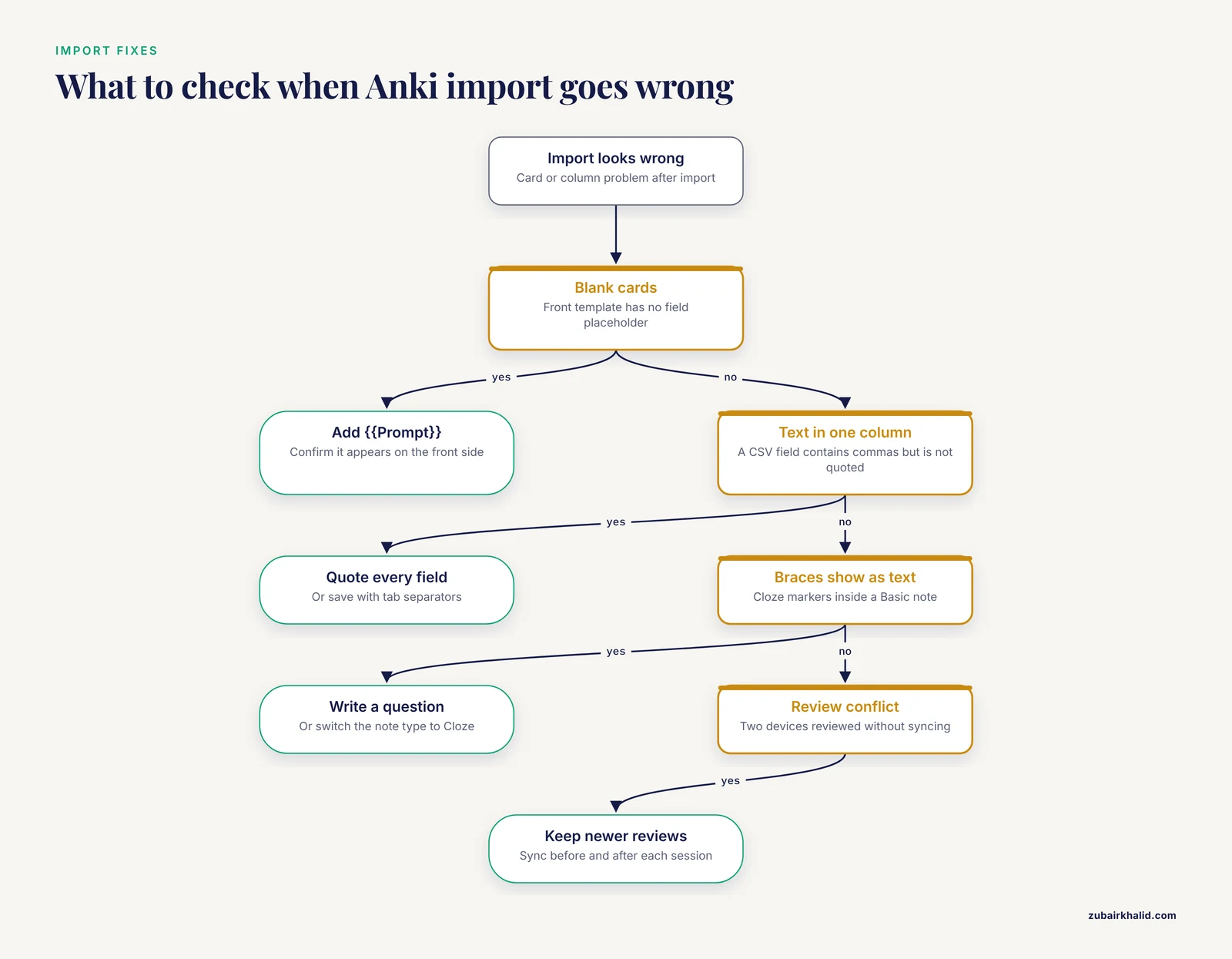
**Blank cards after import.** Anki only generates a card when the front template contains at least one field placeholder. If a note type's front template has none, Anki warns you that the card is empty and produces nothing. Fix by reopening the card template and confirming `{{Prompt}}` appears on the front side.
**All imported text lands in one column.** This happens when a CSV field contains commas but is not quoted, so the parser shifts the columns. Fix by quoting every field, as in the Step 3 example, or by saving the file with tab separators and telling Anki the delimiter during import.
**Literal cloze markers on cards.** If you write `{{c1::term}}` inside a Basic note type, the braces render as plain text on the card. Fix by changing the note type to Cloze, or by deleting the markers and writing an explicit question instead. Explicit questions are preferable here anyway, since open-ended retrieval is what the evidence supports [1].
**Review conflicts between two devices.** If you review on a laptop and a phone without syncing in between, the two copies of your progress diverge and Anki presents a conflict on the next sync. Fix by syncing before and after every session, and if a conflict does appear, choose the copy of your collection with more recent reviews rather than guessing.
**KeyError in the Python script.** If your markdown frontmatter lacks `review_count`, a dictionary lookup would raise `KeyError: 'review_count'`. The script above avoids this by using a regular expression with a default of 0, but if you modify it to parse the full frontmatter, keep a default for every field you read.
**Dates in the past pile up silently.** Plain-text scheduling has no alarm. If you run the script after a two-week trip and see a dozen notes with stale dates, do not shift all their dates forward. Review them now, grade honestly, and reset only the ones you actually failed.
## How to Check the System Is Working
Anki's statistics screen reports your true retention rate, meaning the percentage of review cards you answered correctly when they came due. Check it monthly. A retention rate near 100 percent means you are reviewing too often for the value you get, so increase the ease or lengthen the learning steps. A rate far below that means intervals have grown too fast, so lower the ease factor and let failed cards re-enter the ladder at 1 day.
For the plain-text system, track the same thing manually: each month, count how many prompts you answered before flipping the note and divide by the total reviewed. Also watch your manuscript drafts. The real success measure is whether methods, limitations, and results from papers you read months ago appear in your writing without a fresh trip to the PDF.
## Common Mistakes and Limitations
**Copying sentences into cards.** Re-reading produces familiarity, not recall. The false-familiarity problem documented in pharmacy students applies to note review just as it applies to exam preparation [2]. Every retrieval prompt must be a question you answer from memory.
**Card-ifying everything.** Spaced repetition works best for itemized knowledge in high-volume areas such as medicine, languages, and computer science [6]. Your literature notes contain items that resist decomposition, like the logic of a rival lab's argument or the trajectory of a debate. Those belong in permanent notes and prose, reviewed by writing, not by flashcards. Convert facts, definitions, methods, and quantitative results into prompts. Leave synthesis to synthesis.
**Setting up more than you will sustain.** The documented weakness of spaced repetition tools is adherence. Learners can benefit even when they do not enjoy the tool, but the benefit tracks days actually used. Ten prompts per day, kept up for a year, beats fifty prompts per day abandoned in a month.
**Treating interest as the outcome.** In the organic chemistry study, spaced repetition improved performance and retention even though student interest scores matched the lecture group [4]. Do not expect the system to feel engaging. Expect it to make papers you read in January available in June.
**Letting the first review slip.** The concentration of forgetting in the earliest period means the first scheduled review carries disproportionate weight. Protect the day-one review even on busy weeks and let later reviews slide instead.
**Expecting the schedule to replace understanding.** A prompt you cannot answer without re-reading the whole paper means the literature note itself is unfinished. Go back to Step 1 and write the core claim in your own words before scheduling anything.
One final limitation: results vary by material, person, and schedule, and the studies cited here measured coursework performance and word learning rather than research productivity directly. Treat the template as a well-supported starting point and tune your intervals based on your own retention data.
## Frequently Asked Questions
### What is a spaced repetition research notes template?
It is a fixed note format with fields for a paper's citation, a one-sentence claim, key evidence, and question-answer retrieval prompts, plus metadata that schedules the note for review at growing intervals. The version in this article is a markdown file with frontmatter, usable directly or through Anki.
### Can I use spaced repetition for research notes without any software?
Yes. Use the markdown template with the printed interval ladder, increment `review_count` after each successful recall, and write the computed date into `next_review`. A simple calendar reminder per note works too, though the ladder grows past a calendar's natural recurring options after the one-month mark.
### What intervals should I start with?
Start with 1, 3, 7, 14, 30, 60, and 120 days, with the first review within 24 hours of taking the note. If you want the cautious schedule validated in the password-recall study, use a 12-hour first review and multiply each interval by 1.5 thereafter.
### Should I make a card for every paragraph of a paper?
No. Two to six retrieval prompts per paper is enough. Distill the core claim and the evidence you would actually cite, and leave the rest in the prose literature note. Excessive cards are the most common reason researchers abandon the system.
### How much time does daily review take?
Very little at moderate scale. A controlled study found that roughly three minutes per day of computer-based spaced repetition practice tripled long-term retention compared with no scheduled review, and a ten-to-fifteen-minute daily session comfortably handles a few hundred active cards.
### Does this work for qualitative research notes?
Partly. Facts, coding schemes, participant quotes with attribution, and method details turn into good prompts. Interpretive arguments and thematic connections do not, so keep those in permanent notes and review them by writing summaries from memory rather than by flashcard.
### Why use Anki instead of a spreadsheet?
Anki automates the scheduling, applies an ease factor per card, and reports your true retention rate. A spreadsheet gives you full control and no lock-in but requires manual date updates after every review. The Python script in this article is the middle path, automated but plain-text.
### How do I keep literature notes and flashcards from getting confused?
Keep them in one file but different sections. The literature note holds the claim, evidence, and connections. Only the retrieval prompts section becomes flashcards, and each card carries the note's citation key in its `Cite` field so a weak answer always traces back to the full note and the original source.
## Sources
1. [Harnessing the power of spaced repetition learning and active recall for trainee education in otolaryngology.](https://pubmed.ncbi.nlm.nih.gov/35581105/)
2. [Spaced repetition and active recall improves academic performance among pharmacy students.](https://pubmed.ncbi.nlm.nih.gov/41135423/)
3. [Effectiveness of spaced repetition for clinical problem solving amongst undergraduate medical students studying paediatrics in Pakistan](https://pubmed.ncbi.nlm.nih.gov/38890623/)
4. [Effect of Spaced Repetition Instructional Strategy on Students’ Interest, Performance and Retention in Organic Chemistry among Senior Secondary School Students in Plateau State](https://doi.org/10.15580/gjer.2026.1.071326119)
5. [The effectiveness of computer-based spaced repetition in foreign language vocabulary instruction: a double-blind study](https://doi.org/10.1558/CJ.V33I3.26055)
6. [Modeling Spaced Repetition with LSTMs](https://doi.org/10.5220/0011724000003470)
7. [Spaced repetition for authentic mobile-assisted word learning: nature, learner perceptions, and factors leading to positive perceptions](https://doi.org/10.1080/09588221.2021.1888752)
8. [Enhancing L2 learning through a mobile assisted spaced-repetition tool: an effective but bitter pill?](https://doi.org/10.1080/09588221.2018.1552975)
9. [Rancang Bangun Spaced Repetition Software untuk Menghafal Huruf Jepang Menggunakan Algoritma Supermemo 2 Berbasis IOS](https://doi.org/10.31937/SI.V9I1.846)
10. [Spaced Repetition and Mnemonics Enable Recall of Multiple Strong Passwords](https://doi.org/10.14722/ndss.2015.23094)
11. [Integrating Spaced Repetition and Required Metacognitive Self-Assessment in a Contracts Course](https://doi.org/10.2139/ssrn.3902814)
12. [The time between tasks in task repetition research: A systematic review](https://doi.org/10.1177/13621688251323047)