# Ensembl BioMart for Gene Families
By the end of this article you will be able to build a complete ortholog table for any gene family in Ensembl, for example the human globin genes across mouse and zebrafish, and export it as a clean TSV file you can load into R, Python, or a spreadsheet. You will learn three ways to run the same export: the Ensembl BioMart web interface, the biomaRt package in R, and the BioMart REST service from the command line or a script. You will also learn how to cross-check the export in the [Ensembl genome browser](/blog/guides/ensembl-genome-browser), which filters and attributes actually matter, which errors you are likely to hit and how to fix them, and where the limits of orthology prediction lie.
What you need on hand depends on the route you pick:
- A web browser, for the web interface route at https://www.ensembl.org/biomart
- R 4.x or newer with the biomaRt package from Bioconductor, for the scripted route
- Python 3 or curl, for the REST route
- A list of gene identifiers for your family of interest, for example HGNC symbols or Ensembl stable gene IDs, one per line
- The Ensembl release number you intend to use, because orthology calls can change between releases
## What Ensembl BioMart gives you for gene families
### Orthology in Ensembl comes from Compara gene trees
A gene family is a set of genes that descend from a common ancestral gene through duplication and speciation events. Vertebrate protein-coding genes are organized into many such families, and two rounds of whole-genome duplication contributed heavily to the families present in modern vertebrates [1]. An ortholog is a pair of genes in different species that separated by speciation, while a paralog is a pair of genes separated by a duplication event. Getting that distinction right is the whole point of an orthologs export, because orthology is the usual bridge for transferring annotations between species.
Inside Ensembl, these relationships are computed by Ensembl Compara, which builds gene trees across all species in the release and labels each pair of genes with a homology type. BioMart is the query interface over that database. You pick a reference dataset, apply filters, select attributes, and BioMart returns a table. When you query orthologs, each output row is one relationship between a gene in your reference species and a homolog in a target species.
A benchmark study of seven orthology databases, including Ensembl Compara, found generally high specificity of orthology assignments for well-conserved protein families, but also concluded that no database provides a fully correct and comprehensive protein classification, and that most differences between databases trace back to their underlying concepts rather than to the prediction algorithms themselves [2]. Two practical consequences follow for anyone using Ensembl BioMart for gene families. First, Compara calls are trustworthy but not a gold standard, so spot-checking matters. Second, a second resource can disagree with Ensembl without either one being simply wrong, because the databases define orthology slightly differently [2].
### Homology types you can export
Compara assigns each cross-species relationship one of a small number of types. You will see these exact strings in your exports, so learn them now.
| Homology type | Meaning |
|--|--|
| ortholog_one2one | One gene in each species, split by speciation only |
| ortholog_one2many | One reference gene related to multiple genes in the target species |
| ortholog_many2many | Multiple genes on both sides of the split |
| between_species_paralog | Genes in different species whose last common ancestor event was a duplication |
| within_species_paralog | Duplicated genes inside a single species |
| gene_split | A single ancestral gene whose descendants appear as fragments |
| alt_allele | Alternative alleles or haplotypes of the same gene, not true homologs |
For a gene family analysis you will usually want all of these exported at once and then subsetted in your own code, because collapsing everything to one2one throws away the duplication history that defines the family.
## Walkthrough 1: ensembl biomart orthologs export in the web interface, step by step
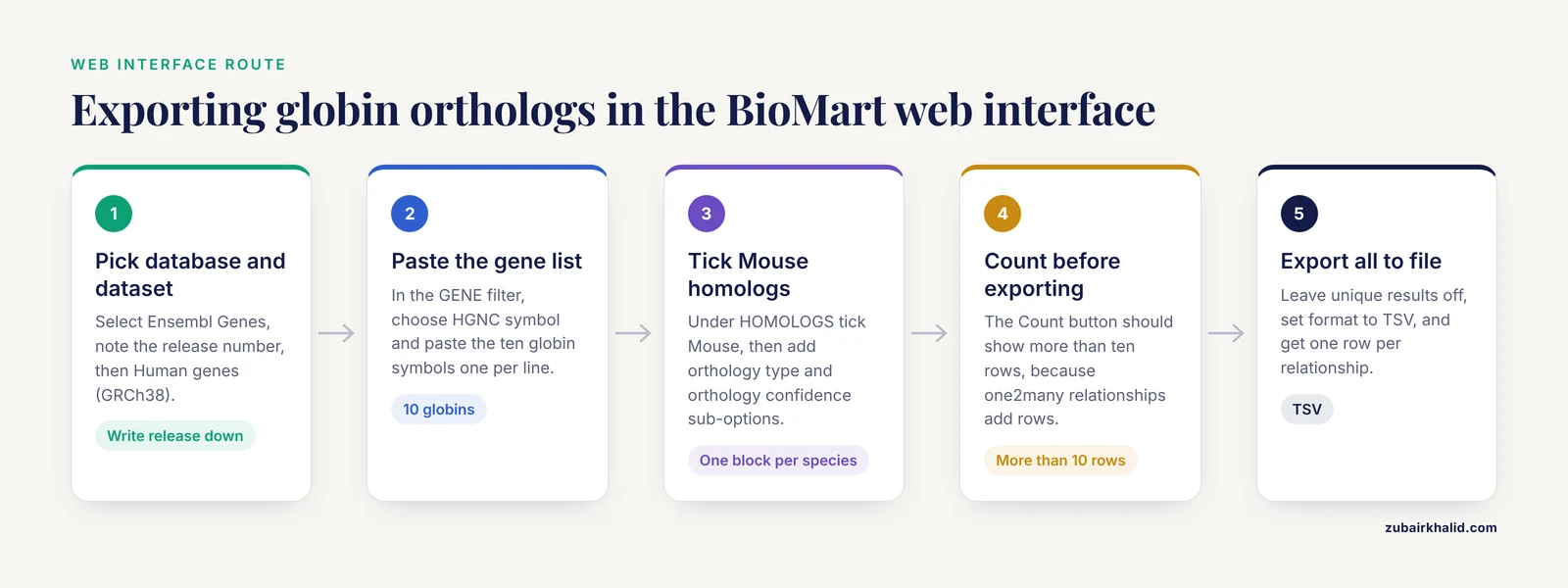
This route works in any browser and produces a TSV file directly. The worked example uses the human globin genes, a classic gene family, queried against mouse.
1. Open https://www.ensembl.org/biomart in your browser.
2. Under CHOOSE DATABASE, select Ensembl Genes. The label includes the current release number, for example Ensembl Genes followed by the release version. Write that number down, because you will need it to reproduce the export later.
3. Under CHOOSE DATASET, select Human genes (GRCh38). GRCh38 is the reference [human genome](/blog/guides/human-genome) assembly, and the suffix after it tracks patch updates to that assembly.
4. Open the Filters panel in the left sidebar. Expand the GENE section. In the ID list limit box, choose the identifier type from the dropdown, which offers options such as HGNC symbol, HGNC ID, and Ensembl Gene ID. Then paste your gene list, one identifier per line. For the globin family, paste this list of HGNC symbols:
```
HBA1
HBA2
HBZ
HBQ1
HBE1
HBM
HBB
HBD
HBG1
HBG2
```
5. Open the Attributes panel. Under GENE, keep Ensembl Gene ID checked and add HGNC symbol. Then find the HOMOLOGS section, which lists species checkboxes such as Mouse, Rat, and Zebrafish. Tick Mouse. Click the plus sign next to Mouse and tick the sub-options for orthology type and orthology confidence in addition to the default mouse gene stable ID and mouse gene name. Each species you tick adds a block of columns, not extra rows.
6. Click the Count button in the toolbar. With ten input genes you should see a row count greater than ten. That is expected and correct. HBB and HBA1 each sit inside expanded globin clusters, so some human globins relate to more than one mouse gene, and each relationship becomes its own row.
7. Click the Results button. Review the first ten rows in the preview window. Tick the unique-results option only if you deliberately want BioMart to collapse duplicate rows, which you usually do not want for ortholog tables because collapsing can discard real one2many relationships. Choose Export all to File with the format set to TSV and click Go. Your browser downloads a plain text file with one header line and one row per homology relationship.
The header of your file will look like this, with one block of columns per target species:
```
Gene stable ID HGNC symbol Mouse gene stable ID Mouse gene name Mouse orthology type Mouse orthology confidence
```
Values you see in the orthology type column are exactly the strings from the table above, for example ortholog_one2one or ortholog_one2many. Gene stable IDs look like ENSG00000244734 for human and ENSMUSG00000021111-style identifiers for mouse. The exact IDs in your file depend on the release you queried, so treat any specific ID you read elsewhere as release-specific and always re-export against the release you are working with.
## Walkthrough 2: ensembl biomart orthologs export in R with biomaRt
biomaRt is the Bioconductor client for BioMart servers. It runs the same queries as the web interface and returns a data frame, which makes it the right choice when you need to regenerate the export for new releases or fold it into a pipeline.
Install and connect:
```r
install.packages("BiocManager")
BiocManager::install("biomaRt")
library(biomaRt)
ensembl <- useEnsembl(biomart = "genes",
dataset = "hsapiens_gene_ensembl")
```
If you are unsure of the dataset string, search for it instead of guessing:
```r
searchDatasets(mart = useEnsembl("genes"), pattern = "mouse")
```
which returns rows whose dataset column contains values such as mmusculus_gene_ensembl.
Find the orthology attributes you want. The attribute names follow the pattern target species prefix, the word homolog, and the field name:
```r
grep("ortholog", listAttributes(ensembl)$name,
value = TRUE, ignore.case = TRUE)
```
You should see names including mmusculus_homolog_orthology_type and mmusculus_homolog_orthology_confidence among many others, one block per species.
Run the globin query:
```r
globins <- c("HBA1","HBA2","HBZ","HBQ1","HBE1",
"HBM","HBB","HBD","HBG1","HBG2")
orthologs <- getBM(
attributes = c("ensembl_gene_id",
"external_gene_name",
"mmusculus_homolog_ensembl_gene",
"mmusculus_homolog_associated_gene_name",
"mmusculus_homolog_orthology_type",
"mmusculus_homolog_orthology_confidence"),
filters = "hgnc_symbol",
values = globins,
mart = ensembl
)
nrow(orthologs)
head(orthologs)
```
Your output is a data frame with one row per relationship. An illustrative subset looks like this, with exact IDs varying by release:
| ensembl_gene_id | external_gene_name | mmusculus_homolog_ensembl_gene | mmusculus_homolog_associated_gene_name | mmusculus_homolog_orthology_type | mmusculus_homolog_orthology_confidence |
|--|--|--|--|--|--|
| ENSG00000244734 | HBB | ENSMUSG00000021111 | Hbb-bt | ortholog_one2one | 1 |
| ENSG00000106538 | HBA1 | ENSMUSG00000039282 | Hba-a3 | ortholog_one2many | 1 |
| ENSG00000206172 | HBA2 | ENSMUSG00000068372 | Hba-a2 | ortholog_one2one | 1 |
Subset to the strict relationships you want, which for most comparative analyses means one2one orthologs with high confidence:
```r
strict_one2one <- subset(orthologs,
mmusculus_homolog_orthology_type == "ortholog_one2one" &
mmusculus_homolog_orthology_confidence == "1")
nrow(strict_one2one)
write.table(strict_one2one, "globin_human_mouse_one2one.tsv",
sep = "\t", quote = FALSE, row.names = FALSE)
```
The confidence column encodes two categories, a confident category recorded as 1 and a low-confidence category recorded as D for dubious. Keeping only confident calls is the single most effective quality filter you can apply to a Compara export.
To query several target species, add one attribute block per species. Each block multiplies the columns and, when any target species has a one2many or many2many relationship, produces additional rows:
```r
orthologs_multi <- getBM(
attributes = c("ensembl_gene_id", "external_gene_name",
"mmusculus_homolog_ensembl_gene",
"mmusculus_homolog_orthology_type",
"drerio_homolog_ensembl_gene",
"drerio_homolog_orthology_type"),
filters = "hgnc_symbol",
values = globins,
mart = ensembl
)
```
Two habits make scripted exports reproducible. First, pin the release. biomaRt can connect to a specific archived release through the version argument, for example useEnsembl(biomart = "genes", dataset = "hsapiens_gene_ensembl", version = 105), so a rerun next year hits the same gene trees. Second, record the release in your output. Add a column or write a small metadata file alongside the TSV stating the mart, dataset, release, and date, because the orthology calls in a file with no release label cannot be audited later.
## Walkthrough 3: ensembl biomart orthologs export from the command line
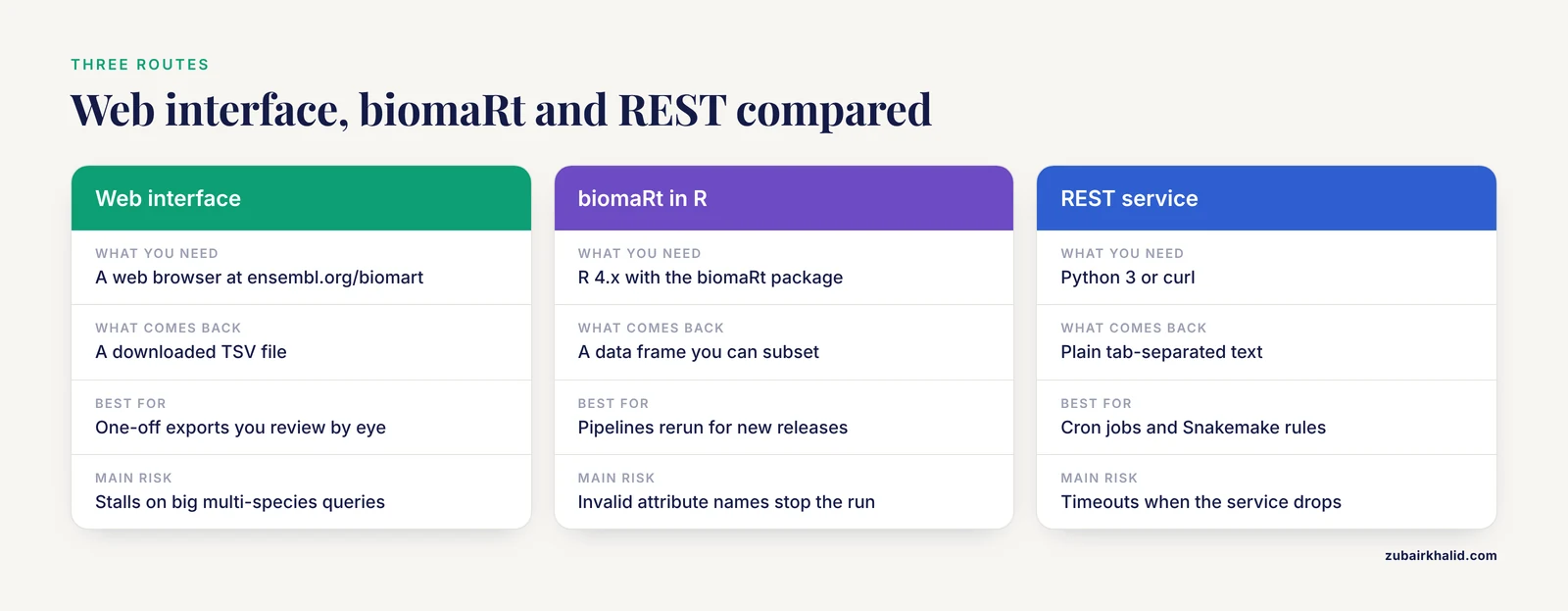
The BioMart REST service accepts the same query as a URL-encoded XML document and returns plain text, which suits Cron jobs, Snakemake rules, and any language with an HTTP client. A complete Python 3 example:
```python
import urllib.parse
import urllib.request
query = '''
'''
url = "https://www.ensembl.org/biomart/martservice"
data = urllib.parse.urlencode({"query": query}).encode("utf-8")
print(urllib.request.urlopen(url, data = data).read().decode("utf-8"))
```
The XML mirrors the web interface exactly. The Dataset element names the reference dataset. Each Filter element is one constraint, and multiple identifiers inside a single value string separated by commas act as a list. Each Attribute element is one output column. Setting header to 1 prints a header line, and setting uniqueRows to 0 preserves every relationship including duplicate-looking one2many rows.
The output is tab-separated text:
```
Gene stable ID HGNC symbol Mouse gene stable ID Mouse orthology type
ENSG00000244734 HBB ENSMUSG00000021111 ortholog_one2one
```
If you prefer a zero-code check, the same query structure works through the BioMart Perl API, and for very large exports the bulk route in the tips section below is faster than any per-query approach.
## Parameters that matter
| Setting | biomaRt name | Web interface control | What it controls | Recommended use |
|--|--|--|--|--|
| Reference dataset | hsapiens_gene_ensembl | CHOOSE DATASET, Human genes (GRCh38) | The species your family is defined in | Set once per query |
| Gene list filter | hgnc_symbol or ensembl_gene_id | GENE section, ID list limit box | Which genes enter the query | Paste one ID per line, comma-separated in REST |
| Ortholog presence filter | with_mmusculus_homolog | Homolog filters | Restricts to genes with at least one target homolog | Use when you want to drop reference-only genes |
| Orthology type | mmusculus_homolog_orthology_type | HOMOLOGS plus menu, orthology type | Which homology classes appear | Export all types, subset afterward |
| Confidence | mmusculus_homolog_orthology_confidence | HOMOLOGS plus menu, orthology confidence | Confident versus dubious calls | Keep confident calls for downstream analysis |
| Unique rows | uniqueRows = 0 | Unique results checkbox | Whether BioMart deduplicates rows | Leave off for orthology tables |
| Release pin | useEnsembl(version = 105) | Use the archived site URL for that release | Which gene tree build answers the query | Pin in every reproducible pipeline |
The distinction between filters and attributes is the core mental model of how to use Ensembl BioMart. Filters decide which genes are allowed into the query. Attributes decide which columns come out. An orthology query therefore needs at minimum one identifier filter, the reference gene attributes, and one homolog attribute block per target species.
## Ensembl biomart orthologs export tips for gene family projects
Split by target species rather than asking for everything at once. A single query with twenty homolog blocks is slow and prone to timeouts, and one species per query gives you small files you can assemble later with a join on the reference gene ID. This also keeps row counts interpretable per species.
Use archived releases when a paper or pipeline depends on a specific call set. Ensembl publishes archived BioMart sites on subdomains such as dec2022.archive.ensembl.org, and biomaRt reaches the same archives through the version argument shown above. Gene trees are rebuilt at every release, so an orthology relationship exported today can change type or disappear in the next release. Recording the release number is the only way to make that visible to whoever reads your table later.
For very large families or whole-genome orthology tables, skip per-gene queries entirely. Ensembl publishes bulk homology TSV files for every release in the homologies folder under the ensembl-compara directory on the Ensembl FTP site. Download once, filter locally, and your export step stops depending on web service uptime.
Treat absence of orthologs as data. Genes that lack any ortholog in the species you queried are not BioMart failures. A study of vertebrate gene families that used the Ensembl and BioMart pipeline to classify protein-coding genes across species documented genes called singletons, the last representatives of their ancestral families with no ortholog in any other species, and showed that such singletons are more vulnerable to evolutionary loss than duplicated genes, with contractions in vertebrate gene families more prevalent than expansions [1]. A blank ortholog column for HBM-like genes in a given species can therefore be a real biological observation about that family, not a bug in your filter.
Cross-check a sample of your export against the gene trees themselves. BioMart returns flattened calls, while Compara derives those calls from explicit gene trees. Spot-checking a handful of rows against the trees, described in the next section, catches attribute mix-ups, wrong-species blocks, and release mismatches faster than any amount of re-reading the TSV. Because benchmark work has shown that database-level differences in orthology resources stem from their underlying concepts [2], a sample-based cross-check against the primary gene trees is also the cheapest way to confirm you are interpreting the exported type labels the way Compara intended.
## Checking your export in the Ensembl genome browser
The genome browser at ensembl.org is the fastest way to sanity-check a BioMart orthologs export, and this short ensembl genome browser routine takes under a minute per gene.
1. Type a gene name such as HBB into the search box on ensembl.org and open the gene page.
2. On the gene tab, find the Gene tree image in the left menu. This is the Compara gene tree from which the homology calls are derived. Genes from other species appear on the tree, and the branching pattern shows you directly whether the relationship is one2one or part of a larger cluster.
3. Open the Orthologues view on the same gene page. It lists orthologs per species together with the orthology type and confidence, which is exactly the same information your BioMart export carries, presented one gene at a time.
4. Compare two or three rows of your TSV against that list. If a row you exported as ortholog_one2one appears in the browser as one of several mouse orthologs, you have almost certainly queried a different release or attached the wrong species block in your attributes.
This check also teaches the structure of the underlying data, which matters when you later need to explain to a collaborator why one HBA gene has three mouse partners while its neighbor has one.
## Common Mistakes and Limitations
These are the errors that account for most failed or misleading ensembl biomart orthologs exports, with the exact symptom you will see and the fix.
**Typo in an attribute or filter name.** biomaRt stops with an error beginning with Invalid attribute(s), naming the string you passed. Homology attribute names embed the species prefix, so mmusculus_homolog_orthology_type is valid while mouse_homolog_orthology_type is not. Fix it by listing names with listAttributes or searchAttributes rather than retyping from memory.
**Wrong mart for the species.** Species outside the main vertebrate set live on separate Ensembl Genomes sites, for example plants at plants.ensembl.org. Querying hsapiens_gene_ensembl on the main mart works, but Arabidopsis does not exist there. Use useEnsembl(biomart = "plants") in biomaRt or select the corresponding database in the web interface.
**Query timeouts on large exports.** biomaRt reports Request to BioMart web service failed when the service drops the connection, and the web interface can stall on big multi-species queries. The fix is the same in both cases: split the query by target species or by chromosome, or switch to the bulk homology files on the Ensembl FTP site.
**Row explosion misread as duplication of your work.** Ten input genes can return thirty rows. Each one2many and many2many relationship adds a row, so a globin query against mouse legitimately produces more rows than genes. If you want one row per reference gene, you must decide yourself how to collapse, for example keeping only one2one rows or listing multiple partners in one cell.
**Blank cells treated as errors.** An empty ortholog column means Compara found no homolog of that gene in the target species. As noted above, singleton genes with no ortholog anywhere are a documented feature of vertebrate gene family evolution [1]. Verify one such gene in the gene tree before you delete its rows.
**Mixed releases.** Exporting the gene list from one release and the orthology calls from another produces subtle nonsense, because stable IDs can be remapped and trees are rebuilt each release. Pin the release on both steps, using archived BioMart sites when needed.
**Confusing orthology with functional equivalence.** An ortholog_one2one label means the two genes descend from the same ancestral gene that existed before the species split. It does not promise identical function, expression, or regulation. Benchmark work across orthology databases supports using these calls as high-specificity starting points while checking well-conserved families against reference phylogenies when the stakes are high [2].
**Importing dubious calls without the confidence column.** If you never export mmusculus_homolog_orthology_confidence, you cannot separate confident calls from low-confidence ones downstream. Export it every time, then filter in your own code.
**Collapsing duplicates in the web interface.** Ticking the unique-results option before exporting can merge rows that represent distinct homology relationships. Leave it off for orthology tables.
**Filter list formatting.** The ID list filter expects one identifier per line in the web interface and comma separation in the REST query. Trailing spaces and mixed identifier types silently reduce your result set, so count your inputs, run the Count button, and reconcile the numbers before exporting.
A final limitation belongs at the level of the field rather than the workflow. Orthology prediction is a comparative judgment that depends on species coverage, gene tree quality, and the definitions each resource chooses, and published comparisons of major databases demonstrate that no single resource is complete and fully correct [2]. For a gene family project, that argues for exporting Compara confidence values, spot-checking gene trees, and documenting the release, rather than treating the exported type labels as immutable ground truth.
## Frequently Asked Questions
### What is the difference between an ortholog and a paralog in Ensembl BioMart?
Orthologs are genes in different species separated by speciation, while paralogs are genes separated by duplication, and the exported orthology_type column records which case applies, including one2one, one2many, many2many, and between_species_paralog labels.
### Why does my orthologs export have more rows than genes?
Each row is one relationship, so a gene with several homologs in the target species contributes several rows, which is normal for expanded families and not a sign that the query went wrong.
### How can I export orthologs for dozens of species at once?
Add a homolog attribute block per species in one query for small jobs, but for dozens of species download the bulk homology TSV files from the Ensembl FTP site and filter them locally.
### Should I filter orthologs on homology confidence?
Yes for most analyses, because the confidence column separates confident calls from dubious ones and keeping only confident calls removes the noisiest relationships, though you should retain the full table before filtering so the removed calls remain auditable.
### Why are some ortholog fields blank in my export?
A blank field means Compara found no homolog of that gene in the target species, which for singleton genes is a genuine biological result rather than a query error.
### How do I reproduce the same export in a later Ensembl release?
Pin the release by using an archived BioMart site or the version argument in biomaRt, and record the release number with every exported file, because gene trees are rebuilt each release and orthology calls can change.
### Is the BioMart web interface the only way to get Ensembl orthology data?
No, the same queries run through biomaRt in R, the BioMart REST service with an XML query, the BioMart Perl API, and bulk homology files published on the Ensembl FTP site each release.
### Do different orthology databases agree with each other?
Not completely, and benchmarking of major orthology databases has shown that most disagreements stem from different underlying database concepts rather than from the prediction methods, so comparing more than one resource is reasonable for critical claims.
## Sources
1. [Gone with the Species: From Gene Loss to Gene Extinction.](https://pubmed.ncbi.nlm.nih.gov/39736015/)
2. [Conceptual framework and pilot study to benchmark phylogenomic databases based on reference gene trees.](https://pubmed.ncbi.nlm.nih.gov/21737420/)