# How to Export Gene Expression Data from Ensembl BioMart
By the end of this guide you will be able to export a clean, reproducible gene annotation table or a cross-species ortholog table from Ensembl BioMart, attach it to your RNA-seq or microarray expression matrix, and verify that the export is correct. You need a modern web browser for the web workflow, and optionally R (version 4.0 or later) with the Bioconductor package biomaRt for the programmatic workflow. No other software is required.
One clarification before the walkthrough. BioMart does not store expression values themselves. It stores the annotation layer around them: gene identifiers, genomic coordinates, biotypes, orthologs, and microarray probe mappings. Your expression values come from your own quantification step, for example aligning reads against an Ensembl gene index with Salmon and testing for differential expression with DESeq2. Exporting [gene expression](/blog/guides/gene-expression) data from Ensembl BioMart therefore means exporting the identifier maps, probe annotations, and ortholog tables that you join to those counts so the numbers become interpretable and comparable across species and platforms.
## What BioMart Is and What It Can Export
BioMart is an open-source data-mining framework that presents large biological databases as a uniform pair of choices: filters, which select the rows you want, and attributes, which select the columns you want. The same query model works through a web form and through a web service, which is why the Ensembl website and the biomaRt R package can run identical queries [1]. Ensembl integrates BioMart directly into its site, and the framework has a long record of connecting independent resources. The Pancreatic Expression Database was the first cancer database designed on BioMart infrastructure, built on the BioMart 0.7 framework to combine genomic, proteomic, miRNA, and gene expression profiles with annotations from federated BioMart resources such as Ensembl and Reactome [2]. A federated query is a single query that reaches across several databases at once. PRIDE, the proteomics repository, likewise supports federated BioMart queries that join peptide identifications with Ensembl, Reactome, and UniProt records [3].
For expression work, the attributes you will actually export fall into five groups:
1. Identifiers: Ensembl gene, transcript, and protein stable IDs, HGNC symbols, and cross-references to RefSeq and UniProt.
2. Coordinates: chromosome, start position, end position, strand, and the assembly version such as GRCh38 for human.
3. Biotype: Ensembl's classification of each feature, for example protein_coding, lncRNA, miRNA, or pseudogene.
4. Homology: orthologs and paralogs in other species, with the orthology type and a confidence score.
5. Microarray probe mappings: probesets from the major array manufacturers mapped to current Ensembl genes [4].
A note on vocabulary, since these terms appear throughout the walkthrough. An ortholog is a gene in another species that descended from a common ancestral gene. A paralog is a duplicated copy within the same species. A stable ID is the permanent Ensembl identifier, for example ENSG00000141510 for the human TP53 gene. A probe or probeset is a short DNA sequence immobilized on a microarray that reports the abundance of the transcript it matches. A release is a numbered, dated snapshot of the entire Ensembl database.
## Choose Your Interface: Website, biomaRt, or the Raw Web Service
Ensembl runs BioMart at https://www.ensembl.org/biomart, with geographic mirrors at uswest.ensembl.org and useast.ensembl.org that serve the same data when the main site is busy. A mirror is an identical copy of the site on different hardware. The website suits one-off exports and exploration. The biomaRt package from Bioconductor suits repeatable, scripted exports and large queries, and it talks to the same BioMart service that the website uses [1]. The raw web service suits scheduled or automated jobs: you save the query as XML from the website and replay it with any HTTP client. All three routes run the same query engine, so every filter and attribute name you learn on the website transfers directly to R.
## Exporting Gene Expression Data from Ensembl BioMart on the Web (Step by Step)
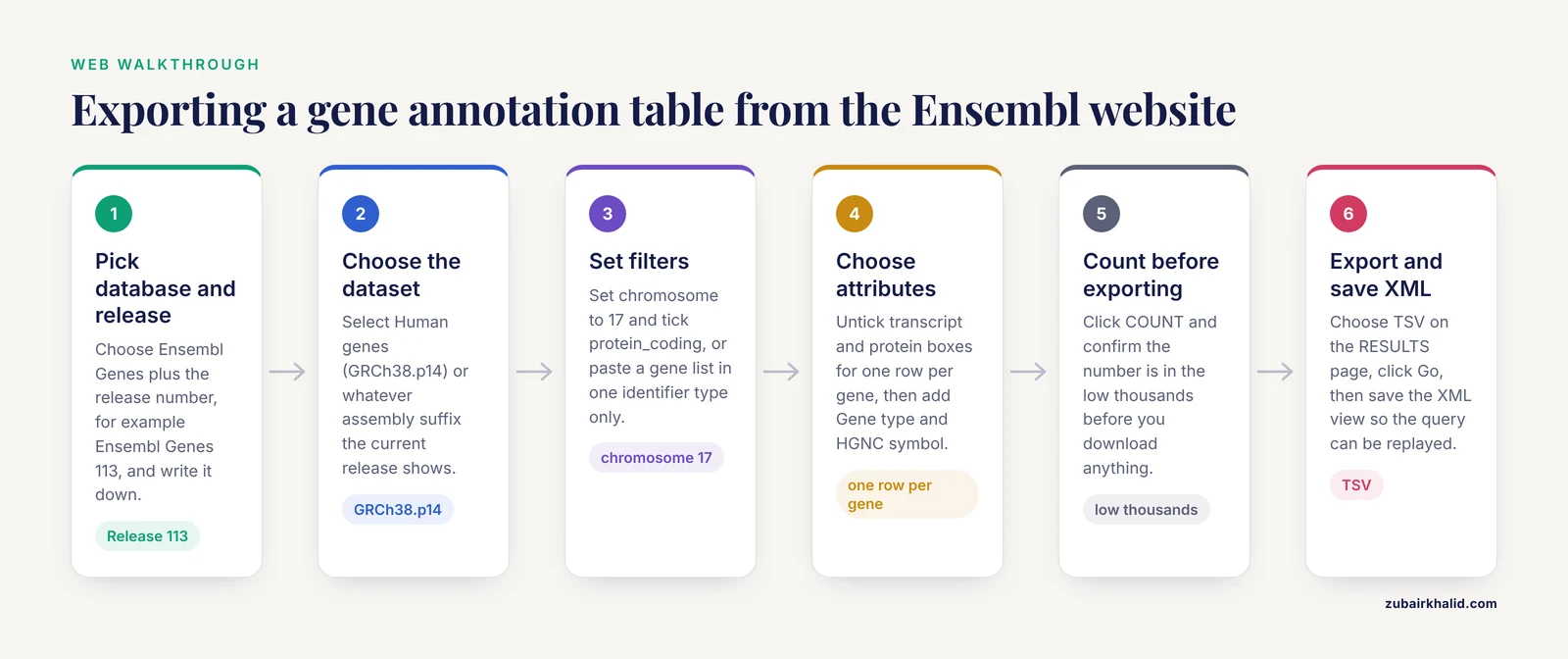
The worked example exports all protein-coding genes on human chromosome 17 with coordinates and HGNC symbols, the annotation table you would join to a chromosome 17 expression matrix.
1. **Open BioMart and choose the database.** Go to https://www.ensembl.org/biomart. Under CHOOSE DATABASE, pick "Ensembl Genes" followed by the release number, for example Ensembl Genes 113. Write the release number down. Ensembl publishes a new release roughly every three months, and the release determines the exact gene set you get.
2. **Choose the dataset.** Under CHOOSE DATASET, pick "Human genes (GRCh38.p14)" or whatever assembly suffix the current release shows. The assembly matters if you will join coordinates to a BAM or VCF file later, because coordinates differ between assemblies.
3. **Set filters.** Click FILTERS in the left panel and expand the GENE section. For this example, set the region chromosome to 17. Open "Gene type" and tick protein_coding. To filter by a gene list instead, paste your identifiers into the "Gene ID(s)" box and pick the matching identifier type in the dropdown beside it. Keep one identifier type per filter, because mixing Ensembl IDs and gene symbols in the same box returns zero rows.
4. **Choose attributes.** Click ATTRIBUTES in the left panel and expand GENE. The default selection includes Gene stable ID, Transcript stable ID, and Protein stable ID, which produces one row per transcript. For a gene-level table, untick the transcript and protein boxes and tick Gene type, Gene start (bp), and Gene end (bp). Expand EXTERNAL and tick HGNC symbol(s). The attribute sections to know are GENE (identifiers and coordinates), EXTERNAL (cross-references, GO terms, and microarray probe IDs), SEQUENCE (cDNA, coding sequence, peptide), and the per-species ortholog sections described later.
5. **Count.** Click COUNT in the left panel. This filter combination should return a number in the low thousands. Counting before exporting catches over-broad filters early.
6. **Preview and export.** Click RESULTS. The page shows a preview of the first rows. Below the preview, choose TSV (tab-separated values) in the Format dropdown, leave "Compress with gzip" unticked for small files, and click Go.
The exported file should look like this, abbreviated:
```
Ensembl Gene ID HGNC symbol Gene type Gene start (bp) Gene end (bp)
ENSG00000141510 TP53 protein_coding 7668421 7687550
ENSG00000012048 BRCA1 protein_coding 43044295 43125482
```
7. **Save the query for reuse.** On the RESULTS page, open the XML view. It contains the complete query in a form you can replay:
```xml
```
Replay it from the command line against the martservice endpoint:
```
printf 'query=' > post_body.txt
cat query.xml >> post_body.txt
curl -d @post_body.txt -o chr17_genes.tsv http://www.ensembl.org/biomart/martservice
```
8. **Load and check in R.**
```r
genes <- read.delim("chr17_genes.tsv", header = TRUE, sep = "\t",
quote = "", check.names = FALSE, stringsAsFactors = FALSE)
nrow(genes)
head(genes)
```
**The parameters that matter.** Filters select rows, attributes select columns, and every additional attribute that describes a one-to-many relationship (transcripts, probes, GO terms, orthologs) multiplies rows. The uniqueRows flag in the saved XML, and the uniqueRows argument in biomaRt, collapse exact duplicate rows. The gzip checkbox compresses large exports. Choose the format deliberately:
| Format | Use it when | Caveats |
|, - |, - |, - |
| TSV | Loading into R, Python, or command-line tools | Cleanest option for read.delim or pandas |
| CSV | Spreadsheet import | Excel can corrupt gene symbols, use the text import wizard |
| XLS | Excel-native workflows | Same autocorrection risk as CSV |
| HTML | Quick visual review | Not machine-readable |
## Exporting Microarray Probe-to-Gene Mappings
Ensembl maintains a consistent microarray annotation protocol across the major array manufacturers, keeps the mappings updated against the latest Ensembl Gene predictions, cross-references them with external database identifiers, and exposes the result through the genome browser, the Ensembl API, BioMart, and biomaRt [4]. That makes BioMart a dependable way to convert a probe-level expression table into a gene-level one.
The workflow mirrors the walkthrough above. Set your filters (paste your probeset IDs if you have a list, or leave filters empty to export the whole platform mapping). On the ATTRIBUTES page, scroll to the microarray subsections, which are named after the arrays themselves, for example an Affymetrix whole-genome array, and tick the probe ID attribute for your platform. Add Gene stable ID and HGNC symbol from the GENE and EXTERNAL sections. Export as TSV.
In biomaRt, find the exact attribute name by searching the attribute table for your platform:
```r
library(biomaRt)
ensembl <- useEnsembl(biomart = "genes", dataset = "hsapiens_gene_ensembl")
attrs <- listAttributes(ensembl)
grep("u133", attrs$description, ignore.case = TRUE, value = TRUE)
```
Then run getBM with that probe attribute alongside ensembl_gene_id and hgnc_symbol. Expect more rows than the array has probesets, because one probe can match several genes and one gene can be hit by several probes. Decide your collapse rule, for example keeping the probe with the highest mean expression across your samples, before you join the annotation to the intensity matrix.
## Exporting Orthologs for Cross-Species Expression Comparisons
Most annotation resources and pharmacotranscriptomic databases assume human gene identifiers, so expression data from mouse, rat, zebrafish, pig, or macaque models need ortholog conversion before reuse. OrthologAL, a Shiny application for humanizing non-human high-dimensional expression data, interfaces with BioMart to access Ensembl gene sets and convert Seurat objects (the standard R data structure for single-cell experiments) to human orthologs without custom code [5]. Doing the same conversion by hand starts with a BioMart export.
**Web walkthrough for mouse to human:**
1. Choose the Mouse genes dataset (GRCm39 assembly) under Ensembl Genes.
2. On the ATTRIBUTES page, expand the ORTHOLOGS section and find the Human subsection. Tick "Human ortholog gene stable ID", "Human ortholog associated gene name", "Human orthology type", and "Human orthology confidence [0 low, 1 high]". Keep your own Gene stable ID ticked in the GENE section.
3. Optionally, in FILTERS, require a human ortholog or restrict to specific orthology types such as one2one.
4. Click COUNT, then RESULTS, then export as TSV.
Expected content, abbreviated:
```
Gene stable ID Gene name Human ortholog gene stable ID Human ortholog associated gene name Human orthology type Human orthology confidence
ENSMUSG00000059552 Trp53 ENSG00000141510 TP53 ortholog_one2one 1
```
Keep the confidence column. A value of 1 marks high-confidence orthologs and 0 marks low-confidence calls, and types such as ortholog_many2many fan one gene out to several partners, which will inflate an expression matrix if you ignore them.
Published studies show the scale of this workflow. An Ensembl BioMart comparison of the zebrafish and mouse genomes produced 17,498 orthologs that were merged with RNA-seq datasets of inner ear supporting cells and hair cells, yielding 11,752 orthologs expressed in zebrafish non-sensory supporting cells, over 10,000 expressed in mouse pillar and Deiters' cells, 306 downregulated and 314 upregulated differentially expressed genes common to both species, and over 1,500 genes uniquely upregulated in zebrafish supporting cells [6]. A human and macaque brain study pulled orthologs with the biomaRt package from the BioMart Ensembl website to align RNA-seq datasets from 16 human and 14 macaque brain regions [7]. A swine pressure-overload study mapped transcripts to the Ensembl Sscrofa 11.1 gene index with Salmon, tested differential expression with DESeq2, and used BioMart to map genes to their human homologs [8]. And a myopia meta-analysis used Ensembl's BioMart to identify human orthologs for differentially expressed genes and proteins from animal models, then tested their overlap with protein-coding genes within 1 Mb, 500 kb, and 250 kb of human GWAS loci, reporting odds ratios of 1.56 at 1 Mb (P = 0.025), 1.92 at 500 kb, 2.33 at 250 kb, and 4.12 for late myopia genes [9].
**The same export in biomaRt** uses getLDS, the linked-data-service function that queries two marts in one call:
```r
library(biomaRt)
mouse <- useEnsembl(biomart = "genes", dataset = "mmusculus_gene_ensembl")
human <- useEnsembl(biomart = "genes", dataset = "hsapiens_gene_ensembl")
ortho <- getLDS(
attributes = c("ensembl_gene_id", "external_gene_name"),
filters = "ensembl_gene_id",
values = c("ENSMUSG00000059552", "ENSMUSG00000026285"),
mart = mouse,
attributesL = c("ensembl_gene_id", "hgnc_symbol",
"mmusculus_homolog_orthology_type",
"mmusculus_homolog_orthology_confidence"),
martL = human,
uniqueRows = TRUE
)
head(ortho)
```
Expected output shape (column names are mangled when duplicated, for example Gene.stable.ID.1):
```
Gene.stable.ID external_gene_name Gene.stable.ID.1 hgnc_symbol mmusculus_homolog_orthology_confidence
1 ENSMUSG00000059552 Trp53 ENSG00000141510 TP53 1
```
A simpler alternative for whole-table exports is to query the human mart directly with getBM and the attributes ensembl_gene_id, mmusculus_homolog_ensembl_gene, mmusculus_homolog_associated_gene_name, mmusculus_homolog_orthology_type, and mmusculus_homolog_orthology_confidence, then join in R.
## Programmatic Exports with biomaRt (R)
biomaRt gives you the same filters and attributes as the website, with the reproducibility of a script. Install it from Bioconductor:
```r
install.packages("BiocManager")
BiocManager::install("biomaRt")
```
Connect and discover the available options:
```r
library(biomaRt)
ensembl <- useEnsembl(biomart = "genes", dataset = "hsapiens_gene_ensembl")
head(listFilters(ensembl)) # valid filter names, for example chromosome_name, biotype
head(listAttributes(ensembl)) # valid attribute names, for example ensembl_gene_id, hgnc_symbol
```
Run the chromosome 17 export from the web walkthrough:
```r
res <- getBM(
attributes = c("ensembl_gene_id", "hgnc_symbol", "start_position",
"end_position", "gene_biotype"),
filters = list(chromosome_name = "17", biotype = "protein_coding"),
mart = ensembl
)
head(res)
write.csv(res, "chr17_protein_coding.csv", row.names = FALSE)
```
Expected output:
```
ensembl_gene_id hgnc_symbol start_position end_position gene_biotype
1 ENSG00000141510 TP53 7668421 7687550 protein_coding
2 ENSG00000012048 BRCA1 43044295 43125482 protein_coding
```
To annotate a gene list from your expression study, pass the identifiers as the values vector:
```r
my_genes <- c("TP53", "BRCA1", "EGFR")
ann <- getBM(attributes = c("hgnc_symbol", "ensembl_gene_id", "gene_biotype",
"chromosome_name", "start_position", "end_position"),
filters = "hgnc_symbol",
values = my_genes,
mart = ensembl,
bmHeader = TRUE) # returns human-readable column names
```
**Pin the release and the mirror.** biomaRt queries the live site by default, so identical scripts can return different gene sets after Ensembl updates. Fix the release with the version argument and route around a busy main site with the mirror argument:
```r
ensembl_110 <- useEnsembl(biomart = "genes", version = 110,
dataset = "hsapiens_gene_ensembl")
ensembl_us <- useEnsembl(biomart = "genes", mirror = "uswest",
dataset = "hsapiens_gene_ensembl")
```
Valid mirror values are "www", "uswest", "useast", and "asia". Record the release number in your script comments and in the output file name.
### Exact Error Messages and Fixes
**"Dataset not found. Please use the listDatasets() function to get the correct dataset name."** The dataset string is wrong or from an old tutorial. Run `listDatasets(useEnsembl(biomart = "genes"))`, search for your species with `grep("sapiens", ..., value = TRUE)`, and copy the exact dataset name such as hsapiens_gene_ensembl.
**"Invalid attribute(s): ..."** followed by a hint to run listAttributes(). The attribute name is misspelled or was renamed between releases. Attribute and filter names do change, so never copy them from old scripts without checking. Older tutorials also use "with_" style filters (for example with_mmusculus_homolog) that Ensembl has retired, which produces an invalid filter error of the same form.
**"Could not resolve host: www.ensembl.org."** A network or DNS problem, or a firewall blocking the connection. Test your connection, then retry, or point at a mirror.
**"504 Gateway Time-out"** in the browser on very large exports. The web request exceeded the server time limit. Add filters, split the query by chromosome, or switch to biomaRt or the martservice endpoint.
**"Operation timed out"** from a slow getBM call. Reduce the number of attributes, chunk a long values list into batches of a few hundred, and retry.
## Practical Tips for Reproducible Exports
- Record the release number, assembly, mirror, and date in a README file stored next to the export.
- Save the XML query from the RESULTS page for every export you might repeat.
- Chunk pasted identifier lists into batches of a few hundred rather than thousands.
- Always carry the orthology type and confidence columns in homolog exports.
- Untick transcript-level attributes when you want one row per gene.
- Use bmHeader = TRUE in getBM when the file will be read by collaborators rather than code.
- Test any new query on one chromosome or a short gene list before scaling up.
- Switch to a mirror when the main site stalls, and note which mirror you used.
## Parameter Reference
| What you control | On the website | In biomaRt | Example |
|, - |, - |, - |, - |
| Resource | CHOOSE DATABASE dropdown | useEnsembl(biomart = "genes") | genes, variation, regulation |
| Species and assembly | CHOOSE DATASET dropdown | useEnsembl(dataset = "hsapiens_gene_ensembl") | human, GRCh38 |
| Rows | FILTERS panel | filters and values in getBM | chromosome_name = "17" |
| Columns | ATTRIBUTES panel | attributes in getBM | ensembl_gene_id, hgnc_symbol |
| Row count | COUNT button | nrow(res) after getBM | check before export |
| Duplicate handling | uniqueRows flag in saved XML | uniqueRows = TRUE in getBM | collapse exact duplicates |
| Output format | Format dropdown on RESULTS page | write.csv or write.table on the returned data frame | TSV for R |
| Compression | gzip checkbox | gzfile connection | gzip for large files |
| Release pinning | Ensembl archive sites | version argument in useEnsembl | version = 110 |
## Common Mistakes and Limitations
1. **Expecting expression values out of BioMart.** The mart returns identifiers, coordinates, biotypes, homology, and probe mappings. Counts, TPM, and FPKM values come from your quantification pipeline. Plan the join on stable IDs from the start.
2. **Duplicate rows from one-to-many joins.** Transcript attributes give one row per transcript, probe attributes give one row per probe-gene pair, GO attributes give one row per term, and homolog attributes give one row per ortholog. Run `any(duplicated(res$ensembl_gene_id))` and decide the collapse rule before joining to a counts matrix.
3. **Release drift.** Each new release merges identifiers, renames genes, and adjusts models. An export from Ensembl Genes 110 will not match a gene set from 113. Pin the release with the biomaRt version argument or an archive site, and record it.
4. **Assembly mismatch.** GRCh38 and GRCh37 coordinates differ. An interval of chr17:43044295-43125482 taken from GRCh38 will not align to a GRCh37 BAM. The GRCh37 archive lives at grch37.ensembl.org, and current releases default to GRCh38.
5. **Versioned versus unversioned IDs.** GTF files (the gene annotation format used by aligners) and quantification outputs often carry versioned identifiers such as ENSG00000141510.19, while BioMart's Gene stable ID attribute is unversioned. There is a separate "Gene stable ID version" attribute (ensembl_gene_id_version in biomaRt). Match versioned IDs to versioned sources and unversioned to unversioned.
6. **Excel corruption.** Opening an export in Excel converts symbols like SEPT1, MARCH1, and DEC1 into dates and strips leading zeros, silently renaming genes. Import through the text import wizard with columns forced to text, or skip Excel and load the TSV in R or Python.
7. **Unfiltered mega-queries.** Exporting every attribute for every gene stalls the web interface and ends in a 504 error. Filter first, or move the job to biomaRt.
8. **Ortholog fan-out.** many2many orthology and low-confidence calls multiply rows and can silently duplicate expression values across species. Filter on orthology confidence and type, and state the rule in your methods.
9. **Poorly annotated features.** lncRNAs and novel transcripts frequently lack symbols, GO terms, and cross-references. A transcriptomic study of infliximab response in Crohn's disease used Ensembl BioMart alongside RNAcentral and ToppGene to recover information for lncRNAs that were otherwise unannotated [10]. Export Ensembl IDs even when the symbol column comes back empty, and treat the empty cells as a data limitation rather than an error.
10. **Treating biomaRt as a static database.** It is a live web service. For a frozen analysis, run the export once, save the file, and archive the script as documentation of where the file came from.
## Checking That Your Export Is Right
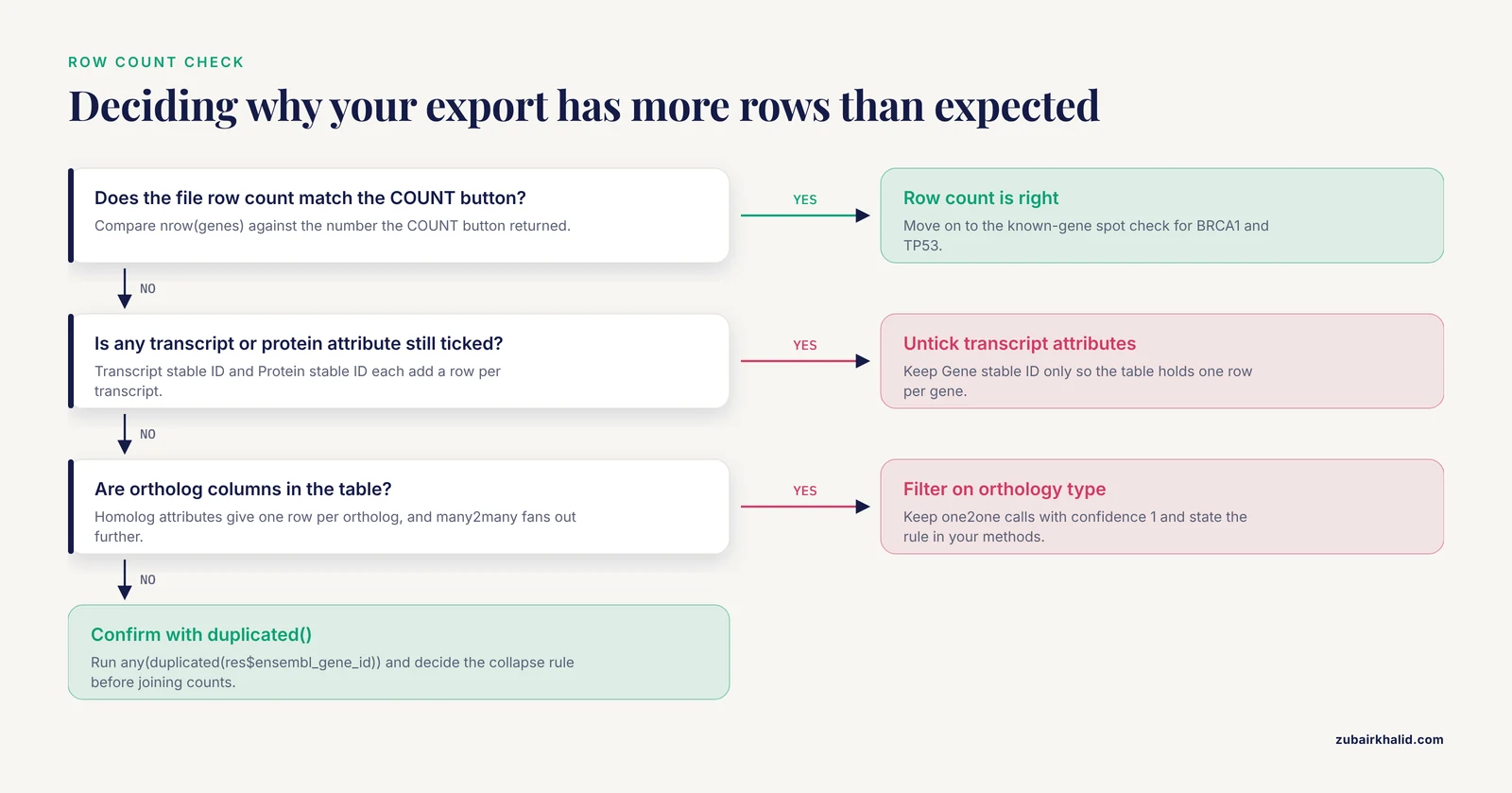
Three checks catch nearly every bad export. First, compare the row count in your file against the COUNT button result. Second, spot-check a gene whose annotation you know: BRCA1 should appear as ENSG00000012048 on chromosome 17 with biotype protein_coding, and TP53 as ENSG00000141510 on chromosome 17. Third, profile the table in R:
```r
genes <- read.delim("chr17_genes.tsv", header = TRUE, sep = "\t",
quote = "", check.names = FALSE, stringsAsFactors = FALSE)
nrow(genes) # compare with the COUNT button
any(duplicated(genes$`Ensembl Gene ID`)) # TRUE means a one-to-many join fired
table(genes$`Gene type`) # biotype distribution looks sane
subset(genes, `HGNC symbol` == "BRCA1") # known-gene spot check
```
For ortholog tables, add `table(ortho$mmusculus_homolog_orthology_type)` and confirm that the TP53 to Trp53 pair comes back as one2one with confidence 1. For coordinate tables, confirm that start positions are always smaller than end positions and that no coordinate is negative. The quote = "" argument matters, because Ensembl occasionally places quotes in descriptions that would otherwise break parsing.
## Using the Ensembl Genome Browser with Your Exported Data
The export becomes more useful once you can see it in genomic context. Type a coordinate such as 17:43044295-43125482 or a gene symbol into the search box on any Ensembl page, and open the "Region in detail" view to see the gene models you just exported. The browser also accepts your own data: through the custom data controls in the region view you can upload or link files such as BED, GFF, bigWig, BAM, and VCF, which lets you plot a bigWig coverage track or a BED track of differential peaks directly under the Ensembl gene models. The pattern is well established. ISACGH, a web environment for combined array-CGH and gene expression analysis, exported its results to the Ensembl viewer through a DAS server (Distributed Annotation System, a protocol for sharing annotation tracks) so that copy-number and expression changes could be read against genomic context [11].
For disease-oriented expression work, dedicated platforms build on the same idea. GVViZ is a FAIR bioinformatics platform for RNA-seq-driven gene-disease annotation and expression analysis with dynamic heat map visualization, designed so that users without a computational background can run customized analyses [12]. Your BioMart export supplies the identifier layer that such tools expect.
## Next Steps
Join the annotation table to your expression matrix on the stable ID column, collapsing duplicates according to the rule you decided earlier. Run enrichment analysis using the GO term attributes you exported or a dedicated tool, after converting non-human identifiers with the ortholog table. If your downstream database is human-centric, apply the confidence and orthology type filters before conversion, following the pattern of tools like OrthologAL [5]. Finally, visualize the result, either as a heat map in a dedicated platform [12] or as custom tracks in the Ensembl genome browser [11], so that expression changes can be read against exons, regulatory features, and neighboring genes.
## Frequently Asked Questions
### Does Ensembl BioMart contain raw RNA-seq counts or FPKM values?
No. BioMart exports identifiers, coordinates, biotypes, orthologs, and probe mappings, while expression values come from your own quantification step. BioMart provides the annotation layer you join to those values.
### Which export format should I choose, TSV, CSV, XLS, or HTML?
Choose TSV for R, Python, and command-line work. Use CSV only with a spreadsheet import wizard that forces text columns, XLS for Excel-native workflows, and HTML for quick visual review.
### How do I export mouse-to-human orthologs for my gene list?
Use the ORTHOLOGS attribute section on the website or getLDS in biomaRt, and always keep the orthology type and confidence columns so you can filter out low-confidence and many-to-many calls.
### Why does my export have more rows than the number of genes I filtered for?
One-to-many attribute joins are the cause. Transcript, probe, GO term, and homolog attributes each add a row per relationship, so untick transcript-level attributes for gene-level tables and set uniqueRows = TRUE in getBM.
### How do I reproduce an export from an older Ensembl release?
Use the version argument in useEnsembl or the Ensembl archive sites for the website, and record the release number together with your saved XML query so the exact gene set is recoverable.
### What is the difference between Gene stable ID and Gene stable ID version?
The stable ID is the permanent identifier with no suffix. The version adds a dot and number, for example ENSG00000141510.19, that increments when the gene model changes. Match versioned IDs to versioned sources such as GTF files.
### Can I export the same data with biomaRt instead of the website?
Yes. biomaRt runs the same queries against the same BioMart service, and every website filter and attribute has a programmatic name you can find with listFilters() and listAttributes().
### Why did my gene symbols turn into dates when I opened the file in Excel?
Excel autocorrects symbols such as SEPT1 and MARCH1 into dates. Re-import the file through the text import wizard with columns set to text, or avoid Excel and load the TSV directly in R or Python.
## Sources
1. [Interfaces to PeptideAtlas: a case study of standard data access systems.](https://pubmed.ncbi.nlm.nih.gov/22941959/)
2. [Using BioMart as a framework to manage and query pancreatic cancer data](https://pubmed.ncbi.nlm.nih.gov/21666272/)
3. [PRIDE and "Database on Demand" as valuable tools for computational proteomics.](https://pubmed.ncbi.nlm.nih.gov/21063943/)
4. [Consistent annotation of gene expression arrays](https://pubmed.ncbi.nlm.nih.gov/20459806/)
5. [OrthologAL: a Shiny application for quality-aware humanization of non-human pre-clinical high-dimensional gene expression data](https://pubmed.ncbi.nlm.nih.gov/40392208/)
6. [Expression of Protein-Coding Gene Orthologs in Zebrafish and Mouse Inner Ear Non-sensory Supporting Cells](https://pubmed.ncbi.nlm.nih.gov/31680844/)
7. [Human-specific protein-coding and lncRNA genes cast sex-biased genes in the brain and their relationships with brain diseases](https://pubmed.ncbi.nlm.nih.gov/39472939/)
8. [Abstract 16888: Reduced Diastolic Myocardial Strain From Interstitial Fibrosis Dissociates the Myocardial Transcriptional Response to Transient Increases in Left Ventricular End-Diastolic Filling Pressure (LVEDP)](https://doi.org/10.1161/circ.148.suppl_1.16888)
9. [Integrated Comparison of GWAS, Transcriptome, and Proteomics Studies Highlights Similarities in the Biological Basis of Animal and Human Myopia.](https://pubmed.ncbi.nlm.nih.gov/28135361/)
10. [P044 Ex vivo effects of infliximab on the long non-coding RNAs expression levels in Crohn′s disease](https://doi.org/10.1093/ecco-jcc/jjac190.0174)
11. [ISACGH: a web-based environment for the analysis of Array CGH and gene expression which includes functional profiling](https://pubmed.ncbi.nlm.nih.gov/17468499/)
12. [Advancing clinical genomics and precision medicine with GVViZ: FAIR bioinformatics platform for variable gene-disease annotation, visualization, and expression analysis](https://pubmed.ncbi.nlm.nih.gov/34174938/)