Mastering SOP Version Control in the Microbiology Lab
By Dr. Zubair Khalid, DVM, MS, PhD ·

SOP version control is the discipline of tracking every edition of a standard operating procedure so that exactly one current version is in use, every change is documented and approved, and every staff member can prove which version they were trained on. A well-run system produces three measurable outcomes at inspection time. Every bench copy matches the master list. Every change has a dated signature trail from draft to approval. Every training record points to a version number, not just a document title.
Use this system when your laboratory prepares, revises, or retires written procedures for culture, identification, susceptibility testing, staining, molecular assays, or specimen handling. It applies equally to a two-person veterinary microbiology bench and a hospital reference laboratory. The method is paper-based, spreadsheet-based, or software-based, and the underlying rules do not change with the medium.
Time budget. A minor revision (typo, clarified step, updated reagent vendor) takes 1 to 2 hours of hands-on work. A new SOP or a major revision takes 4 to 8 hours of drafting plus review cycles. Elapsed time from first draft to effective date is typically 2 to 6 weeks, driven mostly by reviewer availability and training scheduling. Once the system is built, maintaining it takes 1 to 2 hours per month for a mid-sized lab, concentrated around the annual document review cycle.
A standard operating procedure is a set of step-by-step instructions compiled to help carry out routine operations, and its stated goals are efficiency, quality output, uniformity of performance, and reduced miscommunication and regulatory noncompliance [1]. Version control is what turns that definition into a verifiable practice. Without it, "the SOP" becomes whatever copy happens to be taped to the bench, and the laboratory cannot demonstrate which instructions produced any given result.
Why Version Control Matters in the Microbiology Laboratory
The clinical microbiology laboratory produces results that guide antimicrobial therapy, infection control, and public health action. When the written procedure is ambiguous, outdated, or unavailable at the bench, the error surfaces downstream as inconsistent staining, skipped controls, or incomplete records.
A facility-based study of acid-fast bacilli (AFB) smear microscopy in Mekelle City, Ethiopia, documented what uncontrolled procedure practice looks like at the bench. Of 18 health facilities surveyed, only 7 (38.9%) had a legible AFB registration book, 12 (66.7%) had staining reagents with precipitates, 7 (38.9%) reported negative results before examining all required fields, and 16 (88.9%) and 17 (94.4%) did not run positive and negative controls after new reagent batch preparation, respectively. The authors concluded that tuberculosis microscopy was substandard, with clear gaps in documentation, sample collection, and processing [2]. Every one of those gaps is the kind of defect that a current, controlled, properly trained-to SOP is designed to prevent.
Version control also matters at the program level, not just the bench level. The Global Polio Eradication Initiative (GPEI) issued standard operating procedures to guide countries responding to outbreaks of circulating vaccine-derived poliovirus type 2, and assessed compliance against the specific indicators in SOP version 3.1 across 111 outbreaks from 67 distinct emergences affecting 34 countries between April 2016 and December 2020 [3]. Two lessons transfer directly to any laboratory. First, the SOP carried a version number (3.1) because the guidance was revised over time, and compliance could only be measured against a named version. Second, procedures with ambiguous or outdated versions produced inconsistent execution across many sites. Your laboratory is a small version of the same problem: multiple benches, multiple staff, multiple shifts, one written procedure that must behave identically for all of them.
The Principle Behind Document Control
Laboratory quality management rests on a simple premise: a result is only trustworthy if the process that produced it is defined, controlled, and traceable. Document control supplies the traceability. The principle has five components.
- One current version. At any moment, exactly one version of each SOP is authorized for use. All other copies are either obsolete (archived) or uncontrolled (clearly marked, for reference only).
- Change with approval. No one edits a controlled document unilaterally. Changes pass through draft, review, approval, and effective-date steps.
- Traceable history. Each version records what changed, why, who proposed it, and who approved it, so any historical result can be tied to the procedure in force on that date.
- Trained-to-version linkage. Staff are trained against a specific version, and that version number is recorded. If the procedure changes, the training gap is visible immediately.
- Scheduled review. Every SOP carries a review date. A document that has not been looked at in years is a latent failure waiting to be discovered during an incident.
These five rules form the core of document control within any laboratory quality management system, and they are the same rules inspectors and accreditation assessors test when they pull an SOP from the bench and ask a technologist to walk through it.
Anatomy of a Controlled SOP
Before version numbers mean anything, the document itself must carry the right header fields. Missing header fields are the single most common finding in a first document-control audit.
| Header element | Example entry | Function |
|---|---|---|
| Document ID | SOP-MIC-014 | Unique, permanent identifier that never changes across versions |
| Title | AFB Smear Microscopy, Ziehl-Neelsen Method | Identifies the procedure unambiguously |
| Version number | 3.0 | Identifies which edition of the procedure is in force |
| Effective date | 2026-03-01 | The date staff must begin using this version |
| Supersedes | Version 2.2, effective 2024-01-15 | Declares which version this one replaces |
| Author | Technologist name and signature | Accountability for the draft |
| Reviewer | Senior microbiologist name and signature | Scientific accuracy check |
| Approver | Laboratory director name and signature | Authorizes release |
| Review due date | 2028-03-01 | Scheduled revalidation date |
| Page numbering | Page 4 of 9 | Prevents mixing pages from different copies |
| Change log | Table of version, date, section, change, approver | The revision history |
A practical note on the change log: record the change at section level ("Section 6.3, incubation changed from 24 to 48 hours to align with new validation data"), not just "minor updates." A future auditor, or a future you, needs to reconstruct why a result from 2024 was generated under a 24-hour incubation rule.
Materials and Tools
| Item | Working specification | Purpose |
|---|---|---|
| Master document list | Spreadsheet or LIMS module listing document ID, title, current version, effective date, review due date, owner | The single source of truth for what is current |
| SOP template | Preformatted file with locked header fields, change log table, and revision history page | Forces complete headers and uniform formatting |
| Document numbering scheme | Prefix by section, e.g., SOP-MIC (microbiology), SOP-MOL (molecular), SOP-PRE (preanalytic) | Prevents ID collisions as the manual grows |
| Controlled storage location | Read-only network folder, QMS software, or locked binder set | Keeps one authoritative copy per location |
| Version log form | One row per version: number, date, author, summary of change, approver | The audit trail |
| Training log | Staff name, document ID, version trained, date, trainer signature | Links competency to version |
| Redline or track-changes tool | Word processor comparison or QMS built-in diff | Shows reviewers exactly what changed |
| Archive storage | Separate folder or binder marked "SUPERSEDED", with retention dates | Preserves historical versions for record review |
For laboratories using a formal quality management system, the software enforces most of these controls automatically: check-out/check-out of documents, forced version increments, electronic approval routing, and automatic retirement of prior versions at the effective date. Paper-based systems can achieve the same outcomes with discipline and the tools above, but the labor cost is higher and the audit findings more frequent.
SOP Version Control Laboratory Step by Step
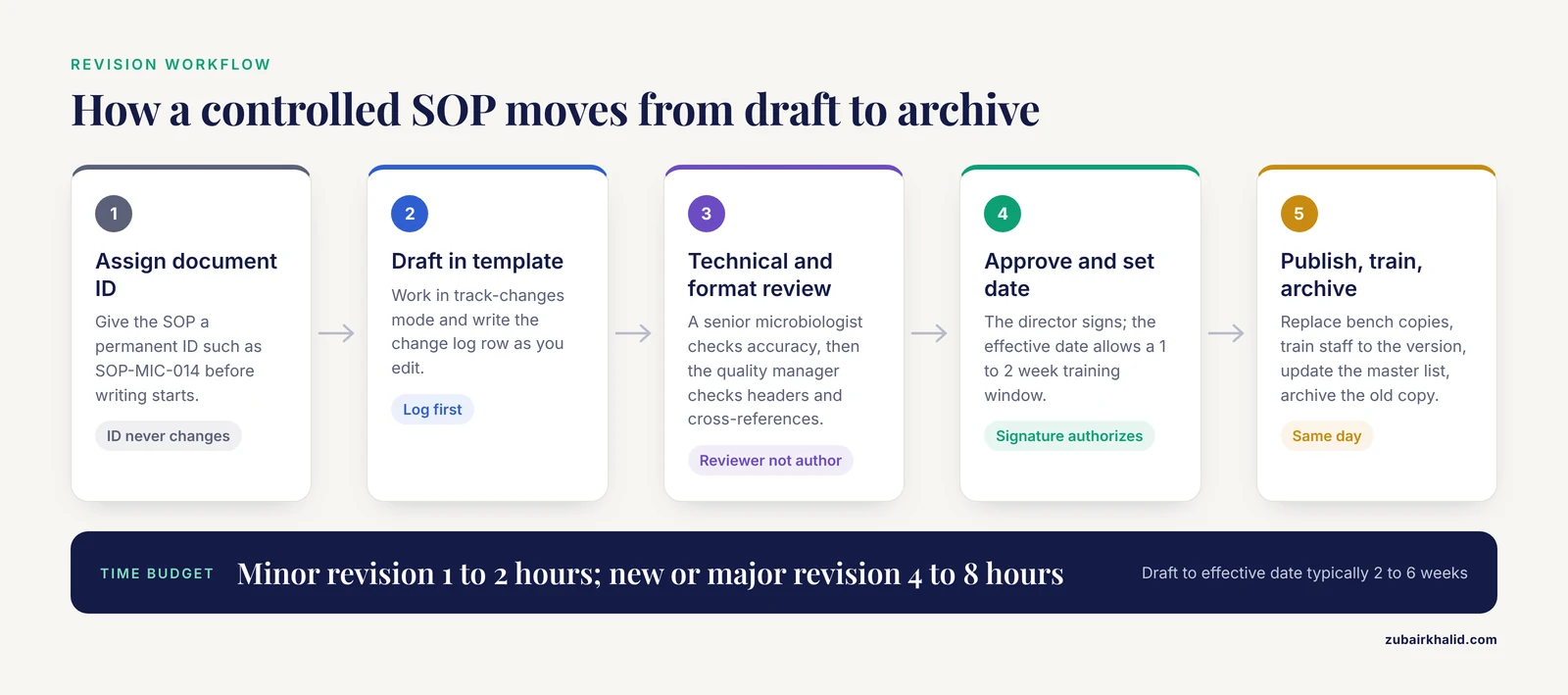
The following procedure covers the full life cycle of a controlled document. The reason for each critical step is stated so that new quality managers understand the logic, not just the mechanics.
- Assign a unique document ID before writing begins. The ID (for example, SOP-MIC-014 for AFB microscopy) never changes across versions. This step matters because version numbers change while identity must not, and the master list relies on the ID as the primary key.
- Draft or revise using the current template only. Start from the template, never from a copy of the old SOP opened in a word processor, because copies drift from the approved header format and lose the change log. If revising, work in track-changes mode so reviewers see every edit.
- Record every change in the revision history table as you write. Do this during drafting, not afterward. Retroactive change logs are the leading source of contradictions between the change log and the document text, a classic audit finding.
- Route the draft for technical review. A senior microbiologist who performs the procedure reviews scientific accuracy: reagent concentrations, incubation conditions, control organisms, acceptance criteria. The reviewer must be someone other than the author. The reason is independent verification, the same principle that underlies result verification in microbiology quality control.
- Route for format and system review. The quality manager checks header completeness, numbering, cross-references to other SOPs, and consistency with the quality manual. Cross-reference errors (an SOP citing a superseded companion SOP by old version number) are common and easy to catch here.
- Obtain approval signatures. The laboratory director or designee signs the approval block. For electronic systems, this is an electronic signature with date and time. The signature is what legally authorizes the version. An unsigned document is a draft, no matter how polished.
- Assign the version number and effective date. Rules for numbering appear in the next section. The effective date should allow a training window, typically 1 to 2 weeks after release for a minor change and longer for a major one. Never set an effective date before the approval date.
- Publish the controlled copy and retire obsolete versions. Replace bench copies, remove or destroy superseded printouts, and mark archived versions clearly. The retired copy goes to the archive folder or binder with its retention date. This step exists because the most common way an old version survives is a forgotten printout in a bench drawer.
- Train affected staff and record the version trained. Training range depends on the change: a read-and-understand acknowledgment for a minor edit, hands-on demonstration and re-verification for a major method change. Record the document ID, version number, date, and trainer signature. High-containment laboratories treat this linkage as a core safety control. The National Biosafety (Level 4) Laboratory in Wuhan built its staff program around modularized theoretical training combined with a standardized practical assessment applied before, during, and after training, on the premise that trained and experienced staff are the most important factor in biosafety and biosecurity [4]. The version number in your training record is what makes that assessment auditable.
- Update the master document list the same day the version goes effective. The list is only trustworthy if it is updated in real time. A master list that lags the bench is worse than none, because staff trust it and act on stale information.
- Archive the superseded version. Move it to the archive, marked obsolete, with the retirement date. Archived versions must remain readable for the full retention period because past patient results are interpreted against the procedure in force at the time.
- Perform the scheduled review. On or before the review due date, the owner re-reads the SOP against current practice, validates that the procedure still matches what the bench actually does, and either re-approves unchanged (with a new review date and, per your program's convention, a version increment or a review-date-only update) or initiates a revision. Many programs review annually or every two years. The reason for scheduled review is drift detection: over months, staff shortcuts and reagent substitutions accumulate silently, and the documented procedure and the real one diverge.
Version Numbering Rules
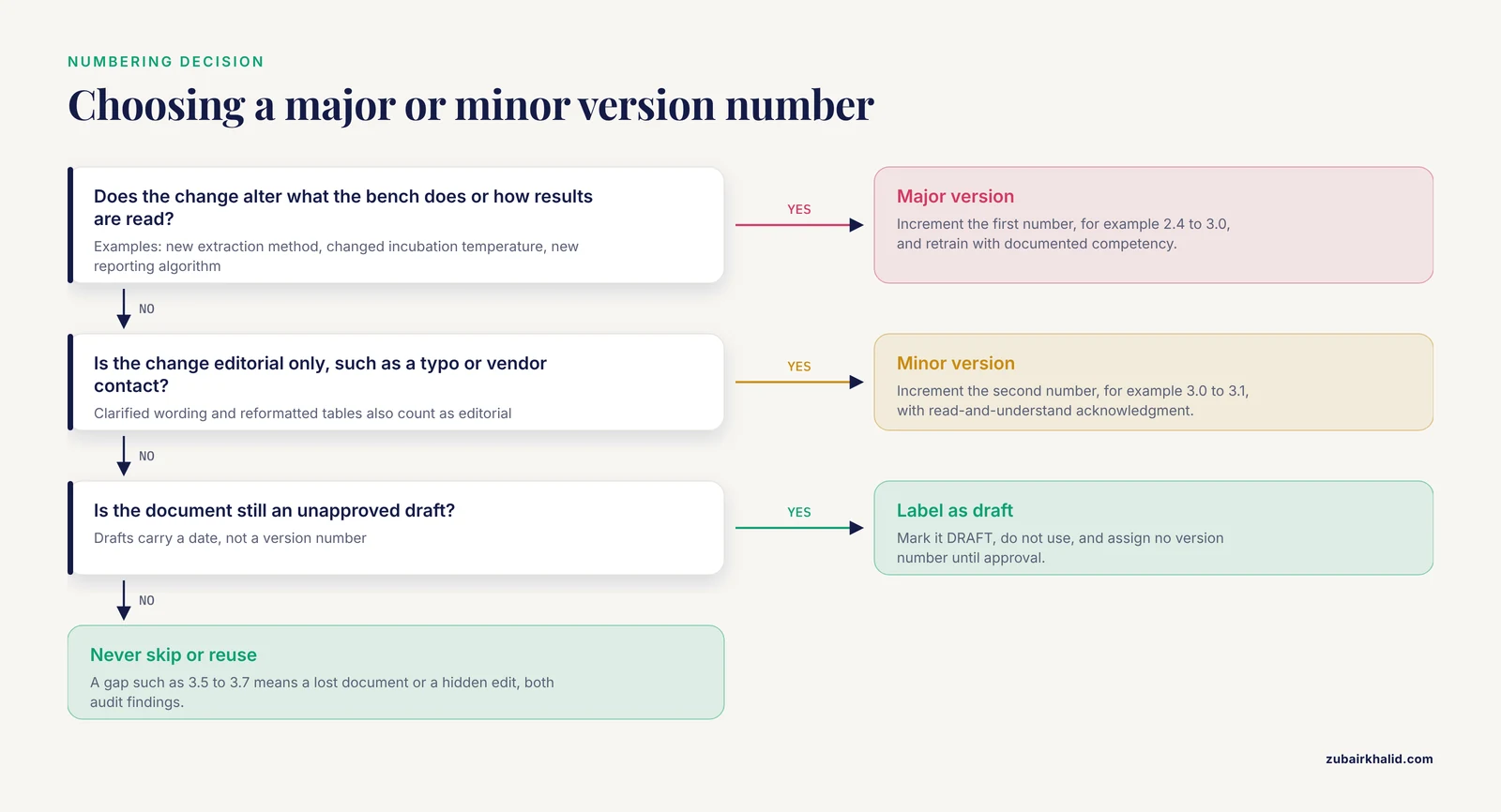
Use a major.minor scheme and apply it mechanically.
- Major version (increment the first number, e.g., 2.4 to 3.0). Any change that alters what the bench does or how results are interpreted. Examples: a new extraction method, a changed incubation temperature, a revised reporting algorithm, a new biophysical safety step. Major versions require full retraining with documented competency.
- Minor version (increment the second number, e.g., 3.0 to 3.1). Changes that do not alter the procedure's outcome: corrected typos, clarified wording, updated vendor contact information, reformatted tables. Minor versions typically require read-and-understand acknowledgment.
- Never skip numbers and never reuse numbers. Version 3.5 followed by version 3.7 means either a lost document or a hidden edit. Both are audit findings.
- Decimal increments stop at .9. If you reach 3.9, the next minor change becomes 4.0 with a change-log note that the increment is administrative, not procedural.
- Drafts are not versions. A document under revision is a draft with a date, not "version 4.0" until it is approved. Label drafts "DRAFT, do not use" in a footer or watermark.
This scheme mirrors the way large multi-country programs handle procedure revisions. The GPEI polio outbreak response SOPs moved through numbered versions (3.1 was in force for the compliance analysis cited above), and each version's indicators were assessed separately so that a country's performance could be scored against the edition actually governing its response [3]. Your lab needs the same resolution: which exact edition governed the work on a given date.
What Triggers a Revision in a Microbiology Lab
Version control is reactive by design. Changes enter the system through defined triggers, and each trigger has a typical response time.
- New or changed analytical method. Adopting a new instrument, stain, or molecular platform requires a new or substantially revised SOP. The current wave of decentralized diagnostics illustrates the trigger clearly. A recently described single-tube multiplex assay combining multiple cross displacement amplification (MCDA) with gold nanoparticle-based lateral flow biosensors (AuNPs-LFB) detects hepatitis B and C virus targets under isothermal conditions at 64 degrees C for 35 minutes, achieving analytical sensitivity comparable to laboratory-based quantitative PCR with a shorter turnaround time and operational simplicity suited to point-of-care settings [5]. Moving such an assay onto the bench means a new SOP covering specimen requirements, amplification conditions, visual interpretation criteria, internal controls, and operator training. The version control system is what guarantees the old platform's SOP is retired the same day the new one goes effective.
- Reagent or media changes. A new manufacturer, a new lot qualification requirement, or a changed storage condition triggers a minor or major revision depending on whether the analytical process changes.
- Corrective action findings. A failed proficiency event, a complaint investigation, or a nonconformity may close with a required SOP change. Document the corrective action number in the change log so the link between the problem and the fix is auditable.
- Updated external requirements. New accreditation checklist items, new biosafety guidance, or new public health reporting rules.
- Internal audit and quality control findings. Recurring QC failures often trace to an ambiguous step. Clarifying the step is a controlled revision, not an informal hallway explanation.
Tying Version Control to Training and Competency
Training records are where version control earns its keep. A training entry that says "trained on AFB microscopy SOP" is worth little. An entry that says "trained on SOP-MIC-014 version 3.0, hands-on staining and reading demonstration, verified by J. Lee on 2026-03-04" allows you to answer the hardest inspection question instantly: which version was this technologist qualified under when this specimen was processed?
Three practices make the linkage airtight.
- Version field, mandatory. No training record is accepted without a version number. A blank version field is treated as an incomplete record.
- Retraining trigger tied to the version increment. Major version changes automatically generate a retraining task list from the master list. Minor changes generate acknowledgment tasks. This is administrative work, but it is the mechanism that prevents a technologist from performing a procedure that changed two weeks ago.
- Competency assessment at the version level. As the BSL-4 training program cited above demonstrates, standardized practical assessment applied before, during, and after training is the model for high-consequence work [4]. For routine microbiology, the practical assessment frequency can follow your competency policy, but the assessment always references the current version in writing.
Version Control Within Microbiology Quality Control
SOPs and quality control records are two halves of one system. The SOP defines which controls are run, at what frequency, and against which acceptance criteria. The QC records prove it happened. The AFB microscopy study cited earlier makes the connection concrete: the majority of surveyed laboratories (88.9% and 94.4%) did not run positive and negative staining controls after new reagent batch preparation [2]. When a laboratory prepares a new stain batch, the correct SOP-driven sequence is a controlled one: prepare the batch, run positive and negative control slides, evaluate against acceptance criteria, record the results, and only then release the batch for diagnostic use. If that sequence exists only in an old, uncontrolled SOP, or worse, in no SOP at all, the bench reverts to habit, and habit is what the study measured.
Practical linkage points to build into your SOPs and check:
- Every SOP section that specifies a control (control organism, control slide, inhibition and growth controls for media) names the acceptance criteria numerically where they exist.
- Every QC record references the SOP document ID and version in force when the QC was performed.
- SOP revisions that change control requirements state the transition plan: which QC runs under the old version, which under the new, and the effective date of the switch.
Expected Results and How to Audit Them
A functioning version control system produces a specific, testable state. Run this set of checks quarterly, and record the results as quality indicators.
| Audit check | Method | Pass criterion |
|---|---|---|
| Bench copies match the master list | Pull 5 random SOPs from the bench, compare version and effective date to the master list | 100% agreement |
| Staff can produce the current version | Ask 3 technologists to locate the current version of their core SOPs within 5 minutes | All succeed without help |
| Change logs match document text | Compare the last change-log entry against the affected section | No contradictions |
| Training records carry version numbers | Sample 10 training records | 100% complete version fields |
| Superseded copies are gone | Search bench areas and shared drives for obsolete printouts or files | Zero uncontrolled current-looking copies |
| Effective dates precede or match training dates | Compare training dates to effective dates for each record | No staff performing a procedure before their version training date |
| Master list complete | Reconcile the master list against folder contents and the binder set | Every controlled document appears exactly once with its current version |
The last check deserves emphasis because it is the one most often failed in newly built systems. Documents exist that the master list does not know about, usually procedures written by an individual technologist for a specialized task. The fix is a standing rule: any written instruction used at the bench is either in the controlled system or is not authorized to exist.
Troubleshooting Version Control Problems
| Symptom | Likely cause | Fix |
|---|---|---|
| Two versions of the same SOP found on the bench | Retirement step skipped at release | Retire the old copy immediately, add a release checklist item requiring physical replacement of bench copies |
| Technologist performs the old procedure after the effective date | Training record missing or delayed | Re-train, document, and add a master-list-driven retraining task list for every major release |
| Version numbers skipped or out of sequence | Drafts numbered before approval, or parallel edits | Reconcile the history, and enforce the rule that only approved documents receive version numbers |
| Change log contradicts the document text | Change log written after the fact | Correct the log, and require the log entry to be written during drafting in step 3 |
| SOP on the bench has no approval signature | Uncontrolled printout of a draft | Remove the copy, trace its origin, and restrict printing rights to the quality manager in software systems |
| Cross-references point to superseded SOPs | Format review skipped | Add a cross-reference check to step 5 and sweep the manual when any document ID changes |
| Master list and folder contents disagree | Master list updated late | Update the list on release day (step 10) and reconcile quarterly |
| Staff report the SOP is out of date but the review date has not arrived | Undocumented procedural drift | Treat as a revision trigger and update the SOP, since the documented procedure and actual practice must match |
| Archived version cannot be found when an old result is questioned | Archive folder disorganized or retention date passed unnoticed | Rebuild the archive index, and add a retention-expiry review to the annual quality calendar |
Common Mistakes and Limitations
These are the errors that account for most version control findings in real laboratories.
- Local editing. A technologist saves a controlled SOP to the desktop, edits it, and e-mails it to a colleague. Within a month there are three "current" versions. The fix is cultural as much as technical: the network copy is read-only, and change requests go through the revision workflow, no exceptions.
- File names as version control. Documents named "SOP_final_FINAL_v7_revised.docx" carry no reliable version information. The version lives in the header and the change log, not the file name.
- Training on the old version. The SOP goes effective, and training happens "when there is time." The gap between effective date and training date is a documented nonconformity, and it is preventable by scheduling the training before the effective date.
- Copying another laboratory's SOP verbatim. An SOP from a different lab describes a different workflow, different reagents, and different controls. Importing it without adaptation produces a document that neither matches practice nor satisfies review, and it undermines the entire manual's credibility.
- Lapsed review dates. A review date of two years ago signals to an assessor that the document control program itself is not functioning. If you cannot meet review dates, shorten the manual or add review labor. Do not let dates lapse silently.
- Change logs without reasons. "Updated" is not a change description. Record what changed and why.
- Ignoring LIMS and software procedures. Instrument maintenance scripts, LIMS test builds, and data-analysis workflows are procedures too. If they affect results, they belong under document control, at least as configuration records with version identifiers.
- Version control only for print. A laboratory that controls its paper manual but lets instrument PCs, shared drives, and wikis accumulate procedure text has uncontrolled documents everywhere an assessor looks.
One limitation belongs to the method itself. Version control preserves traceability but does not create scientific accuracy. A flawed procedure, perfectly versioned, still produces flawed results. Document control must be paired with method validation and quality control to protect patient results. And as always, individual patient cases, whether the specimen is human or animal, require interpretation by the responsible veterinarian or physician in the context of the full clinical picture.
SOP Version Control Laboratory Tips
These tips compress the practices that experienced quality managers converge on.
- Write the change log entry first. Before editing the body, write the row in the revision history. This forces clarity about the change's purpose and prevents retrospective reconstruction.
- Set the effective date 10 to 14 working days out for major versions. This gives the training step room to complete, so no technologist is caught performing a procedure they have not been trained on.
- Use read-only distribution. PDF with a "CONTROLLED COPY" footer, or a QMS viewer. If a document can be edited casually, it will be.
- One owner per document, named. Committees do not maintain SOPs. A named owner with a calendar reminder for the review date does.
- Sweep for cross-references at every major release. Any SOP that cites the revised one by version number needs its citation updated.
- Photograph the retirement. For paper systems, a dated photograph of the superseded bench copy in the discard bin, filed with the release record, closes the loop on physical retirement.
- Keep the numbering scheme in the quality manual. Write the major.minor rules down once, so version decisions never depend on who is quality manager this year.
- Pilot new SOPs as controlled drafts where your program allows it. A draft labeled "EVALUATION COPY, effective pending validation" lets the bench test the procedure while keeping the current version authoritative. The evaluation feedback becomes the revision trigger.
Variations and Scaling
Paper-based systems. Fully valid for small laboratories. The master list is a spreadsheet, the controlled copies are numbered printouts with a distribution record, and the archive is a marked binder. The cost is labor and the risk is physical retirement of printouts, which requires the sweep discipline described above.
Spreadsheet-plus-shared-drive systems. The most common mid-sized configuration. Enforce read-only access, lock the master list, and use document IDs in file names. The main failure mode is drive sprawl, where procedure text accumulates outside the controlled folder.
Quality management software. Check-out and check-in, forced version increments, electronic signatures with date and time stamps, automated training assignment, and automatic archiving of prior versions at the effective date. This is the appropriate choice for multi-site networks and for laboratories with large manuals, because the software removes the two most labor-intensive steps: physical retirement and manual training tracking.
Multi-site harmonization. Networks that share procedures across sites face the polio-program problem cited earlier: consistent execution of one named version across many locations [3]. The usual model is a network-controlled master SOP with a local supplement for site-specific details (instrument models, reporting contacts). The supplement is itself controlled, with its own version number, so the combination in force at any site is fully defined.
Field and point-of-care settings. Decentralized testing compresses the SOP's role: the operator may have less training, the environment is less controlled, and the procedure must be shorter. The MCDA-AuNPs-LFB platform cited earlier was designed around exactly these constraints, isothermal amplification, visual readout, operational simplicity [5]. SOPs for such settings should be shorter, picture-based where possible, and version-controlled centrally with distribution to each testing site, because an outdated bench card in a satellite location is precisely the failure mode version control exists to eliminate.
Storage, Retention, and Stability of Controlled Documents
Controlled documents are records, and records have retention obligations. Apply these rules.
- Retention period. Retain superseded versions for at least as long as any result produced under them could be reviewed, contested, or investigated. Set the specific interval in your retention schedule according to your accreditation and record-retention requirements, and track expiry dates on the archive index.
- Archive format. For electronic archives, use a read-only format such as PDF/A, which is designed for long-term preservation, and store at least one backup copy on separate storage. For paper, a sealed, dated envelope in a marked archive binder works.
- Electronic signatures. Where electronic approval is used, the signature must be attributable to a specific individual with date and time, and the system must prevent signature transfer between documents. This mirrors the function of the wet signature block and is accepted by most accreditation programs when implemented correctly.
- Backup and recovery. The master list and the manual are critical quality records. Back them up on the same schedule as your laboratory information system, and verify restoration annually. A version control system that cannot survive a server failure does not actually control anything.
- Stability of the medium. Paper fades, thermal printouts fade faster, and laminated bench cards accumulate annotations. Refresh printed controlled copies at each scheduled review, and forbid handwritten annotations on controlled copies. A handwritten correction on a bench SOP is an uncontrolled revision, and it should trigger a change request instead.
Safety note. Version control is itself a biosafety control. A technologist working from a superseded biosafety SOP may use an outdated fixation or inactivation step, or may omit a containment practice added in a recent revision. Any SOP that governs handling of infectious agents, and any revision to one, should be prioritized in the training queue ahead of administrative documents. High-containment laboratories treat staff training against current procedures as a primary safety barrier, on the principle that trained staff are the most important factor in laboratory safety and security [4].
Frequently Asked Questions
What is SOP version control in a laboratory?
SOP version control is the system that ensures exactly one current, approved version of each standard operating procedure is in use, that every change is documented, reviewed, and approved, and that superseded versions are archived and traceable. It links each laboratory result to the exact procedure edition in force when the work was performed.
How do I number SOP versions?
Use a major.minor scheme. Increase the major number (2.4 to 3.0) when the procedure's actions or result interpretation change, and increase the minor number (3.0 to 3.1) for editorial or clarifying changes. Never skip or reuse version numbers, and do not assign version numbers to unapproved drafts.
Who approves an SOP revision?
The laboratory director or a formally designated approver signs the approval block, after a technical review by a qualified person other than the author and typically a format review by the quality manager. The approver's dated signature is what converts a draft into an authorized version.
How often should laboratory SOPs be reviewed?
Most laboratory quality programs review each SOP annually or every two years, with the interval set in the quality manual and the due date printed in the document header. An unscheduled review is also triggered whenever the method, reagents, equipment, or external requirements change.
What is the difference between a revision date and an effective date?
The revision date is when the document was approved or changed. The effective date is when staff must begin using the new version. The effective date comes after the approval date, and the interval between them is reserved for training and distribution.
How long must superseded SOP versions be kept?
Retain superseded versions long enough that any result produced under them can still be reviewed or investigated, following your laboratory's written retention schedule and the requirements of your accreditation program. Archive them clearly marked as obsolete, in a readable format, with an index entry and a tracked retention expiry date.
Can I keep digital copies of SOPs?
Yes. Digital distribution is preferred by most laboratories because read-only access prevents uncontrolled editing, and quality management software can automate version increments, approval routing, archiving, and training assignment. The same control rules apply: one current version, complete headers, documented approval, and archived history.
How do I handle an urgent change, such as a reagent lot change or a safety correction?
Use an expedited but complete workflow: draft the change, obtain review and approval from the authorized approver, assign the new version with an immediate effective date, distribute and train the same day, and document the urgency and its reason in the change log. Speed never substitutes for the approval signature and the training record.
Sources
- Standard Operating Procedures in Trichological Practice.
- Standard Operating Procedure Utilization for Tuberculosis Microscopy in Mekelle City, North Ethiopia.
- Assessing country compliance with circulating vaccine-derived poliovirus type 2 outbreak response standard operating procedures: April 2016 to December 2020.
- Networking for training Level 3/4 biosafety laboratory staff.
- The new gold rush in clinical diagnostics: from standard laboratory assays to fast and accurate point-of-care (POC) methods.