How to Set Up Automated QC Rules in Your LIMS
By Dr. Zubair Khalid, DVM, MS, PhD ·

Configuring automated quality control rules in a laboratory information management system (LIMS) turns daily QC from a paper chore into a live control system. Once the rules are in place, the LIMS accepts QC results from instruments and manual entry, evaluates every result against your acceptance limits, flags or rejects out-of-range values in real time, and blocks the release of patient results when QC fails. A well-configured rule set also produces the documentation your inspection team needs, because every QC decision carries a timestamp, a user identity, and an audit trail.
This guide walks through LIMS QC rules configuration step by step for a clinical microbiology laboratory, covering QC plan design, control materials, limit assignment, auto-verification tie-ins, alert routing, and validation. Expect roughly 8 to 12 hours of hands-on configuration work spread over 2 to 3 weeks, with an elapsed timeline of 4 to 8 weeks once you include sandbox testing, validation, and supervisor sign-off. The time varies with the number of instruments, assays, and control lots you manage.
The payoff is measurable. A 60-month evaluation of a centralized web-based QC management platform in a hospital imaging department recorded 3,376 QC test entries and maintained a weighted mean tolerance compliance of 97.49 percent, showing that structured, centralized QC platforms can sustain high compliance over years of routine operation [1]. In the post-analytical setting, a hybrid rule-based and large language model system for newborn screening cut mean per-batch QC and result review time from 50.5 minutes to 24.3 minutes while keeping deterministic QC flagging fully concordant with manual review [2]. The pattern across these implementations is consistent. Deterministic, rule-driven QC evaluated by software outperforms manual review on speed, consistency, and traceability.
Principle
Automated QC in a LIMS rests on three ideas.
First, every result that leaves the laboratory must be traceable to a QC event that passed at the time the result was produced. This is the foundation of laboratory quality management in microbiology, where a failed sterility check, an out-of-range zone diameter for a reference strain, or a contaminated negative control can invalidate everything run alongside it.
Second, QC decisions should be deterministic. A rule either fires or it does not, based on defined limits and logic. Software that applies fixed rules produces the same verdict every time for the same input, which is exactly what regulators and auditors want to see. A newborn screening implementation demonstrated this principle directly. Deterministic QC flagging and patient result flagging in the automated system were fully concordant with manual specialist review, while the human-in-the-loop design preserved final oversight [2].
Third, QC operates at multiple levels. Modern QC frameworks evaluate quality at the sample level, the feature level, and the batch level, combining fixed empirical limits with data-driven outlier detection [3]. Your LIMS rule set should mirror that structure. A QC rule that only checks a single control value misses drift, shift, and systematic error patterns that span runs.
The broader industry trend supports this architecture. Biopharmaceutical QC has shifted from a single-attribute, single-method model toward integrated, multi-attribute approaches that track many quality signals in one analysis, and that same integration logic applies to laboratory QC governance [4]. Your LIMS rule set is the microbiology laboratory's version of that integrated model.
Before You Start: Materials, Access, and Prerequisites
LIMS QC rules configuration is a software task, but the inputs are laboratory documents and physical control materials. Gather everything in the table before you touch the configuration screens.
| Item | Working specification | Why you need it |
|---|---|---|
| LIMS with a QC module | Any platform supporting QC plans, tolerance limits, audit trails, and electronic signatures | The rule engine and record-keeping backbone |
| Administrator account | Configuration-level access with a named individual, not a shared login | Audit trail integrity under 21 CFR Part 11-style controls [5] |
| Bench analyst accounts | Role-based access limited to QC result entry and review | Segregation of duties between configuration and execution |
| Instrument interfaces | Bidirectional QC result transmission or manual entry templates | Automated capture eliminates transcription error |
| QC materials inventory | Current lot numbers, assigned values, ranges, and expiration dates for every control in use | Limits are lot-specific and expire with the lot |
| Reference strains | Standard QC organisms such as Staphylococcus aureus ATCC 25923, Escherichia coli ATCC 25922, Pseudomonas aeruginosa ATCC 27853, and Enterococcus faecalis ATCC 29212 | Required controls for antimicrobial susceptibility testing systems |
| Assay package inserts | Manufacturer-assigned QC ranges for each control lot | Source of the tolerance limits you will enter |
| Rule specification document | A written table of every rule, its logic, limits, and action on failure | Prevents ad hoc configuration and anchors validation |
| Sandbox or test environment | A non-production copy of the LIMS | All rule testing happens here first |
| QC policy documents | Your laboratory's QC plan, including frequency, acceptance criteria, and actions on failure | The rules must encode your policy, not invent one |
A note on change control. Configuration changes in a production LIMS can affect patient result release. Treat the configuration session itself as a controlled activity, schedule it during a maintenance window, and require a second person to review and approve the exported rule specification before activation.
LIMS QC Rules Configuration Step by Step
The sequence below moves from data structure to live monitoring. Each step lists the action and the reason it matters.
Step 1. Define your QC objects and QC plan hierarchy
Open the QC configuration module and build the object hierarchy in this order: instrument or method, then assay or test, then control material, then QC lot. In a microbiology LIMS this typically means one QC plan per instrument (blood culture instrument, ID/AST analyzer, rapid molecular platform) plus separate plans for manual methods (zone diameters, MIC by agar dilution, stain QC).
Reason. The hierarchy determines how rules inherit. A QC event recorded at the instrument level can gate every result that instrument produced, which is what you want when a failed control invalidates a whole run. Configuring rules at the wrong level is the most common structural error, because rules set only at the assay level will not block a broken instrument run.
Step 2. Register control materials and map lots
Enter every control material with its manufacturer, catalog description, lot number, expiration date, assigned values, and acceptable ranges exactly as printed on the package insert or certificate of analysis. Link each lot to its assay. Set the LIMS to warn at lot expiration and to reject QC entry against an expired lot.
Reason. Lot-specific limits are the acceptance criteria you validated against. Using ranges carried over from a previous lot is a real compliance failure, and automated expiration warnings prevent it without anyone having to remember.
Step 3. Assign tolerance limits and statistical rules
For quantitative QC (growth indices, cycle threshold values, colony counts on quantitative controls, photometer readings), enter the mean and standard deviation the LIMS should accumulate and assign multirule logic. Standard practice uses a warning rule at plus or minus 2 standard deviations and a rejection rule at plus or minus 3 standard deviations on a single observation, with additional rules that catch systematic error across consecutive observations, such as two consecutive values beyond the same 2 standard deviation boundary or a run of consecutive observations on one side of the mean [3].
For qualitative microbiology QC (zone diameters, MIC values for reference strains, categorical organism identifications), enter the published acceptance range for each drug-organism or probe-control combination and configure the rule as a simple in-range or out-of-range evaluation.
Reason. Quantitative multirule logic detects both random error and drift. Qualitative microbiology controls have no standard deviation to accumulate, so a fixed range check with a hard fail is the correct and only meaningful rule type. Mixing these two rule types without distinguishing them is a frequent configuration error.
Step 4. Configure run-level and lot-level gating rules
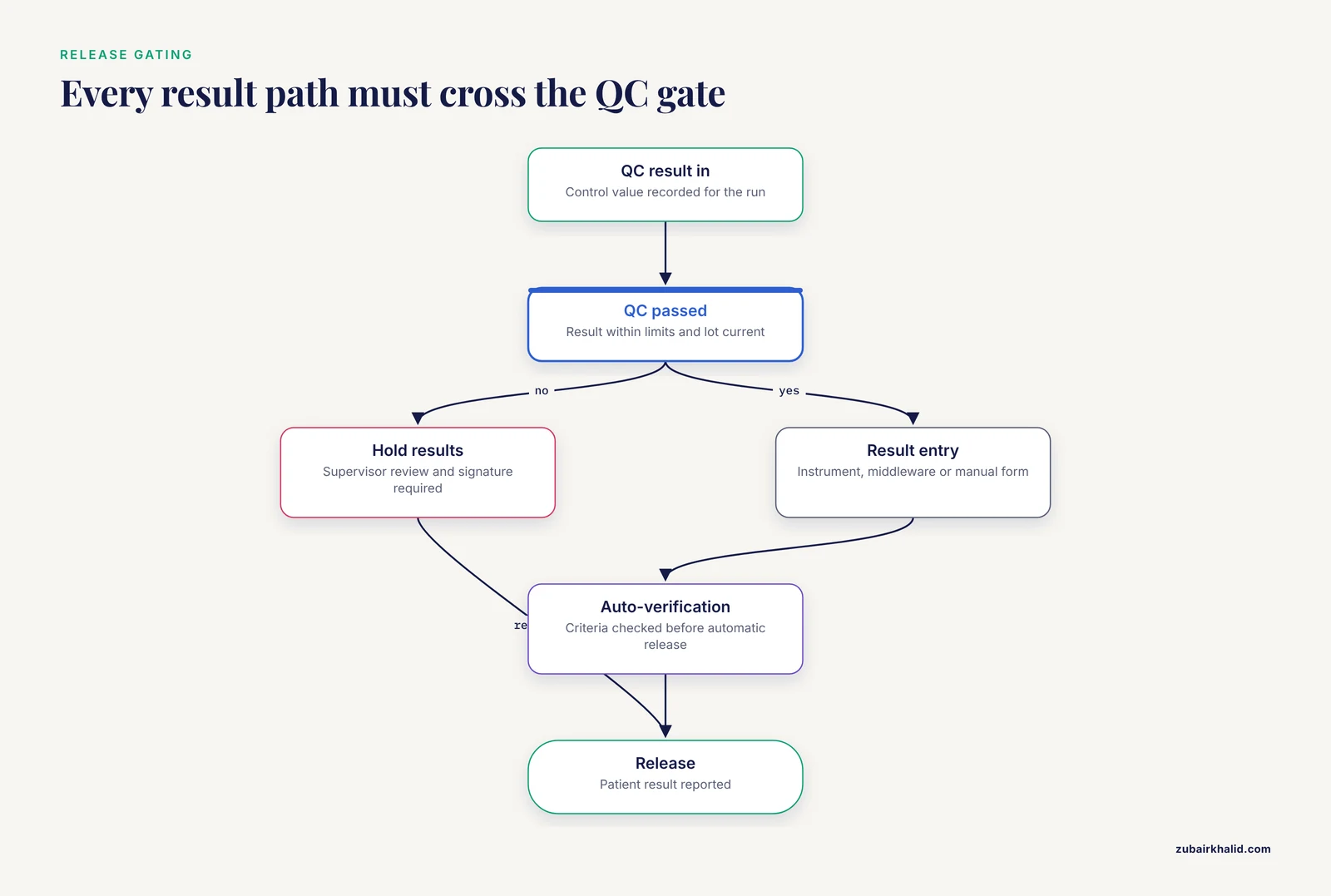
This is the step that gives your rules teeth. Create rules that connect QC outcomes to patient result release:
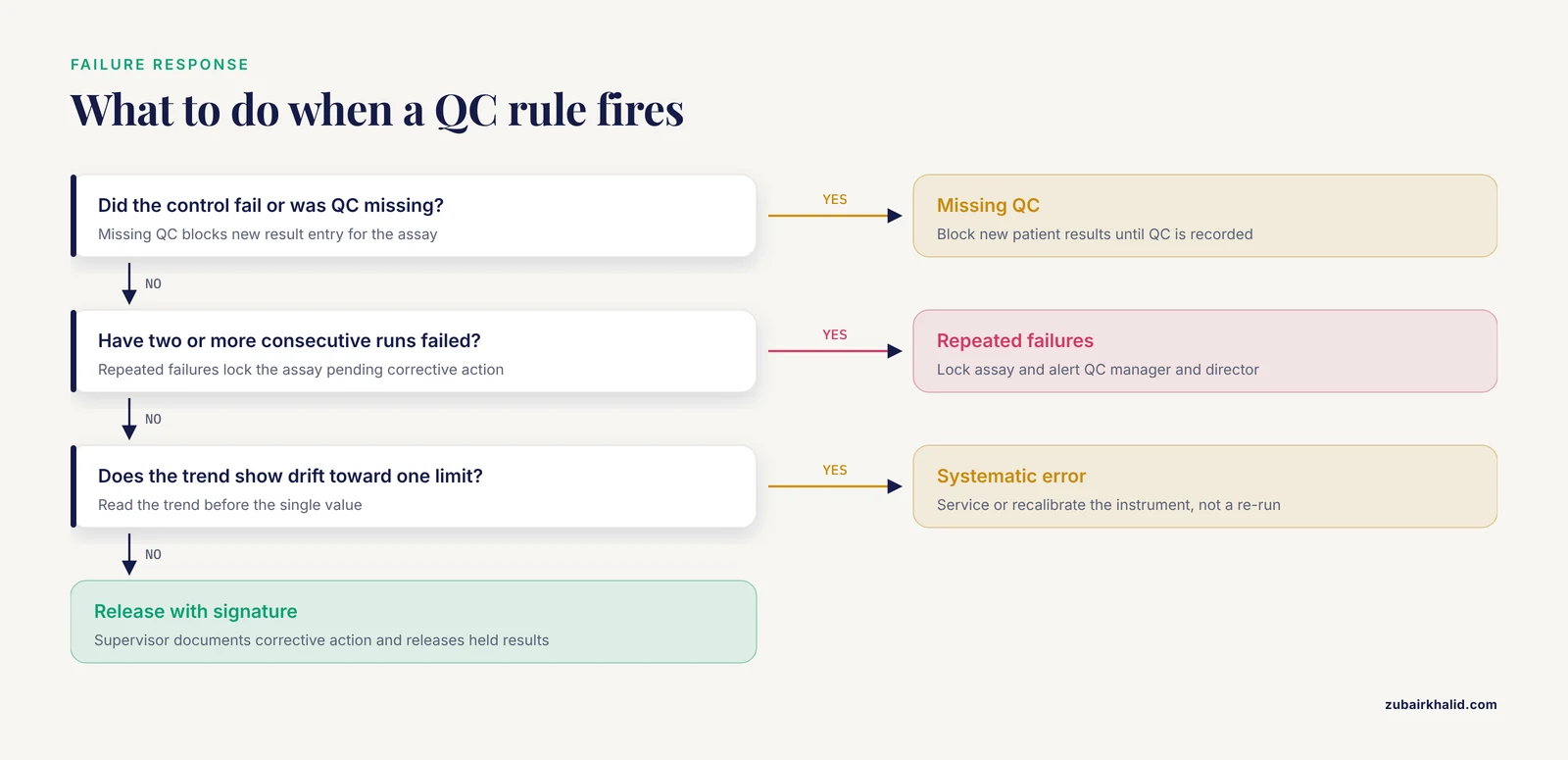
- If any control in the run fails, hold all patient results from that instrument or batch until a supervisor documents review and release.
- If QC was not performed within the required interval (for example, at the start of each run, each lot opening, or each shift per your QC plan), block new result entry for the affected assay until QC is recorded.
- If a new reagent or cartridge lot is opened, require lot-specific QC before results from that lot release.
Reason. Rules that only flag a failed control but do not hold results leave the failure to be caught by a human scanning a list later. Real-time release control is the entire operational benefit of automation. Middleware and intelligent platform software in fully automated laboratories perform exactly this function, providing standardized data validation and quality control tracking alongside real-time operational monitoring [6].
Step 5. Build auto-verification rules for microbiology results
Many laboratories run auto-verification (automatic release of results meeting defined criteria) inside the LIMS. QC rules must sit upstream of it. A practical rule set for an ID/AST analyzer looks like this:
- Verify that the run's reference strain QC passed for the relevant panel type.
- Verify the isolate's organism identification confidence exceeds the laboratory's defined threshold.
- Verify the antimicrobial agent, organism combination is on the laboratory's verified reporting list.
- Hold any result carrying an unusual or critical resistance mechanism flag for manual review.
Reason. Auto-verification multiplies the consequence of a QC failure. If a broken AST run auto-releases 400 susceptibility results, the QC rule that gates the run is the only thing standing between the failure and the report.
Step 6. Configure flagging, notifications, and escalation
Map each rule outcome to an action tier:
| Outcome | LIMS action | Notification route |
|---|---|---|
| Warning (in-control but trending) | Visual flag on the QC record, no result hold | Listed on the daily QC dashboard |
| Failure (out of range) | Result entry flagged, associated patient results held | Immediate alert to the bench supervisor |
| Missing QC | New patient results blocked | Alert to the bench and the QC manager |
| Repeated failures (2 or more consecutive runs) | Assay locked pending corrective action, documented deviation | Alert to QC manager and laboratory director |
A pilot deployment of a unified LIMS and quality management system platform recorded 1,456 quality control checkpoints and 43 deviation-handling episodes across 187 laboratory requests, which illustrates the ratio you should expect in practice. Deviations are a normal, tracked output of a working QC system, not an embarrassment [5].
Reason. Alert fatigue is the main reason automated QC systems get ignored. A tiered structure keeps warning noise off the supervisor's phone and reserves immediate notifications for events that block result release.
Step 7. Enable the audit trail and electronic signatures
Turn on the immutable audit trail for all QC records, capturing who entered each result, who reviewed it, who released held results, and every configuration change to the rules themselves. Require electronic signature for supervisor release of held results and for rule modifications.
Reason. Audit trails and electronic signatures are the regulatory backbone of an electronic QC record. The ATRI LIMS, a cloud-native open-source platform supporting large-scale clinical studies, provides regulatory support through audit trails and electronic signatures as core design features rather than add-ons, and it manages more than 1.2 million biospecimens across multisite trials [7]. A governance platform built under a risk-based computer software assurance framework aligned with FDA 21 CFR Part 11 and ISO/IEC 17025 similarly embeds audit control as a primary module [5]. If your platform does not log rule configuration changes separately from result entry, close that gap before go-live.
Step 8. Test every rule in the sandbox
Run a scripted test suite in the test environment. For each rule, execute at minimum:
- A passing case (in-range result, rule stays silent).
- A failing case at each boundary (just inside, just outside, exactly at the limit).
- A missing-data case (QC absent, results blocked).
- A recovery case (failed run, corrective action documented, results released by a supervisor with signature).
- A lot-change case (new lot opened, QC required, entry against the old lot rejected).
Document each test with the input, the expected outcome, the actual outcome, and a pass or fail determination.
Reason. Boundary behavior is where rule engines misbehave. A rule written as greater than rather than greater than or equal to will accept a value exactly at the limit, and you will not discover it in production until an auditor does.
Step 9. Go live with a parallel review period
Activate the rules in production and run a parallel review period of at least 2 to 4 weeks in which a supervisor manually verifies every automated QC decision against the paper or legacy process. Log every disagreement and tune the rules.
Reason. The parallel period catches limit errors, wrong routing, and rule interactions that sandbox testing misses because production data always contains combinations you did not anticipate.
Step 10. Monitor, review, and maintain
After go-live, the QC system needs scheduled maintenance:
- Review the QC dashboard weekly for warning-tier trends.
- Reassign limits with each new control lot and record the change.
- Re-validate rules after any LIMS upgrade or instrument interface change.
- Perform a documented annual review of the complete rule set against the current QC policy.
- Track rule trigger rates. A rule that never fires in a year is either protecting a perfectly stable process or is misconfigured, and you should know which.
Long-term sustainment matters more than the initial build. The 60-month QATrack+ evaluation in diagnostic radiology demonstrated that a centralized QC platform sustains compliance and traceability over years when the review cadence is maintained [1]. Automated analysis workflows in large-cohort proteomics reach the same conclusion from the other direction, enabling real-time monitoring of experimental stability and proactive alerts for emerging problems rather than retrospective discovery [8].
Controls and Expected Results: How to Read Them
Your LIMS QC dashboard is the readout. Here is what healthy and unhealthy systems look like.
A healthy system shows:
- QC pass rates consistently above your laboratory's target, with warnings appearing occasionally and failures being rare, isolated, and explainable.
- Every held result bundle closed within your documented turnaround time, with a supervisor signature and a corrective action note.
- Levey-Jennings style trend plots (a plot of each QC value against the accumulated mean and standard deviation over time) that show random scatter around the mean with no runs or drifts.
An unhealthy system shows:
- A pass rate of 100 percent over months, which usually means limits are too wide or a rule is silently disabled.
- Warning flags clustering before weekends or shift changes, which points to a human process problem such as controls being run late.
- Held results released in bulk with a generic comment, which means the escalation path is being bypassed.
When you evaluate a QC failure, read the trend before reading the single value. One out-of-range control on one run is usually random error. A sequence of values marching toward one limit is systematic error, and the correct response is instrument service or recalibration, not a re-run.
For AI-assisted QC components, expected performance should be quantified before trust is extended. A locally deployed large language model categorizing cytopathology reports for regulatory QC achieved 98.5 percent agreement with expert review, a Cohen's kappa of 0.973, with residual errors traceable to semantic ambiguity in free-text reports [9]. An AI-based automated QC platform deployed at enterprise scale in digital pathology processed 94,995 whole-slide images in one month and showed artifact detection reproducibility above 97 percent for tissue folds and above 98 percent for air bubbles across scanner platforms [10]. Those figures are benchmarks for the class of tool. Any AI-assisted QC rule you configure in microbiology should be validated against a human-reviewed ground truth set in your own laboratory before it gates anything.
Troubleshooting
| Symptom | Likely cause | Fix |
|---|---|---|
| Rules never fire, QC always passes | Limits entered as manufacturer package insert ranges rather than your validated internal ranges, or a rule disabled during a previous upgrade | Audit the live rule set against the approved specification document, then tighten limits to your internal statistics |
| Excessive hold events overwhelming supervisors | Warning tier mislabeled as failure tier, or limits too tight for the control lot | Reclassify tier assignments, verify limits against the current lot insert, and review the warning rate over 2 weeks before changing limits |
| Patient results releasing despite failed QC | Run-level gating rule not linked to the instrument's result queue, or results entering through a second interface that bypasses the gate | Map every result entry path into the LIMS and confirm each one crosses the QC gate |
| QC entered against an expired lot | Expiration warning present but rejection rule not enabled | Enable hard rejection on expired lots, not just a warning |
| Auto-verification releasing results from a run with a warning-level QC flag | Auto-verification criteria check for failure flags only | Include warning-tier QC status in the auto-verification preconditions |
| Alerts arriving after results are already released | Notification routed through a daily digest job instead of real-time event dispatch | Move release-blocking failures to real-time push notification and reserve digests for warnings |
| Two rules contradict each other on the same event | Overlapping rule scopes from incremental configuration over time | Consolidate rules by scope, retire duplicates, and re-run the sandbox test suite after consolidation |
| Auditors cannot reconstruct why a result was held and released | Audit trail capturing result events but not rule configuration changes | Enable configuration-level audit logging and require electronic signature for rule edits [5] |
Variations
Middleware-based QC for total automation tracks. If your laboratory runs a total automation track, some QC logic may live in the middleware rather than the LIMS. Define which system owns which rule explicitly. The recommended split is that middleware handles instrument-level, real-time QC evaluation and the LIMS owns lot management, release gating, and the permanent record. Reviews of mass spectrometry integration into total laboratory automation describe this division, with middleware and AI-assisted algorithms providing standardized validation and QC tracking while the platform layer manages workflow and reporting [6].
Manual and low-volume methods. For manual microbiology tests where instrument interfaces do not exist, configure manual QC entry forms with the same range checks, holds, and signatures. The rule engine does not care where the value came from, and manual entry with an enforced range check is still far more reliable than a paper log.
AI-assisted and LLM-supported QC review. Where QC decisions involve free-text interpretation, such as reviewing gram stain comments or culture notes for QC-relevant findings, some laboratories are deploying language models to pre-categorize the records for human review. Real-world evaluations show this is feasible with high agreement and that a human-in-the-loop design, in which every AI output requires specialist review before release, is the appropriate safeguard [9] [2]. Treat any such component as a variation on your rule set that requires its own validation, not as a substitute for deterministic rules.
Risk-based prioritization with FMEA. If your rule set cannot cover everything at once, use failure mode and effects analysis (FMEA), a structured method for listing process failures, scoring their severity, occurrence, and detectability, and prioritizing the highest-risk items first. An integrated framework combining FMEA with AI-assisted error detection in anatomical pathology found that errors were most prevalent in the pre-examination phase, which is a useful reminder that QC rules should cover specimen and setup controls, not only analytical steps [11].
Modular QC frameworks for complex assays. For high-complexity molecular or sequencing assays, adopting a modular QC architecture with level-specific rules at sample, feature, and batch levels, each with defined thresholds and automated flags, gives you scalable governance as test volumes grow [3]. End-to-end automated pipelines in other disciplines demonstrate the maturity of this pattern, running QC in parallel with data generation so problems surface during acquisition rather than after [8].
Storage, Retention, and Record Stability Notes
QC records are permanent laboratory records. Confirm and document the following in your configuration:
- QC results, rule definitions, hold events, release signatures, and deviations are retained for the full retention period required by your accreditation and applicable regulations, in a form readable without the original application version.
- The audit trail cannot be edited or deleted by any user role, including administrators.
- Rule definitions are versioned, and each QC record links to the rule version active when it was evaluated.
- Backups of the LIMS database are tested by actual restore exercises, at an interval defined in your laboratory quality management plan.
Fragmented QC documentation spread across spreadsheets and paper logs is the exact failure mode a centralized platform exists to eliminate, limiting traceability and audit readiness when it persists [1]. The value of consolidation is only realized if the electronic records themselves are durable, versioned, and recoverable.
Common Mistakes and Limitations
These are the errors seen most often in real LIMS QC rules configuration projects.
- Configuring rules from the vendor default template without mapping them to your QC policy. Defaults encode someone else's QC plan. Your laboratory's plan defines frequency, acceptance criteria, and corrective action, and the rules must match it line for line.
- Entering manufacturer ranges as the only limits for quantitative controls. Manufacturer ranges are broad. Without your own accumulated mean and standard deviation, the multirule logic that catches drift and shift has nothing to work with.
- Building result-hold rules for failed QC but not for missing QC. The silent failure, where a bench simply does not run the control, is more common than a failed control. The missing-QC gate is what closes that hole.
- Letting auto-verification bypass the QC gate. Every result entry path, including manual entry, middleware routes, and auto-verification, must cross the same QC gate. Auditors trace this, and a single bypass invalidates the whole control.
- Configuring in production. Every rule change in a live system is an unvalidated change to a patient-safety control. Sandbox first, always.
- Ignoring the audit trail configuration. An audit trail that does not capture configuration changes, or that any user can alter, fails inspection. Enable it early and test it.
- Alert fatigue through undifferentiated notification. If every warning pings a supervisor at all hours, the response degrades to ignoring alerts. Tier the outcomes and route only release-blocking failures to immediate notification.
- Treating AI-assisted QC as a set-and-forget component. AI categorization tools perform well in evaluations but require human review of outputs, ground-truth validation in your own setting, and monitoring for semantic ambiguity in your data [9] [2]. A human-in-the-loop design is the demonstrated safe configuration.
- Never retiring rules. Rule sets accrete. An annual documented review that retires obsolete rules and consolidates overlaps keeps the system legible for the next person and the next inspector.
Limitations of the method itself. Automated QC rules enforce the QC plan you wrote, and they cannot improve a weak plan. Rules evaluate data, so a bad interface mapping or an incorrect lot assignment will produce confidently wrong verdicts until someone compares the configuration against the physical materials. The initial configuration also demands informatics and laboratory collaboration. Successful large-scale LIMS deployments explicitly relied on collaboration between informatics engineers and laboratory personnel, with user acceptance testing guiding refinement [7]. Finally, the figures quoted from published implementations reflect those specific environments. Your pass rates, hold volumes, and time savings will differ, and your validation, not a published number, is the evidence that your configuration works.
One practical boundary statement. A configured QC system supports quality management. It does not replace the requirement that qualified personnel review results within the context of the patient, and individual interpretations still belong with the laboratory director and consulting clinicians.
Frequently Asked Questions
Do I have to validate my LIMS QC rules before using them on patient samples?
Yes. Any rule that gates result release is a software control affecting patient results, so it requires documented validation in a test environment before activation, covering pass, fail, boundary, missing-data, and recovery cases.
What is the difference between QC rules and autoverification rules?
QC rules evaluate control materials and gate whether the analytical process is in control, while autoverification rules evaluate patient results and decide whether individual results release automatically. QC rules must sit upstream so a failed run cannot auto-release results.
How often should QC rules be reviewed and updated?
Review the complete rule set at least annually, and immediately after any LIMS upgrade, instrument interface change, new control lot, or QC policy revision. Document each review.
Can a QC rule block the release of patient results?
Yes, and it should. Run-level gating rules hold all patient results from an affected instrument or batch when QC fails or is missing, and a supervisor releases them with an electronic signature after documented corrective action.
What happens when a QC rule fires outside business hours?
Route release-blocking failures to a real-time on-call notification path defined in your QC policy, so a qualified person can act before the next shift, and record the response in the QC record regardless of when it occurs.
How do I handle QC rules for manual microbiology methods?
Configure manual QC entry forms in the LIMS with the same range checks, result holds, and signatures as instrument-based methods, so every assay in the laboratory, whether automated or manual, passes through the same rule engine.
Do LIMS QC records need to meet electronic record requirements?
Yes. Audit trails, electronic signatures, and controlled access are core requirements for electronic laboratory records, and platforms designed under 21 CFR Part 11 and ISO/IEC 17025-aligned frameworks treat these as primary governance modules rather than optional features.
Where should I start if my LIMS has limited QC configuration options?
Start with the highest-risk rules first, using an FMEA-style prioritization: run-level QC gating on your highest-volume instrument, missing-QC blocking, and lot-expiration rejection. Document what the system cannot do and manage those gaps with procedural controls in your QC policy until the platform supports them.
Sources
- Long-term evaluation of a web-based quality control management system (QATrack+) in diagnostic radiology.
- Automated Post-Analytical Workflow for Newborn Screening Using a Hybrid Rule-Based and Retrieval-Augmented Large Language Model System.
- SingleCellMQC: A comprehensive quality control workflow for single-cell multi-omics.
- Development and Integrated Application of the Multi-Attribute Method (MAM) in Quality Control of Biotechnological Drugs.
- A cloud-enabled LIMS-QMS platform with large language model-assisted standard operating procedure generation for GLP/GMP-aligned theranostics laboratory operations.
- Integration of liquid chromatography-tandem mass spectrometry into total laboratory automation: technical challenges and clinical advantages.
- ATRI LIMS: a cloud-native open-source laboratory information management system for biomarker-driven Alzheimer's disease clinical trials.
- Apus enables automated end-to-end analysis and quality control of large-cohort proteomics data.
- Automating fine needle aspiration and non-gynecologic quality control using a large language model: A real-world evaluation of diagnostic accuracy and efficiency.
- Deployment of AI-driven automated quality control of whole-slide images in a large tertiary cancer center.
- A conceptual framework integrating artificial intelligence with failure mode and effects analysis for diagnostic error reduction in anatomical pathology.