How to View Compressed FASTA and FASTQ Files Without Decompressing
By Dr. Zubair Khalid, DVM, MS, PhD ·

By the end of this guide you will be able to peek inside a gzipped FASTA or FASTQ file, count its reads or records, search its sequences, and check that it is intact, all without ever writing an uncompressed copy to disk. Every command shown here is standard on Linux and works the same way on macOS with minor differences that are explained.
You need a terminal session on a Linux workstation, an HPC login node, or a macOS machine, and at least one compressed sequencing file to practice on. GNU coreutils and gzip are preinstalled on essentially every Linux distribution. Nothing else is required for the core workflow, although optional tools such as seqkit and samtools are covered later for readers who want richer views.
Why Compressed Files Dominate Bioinformatics Workflows
Sequencing data is large. A single Illumina NovaSeq flowcell produces multiple terabytes of FASTQ text, and a modest project with 20 whole genome samples can occupy more storage than most lab laptops hold. Compression is not optional, it is the default state of every file you download from SRA, ENA, or a collaborator's server.
The broader structural biology and bioinformatics community treats efficient compression as central to data reuse and interoperability, in line with the FAIR principles that data be findable, accessible, interoperable, and reusable. Work on BinaryCIF, a compressed serialization of macromolecular structural data, shows the scale of the problem. Its authors report that domain specific compression reduces large structural files by more than a factor of two compared with gzip compressed text, and by roughly a factor of ten for the largest structures compared with uncompressed CIF [1]. The lesson generalizes. File sizes in molecular biology are big enough that compression strategy is a first class design decision, not an afterthought.
For sequence data, gzip is the workhorse. Nearly every FASTA and FASTQ file you encounter will end in .gz. The practical skill is learning to read those files in place, streaming their contents through your terminal on demand, and that is exactly what zcat does.
What FASTA and FASTQ Look Like Under the Hood
Before running commands, you need to know what a correct view should look like, because every later check depends on recognizing malformed output.
FASTA is the simpler format. Each record starts with a header line beginning with >, followed by the sequence, usually wrapped at 60 or 80 characters per line.
>NC_000913.3 Escherichia coli str. K-12 substr. MG1655, complete genome
AGCTTTTCATTCTGACTGCAACGGGCAATATGTCTCTGTGTGGATTAAAAAAAGAGTGTCTGATAGCAGC
TTCTGAACTGGTTACCTGCCGTGAGTAAATTAAAATTTTATTGACTTAGGTCACTAAATACTTTAACCAA
FASTQ stores sequence plus per base quality. Every record occupies exactly four lines.
@A00621:17:HFL2JDSX3:1:1101:24169:1000 1:N:0:ATCACG+ATCACG
GATCGGAAGAGCACACGTCTGAACTCCAGTCACTGA
+
FFFFFFFFFFFFFFFFFFFFFFFFFFFFF:FFF,F@
The four lines are, in order, a header beginning with @, the sequence, a separator line beginning with +, and a quality string of equal length to the sequence. Quality characters are ASCII encoded Phred scores, offset by 33 in modern files, so the character F corresponds to a Phred score of 37. The rigid four line structure is what makes the counting one liners later in this guide reliable. If a file is not an exact multiple of four lines, something is wrong with it.
The Core Idea: Stream, Do Not Extract
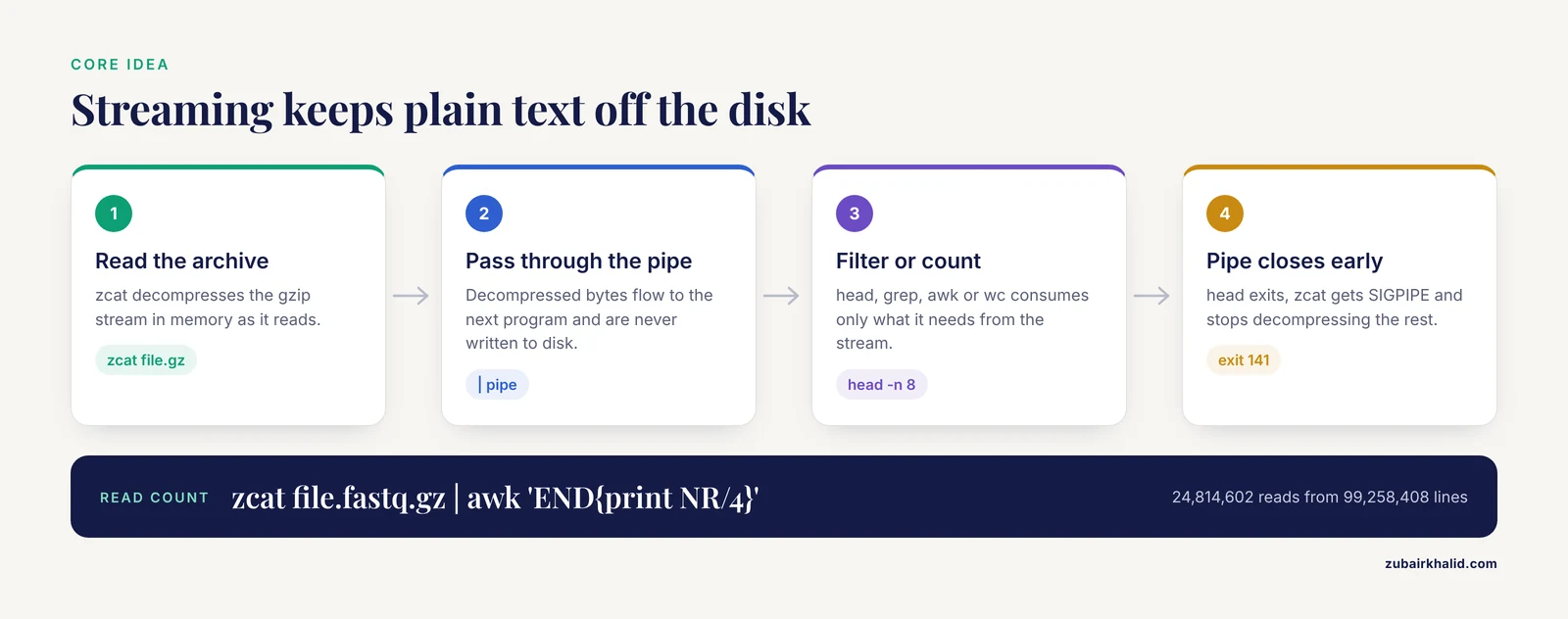
zcat reads a gzip compressed file, decompresses it on the fly in memory, and writes the plain text to standard output. It never creates a .fasta or .fastq file on disk unless you redirect the output to one. The decompressed bytes flow through a pipe and vanish the moment the receiving command, such as head or grep, finishes consuming them.
This is the correct mental model for most of Linux for bioinformatics. You compose small, single purpose programs into pipelines. Each program does one job. zcat decompresses, head takes the first lines, grep filters by pattern, awk computes, wc counts. Once that model clicks, most of the Linux commands bioinformatics relies on become predictable.
The streaming approach has real advantages. It uses no extra disk space, which matters on shared clusters where your quota may be a few gigabytes. It is faster than decompressing to disk because the bottleneck is CPU, not disk writes. It avoids leaving a 40 GB plain text file behind, which on a shared system is both a storage hazard and, for human sequence data, an access control problem.
Step-by-Step: Use zcat to View Compressed FASTA and FASTQ Files
The following walkthrough assumes a file named sample_R1.fastq.gz and, for the FASTA examples, a reference named ecoli.fa.gz. Substitute your own filenames. Run each command from the directory containing the files.
Step 1. Confirm the compression format
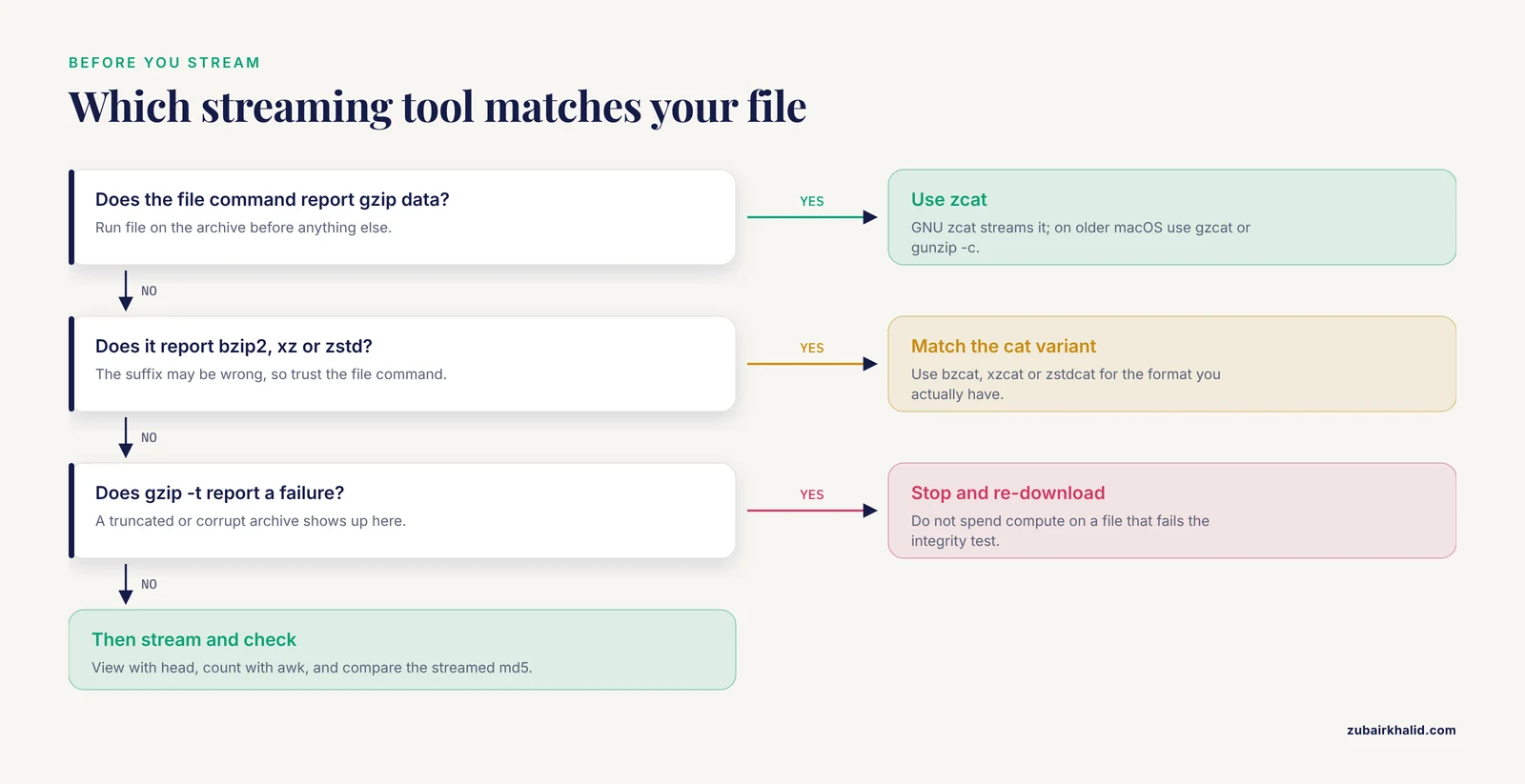
Before anything else, verify what kind of compressed file you actually have. A file ending in .gz is usually gzip, but mislabeled files happen more often than you would expect.
file sample_R1.fastq.gzExpected output:
sample_R1.fastq.gz: gzip compressed data, original size modulo 2^32 4832916830If the output says bzip2 compressed data, XZ compressed data, or Zstandard compressed data, the file was compressed with a different tool, and zcat will fail. Use bzcat, xzcat, or zstdcat instead. The file command costs one second and prevents the most common confusion in this entire workflow.
Step 2. Test that the archive is not truncated or corrupt
gzip -t sample_R1.fastq.gz && echo "archive OK"Expected output:
archive OKgzip -t walks the entire compressed stream and verifies its internal checksum without writing anything. For a 5 GB file this takes a minute or two, and it is worth running once on any newly downloaded file before you invest compute in it. A truncated download, which is the single most frequent cause of analysis failures on shared clusters, shows up here.
Step 3. View the first records with zcat piped into head
This is the canonical way to view compressed FASTQ files.
zcat sample_R1.fastq.gz | head -n 8Expected output:
@A00621:17:HFL2JDSX3:1:1101:24169:1000 1:N:0:ATCACG+ATCACG
GATCGGAAGAGCACACGTCTGAACTCCAGTCACTGAC
+
FFFFFFFFFFFFFFFFFFFFFFFFFFFFFFFFFFFF:FFF,F@FFFFFF:F,FFF
@A00621:17:HFL2JDSX3:1:1101:24537:1000 1:N:0:ATCACG+ATCACG
GATCGGAAGAGCGTCGTGTAGGGAAAGAGTGTCTGCTG
+
FF,FFFFF:F,FFFFFF:FFF:FF,F:FF,F::FFFF,:
Two FASTQ records, eight lines. head -n 8 reads eight lines and then exits, which closes the pipe, which causes zcat to receive a broken pipe signal and stop decompressing. Only the first few kilobytes of the compressed file are ever touched. This is why piping into head on a 50 GB file finishes instantly.
For FASTA, the same pattern shows the first records of a reference genome.
zcat ecoli.fa.gz | head -n 5Expected output:
>NC_000913.3 Escherichia coli str. K-12 substr. MG1655, complete genome
AGCTTTTCATTCTGACTGCAACGGGCAATATGTCTCTGTGTGGATTAAAAAAAGAGTGTCTGATAGCAGC
TTCTGAACTGGTTACCTGCCGTGAGTAAATTAAAATTTTATTGACTTAGGTCACTAAATACTTTAACCAA
TATAGGATGCTATTAAACAT...
>NC_000913.2 ...
One caution specific to FASTA. Two lines of view is not two records, because sequence lines wrap. Count header lines with grep instead, as shown in Step 5.
Step 4. Page through the whole file with zless
When you want to scroll interactively rather than see a fixed number of lines, use zless, which streams the file through less.
zless sample_R1.fastq.gzNavigate with the arrow keys or vim style bindings, search by pressing / and typing a pattern, and press q to quit. zless decompresses as it reads, so scrolling to the middle of a large file costs the same decompression work as reading the file up to that point, but nothing is stored on disk at any moment.
Step 5. Count records without extracting
The four line FASTQ structure makes read counting a one liner.
zcat sample_R1.fastq.gz | awk 'END{print NR/4}'Expected output:
24814602That is 24,814,602 reads in this example file. The awk variable NR counts every input line, and dividing by four converts lines to reads. Because FASTQ records are always exactly four lines, the result is exact.
For FASTA, count the headers instead, since sequence length per record varies.
zcat ecoli.fa.gz | grep -c '^>'Expected output:
1The caret anchors the pattern to the start of a line, which prevents accidental matches inside sequence data. In this example, the file holds a single chromosome.
Step 6. Check read length distribution inline
To confirm you have the read length you paid for, print the length of every second line, which is the sequence line of each four line record.
zcat sample_R1.fastq.gz | awk 'NR%4==2{print length($0)}' | sort -n | uniq -cExpected output:
  612   148
   37   149
2473953 150
Almost all reads here are 150 bases, which matches an expected 2x150 kit. A smear of short lengths would suggest quality trimming upstream or adapter problems. The NR%4==2 condition selects lines 2, 6, 10, and so on, which are precisely the sequence lines.
Step 7. Search inside compressed files with zgrep
zgrep is grep wrapped around zcat. It accepts every grep flag you know.
zgrep -c '^>NC_000913' ecoli.fa.gz
zgrep -m 3 'GAATTC' sample_R1.fastq.gz
Expected output for the first command:
1Expected output for the second, three matching read lines:
GATCGGAAGAGCGTCGTGTAGGGAAAGAGTGAATTCCTGC
GATCGTATGCCGTCTTCTGCTTGAATTCGGACACCGGAA
TTAACCGGATCAATTCGGACTGCAGGCGCTCGGATCCGA
The -m 3 flag stops after three matches, which keeps the command fast on large files. Note that in FASTQ, a motif can match either the sequence line or, very rarely and misleadingly, a quality line. Anchoring header searches with ^@ is unreliable because quality lines can also begin with @, so for FASTQ record extraction use a dedicated tool rather than grep, as described later.
Step 8. Verify content with a checksum comparison
When a collaborator sends both a compressed file and an md5 of the original uncompressed text, you can verify your download without decompressing to disk.
zcat sample_R1.fastq.gz | md5sumExpected output:
d41d8cd98f00b204e9800998ecf8427e -Compare that hash against the md5 provided for the uncompressed file. If they match, the decompressed bytes are bit for bit identical to the original, and the archive is intact, even though you never wrote a plain text copy. This is the strongest correctness check available in this workflow.
A Command Reference Table
The table condenses the tools covered so far plus the most useful companions.
| Command | What it does | Notes | |
|---|---|---|---|
zcat file.gz | Streams decompressed text to stdout | Never writes to disk | |
gunzip -c file.gz | Identical to zcat | Portable fallback, same result | |
| `zcat file.gz \ | head -n N` | View first N lines | Instant even on terabyte files |
zless file.gz | Scroll and search interactively | Quit with q | |
zgrep pattern file.gz | Search inside compressed text | Accepts all grep flags | |
gzip -t file.gz | Verify archive integrity | Writes nothing, reads everything | |
bzcat / xzcat / zstdcat | Same streaming for bzip2, xz, zstd | Match the tool to the format | |
pigz -dc file.gz | Parallel gzip decompression | Several times faster on multicore | |
seqkit stats file.gz | Summary statistics on compressed input | Reads gzipped files natively | |
samtools faidx ref.fa.gz | Index a bgzipped FASTA | Enables random access by coordinates | |
| `zcat file.gz \ | md5sum` | Checksum without extraction | Compare to a known plain text md5 |
Tool Alternatives and When to Reach for Them
seqkit for structured views
seqkit is a Go based toolkit that reads gzipped FASTA and FASTQ natively, so you skip the pipe entirely.
seqkit stats sample_R1.fastq.gz
seqkit head -n 2 sample_R1.fastq.gz
seqkit seq -n ecoli.fa.gz
Expected output from the first command:
file               format  type   num_seqs    sum_len  min_len  avg_len  max_len
sample_R1.fastq.gz  FASTQ   DNA   24,814,602  3,721,873,500      148    150.0      150
seqkit stats gives read counts, total bases, and length ranges in one shot, which replaces several of the awk one liners. seqkit seq -n prints only header names. For daily interactive work, seqkit is usually the fastest path to an answer, and it handles malformed files more gracefully than raw pipelines.
samtools faidx for random access into a reference
A plain gzip stream must be decompressed from the beginning, so there is no fast way to jump to chromosome 3, position 12 million, with zcat. The BGZF format solves this. BGZF is gzip compatible, meaning zcat still reads it, but it stores the data in indexed blocks that external tools can seek into.
bgzip -c ecoli.fa > ecoli.fa.gz
samtools faidx ecoli.fa.gz
samtools faidx ecoli.fa.gz NC_000913.3:1000000-1000099
Expected output:
>NC_000913.3:1000000-1000099
CGCGTCTGCTGAAAGCGTTTAAAGATCGCGTCTGCGCTGATTCGCGCTGCAAGTGCAGC
The first command recompresses the reference with bgzip, the second builds a .fai index, and the third extracts any coordinate range in milliseconds. This is standard practice for reference genomes and is why alignment pipelines insist on bgzipped references.
pigz for speed on big files
zcat uses one CPU core. On a 32 core node, pigz, the parallel implementation of gzip, decompresses much faster while producing byte identical output.
pigz -dc sample_R1.fastq.gz | head -n 8The -d flag means decompress and -c means write to stdout. For files you will stream repeatedly, the wall clock savings compound.
Streaming Over the Network
A frequent real situation is that the file lives on a cluster and you are sitting at a laptop. Compose zcat with ssh and the stream crosses the network without any intermediate file.
ssh [email protected] "zcat /data/run42/sample_R1.fastq.gz" | head -n 8The decompression happens on the remote machine, which usually has fast CPUs, and only the requested lines cross the network. The same composition works for counting.
ssh [email protected] "zcat /data/run42/sample_R1.fastq.gz | wc -l"Expected output:
99258408Dividing 99,258,408 by four gives 24,814,602 reads, which matches the count from Step 5. Cross checking two independent counting methods is a cheap habit that catches format surprises early.
Common Mistakes and Limitations
These are the errors that actually occur, with their exact messages and fixes.
Running zcat on a file that is not gzip. The message is gzip: stdin: not in gzip format. The cause is almost always a mislabeled file, most often bzip2, xz, or zstd, or an HTML error page saved as file.fastq.gz by a failed download. Run file on it. If the format is different, use bzcat, xzcat, or zstdcat. If it is HTML, re-download the file.
Trusting a truncated download until analysis time. The message gzip: stdin: unexpected end of file appears mid pipeline, sometimes after hours of compute. Run gzip -t the moment a file arrives. The gzip -l command also lists sizes, but be aware that for files larger than 4 GB the reported uncompressed size is modulo 2 to the 32nd power, so it can be misleading, and the integrity test is the more reliable check.
Confusing zcat behavior on macOS. Older BSD zcat on macOS expects .Z compressed files and fails on gzip input with a suffix related error. The portable habits are gunzip -c or gzcat, both of which behave exactly like GNU zcat. If your scripts must run on both Linux laptops and Linux servers, gunzip -c is the safest spelling.
Misreading exit code 141 as an error. When zcat file | head finishes, head closes the pipe early and zcat is killed by SIGPIPE. Bash reports exit status 141, which is 128 plus the signal number 13. Under set -o pipefail, this makes pipelines appear to fail. It is normal and expected. The data you asked for was delivered before the pipe closed.
Anchoring grep patterns incorrectly in FASTQ. Grepping ^@ to find headers also matches quality lines that begin with the @ character, which is common because the ASCII range of Phred qualities overlaps @. In FASTA this trap does not exist, and ^> is safe. In FASTQ, extract records with seqkit or awk rather than grep.
Assuming zcat gives random access. A gzip stream is sequential. To read position 200 million of a chromosome, zcat must decompress everything before it. For references you will query repeatedly, bgzip plus samtools faidx is the correct tool. For one time peeks, sequential streaming is fine.
Leaving huge plain text files behind anyway. Redirecting zcat file.gz > file.fastq recreates the storage and access control problem that compression exists to solve, and it is occasionally a compliance problem for human subject data. Stream through pipes and filters, and write only the small derived results you actually need.
Forgetting that view commands consume CPU. Every zcat run decompresses the portion of the file it reads. On a shared login node, repeatedly streaming a 50 GB file annoys your colleagues. Copy to a scratch disk or run on a compute node.
One further limitation deserves a plain statement. These commands tell you what a file contains, but deciding whether that content is fit for a particular analysis, such as whether residual adapter contamination matters for your assembly, is a judgment that depends on the downstream method, and individual cases warrant input from an experienced bioinformatician or the documentation of your specific pipeline.
A closing note on compression choices. The BinaryCIF work shows why format awareness matters beyond gzip. Its authors demonstrate that a compression scheme designed for the data type, rather than generic gzip, reduces large structural files by about a factor of ten over plain text [1]. Your FASTQ files are gzip today and will remain so, but newer instruments and archives increasingly ship zstd and other formats, so the habit of checking with file before choosing your cat variant is the durable skill [1].
Deeper Worked Examples: The Inspections You Will Actually Run Every Week
The core walkthrough showed you how to look inside a compressed file. This section goes further and builds the small repertoire of checks that a working bioinformatician runs on nearly every new dataset. Each example uses the same two practice files from the main guide, sample_R1.fastq.gz and ecoli.fa.gz, and each one is a complete, copyable pipeline.
Per cycle quality profile with awk
The single most informative thing you can learn about a FASTQ file before aligning anything is how base quality behaves across the read. Modern instruments degrade toward the ends of reads, and knowing where the dropoff begins tells you whether trimming will help.
The quality line is the fourth line of every record, and each character on it encodes a Phred score as its ASCII value minus 33. Rather than hardcode a translation table, you can build one inside awk at runtime, character by character, starting at ASCII 33, which is Phred 0.
zcat sample_R1.fastq.gz | awk '
BEGIN { for (j = 0; j < 93; j++) q = q sprintf("%c", 33 + j) }
NR%4==0 {
    reads++
    l = length($0)
    if (l > max) max = l
    for (i = 1; i <= l; i++) sum[i] += index(q, substr($0, i, 1)) - 1
}
END {
    for (i = 1; i <= max; i++) printf "%d\t%.1f\n", i, sum[i]/reads
}'
Expected output, abbreviated:
1	36.9
2	37.0
3	36.9
...
148	33.1
149	31.4
150	28.6
Reading this table, quality holds near Phred 37 for most of the read and slides downward over the final dozen cycles. That is a healthy profile. A profile that collapses below Phred 20 well before the final cycles is a signal to review your trimming policy before spending alignment hours.
One practical caution: awk arrays are sparse and this program stores a sum for every cycle position, which is cheap for 150 cycle reads and equally cheap for the longest common read lengths. If you pipe this through head after a few dozen lines, remember the awk block still runs to completion unless you add an early exit such as if (i > 40) exit inside the END loop.
Counting the dreaded Phred 2 bases
Older Illumina encodings use the character #, which is ASCII 35 and therefore Phred 2, as a read segment quality indicator, frequently near adapter junctions. A quick census of reads containing at least one such base is a cheap contamination hint.
zcat sample_R1.fastq.gz | awk 'NR%4==0 && index($0, "#") > 0 { n++ } END { print n + 0 }'Expected output:
184391Here roughly 0.7 percent of reads carry at least one Phred 2 base. That number is not alarming on its own, but if it climbs into the double digit percentages, adapter content is usually the reason and a targeted look with an adapter trimming tool is warranted before you blame the library.
GC content in one pass
The gsub function in awk both replaces and returns a count, which makes base composition a two line affair. Capture the line length before any substitution, then count G and C by substituting each with itself.
zcat sample_R1.fastq.gz | awk '
NR%4==2 {
    l = length($0); total += l
    gc += gsub(/[Gg]/, "G") + gsub(/[Cc]/, "C")
}
END { printf "%.1f%%\n", gc * 100 / total }'
Expected output:
51.4%A GC fraction near 51 percent is what you expect for reads derived from E. coli. The value of this check is not the exact number, it is the deviation detector. A wild deviation from the organism you ordered, or a bimodal pattern when you extend the script to print a histogram, usually means sample swap, barcode bleed through, or a wrong reference shipped with the run.
Pulling a record by its record number
Sometimes a collaborator says "look at read 1000" or a QC report flags a specific record. Because records are fixed blocks of four lines, the record you want occupies lines 3997 through 4000.
zcat sample_R1.fastq.gz | awk 'NR>=3997 && NR<=4000'Expected output:
@A00621:17:HFL2JDSX3:1:1101:11735:1000 1:N:0:ATCACG+ATCACG
GATCGGAAGAGCACACGTCTGAACTCCAGTCACATCAC
+
FFFFFFFFFFFFFFFFFFFFFFFFFFFFFFFF:FFFFF
Note the off by one arithmetic that trips people up: record N lives at lines 4*N-3 through 4*N. Record 1000 starts at line 3997, not 4000. If you script this, compute the window from N rather than typing it.
Converting FASTQ to FASTA on the fly
Some older tools accept only FASTA. Instead of decompressing to disk, converting, and cleaning up, stream the conversion.
zcat sample_R1.fastq.gz | awk 'NR%4==1 { printf ">%s\n", substr($0, 2) } NR%4==2 { print }' | head -n 4Expected output:
@A00621:17:HFL2JDSX3:1:1101:24169:1000 1:N:0:ATCACG+ATCACGbecomes, after the awk transformation:
>A00621:17:HFL2JDSX3:1:1101:24169:1000 1:N:0:ATCACG+ATCACG
GATCGGAAGAGCACACGTCTGAACTCCAGTCACTGAC
The substr($0, 2) strips the leading @ and the format string substitutes >. If you want to keep the result, redirect only this small derived output, not the full plain text FASTQ, which preserves the storage discipline the whole workflow is built around.
Checking for duplicate read names
Optical duplicates, PCR duplicates, and crashed pipeline stages that appended output all show up as repeated header names.
zcat sample_R1.fastq.gz | awk 'NR%4==1 { print $1 }' | sort | uniq -d | headExpected output:
An empty result means every first field is unique in this file. The sort here reads the entire stream, so on a 24 million read file it will take a little while and spill to temporary disk if needed, but it writes nothing to your working directory and the final result is a few lines at most. On very large files, prefix the sort with LC_ALL=C to speed it up, because byte order comparison avoids the overhead of locale aware collation.
Verifying that paired end files agree
The most valuable cross check in routine work is also the simplest. Read N in the R1 file must be the same instrument read as read N in the R2 file, and if the two files drift out of register, every downstream alignment silently pairs the wrong fragments. Use process substitution to interleave the two header streams and compare.
paste \
  <(zcat sample_R1.fastq.gz | awk 'NR%4==1 { print $1 }') \
  <(zcat sample_R2.fastq.gz | awk 'NR%4==1 { print $1 }') \
  | awk '{ sub(/\/$/, "", $1); sub(/\/$/, "", $2)
           if ($1 != $2) bad++ }
         END { print bad + 0 " mismatched pairs" }'
Expected output:
0 mismatched pairsThe sub calls strip a trailing /1 or /2 if the instrument wrote them, so that the comparison tests the shared portion of the name. If the count comes back nonzero, stop and investigate before running an aligner. The usual causes are a file that was filtered independently of its mate, or a manual edit that added or removed records from one side only.
This example also demonstrates a shell feature worth learning deliberately. The <(...) construct runs the enclosed pipeline and presents its output as a file that paste can read. It is the cleanest way to join two streams that both originate from zcat, and it requires bash or zsh rather than the bare POSIX shell.
Checking FASTA line wrapping
Some tools are strict about FASTA line width, and references copied through spreadsheets or certain transfer tools can arrive with everything on one enormous line. A quick inspection of sequence line lengths catches this.
zcat ecoli.fa.gz | awk 'NR>1 { print length($0) }' | sort -n | uniq -c | headExpected output:
    1 69
4639677 70
Almost every sequence line here is 70 characters, which is this file's wrap width, and the single 69 is the final partial line of the chromosome. If instead you saw one line whose length equals the chromosome size, the FASTA is unwrapped, and you should decide deliberately whether your downstream tools tolerate that.
How Streaming Actually Works, and Why It Matters
A deeper understanding of the mechanics makes every later troubleshooting session faster, so it is worth a short tour of what happens when you press enter on a zcat pipeline.
A gzip file is a sequence of independently checksummed blocks of compressed bytes, produced by the DEFLATE algorithm, followed by a trailer that records a cyclic redundancy check of the uncompressed data. Decompression is a pure function of the input bytes: given a prefix of the compressed stream, zcat can emit the corresponding prefix of the uncompressed text, in order, and nothing else. That sequential property is exactly why zcat file | head returns instantly. head reads eight lines, exits, the pipe closes, the kernel delivers a SIGPIPE signal to zcat, and zcat stops. The decompressor never touched the blocks at the end of the file, and on a 50 GB input that is the difference between an instant result and an hour of I/O.
The same mechanics explain several behaviors that confuse newcomers.
The exit code 141 phenomenon is the SIGPIPE mechanism working as designed, as the main guide explains. When you write scripts, decide deliberately whether a pipeline is meant to be consumed fully. Counting pipelines such as zcat file | awk 'END{print NR/4}' must run to the end, so a 141 there is a real problem and means the stream was cut short. Peek pipelines such as zcat file | head are meant to terminate early, so a 141 is success. A single script can contain both kinds, and treating them identically is a classic source of false alarms in pipeline logs.
Buffers explain apparent stalls. The kernel buffers data moving through pipes, and programs like awk collect output before flushing. When you watch a long counting pipeline with top, zcat and awk will each show modest CPU use and the pipeline appears idle, but progress continues inside the buffers. Resist the urge to kill a pipeline in the first minute of apparent silence.
Throughput is measurable. If you want to see progress instead of trusting it, the pv utility sits in a pipeline and reports bytes, elapsed time, and rate on the terminal.
pv sample_R1.fastq.gz | zcat | awk 'END{print NR/4}'Expected display, updating live:
2.31GiB 0:00:14 [ 168MiB/s ] [ 2.31GiB <=> 2.31GiB ] 49% ETA 0:00:14Here pv meters the compressed bytes flowing into zcat, so the percentage tracks genuine progress through the archive. This turns a faith based wait into an informed one, which changes how you schedule work on shared systems.
stderr is your friend. zcat writes its data to stdout and its complaints, such as truncation warnings, to stderr. When you redirect output to a file, keep stderr attached to the terminal, or log it separately, so that decompression warnings are never silently swallowed into a results file you will not read until it is too late.
A Guided Tour of Compression Formats for Sequence Data
The main guide tells you how to match the streaming tool to the format. This section addresses the more strategic question of why so many formats exist and how to think about them when you create archives of your own.
Gzip dominates sequence data for historical and practical reasons: it is universally available, decompression is fast, and every tool in the ecosystem either reads it directly or reads it through zcat. The DEFLATE algorithm it uses was designed as a general purpose text compressor, which is both its strength and its limitation. It cannot exploit the structure of sequence data, such as the fact that a quality string is a narrow alphabet of scores or that a FASTA header repeats a run barcode across millions of records.
That limitation is exactly why specialized formats keep appearing. The BinaryCIF project in structural biology makes the point in numbers: its authors report that a compression scheme designed for the data type reduces large structural files by more than a factor of two relative to gzip compressed text, and by roughly a factor of ten for the largest structures compared with uncompressed CIF [1]. Domain aware compression beats generic compression precisely because it knows what the bytes mean, not just what they look like. The same insight drives BGZF for indexed random access in genomics, and it drives the newer generation of column oriented formats appearing in sequence archives [1].
For day to day decisions, the practical comparison looks like this.
- gzip: the default. Every tool reads it, zcat streams it, decompression is fast. Choose it for FASTQ and for anything you will share with collaborators, because receiving a
.gzfile never surprises anyone. - bgzip: gzip on the wire, blocks underneath. Choose it for any FASTA you will query by coordinate, and increasingly for large block structured files such as VCF. The
filecommand reports it as gzip because it genuinely is gzip, which is the whole point of the design. - bzip2: stronger compression than gzip and slower at both directions. You will mostly receive bzip2 from non sequencing sources, such as supplementary tables, and
bzcathandles it. - xz: very strong compression and the slowest to decompress of the common choices. Fine for archival snapshots that you will rarely touch, a poor choice for anything in a hot pipeline.
- zstd: designed to decompress extremely quickly with competitive ratios. Instruments and archives that ship zstd are betting that decompression speed matters more than squeezing out the last few percent of ratio, and
zstdcatstreams it identically to zcat.
A common misconception follows from this tour, and it is worth killing explicitly. A bigger compression ratio is not automatically a better format for your data. If a format halves the file size but doubles the decompression time of a file you will stream a hundred times during an analysis, you have traded a modest amount of disk, which is often cheap on a cluster, for a large amount of repeated CPU, which is not. The BinaryCIF authors' comparison shows why the right question is whether the compression scheme matches how the data will be used, not merely how small it gets [1]. For FASTQ that is consumed by aligners and QC tools, gzip remains the rational default even as alternatives appear, and the durable skill is checking formats with file before choosing which cat variant to reach for [1].
A Complete Sanity Check Script You Can Reuse
The individual commands are more useful when they are assembled into one routine that you run on every new file. The script below is deliberately small, prints a labeled report, and handles the early exit exit code correctly so it can live inside a larger pipeline without producing false failures.
#!/usr/bin/env bash
# inspect.sh: sanity checks for one gzipped FASTQ file
set -u

file="$1"

echo "== identity =="
file "$file"

echo "== integrity =="
if gzip -t "$file"; then
    echo "gzip stream OK"
else
    echo "gzip stream FAILED, stop here" >&2
    exit 1
fi

echo "== record count =="
reads=$(zcat "$file" | awk 'END{print NR/4}')
echo "$reads reads"

echo "== length distribution (top 3) =="
zcat "$file" | awk 'NR%4==2{print length($0)}' \
    | sort -n | uniq -c | sort -rn | head -n 3

echo "== first record =="
zcat "$file" | head -n 4
Save it, mark it executable with chmod +x inspect.sh, and run it against the practice file:
./inspect.sh sample_R1.fastq.gzExpected output:
== identity ==
sample_R1.fastq.gz: gzip compressed data, original size modulo 2^32 4832916830
== integrity ==
gzip stream OK
== record count ==
24814602 reads
== length distribution (top 3) ==
2473953 150
    612 148
     37 149
== first record ==
@A00621:17:HFL2JDSX3:1:1101:24169:1000 1:N:0:ATCACG+ATCACG
GATCGGAAGAGCACACGTCTGAACTCCAGTCACTGAC
+
FFFFFFFFFFFFFFFFFFFFFFFFFFFFFFFFFFFF:FFF,F@FFFFFF:F,FFF
A few design notes on why the script is written this way, because the reasoning transfers to anything you write yourself.
The script uses set -u rather than set -euo pipefail. Full strict mode is admirable in general, but here it would turn the expected SIGPIPE from the head -n 4 peek into a script aborting exit code, which is the single most common way well intentioned strictness breaks inspection scripts. Instead, the one check that must not fail silently, the integrity test, gets its own explicit if with an error written to stderr and a nonzero exit. That is the precise, deliberate treatment of exit codes the earlier sections argued for.
The record count is captured into a variable with command substitution before being echoed. This matters more than it looks: if the counting pipeline dies early, the substitution captures whatever partial number awk managed, but you can add a second condition to catch it, for instance by testing that the number is nonzero and by checking the exit status of the substitution if your shell supports it. For a first line of defense, comparing the record count against the yield your sequencing provider quoted in the run paperwork is often enough to catch truncated transfers, since a truncated file will be conspicuously short.
The report is plain text with stable labels. When you run this on forty files and paste the outputs into a project notebook, stable labels mean you can grep across the notebook later, which is a quiet but real contribution to reproducibility.
Troubleshooting Field Guide: Symptoms Beyond the Basics
The main guide covered the most frequent errors. This section adds the next tier of problems, described by symptom, because that is how you encounter them at two in the morning.
Symptom: gzip: stdin: invalid compressed data (crc error) partway through a long pipeline. The file transferred, the size looks plausible, but somewhere inside the stream the checksum does not match. This is different from truncation, where the stream simply ends. A CRC failure usually means bytes were altered in transit. The classic culprit is a transfer path that performed a text mode conversion, changing line endings or padding blocks, which silently rewrites binary data. The fix is to delete the file and retransfer using a binary safe method, then compare the md5 of the compressed file itself, not just the decompressed content, against what the sender recorded. Keep both checksums in your notes: the md5 of the .gz proves the transfer, and the md5 of the decompressed text, computed with zcat file | md5sum, proves the content.
Symptom: grep insists the file is binary. Occasionally zgrep pattern file.gz answers with Binary file stdin matches instead of printing the matching lines. grep makes this decision when it encounters bytes that do not look like text in your locale, which can happen with unusual quality characters or with a file that contains an embedded null byte from corruption. The practical fix is zgrep -a pattern file.gz, where the -a flag forces grep to treat input as text. If the file is genuinely corrupted, the earlier CRC check will reveal that, so treat the binary file message as a prompt to run gzip -t rather than a reason to abandon grep.
Symptom: the file counts fine but every record looks shifted. You run the four line count and get a clean integer, but the headers appear on lines where sequences should be. This is the signature of Windows line endings, carriage return plus newline, introduced by an editor or a copy through a text mode transfer. Detect it cheaply:
zcat sample_R1.fastq.gz | head -n 400 | grep -c $'\r'Expected output on a clean file:
0A nonzero count confirms carriage returns are embedded in the lines. The streaming fix, if you must consume the file as is, is to insert tr -d '\r' immediately after zcat in every pipeline. The durable fix is to obtain a correctly transferred copy, because silently stripping carriage returns can mask the underlying transfer problem that caused them.
Symptom: the record count is not divisible by four, but the file passes gzip -t. An intact archive can contain malformed text, because gzip validates its own bytes, not your format. A non multiple of four lines means a record was split or lines were lost before compression. First rule out the counting artifact: the very last line of a file may lack a trailing newline, and awk's NR can overcount or undercount by one at the boundary in ways that depend on the awk implementation. Check the tail with zcat file | tail -n 8 | cat -A, where cat -A makes line endings visible, and see whether the final record is complete. If the interior of the file is genuinely malformed, no view command can repair it, and the correct action is to go back to the producer of the file with the record number where the structure first breaks, which you can find with zcat file | awk 'NR%4==1 && substr($0,1,1)!="@" {print NR; exit}'.
Symptom: a concatenated file behaves oddly at one internal point. Gzip explicitly supports concatenation: several gzip members appended together form one valid archive, and zcat decompresses them all in sequence. This is how some pipelines merge files. The consequence for your checks is that a concatenated archive passes gzip -t and counts correctly, but contains a boundary where one run's records end and another's begin, with no marker in the text. If provenance matters, and it usually does, ask the sender how the file was assembled rather than discovering the seam during interpretation of results.
Symptom: output contains long runs of gibberish characters. If cat rather than zcat was aimed at a .gz file, the terminal fills with compressed bytes rendered as noise, and occasionally the terminal itself is left in a strange display state. The data is unharmed; nothing was written to the archive. The fix for the display is the reset command. The fix for the habit is to let tab completion and file confirm what you are opening before you open it.
Symptom: everything works on the login node today and slowly tomorrow. Decompression speed depends on where your file lives. Reading the same 5 GB archive from a network filesystem is markedly slower than from local scratch, and the difference is I/O, not compression. When repeated inspection is slow, copy the archive to scratch once and point your pipelines there, which is the same advice the main guide gives for courtesy on shared nodes, restated as a performance fact.
Working With Many Files at Once
Real projects rarely involve one file. The patterns below scale the single file skills to a directory of samples, and they all preserve the no extraction discipline.
A table of record counts for every FASTQ in the directory:
for f in *.fastq.gz; do
    printf "%s\t" "$f"
    zcat "$f" | awk 'END{print NR/4}'
done
Expected output:
sample_R1.fastq.gz	24814602
sample_R2.fastq.gz	24814602
control_R1.fastq.gz	23117054
control_R2.fastq.gz	23117054
Two details make this loop dependable. printf "%s\t" "$f" writes the filename followed by a tab without a newline, so the count lands on the same line, and quoting "$f" protects against filenames with spaces, which do occur in the wild no matter how firmly labs promise otherwise. Notice also that the paired files agree in this example, which is the bulk version of the pairing check from the worked examples section.
Searching every compressed file for a motif, reporting only which files matched:
zgrep -l 'GAATTC' *.fastq.gzExpected output:
sample_R1.fastq.gz
sample_R2.fastq.gz
The -l flag stops searching a file after the first match and prints the filename only, which makes this fast even across dozens of large archives. To also get counts per file, swap -l for -c, and remember that a count per file counts matching lines, not matching reads, since a single read could contain the motif twice.
The same table for an entire subtree of directories, safely:
find . -name '*.fastq.gz' -print0 |
while IFS= read -r -d '' f; do
    printf "%s\t" "$f"
    zcat "$f" | awk 'END{print NR/4}'
done
The -print0 and the null delimited read loop exist to survive filenames with spaces and newlines, which find piped through a plain for loop does not. This is the version worth memorizing if you ever receive data organized as one directory per lane, which is common enough to plan for.
A caution about multiple files in one zcat. zcat a.fastq.gz b.fastq.gz concatenates both streams, which is exactly right for a combined total count and quietly wrong for anything record structured, because the two files' records interleave at the seam. Use per file loops whenever the output must remain interpretable per sample.
Common Misconceptions About Viewing Compressed Sequence Files
The main guide catalogs errors with fixes. This section targets the quieter misunderstandings that survive for years because they never produce an error message.
Misconception: tools need a plain text file, so decompression is unavoidable. Most modern bioinformatics tools read gzip natively. seqkit demonstrated this in the main guide, and the same is true of common aligners, QC tools, and the streaming variants of samtools. The habit worth building is to try handing the .gz file directly to a tool before writing any decompression step, and to reserve extraction for the rare tool that genuinely cannot read compressed input. Every unnecessary extraction on a shared system is storage you must later clean up and, for human data, an access control surface you did not need to create.
Misconception: the md5 of the .gz file and the md5 of its contents are the same thing. They are different hashes of different byte streams, and both are useful, but they answer different questions. The archive md5 proves the transfer was faithful. The stream md5, computed with zcat file | md5sum, proves the decompressed content matches what the sender hashed. When a collaborator publishes checksums, read carefully which kind they published, because comparing the wrong pair produces a permanent false alarm or a false all clear.
Misconception: zcat output should be bit identical to some canonical original, so any difference means corruption. The decompressed bytes are exactly what was compressed, and zcat adds nothing and removes nothing. When a streamed md5 disagrees with an expectation, the discrepancy lies in the expectation: the hash was computed on a differently normalized file, the provider hashed a different version, or the FASTQ was reheadered upstream. Byte comparison is precise enough to be trusted, which means discrepancies are always information, never noise.
Misconception: compression ratio is a quality ranking. As discussed in the formats tour, ratio is one axis among several, and the axis that dominates daily work is decompression speed and tool compatibility. The domain specific compression literature, including the BinaryCIF results showing order of magnitude gains for structural data when the scheme matches the data [1], makes the deeper point that comparing generic compressors on generic text answers a question that is mostly irrelevant to your formats. Choose the format for the access pattern you need.
Misconception: zless and zgrep are separate programs with their own logic. They are thin wrappers around less and grep respectively, with decompression wired into the input path. This matters practically because any behavior you know from the underlying tool applies directly: every grep flag works in zgrep, and every less keybinding works in zless. When a flag appears not to work, the cause is almost always that it is a flag of the wrapper script rather than of the wrapped program, which is rare and documented.
Misconception: viewing is a read only operation, so it cannot affect a running pipeline. Viewing does not modify the archive, but on shared filesystems a heavy read storm can slow everyone, including concurrent jobs of your own that are reading the same file. The courtesy rules in the main guide exist because contention is real, not because of any technical restriction on reading.
From Inspection to Decision: Interpreting What You See
Commands produce numbers; the value comes from knowing what to do with them. This section sketches the interpretation layer, deliberately staying at the level of orientation rather than prescriptive thresholds, because the right action depends on the downstream method.
Record counts. A count that matches the sequencing provider's report establishes that the file is whole. A count near the expected cluster density for the flowcell lane supports that the library performed as ordered. What the count cannot tell you is whether the reads are good, which is why it is the first check and never the last.
Length distributions. A tight peak at the expected read length means the library size selection worked. A shoulder of short lengths can indicate adapter read through, and a long tail toward the expected length with a smear below it can indicate fragmented input DNA. The streaming length histogram from the main guide is usually enough to see these shapes without running a full QC suite.
Per cycle quality. Declining quality toward read ends is normal and is the reason trimming exists. A sudden cliff inside the read, rather than a gradual decline, more often indicates a chemistry or instrument event for that run, and is worth raising with the sequencing facility with the run ID in hand.
Motif matches. Finding a restriction site motif in reads is expected if the protocol involved that enzyme, and a surprise if it did not. Surprises in sequence content are among the few checks that can catch a sample swap, which no quality metric will reveal, since swapped samples can be technically perfect.
When to graduate to dedicated tools. These one liners are for orientation and triage. When a file passes the sanity checks and you need publication grade characterization of per base quality, adapter content, overrepresented sequences, and duplication, run a dedicated QC package on the compressed file directly, since most modern QC tools read gzip natively. The one liners get you to that decision quickly and cheaply, and they remain the fastest way to check a single suspicious file after a long pipeline stage.
A note on fit for purpose. None of these views can tell you whether a file is suitable for a specific analysis. Whether residual adapter contamination matters depends on the aligner and the variant caller; whether a length smear matters depends on the assembly or quantification method. The inspection skills in this guide tell you what a file contains with precision; deciding what that means for your experiment is a separate judgment, and for consequential decisions it should involve the documentation of your specific pipeline or an experienced colleague. This framing, that data must be assessed in the context of its intended reuse, is the same principle that motivates the FAIR movement in structural and sequence data management, and it is why format aware projects such as BinaryCIF invest in making data both compact and usable without conversion steps [1].
Build a Practice Dataset and Reproduce Everything
Every command in this guide can be verified on a file you create in one line, which means you can rehearse the entire skill set on a laptop with no sequencing data at all.
printf '@r1 desc\nACGTACGTAC\n+\nIIIIIIIIII\n@r2 desc\nGGGGTTTTAA\n+\nIIIIIIIIII\n' \
    | gzip > tiny.fastq.gz
This creates a two record FASTQ, compressed, in a single pipeline with no intermediate text file. Now every check has a predictable answer, which is what makes it a practice set.
file tiny.fastq.gztiny.fastq.gz: gzip compressed data, max compression, original size modulo 2^32 65zcat tiny.fastq.gz | awk 'END{print NR/4}'2zcat tiny.fastq.gz | awk 'NR%4==2{print length($0)}' | sort -n | uniq -c 2 10zcat tiny.fastq.gz | md5sumA stable hash prints, and running the command twice gives the same hash, which is the property that makes checksum comparison meaningful.
The quality string IIIIIIIIII is deliberate: the character I is ASCII 73, and 73 minus 33 is Phred 40, so your per cycle quality script should report 40.0 for every cycle of this tiny file, an instantly recognizable correct answer. Building small fixtures with known expected outputs like this is the cheapest way to verify that your awk one liners are correct before you point them at a file whose contents you do not know, and it converts the guide from a list of recipes into a testable skill.
For a FASTA fixture, the same pattern works:
printf '>chrT test sequence\nACGTACGTAC\nGGTTAACCAA\n' | gzip > tiny.fa.gz
zcat tiny.fa.gz | grep -c '^>'1Two sequence lines under one header, which also gives you a live demonstration that line counts and record counts differ in FASTA, the trap the main guide warns about.
Where This Skill Fits in the Larger Data Management Picture
It is tempting to treat file inspection commands as trivia. They are better understood as the interactive layer of data stewardship. Every time you run gzip -t on arrival, record an md5 in a project notebook, and confirm a record count against provider paperwork, you are generating the provenance trail that makes a dataset trustworthy months later, when the collaborator has moved institutions and the original download link has died.
This is the same motivation the FAIR principles express for structural and sequence data: materials should be findable, accessible, interoperable, and reusable, and the community's investment in formats that serve those goals, including the BinaryCIF compressed serialization with its demonstrated order of magnitude savings over plain text for the largest structures, shows that the field treats file format decisions as part of scientific infrastructure rather than clerical detail [1]. Your decision to stream rather than extract, to verify before analyzing, and to choose gzip or bgzip deliberately participates in the same tradition at the scale of one laboratory.
Three habits convert this from philosophy to routine. First, keep a manifest file per project, one line per archive, containing the filename, the md5 of the archive, and the md5 of the streamed content, all captured with the commands in this guide. Second, run the inspection script on every incoming file before it enters a pipeline, and save its output into the manifest. Third, when you publish or share data, send the manifest with it, so your recipient can verify the handoff in seconds without decompressing a single byte. Each habit costs a minute; together they eliminate the most common classes of silent data failure, and they are entirely built from the streaming skills this guide has developed.
Frequently Asked Questions
Does zcat decompress the file to disk?
No. zcat decompresses in memory and writes to standard output, so the plain text exists only in the pipeline and never touches the disk. To make a decompressed file you would have to redirect the output, such as zcat file.gz > file.fastq, which is a separate and usually unnecessary action.
Why does zcat fail on my Mac?
Older macOS versions ship a BSD zcat designed for .Z files rather than gzip. Use gzcat or gunzip -c instead, both of which are always available on macOS and behave identically to GNU zcat on Linux.
How do I count the reads in a gzipped FASTQ file?
Run zcat file.fastq.gz | awk 'END{print NR/4}'. The result is exact because every FASTQ record occupies exactly four lines. Alternatively, seqkit stats file.fastq.gz reports the read count directly.
Can I grep inside a compressed FASTA file?
Yes, use zgrep '^>pattern' file.fa.gz. The caret anchors the match to line starts, so you only hit header lines. For FASTQ, avoid grepping for headers because quality lines can also start with @, and use seqkit instead.
What do I do if the file ends in .bz2, .xz, or .zst?
Match the streaming tool to the format. Use bzcat for bzip2, xzcat for xz, and zstdcat for zstd. Each behaves like zcat, streaming to stdout without writing to disk. The file command tells you which format you actually have.
Is zcat slow on very large files?
Single threaded zcat decompresses at a few hundred megabytes per second on typical hardware. If that is too slow, use pigz -dc for parallel decompression, which can be several times faster on multicore machines while producing identical output.
Can I extract a genomic region from a gzipped FASTA without decompressing the whole file?
Not with plain gzip, because the format only supports sequential decompression. Recompress the reference with bgzip, build an index with samtools faidx, and then extract any coordinate range instantly with samtools faidx ref.fa.gz chr:start-end.
Does viewing a compressed file change it in any way?
No. zcat, zless, and zgrep open the file read only, so the modification time, the checksum, and the file contents are untouched. If a checksum seems to change afterward, the actual cause is almost always a modified uncompressed copy or a partially overwritten file elsewhere.